claude-plan-viewer
Health Uyari
- No license — Repository has no license file
- Description — Repository has a description
- Active repo — Last push 0 days ago
- Low visibility — Only 5 GitHub stars
Code Basarisiz
- process.env — Environment variable access in index.ts
- rm -rf — Recursive force deletion command in package.json
- process.env — Environment variable access in playwright.config.ts
- process.env — Environment variable access in scripts/install-local.ts
- process.env — Environment variable access in scripts/uninstall-local.ts
Permissions Gecti
- Permissions — No dangerous permissions requested
Bu listing icin henuz AI raporu yok.
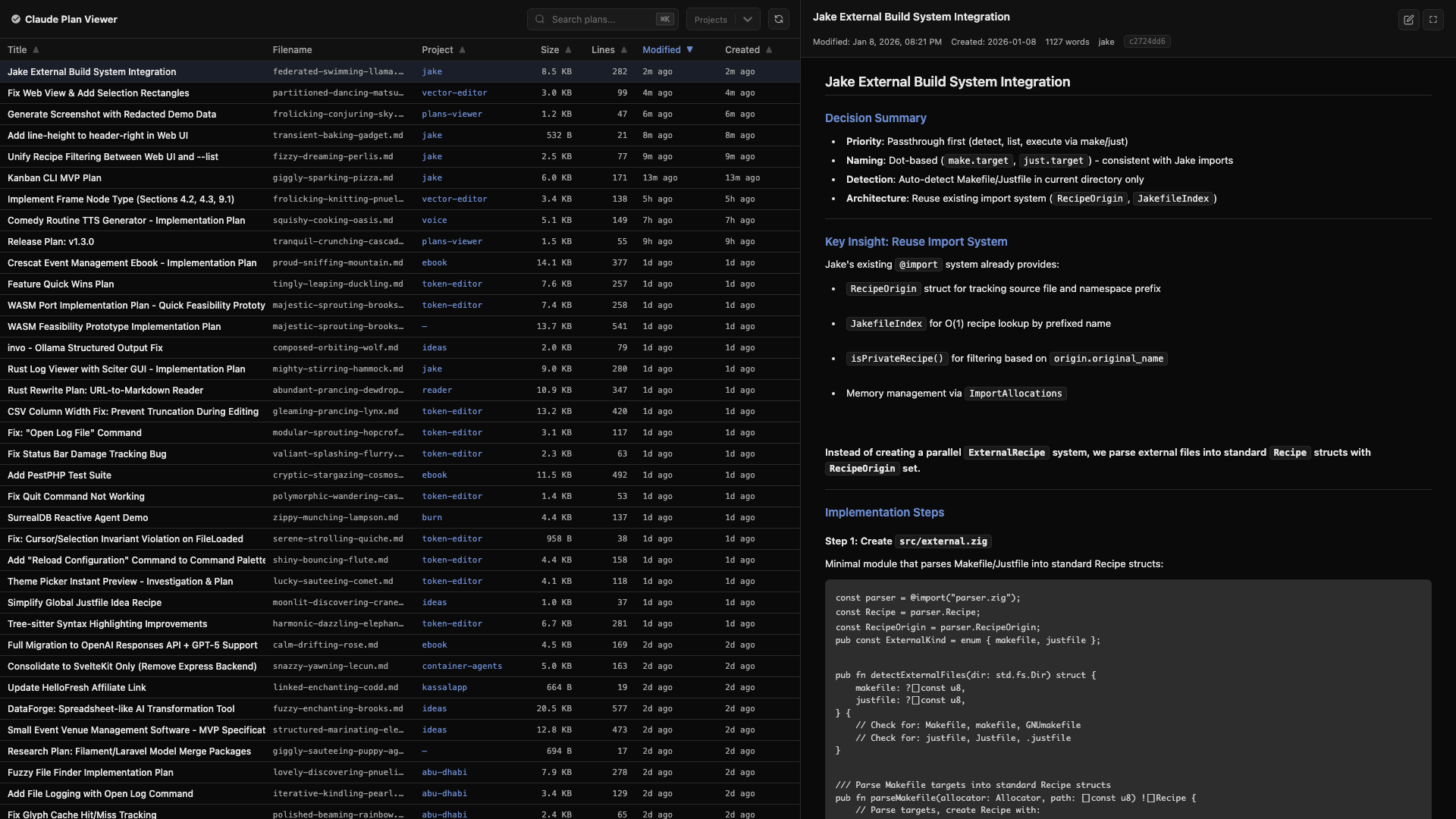
Browse, search, and read your Claude Code plans in a clean web UI
Claude Plan Viewer
Browse, search, and read your Claude Code plans in a clean web UI



📖 Documentation | 🚀 Quick Start | 📚 API Reference
Features
- Browse and search all your Claude Code plans, including their content
- Browse each project's auto memory:
MEMORY.mdload budget, topic files, wikilinks, and links back to plans - Sort by title, project, modified date, or size
- Full markdown rendering with syntax highlighting
- Keyboard navigation (arrow keys, 1/2 to switch views, Cmd+K for search)
- Dark theme UI
Installation
Using npx (recommended)
npx claude-plan-viewer
Using bunx
bunx claude-plan-viewer
Global installation
# With npm
npm install -g claude-plan-viewer

# With bun
bun install -g claude-plan-viewer
Then run:
claude-plan-viewer
Standalone Binary
Download a pre-built binary from the releases page or build your own:
bun run build
./dist/claude-plan-viewer
The binary is fully self-contained (~57MB) and works offline.
Usage
# Start the web viewer
claude-plan-viewer

# Start on specific port
claude-plan-viewer --port 8080
claude-plan-viewer -p 8080

# Listen on all network interfaces (accessible from other devices)
claude-plan-viewer --host 0.0.0.0
claude-plan-viewer -H 0.0.0.0
The server will automatically find an available port if the requested port is in use.
CLI Options
| Flag | Short | Description |
|---|---|---|
--port <number> |
-p |
Port to start the server on (default: 3000) |
--host <address> |
-H |
Host to bind to (default: 127.0.0.1) |
--claude-dir <path> |
-c |
Path to .claude directory (default: ~/.claude) |
--json |
-j |
Export all plans as JSON and exit |
--output <file> |
-o |
Output file for JSON export (prints to stdout if omitted) |
--from-file <file> |
-f |
Load plans from a JSON file instead of ~/.claude/plans |
--version |
-v |
Show version number |
--help |
-h |
Show help message |
The --claude-dir option can also be set via the CLAUDE_DIR environment variable. CLI flag takes precedence over the environment variable.
Export plans to JSON
# Print all plans as JSON to stdout
claude-plan-viewer --json

# Export to a file
claude-plan-viewer --json --output plans.json
claude-plan-viewer -j -o plans.json
The JSON export includes all plan metadata and content, useful for backup or processing.
Load plans from file
# Start viewer with plans from an exported JSON file
claude-plan-viewer --from-file plans.json
claude-plan-viewer -f plans.json
This allows viewing plans offline or from a different machine. When using --from-file, file watching is disabled since the plans are loaded from the static JSON file.
Custom .claude directory
# Use a custom .claude directory
claude-plan-viewer --claude-dir /path/to/.claude
claude-plan-viewer -c /path/to/.claude

# Or set via environment variable
CLAUDE_DIR=/path/to/.claude claude-plan-viewer
This is useful when your Claude Code data is stored in a non-standard location.
API
The viewer exposes a REST API for programmatic access:
| Endpoint | Method | Description |
|---|---|---|
/api/plans |
GET | List all plans (metadata) |
/api/plans/{filename}/content |
GET | Get plan markdown content |
/api/search?q= |
GET | Search plan content |
/api/memory |
GET | List auto memory (metadata) |
/api/memory/content?id= |
GET | Get memory markdown content |
/api/memory/search?q= |
GET | Search memory content |
/api/projects |
GET | List all project names |
/api/refresh |
POST | Force cache refresh |
/api/open |
POST | Open plan or memory in editor |
/api/openapi.json |
GET | OpenAPI 3.0 specification |
Development
# Install dependencies
bun install

# Run in development mode with hot reload
bun run dev

# Or run directly with hot reload
bun --hot index.ts

# To use flags in dev mode, add them after `--`
# Example: using --from-file
bun run index.ts -- --from-file plans.json
Running tests
bun run test          # Run all unit tests
bun run test:api      # Run API tests only
bun run test:e2e      # Run Playwright E2E tests
Note: Use bun run test instead of bun test directly, as the script specifies the test directory path.
Building
Build standalone binaries for different platforms:
bun run build              # Current platform
bun run build:all          # All platforms
bun run build:macos-arm64  # macOS Apple Silicon
bun run build:macos-x64    # macOS Intel
bun run build:linux-x64    # Linux x64
bun run build:linux-arm64  # Linux ARM64
bun run build:windows      # Windows x64
bun run clean              # Remove dist folder
Local Development
# Link package globally for development
bun run install:link       # Create global symlink
bun run uninstall:link     # Remove global symlink

# Install/uninstall locally
bun run install:local      # Install binary locally
bun run uninstall:local    # Remove local installation

# Format code
bun run format             # Format source files with Prettier
Requirements
- Bun runtime (for development/npx usage)
- Claude Code with plan files in
~/.claude/plans(or custom location via--claude-dir)
Standalone binaries have no external dependencies.
License
MIT
Yorumlar (0)
Yorum birakmak icin giris yap.
Yorum birakSonuc bulunamadi