zlite
agent
Fail
Health Warn
- License — License: AGPL-3.0
- Description — Repository has a description
- Active repo — Last push 0 days ago
- Low visibility — Only 9 GitHub stars
Code Fail
- rm -rf — Recursive force deletion command in install.sh
- network request — Outbound network request in install.sh
- rm -rf — Recursive force deletion command in scripts/pack.sh
- rm -rf — Recursive force deletion command in update.sh
- network request — Outbound network request in update.sh
Permissions Pass
- Permissions — No dangerous permissions requested
No AI report is available for this listing yet.
Lightweight CLI AI agent — chat, write code, and manage server software with natural language.
README.md
Zlite
简体中文 | English
Zlite is a lightweight CLI AI agent — small footprint, low memory usage. It's great for everyday conversations and light coding, and can also act as the agent brain for server software, letting you operate and manage services like nginx directly through natural language.
Features
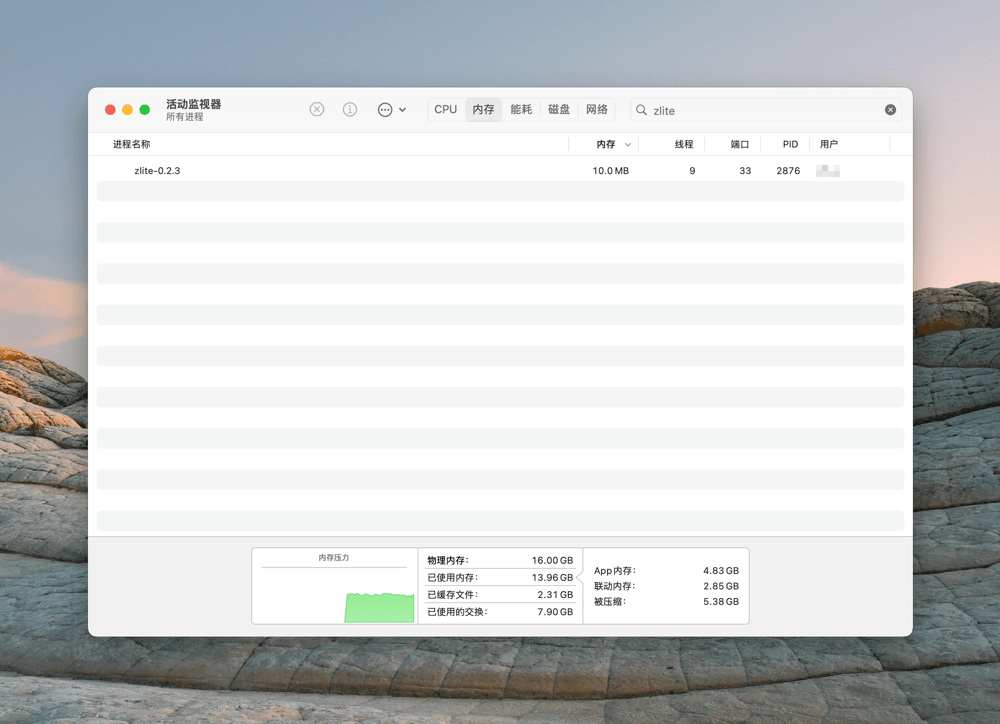
- Lightweight: single-file binary, <12MB in size and ≈20MB memory usage, ready to use after download
- Cross-platform: supports Linux, macOS, and Windows
- Multi-model support: works with any OpenAI- or Anthropic-compatible model; configure multiple providers and switch anytime
- TUI interface: full-featured terminal UI with keyboard shortcuts and plan / build mode switching
- Built-in tools: read files, search, write / edit / delete files, run shell commands, fetch web pages, and search the web — all out of the box
- MCP support: call tools from any MCP server and tap into a rich external ecosystem
- Skills support: load project-level and global skills to reuse instructions and workflows
- ACP protocol: act as an agent for any ACP client, such as Zacp, Zed, and Codeg
- Context compression: automatically compresses long conversations to prevent context overflow
- Session management: persistent storage with session resume and switching
- Permission confirmation: dangerous operations (e.g. shell commands) require human approval before execution
Quick Start
Installation
Linux / macOS
curl -fsSL https://raw.githubusercontent.com/helloxz/zlite/main/install.sh | bash
Windows (PowerShell)
irm https://raw.githubusercontent.com/helloxz/zlite/main/install.ps1 | iex
Initialization
After installation, run zlite and follow the prompts to enter your OpenAI-compatible model information.
Commands and Shortcuts
/init: initialize the project/new: start a new conversation (shortcut:Ctrl + N)/sessions: switch to a previous conversation (shortcut:Ctrl + L)/switch: switch models (shortcut:Shift + Tab)/thinking: toggle thinking effort (shortcut:Ctrl + T)/compress: compress the context (available after more than 10 turns)/exit: quit the TUI (shortcut:Ctrl + C)- Switch plan / build mode:
Tab - Scroll the chat area:
PgUp/PgDnto page,Home/Endto jump to top / bottom
One-Click Update
Linux & macOS
curl -fsSL https://raw.githubusercontent.com/helloxz/zlite/main/update.sh | bash
Windows (PowerShell)
irm https://raw.githubusercontent.com/helloxz/zlite/main/update.ps1 | iex
Build from Source
Requires Go ≥ 1.25
make build        # produces bin/zlite with the version info injected
bin/zlite --version
Contact
Reviews (0)
Sign in to leave a review.
Leave a reviewNo results found