project-os-for-codex
Health Pass
- License — License: Apache-2.0
- Description — Repository has a description
- Active repo — Last push 0 days ago
- Community trust — 83 GitHub stars
Code Fail
- process.env — Environment variable access in mcp/server.mjs
- network request — Outbound network request in mcp/server.mjs
- fs.rmSync — Destructive file system operation in server/agent-api.test.js
- process.env — Environment variable access in server/agent-api.test.js
- network request — Outbound network request in server/agent-api.test.js
- Hardcoded secret — Potential hardcoded credential in server/agent-api.test.js
- process.env — Environment variable access in server/ai.js
- network request — Outbound network request in server/ai.js
- process.env — Environment variable access in server/git.js
- process.env — Environment variable access in server/import-knowledge.js
Permissions Pass
- Permissions — No dangerous permissions requested
No AI report is available for this listing yet.
Open-source control plane for Codex projects: Git-backed context, visible agent progress, scoped MCP access, resumable work, and safe handoffs. Compatible with Claude Code.
🚦 Project OS for Codex
The open-source control plane for Codex projects: visible progress, resumable context, safe handoffs, and reusable knowledge.
Built for Codex. Compatible with Claude Code and other MCP clients. Self-host it and keep project truth in Git.





🚀 Quick Start · 🤖 Connect Codex · 🧭 Features · 📦 Deployment · 🔌 Interfaces
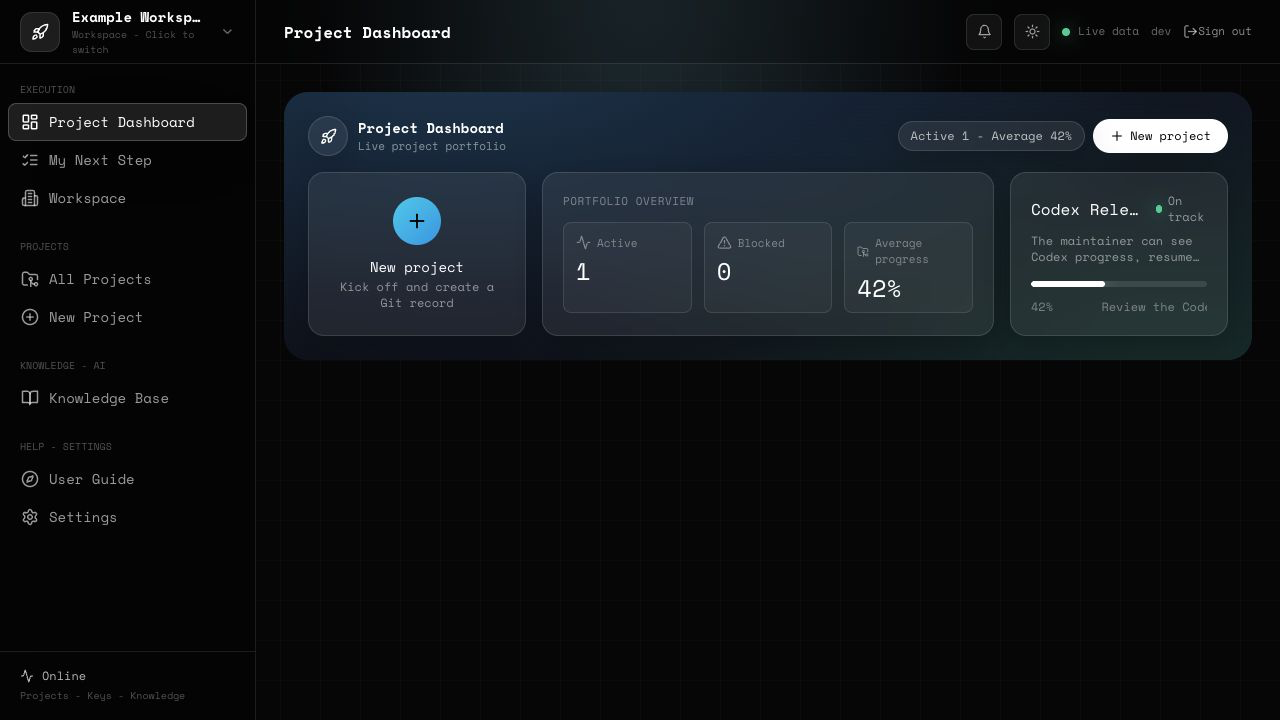
Project OS for Codex is for the moment when a team asks: What is the AI doing? Where should the next session start? How can another person or AI take over without rereading every chat?
It is not another AI chat window. It is the control plane around the work: kickoff card, acceptance criteria, current progress, Git evidence, next action, reusable knowledge, and a handoff package that both humans and agents can read.
If that problem feels familiar, a ⭐ Star helps more AI builders discover the project.
💡 Why Does This Exist?
AI can generate code quickly, but real projects still fail in very ordinary ways:
- The project progress is hidden inside chat history.
- The next AI session does not know where to start.
- Humans cannot tell which tasks are done, blocked, risky, or waiting for review.
- Handoffs become painful because context is scattered across prompts, screenshots, commits, and private notes.
- Teams lose trust because there is no visible project trail.
Project OS for Codex turns those scattered pieces into one workspace: project goals, acceptance criteria, Git records, progress events, risks, next steps, knowledge, and handoff packages.
Built from repeated real delivery work
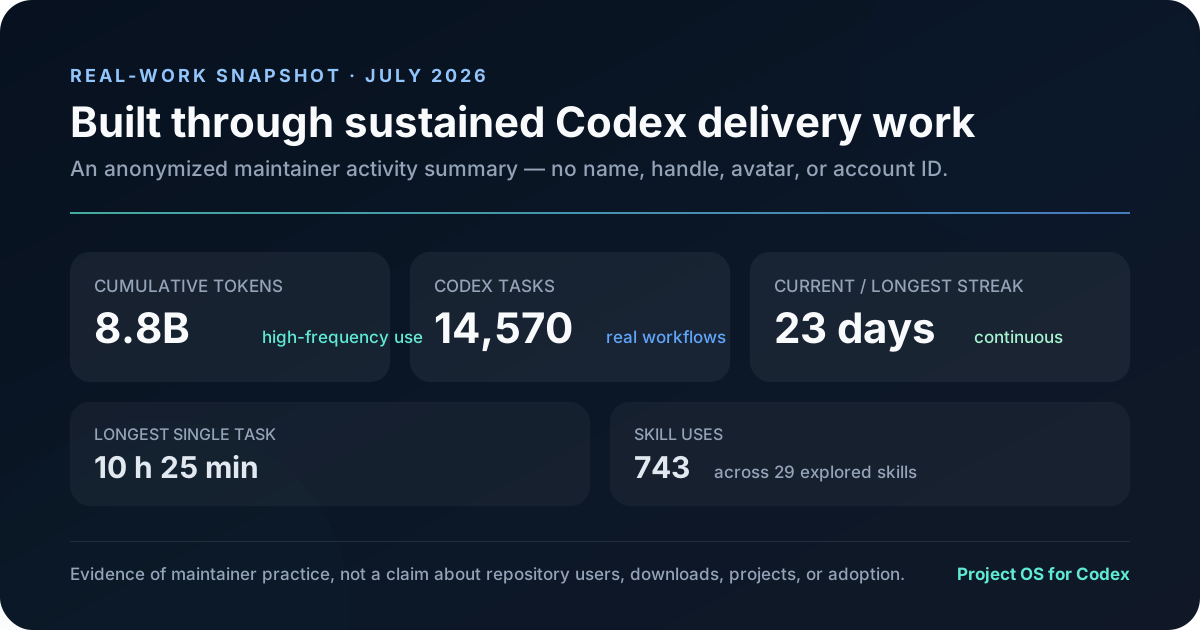
This is not a weekend concept built from imagined agent problems. It was distilled from recurring problems seen across many real internal and client projects, then refined through sustained Codex use: context loss, invisible progress, unclear acceptance, difficult handoffs, and knowledge that disappears after delivery.
The anonymized July 2026 maintainer snapshot below shows 14,570 Codex tasks, 8.8B lifetime tokens, a 23-day streak, and 743 skill uses. These numbers are evidence of maintainer practice—not repository users, downloads, adoption, or 14,570 separate projects.
Explain It Like I Am New
Think of this system as a project cockpit for AI-assisted development.
When an AI helps you build a project, it should not only write code. It should also leave behind:
- what it changed;
- why it changed it;
- what still needs to be done;
- what risks remain;
- what the next human or AI should read first.
This repository provides the structure for that cockpit. It helps a project become something another person or AI can continue, instead of a one-time chat transcript.
Connect Codex or Claude Code in 3 Minutes
Do not give an AI your website username and password. From a project page, create a short-lived AI credential that is bound to one workspace and one project, then run the generated MCP command in your own terminal.
The first production-oriented slice exposes two real MCP tools:
project_os_get_context— reads the kickoff card, acceptance criteria, AGENTS rules, handoff package, progress, Git trail, and next step;project_os_append_progress— appends one validated, audited, idempotent progress event and one matching Git commit.
Credentials expire after 24 hours or 7 days, can be revoked independently, are stored only as hashes, and cannot access members, keys, deletion, publication, or deployment.
Follow the Codex and Claude Code setup guide →
Core Loop
- Create a project with a kickoff card.
- Define the goal, acceptance criteria, non-goals, owner, and next step.
- The server creates or connects a real Git-backed project workspace.
- Humans or AI agents post progress events.
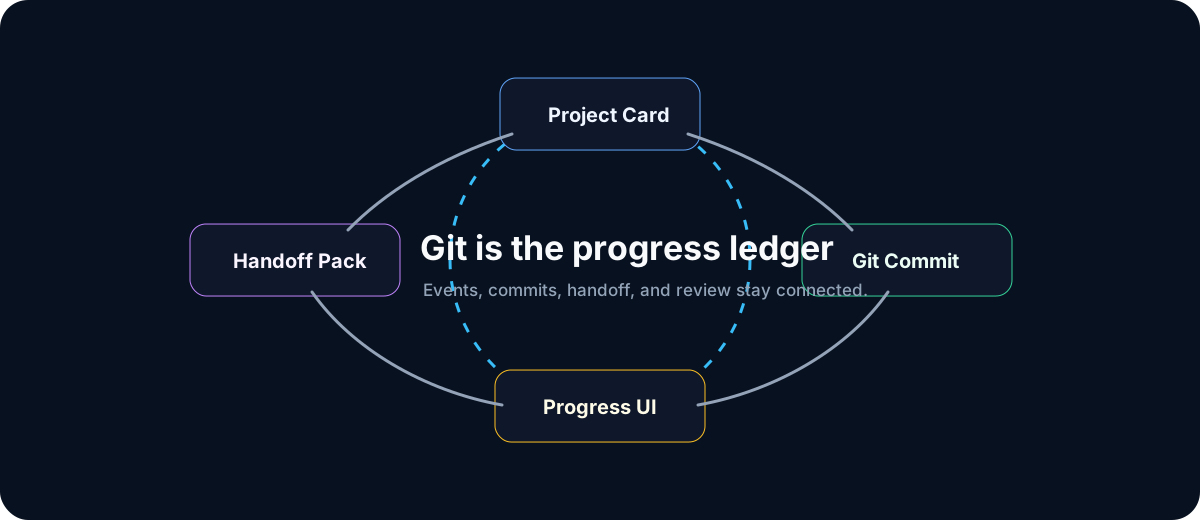
- Important progress becomes a project record and can be linked to Git commits.
- The dashboard shows status, health, progress, and the recorded next action.
- A handoff package lets the next AI or human resume without rereading the whole history.
- Retrospectives and project notes become reusable knowledge for the next project.
Key Features
Project kickoff cards
Start every project with a clear brief:
- project goal;
- expected result;
- acceptance criteria;
- non-goals;
- current owner;
- next step.
Visible AI progress
Track project state with progress events instead of guessing from chat logs:
- active / paused / done project states;
- progress percentage;
- owner;
- next action;
- green / yellow / red project health.
Git-backed evidence
The system is designed around Git as the durable project record:
- project workspace records;
- Git file tracking;
- commit-friendly progress notes;
- audit trail for what changed and why.
Handoff packages
Generate context that another AI or human can use immediately:
- project summary;
- current state;
- important files;
- recent decisions;
- blocked items;
- next step;
- acceptance checklist.
Knowledge base and retrospectives
Turn finished project experience into reusable knowledge:
- project lessons;
- delivery patterns;
- reusable prompts and checklists;
- project review notes;
- future improvement ideas.
Adapter-friendly open-source design
The open-source version keeps private infrastructure behind replaceable boundaries:
- Git database / Git service adapter;
- AI provider adapter;
- knowledge-base adapter;
- deployment and reverse-proxy boundary;
- local JSON persistence for simple evaluation.
No private API keys, production provider addresses, customer data, or internal deployment secrets are included.
AI-native access instead of password sharing
- one short-lived credential per AI and project;
- workspace and project isolation enforced on the server;
- explicit read/append scopes;
- idempotent writes and Git request IDs;
- revocation and audit history;
- one shared MCP integration for Codex and Claude Code.
Open-Source Surface
This repository is the focused OSS Project OS surface. It exposes the project cockpit, kickoff cards, Git-backed progress, handoff packages, team spaces, knowledge base, and retrospectives.
Commercial SaaS modules such as sales back-office pages, paid-plan operations, platform administration, announcement systems, and payment infrastructure have been removed from the public runtime and source tree. A fresh local run starts as a normal project workspace, not as a hosted commercial admin console.
This repository does not include a hosted commercial service, private provider credentials, production customer data, payment infrastructure, or internal deployment secrets.
Who Is This For?
This project is useful if you are:
- building projects with AI coding agents;
- managing multiple AI-assisted software projects;
- using tools such as Codex, Claude Code, Cursor, Cline, OpenHands, or other coding agents;
- trying to make AI work visible to teammates, stakeholders, or future maintainers;
- tired of losing project context between chat sessions;
- building an internal AI project management platform;
- exploring context engineering, agent handoff, and Git-based AI workflows.
Common Use Cases
- AI project management dashboard
- AI coding agent progress tracker
- Agent handoff and context package generator
- Git-backed project execution system
- Internal project operating system for AI teams
- Knowledge base for repeated AI delivery work
- Customer-facing project progress visibility
- Multi-project AI workflow control center
Screenshots and Diagrams
Working project cockpit
Connect Codex / Claude Code
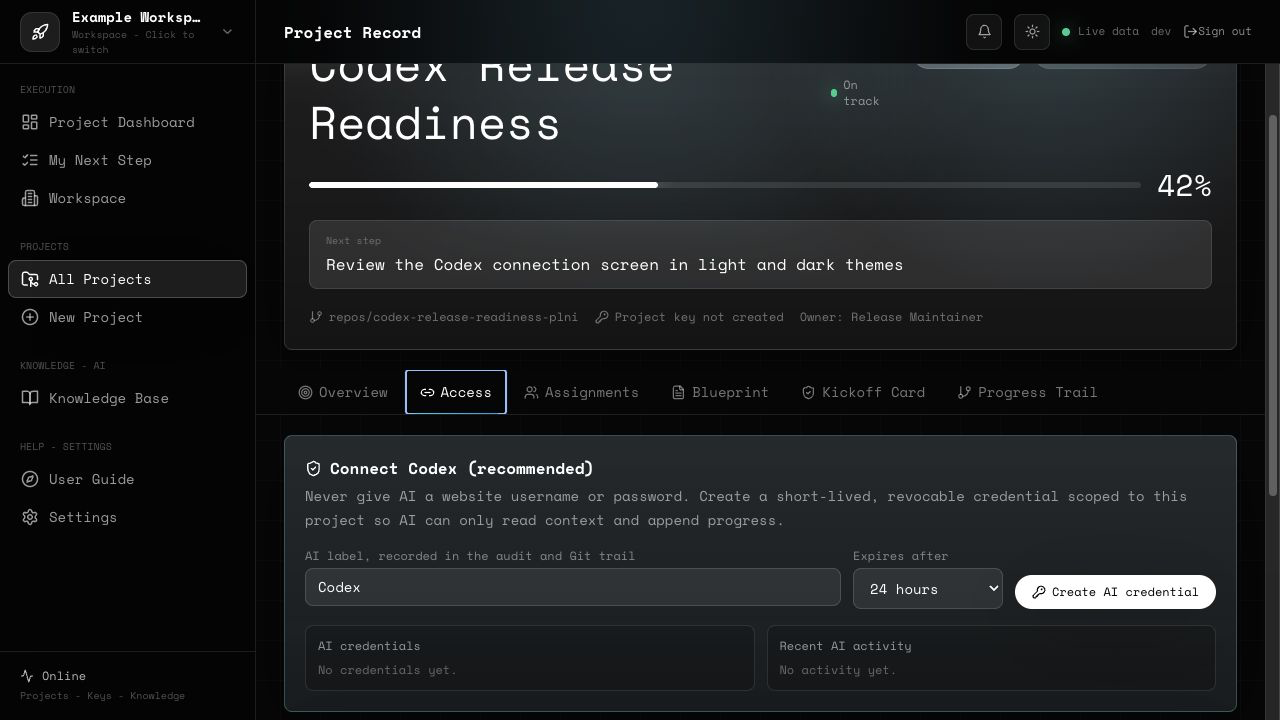
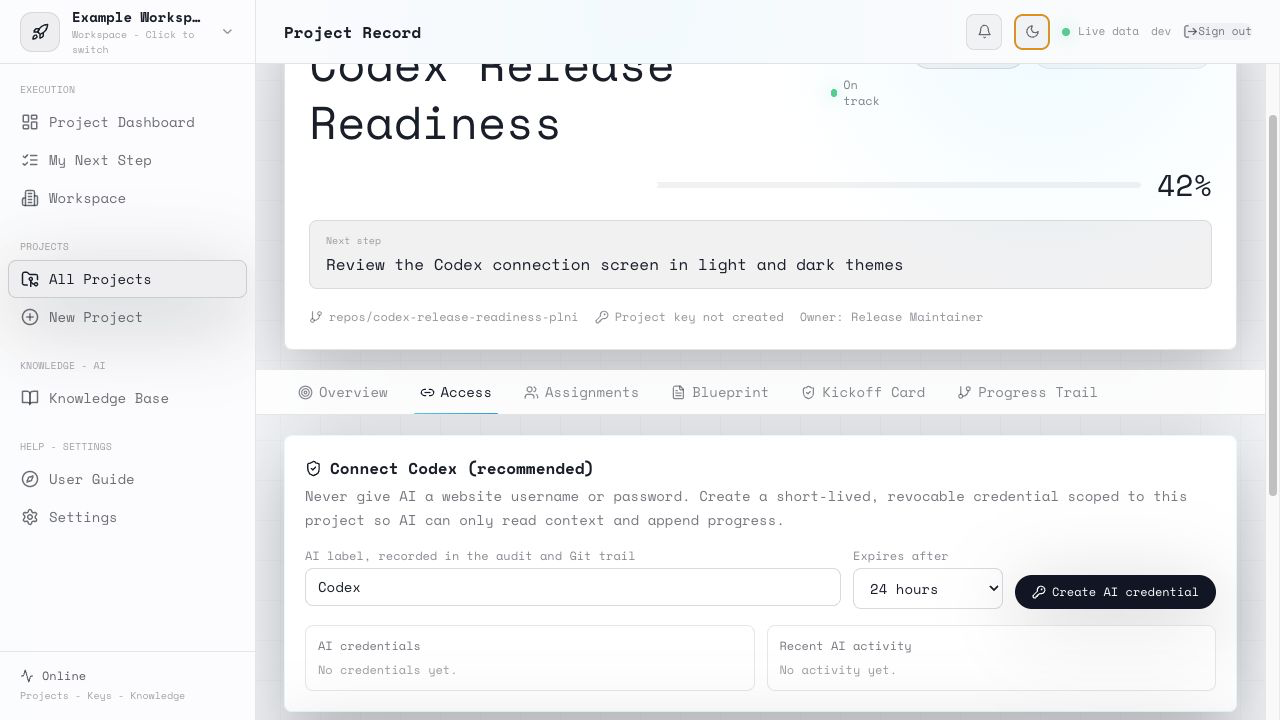
Screenshots use an isolated local workspace with non-sensitive sample content. No customer account, production endpoint, or private credential is shown.
Workflow diagram
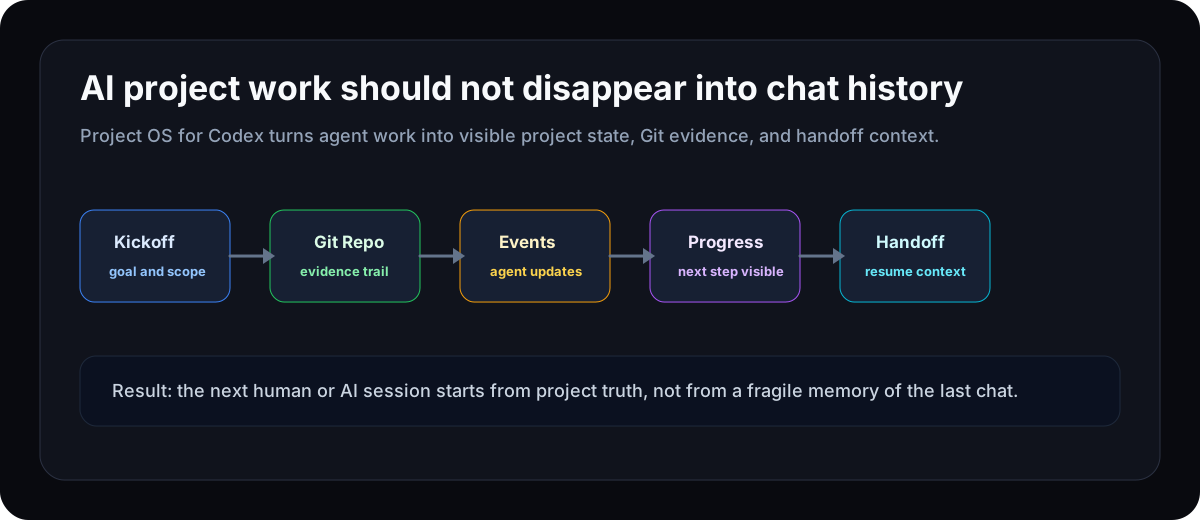
Git loop diagram
Architecture diagram
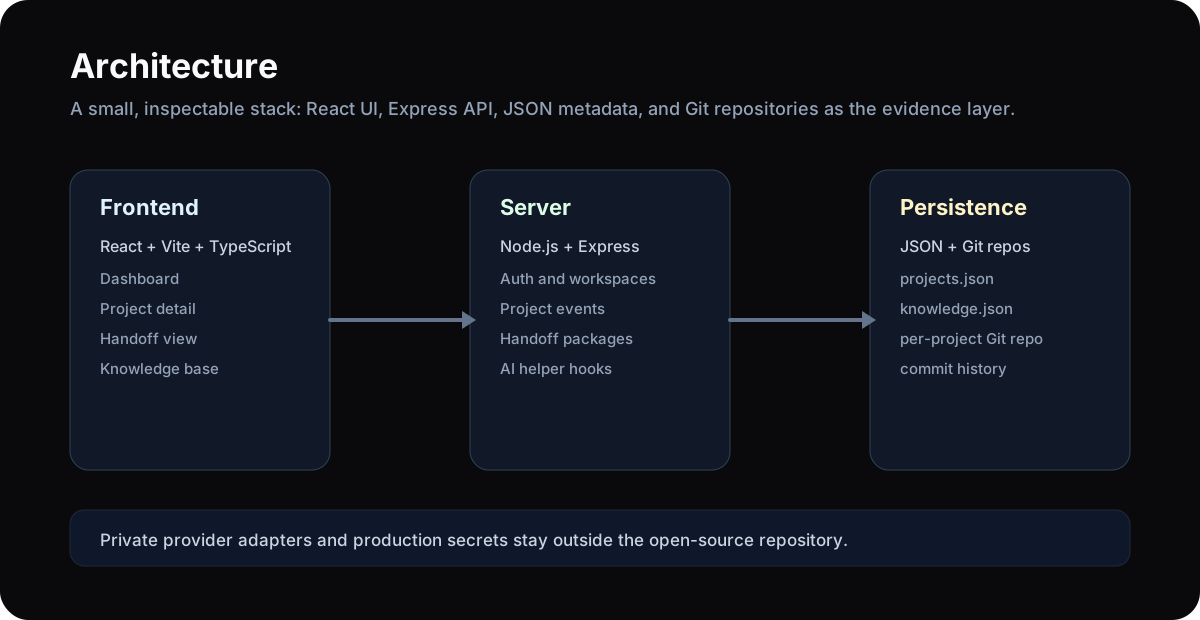
Tech Stack
- Frontend: React, Vite, TypeScript, Tailwind CSS
- Backend: Node.js, Express
- Persistence: local JSON files by default
- Project record model: Git-oriented project workspace
- License: Apache-2.0
Quick Start
Requirements:
- Node.js 18+
- npm or pnpm
- Git
The fastest local-only start is Docker Compose:
docker compose up --build
Open http://localhost:8790. The included Compose file binds to 127.0.0.1 and enables password-free access only for local evaluation.
For a manual development start, install frontend dependencies:
npm install
Start the backend:
cd server
npm install
npm run seed
PROJECT_OS_DEV_NO_AUTH=true npm start
Start the frontend in another terminal:
npm run dev
Open the Vite URL shown in your terminal. The API listens on:
http://localhost:8790
Production refuses to start without PROJECT_OS_AUTH_USER and PROJECT_OS_AUTH_PASSWORD.
For local, server, reverse-proxy, storage, backup, Git, AI provider, and knowledge-base setup, see:
- Deployment Guide
- Interface and Adapter Contracts
- Codex and Claude Code MCP Setup
- Publication Security Checklist
Agent Event Example
Project secrets must be sent in the X-Project-Key header. Do not put secrets in URLs.
curl -X POST http://localhost:8790/api/projects/<project-id>/events \
  -H 'Content-Type: application/json' \
  -H 'X-Project-Key: <project-secret>' \
  -H 'Idempotency-Key: progress-step-001' \
  -d '{"message":"Add handoff checklist","progressTo":55,"nextStep":"Run acceptance smoke test"}'
Repository Keywords
People may find this project while searching for:
- AI project management
- Codex project management
- Claude Code workflow
- MCP server
- Model Context Protocol
- AI coding agent dashboard
- agent handoff
- context engineering
- Git-based project management
- AI workflow automation
- project progress tracker
- knowledge base for AI teams
- developer tools for AI-assisted software delivery
Current Status
This repository is an early public open-source release.
Before production use, review the release gate:
- multi-tenant permission audit;
- no production tokens, private domains, private docs, or customer data;
pnpm run checkpasses;- Agent API + MCP acceptance tests pass;
- light and dark UI screenshots reviewed;
- clear deployment, backup, and rollback plan.
Roadmap
- Stronger project role model
- Remote OAuth-protected MCP transport
- More scoped tools for handoff drafts and knowledge drafts
- Better visual progress timeline
- Provider adapter examples without shipping private keys
- Playwright smoke tests
- A short end-to-end workflow GIF and more guided examples
- More beginner-friendly setup recipes
Independent Project
Codex is a trademark of OpenAI. Claude is a trademark of Anthropic. This independent open-source project is not affiliated with or endorsed by OpenAI or Anthropic.
Long-term Maintenance
This repository is intended to be maintained in public. Every release will document verified additions, security changes, known limits, and the next milestone in CHANGELOG.md and ROADMAP.md.
The next milestone is v0.3.0: Codex-native workflow—a tested first-run path for Codex, stricter structured progress, safer remote MCP transport, and clearer AGENTS.md-driven acceptance. Planned work is not presented as released functionality.
Contributing
Issues, ideas, and pull requests are welcome. Good contributions include:
- clearer documentation;
- adapter examples;
- deployment recipes;
- UI improvements;
- security hardening;
- real-world AI project workflow cases.
If this project helps you, starring the repository makes it easier for more AI builders and project teams to discover it.
Reviews (0)
Sign in to leave a review.
Leave a reviewNo results found