cgcone
Health Warn
- License — License: MIT
- Description — Repository has a description
- Active repo — Last push 0 days ago
- Low visibility — Only 5 GitHub stars
Code Warn
- process.env — Environment variable access in app/api/readme/route.ts
- network request — Outbound network request in app/api/readme/route.ts
Permissions Pass
- Permissions — No dangerous permissions requested
This tool is a cross-platform package manager that installs and configures MCP servers across multiple AI command-line interfaces (like Claude Code, Gemini CLI, and Codex) on a single machine.
Security Assessment
Overall Risk: Medium. The tool inherently modifies local configuration files and requires access to sensitive CLI settings. The automated scan flagged outbound network requests and environment variable access within the API route responsible for fetching package readmes. While this is expected behavior for a package manager that searches a registry, the tool is relatively new and untested by the broader community. The tool handles API keys interactively during configuration, but no hardcoded secrets were detected. No highly dangerous system permissions were requested, and it does not appear to execute hidden shell commands outside its core scope.
Quality Assessment
The project uses the permissive MIT license and was updated very recently (today), indicating active maintenance. However, community trust and visibility are currently very low. With only 5 GitHub stars, the tool lacks the widespread community vetting typically expected for software that manages system-wide configurations and handles sensitive API keys. Developers should be aware that it is in its early stages.
Verdict
Use with caution — while the utility is helpful, the tool's low community adoption means you should carefully review its source code before allowing it to manage sensitive API keys and modify your local AI configurations.
npm for AI CLIs — install MCP servers across Claude Code, Gemini CLI, Codex, Copilot
cgcone
The package manager for AI CLI extensions.
One command installs any MCP server, plugin, or skill across every AI CLI on your machine.
npm install -g @cgcone/cli
cgcone install context7




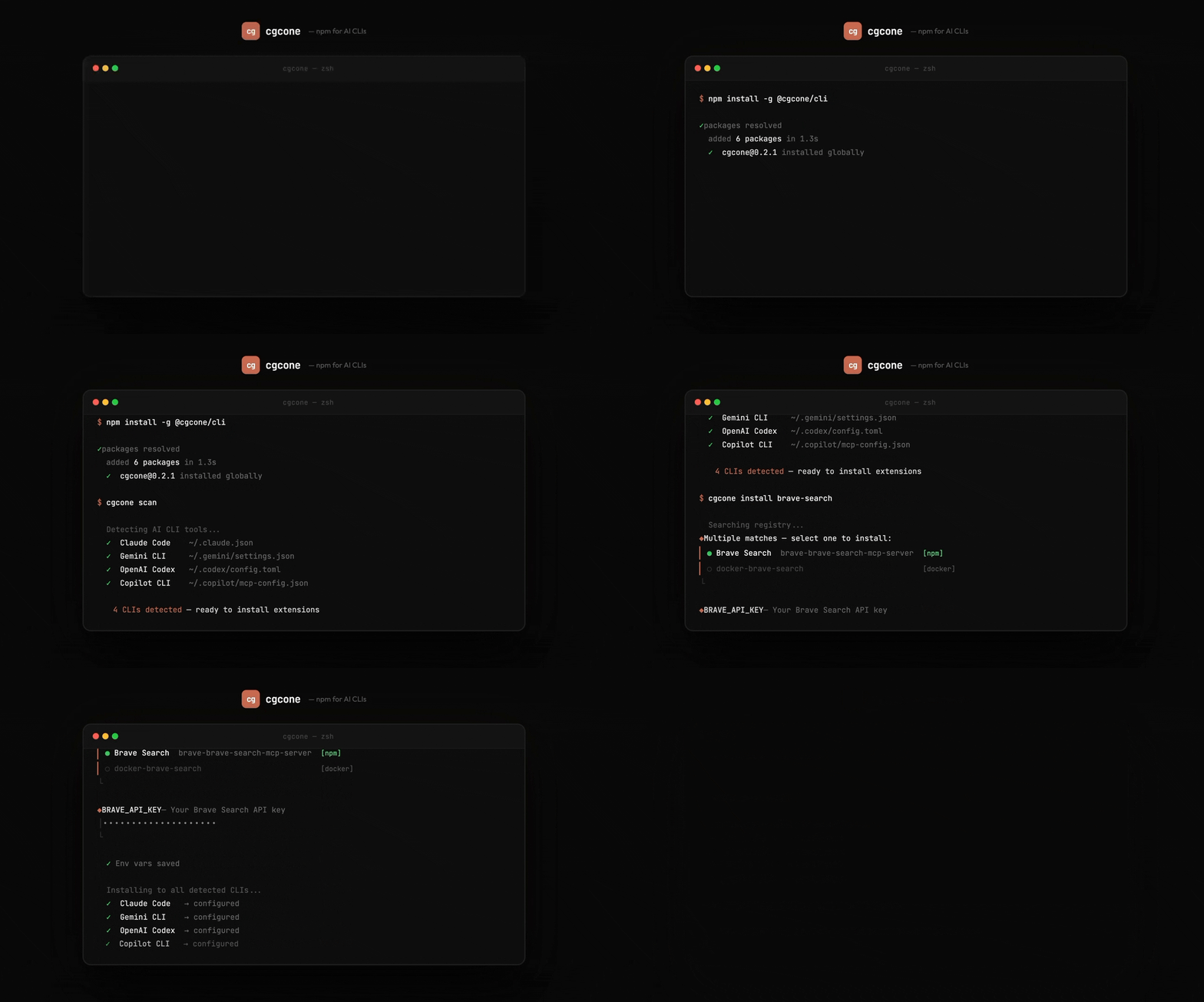
What it does
You have Claude Code. Maybe Gemini CLI. Maybe OpenAI Codex. Each has its own config format, its own file location, its own way to add MCP servers. cgcone abstracts that away.
$ cgcone scan
  ✓ Claude Code    ~/.claude.json
  ✓ Gemini CLI     ~/.gemini/settings.json
  ✓ OpenAI Codex   ~/.codex/config.toml

$ cgcone install brave-search
  Multiple matches — select one to install:
  ● Brave Search  brave-brave-search-mcp-server  [npm]
  ○ docker-brave-search                          [docker]

  Does this MCP require API keys or env vars? ● Yes
  BRAVE_API_KEY — Your Brave Search API key:  ••••••••••

  ✓ Claude Code  → configured
  ✓ Gemini CLI   → configured
  ✓ OpenAI Codex → configured
  ✓ brave-brave-search-mcp-server installed
Install
Requires Node.js 18+.
npm install -g @cgcone/cli
Supported CLIs
| CLI | Config file | Status |
|---|---|---|
| Claude Code | ~/.claude.json |
✅ |
| Gemini CLI | ~/.gemini/settings.json |
✅ |
| OpenAI Codex | ~/.codex/config.toml |
✅ |
| GitHub Copilot CLI | ~/.copilot/mcp-config.json |
✅ |
Commands
# Discover
cgcone scan                          # detect AI CLIs installed on this machine
cgcone search <query>                # search 2400+ extensions in the registry
cgcone info <name>                   # show details, author, install config

# Install & manage
cgcone install <name>                # install to all detected CLIs (interactive picker if multiple matches)
cgcone install <name> --for claude-code   # install to one CLI only
cgcone uninstall <name>              # remove from all CLIs (fuzzy match + picker)
cgcone configure <name>              # update API keys / env vars for an installed MCP

# Maintenance
cgcone list                          # show installed extensions per CLI
cgcone update <name>                 # update a single extension
cgcone update --all                  # update all installed extensions
cgcone doctor                        # diagnose broken installs and config issues
Interactive install picker
When a search query matches multiple extensions, cgcone shows an interactive selection prompt instead of auto-installing the wrong one:
◆ Multiple matches — select one to install:
│ ● Context7  upstash-context7  [npm]
│ ○ Context7  docker-context7   [docker]
└
Arrow keys to navigate, Enter to confirm. npm entries are listed first.
API key configuration
MCPs that require API keys prompt you interactively during install. Sensitive keys are masked:
ℹ This MCP requires 1 env var:

◆ BRAVE_API_KEY — Your Brave Search API key
│ ••••••••••••••••••••••••••••••
└

✓ Env vars saved
Update them later without reinstalling:
cgcone configure brave-search
Registry
cgcone pulls from cgcone.com/registry.json — 2400+ extensions indexed from:
- Official modelcontextprotocol.io registry
- GitHub repositories tagged
mcp-server,model-context-protocol - Claude Code plugins (marketplace.json format)
- Claude Code skills (SKILL.md format)
- Community subagents, commands, and hooks
Browse at cgcone.com.
Website
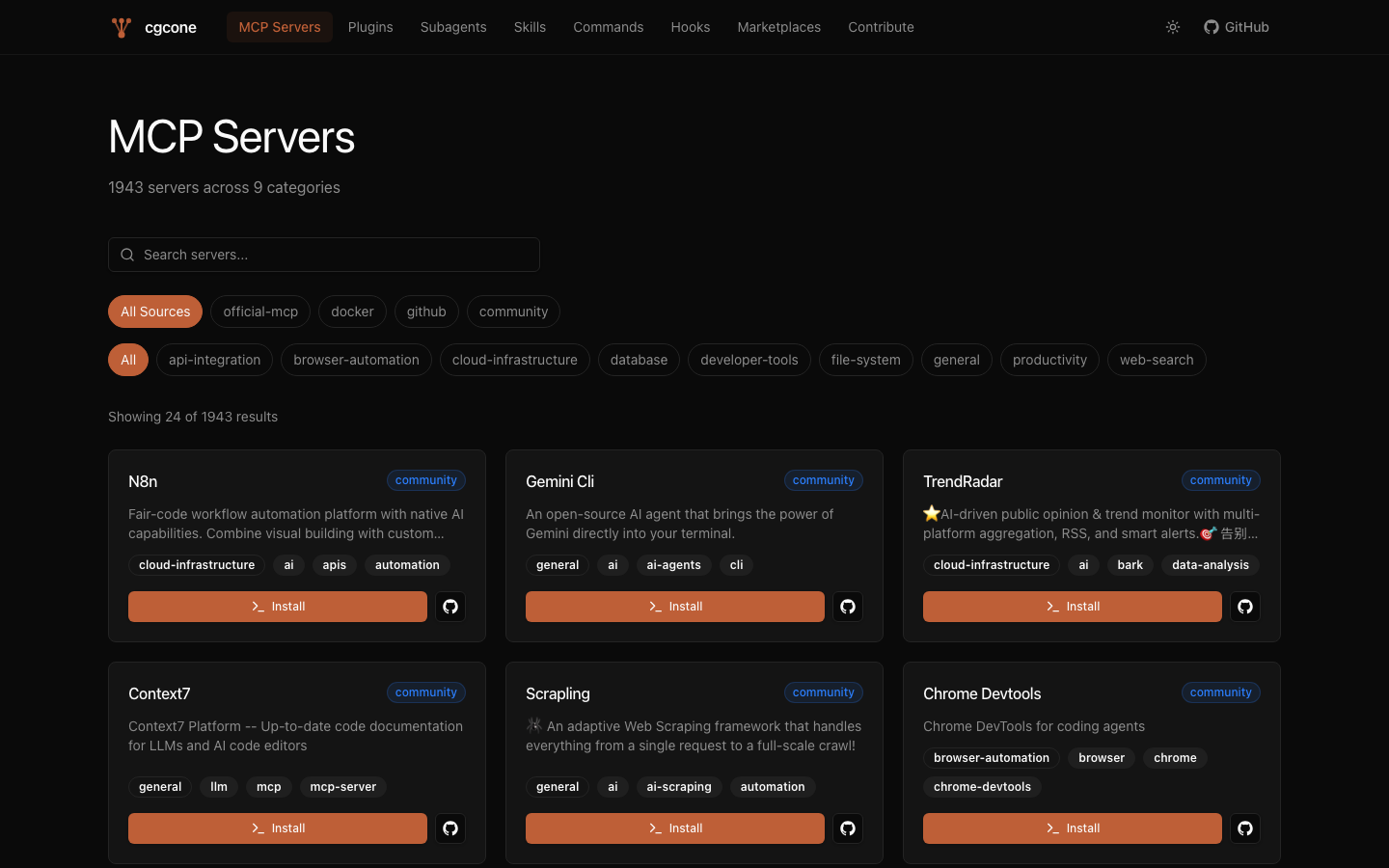
cgcone.com is a full marketplace UI with:
- MCP Servers — 1943 servers, searchable by name, category, source
- Plugins — Claude Code plugins with one-line install commands
- Skills, Subagents, Commands, Hooks — Claude Code extensions
- Per-entry detail pages with README, install command, tags, links
- Light/dark mode
Repository structure
cgcone/
├── app/                  Next.js 15 website (cgcone.com)
│   ├── mcp-server/[slug] MCP detail pages
│   ├── mcp-servers/      MCP listing
│   ├── plugin/[slug]     Plugin detail pages
│   ├── plugins/          Plugin listing
│   ├── skills/           Skills listing
│   ├── subagents/        Subagents listing
│   └── ...
├── components/           Shared UI components
├── lib/                  Shared utilities (registry, types, utils)
├── scripts/              Registry generation pipeline
│   ├── generate-registry.js        orchestrator
│   ├── fetch-mcp-official.js       official MCP registry
│   ├── fetch-mcp-github.js         GitHub topic search
│   ├── fetch-mcp-docker.js         Docker Hub
│   ├── fetch-plugins-github.js     GitHub plugin search
│   ├── fetch-skills-github.js      GitHub skills search
│   └── fetch-readme.js             README batch fetcher
├── public/
│   └── registry.json               generated registry (2400+ entries)
├── packages/
│   └── cli/                        @cgcone/cli npm package
│       └── src/
│           ├── index.js            CLI entry point
│           ├── registry.js         registry fetch + search + fuzzy match
│           ├── store.js            local install tracking (~/.cgcone/)
│           ├── ui.js               chalk/ora helpers
│           ├── adapters/           per-CLI config adapters
│           │   ├── claude-code.js
│           │   ├── gemini-cli.js
│           │   ├── codex-cli.js
│           │   └── copilot-cli.js
│           └── commands/           CLI commands
│               ├── install.js      interactive install + env var prompts
│               ├── uninstall.js    fuzzy uninstall + picker
│               ├── configure.js    post-install env var management
│               ├── search.js
│               ├── list.js
│               ├── info.js
│               ├── scan.js
│               ├── doctor.js
│               └── update.js
├── content/              Community extensions (Markdown)
│   ├── subagents/
│   ├── skills/
│   ├── commands/
│   └── hooks/
├── CONTRIBUTING.md
└── LICENSE
Regenerating the registry
Requires a GitHub token for full results (5000 req/hr vs 60 unauthenticated):
export GITHUB_TOKEN=ghp_...
npm run generate
Skip slow steps during development:
SKIP_GITHUB=1 SKIP_DOCKER=1 npm run generate   # official registry only (fast)
SKIP_SKILLS=1 SKIP_PLUGINS=1 npm run generate  # skip skill/plugin discovery
Releasing the CLI
Releases are triggered by a git tag. The GitHub Actions workflow publishes to npm with provenance attestation (Verified badge on npmjs.com).
# 1. Bump version in packages/cli/package.json
# 2. Commit and push to main
# 3. Tag the release:
git tag cli-v0.2.1 && git push origin cli-v0.2.1
The cli-v* tag triggers .github/workflows/publish.yml → npm publish --provenance.
Required secret: NPM_TOKEN must be set in GitHub → Settings → Secrets → Actions.
Contributing
See CONTRIBUTING.md.
| Contribution | How |
|---|---|
| Submit a skill, subagent, command, or hook | Open a PR adding a file to content/ |
| Submit an MCP server | Open an issue |
| Bug report | GitHub Issues |
| Feature request | GitHub Issues |
Star History
License
MIT — see LICENSE.
Reviews (0)
Sign in to leave a review.
Leave a reviewNo results found