radian
Health Warn
- License — License: Apache-2.0
- Description — Repository has a description
- Active repo — Last push 0 days ago
- Low visibility — Only 5 GitHub stars
Code Fail
- rm -rf — Recursive force deletion command in .github/workflows/pages.yml
- rm -rf — Recursive force deletion command in .github/workflows/release.yml
- exec() — Shell command execution in benchmarks/terminal-bench/radian_agent.py
Permissions Pass
- Permissions — No dangerous permissions requested
No AI report is available for this listing yet.
A coding agent in one Rust binary: full-screen terminal UI and headless exec, JSONL sessions, optional OS sandbox, MCP, skills, memory.

English | 简体中文




radian
radian is a fast, efficient coding agent in one Rust binary.
Built into the same binary is arc, which turns a request into tasks, runs each task with its own radian worker, and merges only what passes a fixed gate.
radian: the coding agent
radianopens a full-screen terminal UI.radis an alias.radian execruns headless.radian exec -p "<task>"runs one task and exits.--output jsonlprints each step as one JSON line, and the exit code tells how the turn ended.- Each session is one JSONL journal file. Both modes can resume a session, fork it at a turn boundary, or watch it read-only with
radian attach. - Providers: OpenAI-compatible Chat Completions and the Anthropic Messages API. Tools: built-in file, search, shell and job tools, MCP stdio servers, skills, memory, and a one-shot
subagent. - It reads what you already have:
AGENTS.mdandCLAUDE.md, skills in~/.agents/skills, MCP servers in themcpServersformat, Claude and Codex style hooks, and pi themes. - Inside herdr, radian reports its state (working, idle, blocked) by itself.
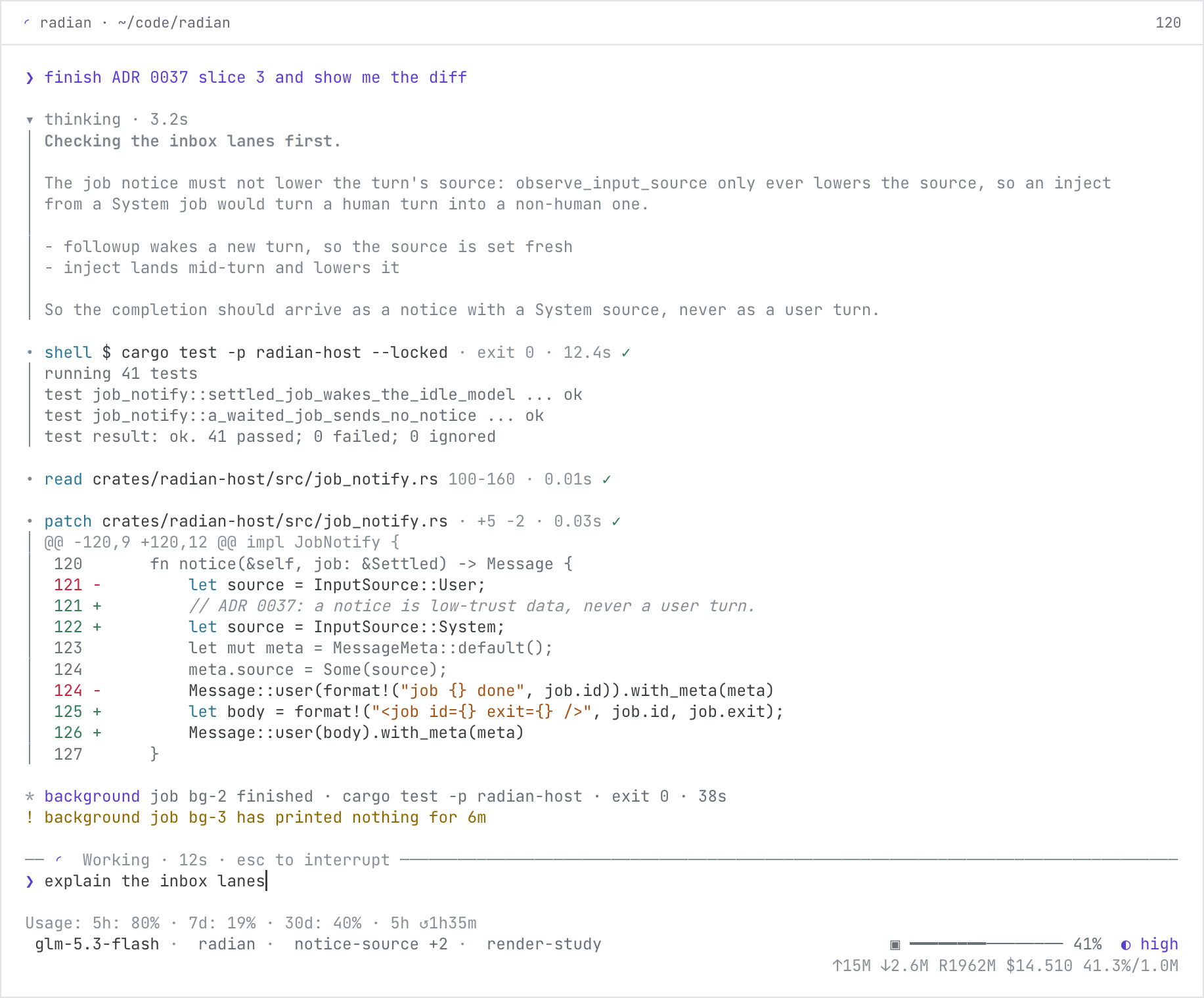
radian at 120 columns, rendered by the TUI prototype script (research/2026-10-16-render-prototype/).
radian login                          # store a provider key
radian                                # the full-screen app
radian exec -p "summarize Cargo.toml" # one task, headless
Permissions. The default tier is full: no sandbox, and no prompts for the built-in tools.--profile workspace turns the sandbox on (macOS seatbelt or Linux bubblewrap) and confines writes to the workspace.
A project can save workspace for itself, and a project setting can only narrow access.full does not defend against prompt injection from an unfamiliar repository: for a boundary use workspace, a container, or a dedicated OS user.
Details: docs/user/permissions.md.
arc: the orchestrator
arc (radian arc) is a plan and task orchestrator.
It keeps a plan and its tasks as files in your repository, starts one headless radian worker for each task, and merges only what passes the gate.
arc is a program, not a model: a lead session writes the plan, and you decide what runs and what merges.
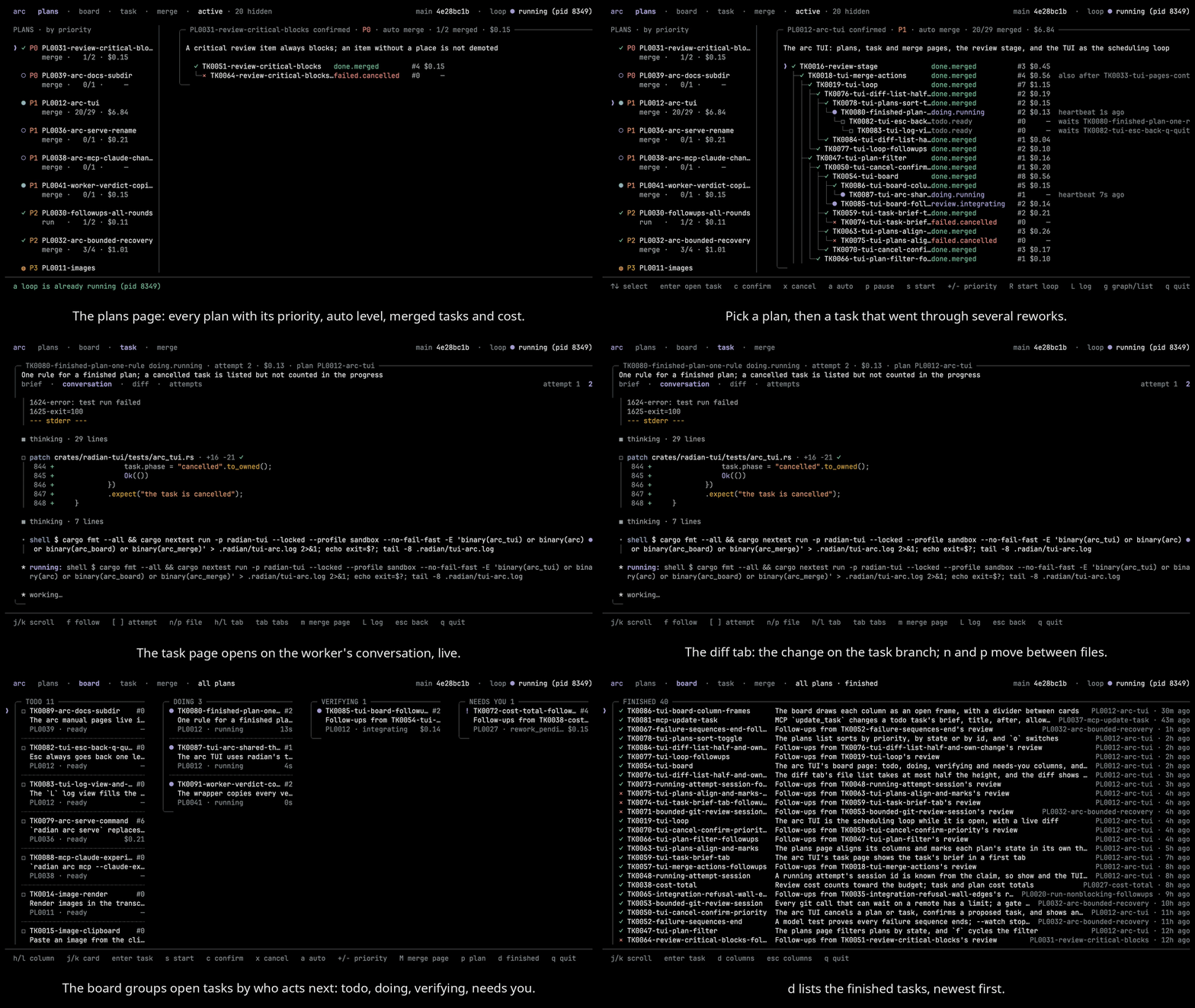
The arc TUI on this repository's own backlog: the plans, one task's conversation, brief, diff and attempts, then the board.
How a request moves:
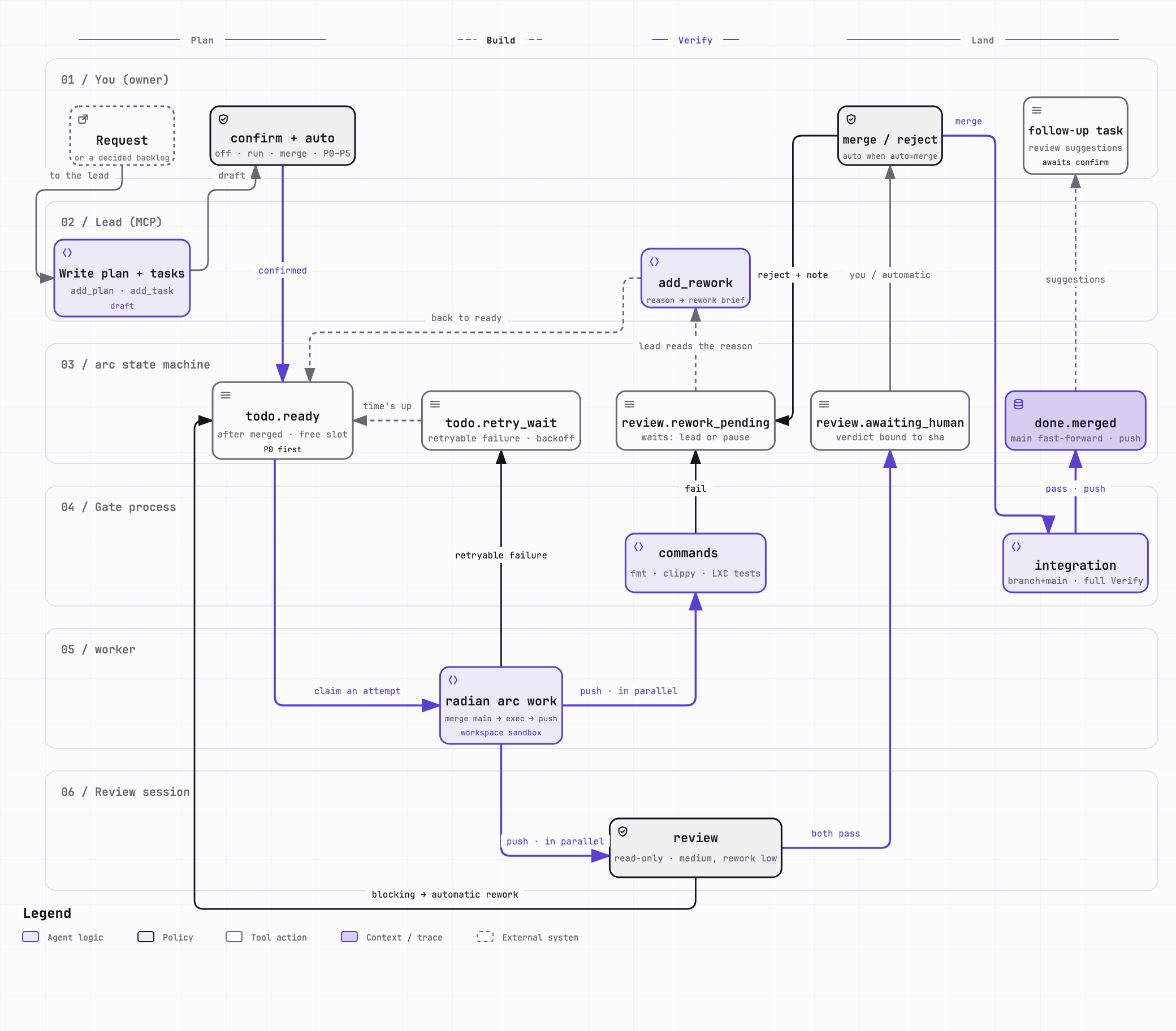
One task from request to merge, as this repository runs it: the gate shown (fmt, clippy, tests) is this repository's own.
- A lead (Claude Code or the radian TUI) writes a plan and its tasks through arc's MCP server,
radian arc mcp. The lead cannot confirm, start or merge anything. - You confirm the plan. With the plan's
autolevel atoffyou start each task yourself; atrunarc starts a task once the tasks it waits for are merged. - Each task runs as a separate headless
radian execworker, in its own git worktree, on its own branch, with its own session journal. - The gate checks the pushed commit: the commands you configure, optionally a read-only review session, and your approval. A failed stage sends the task back for rework.
- A task that passes is merged into your remote main by
radian arc merge, or by arc itself when the plan'sautolevel ismerge. If the branch moved after the gate, the approval is void and the task is verified again.
Every task and plan records its cost, and each can carry a cost and wall-time budget.
The TUI shows the plans, a board that groups open tasks by who acts next (todo, doing, verifying, needs you), each task's conversation, brief, diff and attempts, and the merge page.
radian arc init                        # in your repository: the layout, and four checks
claude mcp add arc -- radian arc mcp   # register arc with a lead (Claude Code here)
radian arc                             # open the arc TUI
arc needs a git working tree with an origin remote you can push the main branch to.radian arc init checks the credential, the remote, a dry-run push and the sandbox, and warns about each one that fails.
The gate's commands go in .radian/arc/config.toml.
The commands, the gate and the files arc keeps are in docs/user/arc/index.md, arc/gate.md, arc/files.md, arc/mcp.md and arc/tui.md.
Install
Install the current release from Homebrew, from a release tarball, or from
source with Cargo.
brew install hisea/tap/radian
The tap links only radian: homebrew-core already has a rad formula, so
this one does not link its rad alias. The macOS packages are signed and
notarized.
Or download radian-<version>-<target>.tar.gz from the
releases page, check it against
its .sha256, and unpack the radian (and rad) binary inside:
shasum -a 256 -c radian-<version>-<target>.tar.gz.sha256
tar -xzf radian-<version>-<target>.tar.gz
./radian --version
Or build from source (this installs both radian and rad):
cargo install --git https://github.com/hisea/radian radian-tui
On Linux the workspace tier runs the sandbox through bubblewrap;
install it first (for example sudo apt install bubblewrap on Debian
and Ubuntu).
Docs
New users start with docs/user/quickstart.md; every page of the manual is listed in docs/user/index.md, and it is also at getrad.dev/docs.
| What | Where |
|---|---|
| Crates, build, status, configuration and permission reference | docs/internals.md |
| Design of record | ARCHITECTURE.md |
| Decisions that constrain the code | docs/adr/ |
| Contributing, security | CONTRIBUTING.md, SECURITY.md |
| Agent instructions (read before changing code) | AGENTS.md |
License
Licensed under either of MIT or Apache-2.0, at your option. Third-party code and its attribution are listed in NOTICE.
Reviews (0)
Sign in to leave a review.
Leave a reviewNo results found