spatialboard
Health Warn
- License — License: MIT
- Description — Repository has a description
- Active repo — Last push 0 days ago
- Low visibility — Only 6 GitHub stars
Code Warn
- network request — Outbound network request in examples/basic/public/sw.js
Permissions Pass
- Permissions — No dangerous permissions requested
No AI report is available for this listing yet.
A React + TypeScript spatial canvas and node-board library for whiteboards, visual editors, and graph interfaces.

Build infinite canvas apps in React — whiteboards, node graphs, and slide decks.
Getting started · Custom nodes · Data flow · Agents & LLMs · SBD format · Examples




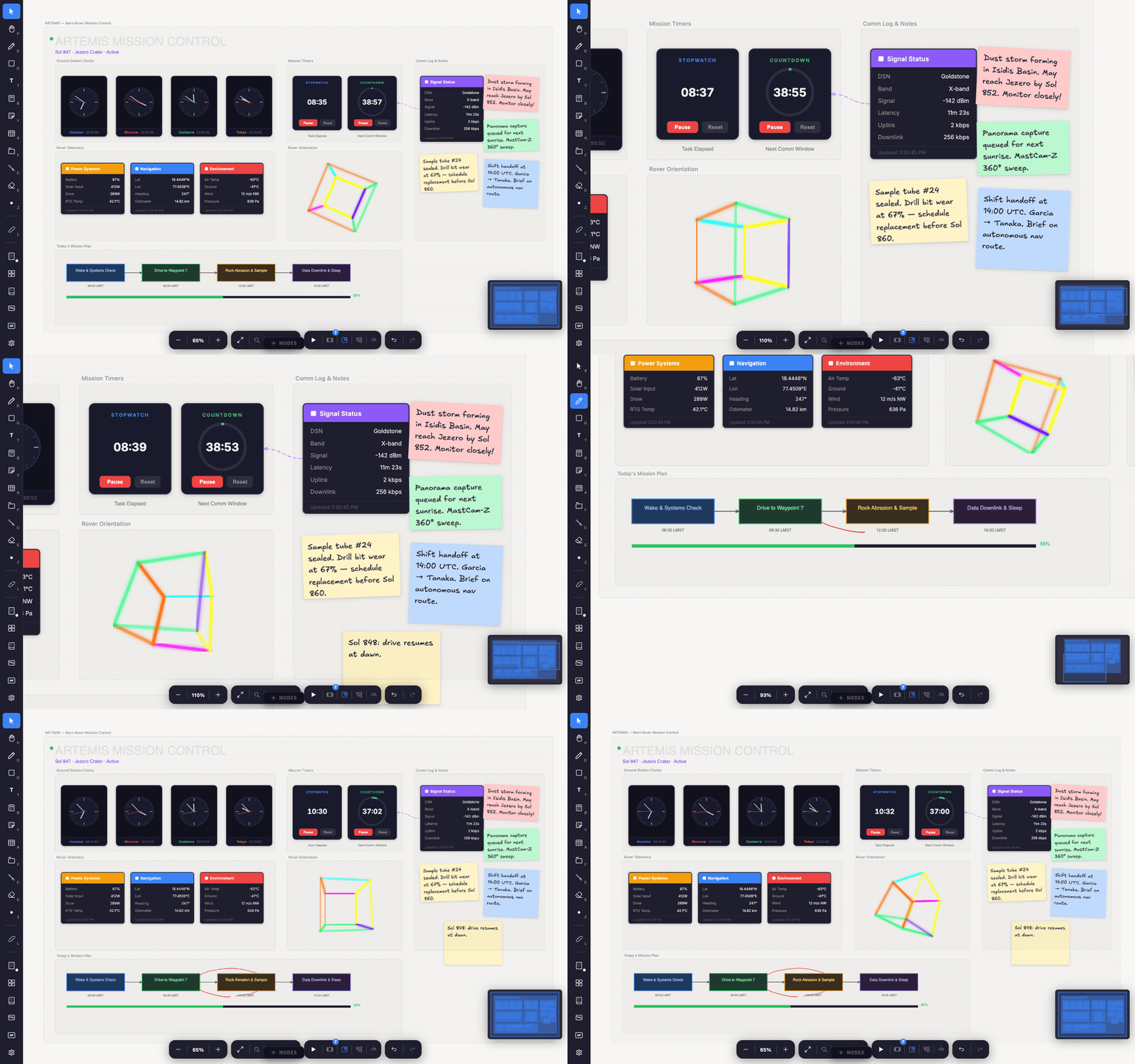
The Mission Control board from the examples — click it to open it live. The clocks, telemetry cards, timers, and 3D wireframe are custom nodes built with the same public API as the built-in stickies, frames, text, and connectors.
SpatialBoard is a whiteboard, node-graph editor, presentation surface, and
LLM-readable board format in one MIT-licensed TypeScript library. All board
state lives in a SpatialEngine, with a React shell on top: you get an
infinite canvas with hand-drawn aesthetics out of the box, and a registry API
that turns that canvas into whatever your product needs — a diagramming tool,
a visual programming environment, a slide deck, or a board that AI agents can
read and write.
Feature highlights
- Whiteboarding, complete — pressure-aware freehand ink, rough hand-drawn
shapes, sticky notes, rich text, images, and frames, with snapping, smart
alignment guides, grouping, align/distribute, infinite pan/zoom, undo
history, and a minimap. - Custom nodes are the core API — everything on the canvas is a node
type: a React component plus a declarative definition. The built-ins use
the same public API you do. - Typed data flow — nodes declare input/output ports and a pure
computefunction; the reactiveDataFlowEnginepropagates values through
the wired graph, detects cycles, and badges live values on edges. - Presentations built in — frames double as slides, stepped through with
animated transitions (pan, fade, dissolve, zoom, fold, 3D cube). One call:engine.enterPresentation(). - Collaboration-ready — transport-agnostic remote ops and live gesture
awareness; wire it to any sync layer or CRDT. Storage stays your business. - AI-native — budgeted board snapshots for LLM context, a programmatic
drawing API, and SBD: a markdown-compatible board format that models both
read and write. - Headless entry —
spatialboard/engineimports without React or CSS, so
the engine runs in tests, scripts, and agent tooling. - Interop — imports Excalidraw
.excalidrawlibshape libraries, and a
built-in Mermaid importer turns flowcharts and sequence diagrams into
editable nodes.
Quick start
npm install spatialboard
import { SpatialBoard, SpatialEngine } from "spatialboard";
import "spatialboard/style.css";
import { useMemo } from "react";

export default function App() {
  const engine = useMemo(() => new SpatialEngine(), []);
  return (
    <div style={{ width: "100vw", height: "100vh" }}>
      <SpatialBoard engine={engine} />
    </div>
  );
}
react / react-dom (^18 || ^19) are the only required peer
dependencies. Three entry points let you take exactly as much as you need:
| Entry | What you get |
|---|---|
spatialboard |
The board component, the engine, and the built-in node types |
spatialboard/blocknote |
Opt-in rich-text nodes (adds the BlockNote ^0.46 + Mantine ^8 peers) |
spatialboard/engine |
The headless engine — no React, no CSS |
docs/getting-started.md covers the engine
lifecycle, persistence, and the key props.
What you can build
A whiteboard. Freehand ink (perfect-freehand), rough hand-drawn shapes
(roughjs), sticky notes, rich-text blocks (BlockNote), images, text, and
frames — everything in the feature list above, working together out of the
box.
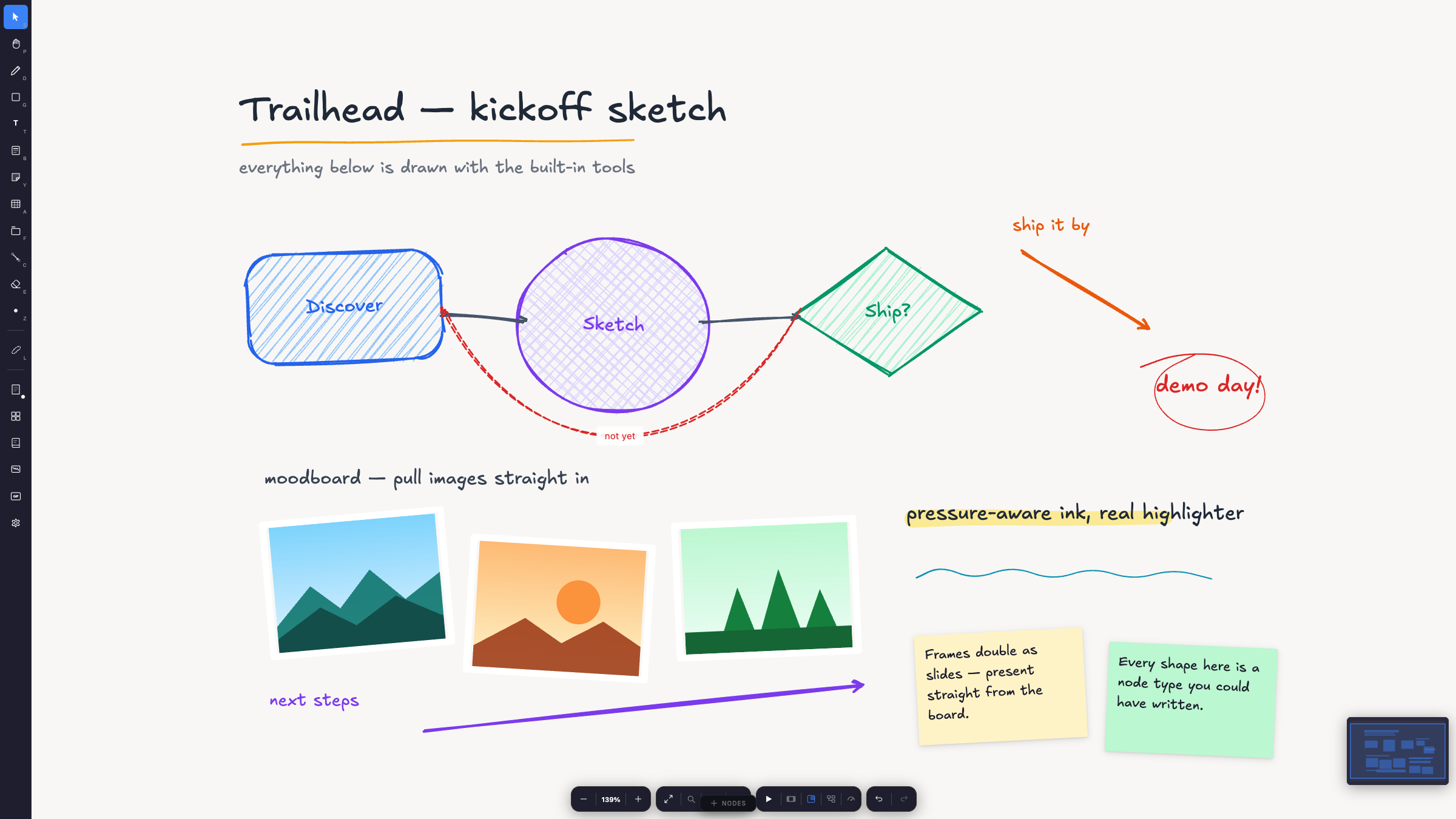
Rough shapes with hachure fills, sketchy edges, pen / pencil / highlighter ink, rotated images, and stickies — all built-in node types, all in the hand-drawn register.
A node-based tool. Define your own node types with typed input/output
ports and a pure compute function; the reactive DataFlowEngine propagates
values through the wired graph. This is the foundation for visual
programming, pipelines, and dashboards. See
docs/data-flow.md.
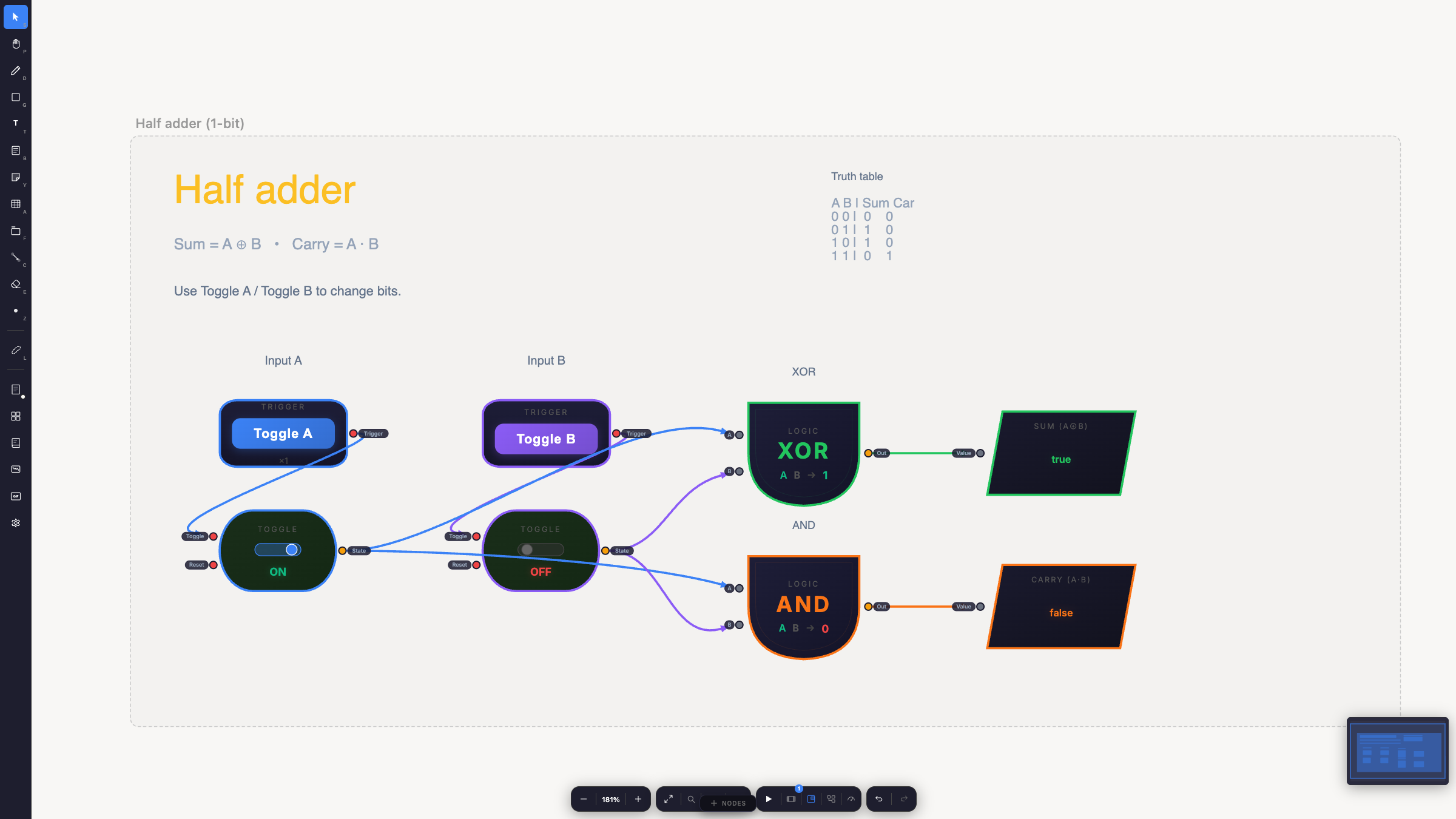
A one-bit half adder. Flipping a toggle propagates through the wired graph — the gates recompute and the Sum and Carry displays update — with no host code in the loop.
A presentation. Frames double as slides: order them explicitly or let
reading order decide, then step through with animated transitions. One method
call — engine.enterPresentation().
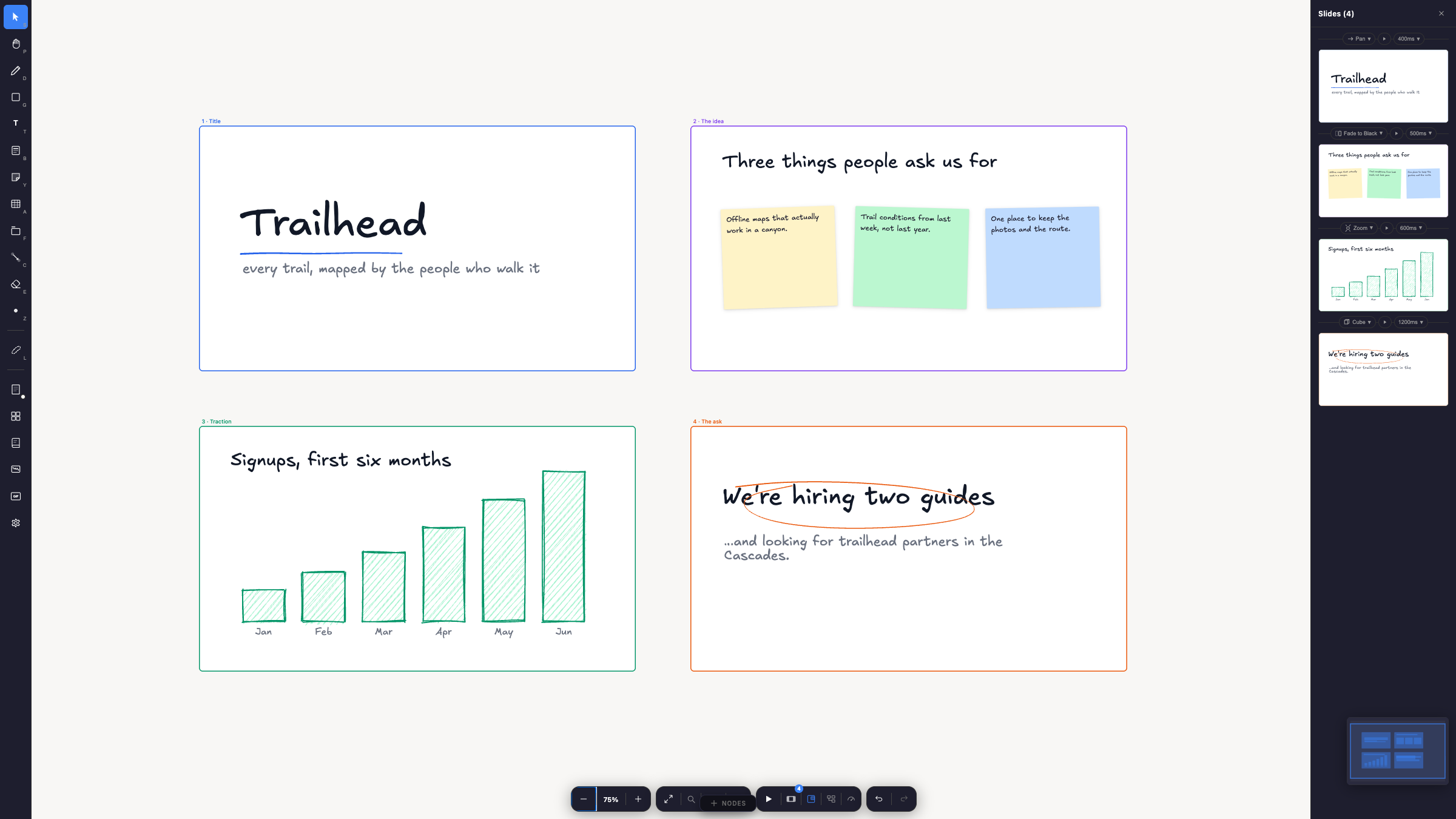
The same four frames are both a canvas layout and an ordered deck. The slides panel picks the transition per slide — pan, fade, zoom, cube — and Present runs them.
A collaborative canvas. The engine exposes remote-op methods
(addRemoteNode, applyRemoteNodeUpdate, deleteRemoteNode) and broadcasts
gesture awareness (live stroke, shape, drag, eraser, and laser previews) so
you can wire it to any transport or CRDT. Storage is deliberately not
SpatialBoard's business — serialize with toSBD()/toJSON() and persist
however you like.
An AI-native surface. getAgentState() returns a structured, budgeted
snapshot for LLM context (getAgentStateMarkdown() for prompts); a
programmatic creation API (createShape, createSticky, createEdge, …)
plus beginAgentAction() batching lets agents draw; and the whole board
round-trips through SBD — a markdown-compatible format that models can
both read and write. See docs/agents.md and
sbd-spec.md.
Custom nodes in one glance
Everything on the canvas is a node type — the built-ins use the same API you
do. A custom type is a React component plus a definition object:
import type { NodeTypeDefinition, NodeRendererProps } from "spatialboard";

type CounterData = { count: number };

function Counter({ data, updateData }: NodeRendererProps<CounterData>) {
  return (
    <button onClick={() => updateData({ count: data.count + 1 })}>
      Clicked {data.count} times
    </button>
  );
}

export const counterNodeType: NodeTypeDefinition<CounterData> = {
  type: "counter",
  component: Counter,
};

// <SpatialBoard nodeTypes={[...coreBoardNodes, counterNodeType]} />
Definitions can also declare container behavior, custom hit-testing, a
properties panel, lifecycle hooks (onCreate, onResize, onFlip, …), and
data-flow ports with a compute function. The full tour:
docs/custom-nodes.md.
The SBD format
Boards serialize to SBD — a markdown document with HTML-comment
directives. It is diff-stable, hand-editable, and LLM-friendly:
<!--@meta sbd="3" background="dot-grid" -->

<!--@frame id="f1" x="100" y="100" w="400" h="300" label="Plan" -->

<!--@sticky id="s1" x="40" y="60" w="200" h="150" parent="f1" color="#FEF3C7" -->
Battery check at 06:00.

<!--@edge id="e1" from="s1" to="f1" style="dashed" -->
Round-trip with await engine.toSBD() / await engine.fromSBD(text). The
lower-level functions are serializeToSBD(nodes) and parseSBD(text) (which
returns { nodes, meta, warnings }). Spec in sbd-spec.md.
Documentation
| Guide | What's inside |
|---|---|
| ARCHITECTURE.md | The code-flow map: from App() to the engine to the render layers, with exact code references |
| docs/getting-started.md | Install, first board, engine lifecycle, persistence, key props |
| docs/design-philosophy.md | Why the engine lives outside React, the performance model, the layering |
| docs/custom-nodes.md | The NodeTypeDefinition API end to end, with a worked example |
| docs/data-flow.md | Ports, compute, the reactive DataFlowEngine, cycles, edge overlays |
| docs/agents.md | LLM/agent integration: state snapshots, programmatic drawing, SBD loops |
| docs/examples.md | Guided path through examples/, simplest to most complex |
| sbd-spec.md | The normative SBD format specification |
Examples
Four runnable apps — three focused tiers plus the kitchen sink, all hosted
live at
spatialboard.hishamkhalifa.com. All
are self-contained, persist to localStorage, and work offline (PWA):
examples/basic
(live) — the slim core
board (<SpatialBoard />), no rich text and zero@blocknotepeers.examples/rich-text
(live) — opt-in
BlockNote nodes viaspatialboard/blocknote.examples/custom-nodes
(live) — three
custom node types wired as a live data-flow graph
(Number × Number → Multiply → Gauge).examples/dev-app
(live) — the development
playground: every feature and ~40 custom node types. Every board pictured
above ships here — Whiteboard, Half adder, Deck, and Mission Control all
load from the debug panel.
From the package root:
npm install
npm run dev            # examples/basic
npm run dev:rich-text  # examples/rich-text
npm run dev:custom     # examples/custom-nodes
npm run dev:app        # examples/dev-app
docs/examples.md walks them from the one-liner up to the full
playground.
Optional integrations
- GIF picker — pass
gifApiBaseUrland SpatialBoard renders a GIF search
UI against your endpoint (Klipy-compatible response shape; seesrc/utils/klipy.ts). - Theming — override sidebar/panel tokens via the
themeprop; RTL and
localization viadirectionandlocalization. - Read-only + preview modes —
readOnlykeeps pan/zoom/select alive while
guarding all mutations;previewrenders a static board.
Roadmap
Roughly in the order I plan to tackle things — open an issue if you think
the order is wrong:
- Better test coverage. The suite covers the
engine core, serialization, export, and geometry, but the interaction
layer (pointer gestures, selection, undo), the data-flow edge cases, and
the React rendering side are still mostly verified by me clicking
around. - MCP server. SBD and
getAgentStateMarkdown()already give models a
way to read and write boards; an MCP server would make that a standard
plug instead of a bring-your-own-glue exercise. - CRDT collaboration example. The engine is transport-agnostic by
design, but "wire it to any CRDT" deserves a worked end-to-end example.
Development
npm install
npm run dev        # examples/basic (or dev:rich-text / dev:custom / dev:app)
npm run typecheck
npm run test
npm run build      # dist/ (generated; not committed)
Contributing
Contributions are welcome — see CONTRIBUTING.md. Security
reports go through SECURITY.md.
License
SpatialBoard is MIT licensed — development and production, no
license keys, no watermarks. Third-party components and their licenses are
inventoried in THIRD_PARTY_NOTICES.md; bundled and
runtime fonts in FONTS.md.
Reviews (0)
Sign in to leave a review.
Leave a reviewNo results found