claude-code-chat-viewer
Health Warn
- License — License: Unlicense
- Description — Repository has a description
- Active repo — Last push 0 days ago
- Low visibility — Only 6 GitHub stars
Code Fail
- exec() — Shell command execution in lib/marked.min.js
- process.env — Environment variable access in scripts/build-single.mjs
- process.env — Environment variable access in scripts/release-notes.mjs
- new Function() — Dynamic code execution via Function constructor in test/enrich.test.mjs
- new Function() — Dynamic code execution via Function constructor in test/golden.test.mjs
- process.env — Environment variable access in test/golden.test.mjs
- new Function() — Dynamic code execution via Function constructor in test/liar.test.mjs
- new Function() — Dynamic code execution via Function constructor in test/rules.test.mjs
- new Function() — Dynamic code execution via Function constructor in test/state.test.mjs
Permissions Pass
- Permissions — No dangerous permissions requested
No AI report is available for this listing yet.
Browse Claude Code conversation history offline: one HTML file that reads JSONL session transcripts from ~/.claude/projects

Just click — no install, no build, no signup.
English · Русский · Español · Français · 中文 · العربية
Claude Code Chat Viewer
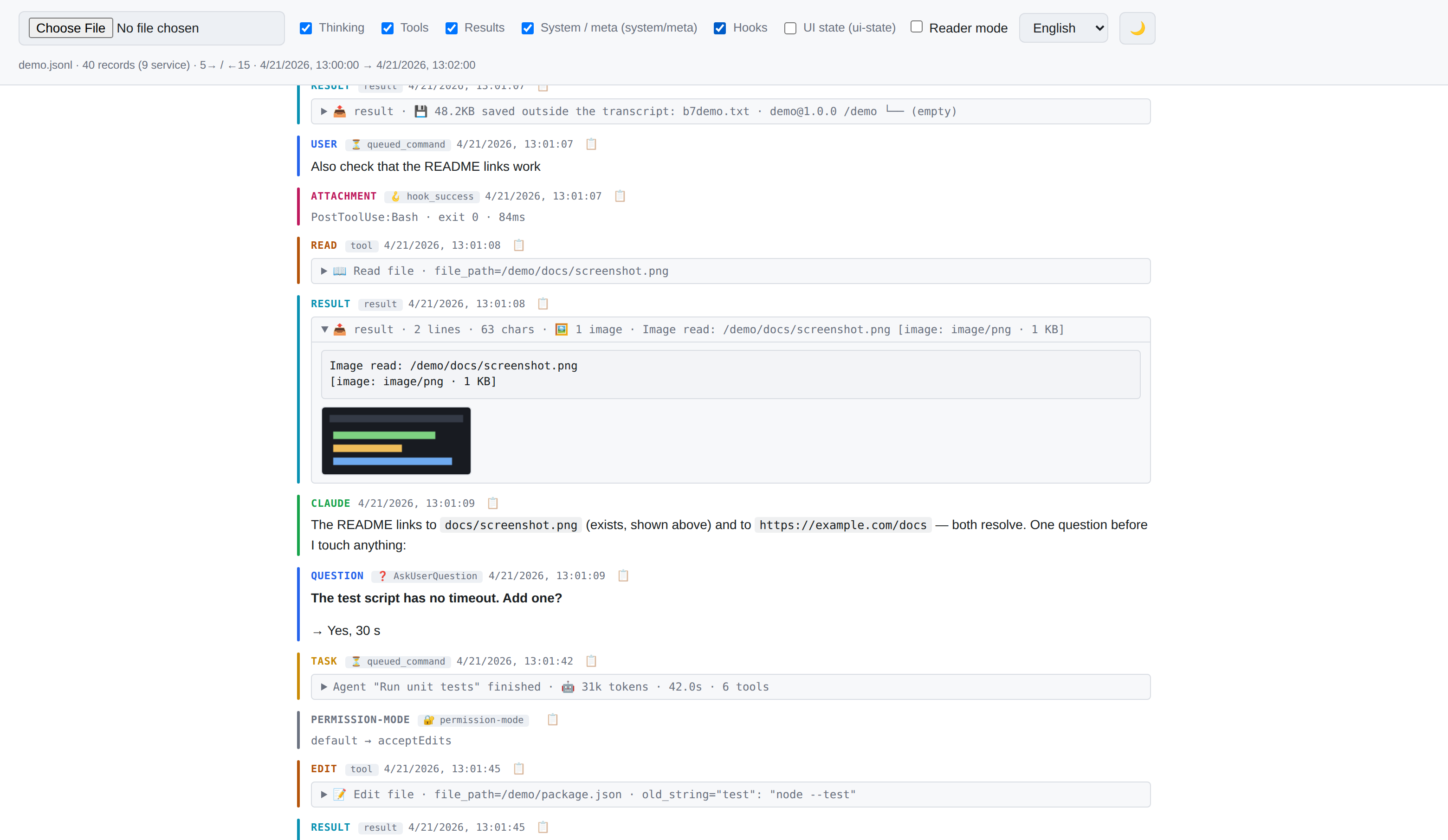
Read your Claude Code conversation history in a browser. Claude Code saves every session as a JSONL file under ~/.claude/projects/; open one here and it becomes a readable feed — your messages, Claude's replies, thinking, tool calls and results, subagent reports — with filters and a reader mode. One HTML file, no server, no install, works offline; nothing leaves your machine. Reads the transcript format up to Claude Code 2.1.310.




Why
Claude Code writes every session to ~/.claude/projects/<project>/<session-uuid>.jsonl — one line per record (user message, model reply, thinking, tool_use, tool_result, attachment, etc.). The raw file is unreadable; built-in commands like /resume and /export reopen or dump a conversation, but don't let you inspect an old transcript with its tool calls and service records.
This viewer turns such a .jsonl into a readable feed with color-coded roles, collapsible service blocks (thinking / tools / results), and filters.
What it shows
- user (blue) — real user messages
- assistant (green) — Claude's text replies
- thinking (purple) — extended thinking, collapsed by default
- tool_use (amber) — tool invocations with argument preview
- tool_result (cyan / red for errors) — tool responses
- meta / task-note (yellow) — system injections and
<task-notification>from subagents - question → answer — an
AskUserQuestioncall and the human's answer in one card - subagent report (
↩ report) — a subagent's final report, labelled with its task; when a background subagent finishes you see tokens · time · tool calls - hooks — hook runs and hook errors (own filter, off by default)
- compaction — a divider with the token drop; the compaction summary is collapsed
- images — screenshots and PDF pages stored in the transcript, drawn when you open their block
- system / attachment / ui-state — service records (hidden by default); a value the CLI rewrites every turn (session title, permission mode) is shown only when it changes
Each block is a separate row with a colored left bar. No messenger bubbles: this is a log, not a chat.
How to open
Pick whichever fits you:
A. Single-file download — easiest. Grab the standalone HTML from the latest release, double-click it. One file, works offline forever.
B. Clone the repo — if you want to hack on it. You need index.html + the lib/ folder.
C. Live online — just use https://hitmman55.github.io/claude-code-chat-viewer/. Nothing to download.
Once open, click the file picker (or drag-drop, or use the "Try with example" button) and pick a .jsonl transcript.
Claude Code transcripts live at:
~/.claude/projects/<project-slug>/<session-uuid>.jsonl
where <project-slug> is your working directory with every character other than a letter or digit replaced by -. Example: /home/user/my_proj → -home-user-my-proj.
Features
Ways to load a file
- File picker — click "Choose file" and pick a
.jsonl. - Drag and drop — drop a file anywhere on the page. A dashed outline signals the drop zone. Folder drops and non-file drags are rejected cleanly.
- Try with example — on the empty state (when hosted online) there's a button that loads a bundled
demo.jsonlshowcasing the main entry types.
Reading comfort
- Reader mode — a header toggle that keeps only what people and Claude said: your messages (including
/compactwith its arguments), Claude's text replies, question → answer cards, subagent reports and compaction dividers. No thinking, no tool calls, no service records. Good for skimming or sharing a clean view. - Copy per message —
📋button in each entry header. Copies the entry's text to the clipboard, with a checkmark confirmation for 1.2 s. Usesnavigator.clipboard.writeTextwith adocument.execCommandfallback forfile://contexts. - Honest stats line — human messages and model replies are counted by the same rules as the feed (tool output, command wrappers and notifications are not your messages); duplicates after
--resumeare merged; API request logs are skipped (CLI 2.1.300+).? N new record typesflags record types this version doesn't know yet — hover for the list; those records are still shown, as JSON. - Friendly tool names — known tools are labelled with icons (e.g.
📖 Read file,🖥️ Shell,📝 Edit file). Unknown / MCP tools fall back to🔧 {raw_name}. - Auto theme — the viewer follows your system's
prefers-color-schemeby default. Click the sun/moon button to pin a choice; pinned choice persists across sessions. - Six UI languages — English, Русский, Español, Français, 中文, العربية. Arabic switches to RTL. Picker in the header, preference saved.
Performance & safety
- Streaming parse —
.jsonlis read viafile.stream()+TextDecoderStream, not loaded as a single string. - Native virtualization —
content-visibility: autoon each record: the browser skips layout and paint for off-screen entries. Scales to thousands of records. - Chunked rendering — 500 records per chunk, "Load more" button for the rest.
- Filters — six checkboxes (thinking / tools / results / system / hooks / ui-state), toggle categories via a single CSS class on the container (no re-render).
- XSS-safe rendering — every text block is HTML-escaped before markdown parsing. No raw HTML from the transcript ever reaches the DOM, so no DOM sanitizer is needed at runtime. Markdown images are neutralized (shown as inert text, never fetched). Links are restricted to
http(s)and opened withrel="noopener noreferrer nofollow". - Size caps — prose blocks truncated at 20 000 characters, service blocks at 5 000. The
📋button copies what is shown, within these caps, so a click never ships megabytes of text; the full text is reached only on demand, through⤢. - ⤢ Open in full — an entry cut for display gets a
⤢button: the whole text opens in a panel over the feed (plain text / markdown / raw JSON of the record), with "Copy all" and "Save file". The feed itself never changes height. .jsonfallback — if the file isn't JSONL but a plain JSON array/object, it's parsed as a list of records.
Browser requirements
- Chrome / Edge 85+
- Firefox 105+
- Safari 15.4+
content-visibility: auto (Firefox 125+, Safari 18+) only speeds up scrolling of large files; without it everything works, just slower.
Dependencies
Only one, vendored locally in lib/:
- marked — markdown → HTML (~35 KB)
No CDN, no network, no Subresource Integrity dance. Clone and run.
What's personal in a transcript
A transcript holds much more than the conversation. Before you share a .jsonl file — or a screenshot of the viewer — know what's in it:
- every message, thinking block and tool output, including file contents and command output, which may contain keys, tokens or passwords;
- absolute paths, your user name, the working directory and the git branch, repeated on every record;
- your account email, the full system prompt and the text of your
CLAUDE.mdfiles — these records are hidden by default (system / ui-state filters), their one-line summary shows only counts, and opening one shows its content; - images: screenshots and pages of PDF files read during the session;
- full API request logs (
api-request*lines, CLI 2.1.300+; up to half the file) — the viewer skips them, but they are in the file.
Outputs too large for the transcript are not in it: Claude Code keeps them in <session>/tool-results/ next to the file, and the viewer shows only a ~2 KB preview with the path.
Privacy
Everything runs locally in your browser. The viewer itself makes no automatic network requests — no CDN, no analytics, no remote fonts. Markdown images embedded in transcripts are neutralized: shown as inert text with their URL visible, but never fetched. External links (http(s) only) open in a new tab only when you click them, with rel="noopener noreferrer nofollow". Your transcripts stay on your machine. Images stored inside a transcript (base64) are drawn from the file itself, still with no network request.
Known limits
- Files over ~100 MB need indexed line-offset loading with window-based rendering (not implemented).
- No export of a whole session (the goal is viewing, not conversion); a single entry can be saved through
⤢→ Save file. - No syntax highlighting in code blocks (intentional — kept dependencies minimal).
- A message you edited and resent appears twice — conversation branches are not drawn as a tree yet.
- Badges of service records show the raw record type (e.g.
hook_success), untranslated — that way new record types need no translation.
Development
All code lives in one HTML file. Edit it directly — styles in <style>, logic in <script>, translations in the I18N object near the top of the script.
Check syntax and run the tests without a browser (nothing to install):
node scripts/check-syntax.mjs  # syntax of the inline script
node --test test/*.test.mjs    # unit tests
The DOM-free parts — record triage and the rule tables that decide how each record type is shown — sit in the triage and rules sections of the script, each between // ===== <name> ===== and // ===== end <name> =====; the tests cut them out of index.html and run them under Node. Supporting a new record type is usually one entry in a rule table.
License
Unlicense — public domain. Use it however you want, no attribution required.
Reviews (0)
Sign in to leave a review.
Leave a reviewNo results found