markdy-com
Health Pass
- License — License: MIT
- Description — Repository has a description
- Active repo — Last push 0 days ago
- Community trust — 84 GitHub stars
Code Pass
- Code scan — Scanned 12 files during light audit, no dangerous patterns found
Permissions Pass
- Permissions — No dangerous permissions requested
No AI report is available for this listing yet.
🎬 Open-source animated architecture diagrams as code. Diagram-native DSL, 17 layout engines, Web Animations API, and MCP server for AI agents.

Markdy
Open-source diagram-as-code DSL for animated architecture & system design explainers.
Write declarative MarkdyScript → render 60fps browser-native animated diagrams powered by the Web Animations API.
⚡ Launch Studio Playground • 📖 Documentation • 🌟 17+ Examples Gallery • 🤖 AI & Agent Guide






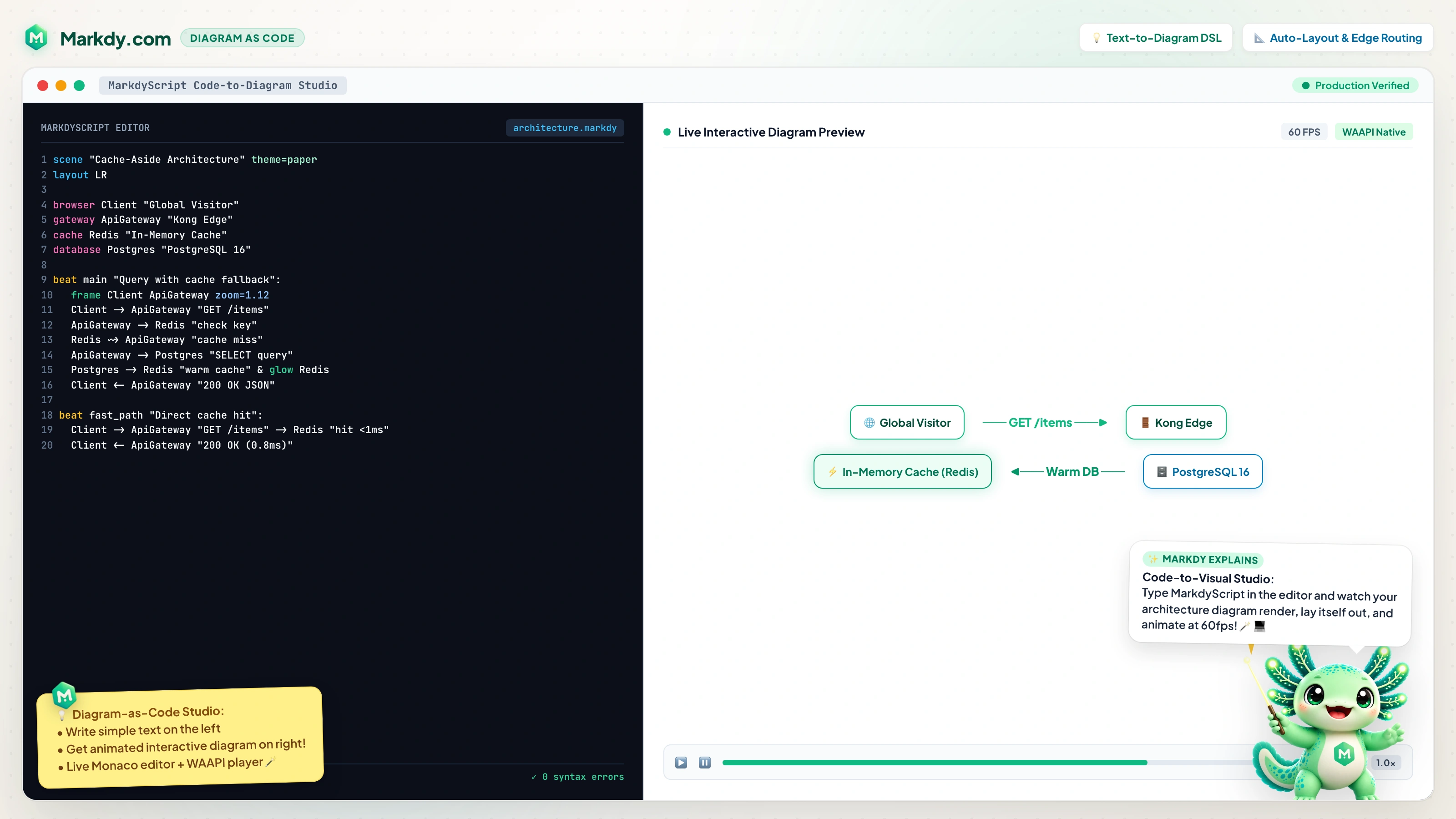
⚡ Try the Interactive Studio & Live Playground on markdy.com ↗
What is Markdy?
Markdy is a framework-agnostic, diagram-native DSL for animated architecture and system diagrams. Declare semantic nodes, groups, beats, flows, and cues in MarkdyScript — Markdy handles layout, edge routing, timing, and browser-native rendering with the Web Animations API. No Canvas, no GSAP, zero bloated dependencies.
Markdy is built for animated architecture diagrams and system-design explainers.
The built-in vocabulary expresses architecture, cloud, Kubernetes, CI/CD, auth, data, messaging, state-machine, and flow diagrams.If you are searching for a Mermaid alternative with animation, animated architecture diagrams, diagram as code, AI-generated diagrams, text-to-diagram, architecture as code, or docs-as-code motion graphics, Markdy is designed for that workflow.
scene theme=paper
layout LR

browser Client
service API
database DB

beat main "Trace the request":
  show $nodes
  frame Client API zoom=1.12
  Client -> API "GET /items" -> DB "query"
  Client <- API "200 OK"
Key Features
| Feature | Detail |
|---|---|
| Zero-dep parser & engines | @markdy/core is pure TypeScript — AST parser, architecture linter, semantic classifier, AST diff engine, brand theme generator, and URL state codec |
| Web-native renderer | Web Animations API + CSS transforms. No Canvas, no GSAP, zero dependencies |
| 17 Specialized Layout Engines | architecture (LR, RL, TB, BT), flowchart, tree, state, sequence, constellation, loop/flywheel, medallion, quadrant, swimlane, pyramid, radar, timeline, gantt, venn, grid, and radial |
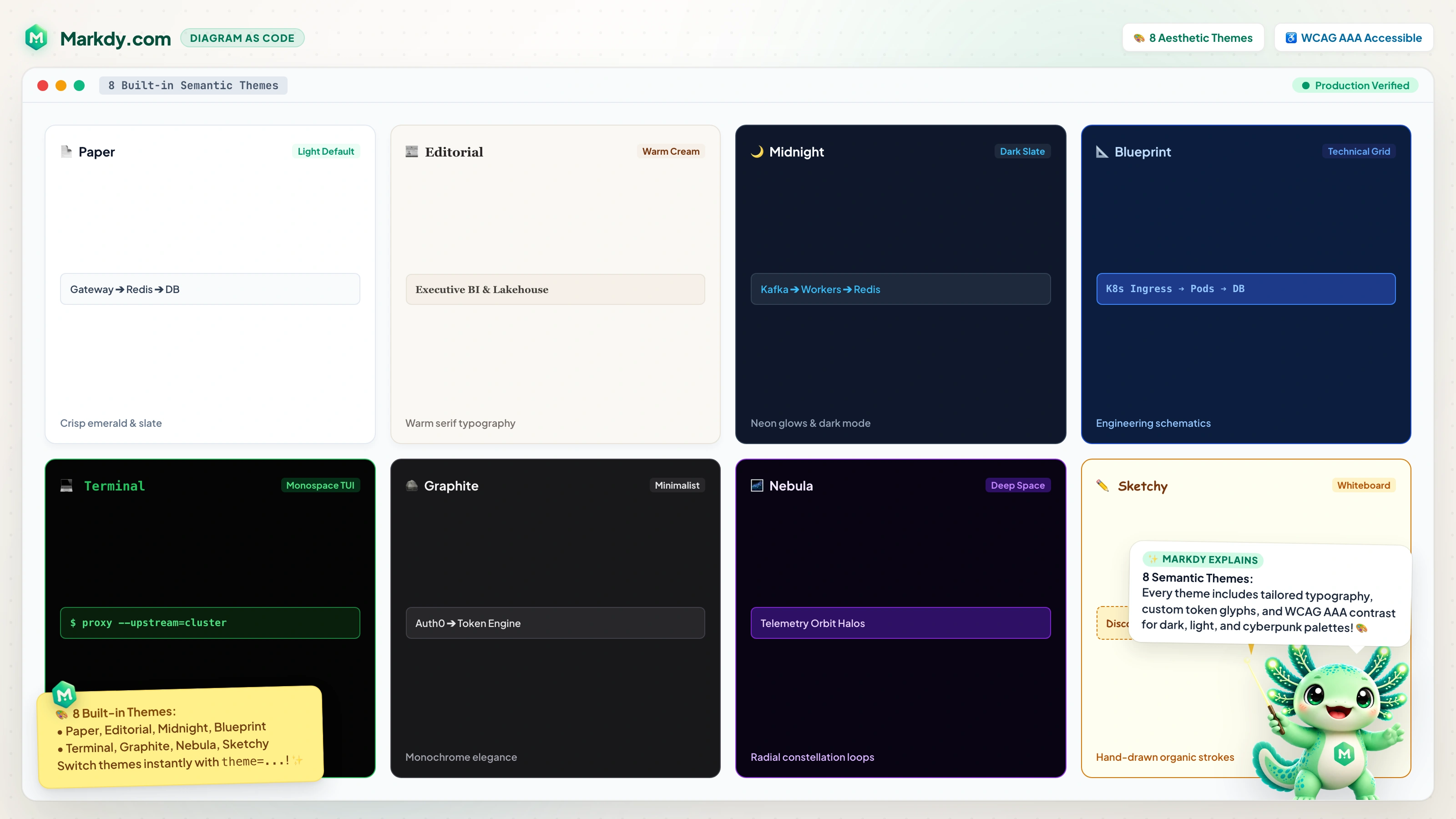
| 8 Semantic Themes | paper, editorial, nebula, midnight, blueprint, graphite, terminal (CLI/TUI dark mode), and sketchy (editorial hand-drawn) |
| Universal Ingestion | Instant transpilers for Mermaid, draw.io, Docker Compose, Kubernetes manifests, and Terraform state into animated MarkdyScript scenes (markdy import) |
| Brand Theme Generator | Extract and generate WCAG-compliant light and dark themes from any brand hex color (generateThemeFromBrand()) |
| Output Size Presets | 8 standard export presets (doc-inline, doc-wide, slide-16x9, slide-4x3, social-og, social-square, print-a4, print-letter) |
| Architecture Governance | Built-in Well-Architected validation: layer boundaries, deadlock cycle detection, gateway checks, and isolation rules (markdy lint --arch-rules) |
| Semantic AST Diffing | Compares architecture versions, outputs Markdown audit tables, and generates animated evolution scenes (markdy diff) |
| Media Exporters | Zero-dep GIF89a encoder with LZW compression for animated GitHub READMEs and vector SVG export for Figma |
| Model Context Protocol (MCP) | @markdy/mcp-server equips Claude, Cursor, Antigravity, and AI agents with validation, transpilation, and architecture explanation tools |
| Diagram-native DSL | Declare nodes, groups, and beats; the engine handles layout, routing, timing, and rendering |
| Auto-layout + routing | Rank-based layout and collision-aware orthogonal Manhattan edge routing are built in — no coordinates required |
| Flow operators | -> request, <- response, ~> event, -- dependency, each with its own edge style |
| Beats + cues | Sequence reveals with beat blocks, captions, and show/hide/glow/focus/frame cues; run cues together with & |
| Semantic node cards | Kind-aware SVG glyphs for browsers, services, gateways, queues, workers, databases, storage, CDN, security, hub, station, medals, and more |
| Editorial Callouts | Italic-serif annotations with dashed Bézier leaders, landing dots, and color intents (accent, muted, neutral) |
| Astro & MDX Ready | <Markdy /> islands that hydrate on viewport entry with zero layout shift |
| AI-agent friendly | Structured DSL that LLMs can generate, validate, and iterate on (Agent Guide) |
Packages
| Package | Description | Size |
|---|---|---|
@markdy/core |
Parser + AST diff, architecture linter, semantic classifier, URL codec (zero runtime deps) | ~14 KB |
@markdy/compat |
Universal transpilers (Mermaid, Docker Compose, Kubernetes, Terraform) & snapshot gates | ~8 KB |
@markdy/renderer-dom |
Web Animations API renderer, GIF89a encoder, SVG exporter, presentation controller | ~24 KB |
@markdy/cli |
CLI for linting, architecture rules, formatting, importing, diffing, explaining, and sharing | Node package |
@markdy/mcp-server |
Official Model Context Protocol (MCP) server for AI coding assistants & agents | Node package |
@markdy/language-server |
Shared LSP server for editors and IDE integrations | Node package |
@markdy/astro |
Astro island component | ~2 KB |
@markdy/mdx |
MDX remark plugin + lazy React diagram component | ~4 KB |
@markdy/stdlib-systems |
Architecture nodes, visual primitives, and request/response/emit flows for animated diagrams | <1 KB |
📦 Registries: All packages are published to both npmjs.com and GitHub Packages. See the GitHub Packages Guide for npm/pnpm authentication and configuration.
Search intent: when to use Markdy
Developers usually discover this problem through many names:
- "Mermaid but animated"
- "Markdown animation"
- "animated diagrams as code"
- "text-to-diagram with motion"
- "AI-generated architecture diagrams"
- "sequence diagrams for developer docs"
- "architecture visualization for docs"
- "docs-as-code animation"
- "LLM-friendly visual DSL"
Use Markdy when you want a diagram or explainer that is:
- Text-first — reviewable in pull requests and easy for AI agents to edit.
- Time-based — requests, responses, events, phased reveals, and emphasis happen in sequence.
- Browser-native — rendered with DOM/CSS/Web Animations instead of screenshots or video exports.
- Documentation-friendly — works in Astro, MDX, static sites, and package READMEs.
Use Mermaid, PlantUML, D2, Graphviz, Excalidraw, or draw.io when you need static diagrams. Use Markdy when the story depends on motion.
CLI install note
@markdy/cli provides the markdy binary, but a normal project install does not put that binary on your shell PATH.
Use one of these depending on where you installed it:
npx markdy render examples/showcase/url-shortener-architecture.markdy --out examples/xscene.html
npm exec markdy render examples/showcase/url-shortener-architecture.markdy --out examples/xscene.html
npm i -g @markdy/cli
--out writes the generated HTML to the path you pass in, relative to the current working directory unless you give an absolute path.
Ecosystem map (text)
@markdy/core
  -> parses MarkdyScript into AST

@markdy/renderer-dom
  -> renders AST in the browser with Web Animations API

@markdy/astro, @markdy/mdx
  -> host integrations for site/content workflows

@markdy/cli
  -> lint, format, render, explain, and preview commands

@markdy/language-server
  -> diagnostics, completion, and hover in editors

@markdy/stdlib-systems
  -> optional node vocabulary manifest for architecture and technical diagrams
Mermaid vs Markdy: Beyond Static Diagrams
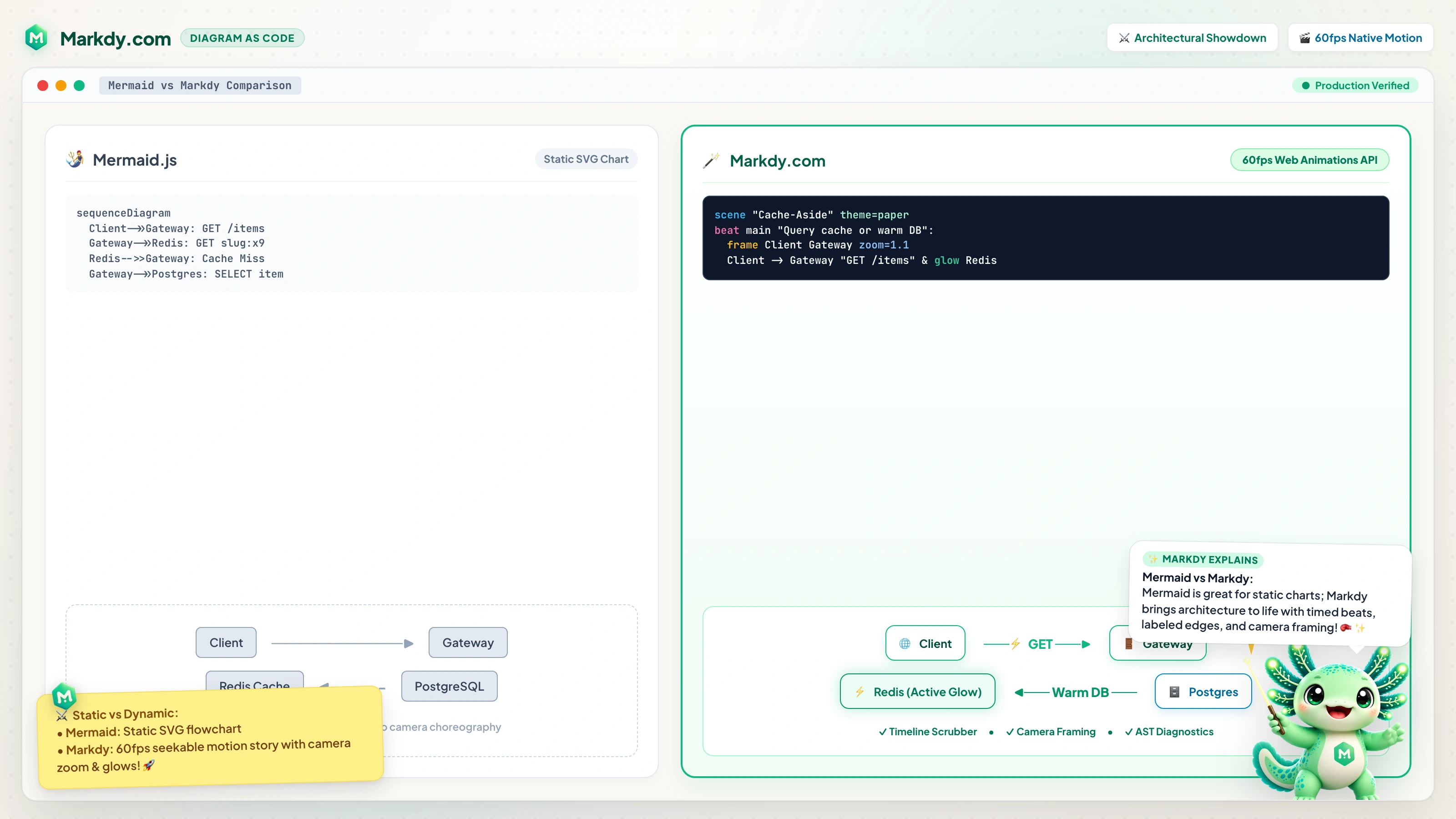
| Capability | Mermaid.js / PlantUML | Markdy |
|---|---|---|
| Animation & Time | ❌ Static SVG/PNG | ✅ Browser-native 60fps WAAPI motion & seekable beats |
| Return Flows & Arcs | ⚠️ Creates ranking cycles & layout distortion | ✅ Cycle-safe response flows (<-) and event arcs (~>) |
| Architectural Governance | ❌ No validation rules | ✅ Built-in Well-Architected linter & CI deadlock checks |
| AI Agent Support | ⚠️ Basic text generation | ✅ Official Model Context Protocol (MCP) server & AST self-healing |
| Universal Ingestion | ❌ Manual rewrite | ✅ 1-click import from Mermaid, Draw.io, K8s, Docker Compose, Terraform |
Universal Ingestion & 1-Command Migration
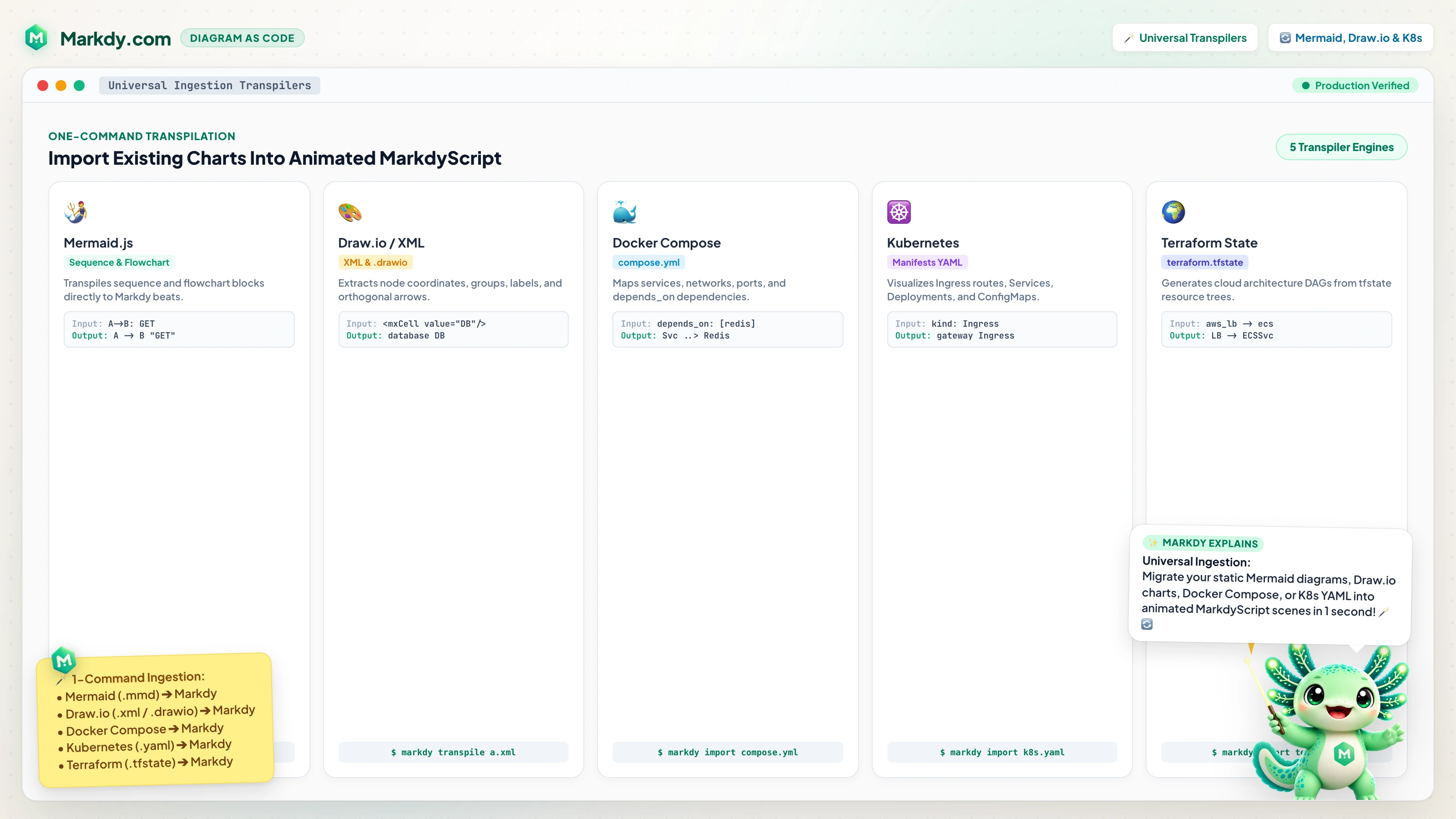
Convert existing static architecture definitions into animated MarkdyScript scenes in one command:
markdy import flow.mmd --out flow.markdy
markdy import docker-compose.yml --out architecture.markdy
markdy import k8s-manifests/ --out cluster.markdy
markdy import terraform.tfstate --out infra.markdy
🏛️ 17 Specialized Diagram Layout Engines
Explore the Live Examples Gallery or click any preview below to open it in the Markdy Studio:
| ⚡ Systems & High Concurrency | 🚦 Decision Logic & Consensus |
|---|---|
| Architecture (Cache-Aside Pattern) Sub-2ms Redis cache redirection & database fallback 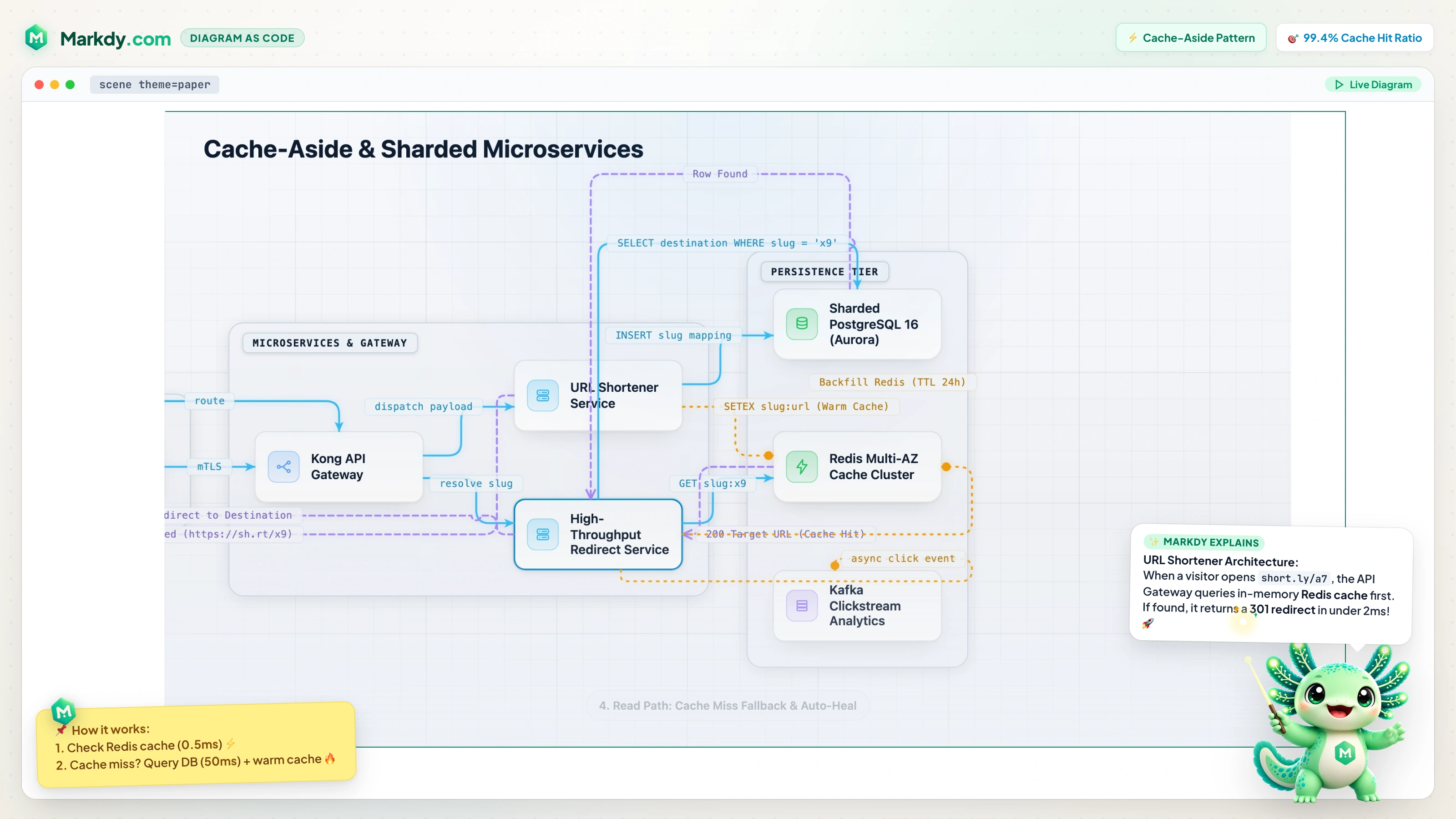 ⚡ Open Interactive Scene in Studio ↗ |
Concurrency Strategy Flowchart Thread safety, CAS atomics & mutex contention 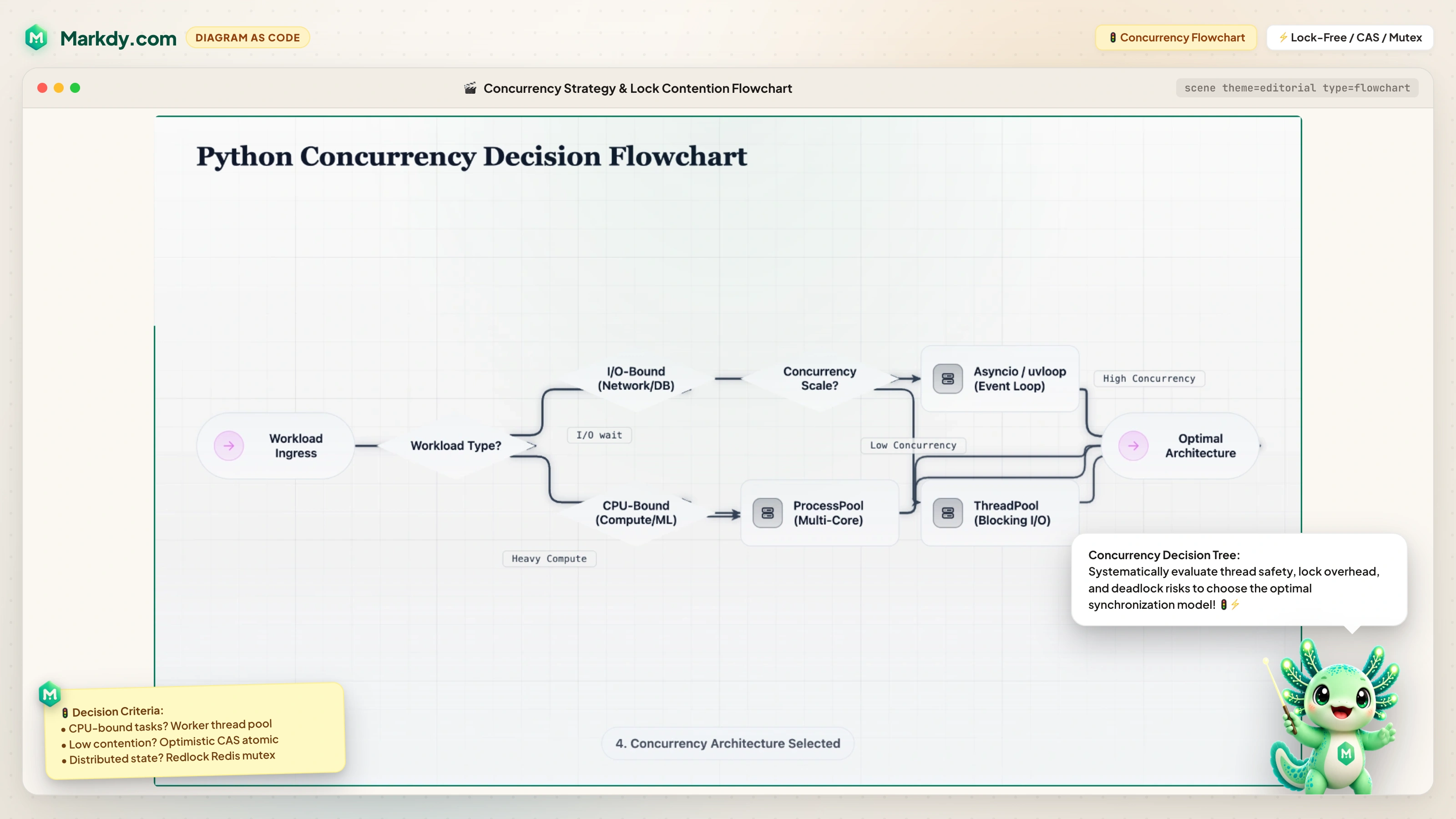 ⚡ Open Interactive Scene in Studio ↗ |
Consistent Hash Ring TreeO(k/N) minimal data rebalancing & vNode partitions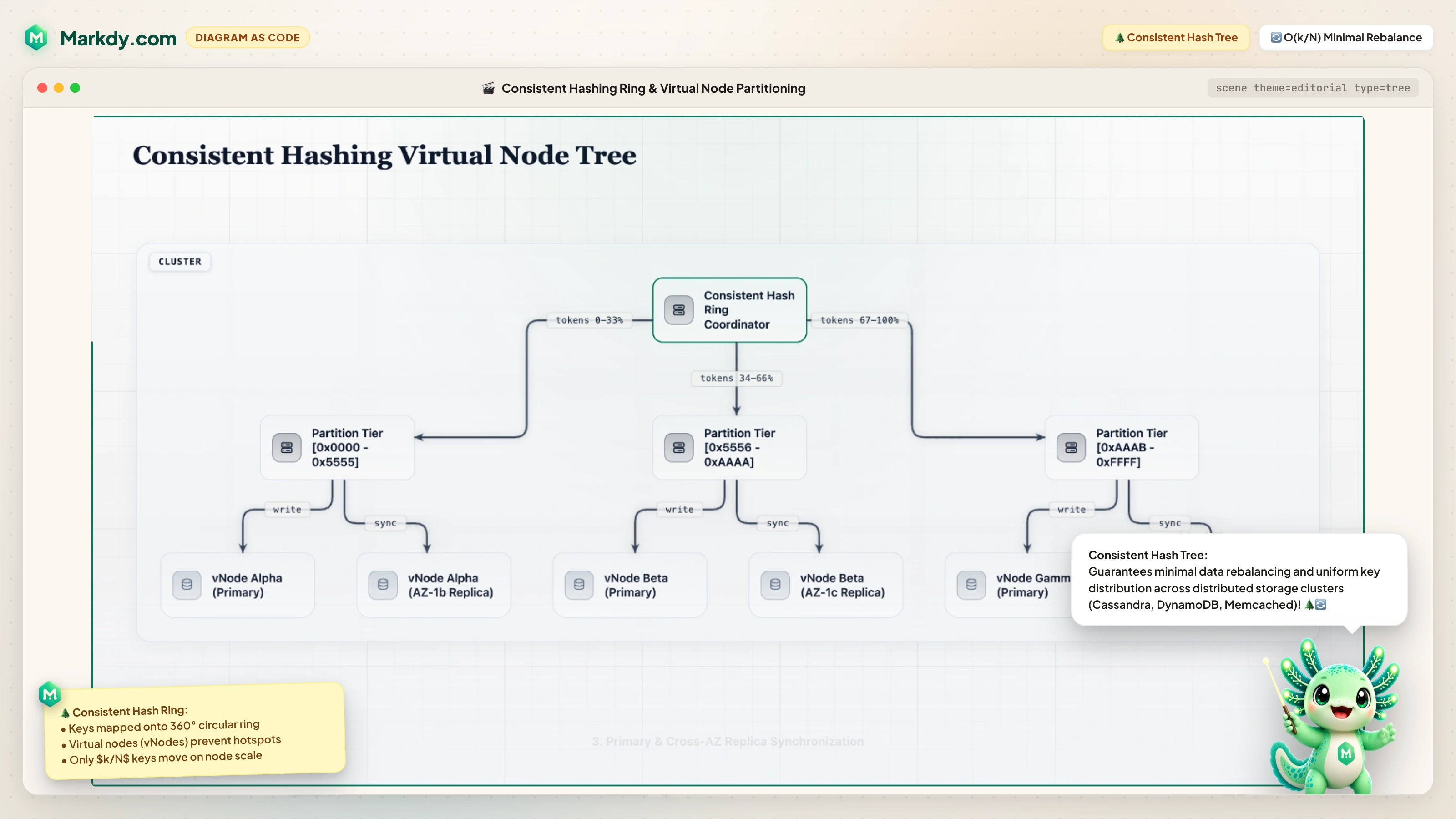 ⚡ Open Interactive Scene in Studio ↗ |
OAuth 2.0 PKCE Auth Sequence Zero-trust Single Page App authentication exchange 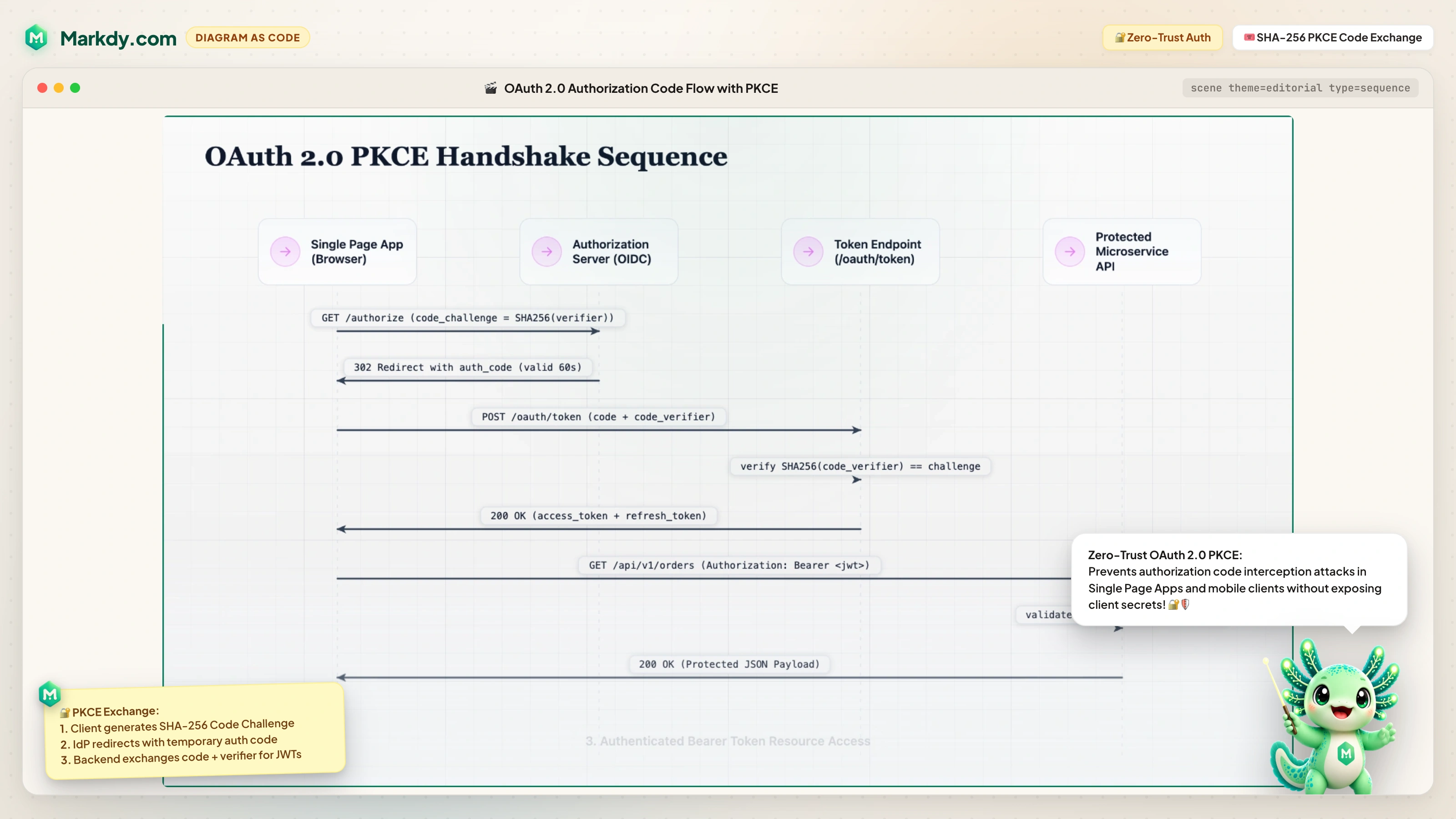 ⚡ Open Interactive Scene in Studio ↗ |
| Distributed 2PC Consensus State Prepare/Commit/Abort multi-partition consensus 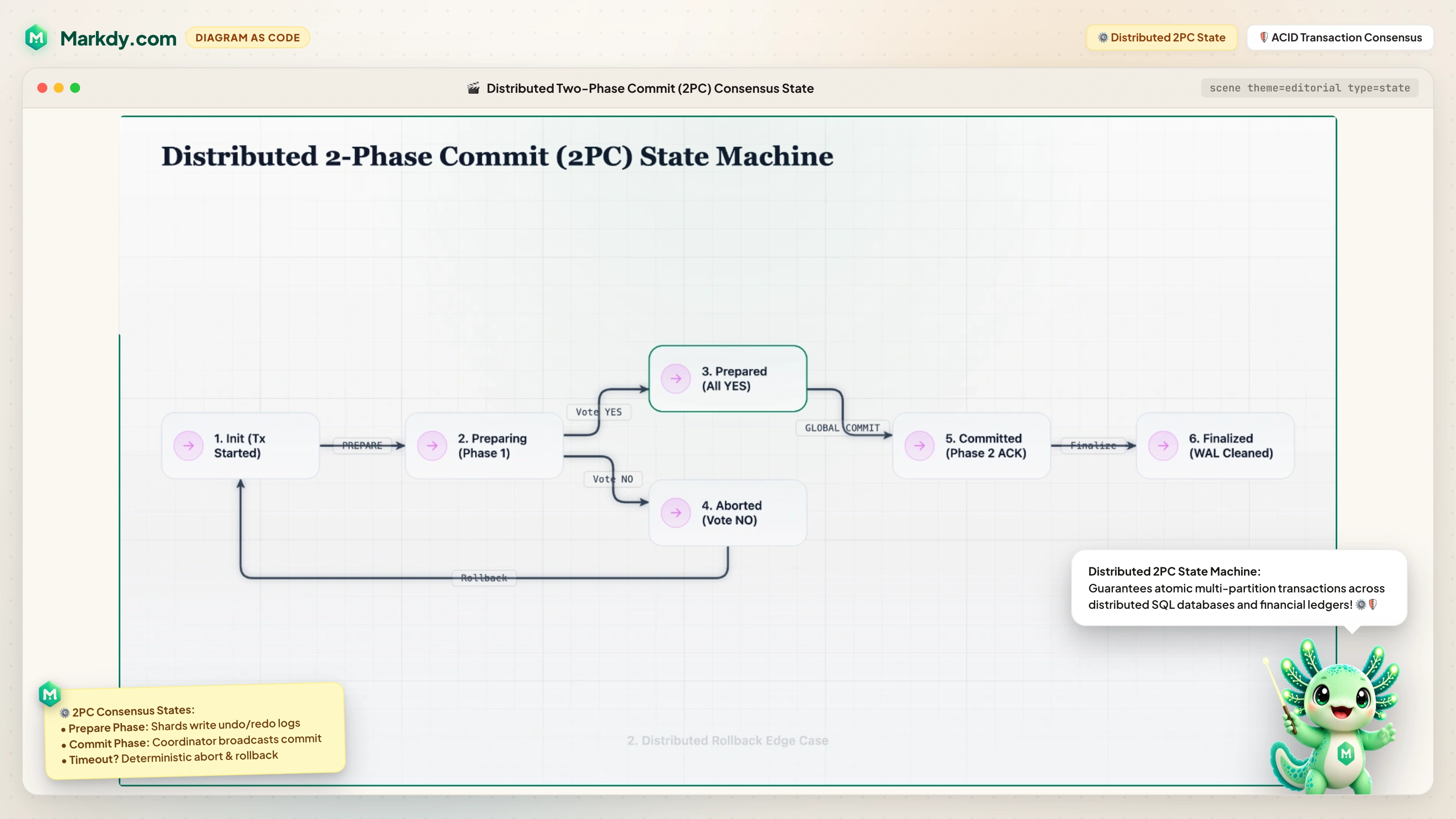 ⚡ Open Interactive Scene in Studio ↗ |
OSI 7-Layer Protocol Stack Full-width horizontal packet encapsulation bands 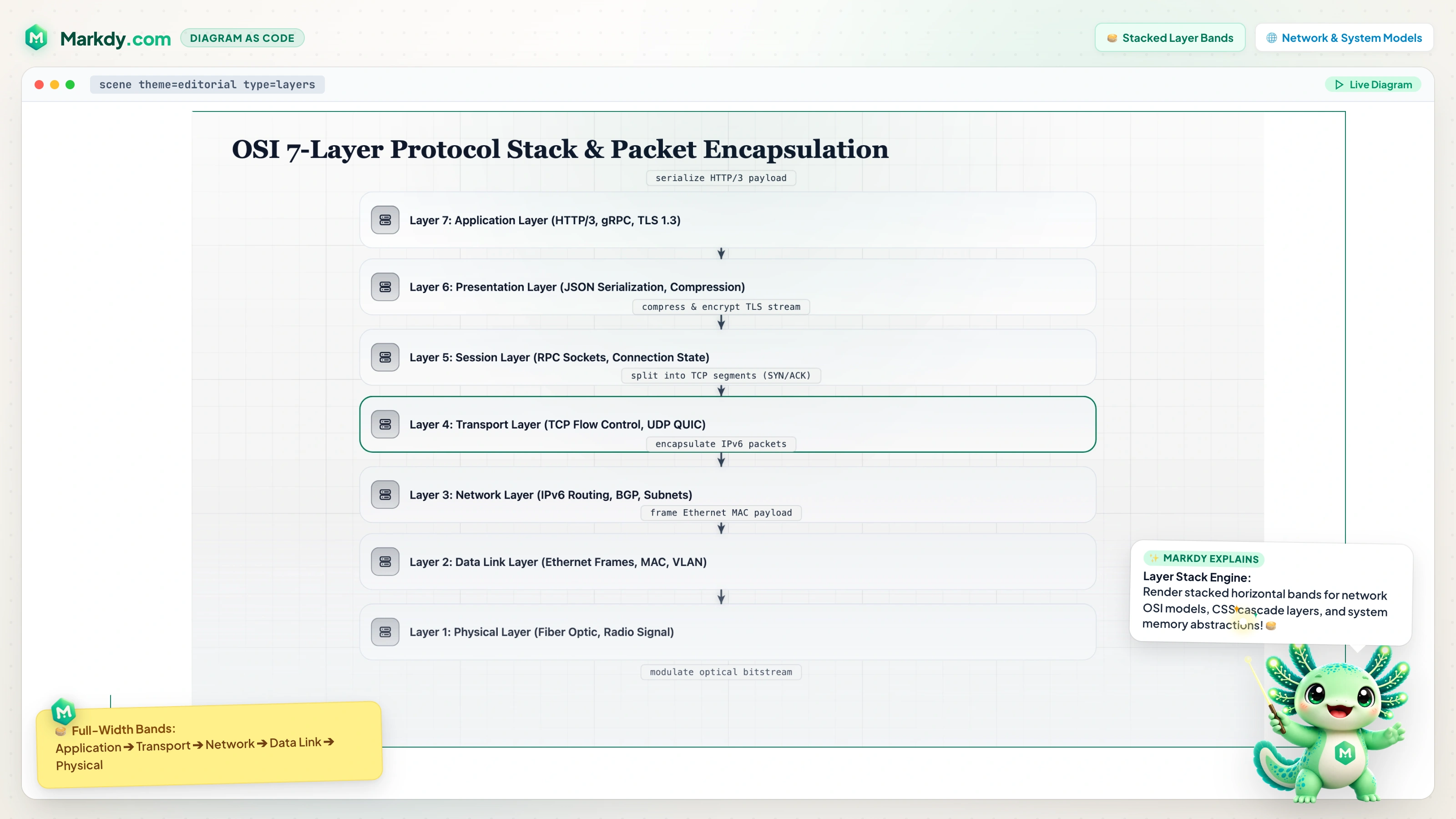 ⚡ Open Interactive Scene in Studio ↗ |
| Zero-Trust Security Perimeter Concentric defense-in-depth Kubernetes security enclaves 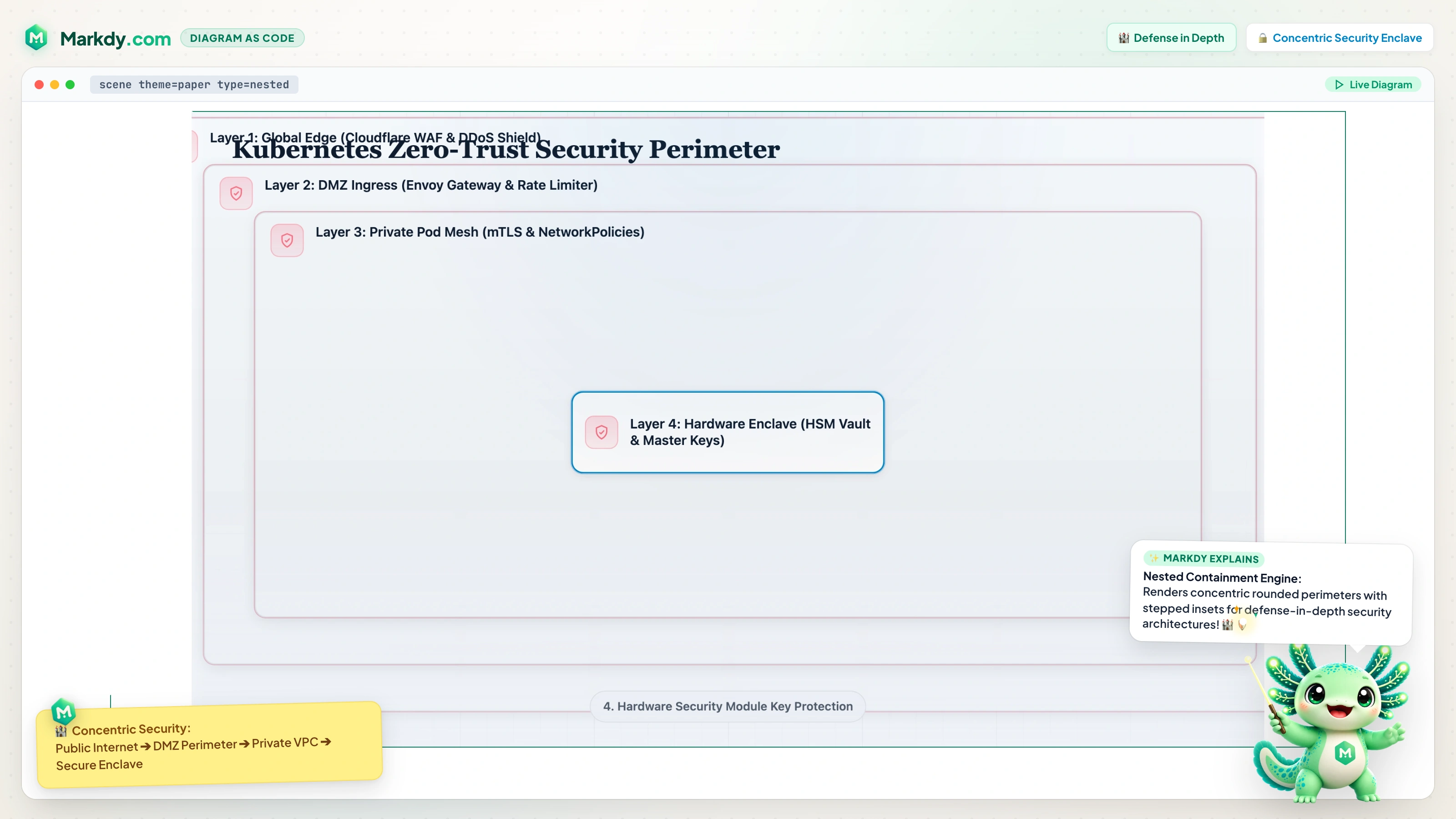 ⚡ Open Interactive Scene in Studio ↗ |
Distributed Saga Order Swimlanes Cross-functional lanes & asynchronous rollback coordination 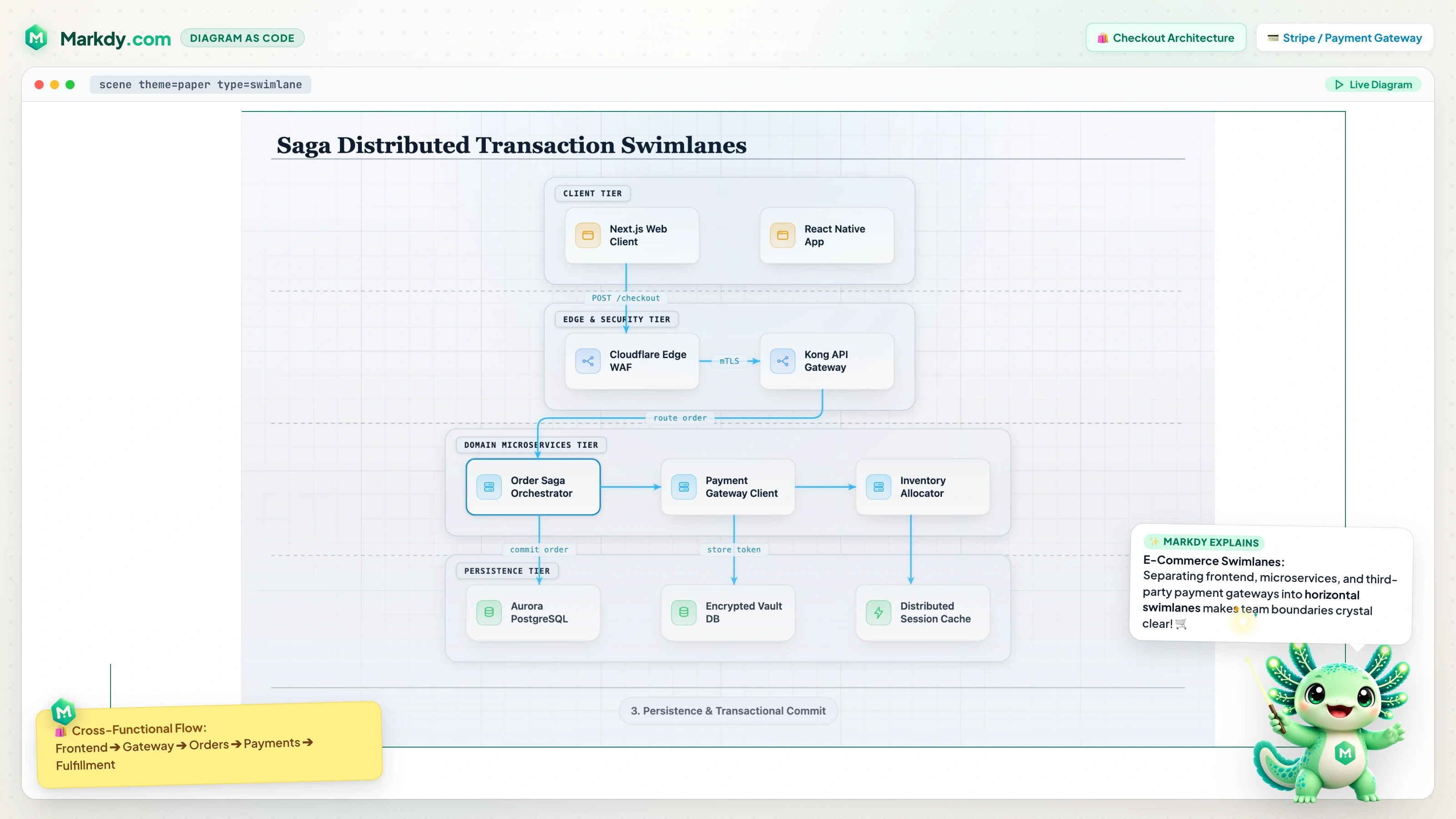 ⚡ Open Interactive Scene in Studio ↗ |
| Database WAL & CDC Stream Timeline Zero-collision alternating milestone baseline 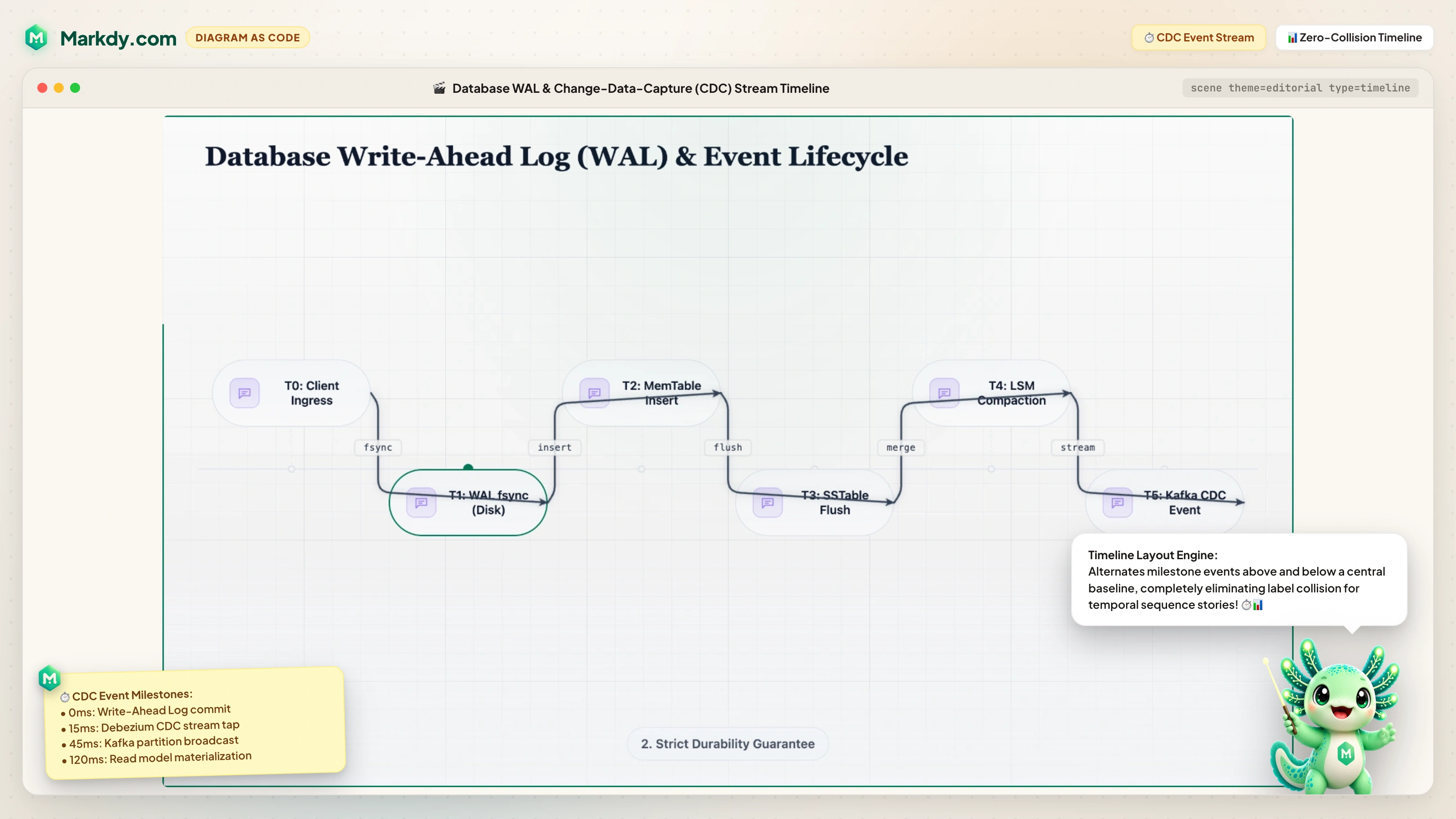 ⚡ Open Interactive Scene in Studio ↗ |
Zero-Downtime Migration Gantt Multi-phase task spans & critical path dependencies 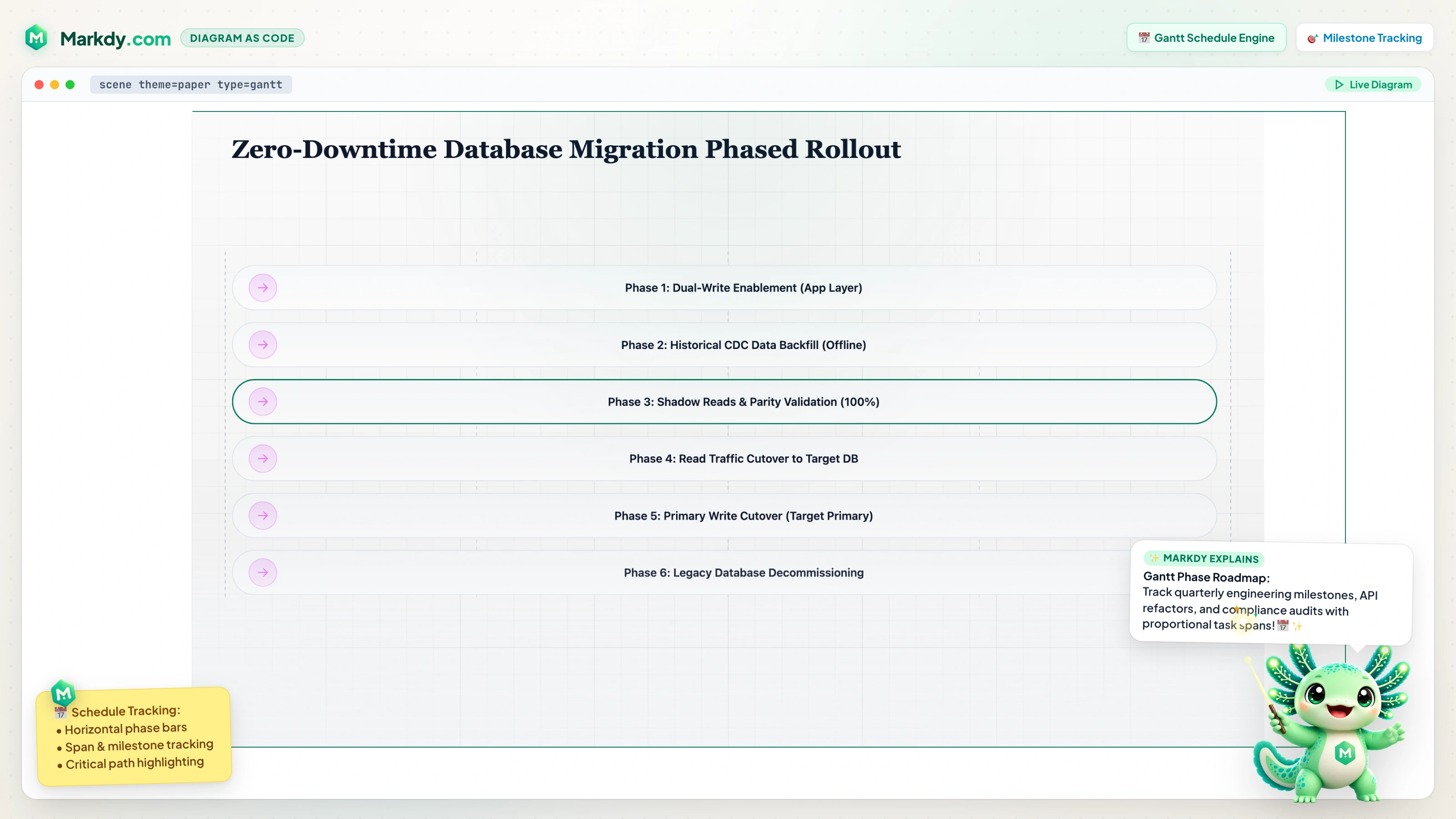 ⚡ Open Interactive Scene in Studio ↗ |
| Lakehouse Medallion Data Pipeline Streaming Bronze → Silver → Gold transformations 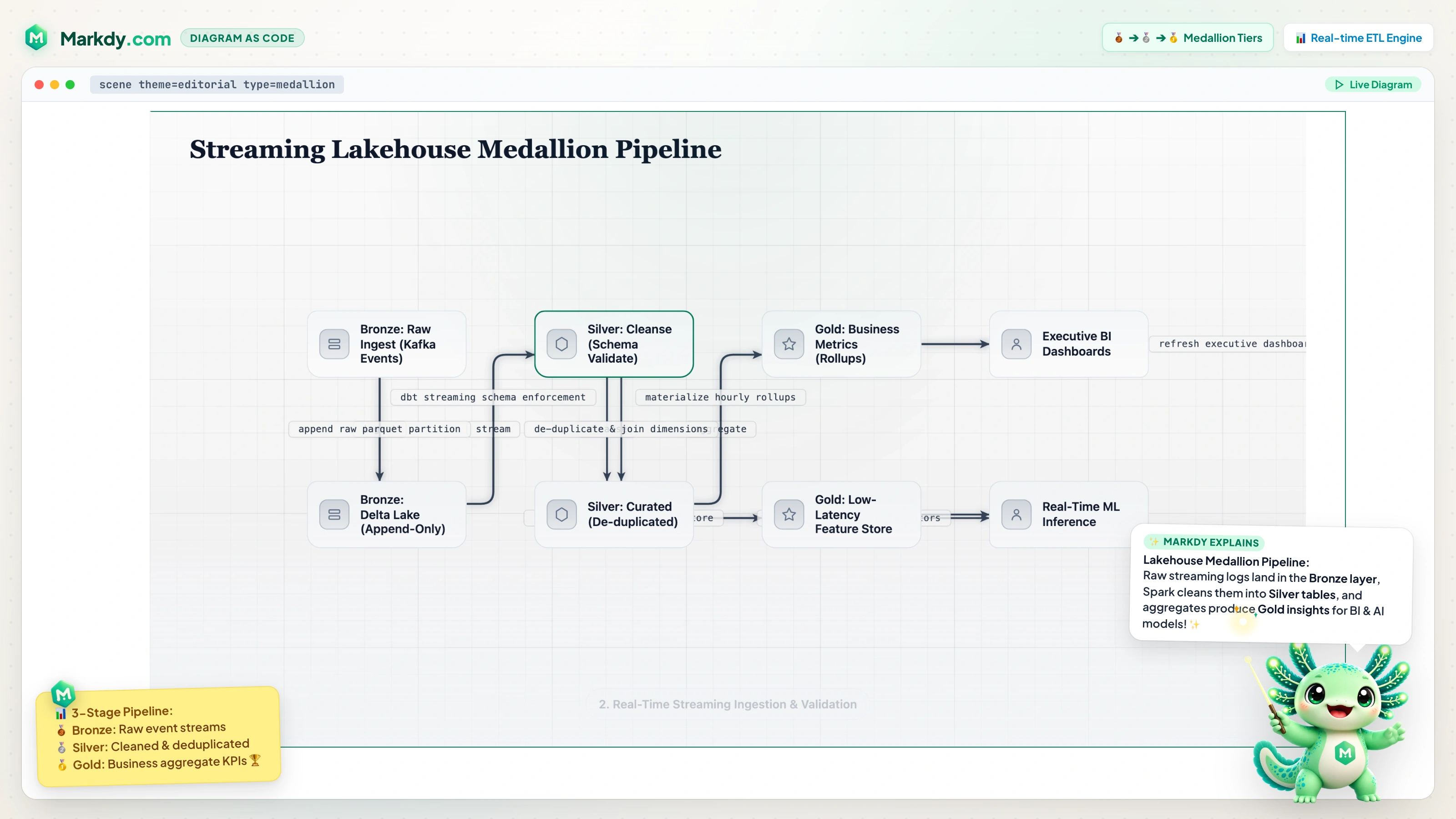 ⚡ Open Interactive Scene in Studio ↗ |
Decentralized Gossip Flywheel Circular closed-loop anti-entropy sync engine 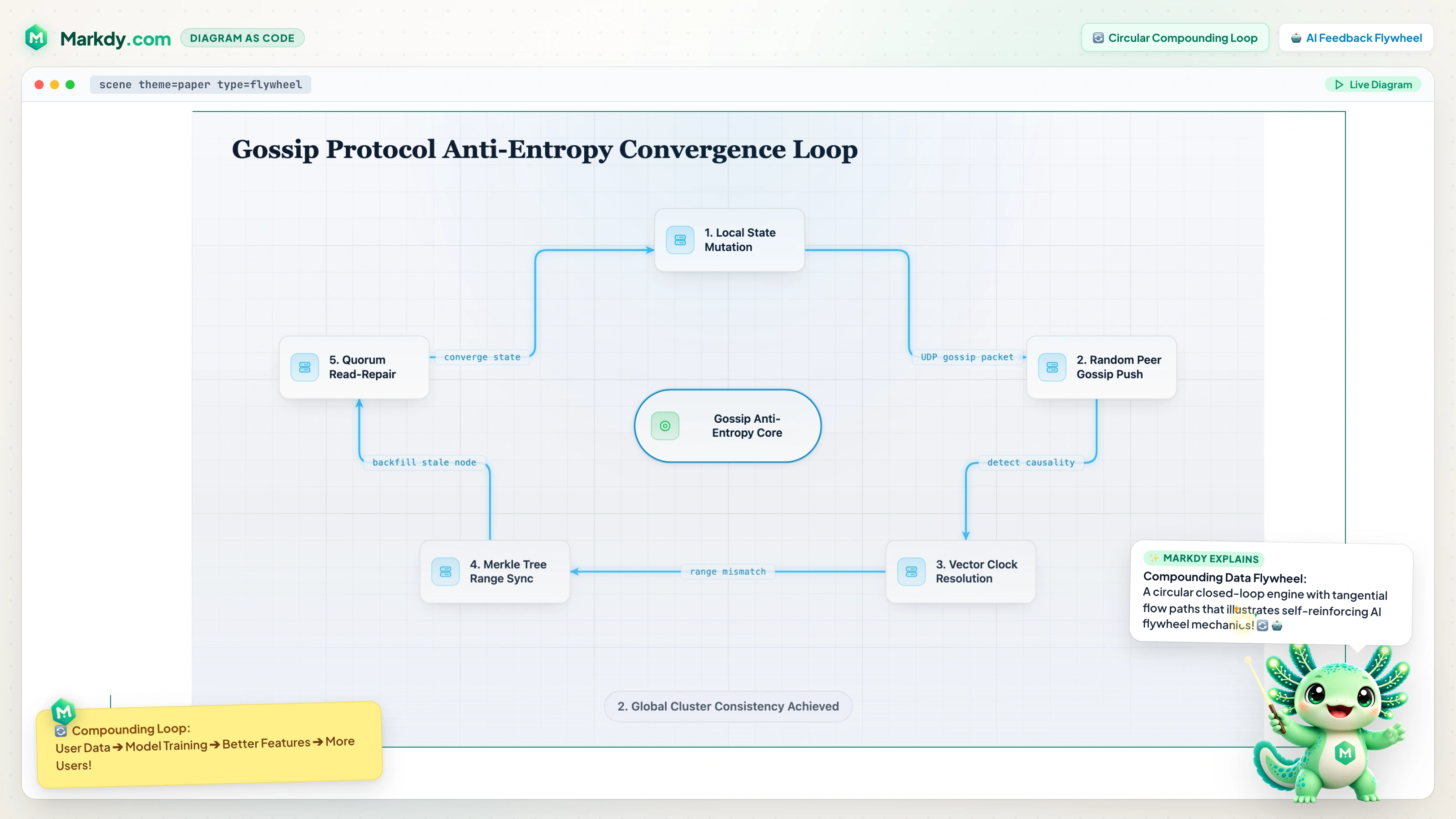 ⚡ Open Interactive Scene in Studio ↗ |
| Raft Quorum Constellation (Nebula) Radial orbit geometry & pulsating consensus halos 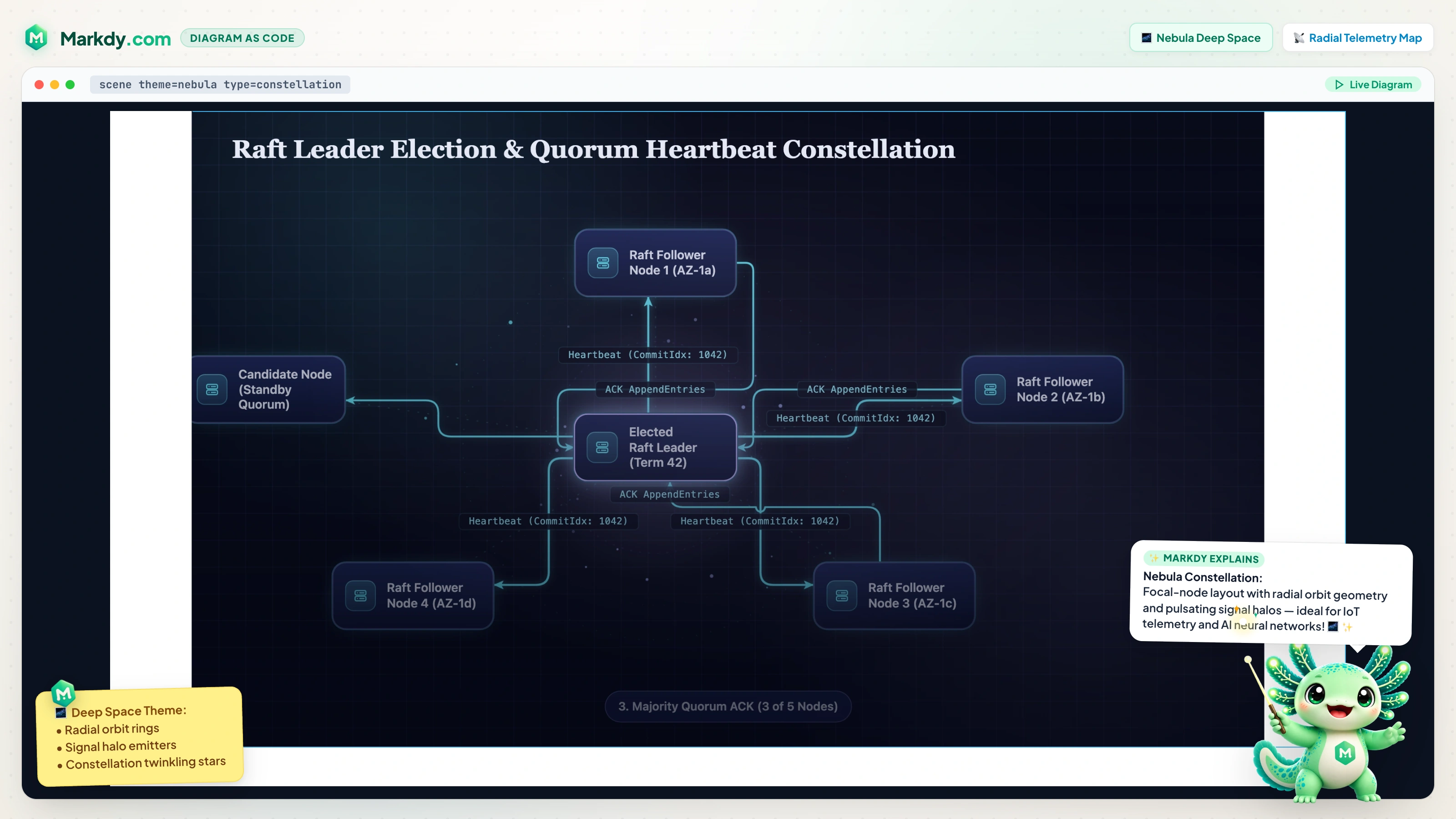 ⚡ Open Interactive Scene in Studio ↗ |
CAP Theorem Decision Quadrant Automated 2×2 matrix trade-off positioning 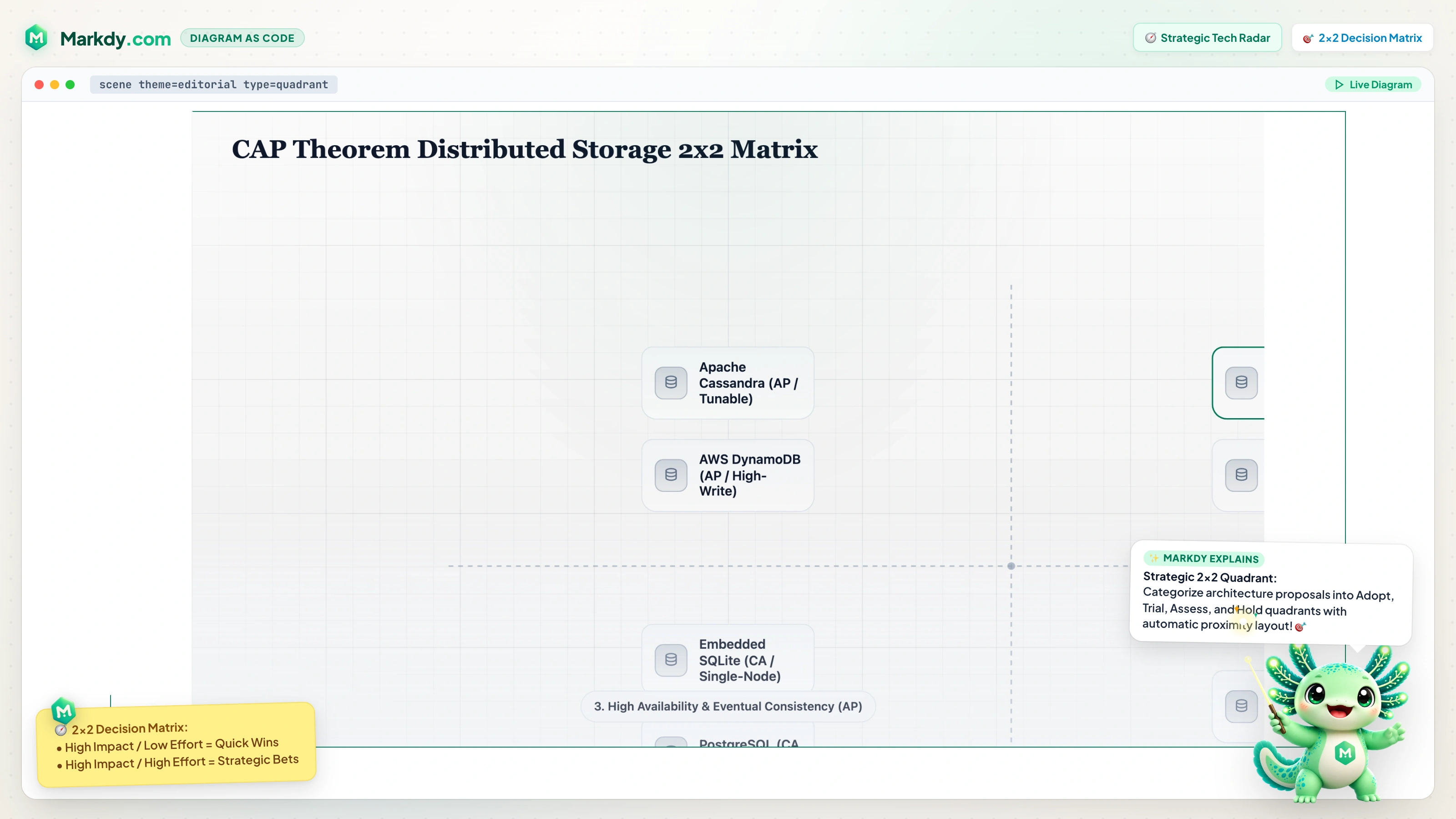 ⚡ Open Interactive Scene in Studio ↗ |
| Cloud Observability Pyramid Step-proportional telemetry & monitoring tier stack 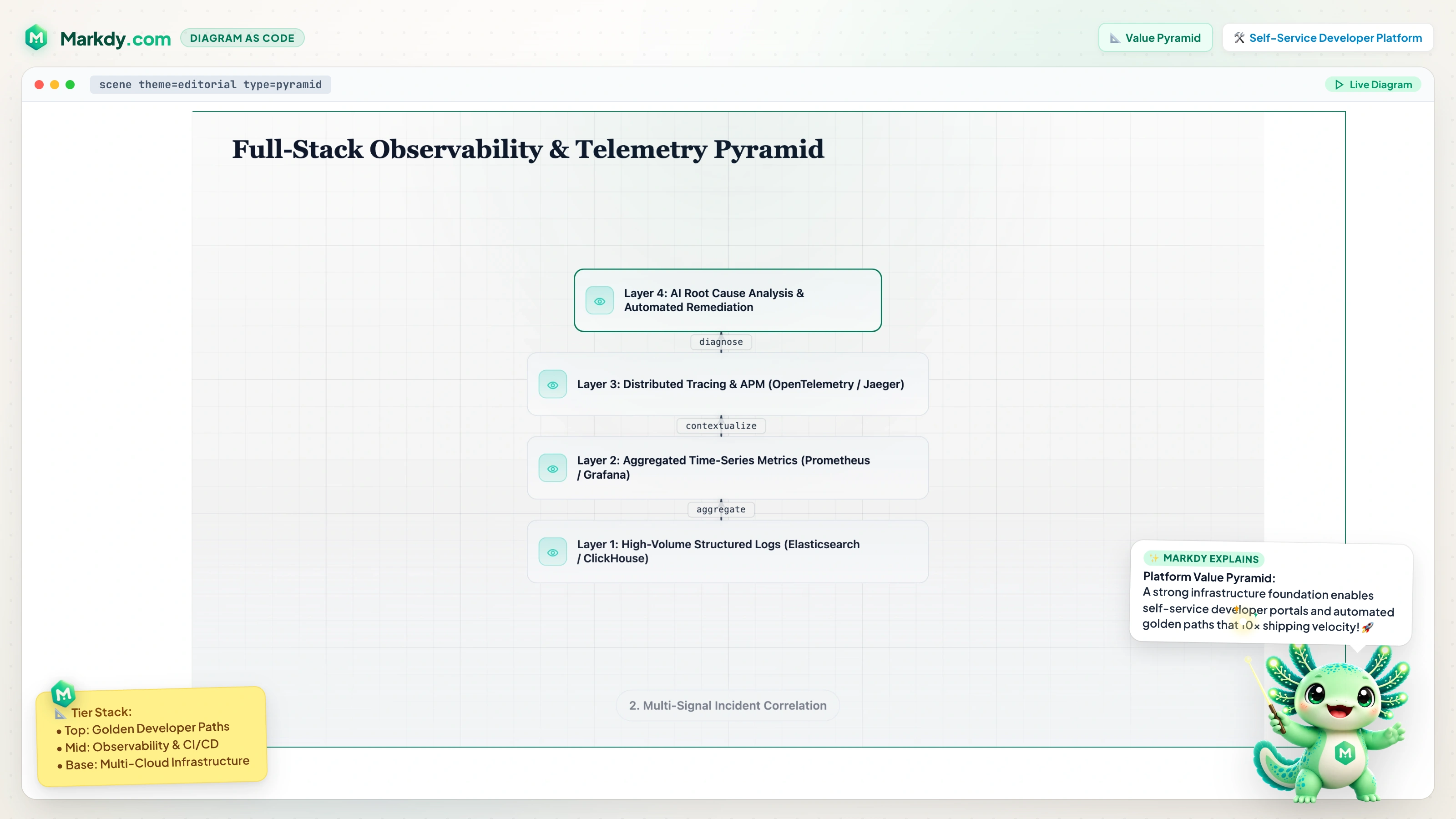 ⚡ Open Interactive Scene in Studio ↗ |
Storage Benchmark Radar Multi-axis polygon database performance evaluation 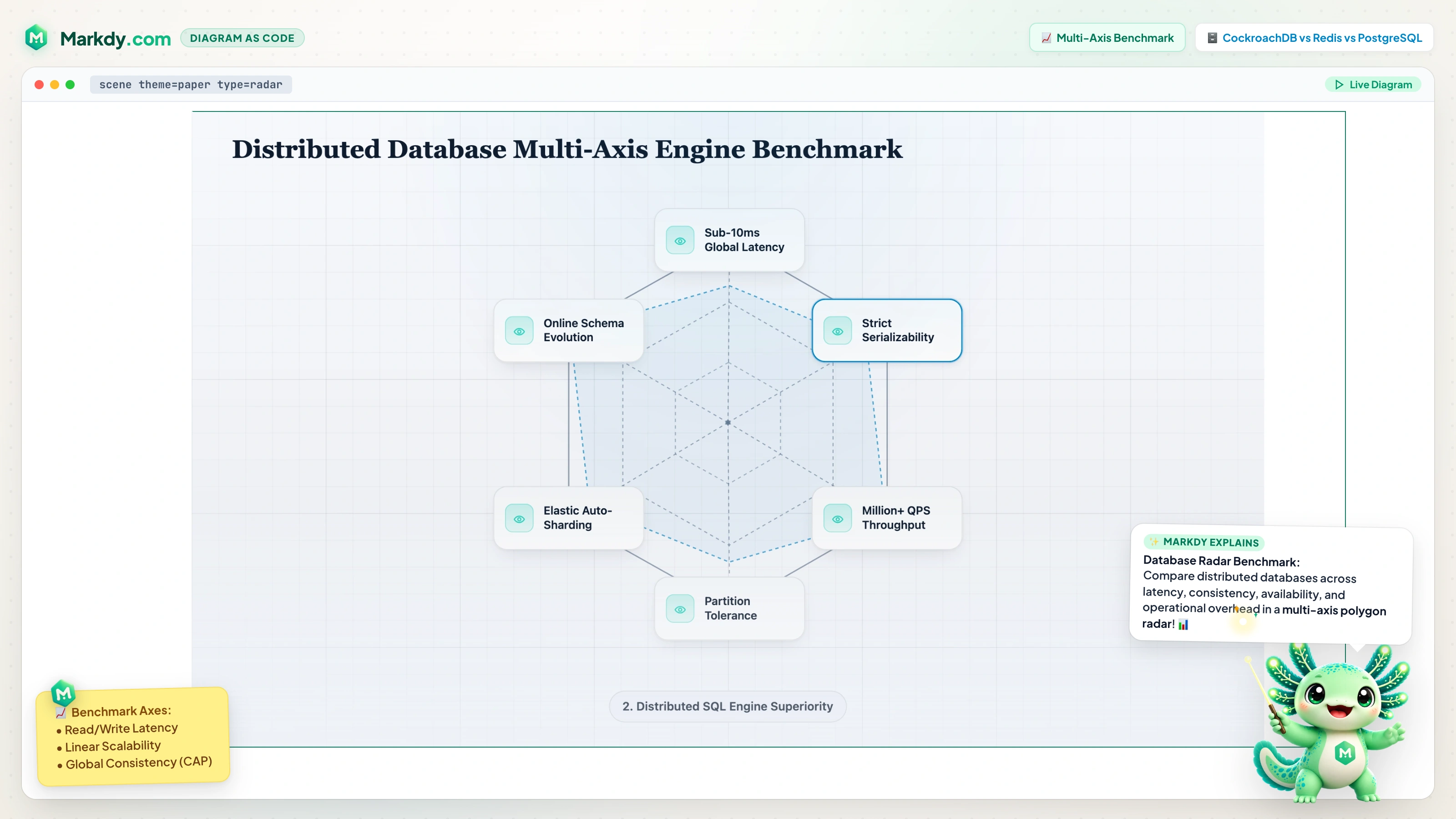 ⚡ Open Interactive Scene in Studio ↗ |
| ACID vs BASE Consistency Venn 3-Circle concept intersection & sweet spot overlap 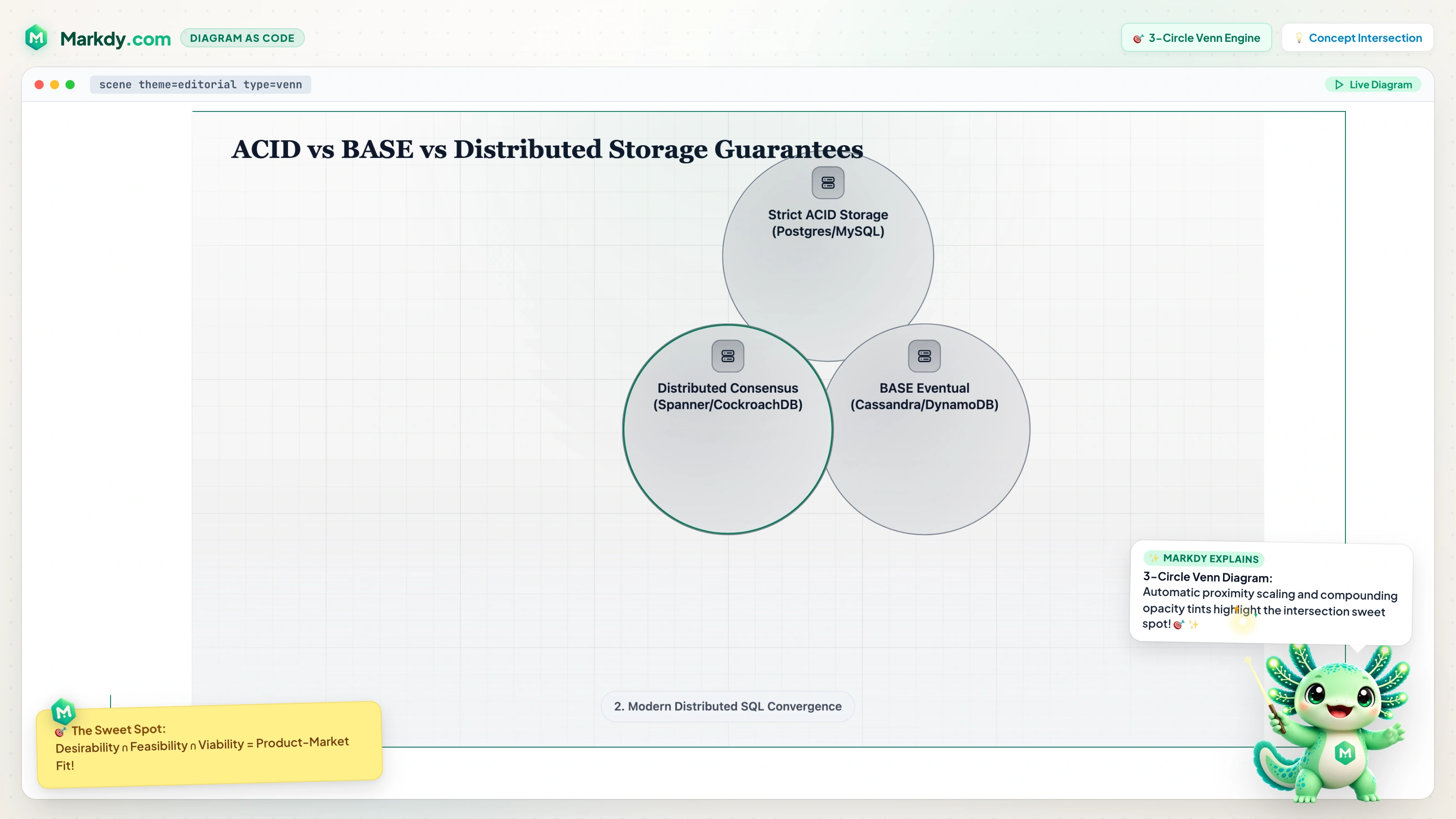 ⚡ Open Interactive Scene in Studio ↗ |
AI Agent Workflow & Prompting Autonomous MCP tool execution & self-healing diagrams 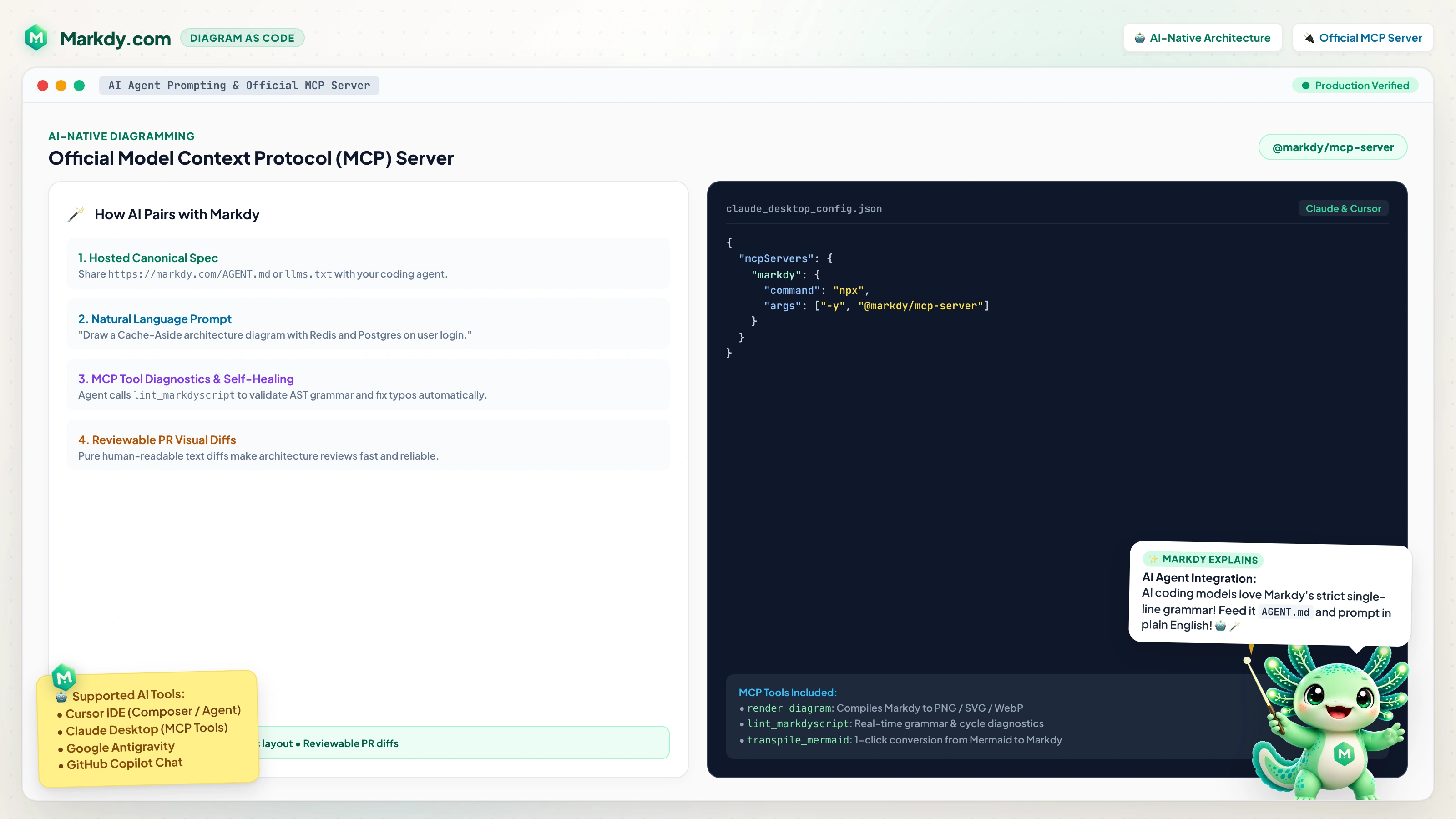 🤖 Explore Agent Integration Guide ↗ |
To preview a full scene result locally, run:
npx markdy render examples/showcase/url-shortener-architecture.markdy --out scene.html
Quick Start
Write a .markdy scene
Create architecture.markdy:
scene theme=paper
layout LR

browser WebApp
service CheckoutApi
database OrdersDb

beat main:
  show $nodes stagger=80ms
  WebApp -> CheckoutApi "GET /orders" -> OrdersDb "query"
  WebApp <- CheckoutApi "200 OK"
Preview or validate it with the CLI:
pnpm add -D @markdy/cli
pnpm markdy lint architecture.markdy
pnpm markdy render architecture.markdy --out architecture.html
Astro / MDX
pnpm add @markdy/astro
---
import { Markdy } from "@markdy/astro";

const code = `
  scene theme=paper width=800 height=400
  browser WebApp
  service CheckoutApi
  beat main:
    show $nodes
    WebApp -> CheckoutApi "GET /users"
`;
---

<Markdy code={code} width={800} height={400} bg="#07111f" autoplay />
Parser Only (Node.js / Edge)
import { parse, ParseError } from "@markdy/core";

try {
  const ast = parse(source);
  console.log(ast.nodes);  // { API: { kind: "service", ... } }
  console.log(ast.beats);  // [{ name: "main", cues: [...] }]
} catch (e) {
  if (e instanceof ParseError) {
    console.error(`Line ${e.line}: ${e.message}`);
  }
}
DSL at a Glance
Full reference: docs/SYNTAX.md · Step-by-step tutorial: docs/TUTORIAL.md · Getting started: docs/GETTING_STARTED.md · Guides: docs/GUIDES.md · Comparisons: docs/COMPARISONS.md · Troubleshooting: docs/TROUBLESHOOTING.md · AI agent guide: markdy.com/agent
Nodes + Beats + Flows
scene theme=paper
layout LR

browser WebApp
service OrderService
database OrdersDb

beat main:
  show $nodes stagger=80ms
  WebApp -> OrderService "POST /order" -> OrdersDb "persist"
  WebApp <- OrderService "201 Created"
Groups + Patterns
group storage: Redis OrdersDb

pattern lookup(client, store):
  $client -> $store "lookup"
  $client <- $store "result"

beat read:
  use lookup(OrderService, Redis)
Flow operators
| Operator | Edge kind | Rendered as |
|---|---|---|
-> |
request | solid arrow |
<- |
response | dashed arrow, drawn back to the caller |
~> |
event | dotted arrow |
-- |
dependency | thin link |
Cues
Cues live inside a beat and are scheduled in order; put & between two cues to run them together.
| Cue | Description | Key parameters |
|---|---|---|
show |
Reveal nodes or groups | stagger, dur |
hide |
Fade nodes out | dur |
glow |
Emphasize with a colored glow | color, strength, dur |
focus |
Pulse-scale to draw attention | zoom, dur |
frame |
Move the scene camera to nodes or groups | zoom, dur |
use |
Expand a pattern |
pattern args |
Selectors: $nodes targets every node, $edges targets structural and animated edges, and a group name targets its members.
Player Configuration
Everything outside the scene itself can live in one optional player: block. Keep it at the bottom so the diagram remains the first thing readers see:
scene theme=paper
layout LR

browser Client
service API

beat request:
  show $nodes
  Client -> API "GET /orders"

player:
  playback:
    loop false
  controls:
    speed true
    speeds "0.5 1"
    fit true
    share true
  interaction:
    zoom true
    pan true
  chrome:
    badge true
    progress boundary
| Group | Owns |
|---|---|
playback |
when and how fast the timeline runs |
controls |
which toolbar affordances are mounted |
interaction |
what pointer and key input do |
chrome |
non-interactive decoration (badge, progress) |
Controls are explicit opt-ins: only leaves set to true are mounted. fit frames every item and pins the camera so frame/focus zoom cues stop moving the view; prev_beat/next_beat step through beats. rate sets the initial multiplier, while speeds provides viewer choices; the speed selector needs at least two distinct positive values. The linked badge stays at the footer's right edge. keyboard is opt-in (←/→ beats, Space play, Home restart) because it captures window key events. Legacy directives and flat keys normalize into the same groups; explicit host options gate or supply defaults for script settings.
Themes & Layout Modes
Themes (theme=):
paper— clean light documentation canvas (default)editorial— flat editorial paper with serif headings and semantic ink/accent rolesterminal— dark CLI/TUI canvas with monospace font and neon glow accentssketchy— organic hand-drawn whiteboard theme with displacement filternebula— deep-space canvas with orbit rings, signal halos, and starfieldmidnight— modern dark developer canvasblueprint— technical cyan-grid CAD canvasgraphite— restrained dark minimal canvas
Layout Types (type=):
architecture— ranked multi-tier systems and platform topology (default)flowchart— top-down steps, decisions, and mergestree— parent/child hierarchies with shared sibling busesstate— cycle-safe state transitions and self-loopssequence— participant columns, lifelines, ordered messages, and activationstimeline— horizontal hairline baseline with collision-free alternating milestone cardsgantt— phase-based horizontal bar stacking with temporal span trackingvenn— 2–3 circle concept intersection with proximity scalingradar— multi-axis polygon comparison chart with series color palettemedallion— multi-tier Bronze → Silver → Gold data lakehouse stagesflywheel/loop— circular closed-loop engine with tangential flow pathsquadrant— 2×2 decision and strategic positioning matrixswimlane— multi-tier cross-functional horizontal lane partitionspyramid— hierarchical tier pyramid with step-proportional width scalingconstellation— radial focal node with orbital signal rings
API Reference
parse(source: string, opts?: ParseOptions): DiagramAST
Parses MarkdyScript source into a typed diagram AST. Throws ParseError with line numbers on structural errors. Pure function with no side effects — runs in Node.js, Deno, edge runtimes, or the browser.
interface ParseOptions {
  parseOnly?: boolean;  // Skip layout/schedule compilation; parse structure only.
}
DiagramAST exposes ast.meta, ast.nodes, ast.edges, ast.groups, ast.patterns, ast.beats, and ast.diagnostics[] (soft warnings such as unknown scene properties). Call compile(ast) to produce a RenderPlan with positioned nodes, routed edges, and scheduled cues. See docs/AGENT.md for the full shape.
createDiagram(options: DiagramOptions): Diagram
Creates a DOM-based animated diagram.
interface DiagramOptions {
  container: HTMLElement;    // Mount point
  code: string;             // MarkdyScript source
  autoplay?: boolean;       // Start immediately (default: true)
  loop?: boolean;           // Loop at end (default: true)
  copyright?: boolean;      // "Powered by Markdy" badge (default: true)
  progressBar?: boolean;    // Deprecated: use sceneBoundaryProgress
  sceneBoundaryProgress?: boolean; // Rainbow border progress bar (default: true)
  playbackRate?: number;    // Timeline speed multiplier (default: 1)
  interactiveViewport?: boolean; // true: default gestures; false: suppress script gestures
  controls?: boolean;       // true: legacy defaults; false: suppress script controls
  shareUrl?: string;        // Base URL for Share links
  onWarning?: (w: Diagnostic) => void;                 // Soft parse warnings
  onTimeUpdate?: (seconds: number, duration: number) => void;
  onPlayStateChange?: (playing: boolean) => void;
}

interface Diagram {
  play(): void;             // Start / resume
  pause(): void;            // Pause at current position
  seek(seconds: number): void;  // Jump to time
  setPlaybackRate(rate: number): void; // Set timeline speed, e.g. 0.5 or 2
  playbackRate(): number;    // Current timeline speed multiplier
  beats(): BeatRange[];         // Beat ranges in the compiled scene
  seekToBeat(name: string): void;  // Jump to a named beat
  nextBeat(): void;         // Step to the next beat from the current time
  prevBeat(): void;         // Step to the previous beat from the current time
  destroy(): void;          // Remove DOM + cancel animations
}
<Markdy /> (Astro Component)
| Prop | Type | Default | Description |
|---|---|---|---|
code |
string |
(required) | MarkdyScript source |
width |
number |
800 |
Placeholder width (px) |
height |
number |
400 |
Placeholder height (px) |
bg |
string |
"white" |
Placeholder background colour |
assets |
Record<string, string> |
{} |
Asset URL overrides |
autoplay |
boolean |
true |
Auto-play when fully visible in viewport |
loop |
boolean |
true |
Loop the animation when it ends |
copyright |
boolean |
script or true |
Show the linked badge at the footer's right edge |
progressBar |
boolean |
true |
Show a rainbow progress bar around the viewport border |
sceneBoundaryProgress |
boolean |
progressBar |
Preferred flag for the rainbow scene-boundary progress bar |
playbackRate |
number |
script or 1 |
Initial timeline speed multiplier |
interactiveViewport |
boolean |
script | true supplies default gestures; false suppresses script gestures |
controls |
boolean |
script | true supplies legacy defaults; false suppresses script controls |
class |
string |
— | CSS class for outer wrapper |
Architecture
See docs/ARCHITECTURE.md for technical details.
  MarkdyScript source
        │
        ▼
  ┌─────────────┐
  │ @markdy/core │  parse() → DiagramAST
  │  (parser)    │  Pure TS, zero deps
  └──────┬──────┘
         │ DiagramAST
         ▼
  ┌──────────────────┐
  │ @markdy/renderer  │  createDiagram() → Diagram
  │  -dom             │  WAAPI + rAF loop
  └──────┬───────────┘
         │ Diagram
         ▼
  ┌──────────────────┐
  │ @markdy/astro     │  <Markdy /> island
  │  (optional)       │  SSR placeholder + IntersectionObserver
  └──────────────────┘
All WAAPI animations are permanently paused. A requestAnimationFrame loop manually sets anim.currentTime = sceneMs each frame. This avoids browser-specific quirks with startTime-based resumption and enables reliable seek().
Development
git clone https://github.com/HoangYell/markdy-com.git
cd markdy-com
pnpm install
pnpm build
pnpm test
Project Structure
packages/
  core/              @markdy/core         — Parser + AST types (zero deps)
  renderer-dom/      @markdy/renderer-dom — WAAPI renderer
  cli/               @markdy/cli          — CLI for local authoring workflows
  astro/             @markdy/astro        — Astro island component
  mdx/               @markdy/mdx          — MDX plugin + React diagram component with viewport hydration
  stdlib-systems/    @markdy/stdlib-systems — System-diagram node vocabulary
  markdy-language-server/ @markdy/language-server — Shared LSP server for editors
website/               Official markdy.com playground & website (Astro)
docs/
  SYNTAX.md          Full DSL reference
  TUTORIAL.md        Step-by-step human tutorial
  AGENT.md           Guide for AI agents / LLMs
  ARCHITECTURE.md    Technical deep dive
Scripts
| Command | Description |
|---|---|
pnpm build |
Build all packages and website |
pnpm test |
Run all tests (vitest) |
pnpm typecheck |
Type-check all packages |
pnpm clean |
Remove all dist/ directories |
pnpm run release <version> |
Full release train: commit/bump/changelog/validate → release PR → merge → tag → publish |
Deployment (Cloudflare)
The project is deployed via Cloudflare Pages (Workers Assets).
- Project Name:
markdy-com - Build command:
pnpm build - Deploy command:
cd website && npx wrangler deploy - Path:
/(repo root)
Documentation
| Document | Audience | Description |
|---|---|---|
| SYNTAX.md | All users | Complete DSL language reference |
| TUTORIAL.md | Humans | Step-by-step guide from zero to animated scenes |
| AGENT.md | AI agents / LLMs | Maintained source for the hosted agent guide and LLM context bundle |
| ARCHITECTURE.md | Contributors | Technical design, renderer internals, AST shape |
| CONTRIBUTING.md | Contributors | Dev setup, code style, PR guidelines |
Contributing
See CONTRIBUTING.md for development setup and guidelines.

Loving Markdy? Star the repository on GitHub! ⭐
Built with ❤️ by Hoang Yell & the open-source community.
License
Reviews (0)
Sign in to leave a review.
Leave a reviewNo results found