bad-ass-mcp
Health Warn
- License — License: MIT
- Description — Repository has a description
- Active repo — Last push 0 days ago
- Low visibility — Only 8 GitHub stars
Code Pass
- Code scan — Scanned 12 files during light audit, no dangerous patterns found
Permissions Pass
- Permissions — No dangerous permissions requested
No AI report is available for this listing yet.
Cross-platform GUI MCP for interacting with your desktop in macos, Windows, and Linux!
bad-ass-mcp
Every other tool needs a browser or a vision model. This one reads what the OS already knows.
A cross-platform MCP server for desktop GUI automation — driven by accessibility APIs, not screenshots.
Works with Claude, Codex, Gemini, Ollama, or any OpenAI-compatible client that supports MCP.
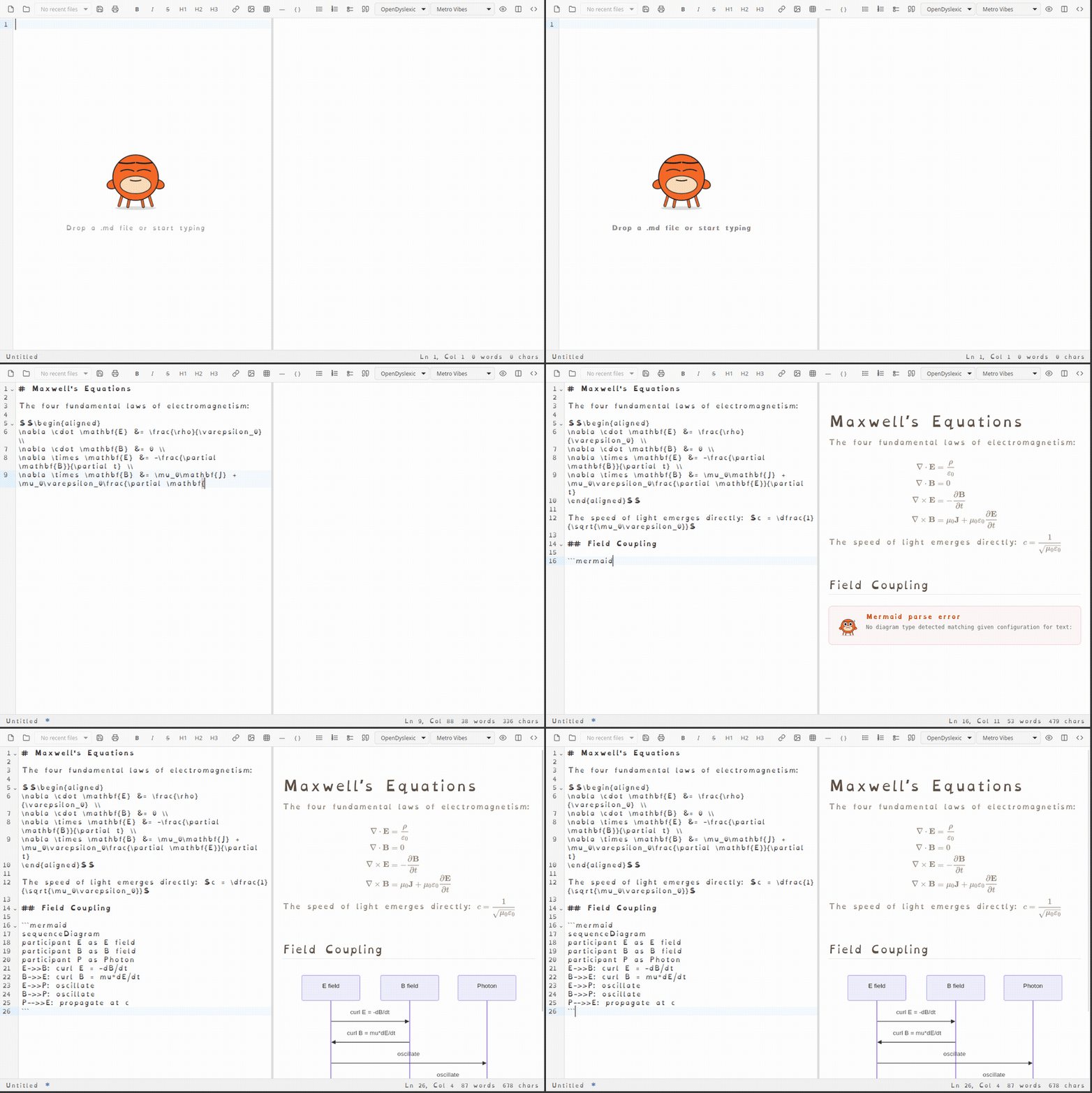
bad-ass-mcp recording itself interacting with MarkTheCrab
Why
Most AI desktop automation tools work by taking screenshots and asking a vision model "what do you see?" That's slow, expensive, and fragile.
Every major OS exposes a structured accessibility tree — the same one used by screen readers — that describes every button, text field, combo box, and menu in every running application. bad-ass-mcp speaks that language directly.
- macOS: AXUIElement via PyObjC
- Linux: AT-SPI2 via
gi.repository.Atspi - Windows: UI Automation via
comtypes
Actions fire on control objects directly, so the target window doesn't need focus. The user can keep working while automation runs in the background.
Tools
| Tool | Description |
|---|---|
list_windows |
List all visible application windows |
get_tree |
Full accessibility tree for a window as nested JSON |
find_elements |
Find elements by role and/or name |
click |
Click / invoke an element (foreground-independent) |
click_at |
Click at absolute screen coordinates — fallback for webview/canvas UI |
type_text |
Type text into a field (SetValue → EditableText → key injection) |
select_option |
Select an option in a combo box or list |
get_value |
Get the current value or text of an element |
wait_for_window |
Wait until a window matching a pattern appears |
wait_for_element |
Wait until an element exists and optionally has a given state |
screenshot |
Capture a PNG (write to output_path or return base64) |
start_recording |
Start recording the screen (or a specific window) |
stop_recording |
Stop recording and export as a GIF |
learn_layout |
Resolve semantic names → live handle IDs (one call per session) |
run_sequence |
Execute a list of actions server-side — no per-action round-trips |
Webviews: waking lazy accessibility trees
Chromium-based apps (Electron, CEF, and every Chromium browser) have a
full accessibility tree — they just don't build it until an assistive
technology announces itself. Until then the window looks canvas-only:get_tree returns nothing and screenshot-clicking is the only option.
bad-ass-mcp announces itself. When a window's a11y tree comes back
empty and the process looks like a webview, the backend performs the
platform's "a screen reader is here" handshake, waits a beat, and
re-probes before giving up:
- Linux: sets
org.a11y.Status.ScreenReaderEnabledon the session
D-Bus at server start so Chromium/Electron apps launched
afterwards enable accessibility from birth. Windows that stay hollow
(an application+frame whose phantom child fetches asNone) are
detected via the AT-SPI toolkit name and reportedaccessible: false: the app either launched before the flag went up
or opts out on its own. Restarting the app with the server running
should pick the flag up per Chromium's documented behavior, but note
that is not yet verified here: the only Linux app live-tested so far
(flatpak Vivaldi) ignores the flag entirely, its own first-run
assistive-technology toggle included, and only produces a tree when
launched with--force-renderer-accessibility. - macOS: sets
AXManualAccessibilityon the app (Electron's
documented switch), falling back toAXEnhancedUserInterface(what
VoiceOver sets, watched by plain Chrome/CEF). The attribute set only
succeeds on apps that support it, so it's a free no-op elsewhere. - Windows: sets the system
SPI_SETSCREENREADERRUNNINGflag, then
queries theChrome_RenderWidgetHostHWNDchild window — Chromium
hangs its DOM tree off that renderer child, not the top-level HWND
(which only shows empty panes).get_tree/find_elementsare
routed through the renderer child automatically.
One wake attempt per process per server run. If list_windows still
reports accessible: false after this, the window is genuinely
canvas-only (custom OpenGL/Vulkan surface, immediate-mode toolkit
without AccessKit) — fall back to screenshot + click_at.
The tradeoff: a woken app spends some memory/CPU maintaining its tree,
which is exactly why Chromium lazy-loads it. The wake targets the app
you're automating, not the whole desktop (the Linux flag is technically
session-global, but only a11y-aware apps respond, and only on demand).
Installation
Requirements: Python 3.11+, ffmpeg + gifsicle for recording (optional)
# macOS
pip install 'bad-ass-mcp[macos]'

# Linux — install system PyGObject + AT-SPI bindings first, then:
pip install bad-ass-mcp

# Windows
pip install 'bad-ass-mcp[windows]'
Linux: PyGObject and AT-SPI are not on PyPI — install them from your distro:
# Debian/Ubuntu
sudo apt install python3-gi gir1.2-atspi-2.0 at-spi2-core

# Arch
sudo pacman -S python-gobject at-spi2-core

# Fedora
sudo dnf install python3-gobject at-spi2-core
Then make sure AT-SPI is enabled (most desktop environments — GNOME, KDE, XFCE — have it on by default):
# Check
gsettings get org.gnome.desktop.interface toolkit-accessibility

# Enable
gsettings set org.gnome.desktop.interface toolkit-accessibility true
If you're using a venv, create it with --system-site-packages so it can see the distro-installed gi:
python -m venv --system-site-packages venv
Windows: Elevated (admin) applications can only be automated from an elevated Python process. No special permissions are needed for normal apps.
Register with Claude Code
claude mcp add bad-ass-mcp --scope user -- bad-ass-mcp
Or manually in ~/.claude.json:
{
  "mcpServers": {
    "bad-ass-mcp": {
      "type": "stdio",
      "command": "bad-ass-mcp"
    }
  }
}
Usage
list the windows on screen
→ [{ "id": "12345", "name": "Firefox", ... }]

find the search box in window 12345 and type "hello"
→ find_elements(window_id="12345", role="entry")
→ type_text(handle_id="...", text="hello")
Electron/CEF apps get their lazy accessibility tree woken automatically (see Webviews above). For apps that still don't expose a clean tree, type_text falls back to platform-native key injection automatically (AT-SPI on Linux, Quartz events on macOS, PostMessage on Windows).
Architecture
bad_ass_mcp/
├── server.py          # FastMCP tool definitions
├── types.py           # WindowInfo, ElementHandle, ActionResult, StaleHandleError
└── backend/
    ├── base.py        # Abstract DesktopBackend interface
    ├── linux.py       # AT-SPI2 + xdotool
    ├── macos.py       # AXUIElement + Quartz
    └── windows.py     # UI Automation + ctypes Win32
The abstract backend interface means adding a new platform is just implementing one class. The full contract-test suite runs against every backend via FakeBackend.
Releasing
Tag a version and the release workflow builds the sdist and wheel, publishes them
to PyPI via trusted publishing, and attaches them (plus the PyInstaller bundles)
to the GitHub release:
git tag v1.4.0 && git push --tags
License
MIT
Reviews (0)
Sign in to leave a review.
Leave a reviewNo results found