AgentLimb
Health Pass
- License — License: NOASSERTION
- Description — Repository has a description
- Active repo — Last push 0 days ago
- Community trust — 18 GitHub stars
Code Pass
- Code scan — Scanned 12 files during light audit, no dangerous patterns found
Permissions Pass
- Permissions — No dangerous permissions requested
This tool is a Chrome extension and MCP server that allows AI coding assistants (like Claude Code or Cursor) to directly control and automate your local web browser.
Security Assessment
Overall risk: Medium. The tool inherently requires access to your browser, which means it handles sensitive data like active sessions, cookies, and potentially any information displayed on web pages. The automated light code scan passed with no dangerous patterns, hardcoded secrets, or requested dangerous system permissions. However, because the tool is designed to execute browser actions on your behalf and interacts directly with external AI models, it inherently deals with high-value data. Keep in mind that only 12 files were scanned, meaning a deeper security review might be necessary for strict enterprise environments.
Quality Assessment
The project is very new but active, with its most recent code push occurring just today. Community trust is currently limited given its small footprint of only 18 GitHub stars. The repository's automated license check reads as "NOASSERTION," but the README documentation indicates it is released under BSL 1.1 (Business Source License). It is important to note that BSL 1.1 is a source-available license, not a standard open-source license, meaning it carries specific usage restrictions you should review before adopting it in a commercial project.
Verdict
Use with caution: the code passes basic security checks and is active, but its small user base, inherent access to sensitive browser data, and non-standard license warrant careful review before trusting it with critical web sessions.
Let any AI coding tool — Claude Code, Cursor, Codex — drive your real Chrome. One-prompt setup, muscle memory, local-first.

AgentLimb
Stop watching your AI relearn the same task.
The open-source alternative to CoWork — 90% fewer tokens on repeat browser tasks.



If AgentLimb is useful to you, please ⭐ star this repo — it helps others discover the project and keeps us motivated!




English | 中文 | 日本語 | 한국어 | Español | Français | Deutsch | Português | Русский | العربية | Italiano | हिन्दी
About
AgentLimb is a Chrome extension — now live on the Chrome Web Store — that lets any AI terminal — Claude Code, Cursor, Codex, Trae, Windsurf, or any local model — drive your browser with precision. Install the extension, copy one prompt, paste it to your AI, and it auto-configures in 10 seconds.
No headless browsers. No re-login. No invasive agents. Your real Chrome, your real cookies, your real sessions — plus muscle memory that makes repeat tasks dramatically cheaper every time you run them.
Highlights
1. One-Prompt Setup
Copy a single prompt, paste it to any AI tool. No config files, no terminal commands, no API keys. If your AI can run commands, it can use AgentLimb.
2. Muscle Memory — 85% Fewer Tokens, 80–95% Less Waiting
The first time your AI hits a site, it explores the DOM and learns selectors / workflow. AgentLimb writes that knowledge to ~/Desktop/AgentLimb-muscle/<domain>.json. Every future run on the same site skips the exploration and reuses what was learned.
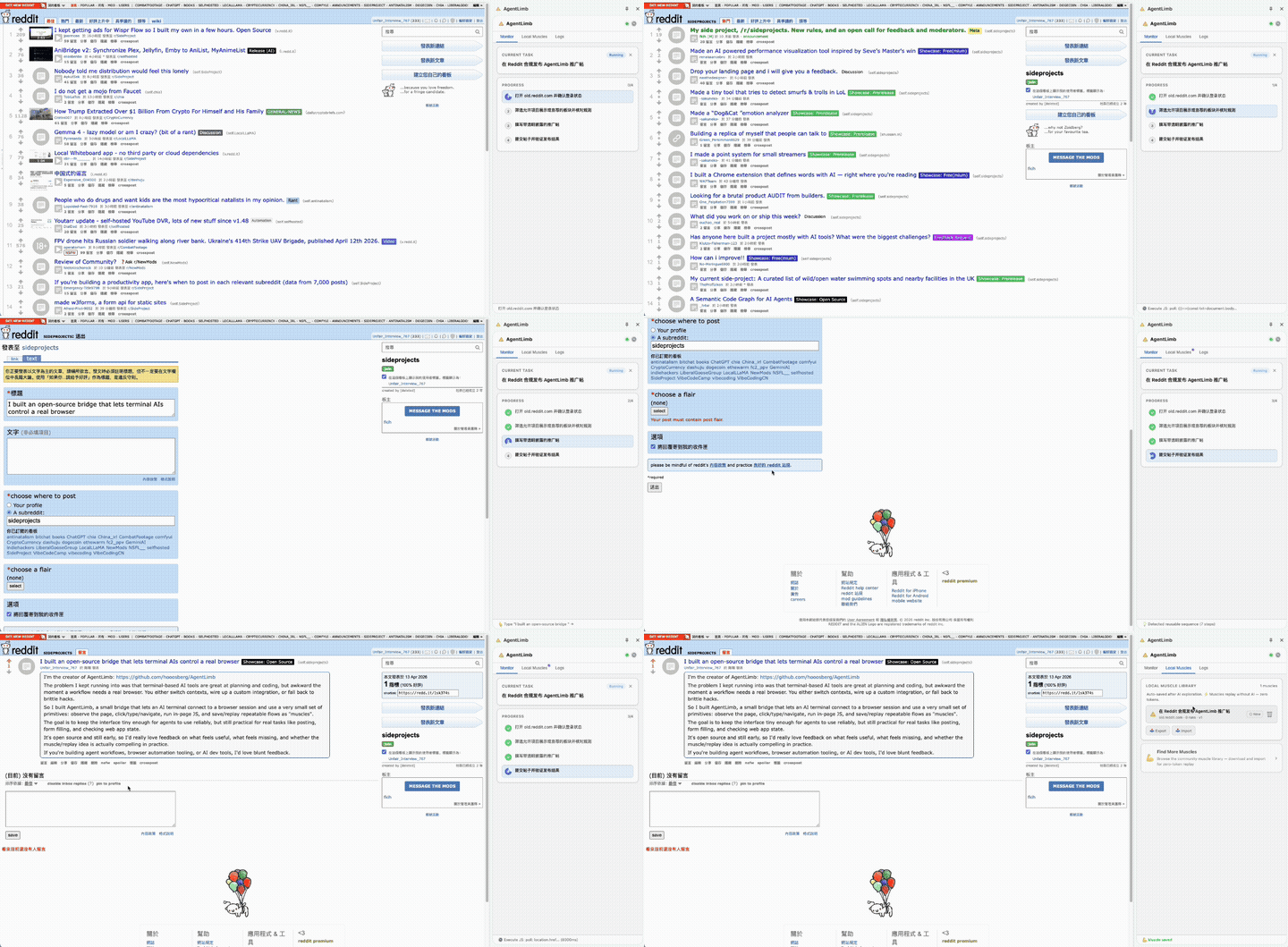
Real regression data from a Reddit posting task (low-parameter Codex, 2026-04-18):
| Cold start (first explore) | Hot start (muscle recall) | Savings | |
|---|---|---|---|
page_snapshot calls |
3 | 0 | 100% |
| Total tool calls | 23 | 10 | 56.5% |
| Estimated tokens | ~12,250 | ~1,750 | ↓ 85.7% |
| Wall-clock time | 8–20 min | 30 s–2 min | ↓ ~80–95% |
The more you reuse a site, the cheaper and faster it gets.
3. CDP-Native, Not Screenshot Guessing
AgentLimb drives the browser through Chrome Debugger Protocol. The AI receives a structured semantic list of interactive elements — not screenshots. Clicks hit the right node, form fills use native APIs, navigations return the new URL immediately.
4. Explicit Task Lifecycle
Silence no longer equals success. The AI explicitly declares task_plan → task_step_done → task_complete / task_fail. Timeouts and bridge drops are captured as real failures, not false positives. The side panel renders the live step list in real time.
5. 100% Local & Private
Bridge runs on 127.0.0.1:7791. No analytics, no tracking, no cloud. Muscle knowledge is plain JSON on your desktop — you can read, diff, share, or delete it at any time.
6. Multi-Account Parallel Control — Run Multiple Chrome Profiles at Once
One AI command, every Chrome profile executes it. Whether you have two Twitter accounts, three company Google accounts, or a dozen test profiles — AgentLimb drives them all in a single task.
- Explicit identity — each side panel shows "This panel: Profile-xxxxxx"; the Bridge tracks which profile sent which result
- Suspend / auto-suspend — close a panel (or click Suspend) to opt that profile out; the rest continue without interruption
- task_* fan-out —
task_plan,task_step_done,task_complete,task_failbroadcast to every active profile; all side panels stay in sync - Window locking —
navigatetargets the correct Chrome window automatically, even when the same profile has multiple windows open - Target routing — point a tool call at a specific profile by label for surgical precision
How It Works
Your AI Terminal  (Claude Code / Cursor / Codex / Trae / Windsurf / local model)
    ↕  HTTP + SSE  (16 standardized tools, auto-discoverable via /docs endpoints)
AgentLimb Bridge  (local Node.js · 127.0.0.1:7791)
    ↕  chrome.runtime message passing
AgentLimb Extension  (Chrome MV3 · side panel UI · task/muscle/log tabs)
    ↕  Chrome Debugger Protocol
Your Browser  (logged in, with cookies, your real sessions)
    ↓  knowledge persisted
~/Desktop/AgentLimb-muscle/<domain>.json  (durable, human-readable)
Quick Start
- Install — Two options:
- Chrome Web Store (recommended): Install AgentLimb — one click, auto-updates
- Manual (latest build): Download the latest zip, unzip, open
chrome://extensions, enable Developer Mode, click Load unpacked
- Copy — Open the side panel, click "Copy Onboard Prompt"
- Paste — Paste to any AI terminal. It auto-connects, fetches the tool schema on demand, and starts working
Toolset — 16 Tools
16 standardized tools spanning five categories: observing browser state, navigating and interacting with page elements, reading and writing muscle memory, declaring task lifecycle events, and maintaining bridge connectivity. Full documentation is served on demand — the AI fetches schemas only when it needs them.
Why Not Just Use X?
Every existing approach to browser automation has a real cost. Here's the honest comparison:
| Browser Use / Playwright | BrowseAI / Browserbase | Codex / Claude Computer Use | AgentLimb | |
|---|---|---|---|---|
| Setup | Write scripts, manage deps | SaaS config per workflow | Mac only, desktop env required | Copy one prompt |
| Element targeting | CSS/XPath — you maintain them | Visual AI — breaks on updates | Screenshot coordinates — ±1px miss | CDP reads live DOM — semantic |
| Token cost / step | None (pure script) | Cloud fees + AI tokens | 1,000–3,000/screenshot × every step | ~300/step, 85.7% less on hot start |
| Repeat task cost | Fixed | Billed per run | Linear — re-explores every time | Decreasing — muscle memory compounds |
| Login sessions | Extra setup | Cloud — no local sessions | OS-level, unaware of browser state | Your real Chrome — already logged in |
| When site updates | Scripts break, rewrite | Model may degrade silently | Screenshot inference — expensive | AI self-heals muscle selectors |
| Data privacy | Local ✅ | Third-party servers ❌ | Local ✅ | 100% local, 127.0.0.1 ✅ |
| AI choice | Any (pure script) | Platform-dependent | Bundled with Codex / Claude | Any AI that speaks HTTP |
| Shared knowledge | Script = one AI only | Workflow = locked to platform | No persistent memory | Muscle files = cross-AI, transferable |
| Multi-account parallel | Manual orchestration | Platform-dependent | No | ✅ Multiple Chrome profiles, one command |
The unique differentiator: AgentLimb's muscle files live in ~/Desktop/AgentLimb-muscle/ as plain JSON. Knowledge explored by Claude Code today is available to Codex tomorrow — same files, zero re-exploration. Switch AI tools without losing a single learned workflow.
Use Cases
- Marketing — Post to social media, manage campaigns across platforms
- Research — Scrape data, compare products, gather competitive intelligence
- Automation — Fill forms, submit applications, update profiles
- Testing — QA your web app on a real browser with real sessions
Design Philosophy
- Minimal surface — 16 tools, each does one thing well, composable across any workflow
- Non-invasive — works inside your real browser, not a sandbox
- Local-first — privacy by architecture, not by promise
- AI-agnostic — any tool that can send HTTP can connect; no vendor lock-in
Resources
- Website: agentlimb.com
- Tutorials: agentlimb.com/tutorials.html
- AI Tools Directory: agentlimb.com/tools.html
- News: agentlimb.com/news.html
- Privacy Policy: agentlimb.com/privacy.html
- Terms of Service: agentlimb.com/terms.html
- License: agentlimb.com/license.html
Contact
- GitHub: hooosberg/AgentLimb
- Email: [email protected]
Sibling projects
Built by hooosberg:
- BeRaw — Behance raw-image grabber
- Packpour — App Store Connect locale filler
- WitNote — local-first AI writing companion
- GlotShot — perfect App Store preview images
- TrekReel — outdoor trails, cinematic reels
- DOMPrompter — visualize DOM for AI code
- UIXskills — AI → JSON → Whiteboard → UI
License
Business Source License 1.1 — free for personal use. Commercial use requires a license. Converts to Apache 2.0 on 2030-04-12.
Copyright © 2025 hooosberg. All rights reserved.
Reviews (0)
Sign in to leave a review.
Leave a reviewNo results found