agent-checkpoint
Health Warn
- License — License: MIT
- No description — Repository has no description
- Active repo — Last push 0 days ago
- Low visibility — Only 9 GitHub stars
Code Fail
- rm -rf — Recursive force deletion command in install-repo-skills.sh
- rm -rf — Recursive force deletion command in upgrade-repo-skills.sh
Permissions Pass
- Permissions — No dangerous permissions requested
No AI report is available for this listing yet.
agent-checkpoint



English | 中文
Repo-local continuity skills for coding agents. Checkpoints use a sharedagent-handoff/v1 markdown format so Codex/OpenAI CLI, Claude Code, opencode,
and other programming agents can write and resume the same repo state.
These two skills turn "I lost the thread" into a recoverable workflow: save the
real working lane into the repository itself, then restore it in the next
session without depending on fragile external chat memory.
Demo
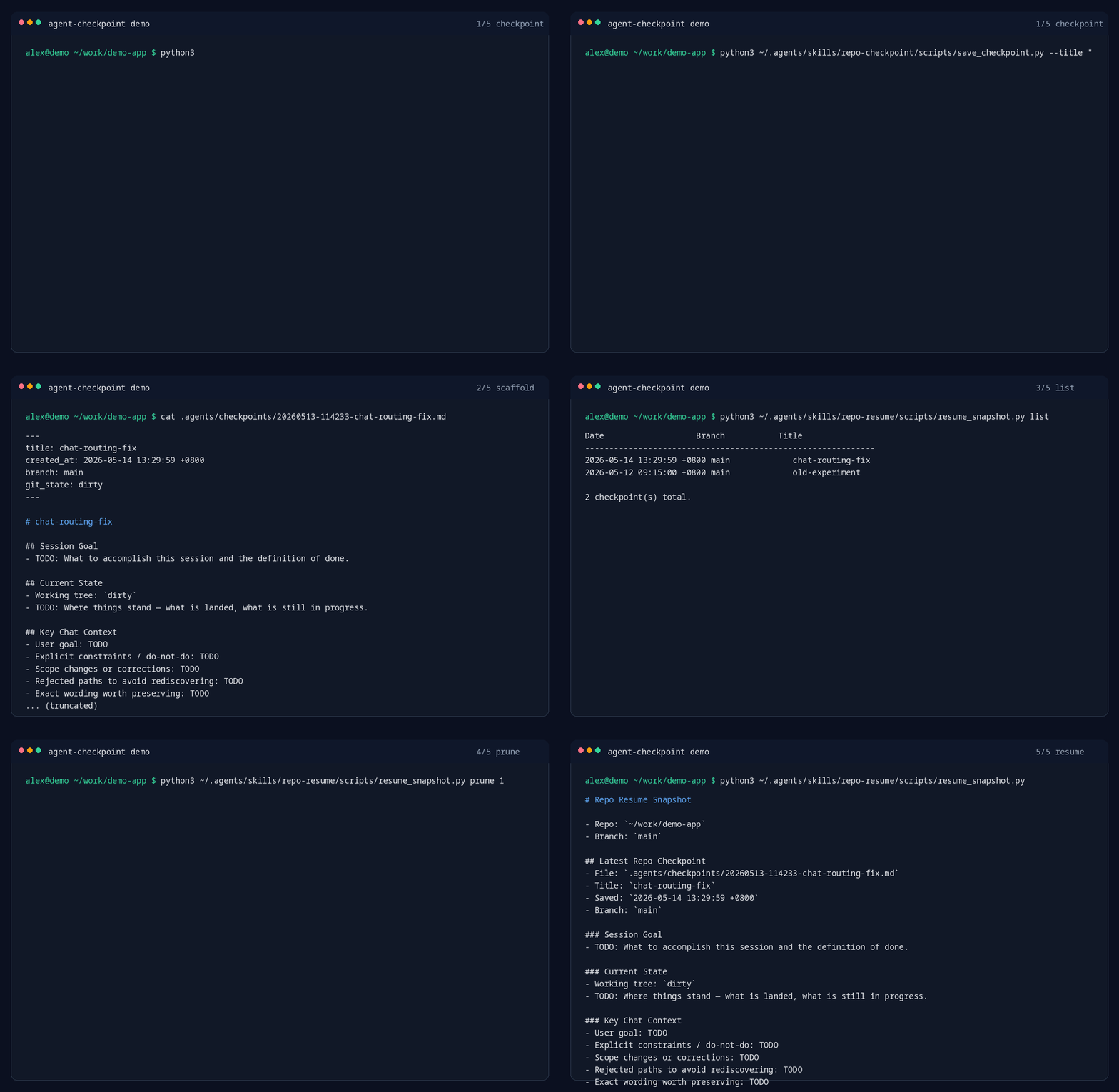
What It Does
- repo-checkpoint — writes a timestamped markdown handoff under
.agents/checkpoints/, including session goal, current state, key chat
context, files in play, verification state, next step, and a git snapshot. - repo-resume — restores the latest active lane from the newest checkpoint
plus current branch, working tree, and recent commits.
Why this exists: Most agents can reread code. What they usually lose is the
human context: what the user actually wanted, what was already tried, which
constraints mattered, and what the next concrete step should be.
Why It Matters
- Repo-local, not session-local — the handoff lives inside the repo, so it
survives model switches, browser restarts, shell reconnects, and machine
changes. - Cross-agent by design — Codex can write a checkpoint and Claude Code or
opencode can resume it later from the same.agents/checkpoints/directory. - Plain markdown, no lock-in — checkpoints are readable in any editor and
reviewable in git. - Fast cold start — resume goes straight to the last known lane instead of
broad repo exploration. - Human context included — goal, constraints, rejected paths, and next
actions are captured explicitly. - Works even without an agent runtime — both scripts can be run manually.
Best For
- long-running debugging or refactor sessions
- interruptions during implementation or review
- switching between local machine, remote box, and another agent session
- repos where "what were we actually doing?" is more expensive than reading the
code
Quick Start
git clone https://github.com/hotalexnet/agent-checkpoint.git
cd agent-checkpoint
bash install-repo-skills.sh
Upgrade an existing install from GitHub:
bash <(curl -fsSL https://raw.githubusercontent.com/hotalexnet/agent-checkpoint/main/upgrade-repo-skills.sh)
From the target repo root:
# End of session: create a scaffold, then fill in the TODOs
python3 ~/.agents/skills/repo-checkpoint/scripts/save_checkpoint.py \
  --title "chat-routing-root-cause" \
  --agent codex

# Next session: recover the latest lane
python3 ~/.agents/skills/repo-resume/scripts/resume_snapshot.py
Example Flow
Session A:
- investigating a routing bug
- several files open
- one failed approach already ruled out
        ↓
repo-checkpoint
        ↓
.agents/checkpoints/20260513-114233-chat-routing-root-cause.md
        ↓
Session B starts later on the same or another machine
        ↓
repo-resume
        ↓
latest checkpoint + branch + working tree + recent commits
        ↓
continue from the real next step instead of re-deriving intent
What Gets Saved
Each checkpoint keeps these top-level sections:
Agent HandoffSession GoalCurrent StateKey Chat ContextFiles In PlayVerificationNext StepResume RecipeGit Snapshot
That is the real value here: not just code state, but the reasoning state around
the code.
Example Checkpoint Content
## Session Goal
- Fix the chat fallback so non-matching questions stop returning stale onboarding guidance.

## Current State
- Router fix is implemented locally.
- Local smoke test passed.
- Staging behavior still needs separate verification.

## Key Chat Context
- User wants root-cause-level cleanup, not a keyword patch.
- Old onboarding copy must stop leaking into normal chat replies.
- Do not broaden scope into model switching yet.

## Files In Play
- src/chat/router.py
- src/prompts/chat_prompt.py
- tests/test_chat_router.py

## Next Step
1. Reproduce against the current deploy path.
2. Verify fallback selection with 3 representative prompts.
3. Commit only after the bad greeting path is gone.
Install
Prerequisites
python3git- a skill runtime that loads skills from
~/.agents/skills, or a vendored
skill path inside your own tooling
Option 1: Run the installer
bash install-repo-skills.sh
Default install target:
~/.agents/skills
Custom install target:
bash install-repo-skills.sh --target /path/to/skills
Option 2: Clone the repo
git clone https://github.com/hotalexnet/agent-checkpoint.git
cd agent-checkpoint
bash install-repo-skills.sh
Option 3: Copy the skill folders directly
mkdir -p ~/.agents/skills
cp -R repo-checkpoint ~/.agents/skills/
cp -R repo-resume ~/.agents/skills/
Usage
| Trigger or need | Action |
|---|---|
| "save progress" / "checkpoint this" | run repo-checkpoint |
| "continue where we left off" / "what was I doing?" | run repo-resume |
| "show all checkpoints" | run repo-resume list |
| "clean up old checkpoints" | run repo-resume prune 5 |
Manual commands from the target repo root:
python3 ~/.agents/skills/repo-checkpoint/scripts/save_checkpoint.py --title "my-work"
python3 ~/.agents/skills/repo-checkpoint/scripts/save_checkpoint.py --title "my-work" --agent claude-code
python3 ~/.agents/skills/repo-resume/scripts/resume_snapshot.py
python3 ~/.agents/skills/repo-resume/scripts/resume_snapshot.py list
python3 ~/.agents/skills/repo-resume/scripts/resume_snapshot.py prune 5
Upgrade
From an existing clone:
cd agent-checkpoint
bash upgrade-repo-skills.sh
From any machine with Git, Bash, and Python:
bash <(curl -fsSL https://raw.githubusercontent.com/hotalexnet/agent-checkpoint/main/upgrade-repo-skills.sh)
Custom skill install directory:
bash upgrade-repo-skills.sh --target /path/to/skills
Use the current checkout without pulling, useful for testing local changes:
bash upgrade-repo-skills.sh --no-pull --target /path/to/skills
Recommended Workflow
1. Before closing a session
Run repo-checkpoint, then replace every TODO with concrete session state.
2. When reopening later
Run repo-resume first, before broad repo exploration.
3. Keep the checkpoint executable
A good checkpoint should answer these questions fast:
- What are we trying to finish?
- What is already true?
- What must not be broken?
- Which files matter first?
- What should happen next?
Why Repo-Local Beats External Chat Memory
- external session memory is often unavailable, partial, or tool-specific
- a repo-local handoff travels with the codebase
- teammates and future-you can inspect it without special software
- the checkpoint can be committed, ignored, copied, or archived with normal git
habits
How It Works
Current coding session
    ↓
repo-checkpoint
    ↓
Timestamped markdown handoff under .agents/checkpoints/
    ↓
New session starts later
    ↓
repo-resume
    ↓
Latest checkpoint + current git state
    ↓
Continue the exact lane with minimal cold-start cost
Compatibility
- Any git repository
- Local machine or remote server
- Cross-machine reuse by cloning or copying the skill folders
- Manual CLI use, even if your agent runtime does not auto-load skills
Multi-Machine Usage
You can either:
- clone this repository on another machine and run the installer, or
- copy
repo-checkpoint/andrepo-resume/directly into that machine's~/.agents/skills/
Updating
If you already installed an older version, rerun:
bash install-repo-skills.sh
The installer replaces:
~/.agents/skills/repo-checkpoint~/.agents/skills/repo-resume
Limits
- Resume quality depends on checkpoint quality.
- The scaffold is intentionally simple; it does not auto-summarize your whole
session for you. - If you leave the
TODOs blank, future-you still has to reconstruct intent.
.gitignore
Checkpoints are stored under .agents/checkpoints/. You can either commit them
(so teammates can resume each other's work) or gitignore them (private notes):
# Option A: ignore all checkpoints
.agents/checkpoints/

# Option B: keep them in git — add nothing to .gitignore
Project Structure
agent-checkpoint/
├── README.md
├── README.zh-CN.md
├── CHANGELOG.md
├── VERSION
├── LICENSE
├── assets/
│   └── demo.gif
├── install-repo-skills.sh
├── repo-checkpoint/
│   ├── SKILL.md
│   └── scripts/
│       └── save_checkpoint.py
├── repo-resume/
│   ├── SKILL.md
│   └── scripts/
│       └── resume_snapshot.py
├── tests/
│   ├── conftest.py
│   ├── test_checkpoint.py
│   └── test_resume.py
└── scripts/
    └── generate_demo_gif.py
License
Acknowledgments
- Repo-local continuity workflow patterns developed during long-running coding
sessions - Git, for making branch and working tree state easy to snapshot and recover
⚠️ Note: Concrete files, constraints, verification state, and next actions
are what make resume fast. The more specific your checkpoint is, the more
valuable the next session becomes.
Reviews (0)
Sign in to leave a review.
Leave a reviewNo results found