lemieux
Health Warn
- License — License: Apache-2.0
- Description — Repository has a description
- Active repo — Last push 0 days ago
- Low visibility — Only 5 GitHub stars
Code Fail
- rm -rf — Recursive force deletion command in .github/workflows/dependency-submission.yml
Permissions Pass
- Permissions — No dangerous permissions requested
No AI report is available for this listing yet.
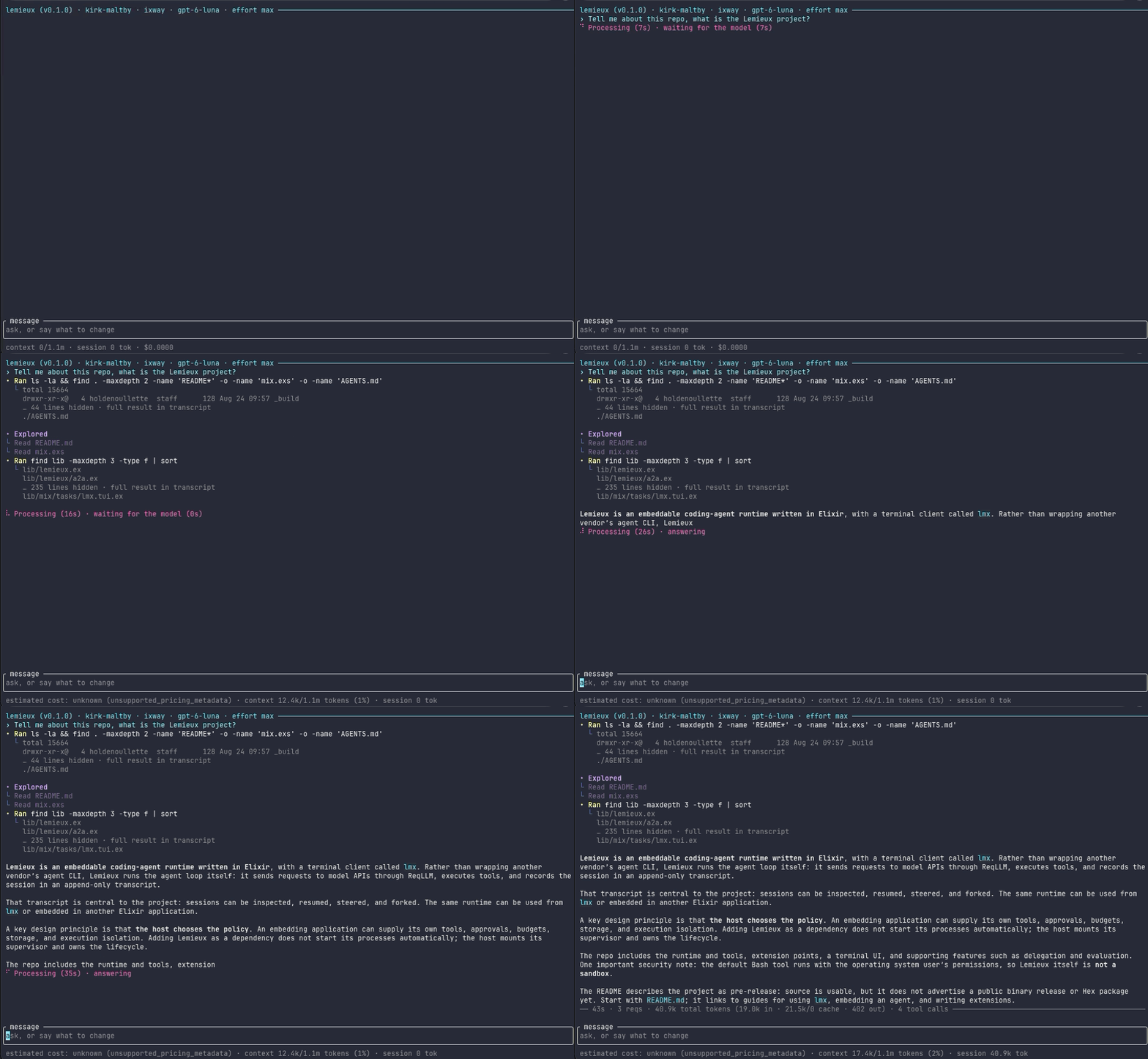
An open-source coding agent you can take apart: a terminal app (lmx), and the Elixir runtime underneath it (Lemieux). Works with any ReqLLM provider or a local Ollama model, and keeps every session as a transcript you can resume, fork and replay.
Lemieux


An open-source coding agent you can take apart: a terminal app (lmx), and the Elixir runtime underneath it (Lemieux).
lmx is a coding agent for your terminal: it reads your code, edits
files, runs commands and checks its work with your project's own tests, on
any model ReqLLM supports or a local one in
Ollama. Lemieux is the Elixir library underneath. It runs the agent loop
itself, with no vendor CLI behind it, and lmx is built on its public API.
Contents
- What makes it different
- New in 1.1
- Also included
- Install
- Quickstart
- Safety
- When to use it
- FAQ
- Documentation
- Project status
- Contributing and community
- License
- Acknowledgements
What makes it different
The loop behind lmx is a library you can read, extend and embed, rather
than a program you drive from outside. That is where the differences come
from:
- Every session is a transcript you can take apart. A session is an
append-only record on your disk. Resume it (lmx -c, or by name:lmx --resume wayne-gretzky), fork it from an earlier turn
(lmx fork SESSION --at-turn 2), switch models halfway through (/model),
or print the exact requestlmxsent for any model call, with its system
prompt, tool schemas and the transcript entries it carried
(lmx request). - Its behaviour is code you can replace. Tools, compaction, the
stop-when-stuck rule, the sentences the model reads on a denial and the
status line are Elixir behaviours with shipped defaults, not prompts you
hope the model follows.lmx extension new NAMEwrites a one-file
extension thatlmxcompiles when it loads it, andlmxitself is
assembled from the same kind of extensions. - It runs on OTP. A session is a supervised process, so it keeps
listening while it works: type while the model is busy and your message
reaches its next request (/unsteertakes it back). A tool that crashes
becomes an error the model can read, not a dead session. An installedlmxis an OTP release, so a compatible, signed update can load into the
terminal UI while it runs. - The same loop runs in your application. Add
{:lemieux, "~> 1.1"},
mountLemieux.Supervisor, and supply your own tools, store, approval
policy and interface through the APIlmxuses;lmxhas no private path
into the library. First embedded agent runs
a complete session without an API key.
New in 1.1
- Models and account usage. The Codex picker discovers the
active account's visible models./usagereports supported provider spend
and subscription windows, with scope, caching and unavailable values labeled.
Providers and
account usage explain credentials and limits. - Questions that can wait. The agent can ask an optional question while
continuing independent work. Required questions still block; unanswered
questions never approve an action. Question panels also support text selection
and copying. See questions. - MCP setup and inspection. Add local or global servers from the terminal,
complete interactive OAuth, and inspect cached tools and schemas in/mcp.
MCP covers trust and unattended behavior. - Errors you can act on. Readable budget refusals keep their exact saved
diagnostics. Internal faults show a reporting hint and turn summary;/feedback bugprepares a sanitized draft for your review and explicit submission.
Bug reports explains what is included.
The changelog includes the dependency updates, local MTPLX
discovery, configuration reload limits and experimental learning changes.
Updating from 1.0 requires a restart on every platform; save drafts, restart
and resume with lmx -c (upgrade steps).
Also included
What you would expect from a coding agent is here too:
- Any model. Anthropic, OpenAI, Google Gemini, any other ReqLLM provider,
or a local Ollama model that can call tools;/modeland/provider
switch at any time. - It checks its own work. After a turn that edits files,
lmxruns your
project's check (make test,mix test,npm test,cargo test,pytestand others) and gives the model up to two more tries if it fails. /undoand/redo, covering what commands changed in a git
repository as well as file edits
(what they cover).- Your Claude Code setup, within limits.
CLAUDE.mdandAGENTS.md,
Agent Skills, commands, subagents, plugins, hooks and MCP servers
(compatibility table). - Scripting.
lmx run "…"prints only the answer and exits with a status
that says what happened;--output-format jsonorstream-jsonfor tools
and CI. - MCP servers, web search and fetch (with a Brave key), and a
desktop launcher on Linux, Omarchy included.
Install
The lmx binary
On macOS and Linux, one command installs lmx for your user under~/.local (no root needed):
curl -fsSL https://github.com/houllette/lemieux/releases/latest/download/install.sh | sh
The installer needs curl and Python 3.8 or newer. It checks the release's
signature and checksums before it installs anything, runs nothing from the
archive, and prints where it put lmx: add ~/.local/bin to your PATH if
it is not there already. Options go after sh -s --: --prefix DIR,--release X.Y.Z, and --replace to install over a PREFIX/bin/lmx the
installer did not write. To upgrade, run lmx update.
| Platform | Status |
|---|---|
| macOS, Apple Silicon or Intel | Supported on macOS 15 or later. The build is not signed by Apple: install it with the installer, not by unpacking the archive in Finder. |
| Linux x86-64 | Supported on glibc 2.34 or newer with its libgcc_s (Ubuntu 22.04+, Debian 12+, Fedora, RHEL 9+, Rocky, Alma, openSUSE, Amazon Linux 2023), with ca-certificates and awk installed (some slim container images leave them out). Not musl distributions such as Alpine. |
| Linux arm64 | No binary yet: run it from source. |
| Windows x86-64 | Experimental. Unpack lmx_windows.tar.gz from the latest release into a new directory and run bin\lmx.cmd there (the steps); update by downloading the new archive. Needs Git for Windows: its Git Bash runs the agent's commands, and WSL's bash is never used. Under WSL2, install the Linux build inside WSL instead. |
An installed lmx checks for new releases and installs one only after its
signature verifies against the key built into it; lmx update does the same
from a terminal. LMX_AUTO_UPDATE=0 keeps the notices but installs only onlmx update or /update, and LMX_CHECK_UPDATES=0 turns the automatic
checks off. The first download trusts HTTPS
and GitHub; to check a release yourself, follow
Verify a download. The release-signing
public key is X7aGNLOgOV+bz13CuG4x4AVnhKmsPIH8eYvBrajsiG8=. On Linux,lmx desktop install adds lmx to your application launcher
(Desktop launchers and Omarchy).
From source
You need git and mise, which installs the Erlang and
Elixir versions the project pins:
git clone https://github.com/houllette/lemieux.git
cd lemieux
mise install
mise exec -- mix deps.get
mise exec -- mix lmx -C /path/to/your/project
mise exec -- mix lmx runs any lmx command from the checkout. The first
run compiles everything, in about a minute, with dependency warnings you can
ignore. On Linux distributions other than
Ubuntu, mise install builds Erlang and needs a few packages first;
First session lists them and
shows how to make lmx work from any directory.
As a library
def deps do
  [{:lemieux, "~> 1.1"}]
end
Lemieux needs Elixir 1.19 or newer on Erlang/OTP 27 or newer. Adding it starts
no Lemieux processes: mount {Lemieux.Supervisor, name: MyApp.Agents} in your
supervision tree. ReqLLM, which makes the model calls, loads the .env file
in the directory your application starts in and runs any $(...) in it; if
that directory may be untrusted, set config :req_llm, load_dotenv: false
(For library hosts).
Quickstart
Give
lmxa model. Export one provider's key:export ANTHROPIC_API_KEY=... # or OPENAI_API_KEY, GOOGLE_API_KEY, ... (lmx help models)A usable local Codex sign-in
is another option in the provider panel. Or run a model that can call tools
in Ollama, started
with a long enough context window:OLLAMA_CONTEXT_LENGTH=65536 ollama serve
(32768 at the least; with less than about 23 GiB of GPU memory, Ollama
otherwise serves 4,096 tokens and silently drops the start of a longer
conversation, your task first). With none of these,lmxopens a panel where you
pick a provider and paste its key.Start it in your project:
cd /path/to/your/project
lmx
Ask something:
Explain how this project is organized, then suggest one small improvement. Do not change files yet.
/help lists commands and keys, /undo takes back the last turn, and /quit
leaves; lmx -c picks up where you left off. Settings live in~/.lmx/config.json (only you can read it) and transcripts in~/.lmx/sessions. Your provider bills API requests; see
What does it cost? for the caps.
First session walks through all of this, and
Everyday use covers the rest.
Safety
lmx starts in auto: workspace file edits run automatically, and commands
run automatically only inside an available OS sandbox. Without one, commands
ask for approval. MCP, web and Elixir-evaluation tools ask either way;
unattended calls that would ask are denied. The startup banner reports the
actual mode and sandbox. --permission-mode full_auto explicitly bypasses
approval prompts; deny rules still apply.
Commands inherit your environment, less variables whose names contain KEY,TOKEN, SECRET, PASSWORD or PASSWD (by name only: a password insideDATABASE_URL still passes). After a turn that edits files, the repository's
check runs through the same command policy. "verify": false in~/.lmx/config.json turns verification off.
- Ask first:
lmx --permission-mode askasks before edits and commands;--permission-mode accept_editsasks only before commands. - Confine commands:
lmx --sandboxruns them inside macOS Seatbelt or
Linux bubblewrap (installbubblewrapfirst). They can write only to the
project, temporary directories and tool caches, reach no network beyond
loopback, and cannot see credential locations such as~/.ssh,~/.aws
and~/.lmx(lmx help sandboxlists them all). The sandbox does not
cover MCP servers, hooks, web tools or the Elixir evaluator, and a
sandboxed command can still change the repository's.git/configand
hooks, which thegityou run afterwards will use. - Guarded by default: file tools stay inside the working directory,
writewill not replace a file the session has not read, a repository's.mcp.jsonservers wait until you trust that file, a repository's hooks
never run on their own, and the installedlmxnever reads a.envfile
from the directory it starts in. - What leaves your machine: your conversation and the instruction files
lmxreads (the repository's and your own, such as~/.claude/CLAUDE.md),
to the model provider or gateway you chose; calls to the MCP servers you
connect; update checks, to GitHub; web searches and fetched pages once you
set a Brave key; and whatever the agent's commands send, since without--sandboxthey have your network access. The bundled
System One compaction
extension sends abridged conversation text only once you configure a
provider: a TypeSafe key (JEV_API_KEY), an Ixway gateway, or another
System One service, which can be an open model on your own machine.
The trust model lists exactly what is
guarded and what is not.
When to use it
Claude Code, Codex CLI, OpenCode and Aider are capable, widely used terminal
agents; if one of them fits how you work, use it. lmx is for when you want
to own the harness: to see and fork exactly what a session did, to change how
the agent behaves in code rather than in prompts, or to run the same loop
inside your own Elixir application. It is Apache-2.0 licensed and works with
any model ReqLLM supports.
FAQ
Do I need to know Elixir to use lmx?
No. The binary bundles its own Erlang runtime, and the source route installs
Erlang and Elixir for you. Everything you configure is plain text: JSON
settings, Markdown instructions and skills, shell-command hooks and MCP
servers. You need Elixir only to write an extension or to embed the library.
Why Elixir?
An agent is mostly concurrency and state, which is what OTP is for. Each
session is a supervised process with a single ordered transcript writer, and
model calls, tools, hooks and compaction run as supervised work beside it, so
the session keeps taking your steering, cancellation and approvals while a
command runs. Events are ordinary messages, which a Phoenix app can stream to
a page. Why Lemieux has the longer version.
Which models work best?
lmx needs a model that can call tools. It is developed mainly against
Anthropic's models. Anthropic, OpenAI, Google Gemini, Z.AI Coding Plan and a
local Ollama model each have an opt-in live test that runs a whole session,
tool calls included; the validation matrix
has the details. Other ReqLLM providers go through the same code but have no
live test. A local model needs Ollama to serve it with a context window of at
least 32k tokens. lmx help models lists the model lmx starts on for each
provider's key.
What does it cost?
Lemieux is free and Apache-2.0 licensed. You pay your model provider for API
use, or nothing for a local model. The status line shows tokens and, when the
model's price is known, cost. --max-cost-usd 2 stops a session before a
request that could take it past $2 (and outright when the price is unknown),
and --max-requests 20 caps its requests. The read-only repository scout, on
by default, spends from its own cap of $9 per session; --no-delegate turns
it off when one number must bound everything.
Why "Lemieux"?
It is named in memory of Claude Lemieux, four-time Stanley Cup champion, who
began his career with the Montreal Canadiens. The name is also a wink: Claude
Code is an agent harness, and so is this one. Hockey runs through the project.
Every session gets the name of a real professional hockey player (from the
NHL, the PWHL, and five from the CWHL), derived from its id, so you can typelmx --resume marie-philip-poulin instead of a 26-character id. A GO HABS GO
banner plays while lmx starts. The names come from public NHL and PWHL
roster listings and Hockey Hall of Fame player pages, and names that read as
crude out of context are never generated. Lemieux is not affiliated with or
endorsed by the NHL, the PWHL or the Hockey Hall of Fame.
Documentation
The examples
are runnable agents and extensions, each with a check that runs offline. All
guides and the API reference are on HexDocs.
Project status
Lemieux is at 1.1.0, with supported 1.x contracts and one maintainer;
0.8 was its first public release.
The contracts that Support and compatibility lists as
supported (sessions, tools, transcripts, resume and fork, extensions) have
offline tests, and lmx is the supported first-party host. Supported source
and automation contracts remain compatible throughout 1.x; experimental
interfaces have their own migration notes in the changelog.
Experimental and outside the stable public API: the harness-learning,
feedback, benchmarking and evaluation tools (modules whose documentation opens
with Experimental., lmx feedback, lmx corpus and lmx harness, and
the mix lemieux.* tasks), the Windows build, and the computer-use example.
The roadmap lists what comes next.
Version 1.0 established the supported library, CLI and extension contracts in
Support and compatibility. Learning remains
experimental: retained experience and observed reuse do not establish better
task outcomes or lower cost. lmx learning inspect, off, undo and forget
give you local controls; retention
explains what is removed and what audit history remains.
Contributing and community
- Questions and ideas: GitHub Discussions.
- Bugs: open an issue.
Never paste API keys,.envfiles, transcripts or crash dumps. - Code and docs: CONTRIBUTING.md maps the source tree
and the checks to run (mix precommit). The ordinary test suite needs no
API key. Before a larger change, such as a new dependency, a provider
adapter, or a change to the transcript format, the extension and hook
contracts or supervision, start a conversation in
Discussions → Ideas. - Security: report vulnerabilities privately, as SECURITY.md
describes. - Conduct: the Code of Conduct
applies everywhere the project meets.
License
Lemieux is licensed under the Apache License 2.0. Attributions are in
NOTICE. Every lmx
release archive also carries THIRD_PARTY_NOTICES, covering the Erlang/OTP
runtime and the libraries it bundles. Contributions are accepted under the
same license.
Acknowledgements
Pi and its Python port
tau inspired the native loop and the four
default tools. Codex,
Claude Code and
Gemini CLI informed the
interactive experience, workspace conventions and hooks. The apply_patch
tool follows Codex's patch format and matching (codex-rs/apply-patch,
Apache-2.0). ReqLLM provides model
integration, and ExRatatui powers the
terminal UI.
Thanks also to Alloy,
Ash AI,
Whisperer,
Sagents,
Legion,
LangChain,
Jido,
beamcore and
ex_athena, whose published designs
informed Lemieux's tool, feedback, telemetry, evaluation and terminal
boundaries; Why Lemieux
describes those influences. Hayata's
Erlang/OTP design informed execution-scoped tool receipts and ownership of
auxiliary model tasks. The bundled System One compaction extension adapts the
selective idea in fast-jev-compaction,
and the experimental computer-use example adapts portions of
jev-ultrafast (MIT).
Reviews (0)
Sign in to leave a review.
Leave a reviewNo results found