cc-inspect
mcp
Warn
Health Warn
- No license — Repository has no license file
- Description — Repository has a description
- Active repo — Last push 0 days ago
- Community trust — 15 GitHub stars
Code Pass
- Code scan — Scanned 1 files during light audit, no dangerous patterns found
Permissions Pass
- Permissions — No dangerous permissions requested
Purpose
This tool is a Claude Code skill that scans your local environment and installed configurations, generating a self-contained HTML dashboard that displays all your skills, plugins, MCP servers, commands, and hooks in your web browser.
Security Assessment
The overall risk is Low. The script inherently accesses sensitive data by design—it reads your `~/.claude/` directories and `settings.json` files to generate its report. However, the code audit found no dangerous patterns, hardcoded secrets, or dangerous permission requests. It executes local shell commands (like `open` or `xdg-open`) strictly to display the generated HTML file. Importantly, it generates a self-contained local file and makes absolutely no external network requests, meaning your configuration data is not transmitted over the internet.
Quality Assessment
The project appears actively maintained, with its most recent code push occurring today. It has garnered 15 GitHub stars, indicating a baseline level of community trust. While the automated rule-based scan flagged a missing license file, the README explicitly states the project is licensed under the MIT license, which permits free use, modification, and distribution. The tool relies on bash and python3, meaning it requires zero external dependencies to run.
Verdict
Safe to use.
This tool is a Claude Code skill that scans your local environment and installed configurations, generating a self-contained HTML dashboard that displays all your skills, plugins, MCP servers, commands, and hooks in your web browser.
Security Assessment
The overall risk is Low. The script inherently accesses sensitive data by design—it reads your `~/.claude/` directories and `settings.json` files to generate its report. However, the code audit found no dangerous patterns, hardcoded secrets, or dangerous permission requests. It executes local shell commands (like `open` or `xdg-open`) strictly to display the generated HTML file. Importantly, it generates a self-contained local file and makes absolutely no external network requests, meaning your configuration data is not transmitted over the internet.
Quality Assessment
The project appears actively maintained, with its most recent code push occurring today. It has garnered 15 GitHub stars, indicating a baseline level of community trust. While the automated rule-based scan flagged a missing license file, the README explicitly states the project is licensed under the MIT license, which permits free use, modification, and distribution. The tool relies on bash and python3, meaning it requires zero external dependencies to run.
Verdict
Safe to use.
Claude Code ecosystem inspector — /inspect skill that shows all installed skills, plugins, MCP servers, commands, and hooks in a browser dashboard
README.md
cc-inspect
A Claude Code skill that instantly shows all your installed skills, plugins, MCP servers, commands, and hooks in a browser dashboard.
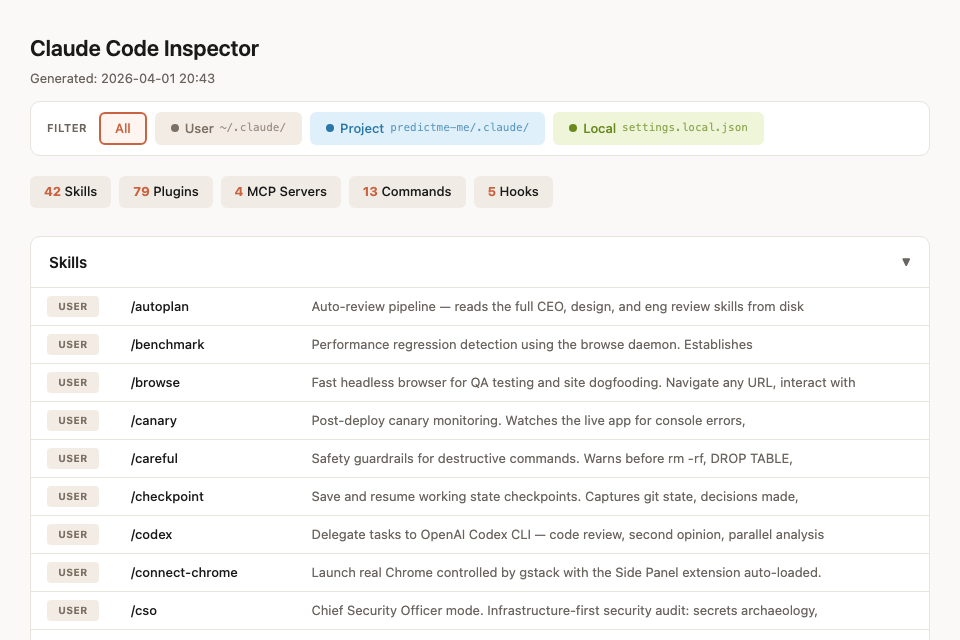
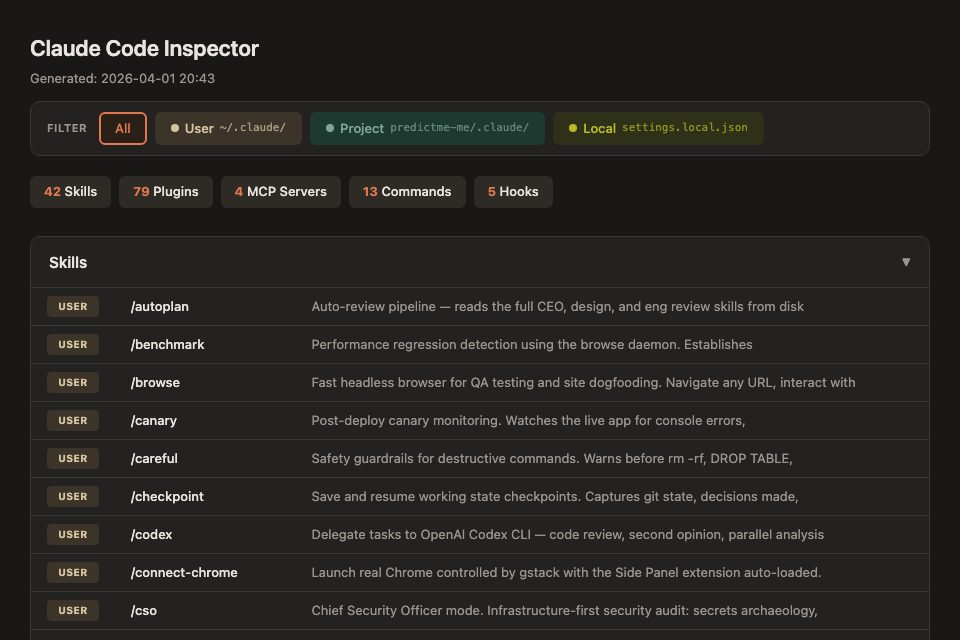
Features
- Scope-aware: shows User (
~/.claude/), Project (.claude/), and Local (settings.local.json) layers - Clickable scope filter — badge counts update dynamically
- Collapsible sections for Skills, Plugins, MCP Servers, Commands, Hooks
- Auto-detects project scope from current working directory
- Light/dark mode follows system preference
- Zero dependencies — pure bash + python3, generates a self-contained HTML file
Install
git clone https://github.com/howardpen9/cc-inspect.git
cd cc-inspect
mkdir -p ~/.claude/skills/cc-inspector
cp inspect.sh SKILL.md ~/.claude/skills/cc-inspector/
chmod +x ~/.claude/skills/cc-inspector/inspect.sh
Usage
In any Claude Code conversation:
/inspect
A browser tab opens with your full Claude Code ecosystem dashboard.
How it works
inspect.shscans~/.claude/and the current project's.claude/directory- Collects skills, plugins, MCP servers, commands, and hooks from all scopes
- Generates a self-contained HTML file at
/tmp/cc-inspector.html - Opens it in the default browser via
open
Requirements
- macOS (uses
opencommand; Linux users can change toxdg-open) - Python 3 (for JSON parsing and YAML frontmatter extraction)
- Claude Code CLI
What it scans
| Source | Path | Scope |
|---|---|---|
| Skills | ~/.claude/skills/ |
User |
| Skills | <project>/.claude/skills/ |
Project |
| Plugins | ~/.claude/plugins/marketplaces/ |
User |
| MCP Servers | settings.json → mcpServers |
User / Project / Local |
| Commands | ~/.claude/commands/ |
User |
| Commands | <project>/.claude/commands/ |
Project |
| Hooks | settings.json → hooks |
User / Project / Local |
繁體中文
功能特色
cc-inspect 是一個 Claude Code skill,執行 /inspect 後會立即在瀏覽器中打開一個 dashboard,展示你所有已安裝的模塊:
- 三層 Scope 感知:區分 User(全域)、Project(專案)、Local(本機覆蓋)
- 可點擊的 Scope 篩選器:切換後數字 badge 即時更新
- 可折疊的分類區塊:Skills、Plugins、MCP Servers、Commands、Hooks
- 自動偵測當前工作目錄的專案 scope
- 亮色 / 暗色模式跟隨系統設定
- 零依賴:純 bash + python3,產生一個 self-contained HTML 檔案
安裝
git clone https://github.com/howardpen9/cc-inspect.git
cd cc-inspect
mkdir -p ~/.claude/skills/cc-inspector
cp inspect.sh SKILL.md ~/.claude/skills/cc-inspector/
chmod +x ~/.claude/skills/cc-inspector/inspect.sh
使用方式
在任何 Claude Code 對話中輸入:
/inspect
瀏覽器會自動打開,展示你的 Claude Code 生態系統全貌。
運作原理
inspect.sh掃描~/.claude/和當前專案的.claude/目錄- 收集所有 skills、plugins、MCP servers、commands、hooks
- 產生 self-contained HTML 檔案到
/tmp/cc-inspector.html - 透過
open指令在瀏覽器中打開
License
MIT
Reviews (0)
Sign in to leave a review.
Leave a reviewNo results found