irasutoya
Health Warn
- License — License: MIT
- Description — Repository has a description
- Active repo — Last push 0 days ago
- Low visibility — Only 7 GitHub stars
Code Warn
- network request — Outbound network request in scripts/irasutoya.py
Permissions Pass
- Permissions — No dangerous permissions requested
No AI report is available for this listing yet.
Claude skill: find, download and place free いらすとや illustrations in one call
irasutoya skill
A Claude skill that searches いらすとや,
downloads the transparent PNGs, and drops them into whatever you're building — slides,
docs, blog posts, web pages, design canvases.
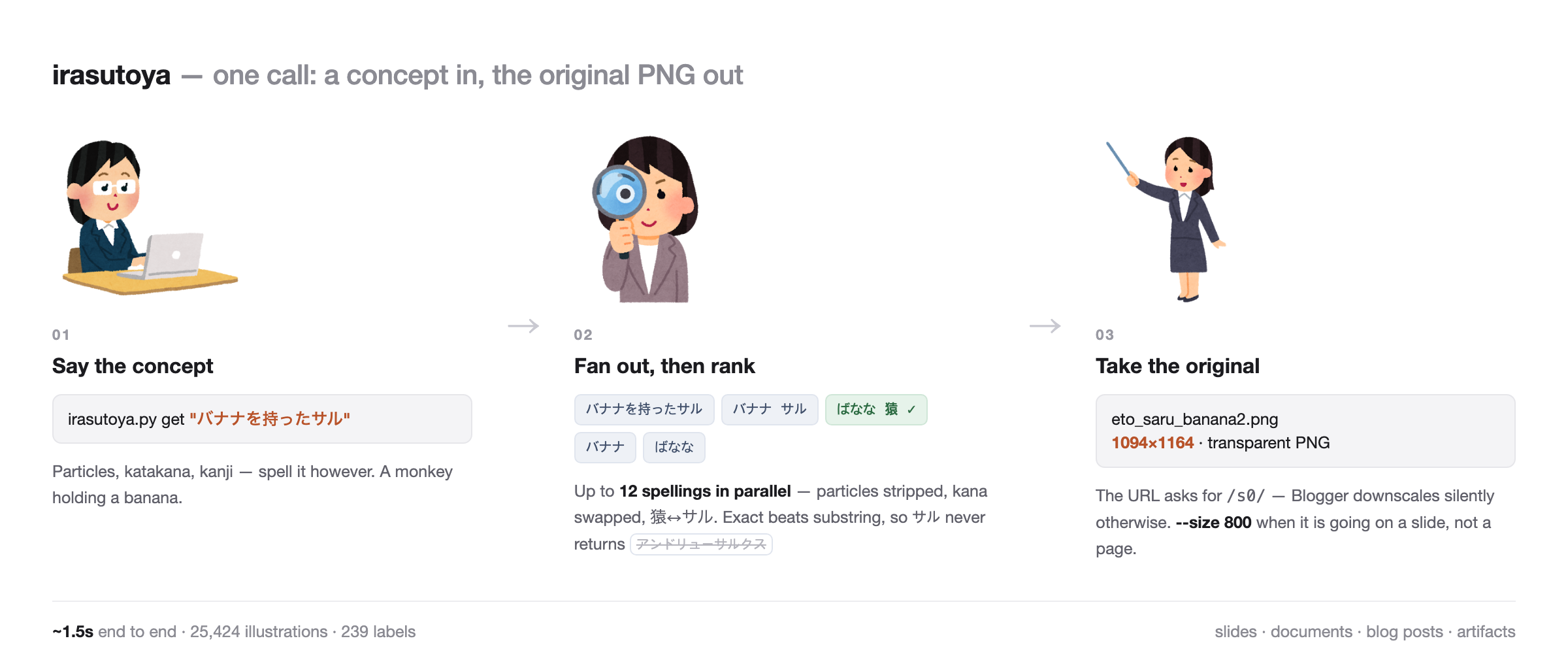
$ python3 scripts/irasutoya.py get "バナナを持ったサル"
tried: バナナを持ったサル | バナナ サル | ばなな 猿 | バナナ   (10 hits)
 1* バナナを持った猿のイラスト(申年・干支) | eto_saru_banana2.png | 動物キャラ,干支
     saved ~/Downloads/irasutoya/eto_saru_banana2.png (389KB 776x800)  src https://...
 2  頭にバナナを乗せた猿のイラスト | eto_saru_banana.png | 動物キャラ,干支
One call: search, rank, download. About 1.5 seconds.
Why it isn't just a fetch
いらすとや runs on Blogger, and its search is picky about orthography. リンゴを食べる
returns nothing; リンゴ 食べる returns the illustration. サル バナナ returns nothing
while 猿 バナナ returns two. Titles pick one of kanji or katakana with no pattern —猿 or サル, 眼鏡 or メガネ.
So the script fans out. For one query it builds up to 12 spellings — particles stripped
(but のり keeps its の), kana converted, kanji/katakana synonyms swapped, verb tails
dropped — fires them in parallel, merges, and ranks. Substring matches are demoted, so
searching サル stops surfacing アンドリューサルクス, a prehistoric mammal.
Pick the concept word. The script handles the spelling.
Queries go to the /feeds/posts/summary endpoint rather than /default — same fields,
about 40% less payload, which matters when a single search fans out to a dozen requests.
Install
git clone https://github.com/hsol/irasutoya ~/.claude/skills/irasutoya
Then just ask for an illustration, or let Claude add one while building something.
Requires Python 3 and curl. No third-party packages. Network access towww.irasutoya.com and blogger.googleusercontent.com.
Claude Code and Claude Cowork
~/.claude/skills/ is read by Claude Code. Cowork does not read it, and its sandbox
denies www.irasutoya.com at the egress proxy, so a clone alone gets you nothing there:
the skill is never discovered, and even if it were, every request would fail withcurl: (56) CONNECT tunnel failed, response 403.
For Cowork, register the same SKILL.md as an account skill. It resolves both questions
at run time rather than assuming a layout:
- script —
scripts/irasutoya.pybeside itself, else~/.claude/skills/irasutoya/scripts/irasutoya.py, else bootstrapped from this repository - shell — it probes the feed endpoint once, and on a denial routes every call through
a host-side process tool (Desktop Commander) so the command runs on the real machine
instead of the sandbox
On that route, pass absolute paths and send downloads into a folder connected to the
session with --out. ~/Downloads is invisible from the sandbox side.
If your administrator allowlists www.irasutoya.com and blogger.googleusercontent.com
for egress, the sandbox shell reaches the site directly and the routing never triggers.
CLI
| Command | |
|---|---|
find "<japanese>" [n] |
search only, 10 candidates |
get "<japanese>" [n] |
search + download the top n (default 1) |
browse "<label>" [n] |
list everything under one label |
random [n] |
n random illustrations out of ~25,000 |
labels ["<substr>"] |
list the site's 239 labels |
b64 <query|path> [px] |
print a data URI (for CSP-restricted pages) |
Flags: --label "<name>" (keep only results carrying that label), --size 800 (smaller
copy), --out <dir>, --get (download what was listed), --open --urls --json.
Output folder: IRASUTOYA_OUT, default ~/Downloads/irasutoya.
Downloads default to the original upload — Blogger quietly downscales whenever the URL
names a size, so the URL names /s0/. Expect ~1100×1160 and up to 1 MB, and pick a size
for the destination: --size 800 for slides and web, 320 for inline icons, 240 or less
before base64, original for print.
Labels are the practical way to keep a set coherent — find "会議" --label 会社 drops the
doctors and the construction crew. Note that Blogger will not AND a label path with q,
so the filtering happens client-side.
Tests
python3 tests/test_search.py
Eleven cases, each one a bug this skill actually had — リンゴを食べる returning nothing,サル surfacing a prehistoric mammal, the の in のり being eaten as a particle. Hits
the live site, takes about 15 seconds.
Licence and the 20-image rule
いらすとや material is free for personal and commercial use, no credit required. Past
20 distinct illustrations in one commercial design it needs a paid licence
(repeats count once).
The skill treats that as information, not a gate. It counts only when there are
commercial signals, mentions it once when you cross the line, and continues if you say
so. Read the terms yourself — the skill is a
reminder, not legal advice.
This repository is not affiliated with or endorsed by いらすとや. It ships no artwork;
it only fetches from the public site. The illustrations remain the property of their
author, みふねたかし.
Licence
MIT for the skill and script. See LICENSE.
irasutoya 스킬 (한국어)
いらすとや에서 일러스트를 찾아 투명 PNG로 받아,
만들고 있는 것에 바로 넣어주는 Claude 스킬입니다. 슬라이드, 문서, 블로그 글,
웹페이지, 디자인 캔버스 어디든.
검색·선별·다운로드가 한 번의 호출로 끝납니다. 약 1.5초.
그냥 fetch 하면 안 되는 이유
いらすとや는 Blogger 위에서 돌아가고, 검색이 표기에 예민합니다. リンゴを食べる는
0건인데 リンゴ 食べる는 나옵니다. サル バナナ는 0건, 猿 バナナ는 2건입니다.
제목이 한자를 쓸지 가타카나를 쓸지도 규칙이 없습니다 — 猿이기도 하고 サル이기도
합니다.
그래서 스크립트가 대신 흩뿌립니다. 질의 하나로 최대 12가지 표기를 만들어
— 조사 제거(단 のり의 の는 보존), 가나 변환, 한자↔가타카나 대응어 치환,
동사 활용 꼬리 제거 — 병렬로 던지고 합쳐서 순위를 매깁니다. 부분일치는 강등해서,サル을 찾을 때 アンドリューサルクス(고대 육식동물)가 1위로 올라오지 않습니다.
개념 단어만 고르세요. 표기는 스크립트가 처리합니다.
설치
git clone https://github.com/hsol/irasutoya ~/.claude/skills/irasutoya
Python 3와 curl만 있으면 됩니다. 외부 패키지 없음.
Claude Code 와 Claude Cowork
~/.claude/skills/ 를 읽는 것은 Claude Code 입니다. Cowork 는 읽지 않습니다.
게다가 Cowork 샌드박스는 egress 프록시에서 www.irasutoya.com 을 막습니다. 클론만
해두면 스킬이 발견되지 않고, 발견돼도 모든 요청이curl: (56) CONNECT tunnel failed, response 403 으로 끝납니다.
Cowork 에서는 같은 SKILL.md 를 계정 스킬로 등록합니다. 레이아웃을 가정하지 않고
실행 시점에 둔 가지를 모두 해결합니다.
- 스크립트 — 자기 옆의
scripts/irasutoya.py, 없으면~/.claude/skills/irasutoya/scripts/irasutoya.py, 그런다음 이 저장소에서 부트스트랩 - 셸 — 피드 엔드포인트를 한 번 프로브해 보고, 막혔 있으면 모든 호출을 호스트 측
프로세스 도구(Desktop Commander)로 돌려 샌드박스가 아닌 실제 머신에서 실행합니다
이 경로에서는 경로를 전부 절대경로로 주고, 다운로드는 --out 으로 세션에 연결된
폴더에 받습니다. ~/Downloads 는 샌드박스에서 보이지 않습니다.
관리자가 www.irasutoya.com 과 blogger.googleusercontent.com 을 egress 허용목록에
넣어 주면 샌드박스 셸이 직접 닿아 이 우회 자체가 발동하지 않습니다.
라이선스와 20장 규칙
いらすとや 소재는 개인·상용 모두 무료이고 크레딧 표기 의무도 없습니다. 다만
한 상용 디자인에 21장부터는 유료 라이선스가 필요합니다(중복은 1장으로 계산).
스킬은 이걸 차단이 아니라 정보로 다룹니다. 상용 신호가 보일 때만 세고, 선을 넘는
순간 한 번만 알리고, 그대로 가겠다고 하면 그대로 갑니다. 약관은
직접 확인하세요 — 스킬은 알림이지 법률 자문이 아닙니다.
이 저장소는 いらすとや와 무관하며 승인받지 않았습니다. 일러스트를 포함하지 않고
공개 사이트에서 받아올 뿐입니다. 저작권은 저자 みふねたかし에게 있습니다.
Reviews (0)
Sign in to leave a review.
Leave a reviewNo results found