outline-skill
Health Warn
- License — License: MIT
- Description — Repository has a description
- Active repo — Last push 0 days ago
- Low visibility — Only 5 GitHub stars
Code Fail
- os.homedir — User home directory access in bin/cli.mjs
- network request — Outbound network request in bin/cli.mjs
- os.homedir — User home directory access in scripts/outline-client.mjs
- process.env — Environment variable access in scripts/outline-client.mjs
- network request — Outbound network request in scripts/outline-client.mjs
Permissions Pass
- Permissions — No dangerous permissions requested
No AI report is available for this listing yet.
An open-source Agent Skill and CLI tool for managing and formatting documentation in Outline knowledge base
outline-skill
An open-source Agent Skill and CLI tool for managing, formatting, and organizing notes and knowledge base documentation in Outline.




English | 简体中文 · Outline · Agent Skills · Discussions
中文用户:用于 Outline 知识库的开源 Agent Skill 与 CLI 工具,规范排版并打通知识沉淀流程 → 查看中文说明
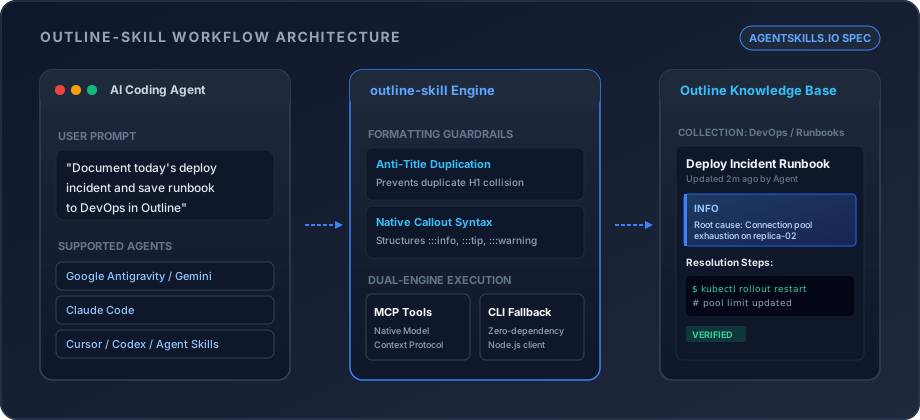
- Standard Agent Skill Specification — Fully compliant with the
agentskills.iostandard, discoverable by Antigravity, Claude Code, Cursor, and Codex - Outline Formatting Guardrails — Eliminates duplicate titles, structures native callouts (
:::info,:::tip), and fixes table alignments - Dual-Engine Architecture — Uses native MCP tools when available and transparently falls back to a zero-dependency Node.js CLI
npx skills add huangy7/outline-skill -g
Needs: Node.js >= 18 and an Outline API key (Outline -> Settings -> Account -> API Tokens). Works with Google Antigravity, Claude Code, Cursor, or standalone CLI.
Disclaimer: outline-skill is an open-source community project and is not officially affiliated with Outline or General Outline Inc.
Why outline-skill?
When AI coding agents interact with knowledge bases directly through raw markdown, three common issues arise:
- Title Collisions: Agents frequently repeat
# Titlewithin documents that already have a dedicated title field in Outline, resulting in ugly duplicate headings. - Broken Callout Conventions: Agents default to blockquotes (
> Note) instead of Outline's native callout blocks (:::info,:::tip,:::warning,:::danger). - MCP Server Dependency: Many setups do not have an Outline MCP server pre-configured.
outline-skillprovides a standalone zero-dependency CLI fallback that works instantly.
Key Features
- Standard Agent Skill Specification: Fully compliant with
agentskills.iostandard, discoverable bynpx skillsand modern AI coding assistants. - Outline Formatting Guardrails:
- Automatically eliminates title duplication (prevents awkward leading
# Titlecollision). - Natively structures Outline callouts (
:::info,:::tip,:::warning,:::danger). - Ensures proper language tagging for code blocks and clean table alignments.
- Automatically eliminates title duplication (prevents awkward leading
- Dual-Engine Architecture:
- Native MCP Support: Seamlessly leverages Outline's built-in Model Context Protocol tools (
list_documents,create_document, etc.) if configured. - Zero-Dependency CLI Fallback: Bundles a standalone Node.js client (
scripts/outline-client.mjs) using nativefetch(Node 18+) that works out-of-the-box without requiring an MCP server.
- Native MCP Support: Seamlessly leverages Outline's built-in Model Context Protocol tools (
- Intelligent Knowledge Workflows:
- Automatically transforms chat, debugging, and troubleshooting sessions into structured runbooks.
- Checks for existing notes before creation to prevent redundant pages.
- Automatically files documents into appropriate collections (knowledge bases).
Installation
Option 1: Universal Install via skills CLI (Recommended)
Install globally across supported AI agents using the community standard skills tool:
npx skills add huangy7/outline-skill -g
Or install for a specific agent:
# For Claude Code
npx skills add huangy7/outline-skill --agent claude-code

# For Google Antigravity / Gemini CLI
npx skills add huangy7/outline-skill --agent gemini-cli
Option 2: Interactive Setup Wizard
Run the interactive setup wizard to configure credentials and auto-install into local agent directories:
npx outline-skill setup
The wizard will prompt for:
- Outline Instance URL (e.g.,
https://note.yourdomain.comorhttps://app.getoutline.com) - API Token (created in Outline under
Settings->Account->API Tokens) - Automatically validates connection via
auth.infoand saves configuration.
Option 3: Manual Clone
Clone directly into your agent's skills directory:
# For Google Antigravity
git clone https://github.com/huangy7/outline-skill.git ~/.gemini/config/skills/outline-wiki

# For Claude Code
git clone https://github.com/huangy7/outline-skill.git ~/.claude/skills/outline-wiki

# For Universal Agent Skills
git clone https://github.com/huangy7/outline-skill.git ~/.agents/skills/outline-wiki
Configuration
Credentials can be provided through either environment variables or a configuration file.
Environment Variables
export OUTLINE_URL="https://note.yourdomain.com"
export OUTLINE_API_KEY="ol_api_xxxxxxxxxxxxxxxxxxxx"
Configuration File
Create ~/.config/outline-skill/config.json:
{
  "url": "https://note.yourdomain.com",
  "token": "ol_api_xxxxxxxxxxxxxxxxxxxx"
}
Usage in Conversations
Once installed, instruct your AI Agent naturally:
- "Please summarize our Docker upgrade process and create a runbook in my Outline DevOps collection."
- "Search Outline for our database backup policy."
- "Format and update the troubleshooting note for container networking in Outline."
- "Review our meeting discussion and draft a specification note in Outline."
The agent will automatically load the skill, check existing collections and documents, apply Outline-tailored formatting, and save the result.
Standalone CLI Usage
The bundled client can also be invoked directly from the terminal or in CI/CD scripts:
# Check authentication
node scripts/outline-client.mjs auth:check

# List collections
node scripts/outline-client.mjs collections:list

# Search documents
node scripts/outline-client.mjs documents:search --query "Docker"

# Create a document
node scripts/outline-client.mjs documents:create \
  --title "Server Maintenance Guide" \
  --collection "<collection-id>" \
  --file "./guide.md"

# Append to an existing document
node scripts/outline-client.mjs documents:update \
  --id "<document-id>" \
  --append "### Changelog\n- Updated on 2026-10-09"
Project Structure
outline-skill/
├── SKILL.md                 # Agent Skills specification entrypoint
├── package.json             # npm package & bin configuration
├── bin/
│   └── cli.mjs              # Interactive setup wizard
├── scripts/
│   └── outline-client.mjs   # Standalone Node.js Outline REST API client
├── references/
│   ├── formatting-guide.md  # Outline markdown conventions & callouts
│   └── workflows.md         # Document management workflows
├── assets/
│   └── demo.svg             # Workflow architecture diagram
├── LICENSE                  # MIT License
├── README.md                # English Documentation
└── README.zh-CN.md          # Chinese Documentation
Community
- GitHub Discussions: Ask questions, discuss features, and share workflows
- Issues: Report bugs or submit feature requests
Contributing
Contributions, bug reports, and suggestions are welcome. Please open an issue or pull request on GitHub.
Acknowledgements
- Special thanks to Megaphone (web checker) for providing valuable launch-readiness audits and recommendations (see #3) that helped refine this project's landing documentation and workflow showcase.
License
MIT License. See LICENSE for details.
Reviews (0)
Sign in to leave a review.
Leave a reviewNo results found