speedrun
Health Pass
- License — License: Apache-2.0
- Description — Repository has a description
- Active repo — Last push 0 days ago
- Community trust — 64 GitHub stars
Code Pass
- Code scan — Scanned 12 files during light audit, no dangerous patterns found
Permissions Pass
- Permissions — No dangerous permissions requested
No AI report is available for this listing yet.
Fastest cross-platform E2E Automation for Mobile
Speedrun
The fastest end-to-end test runner for mobile apps.
Black-box UI tests for Android and iOS, written in plain YAML.



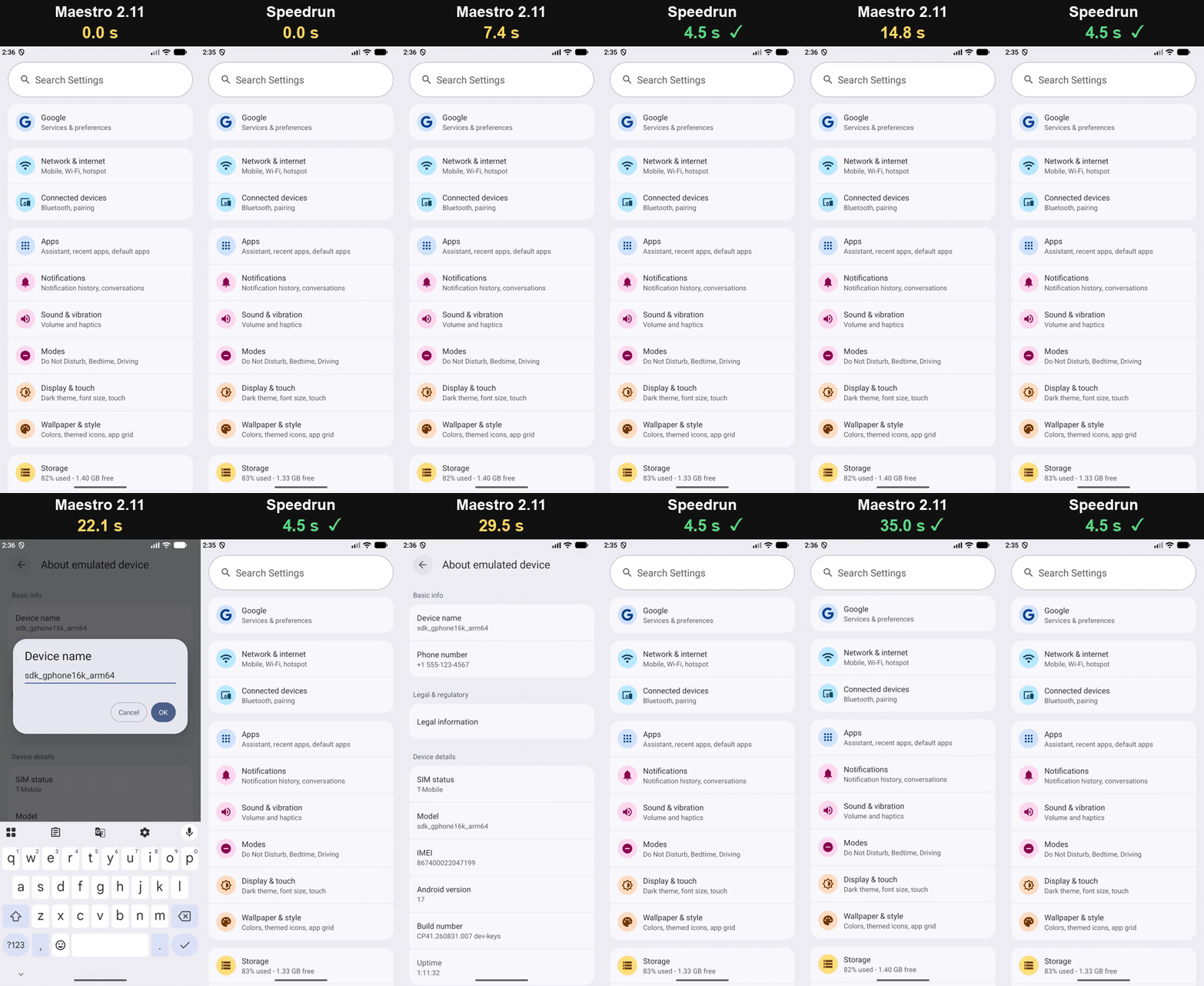
The same 15-step test of Android's Settings app (flow) on one emulator, in real time.
Speedrun tests your app the way a user uses it: it taps, types, scrolls and checks what is on
screen, from outside the app, with nothing added to it. A test is a short YAML file:
appId: com.example.app
---
- launchApp
- tapOn: "Sign in"
- inputText: "[email protected]"
- tapOn: "Continue"
- assertVisible: "Welcome"
Why Speedrun?
- Fast. A tap that opens a screen takes about 0.3 s, and a run starts in 1–3 s. The same
user journey takes 20 s with Speedrun on Android, 59 s with Appium, 66 s with
maestro-runner and 127 s with Maestro (benchmark). - Waits for the app, not the clock. Each step starts the moment the app has finished
changing: no sleeps, no comparing screenshots. Screens that never stop moving (spinners,
tickers, carousels) don't hold it up. - Fewer flaky failures. It doesn't tap a popup that is still sliding in or a button behind
a loading overlay, and it scrolls an element out from under a sticky footer or the keyboard
before tapping it, so the same flow passes on a small phone. - Black-box. Any build of your app, release builds included, through the platform's
accessibility layer. Tested on native and React Native apps. - One file. The Android and iOS agents are built in: no JVM, no drivers to install, no
SDK in your app. - Ready for CI. JUnit and HTML reports, sharding across devices, tags, and a debug folder
with screenshots and logs for every failure. It answers the "isn't responding" dialogs a
freshly booted emulator puts up, and reconnects to its agent if the agent crashes.
Quick start
Install with Homebrew (macOS on Apple silicon, Linux x86_64):
brew install hubastard/tap/speedrunOr with the install script:
curl -fsSL https://raw.githubusercontent.com/hubastard/speedrun/main/install.sh | bash- The script installs into
~/.speedrunand adds it to your PATH. For another folder or a
specific release, putSPEEDRUN_DIR=/usr/local/binorSPEEDRUN_VERSION=v0.2.0in
front ofbash. - Speedrun is one file, with its Android and iOS agents built in. You can also download it
from the releases and put it anywhere
on your PATH. - Speedrun tells you when a new release is out. Update with
brew upgrade speedrun, orspeedrun updateif you used the script. - To build it yourself, see Building from source.
- The script installs into
Write a flow (how), or use the ones you have:
# login.yaml
appId: com.example.app
---
- launchApp:
    clearState: true
- tapOn: "Email"
- inputText: "[email protected]"
- tapOn: "Password"
- inputText: ${PASSWORD}
- tapOn: "Sign in"
- assertVisible: "Welcome"
Run it on a running Android emulator or device, or a booted iOS simulator:
speedrun test login.yaml -e PASSWORD=secret                  # Android
speedrun test -p ios login.yaml -e PASSWORD=secret           # iOS simulator
speedrun test flows/ --format junit --output report.xml      # a whole suite, for CI
In a terminal you see each step live, with its time. When a step fails, Speedrun shows what
was on screen, and where it saved the screenshot and logs.
Already using Maestro?
Speedrun reads the Maestro flow format: your flow files, config.yaml,
tags, environment variables and scripts run as they are, and speedrun test takes the same
options as maestro test and writes the same reports. Switching is a one-word change:
maestro test flows/     # before
speedrun test flows/    # after
Everything runs as written except Maestro's AI commands (assertWithAI and the like). The
details, and the few differences you may notice:
Maestro compatibility.
Explore an app with an AI agent
A session keeps Speedrun connected to the device between commands, so an AI coding agent can
drive the app a step at a time, read the screen in a few lines, and save the steps that worked
as a flow for CI:
speedrun session start --app com.example.app
speedrun look                          # @5 Field #email, @7 Button "Sign in" ...
speedrun do 'tapOn: @5' 'inputText: "[email protected]"' 'tapOn: @7'
speedrun session save flows/sign-in.yaml
Each answer says how each command went and what changed on screen, in a few lines: an agent
pays a few hundred tokens per step, not a whole accessibility tree. See
Sessions, and the comparison with other agent tools.
As an MCP server
speedrun mcp serves the same as Model Context Protocol
tools (session_start, look, run, save_flow...), for agents that take tools from MCP
servers. With Claude Code, after installing Speedrun:
claude mcp add speedrun -- ~/.speedrun/speedrun mcp              # this project
claude mcp add --scope user speedrun -- ~/.speedrun/speedrun mcp # every project
Other MCP clients (Claude Desktop, Cursor, ...) take a server in their JSON configuration:
{
  "mcpServers": {
    "speedrun": { "command": "/Users/you/.speedrun/speedrun", "args": ["mcp"] }
  }
}
Use the binary's full path: an MCP client may not start servers with your shell's PATH. Then start an emulator or simulator and ask the agent to test something like:
Start a speedrun session for com.example.app, sign in as [email protected], and save the flow to flows/sign-in.yaml
Built against an app made to be hard to test
Speedrun is developed against Speedrun Bench, a React Native app built to trip up
UI test tools: screens that never stop moving (looping Lottie and Reanimated animations,
tickers, marquees, shimmering skeletons, carousels that page on their own), a button that
turns on late, a banner that shifts the layout, a loading overlay over a keypad, popups that
arrive late or one after another, the keyboard over the checkout button, lists that load
more as you scroll, native alerts and permission prompts. Its 19 flows cover every command
and selector, and are Speedrun's regression suite on Android and iOS; a journey through the
app also runs on GitHub Actions' emulator and simulator after every push.
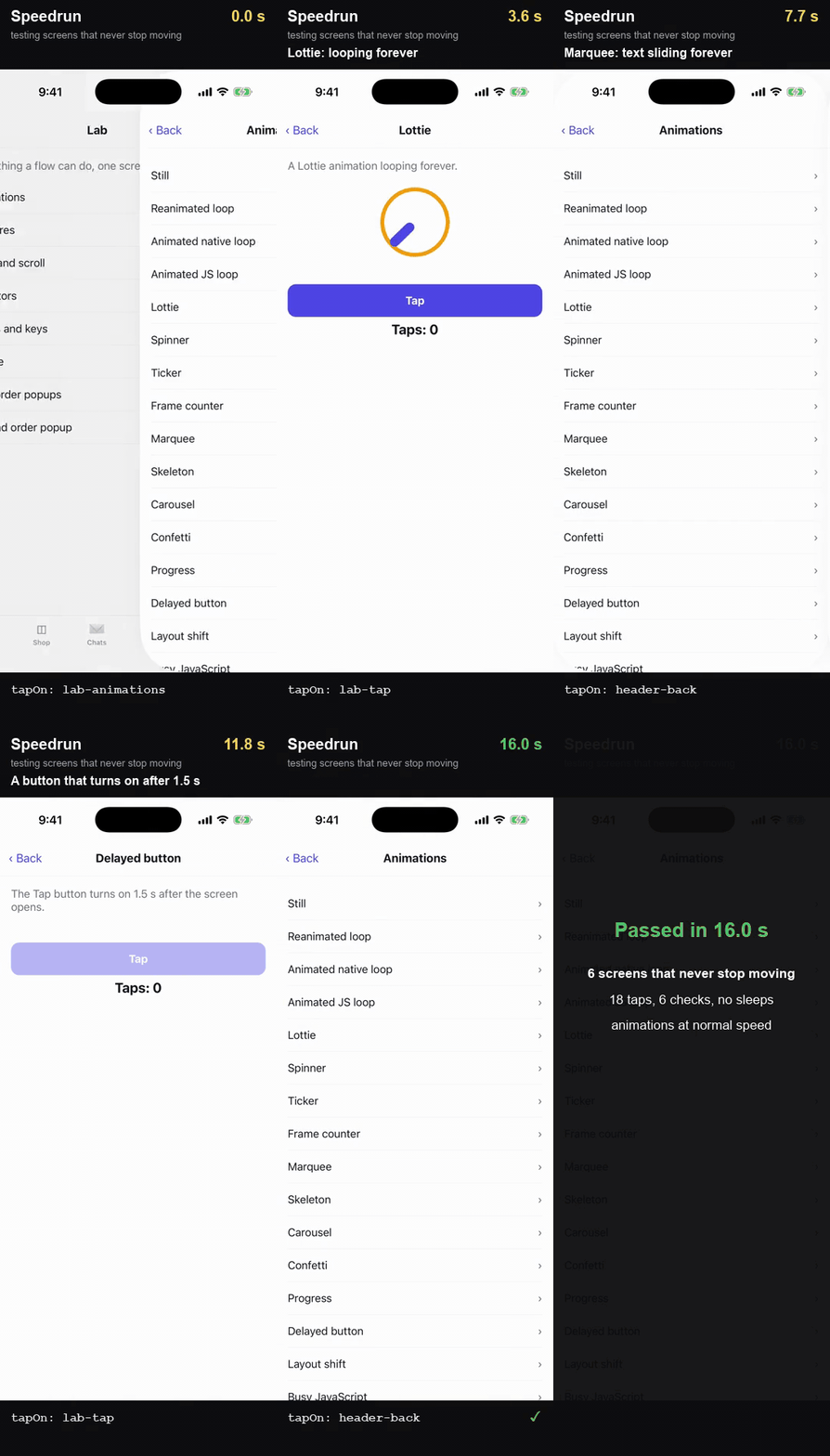
Six of those screens on the iOS simulator, in real time, with animations at their normal speed: Speedrun taps each screen's button three times while it moves, then checks the count. No sleeps.
Waiting for a still screen would never end on such an app. Speedrun waits until what it acts
on has settled and leaves endless animations out of that check; it also waits for a disabled
button to turn on, a loading overlay to go and a popup to finish sliding in before it taps.
Benchmark
Speedrun Bench's 19 flows, run by Speedrun and Maestro from the same files:
| Speedrun | Maestro 2.11 | Speedrun is | |
|---|---|---|---|
| Android emulator, whole suite | 5 min 55 s, 19/19 passed | 46 min 56 s, 16/19 passed | |
| on the 16 flows both pass | 5 min 4 s | 43 min 58 s | 8.7x faster |
| iOS simulator, whole suite | 9 min 33 s, 19/19 passed | 40 min 19 s, 8/19 passed | |
| on the 8 flows both pass | 2 min 34 s | 7 min 42 s | 3.0x faster |
Maestro's time for a flow it fails stops at the failure. Estimating the whole suite as if it
had finished those flows, Speedrun is about 8.0x faster on Android and 4.8x on iOS. On native
screens, the system Settings app (bench/settings), Speedrun is 10.7x
faster on Android and 2.9x on iOS.
Measured on an Apple M1 Pro (16 GB), with an Android 17 emulator and an iPhone 17 Pro
simulator (iOS 26.2): Speedrun's current code on 2026-10-29, the other tools on 2026-10-27
(they have not changed since). Speedrun's iOS numbers are with SPEEDRUN_REDUCE_MOTION=1 (the
simulator's Reduce Motion on during the run; without it this suite took 585 s instead of
573 s) and, as Speedrun always runs iOS apps, their animations 10x faster (UIKit's animation
speed setting). Per-flow results, why Maestro failed, and how to rerun it all:
bench/app.
Against other black-box tools
One user journey on Speedrun Bench (sign in with a code, search the shop and fill a cart, set
a PIN under a loading overlay, scroll a long list), written for each tool the way its tests
are usually written: bench/journey. Each tool ran it three times after a
warm-up; the time is the median of its passing runs, its start-up included.
| Tool | Android emulator | iOS simulator |
|---|---|---|
| Speedrun | 20.3 s, 3/3 passed | 25.5 s, 3/3 passed |
| Appium 3.9 | 59.4 s, 3/3 passed | 94.1 s, 3/3 passed |
| maestro-runner 1.1.29 | 65.9 s, 2/3 passed | 49.6 s, 3/3 passed |
Argent 0.31 (argent e2e) |
81.5 s, 3/3 passed | 72.2 s, 3/3 passed |
| XCUITest | 81.2 s, 3/3 passed | |
| Maestro 2.11 | 126.5 s, 2/3 passed | 113.1 s, 2/3 passed |
Speedrun runs the journey 2.9x faster than Appium on Android and 3.7x on iOS, 3.2x (Android)
and 1.9x (iOS) faster than maestro-runner, 4.0x (Android) and 2.8x (iOS) faster than Argent's
e2e runner, 3.2x faster than XCUITest, and 6.2x (Android) and 4.4x (iOS) faster than Maestro.
Speedrun and Argent ran on 2026-10-29, maestro-runner on 2026-10-28, the others on
2026-10-27, on the same machine; Speedrun on iOS with SPEEDRUN_REDUCE_MOTION=1 (26.6 s
without) and the app's animations 10x faster, as always.
It also passed every run, as it passes all 19 flows of the app's test suite on both
platforms. Maestro failed one journey run on each platform (a tap lost on the product page on
iOS, the long-list scroll out of time on Android) and 3 of the suite's 19 flows on Android, 11
on iOS; maestro-runner's long-list scroll ran out of time in one Android run. The journey leaves out one step of the suite that the other tools could not pass
reliably: tapping a checkbox right after scrolling to it, a tap Maestro lost in all 4 of its
iOS runs and XCUITest in 1 of 4.
For AI agents
The steps an agent takes to try out a feature of an app, driven through each agent tool's MCP
server with the loop its documentation recommends, the calls scripted rather than chosen by a
model: on Speedrun Bench, launch it, skip the onboarding, search the shop, open a product and
check what shows; on a neutral app another team made to benchmark its own agent, fill in and
submit a login form (bench/agents). The time is the median of three runs after
a warm-up, session set-up included; the tokens are what the tool answered, which the agent
reads.
| Tool | Android emulator | iOS simulator | Neutral app, Android / iOS |
|---|---|---|---|
| Speedrun | 4.5 s, ~1,590 tokens | 7.8 s, ~1,270 tokens | 4.0 s / 6.8 s |
| agent-device 0.21 | 8.2 s, ~2,260 tokens | 12.5 s, ~1,680 tokens | 4.9 s / 11.3 s |
| Argent 0.31 | 13.0 s, ~11,370 tokens + 10 screenshots | 11.8 s, ~6,250 tokens + 10 screenshots | 11.9 s / 10.5 s |
Every run passed, each tool with their default settings. On iOS that means Speedrun runs the app's animations
10x faster, the others at normal speed. With all three
at normal speed, Speedrun takes 11.3 s on Speedrun Bench and 8.5 s on the neutral app; with
all three at Speedrun's 10x, agent-device takes 11.5 s and 10.7 s, Argent 11.7 s and 10.4 s.
On Android all three ran with the system's animations off.
How it works
Speedrun runs a small agent on the device. It reads the screen in milliseconds, without
screenshots, and tells exactly when the app has settled, so each step starts the moment the
app is ready instead of after a fixed wait.
Requirements
- macOS on Apple silicon, for Android and iOS, or Linux x86_64, for Android (CI
runners included). The install script picks the right package. - Android: the platform tools (
adbon your PATH) and a running emulator, or a device
with USB debugging on. - iOS: Xcode and a booted simulator. Real iOS devices are not supported yet. A release's
iOS agent is built with one Xcode (its release notes name it); with a much different Xcode,
build from source. curl, for flow scripts that make HTTP requests.
Documentation
- Writing flows: a flow's steps, finding elements, every command, for
someone new to the format. - Command line: options, environment variables, exit status.
- Sessions: drive an app a command at a time, from an AI agent or a
terminal, and save the steps as a flow. - Maestro compatibility: what is supported, and the
differences you may notice. - Troubleshooting.
- Benchmark: the app, its flows, per-flow results.
Building from source
You need JDK 17, the Odin compiler and a C compiler (cc), plus
Xcode for iOS support.
git clone https://github.com/hubastard/speedrun.git
cd speedrun
./build.sh      # builds ./speedrun (Android support only without Xcode)
./package.sh    # optional: a release archive in dist/
For iOS only, without a JDK: SPEEDRUN_NO_ANDROID=1 ./build.sh.
How Speedrun works inside: DEVELOPMENT.md. What is still slow:
TO_IMPROVE.md.
Status
Speedrun is young and changes fast. If a flow that passes with Maestro fails with Speedrun,
please open an issue with the flow and the output of SPEEDRUN_DEBUG=1 speedrun test ….
License
Speedrun is licensed under the Apache License 2.0. It includes
QuickJS-ng (MIT),
Datafaker's English word lists (Apache-2.0) and
stb_image (public domain or MIT): see NOTICE.
Reviews (0)
Sign in to leave a review.
Leave a reviewNo results found