iphone-cli
Health Pass
- License — License: MIT
- Description — Repository has a description
- Active repo — Last push 0 days ago
- Community trust — 20 GitHub stars
Code Fail
- rm -rf — Recursive force deletion command in install.sh
Permissions Pass
- Permissions — No dangerous permissions requested
No AI report is available for this listing yet.
Let AI agents read and operate any app on a real iPhone through the accessibility tree. No XCUITest, WebDriverAgent or Xcode signing.
iphone-cli (iph)
A CLI and MCP server that lets AI agents read and operate any app on a real iPhone through its accessibility tree. No XCUITest, no WebDriverAgent, no Xcode signing: it talks directly to the Apple developer services Xcode itself uses. Sequences you run often become scripts (JavaScript) that execute in one call, without a round trip to the model between steps.
Built on the principle of Poki. No Poki code is used; this is a new implementation from the behaviour Poki's documentation describes and from experiments on a device. Device communication relies on idevice (MIT).
한국어: README.ko.md
Requires a real iPhone running iOS 27 or later (macOS or Windows, over USB or Wi-Fi). Simulators and iOS 26 or earlier are not supported.
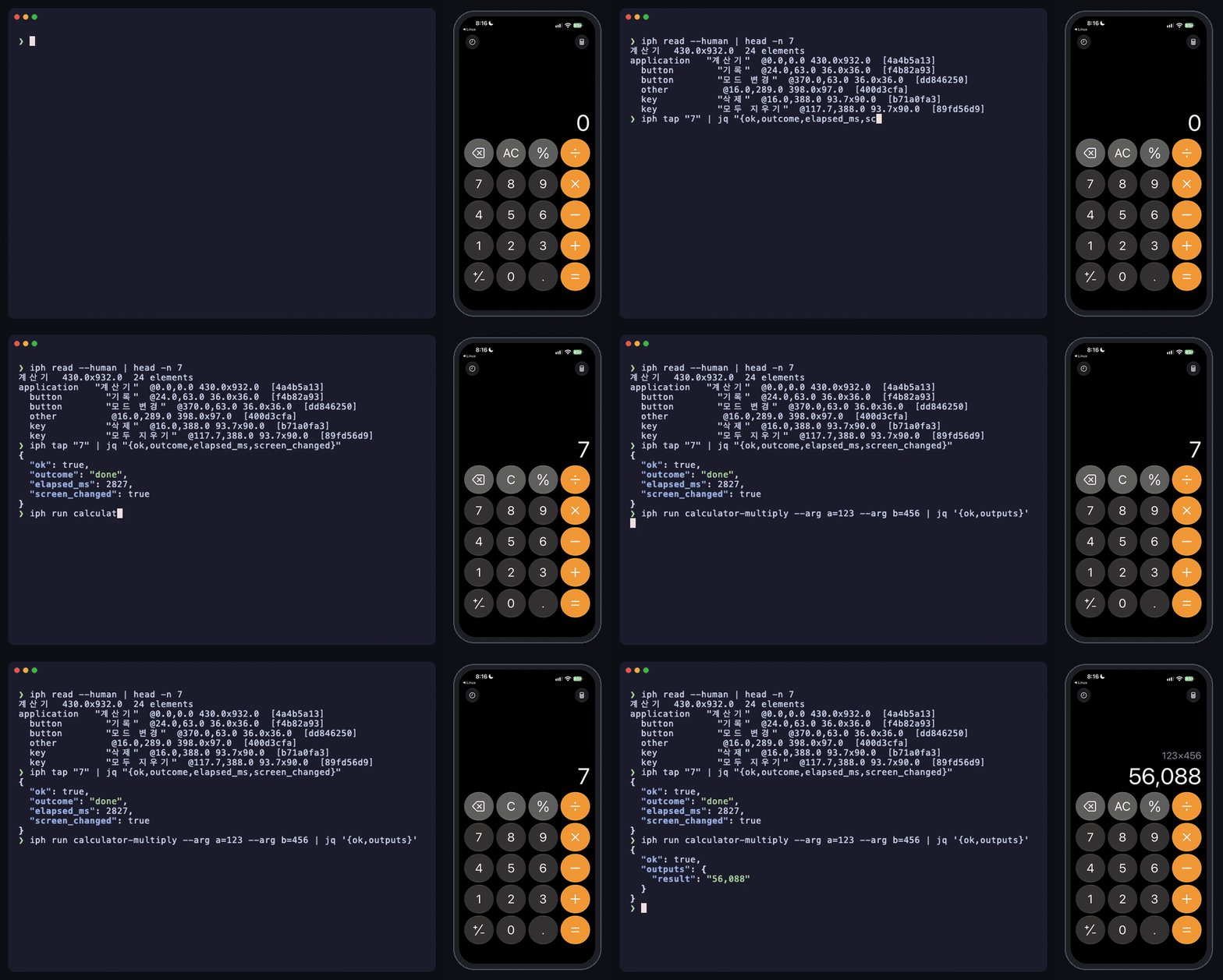
$ iph read --human
Settings  430x932  15 elements
application   "Settings"  @0,0 430x932
  header        "Settings"  @20,119.3 53.7x37
  switch        "Airplane Mode" = "0"  @20,489.3 390x49.3
  button        "Wi-Fi, HomeNet"  @20,538.7 390x49.3
  button        "General"  @20,700 390x49.3
  …

$ iph tap "General"
{"ok":true,"outcome":"done","elapsed_ms":1752,"sent":true,"verified":true,"screen_changed":true,…}
Scope
| Host | macOS, Windows 10/11 (x64) |
| Device | A real iPhone, iOS 27 or later (verified on one iPhone 15 Pro Max with iOS 27.0.1 only, Korean interface). Touch and text input go through the phone's screen-sharing service (com.apple.coredevice.displayservice, new in iOS 27), so input is not expected to work on iOS 26 or earlier (not tried) |
| Connection | USB or the same Wi-Fi (verified over Wi-Fi on the Mac, over USB on Windows) |
| Out of scope | Simulators, Android, Linux hosts, landscape |
On Windows, doctor, reading, touch and scripts were checked with one iPhone19,4 on iOS 27.2 over USB.
Install
Neither Rust nor Xcode is needed. On a Mac it is one line in Terminal (it uses only tools macOS ships: curl, tar, shasum).
curl -fsSL https://raw.githubusercontent.com/HyunSeob/iphone-cli/main/install.sh | sh
iph setup                     # walks through what the phone needs
It downloads the universal binary (Apple silicon and Intel) from the latest release, checks its checksum and puts it at ~/.local/bin/iph. IPH_INSTALL_DIR picks another folder and IPH_VERSION=v0.1.0 a specific version. On Windows, download iph-windows-x86_64.zip from the releases and put iph.exe in a folder on your PATH.
- Mac: plug the phone in and tap Trust on it; that pairs it.
- Windows: Apple's device service must be installed: the Apple Devices app from the Microsoft Store, or just the service with
winget install Apple.AppleMobileDeviceSupport. Then plug the phone in and tap Trust. - Developer disk image: when the phone lacks it,
iph doctorinstalls it. It uses Xcode's copy when the Mac has one, and otherwise fetches one once from the public doronz88/DeveloperDiskImage repository (about 18 MB, pinned commit and SHA-256). The iph repository contains no Apple files.
With Rust 1.88 or later, the crate on crates.io installs the same iph (building it takes a few minutes; on Windows it needs Visual Studio Build Tools (C++)):
cargo install iphone-cli # ~/.cargo/bin/iph
Or from a checkout:
git clone https://github.com/HyunSeob/iphone-cli
cd iphone-cli
cargo install --path .        # ~/.cargo/bin/iph
First-time setup
iph setup runs iph doctor, says in one line what to do on the phone for each failed check, and checks again. An agent can read checks[].user_action from iph doctor (JSON) and guide the user.
| Check | Required | What it is |
|---|---|---|
pairing |
yes | The Mac holds a pairing record for the phone. If not: connect by USB and tap Trust |
connection |
yes | The phone is visible over USB or the same Wi-Fi |
developer_mode |
yes | Settings → Privacy & Security → Developer Mode. If it is off, iph doctor makes that switch appear |
developer_disk_image |
yes | Source of the accessibility, display and input services. When missing, iph doctor fetches and installs it (see Install) |
screen_unlocked |
yes | The phone is unlocked. Only lockdown's word decides a lock |
settings_in_front |
yes | Settings comes to the front (fails when something covers it). When the screen cannot be read, accessibility_tree fails instead |
accessibility_tree |
yes | Screen elements can really be read |
touch_input |
yes | Scrolls the Settings list down one step and back to see that touch lands (--no-touch-test skips it) |
wifi |
recommended | Wireless lockdown flags and the phone's usbmuxd Network entry (see below) |
auto_lock |
recommended | Auto-Lock → Never for long sessions |
do_not_disturb |
info | Shown only while Do Not Disturb from iph dnd on is still on |
Which checks proved truly required, and what could not be verified, is in docs/onboarding.md (Korean).
Wi-Fi setup and troubleshooting
The same Wi-Fi alone is not enough. On supported devices, EnableWifiConnections and EnableWifiDebugging in lockdown's com.apple.mobile.wireless_lockdown domain need to be true for wireless discovery. With either disabled, the phone may not advertise Bonjour's _apple-mobdev2._tcp.local. service, so usbmuxd has no Network entry even on the same subnet.
- Connect by USB, unlock and trust the computer, then run
iph setuporiph doctorto readSupportsWifi,SupportsWifiSyncingand both enable flags. Both commands leave wireless flags unchanged by default. - To explicitly enable wireless setup, run
iph setup --fix-wifioriph doctor --fix-wifi(iph_doctorMCP:fix_wifi: true). If either support flag istrue, only enable flags explicitly reported asfalseare set totrueand read back. Unsupported or unknown values are not changed. Add--humanto doctor for terminal output; setup keeps its interactive, human-readable output. - After enabling the flags, setup briefly checks (up to 4 seconds) for the same phone's usbmuxd
Networkentry.checks[].auto_fixedrecords confirmed flag changes;wifiremains a warning until the network entry appears. Wi-Fi is optional, so that warning does not prevent USB readiness. - If flags are off, doctor names them. Manual alternatives are Finder → select iPhone → “Show this iPhone when on Wi-Fi” (Apple Devices on Windows), and Xcode → Devices and Simulators → “Connect via network”. If an automatic write is rejected or cannot be verified,
detailcontains the key and error; check trust/unlock and retry, or use those controls. - If both flags are on but
Networkis absent, check the same Wi-Fi subnet, AP/client isolation and blocked mDNS/Bonjour (_apple-mobdev2._tcp.local.). Run doctor again after a short wait. Unreadable flags and failed usbmuxd queries are reported separately rather than assumed to mean disabled flags or a subnet problem.
Notification banners take taps near the top of the screen. Banners cover the top of the screen and are not part of the accessibility tree. A tap near the top then lands on the banner and opens another app (this happened once during development). For long unattended work turn Do Not Disturb on with iph dnd on, and put it back with iph dnd off afterwards. Details: Do Not Disturb below.
Commands
Every command prints JSON; add --human for people. The device is chosen by --udid, then IPH_UDID, then udid in ~/.config/iph/config.toml, then the only connected phone. With several phones and none chosen, you get an error with the list.
| Command | Does |
|---|---|
iph devices |
Connected phones, iOS version, connection, readiness |
iph setup / iph doctor |
Preparation and checks |
iph read [--app] [--all] [--full] [--raw] [--max-age ms] |
Elements on screen. --all includes off-screen ones, --full adds identifiers (about 0.5 s more), --raw attaches every numbered attribute |
iph find <selector> |
Elements matching a selector |
iph tap <selector | x,y> [--long ms] [--double] |
Tap the middle of an element, or a point |
iph swipe <up|down|left|right | x1,y1,x2,y2> [--duration ms] [--drag] |
Swipe. --drag slows to a stop before lifting, so nothing coasts |
iph scroll <up|down> [--until selector] [--max N] |
One step, or until an element shows |
iph type <text> [--clear] [--submit] |
Paste text into the field that has the keyboard (any language, emoji). The clipboard is put back and the field's value checked |
iph key <key> |
return, esc, tab, cmd+a … |
iph button <home|lock|volume_up|volume_down> |
Hardware buttons |
iph launch <bundle id | name> [--restart] / iph apps |
Launch an app, list apps |
iph screenshot [-o file] |
PNG capture |
iph batch <file | -> |
A JSON array of steps in one call |
iph script <file | -> [--arg k=v] |
Run JavaScript as given (- reads stdin) |
iph run <name> [--arg k=v] / iph scripts |
Run a saved script, list saved scripts |
iph mcp [--tools a,b] |
MCP server on stdio |
iph dnd <on|off|status> |
Turn Do Not Disturb on, put the earlier Focus back, or show the current state |
iph stop |
Stop the resident process for this phone |
Selectors
- A plain string is an exact label:
iph tap "General" label="exact",label~="contains",label/regex/role=button(application, button, switch, text_field, search_field, key, tab, header, text, image, link, adjustable, other)id=…matches the accessibility identifier or the elementidfromiph read;id~=andid/regex/work toovalue="…",value~=…within="<selector>"only inside that element,index=Nthe Nth match (from 0)- Several matches are an
ambiguous_selectorerror with the candidates; nothing is picked for you
Rows labelled "name, value" (as in Settings: "Wi-Fi, HomeNet") also match label="Wi-Fi".
Scripts, MCP and batch also take an object: {label, label_contains, label_regex, value, value_contains, value_regex, role, id, id_contains, id_regex, within, index}.
Results
{"ok": true, "outcome": "done", "elapsed_ms": 1752, "sent": true, "verified": true, "screen_changed": true, "element": {…}}
{"ok": false, "outcome": "not_sent", "error": {"code": "not_found", "message": "…", "hint": "…"}, "elapsed_ms": 1210, "screen_summary": {…}}
outcome |
Meaning | Exit code |
|---|---|---|
done |
Ran to the end. With ok: false: everything was done, but what was looked for is not there (below) |
0, 1 with ok: false |
not_sent |
Nothing reached the phone. Safe to try again | 1 |
unknown |
Input may have reached the phone. Do not resend; read the screen | 2 |
The exit code is 0 only with ok: true. batch, script and run follow the same table (1 when nothing went out). The one ok: false with outcome: "done" is scroll --until that did not find its target: the scrolls did go out, so it is not not_sent; the result has error.code: "not_found", found: false, exit code 1. Trying again is safe, but the screen has moved by those scrolls.
The phone does not acknowledge touch reports. So results separate sent from verified (the screen was read again afterwards), and taps, typing and scrolls report screen_changed. When another app came to the front, app_changed: true is added.
Configuration
# ~/.config/iph/config.toml
udid = "00008130-…"

[dnd]
# focus = "Work"         # a Focus for iph dnd on to switch to instead of Do Not Disturb, by the name the phone shows
# control = "Focus"      # label of the Focus control in Control Center, for a phone not in Korean or English

[daemon]
input_idle_secs = 120    # close the input session after this long unused; 0 closes it after every command
idle_exit_secs = 1800    # the resident process exits after this long without requests
screen_video = false     # also take the screen video while sending input. Touches do not need it, and over Wi-Fi it clogs the tunnel
restart_accessibility = true  # when the phone's accessibility daemon stops answering or answers only with empty readings, end it so the phone starts a new one (takes about 20 s)

[script]
timeout_secs = 300       # how long one script may run (840 at most)
memory_mb = 64           # how much memory a script may hold
Sending input needs the phone to be in "screen sharing" state (an indicator shows at the top of the phone). iph sets that up with the audio stream alone and does not take the screen video (screen_video). For an app that hides its content or warns while the screen is shared, set input_idle_secs = 0: the phone is then in that state only while input is being sent, at the price of 3 to 4 s more per input. Reading does not depend on screen sharing.
iph does not judge what it presses. Pay, send and order buttons are pressed like any other, and input goes to whatever app is in front. What to press is up to the caller.
Do Not Disturb
- On and off:
iph dnd onturns Do Not Disturb on,iph dnd offputs back the Focus that was on before. iph never switches it by itself. - Put back to what: at
onthe Focus that was on (or none) is written to~/Library/Application Support/iph/<udid>.dnd.json, andoffrestores it as it was. If the phone was already in Do Not Disturb, iph leaves it alone; if a person switched to another Focus meanwhile, that one stays. The record outlives the resident process. - How: no service on the phone offers this, so iph does what a person does: pull Control Center down, hold the Focus control, pick the mode in the list, press Home twice. Control Center is therefore visible for a moment, and one switch usually takes 11 to 15 s, or 19 to 36 s when the resident process has just started.
- Needs: the Focus control on Control Center's first page, and Control Center opening while an app is in front. For a phone in a language other than Korean or English, put the names the phone shows in
controlandfocusunder[dnd]. - Not covered: whatever comes through Do Not Disturb (alarms and timers, emergency alerts, people and apps allowed in the Do Not Disturb settings) and system pop-ups. Whether banners really stay away while Do Not Disturb is on was not tested separately (it relies on how iOS behaves).
Scripts
A sequence you run often is written in JavaScript and runs in one call. The commands (read, tap, scroll …) are functions; loops, conditions and variables are the language's own. The engine (QuickJS) is inside iph, so there is nothing else to install.
// Read the iOS version from Settings
launch("com.apple.Preferences", { restart: true });
scroll("down", { until: "일반" });
tap("일반");
tap("정보");
return { ios_version: readField({ selector: { label: "iOS 버전" }, take: "value" }) };
iph script flow.js --arg city=Seoul    # run a file
iph script - <<'EOF'                   # from stdin
return { front: read({ app: true }).apps[0].name };
EOF
iph run settings-version               # a saved script, by name
iph scripts                            # list saved scripts
{"ok": true, "outcome": "done", "elapsed_ms": 10712, "outputs": {"ios_version": "27.0.1"}, "logs": [], "calls": 5, "inputs_sent": 4, "script": "settings-version", "source": "builtin:settings-version"}
- Where they live:
~/.config/iph/scripts/<name>.js(personal, wins), then the repository'sscripts/(examples, built into the binary). A file's first comment line is its description iniph scripts. - Arguments and results:
--arg k=varrives asargs.k(text, so a number isNumber(args.n)). The object the script returns, plus anything set withoutput(k, v), becomesoutputs; lines written withlog(…)come back inlogs.
| Function | What it does |
|---|---|
read(opts) · find(selector, opts) · apps() |
Same arguments and result as the command of that name |
tap(target, {long_ms, double, timeout_ms, settle}) |
For a selector: waits up to 5 s for it to appear and taps once it has been in the same place on two readings in a row (a screen that has just come up may still shift its rows). settle: false turns that off |
tap([a, b, …]) |
Tap several targets in a row on the screen as it is, without reading in between (keypads) |
swipe(direction | {from, to}, {duration_ms, drag}) · scroll(direction, {until, max}) |
Swipe, scroll |
type(text, {clear, submit}) · key(name) · button(name) |
Type, key, button |
launch(app, {restart}) |
Launch and check it is in front. restart quits it first so it starts on its first screen |
waitFor(selector, {timeout_ms}) |
Until the element appears (8 s by default). It sits out a system panel (Face ID) that covers the app for a moment |
readField({selector, take, regex}) |
One value, as text. take: value (default), label, identifier, text |
readList({row, columns, key, group, stop_below, until, max_scrolls, limit}) |
Collect a list while scrolling, each row once; returns {rows, scrolls, ended} |
sleep(ms) · log(…) · output(k, v) |
Wait, note, add a value to the result |
- A function returns the JSON object the CLI command of the same name prints (
tap("일반").screen_changed,read().elements). Selectors can be strings or objects. - A failure is an exception. A call that fails throws an
Errorcarryinge.code,e.outcome,e.hintande.result(the whole result object). Uncaught, it ends the script, and the result hasfailed_call: {cmd, line, outcome},reason: {code, message}andscreen_summary. Nothing is guessed. Usetry { … } catch (e) { … }only around something that may legitimately be missing. - The
outcomeof a script that stopped:unknownif any input had gone out before it stopped (running it again would send that input again), andnot_sentif none had.inputs_sentcounts the calls that sent input. - Nothing follows
unknown. After a call whose input may or may not have reached the phone (outcome: "unknown") the script is ended there. Catching the error does not help: no further call reaches the phone. - Any call takes
hint: "…"among its options: what to tell the person if the script stops at that call ("look at the phone" on awaitForthat sits out Face ID). - After
launch, that app must stay in front. If another app comes up, input calls andreadField/readListstop withunexpected_app. readList:columnsis{name: {take, regex, selector}}, or{name: {value: "…"}}for the same value on every row.group: {selector, regex, as}turns headings between rows (a date line) into a column of the rows under them, andstop_below: Nstops once a heading's number falls below N.key: "column"says two rows are the same row when that column agrees; use it for lists whose rows change while they are read (a clock, time left). Without it the whole row has to agree.readListreads each screen once and works out by itself how far to scroll so that the last two rows of one screen land at the top of the next (that depends on the phone and the app, so it is computed from where rows were read). The two shared rows stitch the screens together, which shows whether a row was skipped. Before it calls the end of a list it moves the list up and down once to check.- Walls: a script cannot reach files, the network or other processes (no module loading, no timers).
Date,JSON,RegExp,Mapand the rest of the language are there. A script that runs past[script] timeout_secs(300 s by default) or holds more thanmemory_mb(64 MB) is stopped.
Examples: settings-version, calculator-multiply, clock-world-list, and settings-list with a loop and a condition (all written for a Korean-language phone). Keep personal scripts (banking, delivery) out of the repository, in ~/.config/iph/scripts/.
batch
iph batch runs a JSON array of steps in order and stops at the first failure. It is for short sequences that need no loop or condition.
| Step | What it does |
|---|---|
launch: <app> or {app, restart} |
Launch and check it is in front |
wait_for: <selector> or {selector, timeout_ms} |
Until the element appears (8 s by default) |
tap: <selector> or {selector, long_ms, double, timeout_ms} · tap: [selector, …] |
Tap, tap several in a row |
type: <text> or {text, clear, submit} · swipe: <direction> or {from, to, duration_ms, drag} |
Type, swipe |
scroll_until: <selector> or {selector, direction, max} |
Scroll until it shows |
read_field: {name, selector, take, regex} · read_list: {name, row, columns, …} |
Read one value, read a list (as readField and readList) |
assert: <selector> · button: home · key: return · sleep: 500 |
Continue only if it is there, button, key, wait (ms) |
(on any step) when: "a == b" · hint: "…" |
Condition, what to say if it stops |
A failing step returns {failed_step, reason, screen_summary, inputs_sent}; each step's elapsed_ms is in steps.
MCP
claude mcp add iph -- iph mcp          # Claude Code
codex mcp add iph -- iph mcp           # Codex
iph mcp --tools read,find,script       # offer only some tools
To have an agent reach for iph on its own, link the skill (it works with iph in the shell alone, without the MCP registration).
ln -s "$PWD/skills/iph" ~/.claude/skills/iph                    # Claude Code
ln -s "$PWD/skills/iph" ~/.codex/skills/iph                     # Codex
Tools: iph_read, iph_find, iph_tap, iph_swipe, iph_scroll, iph_type, iph_key, iph_button, iph_launch, iph_apps, iph_screenshot, iph_batch, iph_script, iph_run, iph_scripts, iph_doctor, iph_dnd. Arguments and results are the same as the CLI's. iph_script takes code (JavaScript) and args; iph_run takes name and args. Guidance for agents: skills/iph/SKILL.md.
Speed
iPhone 15 Pro Max, iOS 27.0.1, Wi-Fi, with the resident process connected (2026-11-11).
| Action | Time |
|---|---|
iph read (Settings home, 10 runs) |
median 1.35 s, max 2.10 s |
iph read --full (10 runs) |
median 1.45 s, max 1.79 s |
iph tap including the check (20 runs, 0 misses) |
median 1.75 s, max 4.30 s |
iph scroll, one step with check |
2.1 to 2.6 s |
iph type (Notes, with check and clipboard restore) |
4 to 7 s |
Script settings-version (5 calls, over USB) |
9.9 to 13.3 s (8 runs) |
First iph read without a resident process (tunnel and subscription included) |
about 2 to 3 s |
| Turning Do Not Disturb on, or putting the earlier Focus back | median 12.5 s with the connection up (11 runs, 10.9 to 14.2 s); 19 to 36 s right after the resident process starts |
A reading takes more than a second because of the phone: after a request it waits about 1.1 s in silence before it sends the screen. In apps whose screen often changes on its own, readings are taken twice and compared so that an out-of-date screen is not used; that adds 1 to 2 s per step. Details: docs/how-it-works.md (Korean).
Known limits
- Verified on one device. Other iOS versions may number the accessibility attributes differently (check with
iph read --raw). - Apps whose screen keeps moving (animations, video) take longer to read.
- Notification banners and system pop-ups are not in the app's tree.
iph dnd onkeeps most banners away, but not what comes through Do Not Disturb. - Once, a new input session took no touch at all (cause unknown, one session in about a dozen).
iph dndnotices this when its pull on Control Center does nothing, and tries again on a new session. - There are stretches when the phone answers slowly. On the morning of 2026-11-11 this happened four times in two hours (from a few minutes to 40): readings took 2 to 30 s or timed out, and input connections dropped. Once the Mac's CPU was fully used by other work; the cause of the others is unknown (often right after the resident process had been stopped and started several times in a row). In such a stretch a late reading of an earlier screen can be acted on: switching Do Not Disturb failed, Control Center was left open, or the app was left for the home screen.
iph stop, a minute's wait and a new start brought it back. The record is in docs/how-it-works.md, section 7 (Korean). - Portrait only.
iph appsshows the names the phone reports (usually English). Launch by bundle id to be sure.iph typeputs back the clipboard's text (or one image). Content copied in an app (text from Notes, which comes with formatting) is not put back. Reading it from the computer stalls the phone's clipboard for about a minute, so it is left unread and the clipboard is emptied after typing. The result saysclipboard_restored: falsewith aclipboard_note.- Nothing works on a locked phone. Face ID and passcode prompts are never answered for you.
- Mounting the developer disk image automatically is written but untested (the test phone already had it mounted).
How it is put together
One iph call is one request over a Unix socket (~/Library/Application Support/iph/<udid>.sock) to a resident process (iph daemon, started by the first call). It keeps the tunnel, the accessibility subscription and the touch-input session open per phone and handles requests one at a time. It exits after 30 minutes without requests.
iph (CLI) ─┐
iph mcp  ──┼─ unix socket ─ iph daemon ─ lockdown → CoreDeviceProxy → userspace TCP tunnel → RSD
           ┘                              ├ axAuditDaemon.remoteAXService   (screen elements)
                                          ├ displayservice + universalhid   (touch, keyboard)
                                          ├ pasteboardservice               (clipboard)
                                          ├ appservice                      (launch, app list)
                                          └ screencaptureservice            (capture)
Reporting a problem
Create an issue attachment with one command, even when no phone is detected:
iph diagnose
iph diagnose -- read --full        # run the failing iph command once and capture its output
iph diagnose --wifi -- read        # start with USB connected; unplug when prompted
Attach the generated iph-diagnostics-*.txt to a GitHub issue, along with the reproduction steps and expected/actual behavior. The file contains readable JSON: versions and network state, raw and parsed usbmuxd lists, phone facts and wireless settings, pairing/connection/tunnel errors with timings, Bonjour advertisements and endpoint TCP probes, recent connection events and daemon logs, and related macOS system logs. UDIDs, addresses, command arguments and captured output are retained for debugging. Pairing records and private keys are not collected.
--wifi records USB facts first, then observes discovery for 30 seconds while you unplug the cable. --duration 60 changes that observation window. The phone selected during the USB baseline remains selected after it disappears; use --udid when several phones are attached. Bonjour services may belong to other devices, so the report preserves the advertisements without assuming their identity. On Windows, the Bonjour checks use dns-sd if it is installed; missing tools and failed checks are recorded and do not prevent the attachment.
Use -o report.txt to choose the output path (existing files are preserved). --command-timeout 180 changes the reproduction timeout. Collection itself does not change phone settings, install a developer image, or operate the screen. A command supplied after -- performs its normal actions; the collector runs it once and never repeats it. For ordinary command capture, active device probes run afterwards so they do not initialize a session before the failure. setup, mcp, daemon and nested diagnose are not accepted as reproduction commands. Ctrl+C saves the collected partial report. Exit code 0 means the report was saved; the reproduced command's exit code and output are inside it.
Connection events are recorded automatically under ~/Library/Application Support/iph/events/ on macOS or %LOCALAPPDATA%\iph\events\ on Windows, including failures before a phone is selected. Files rotate at 512 KiB, with 32 recent files retained; the report includes tails of the 8 most recently updated files and the selected phone's daemon log. Each captured output is limited to its last 256 KiB, with truncation marked. USBMUXD_SOCKET_ADDRESS can select a nondefault usbmuxd socket for both normal commands and diagnosis.
Development
cargo test          # runs without a phone: parser (real Calculator dumps), selectors, scripts
IPH_TRACE=1 iph …   # logs request and dump times to ~/Library/Application Support/iph/<udid>.log
IPH_PCAP=<dir> iph … # writes the tunnel's packets out for Wireshark; they hold screen contents, delete them after
Releasing: raise version in Cargo.toml and push to main. The release workflow then tags vX.Y.Z, publishes the macOS and Windows binaries as a GitHub release (what install.sh downloads) and publishes the crate to crates.io through Trusted Publishing, so no token is kept anywhere. Pushes that leave the version alone release nothing.
License
MIT, see LICENSE. The media-session bring-up is adapted from an idevice example tool (LICENSE.idevice). src/tcp is the tunnel's TCP stack, taken from jktcp 0.1.8 (MIT), with two constants changed so that it waits longer before giving a connection up, and the microseconds of its packet capture fixed (LICENSE.jktcp).
Reviews (0)
Sign in to leave a review.
Leave a reviewNo results found