kooky
Health Pass
- License — License: MIT
- Description — Repository has a description
- Active repo — Last push 0 days ago
- Community trust — 348 GitHub stars
Code Fail
- rm -rf — Recursive force deletion command in scripts/build-app.sh
- rm -rf — Recursive force deletion command in scripts/build-dmg.sh
- rm -rf — Recursive force deletion command in scripts/setup-libghostty.sh
Permissions Pass
- Permissions — No dangerous permissions requested
No AI report is available for this listing yet.
A minimal modern terminal for AI coding experience — Sidebar workspaces; horizontal / vertical split panes; one-click agent launch; per-agent activity readout; live workspace state with one-click Node and branch switching.
kooky





A minimal modern terminal for AI coding.
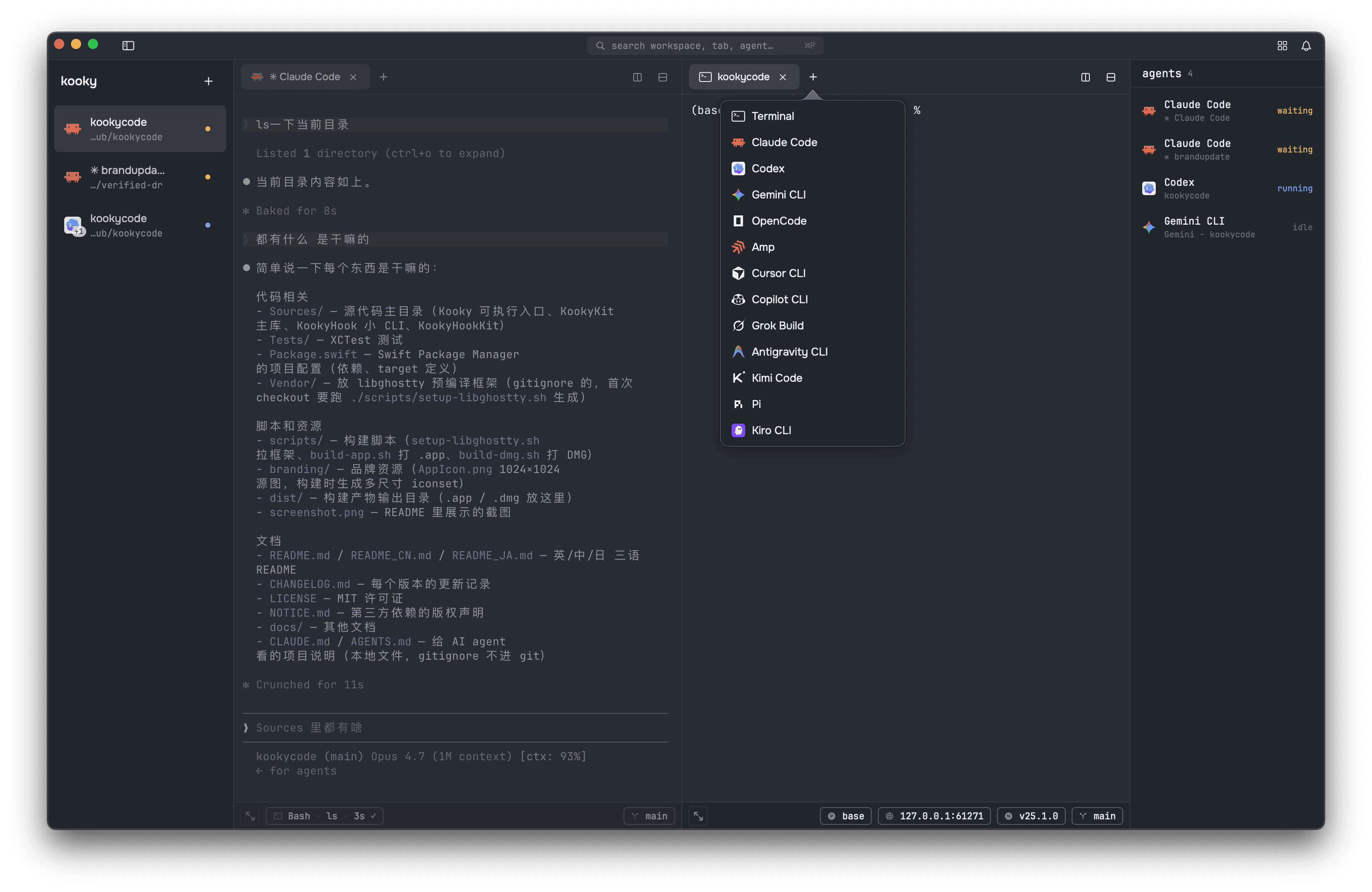
A minimal modern terminal built for AI coding. Sidebar workspaces; horizontal / vertical split panes; one-click agent launch; per-agent activity readout; live workspace state with one-click Node and branch switching. Open-source, MIT-licensed. No accounts, no telemetry; app state stays local. GPU rendering via libghostty.
Features
Vertical tabs, split panes & windows. Sidebar workspaces with three-state collapse (⌘⌃S). Each pane owns its own tab strip and active tab; split it right or down from the two buttons on its tab bar, or with ⌘D / ⌘⇧D. Rename a tab with ⌘R, a workspace with ⌘⇧R. ⌘⇧N opens another window. Drag a tab to reorder it, move it across panes, or drop it into a different window — the live session moves whole, scrollback and running process intact. State persists across launches; every open window is restored. Open any folder as a new workspace: drop it onto the sidebar from Finder, or use ⌘O. Press ⌘⇧E to zoom the active pane to fullscreen and back — the other panes slide off-screen but their processes keep running.
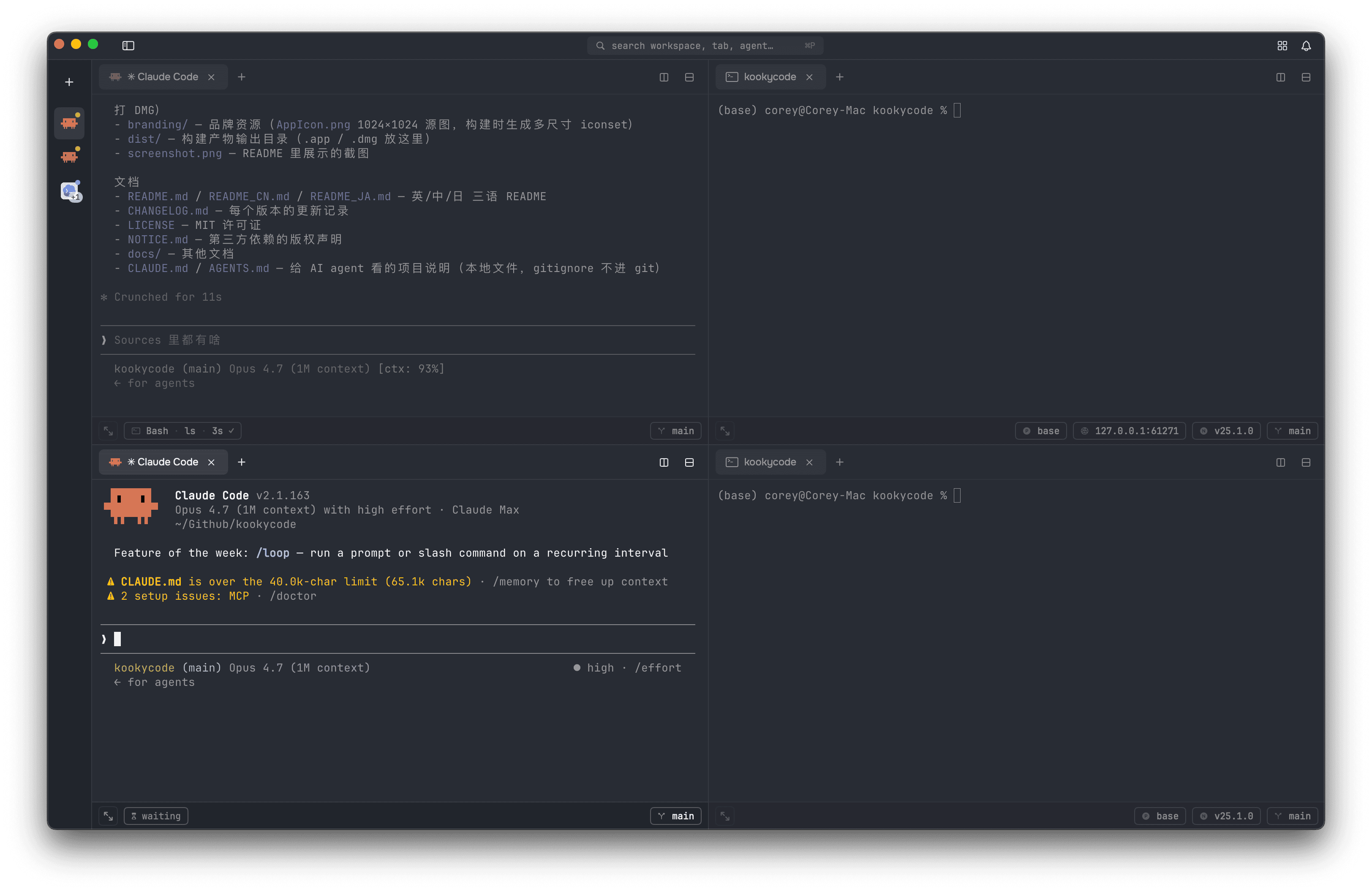
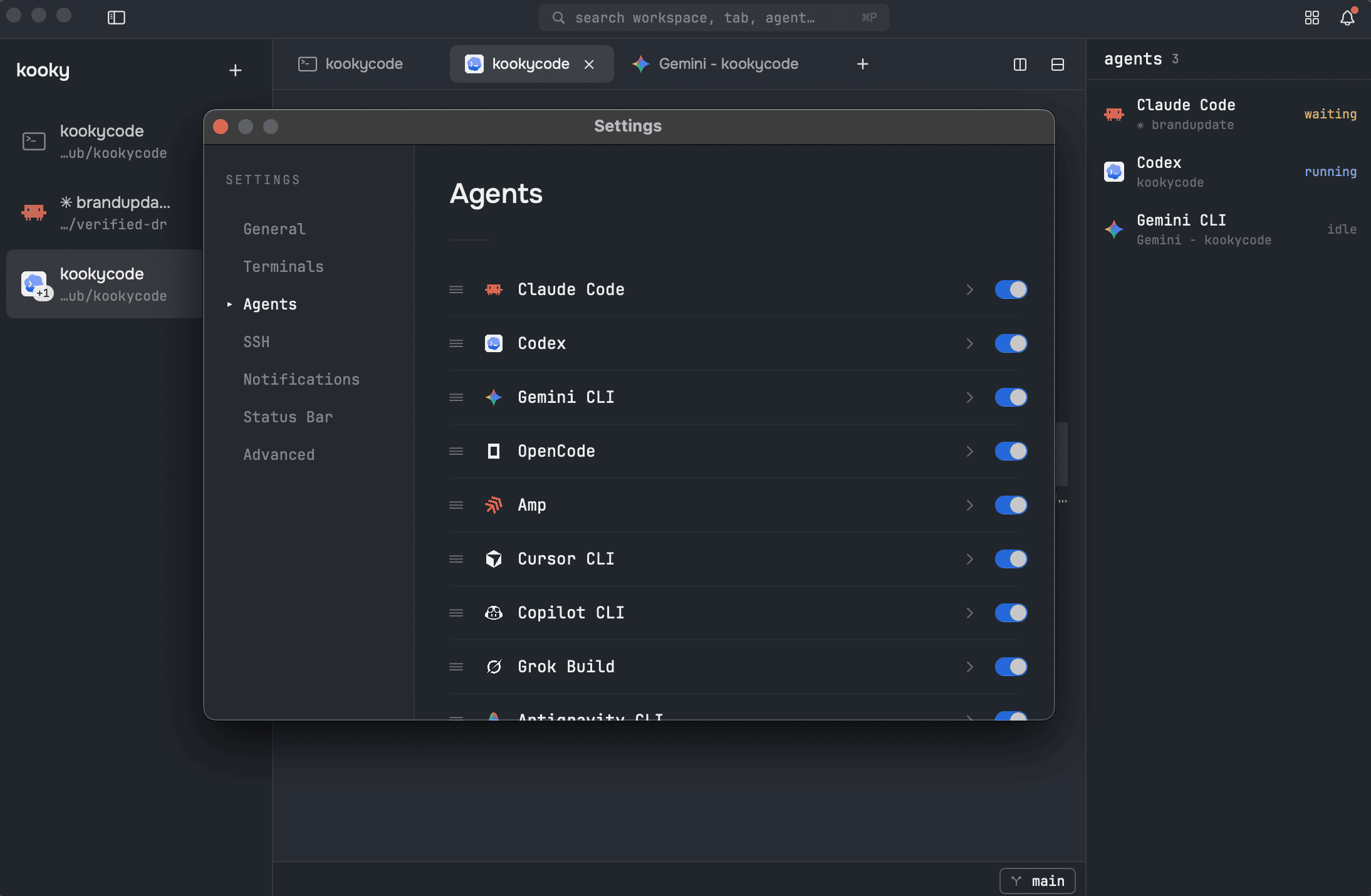
One-click AI agent sessions. Claude Code · Codex · Gemini CLI · OpenCode · Amp · Cursor CLI · Copilot CLI · Grok Build · Antigravity CLI · Kimi Code · Pi · Kiro CLI. Pick one from the + menu; the agent boots before your first prompt prints. Claude conversations also auto-resume across kooky restarts so closing and reopening a tab picks up where you left off.
Git worktrees. Right-click any git workspace → "Create Worktree…" to spin one up on a new branch (or check out an existing one). Each worktree shows up nested under its source repo in the sidebar with its own tabs + agent — let Claude work on a feature branch without touching what's running on main. Worktrees you create from the command line show up automatically the next time you launch kooky.
Right-click a selection → "Ask ". Select an error / log line / file path, right-click, pick any agent — a new tab spawns with the selection already submitted as the first prompt. Zero ⌘C / ⌘V to go from "what is this" to an actual answer.
Quick Open (⌘P). Fuzzy-search across every window's workspaces, tabs, agents, and Terminal presets from one floating panel. Type to filter, ↑↓ to navigate, Enter to jump or spawn. Triggers from ⌘P or the search pill in the top chrome.
Friction-free input. Click anywhere on the zsh prompt to move the shell cursor there (no modifier needed, same UX as ghostty.app). Drag a file or folder from Finder onto any pane to drop its escaped absolute path at the cursor.
Prompt composer (⌘L). A chat-style box rises from the bottom of the pane for writing a long, multi-line prompt without a stray Return firing it off mid-thought. Return sends it to the current agent (or shell), Shift+Return adds a newline, Esc cancels and keeps your draft. Open it with ⌘L or the compose button in the pane status bar.
Agent activity readout. Sidebar dot tracks each agent in real time — running (blue), waiting on you (amber), idle (none). Tab + workspace dots also turn red when the last command exited non-zero; hover for exit N · 12.4s. For Claude Code and Pi sessions, the pane status bar also shows the tool the agent is running right now (Bash / Edit / Read / etc.) and how long — click the pill for the full session history; failed calls turn red immediately. Toggle the pill per agent in Settings → Status Bar.
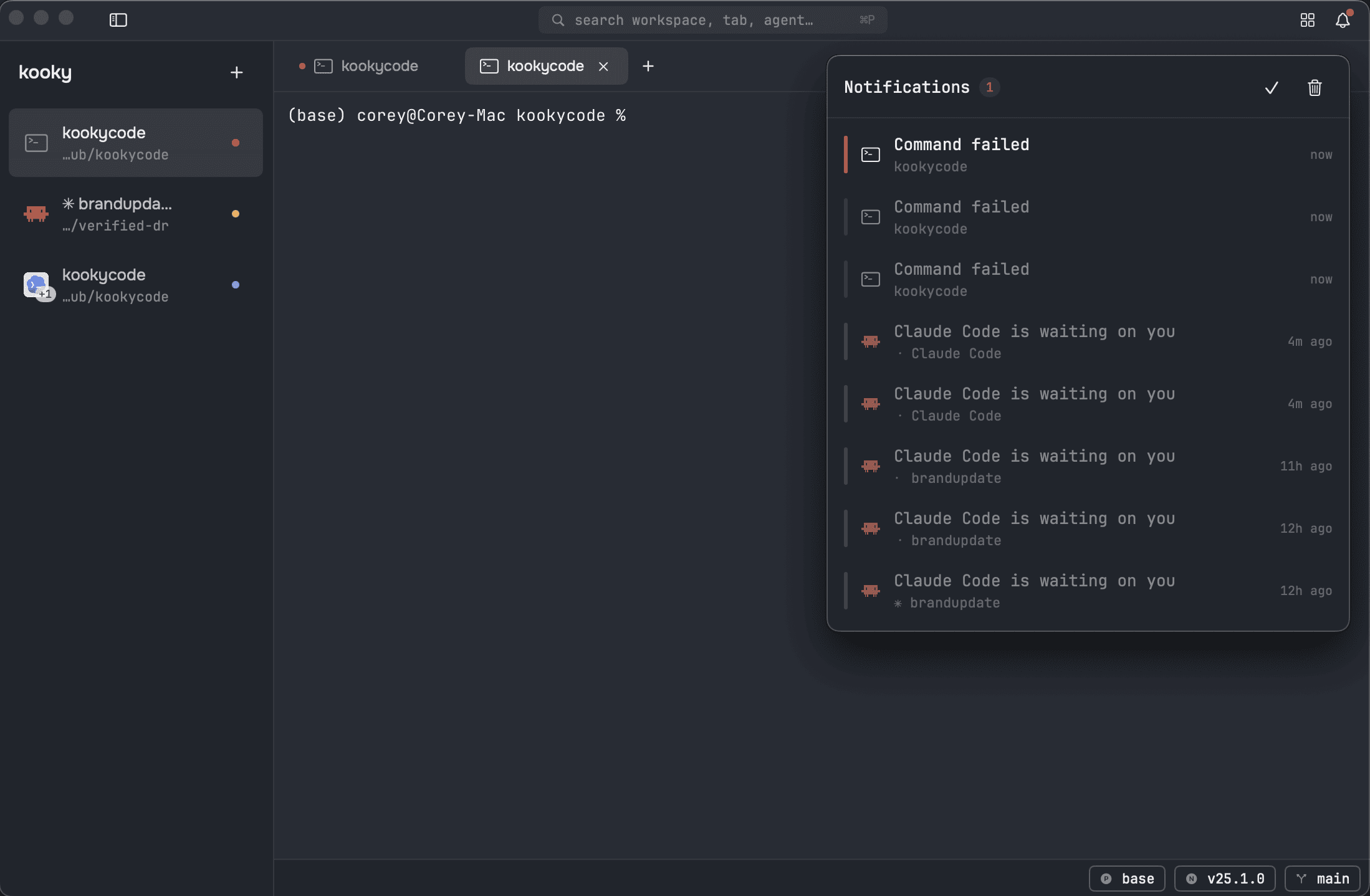
Notifications. When an agent in a tab you're not looking at starts waiting on you, or a command there fails, kooky posts a macOS notification — turn each kind on or off in Settings → Notifications. A bell in the top bar (⇧⌘I) keeps a running inbox of those alerts across every window — who's waiting, what failed, what finished — with a red dot when something's unread. Click an entry to jump straight to that tab; switching to a tab clears its alerts on its own.
Agent panel. A right-side sidebar — toggle in the top bar, three collapse states like the left one — lists every agent across all your windows at once, sorted by who needs you first: waiting on you, then failed, then running, then idle. Click any row to jump straight to that tab; compact mode shrinks it to a rail of status-tinted icons.
Live workspace state. Pane status bar shows git branch + diff (N files +X −Y), Python venv, Node version, and active proxy (https_proxy / http_proxy / all_proxy). Auto-refreshes when an agent's Bash tool or another terminal switches branches. Click the Node or branch pill to switch versions / branches without typing; click the proxy pill to see and copy the full name=value.
SwiftUI-native, minimal chrome. Onest + JetBrains Mono. Custom About panel, native menus with shortcut hints, full IME support.
Configurable. Settings (⌘,) covers themes, font, cursor, default new-tab behavior, Terminal presets, agents, and the pane status bar. Theme changes update the whole window immediately, including custom Ghostty themes in your themes folder.
Local by default. No accounts, no telemetry, no cloud sync. Kooky keeps its own state on your device.
libghostty-powered. GPU-accelerated cell rendering, same engine as ghostty. Fast.
Install
Download the latest .dmg from Releases. Open it and drag Kooky.app to Applications.
First launch is blocked by Gatekeeper because the build is adhoc-signed (no Apple Developer ID yet — public-distribution signing and notarization will come when there are real users). You'll see "Kooky cannot be opened because Apple cannot check it for malicious software" or "is damaged and cannot be opened". Pick whichever bypass works for you:
Path A — System Settings (recommended)- Double-click
Kooky.app. If shows the warning. Dismiss it. - System Settings → Privacy & Security, scroll to Security.
- Click Open Anyway next to "Kooky was blocked to protect your Mac". Enter your password.
- Double-click
Kooky.appagain → click Open. Done.
xattr -d com.apple.quarantine /Applications/Kooky.app
Sequoia sometimes hides the Open Anyway button entirely for adhoc-signed apps. Re-enable the legacy "Anywhere" option, then redo Path A:
sudo spctl --global-disable      # macOS 15+; older systems use --master-disable
# System Settings → Privacy & Security → "Allow applications from" → Anywhere
# Open Kooky.app → it now launches
sudo spctl --global-enable       # turn Gatekeeper back on
This is system-wide while disabled. Re-enable as soon as kooky launches once (the per-app whitelist persists).
macOS only blocks the first launch. After that, Spotlight / Dock / Finder all work normally.
Build from source
Requires Xcode 26+ and macOS 14+ (Sonoma — @Observable is the floor).
./scripts/setup-libghostty.sh        # one-time: fetch the libghostty xcframework
swift build
swift run                            # dev mode
swift test                           # 383 unit tests

./scripts/build-app.sh               # writes dist/Kooky.app
./scripts/build-dmg.sh --build       # writes dist/Kooky-vX.Y.Z.dmg
Vendor/ and dist/ are gitignored. The libghostty setup script is idempotent.
Star History
License
MIT — see LICENSE. Bundled third-party assets retain their upstream licenses; see NOTICE.md.
Reviews (0)
Sign in to leave a review.
Leave a reviewNo results found