herdr-redline
Health Warn
- No license — Repository has no license file
- Description — Repository has a description
- Active repo — Last push 0 days ago
- Low visibility — Only 6 GitHub stars
Code Fail
- exec() — Shell command execution in mods/redline/diff.js
- exec() — Shell command execution in mods/redline/highlight.js
- exec() — Shell command execution in mods/redline/hosting.js
- exec() — Shell command execution in mods/redline/launcher.js
- exec() — Shell command execution in mods/redline/lib.js
Permissions Pass
- Permissions — No dangerous permissions requested
No AI report is available for this listing yet.
Redline: code review inside the Herdr app. Review GitLab MRs and GitHub PRs in a git worktree next to an AI agent: inline comments, pending reviews, council AI findings, pipelines, approve and merge.
Code review inside Herdr.
GitLab merge requests and GitHub pull requests, reviewed in a git worktree, next to the AI agent you already use.
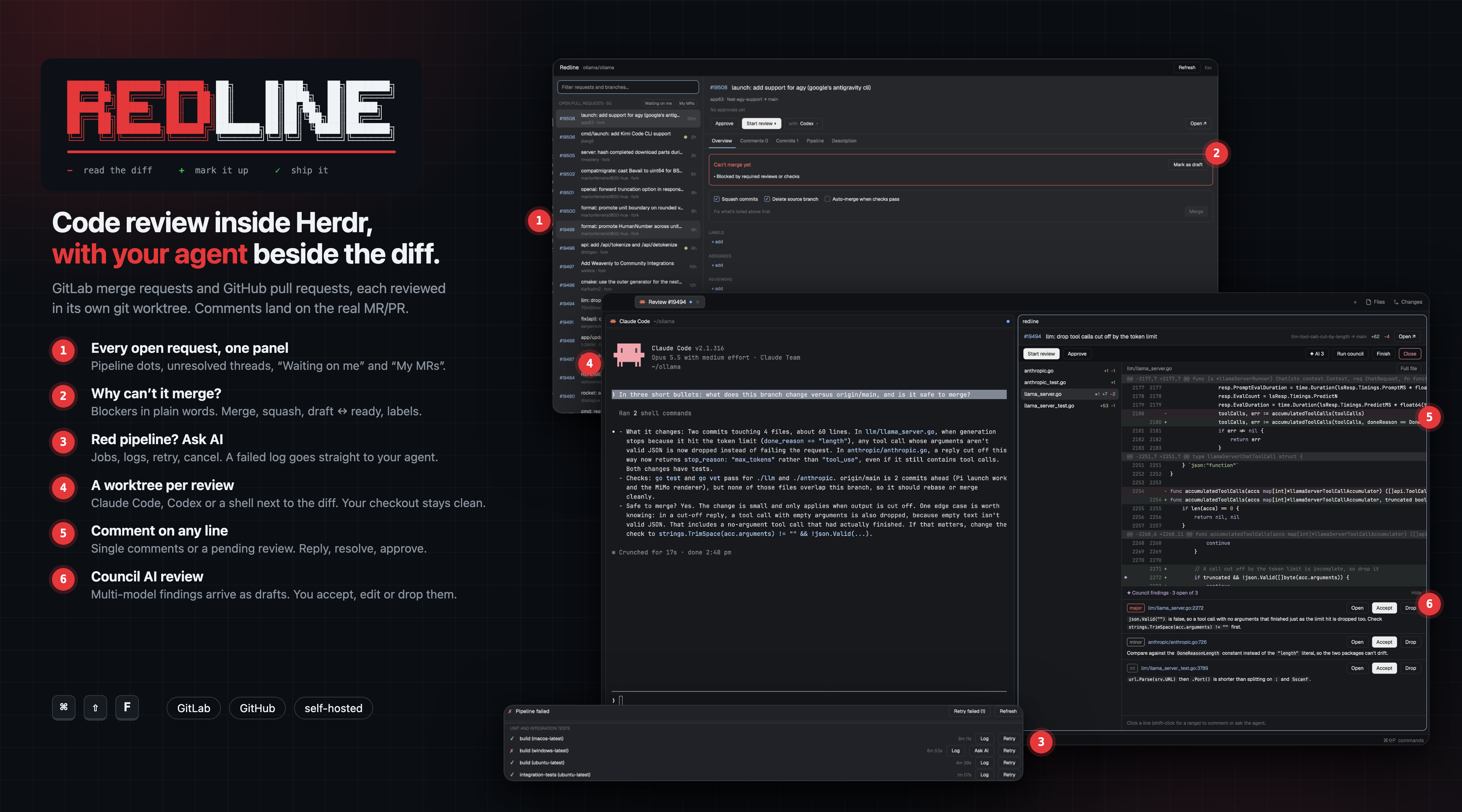
A review, start to finish
It's late afternoon. You have three merge requests waiting on you, a pipeline that went red after lunch, and a terminal full of agents. Reviewing used to mean a browser tab per request, a git checkout that trampled whatever you were doing, and copy-pasting code into a chat to ask "is this right?".
With Redline you press Cmd+Shift+F.
1. See what's waiting
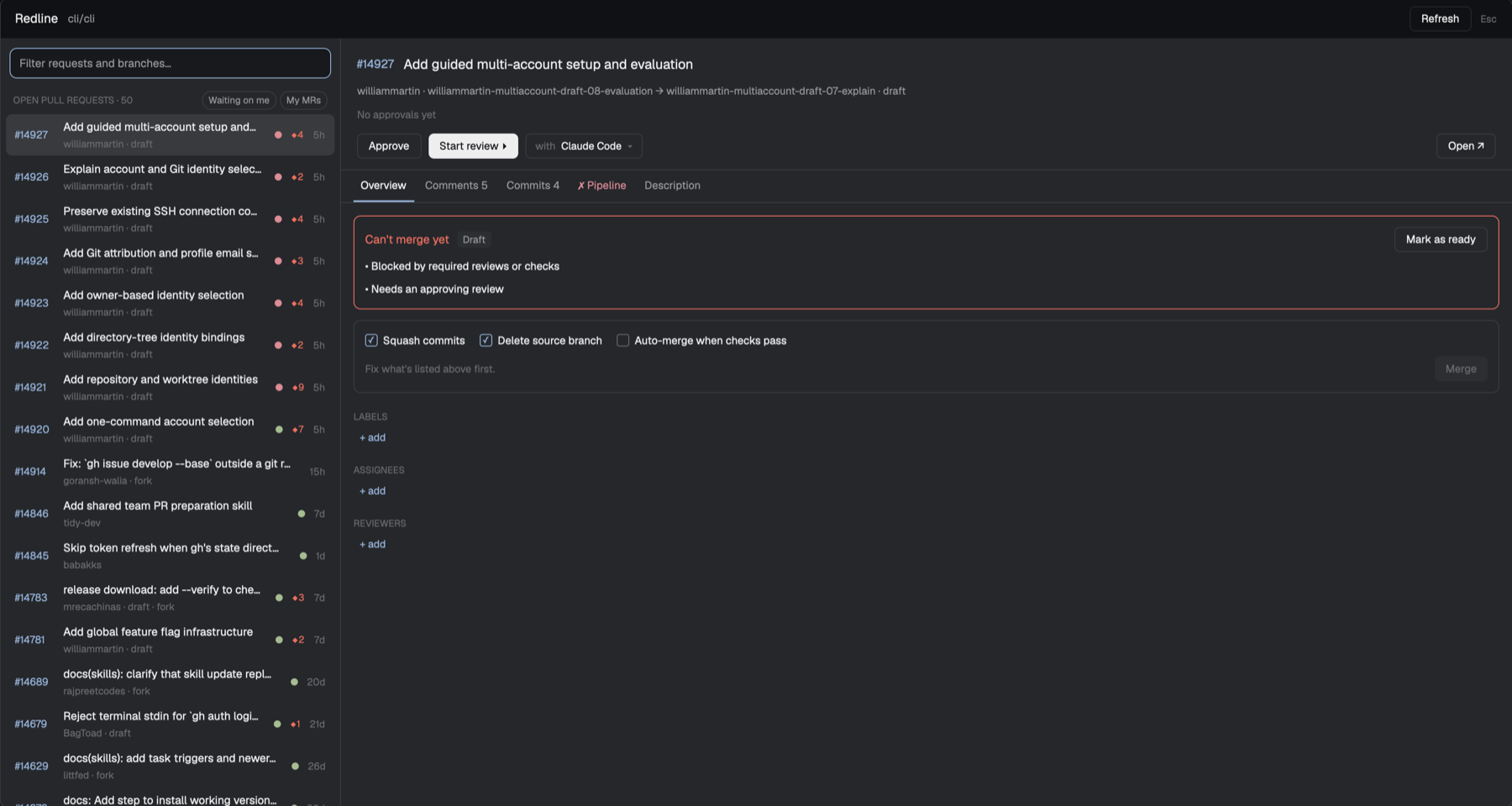
Every open request for the repo you're in, in one list. Each one carries:
- a pipeline dot (passed, failed or running),
- ◆ 3, the number of unresolved threads,
- a you badge when your review was asked for and you haven't approved yet.
Click Waiting on me to see only those. Click My MRs to see your own, each with what's blocking it ("Needs an approving review", "Has merge conflicts") or Ready to merge.
The Overview tab answers the question you open a request with: can this merge, and if not, why? It shows the blockers, how far behind the target the request is, and whether it's a draft. From there you can:
- Merge, with squash and delete-branch options, or merge when the pipeline succeeds,
- flip draft ↔ ready,
- add or remove labels, assignees and reviewers.
Comments shows every thread, so you can reply or resolve without leaving. Commits and Description are one click away.
2. Find out why the pipeline is red
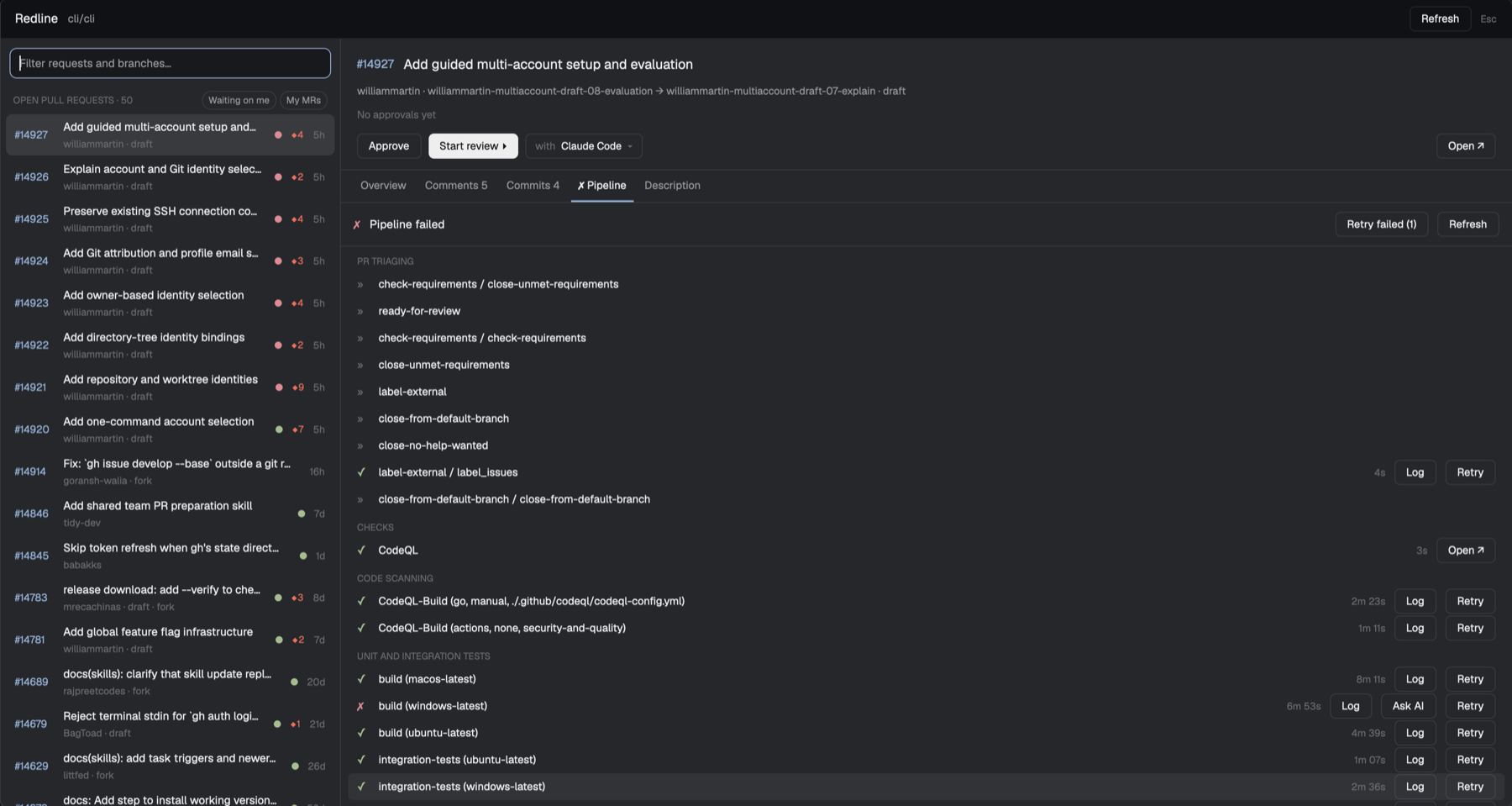
The Pipeline tab lays the run out stage by stage, child pipelines included, with each job's status and duration.
- Log opens a job's log in a terminal tab.
- Retry, Run (for manual jobs) and Cancel do what they say. Retry failed re-runs everything that broke.
- Ask AI on a failed job sends the end of its log to your agent, asking it to find the cause in the branch. Nobody has to read 4,000 lines of CI output first.
3. Review it properly, with an agent beside you
Pick Start review ▸, and choose who sits next to the diff: Claude Code, Codex, any agent Herdr knows, a Council review, or just a shell.
Redline checks the branch out in its own git worktree, under ~/.herdr/worktrees, so your working copy is never touched. It then opens a review tab: your agent on one side, the diff on the other. They're ordinary Herdr panes, so you can close, zoom or split them as usual.
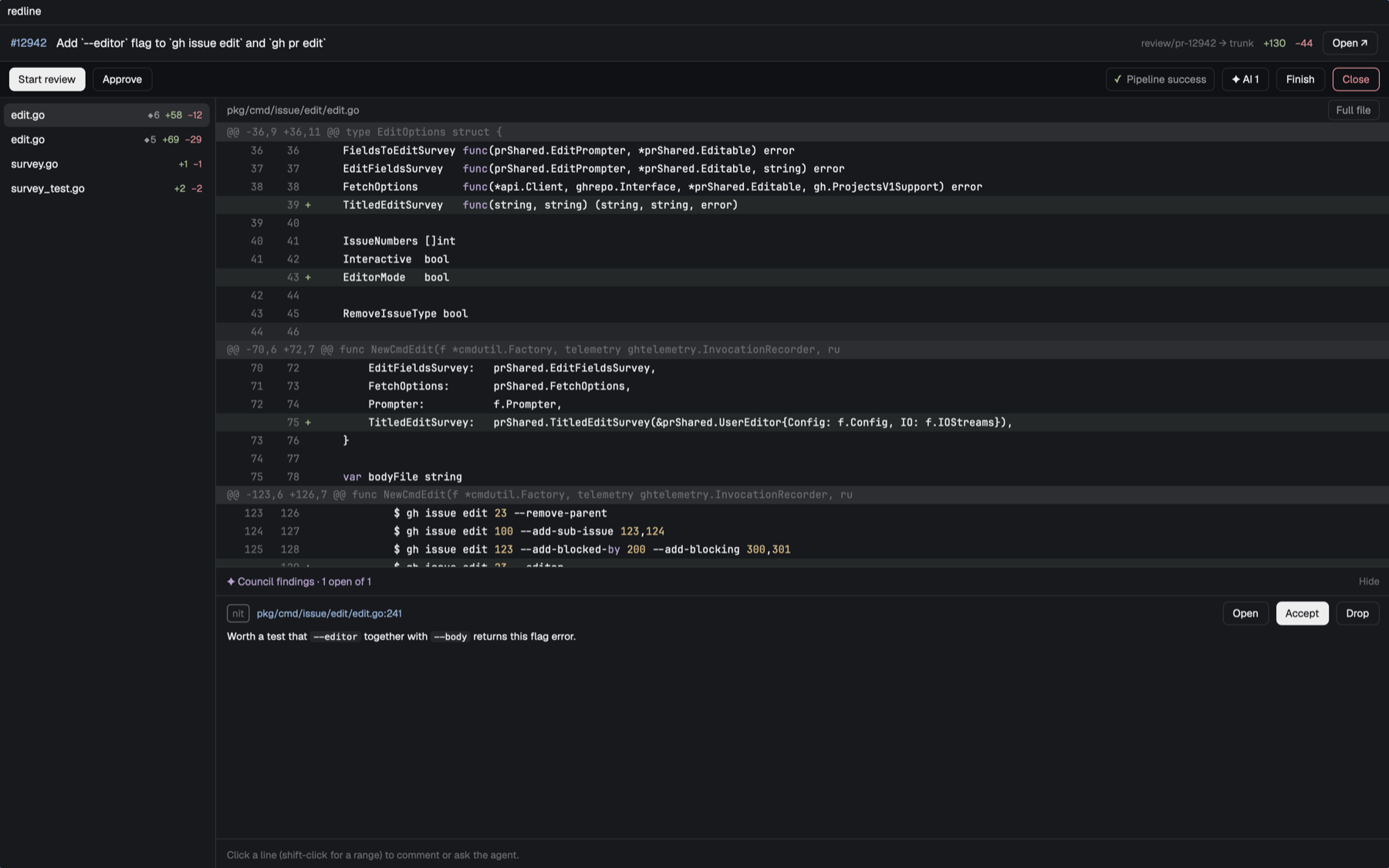
- Select a line (shift-click for a range) to:
- Ask AI about exactly those lines,
- post a single comment,
- or start a review, collecting pending comments and posting them together.
- Reply to and resolve existing threads right on the line, and edit your pending comments before they go out.
- Submit review posts everything at once, as a comment or an approval. GitHub also offers request changes.
- Full file shows the whole file around the changes. The diff is syntax-highlighted.
- If the author pushes while you're reviewing, an Update button appears. Comments are never anchored to stale lines.
4. Let the council weigh in
Choose Council review and the agent starts a multi-model review of the branch. Its confirmed findings land in the pane as ✦ markers and a findings list:
- Accept turns a finding into a pending comment as written.
- Open jumps to the line with the text ready to edit.
- Drop dismisses it.
The AI drafts; you decide what's posted under your name. Nothing reaches GitLab or GitHub until you submit.
5. Ship it, then clean up
Approve, or submit with Approve. When you're done, Finish removes the review's worktree and closes the tab. It checks first, and warns you about uncommitted or unpushed work before throwing anything away.
Why it helps
| Before | With Redline |
|---|---|
| A browser tab per request, context lost on every switch | One panel per repo, everything in your terminal workspace |
git checkout over your work-in-progress |
A separate worktree per review, removed when you finish |
| Copy-pasting code into a chat to ask about it | Select lines, Ask AI: the agent gets the file, the lines and your question |
| Reading CI logs top to bottom | Ask AI on the failed job |
| AI review comments you can't control | Council findings arrive as drafts you accept, edit or drop |
| "Why can't this merge?" | The blockers, listed in plain words, with Merge right below |
Features
- Requests panel (
Cmd+Shift+F/Ctrl+Shift+F):- open MRs/PRs plus branches without a request;
- filtering, Waiting on me and My MRs;
- pipeline status, unresolved-thread count and review-requested badge.
- Overview tab:
- merge blockers and commits behind the target;
- Merge (squash, delete branch, when the pipeline succeeds) and cancel auto-merge;
- draft ↔ ready;
- labels, assignees, reviewers.
- Comments: threaded discussions with reply and resolve, plus general comments.
- Commits and Description tabs.
- Pipeline tab:
- stages and jobs, including GitLab child pipelines and GitHub check runs;
- logs, retry, run, cancel, retry failed;
- Ask AI on failures; auto-refresh while running.
- Review tabs:
- a git worktree per review and your choice of agent;
- a diff with syntax highlighting, rename detection and a full-file view.
- Line comments:
- single comments, or pending reviews (GitLab draft notes; GitHub reviews);
- submit as comment, approve or request changes;
- reply, resolve, edit pending.
- Ask AI from any line selection.
- Council review: findings as ✦ markers you accept, edit or drop.
- Update when the request moves; Finish to remove the worktree.
- Works with GitLab (including self-hosted) and GitHub, through
glabandgh.
Install
You need the Herdr app, git, and glab and/or gh logged in (glab auth login, gh auth login). For the Council review option you need Claude Code with the council skill.
git clone https://github.com/iampedii/herdr-redline.git
cp -R herdr-redline/mods/redline ~/.config/herdr-app/mods/
herdr-app check ~/.config/herdr-app/mods/redline
Then add the keys from keys.json to the "global" section of ~/.config/herdr-app/keys.json:
"cmd-shift-f": "mod.open:redline",
"ctrl-shift-f": "mod.open:redline"
Herdr picks the mod up within a second. Focus a terminal inside a git repository and press Cmd+Shift+F.
How it works
Redline is a Herdr mod written in gpui-kit JavaScript.
| File | Role |
|---|---|
launcher.js |
The requests panel. |
panels.js |
The Overview and Pipeline tabs. |
diff.js |
The review pane. |
hosting.js |
Every GitLab and GitHub call, through glab api / gh. |
lib.js |
git, the worktree checkout and diff parsing. |
highlight.js |
The line highlighter. |
Pending GitLab comments are real draft notes on the server, so they also show as pending on the website. GitHub's are kept locally until you submit, then sent as one review.
Status and limits
Redline is young. Things to know:
- Test writes on a request that doesn't matter first. The read paths are tested against GitLab and GitHub. Merge, the draft toggle, label, assignee and reviewer edits, and job retry/cancel are built on the documented APIs but haven't been run against a real request yet.
- On GitLab, a comment on a range of lines is posted on its last line. GitHub keeps the range.
- Notifications (review requested, pipeline failed, replies) are written but switched off. They need a home in the Herdr window that can't block clicks.
- The requests list shows up to 50 open requests.
Issues and pull requests are welcome.
Reviews (0)
Sign in to leave a review.
Leave a reviewNo results found