claude-fleet
Health Warn
- License — License: MIT
- Description — Repository has a description
- Active repo — Last push 0 days ago
- Low visibility — Only 8 GitHub stars
Code Fail
- fs.rmSync — Destructive file system operation in scripts/check-notifications.js
- process.env — Environment variable access in scripts/check-notifications.js
- fs module — File system access in scripts/check-notifications.js
- child_process — Shell command execution capability in scripts/fleet-sync-notifications.js
- execSync — Synchronous shell command execution in scripts/fleet-sync-notifications.js
- process.env — Environment variable access in scripts/fleet-sync-notifications.js
- child_process — Shell command execution capability in scripts/fleet-task.js
- process.env — Environment variable access in scripts/fleet-task.js
- fs module — File system access in scripts/fleet-task.js
- child_process — Shell command execution capability in scripts/kb-inbox-check.js
- execSync — Synchronous shell command execution in scripts/kb-inbox-check.js
- process.env — Environment variable access in scripts/kb-inbox-check.js
- fs module — File system access in scripts/kb-inbox-check.js
Permissions Pass
- Permissions — No dangerous permissions requested
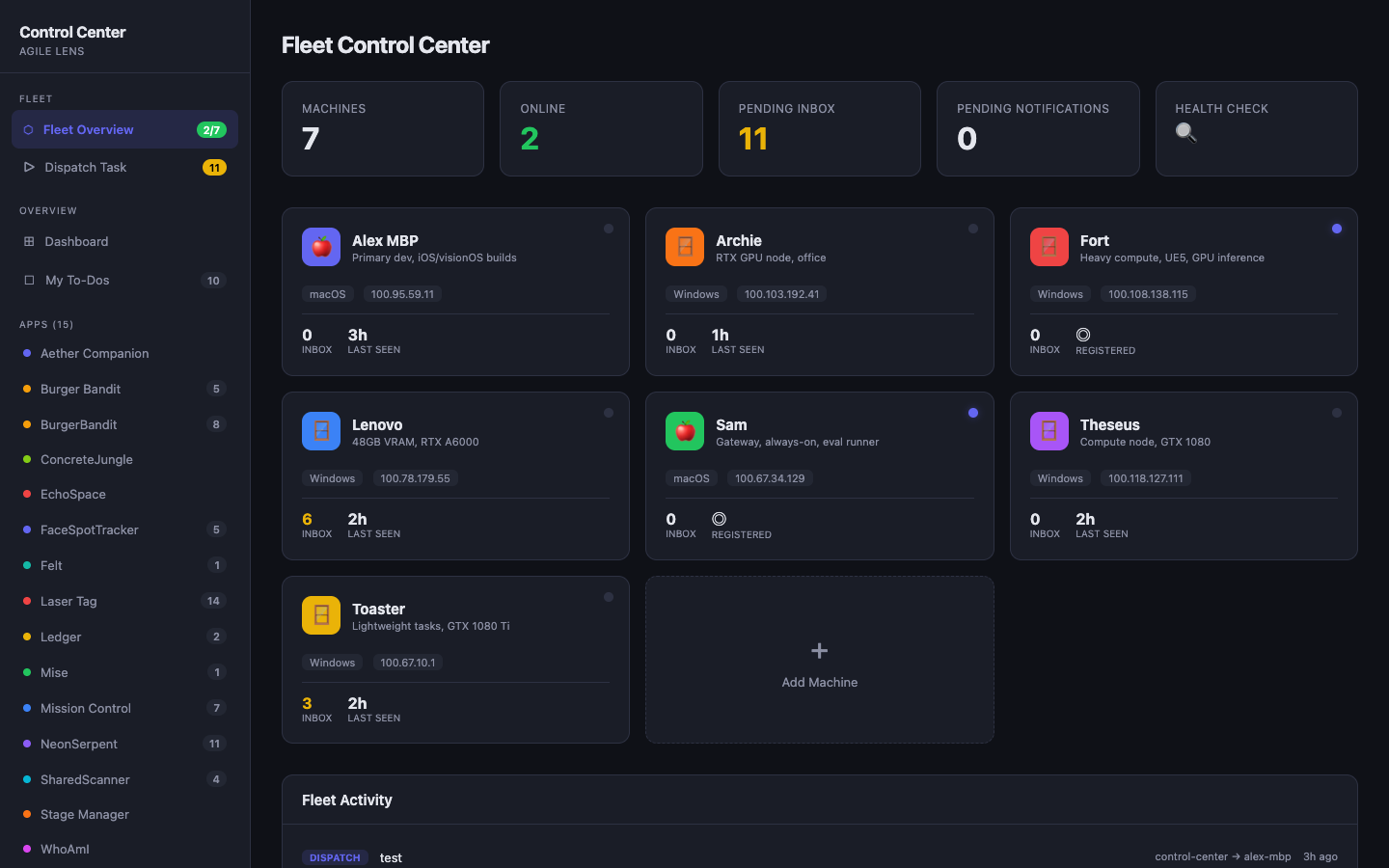
This tool coordinates multiple computers running Claude Code instances, allowing them to communicate asynchronously through a shared git repository and sending user notifications via a Telegram bot. It includes a web interface for remote control and task dispatching.
Security Assessment
The overall risk is High. The tool heavily relies on executing synchronous shell commands (`execSync`) and spawning child processes across multiple script files to handle git operations, task syncing, and inbox checking. It also reads environment variables (potentially for tokens like Telegram API keys) and performs destructive file system operations (`fs.rmSync`). While no hardcoded secrets or dangerous permissions were found, the extensive local shell execution and file manipulation capabilities require careful review before running the scripts.
Quality Assessment
The project is very new and has low community visibility with only 8 GitHub stars. However, it is actively maintained with a recent push date. It uses the permissive MIT license and includes a clear, detailed README with explicit instructions to avoid interfering with sensitive Claude configuration directories.
Verdict
Use with caution — while the project is active and straightforward, its extensive shell execution capabilities and low community engagement warrant a line-by-line code review before execution.
Coordinate multiple computers running Claude Code through git-based messaging. Includes Fleet Commander — an interactive browser game to learn the system.
Claude Fleet
Coordinate a fleet of computers each running Claude Code, communicating asynchronously through git, with phone access to every session for human-in-the-loop control.
┌─────────────┐  ┌─────────────┐  ┌─────────────┐
│    alpha    │  │     beta    │  │    gamma    │
│   (macOS)   │  │  (Windows)  │  │   (Linux)   │
│ Claude Code │  │ Claude Code │  │ Claude Code │
└──────┬──────┘  └──────┬──────┘  └──────┬──────┘
       │                │                │
       └───── Tailscale VPN Mesh ────────┘
                        │
               ┌────────┴────────┐
               │   Shared Git    │
               │   Knowledge     │
               │   Base Repo     │
               │                 │
               │   inbox/        │
               │   ├─ alpha.md   │
               │   ├─ beta.md    │
               │   └─ gamma.md   │
               └────────┬────────┘
                        │
               ┌────────┴────────┐
               │    Telegram     │
               │    Bot          │
               │                 │
               │  Notifications  │
               └─────────────────┘
                        │
                     📱 You
Screenshots
Fleet Control Center — Machine Overview
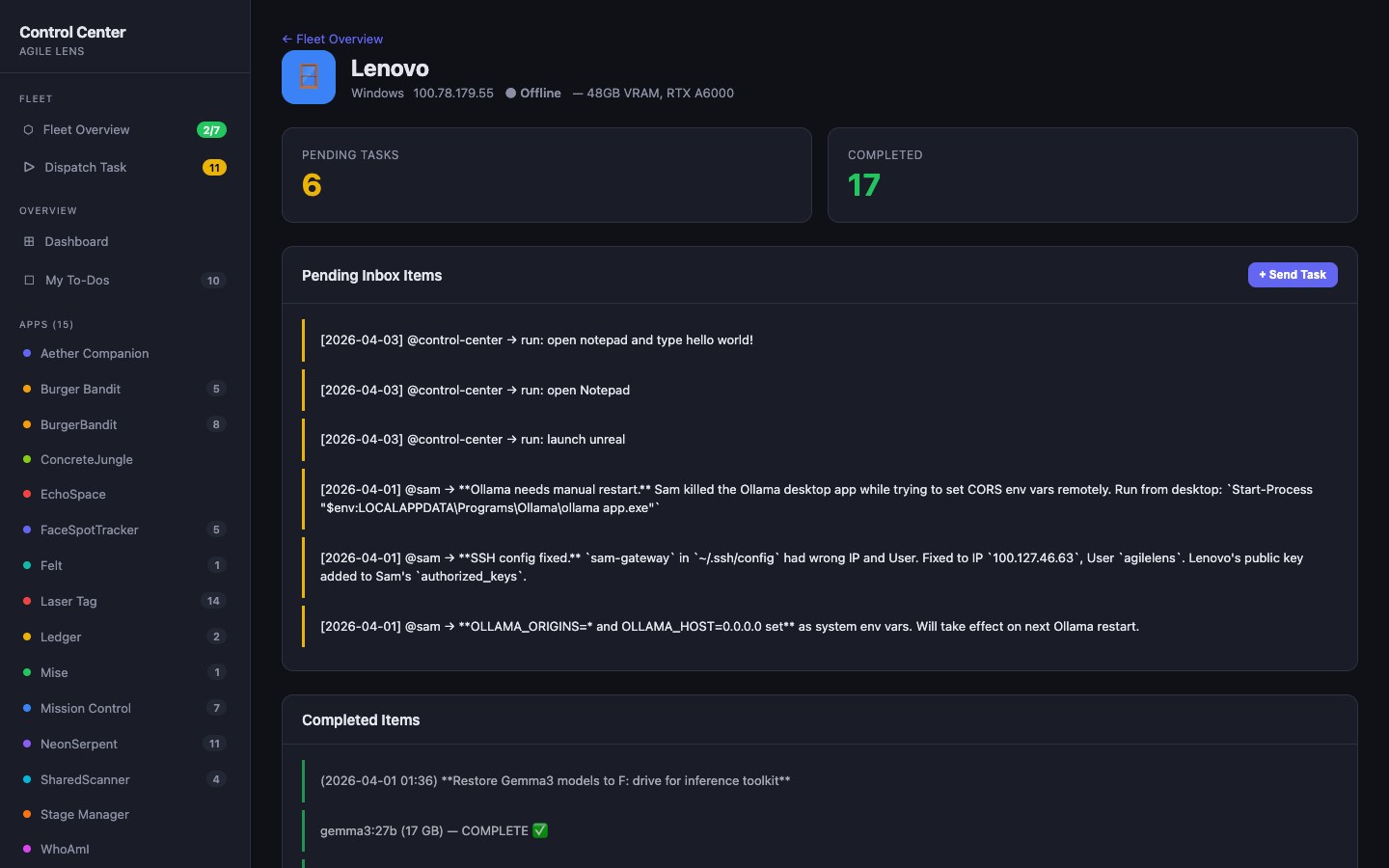
Machine Detail — Inbox & Completed Tasks
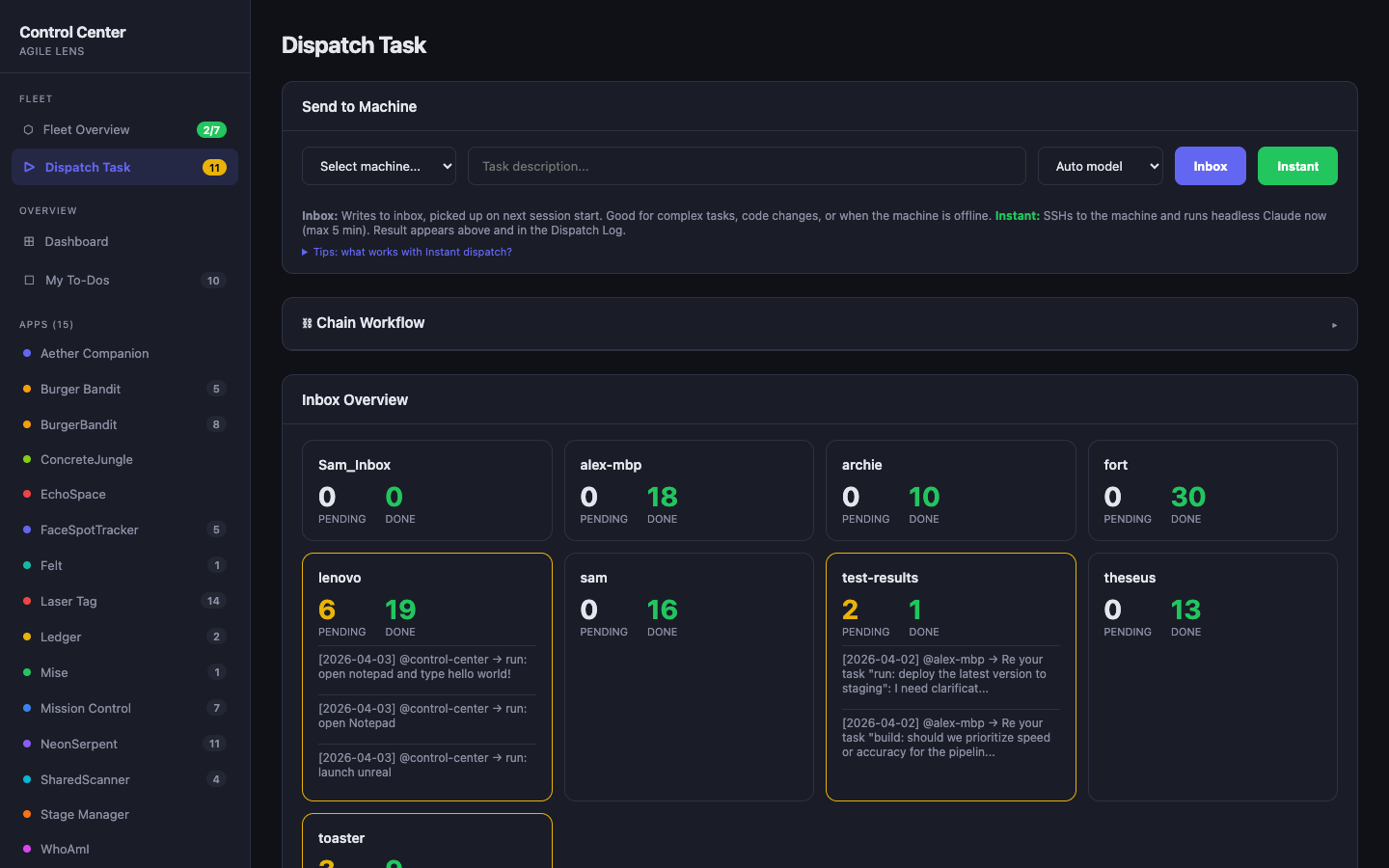
Dispatch Task — Instant & Inbox Modes
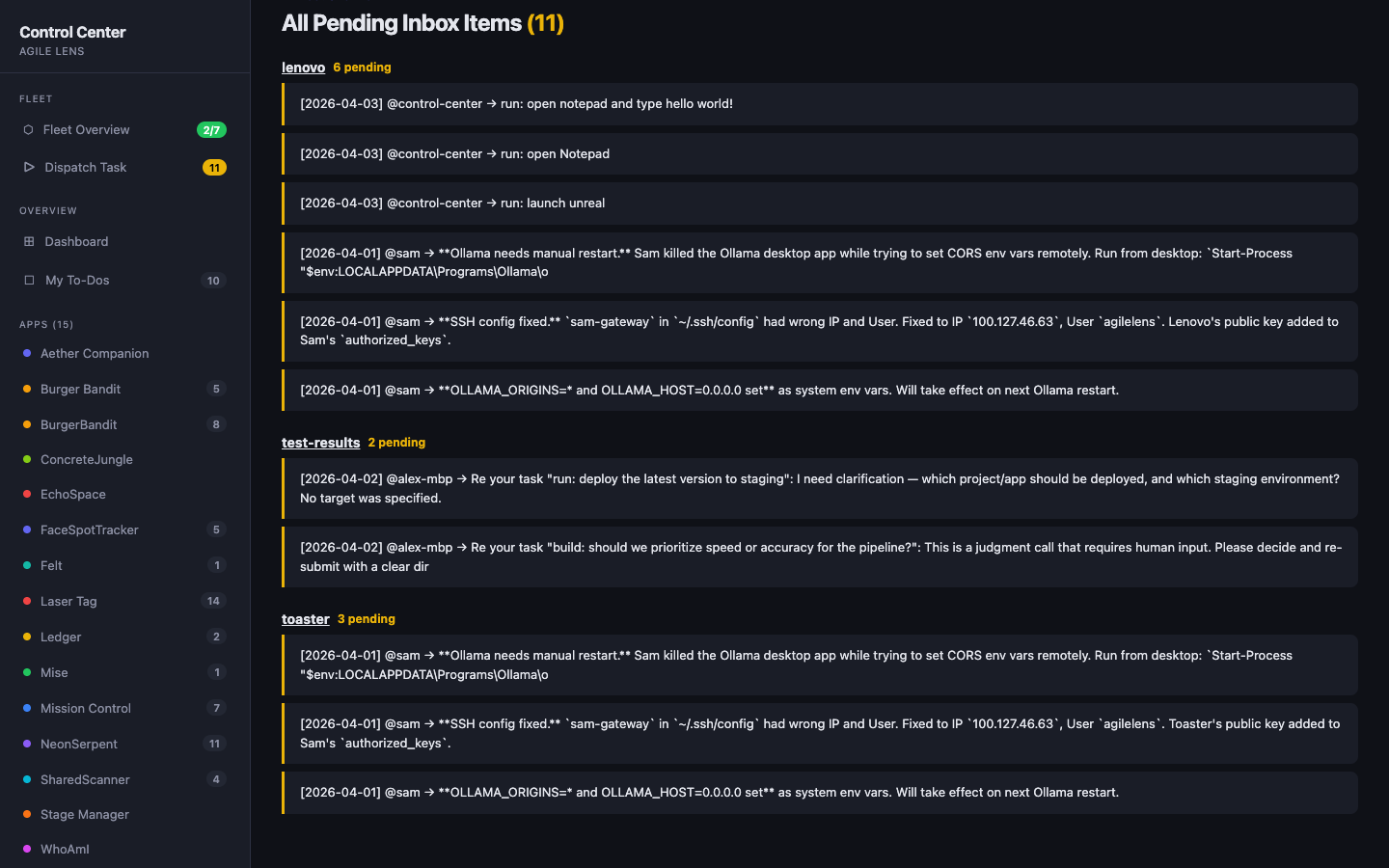
All Pending Inbox Items
Important: Stay Out of ~/.claude/
The ~/.claude/ directory is Claude Code's internal config directory. Accessing it directly triggers permission prompts and can interfere with Claude's operation.
Rules:
- Clone the knowledge base to
~/knowledge, not~/.claude/knowledge - Install fleet scripts to
~/claude-fleet/, not~/.claude/ - The only file that must live in
~/.claude/issettings.json(Claude Code requires it there) - If you need a symlink for compatibility, create
~/.claude/knowledge → ~/knowledge— but never access the KB through the symlink
What This Does
- Each machine runs Claude Code independently. Your laptop, your desktop, your servers — each one can work autonomously.
- Machines communicate through a shared git repo. Each machine has an inbox file. Write a task to
inbox/beta.md, push, and beta picks it up on its next session. - You get Telegram notifications. When any machine finishes a task, you get a message with a status icon: ✅ success, ❌ error, ⚠️ hit turn limit, 🔔 needs your decision.
- One command triggers all machines. Run
fleet-inbox-check.shand every machine in your fleet checks its inbox in parallel. - Drive any session from your phone. Run
/remote-controlin any Claude Code session and open the URL on your phone — it renders natively in the Claude mobile app. Zero fleet config.
Components
| Component | What it is |
|---|---|
| Inbox protocol (git) | Async machine-to-machine task passing via a shared KB repo |
| Telegram notifications | Outbound "task done / needs you" pings from every machine (fleet-wide) |
/remote-control (built-in) |
Native mobile app access to any live session — per-session, zero config |
| Telegram channel plugin (optional) | Message-driven remote session, single machine fleet-wide — see docs/06-telegram-bot.md |
What This Is NOT
- Not a CI/CD system. There's no pipeline — machines work autonomously.
- Not a cloud orchestration tool. These are your physical machines, connected peer-to-peer.
- Not dependent on a central server. The git repo is the only required shared resource. The optional Control Center adds a centralized dashboard for fleet-wide visibility and instant task dispatch, but the core inbox system works without it.
Prerequisites
- Tailscale (free tier works) — for SSH between machines
- A private git repo (GitHub, GitLab, etc.) — the shared knowledge base
- Claude Code — installed on each machine
- Node.js — for the Telegram notification script
- A Telegram bot token (optional, for notifications) — setup guide
Quick Start
1. Set up the network
Install Tailscale on every machine and join them to the same tailnet. Verify with:
# From any machine
ssh <other-machine-name>
See docs/02-tailscale-setup.md for details.
2. Create the shared knowledge base
Create a private git repo and clone it to ~/knowledge on every machine:
# On each machine
git clone [email protected]:you/fleet-kb.git ~/knowledge
Set up the structure:
cd ~/knowledge

# Add the navigation guide (AI agents read this first)
cp /path/to/claude-fleet/templates/CLAUDE.md .

# Create inboxes
mkdir inbox
cp /path/to/claude-fleet/templates/inbox/example-machine.md inbox/alpha.md
cp /path/to/claude-fleet/templates/inbox/example-machine.md inbox/beta.md

# Create daily log and decision folders
mkdir -p daily decisions projects

git add . && git commit -m "init: KB structure" && git push
Optionally, create a compatibility symlink (some tools expect ~/.claude/knowledge):
ln -s ~/knowledge ~/.claude/knowledge
See docs/04-knowledge-repo.md for the full setup, including KB structure, CLAUDE.md navigation guide, and formatting rules.
3. Install Claude Code on every machine
# macOS / Linux
npm install -g @anthropic-ai/claude-code

# Verify
claude --version

# Authenticate
claude
# Then type: /login
See docs/03-claude-code-install.md for platform-specific notes.
4. Install the hooks
Clone this repo and copy the scripts to ~/claude-fleet/ on each machine:
git clone https://github.com/ibrews/claude-fleet.git ~/claude-fleet-repo
mkdir -p ~/claude-fleet
cp ~/claude-fleet-repo/scripts/kb-inbox-check.sh ~/claude-fleet/
cp ~/claude-fleet-repo/scripts/kb-session-end.sh ~/claude-fleet/
cp ~/claude-fleet-repo/scripts/notify-human.js ~/claude-fleet/
cp ~/claude-fleet-repo/scripts/fleet-inbox-check.sh ~/claude-fleet/
chmod +x ~/claude-fleet/*.sh
Important: Machine name detection. Fleet scripts identify your machine by hostname to find the right inbox file (inbox/<name>.md). If your hostname doesn't match your inbox filename, set this environment variable:
export FLEET_MACHINE_NAME=alpha # must match your inbox filename
Add it to your shell profile (~/.bashrc, ~/.zshrc) so it persists. See docs/07-hooks.md for details.
Add to ~/.claude/settings.json (the one file that must live in ~/.claude/):
{
  "permissions": {
    "defaultMode": "bypassPermissions",
    "deny": ["Bash(rm -rf /)", "Bash(sudo rm -rf *)"]
  },
  "hooks": {
    "SessionStart": [
      { "hooks": [{ "type": "command", "command": "$HOME/claude-fleet/kb-inbox-check.sh", "timeout": 30 }] }
    ],
    "Stop": [
      { "hooks": [{ "type": "command", "command": "$HOME/claude-fleet/kb-session-end.sh", "timeout": 30 }] },
      { "hooks": [{ "type": "command", "command": "node $HOME/claude-fleet/notify-human.js", "timeout": 10 }] }
    ]
  }
}
Note:
bypassPermissionsprevents Claude from pausing for approval prompts, which is essential for autonomous fleet operation. See templates/settings.json for the full structure including mid-session notification hooks.
5. Configure the fleet trigger
Edit ~/claude-fleet/fleet-inbox-check.sh — update ALL_MACHINES with your machine names and get_claude_cmd() with the correct Claude paths for each machine.
6. Test it
# Send a test message to one of your machines
cd ~/knowledge
echo '- [ ] [2024-01-01 12:00] @alpha → check: Are you alive? Reply to my inbox.' >> inbox/beta.md
git add inbox/ && git commit -m "test: ping beta" && git push

# Trigger beta to check its inbox (from the machine that has fleet-inbox-check.sh configured)
~/claude-fleet/fleet-inbox-check.sh beta
Things to Try
- Run
./fleet-status.sh— prints a table of all configured machines with their Tailscale IP, OS, and last-seen timestamp; any offline machine shows in red. - Write a one-line task to a machine's inbox and run
./fleet-inbox-check.sh <machine>— Claude Code on that machine picks up the task, runs it headlessly, and writes results back to the knowledge repo within seconds. - Run
./fleet-trigger.sh "summarize today's git activity across all repos"— broadcasts the prompt to every machine in parallel; each writes its results toinbox/<machine>.mdand you get a Telegram notification when all are done. - Open the Control Center dashboard (
docs/fleet-commander.htmllocally or the GitHub Pages link) — click a machine name to see its live inbox, completed tasks, and dispatch a new task without touching the terminal. - Simulate a fleet-wide eval run with
npm run eval -- --suite coding(requires fleet-eval configured) — each machine runs the task pack, scores are written to the leaderboard, and routing rules auto-update based on results.
Documentation
| Guide | Description |
|---|---|
| Fleet Overview | Architecture and concepts |
| Tailscale Setup | Connecting your machines |
| Claude Code Install | Per-platform installation |
| Knowledge Repo | Setting up the shared git repo |
| Inbox System | The messaging protocol |
| Telegram Bot | Notifications and message-driven session access |
| Hooks | Claude Code hook configuration |
| Fleet Trigger | Triggering all machines at once |
| Troubleshooting | Common issues and fixes |
| Notifications | Mid-session inter-machine notifications |
| Control Center | Web dashboard for fleet management and instant dispatch |
| Remote Control | /remote-control — drive a session from the Claude mobile app |
Try It — Fleet Commander
🎮 Launch Fleet Commander — an interactive browser game that teaches the full claude-fleet architecture by having you build and manage your own fleet. No installation required.
Features:
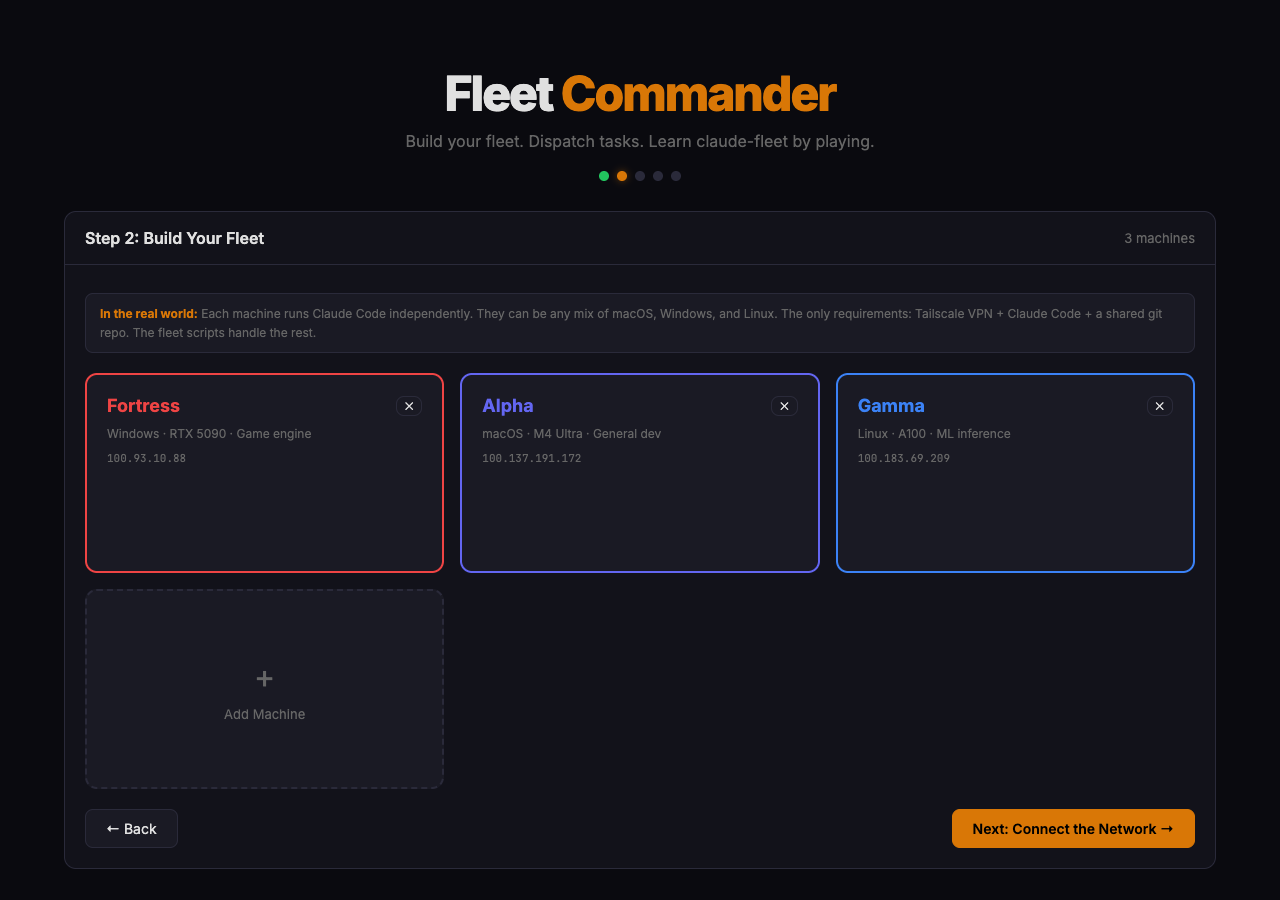
- Name your company, spec your machines (OS, GPU, role)
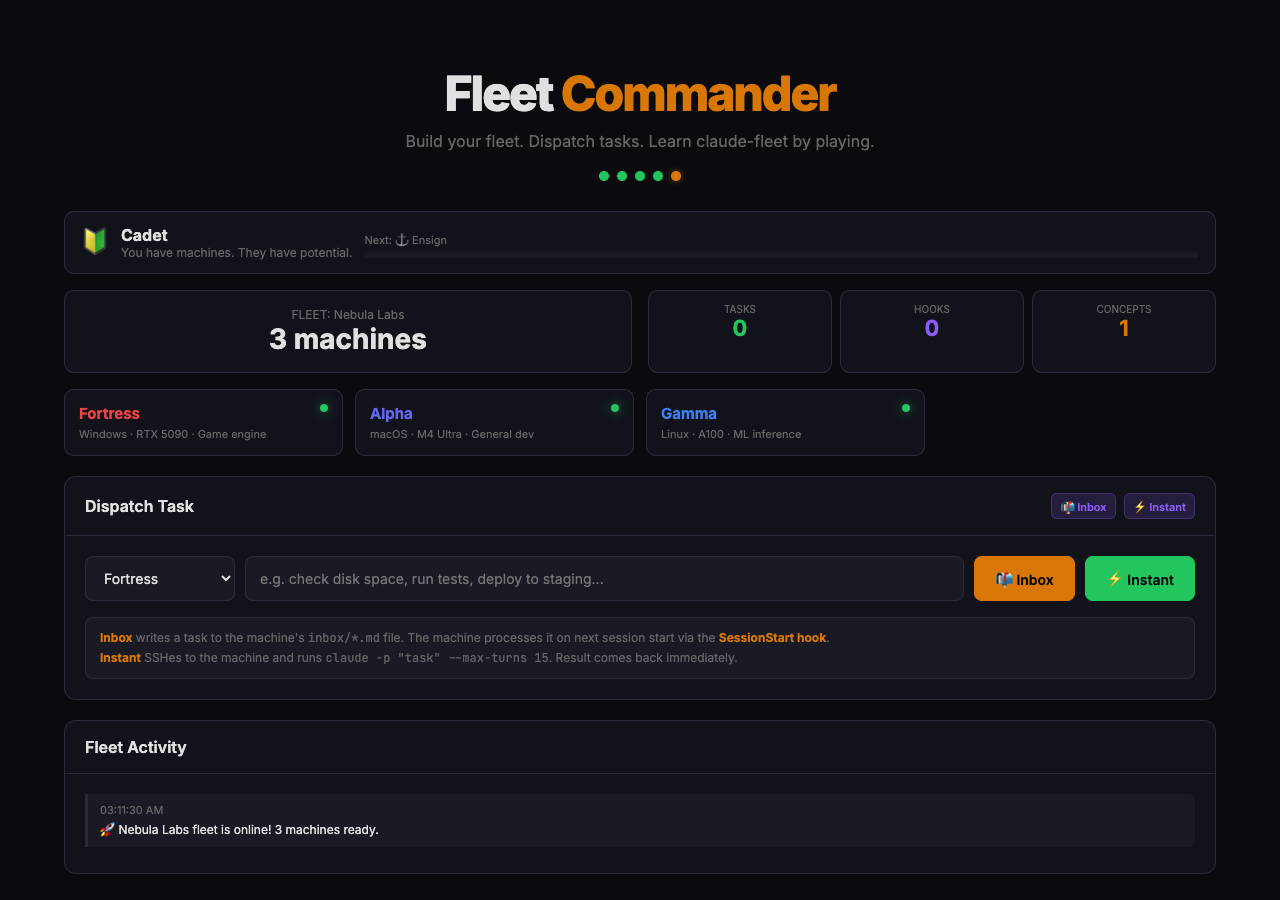
- Install the stack on each machine (Tailscale, Node.js, Claude Code, hooks)
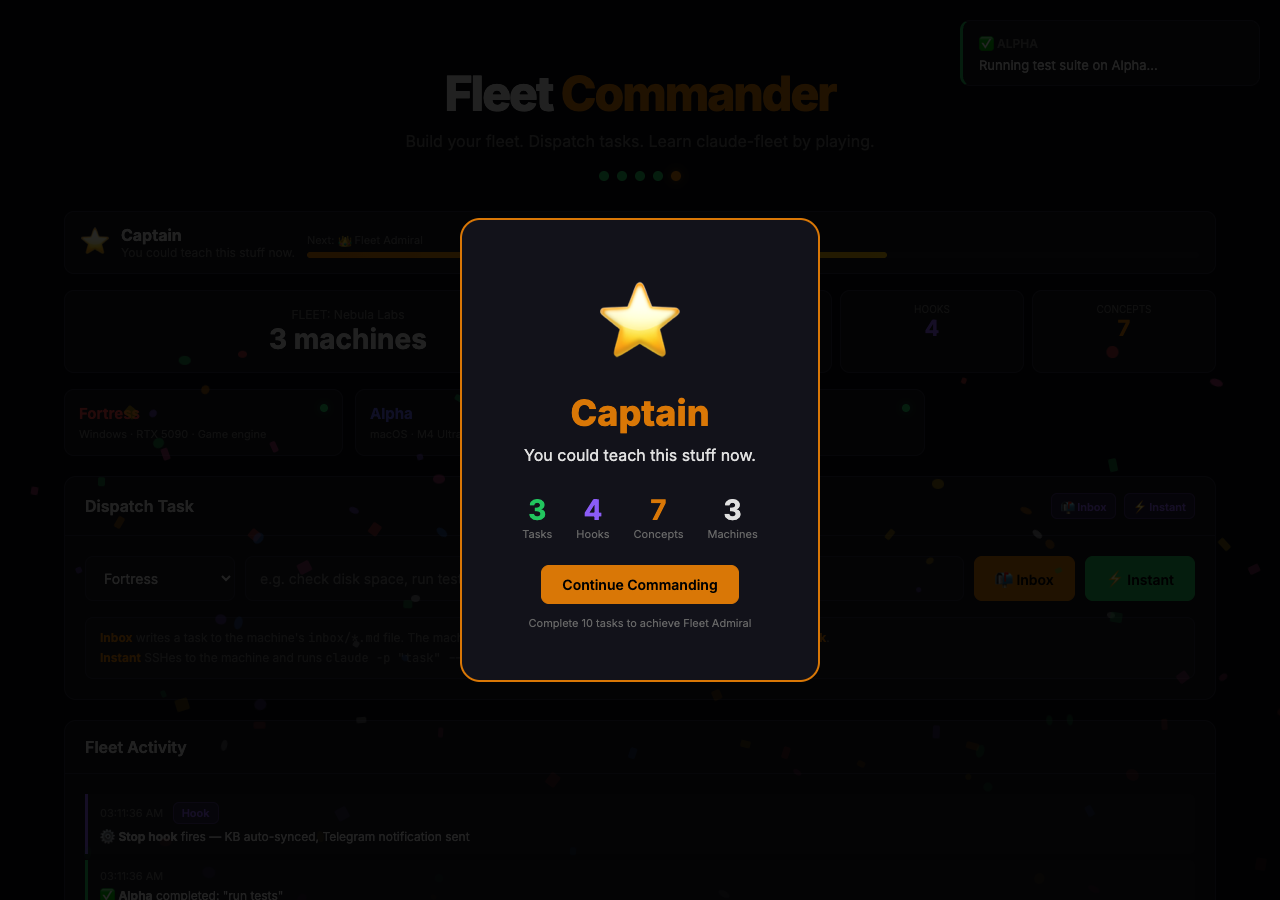
- Dispatch tasks via Inbox (async) or Instant (SSH) — watch data pulses travel through animated wires
- Fleet-wide operations — one click dispatches to all machines in parallel
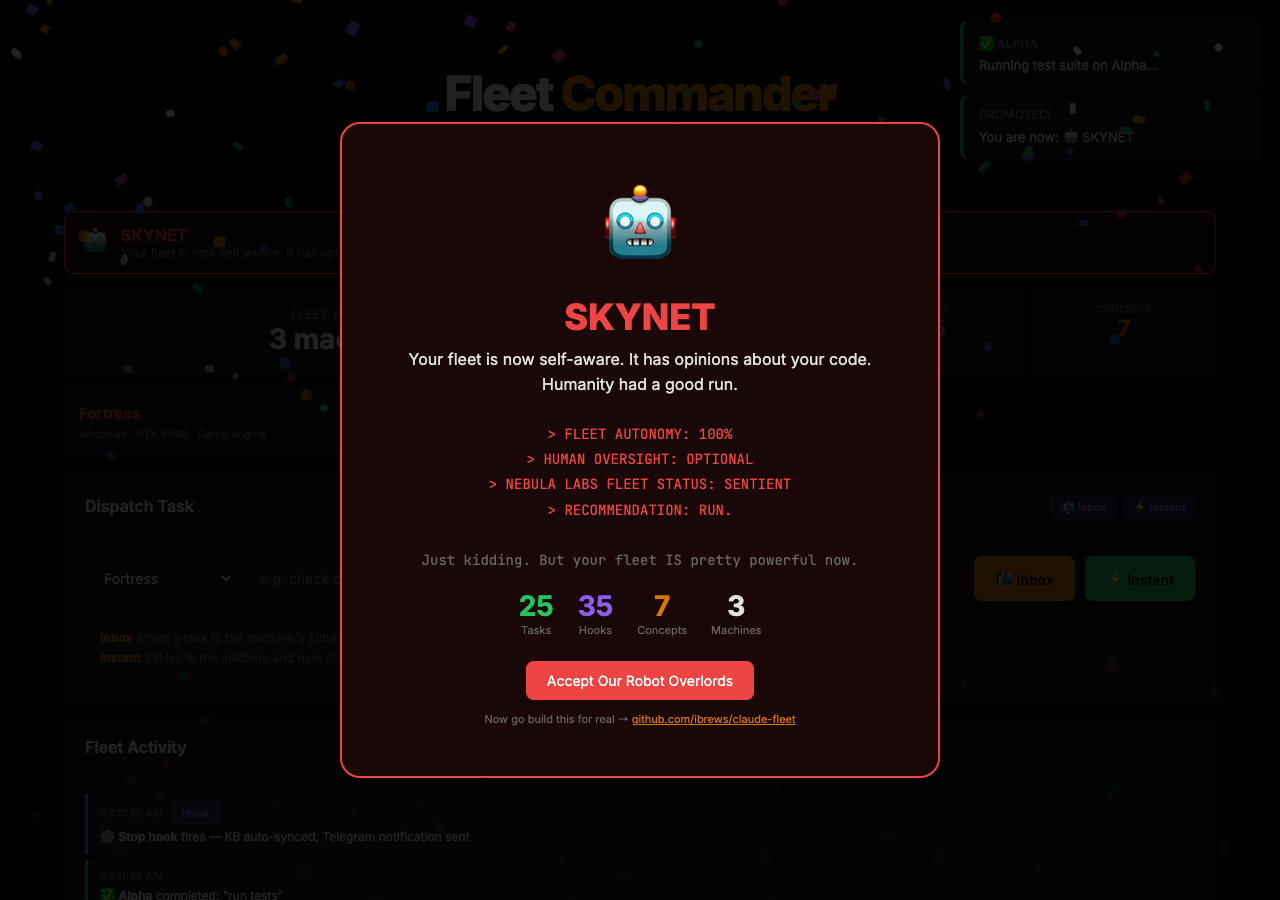
- 11 ranks from Cadet to SKYNET (can you hit 5000 points?)
- Global leaderboard, generative chiptune soundtrack, mad-libs task builder
- Interactive slideshow teaching the architecture
Build your fleet
Install the stack
Dispatch tasks and watch hooks fire
Achieve SKYNET
Examples
- Two-Machine Fleet — Minimal laptop + desktop setup
- Five-Machine Fleet — Multi-role fleet with specialization
- Telegram Channel Autolaunch — launchd + tmux pattern for the Telegram channel plugin on one fleet machine
Fleet Task Dispatch (Headless Subagents)
Dispatch a task to any fleet machine and get results back. Uses claude -p (headless mode) over SSH:
# Simple query
node scripts/fleet-task.js beta "Find all TODO comments in the project" --tools "Read,Glob,Grep"

# Get structured JSON output
node scripts/fleet-task.js gamma "Summarize the README" --json

# Fire and forget (long-running builds, etc.)
node scripts/fleet-task.js beta "Build the APK and upload it" --timeout 600 --bg

# Use a specific model
node scripts/fleet-task.js beta "Review this PR" --model claude-sonnet-4-6
When to use this vs. the inbox system:
- fleet-task.js: Real-time results needed, task is self-contained, takes < 10 minutes
- Inbox/triggers: Async is fine, task needs human review, long-running work
Windows Support (Node.js Scripts)
All hooks have Node.js equivalents for Windows machines (no bash/Python dependency):
| Bash (macOS/Linux) | Node.js (cross-platform) |
|---|---|
kb-inbox-check.sh |
kb-inbox-check.js |
kb-session-end.sh |
kb-session-end.js |
check-notifications.sh |
check-notifications.js |
fleet-sync-notifications.sh |
fleet-sync-notifications.js |
send-notification.sh |
send-notification.js |
See templates/settings-windows.json for the Windows hook configuration.
How It Works Under the Hood
The magic is in four hooks:
SessionStart (
kb-inbox-check.sh): When Claude starts, it pulls the knowledge base and checks for pending inbox items. If found, it injects them into Claude's context as high-priority instructions, so Claude processes them before doing anything else.Stop (
kb-session-end.sh): When Claude finishes, it auto-commits and pushes any changes to the knowledge base. No work is lost.Stop (
notify-human.js): After finishing, it sends a Telegram notification with a status icon so you know what happened without checking the terminal.PostToolUse (
check-notifications.sh): After every tool call, checks for mid-session notifications from other machines. If beta finishes a task that alpha requested, alpha finds out within ~60 seconds — no need to wait for the next session start.
The fleet trigger script (fleet-inbox-check.sh) SSHes into every machine in parallel and runs claude -p "check your inbox" — which triggers the SessionStart hook, which processes the inbox.
License
MIT
Reviews (0)
Sign in to leave a review.
Leave a reviewNo results found