icode-workbench
Health Pass
- License — License: AGPL-3.0
- Description — Repository has a description
- Active repo — Last push 0 days ago
- Community trust — 37 GitHub stars
Code Fail
- fs module — File system access in config/electron-builder.win.cjs
- fs module — File system access in config/scripts/check-brand.cjs
- spawnSync — Synchronous process spawning in config/scripts/gates.cjs
- process.env — Environment variable access in config/scripts/gates.cjs
- fs module — File system access in config/scripts/native/after-pack.cjs
- fs.rmSync — Destructive file system operation in config/scripts/native/docker-node-pty.cjs
- fs module — File system access in config/scripts/native/docker-node-pty.cjs
- fs module — File system access in config/scripts/native/mac-pty-modes.cjs
Permissions Pass
- Permissions — No dangerous permissions requested
No AI report is available for this listing yet.
The universal ADE — every agent, every platform, one workbench. Parallel, isolated, yours.
 iCode Workbench
English · 简体中文 · 日本語 · 한국어 · Español · Português (BR) · Deutsch · Français
THE UNIVERSAL AGENT DEVELOPMENT ENVIRONMENT (ADE)
Every agent. Every platform. One workbench.
Today: Claude Code, Codex, and OpenCode in parallel, each in its own Git worktree.
Mira, your cross-project assistant, watches every repository, tells you what
needs you, and can act across them. Review the diff, and keep the terminal
alive when the app restarts.
Get started
Pre-1.0 · Linux (WSL2/WSLg) · Windows x64 · macOS x64 / arm64
Why iCode Workbench?
iCode Workbench is the control room for a team of coding agents. It turns the
terminal into a portfolio: each agent gets an isolated worktree, each task has a
durable record, and every change is reviewed where it was made.
- Every agent, one workbench. Claude Code, Codex, and OpenCode today; the
adapter model is built to add more harnesses. - Every platform. Linux (WSL2/WSLg), Windows x64, and macOS x64 / arm64.
- Parallel by default. Every session gets its own branch and Git worktree.
- Mira across projects. One conversation for the real queue, blockers, and
cross-project actions. - Review where the agent worked. Task diffs, Source Control, and Monaco in
the session checkout.
Features
Meet Mira, your cross-project assistant
Mira is a person item in the rail — Projects · Schedules ┊ Mira ┊ Settings —
with an avatar, live status and unread badge. She is not another project tab and
not a terminal: one conversation spans every repository.
- She can see the work. Projects, tasks, sessions, review state and diffs are
in her context, so “what needs me?” is answered from the real queue rather than
a summary you have to assemble. - She can act across projects. Through validated actions she creates,
cancels, retries and archives tasks, messages task sessions and project
supervisors, records non-binding review recommendations, and remembers durable
preferences. She has no shell, no project working directory, and cannot approve
a proposal, decide a review, merge or push. - She streams. With Claude Code, replies render as Markdown while they are
written; the run line shows the current stage, elapsed time and thinking-token
count, and Stop terminates the harness — on Windows, its whole shim process
tree. - She remembers the conversation. The installed harness owns the native
conversation and Mira resumes it by session id. The header selects the current
or an earlier conversation, each segment pages through its transcript, and a
harness or target switch starts a bridged conversation with a visible
boundary. New conversation starts a clean one; a failed resume falls back
to reconstructed replay. - She comes to you. Approvals, failed or waiting tasks, review-ready work and
completed Mira/supervisor tasks become proactive messages with a rail badge and
an OS notification when no window is focused. They stay in the notifications
drawer rather than cluttering the conversation. Deduplication, an hourly budget
and quiet hours keep it from becoming noise.

Mira streams a Markdown status report across projects. The work line keeps the
harness stage, elapsed time and thinking tokens visible; the reply and the actions
are validated separately.
Mira is configured in Settings → Mira: persona name, run target (this machine
or a WSL distro), preferred harness, low-risk auto-dispatch, and notification
policy. Markdown is rendered as React nodes — headings, lists, tables, code,
quotes and http(s) links — never as raw HTML. Low-risk tasks she creates may
auto-dispatch under a daily cap and protected-path/keyword policy; everything else
waits for a person.
One wall for every project
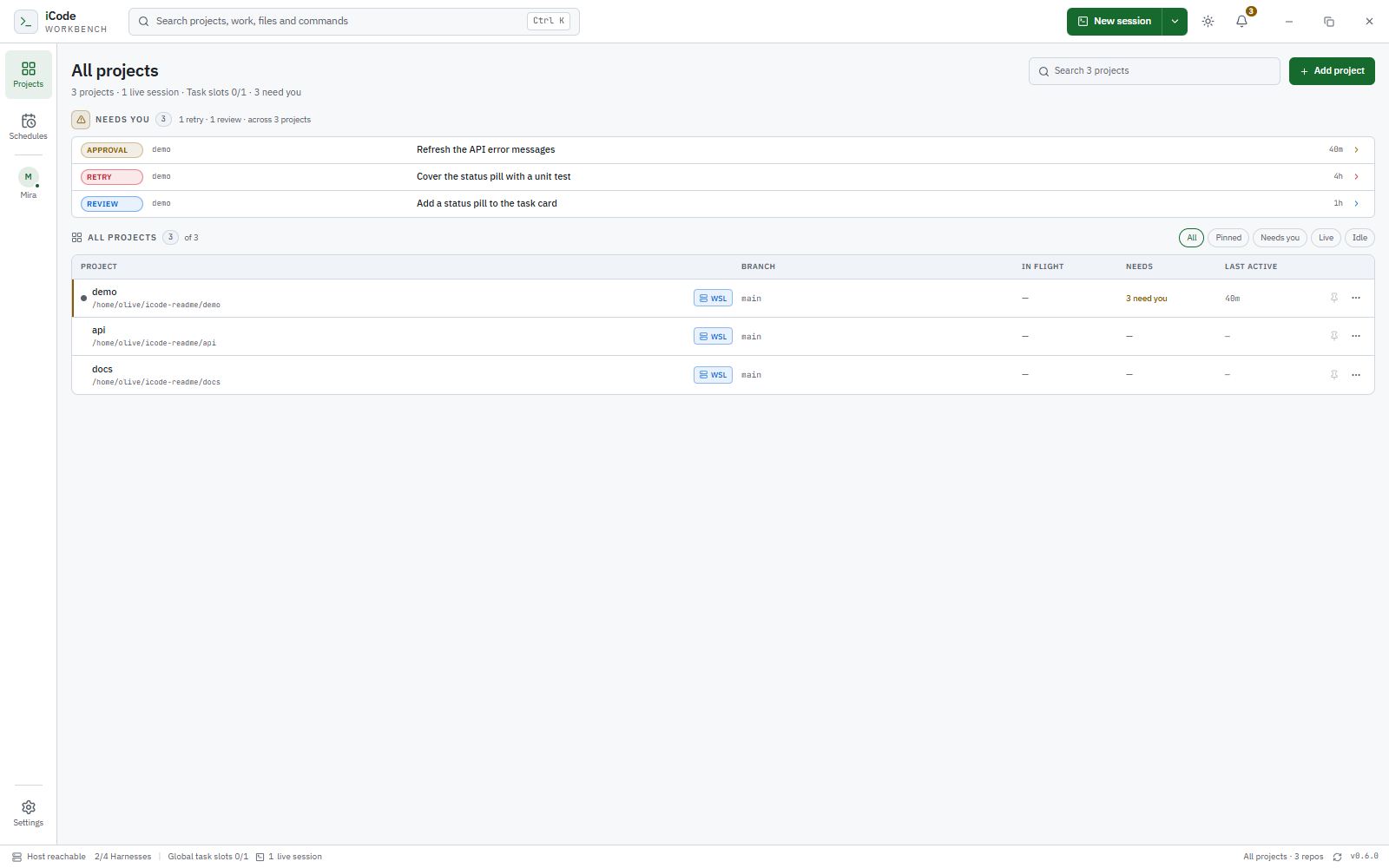
The Projects wall is the operational view. Each row separates three questions
that a terminal mixes together: In flight shows live direct sessions plus
running and queued tasks; Needs aggregates setup failures, tasks waiting for
an answer, failed tasks to retry, completed tasks awaiting review, and direct
agents waiting for input; Last active uses agent, task, and setup timestamps
rather than summary refresh time. Filter by Needs you, Live, or Idle, pin
projects, and open a waiting task or session directly from the attention list.
Isolated sessions by default
Every new session gets its own Git worktree and branch at the current HEAD, so
two agents in the same repository never edit the same checkout. Restart a
session without moving its worktree; sleep a direct session to stop the process
while keeping the checkout and resume token; wake it to continue the harness
conversation where the harness supports it. Removal is guarded by live PTYs, host
reachability, uncommitted changes, unmerged commits, and missing worktrees; a
clean removal deletes the checkout and keeps the branch.
Terminals that survive the app
A detached host owns the PTYs, terminal emulation, and exit truth. Closing the
window or quitting iCode does not stop a live session; reopening the app
reattaches to the same PTY incarnation. Attach returns a serialized snapshot with
scrollback and alternate-screen state, and flow control keeps a slow UI from
blocking the agent's process.

A real PTY in the session worktree; the detached host keeps it alive. The
terminal keeps its own dark palette in both appearances.
Attention, not terminal scraping
Claude Code hooks report session start, prompts, tool calls, permission requests,
and turn endings. iCode turns those events into Working · <tool>, Needs you,Done, and Done · failed, with unread markers and OS notifications only when
no window is focused. Activity is advisory: it never changes process state, and a
relaunch resets it to unknown rather than showing stale work. Only Claude Code
reports activity today; Codex, OpenCode, and shell sessions stay unknown by
design. Task-linked sessions do not raise a second OS notification: Mira owns the
blocker message, and the activity stream stays the raw evidence.
Tasks, approvals, and schedules
Tasks are durable units of work, not terminal tabs. Queue work with a global 1–4
slot limit; statuses move through queued, dispatching, running, waiting,completed, failed, and cancelled. A retry is a new attempt; cancellation
leaves the worktree for inspection. The workbench shows the instruction, live
session, changes against the task baseline, and a review decision separate from
process exit.
Tasks can come from you, Mira, or a project supervisor. Human-created and
higher-risk proposals wait for a person. Mira’s low-risk auto-dispatch can open
the gate for small, unprotected work under a daily cap and protected-path policy;
everything else stays pending. A project supervisor is a control session bound to
one repository; it proposes tasks from that project’s own context, follows the
same human gate, and stays in the project’s Sessions. Mira can start or message
one for you. Review accept/reject is also a human decision — accepting records
the judgment, it does not merge, push or delete anything. Merge remains in
Source Control.
Schedules create ordinary queued tasks on a cadence — once, daily, weekdays,
weekly, or every few hours — with queue-or-skip overlap handling and run-now.

Task workbench: the instruction, the live session, changes against the task
baseline, and a review decision.

Recurring tasks with queue-or-skip overlap handling.
Task history without the clutter
The default Tasks view is the working set: proposals and active work. A Needs
strip brings review-pending completions, failed tasks and waiting sessions
forward. Reviewed completions and cancellations move to History instead of
accumulating beside current work. Retry chains collapse to the latest attempt;
earlier attempts remain in the task’s Previous attempts.
History can Archive or Restore a task, or Archive all finished in one
click. Archive is reversible and does not delete the review, session, worktree or
retry chain. Reviewed completions and cancellations auto-archive after seven days;
review-pending completions and un-retried failures stay put. Archived tasks are
excluded from attention counts, Mira’s context and notifications, but remain
queryable as history. There is deliberately no hard-delete action.

History keeps finished work out of the working list while preserving the task,
its attempts and its review record.
Review where the agent worked
Source Control is scoped to the session's checkout. Changes shows conflicts,
staged, unstaged, untracked, and commits made in this session; diffs are
area-scoped; stage or unstage by file, folder, hunk, or line; discard by file,
folder, or hunk; and a three-way merge editor handles conflicts. Add notes to
exact changed lines and send them back to the agent's terminal. Commit, commit
all tracked changes, amend, commit & push, pull, push, sync, or publish the
current branch, with paginated history and cherry-pick, revert, and reset
actions. Draft a commit message with the installed harness in one-shot mode; the
result only fills the draft.

Review, stage, and commit in the session worktree.

Commit history, scoped to the current branch or the session.
Edit in the same checkout
Open Files beside the terminal and work in the same worktree the agent is
editing. The explorer supports create, rename, delete, duplicate, and move, with
app-managed trash and undo; Monaco provides editing, quick diffs against HEAD,
inline blame, and file history. Search the workspace, quick-open files, handle
external changes with reload/keep, and keep unsaved buffers across an ordinary
restart through hot exit.

Files and Monaco beside the terminal, in the same worktree.
Run where your code lives
Repositories can target this machine or a WSL distro. Local sessions run on
Linux, macOS, or native Windows over ConPTY; WSL agent sessions run on a managed
guest host reached through a relay, and shell sessions open through wsl.exe.
Harness detection is tri-state and target-aware, so a CLI installed on Windows
but missing inside the distro is reported correctly.
Local-first, no cloud dependency
State is local: SQLite holds projects, sessions, worktrees, tasks, and schedules;
a detached host owns terminal truth; there is no telemetry and no hosted service.
iCode does not call model APIs — your harness does — and the renderer is
sandboxed behind a typed preload and validated IPC.
Also in the box:
- Command palette:
Ctrl/Cmd+Kfor projects, sessions, tasks, Source
Control actions, and “Talk to Mira”;Ctrl/Cmd+Pfor quick open. - Mira settings: persona, local/WSL target, preferred harness, low-risk
auto-dispatch, notifications and quiet hours. - Task history: archive/restore, bulk archive of reviewed completions and
cancellations, collapsed retry attempts, and seven-day retention. - Themes: light by default, with System and Dark available, applied before
first paint. - Configurable workflow: task concurrency, Source Control, and Files
preferences. - Session diagnostics: host authority, PTY incarnation, worktree state, exit
codes, and orphan terminal reporting. - Retained branches: iCode-owned branches survive session removal; deletion
is separate and requires the exact name when unmerged. - Native window chrome: native traffic lights on macOS; custom controls on
Windows and Linux.

Settings for appearance, Mira’s target and harness, notifications, task
concurrency, Source Control, and Files.
How it works
- Add a project. Register an existing Git checkout, or initialize a folder
on its first commit. Repositories can live on this machine or inside a WSL
distro. - Ask Mira, or start work directly. Mira can answer across projects or
create a task for you; a session launches immediately, while a queued task
starts when a slot is free. Either way, iCode creates a worktree on branchicode/ses_<sessionId>at the current HEAD and launches the harness in a real
PTY. - Approve or adjust the plan. Proposals wait for a person. Review-pending
tasks expose Accept/Reject in the workbench; low-risk Mira tasks can already
be running under the auto-dispatch policy. - Work in the terminal. Open Files and Source Control beside it. Both are
tied to the same worktree the agent is editing. - Review. Stage by file, folder, hunk, or line; send line notes to the agent;
commit, amend, and push when the result is ready. - Archive the finished work. Reviewed completions and cancellations move to
History; a retry chain stays one row with its attempts preserved. - Finish safely. Removing a session stops the PTY, blocks on uncommitted or
unmerged work, and keeps the branch even when the checkout is removed.
iCode is the environment, not the agent. It does not call model APIs or
answer permission prompts. Your harness keeps its TUI, credentials, and
permissions; you keep the decisions.
Supported harnesses
Works with the coding-agent CLIs you already use. iCode runs the harness itself,
not a chat reimplementation, so its TUI, permissions, and hooks keep working.
Claude Code Codex OpenCode Shell
Detection is tri-state and target-aware: available, unavailable after a real
probe, or a retryable detection failure. A tool installed on Windows but missing
inside a WSL distro is reported correctly.
Mira uses the same installed CLI in a one-shot mode in a scratch directory on
this machine or inside a WSL distro. Claude Code supplies token-by-token
streaming; Codex and OpenCode currently report run stages and the final reply
rather than a live text draft.
Install
iCode is pre-1.0. CI produces installers for Linux x64, Windows x64, and macOS
x64 / arm64; until releases are published, build from source.
From source
Requirements: Node 24.x (.nvmrc pins 24.15.0), Corepack with pnpm 11.16.0,
Git, and at least one harness on PATH. Linux also needs build-essential andpython3; macOS needs Xcode Command Line Tools.
git clone https://github.com/icodehq/icode-workbench.git
cd icode-workbench
corepack enable
pnpm install
pnpm dev
Then choose Add project, start a session, queue a task, or open Mira and
ask what needs you.pnpm install rebuilds node-pty against Electron's ABI on Linux; Windows and
macOS use Node-API prebuilds.
Packages
| Platform | Artifacts |
|---|---|
| Linux x64 | AppImage, deb, rpm |
| Windows x64 | NSIS installer |
| macOS x64 / arm64 | dmg, zip |
pnpm package:linux         # AppImage, deb, rpm
pnpm package:win           # NSIS; run on Windows
pnpm package:mac -- --x64
pnpm package:mac -- --arm64
Windows packaging requires the verified WSL host artifact tree atartifacts/wsl-host/linux-x64. CI builds it once on Linux and passes it to the
Windows job; locally, pnpm build:wsl-host requires Docker. Linux and macOS
packages never ship that tree.
Artifacts are unsigned unless signing credentials are configured, so Windows
SmartScreen and macOS Gatekeeper warnings are expected.
On Linux, the unpacked build runs with ./dist/linux-unpacked/icode. Its profile
is $XDG_CONFIG_HOME/iCode (default ~/.config/iCode), with the database aticode.sqlite and host runtime files under run/. Quitting the window leaves
the host and its PTYs alive.
Community & support
- Issues: github.com/icodehq/icode-workbench/issues
- Contributing: .github/CONTRIBUTING.md
- Code of Conduct: CODE_OF_CONDUCT.md
- Security: SECURITY.md
- Translations: TRANSLATIONS.md
- Changelog: CHANGELOG.md
- Privacy: iCode has no telemetry, no hosted service, and makes no model API
calls. Model traffic belongs to your harness.
Developing
See .github/CONTRIBUTING.md for prerequisites,
repository layout, compatibility gates, packaging, and the versioning convention.
Before sending a change:
pnpm typecheck
pnpm test
pnpm check:brand
pnpm build
Repository layout
| Path | Responsibility |
|---|---|
src/main |
Electron main: windows, gates, persistence, host supervisor/client |
src/host |
Detached terminal host: PTYs, NDJSON protocol, token auth |
src/preload |
Frozen typed bridge; context isolation on, Node off, sandbox on |
src/renderer |
Terminal workspace and product UI |
src/shared |
Domain model, Zod boundary contracts, host protocol |
config |
TypeScript, Vitest, electron-builder, build scripts |
tests/compat |
Compatibility gates and packaged smokes |
tests/wsl |
WSL host artifact selftests and smokes |
Mira: a typed control plane
Mira is a headless planner, not a repo-less PTY. Each harness conversation is
resumed by the harness's own session id, so the persona and a freshly rebuilt
cross-project snapshot lead each turn while the harness keeps the prior context.
A fresh or reset conversation also replays a compact recent history. Retired
native conversations remain selectable transcript segments, and the per-turn
digest carries action results, failures and notifications from turns the
harness did not see. The model answers with one JSON envelope. Main validates
it with Zod and executes reads first; up to three harness calls are allowed per
turn. Writes are authorized and audited in assistant_actions; the model never
gets a project working directory, a shell, or a control socket. Approvals,
review decisions, merges and deletes are absent from its action vocabulary.
Claude runs with --output-format stream-json: text deltas feed a Markdown draft,
thinking-token events feed the run line, and the final result event is captured
as it arrives. The reply is rendered immediately, but actions execute only after
the complete envelope validates. Low-risk auto-dispatch is a conservative policy
over daily caps, protected keywords and protected paths; the default is three per
project and ten globally. Notifications use a per-thread sequence watermark and a
partial unique dedupe key, so restarts and repeated task events do not replay the
same message.
Terminal host and continuity
createOrAttach is idempotent by durable session ID. A live session attaches; an
exited session restarts with a new PTY incarnation; attach-only never spawns.
Every write, resize, data event, and exit event carries both the durable session
ID and the incarnation, so a stale handle cannot touch a restarted PTY.
Each session runs a headless xterm fed by PTY output. Attaching waits for the
emulator to drain, then returns a serialized snapshot with dimensions, cursor,
sequence, alternate-screen state, up to 5,000 lines of scrollback, and atruncated flag when history was lost. Snapshots are capped at 3 MiB. Alternate
screen content round-trips through the serialize addon.
Output feeds the emulator before clients, so a slow UI never blocks the process.
If the parse backlog exceeds 1 MiB, the PTY is paused and resumed below 256 KiB.
Per-client queues are capped at 1 MiB; excess data events become one lagged
notice with a sequence range. Responses are never dropped.
The socket prefers $XDG_RUNTIME_DIR/icode/<profile-scope>/terminal-host.sock,
with ICODE_HOST_SOCKET and ICODE_HOST_DIR as overrides. Authentication uses a
32-byte token in a 0600 file, a versioned hello, and constant-time comparison.
The host verifies effective 0700/0600 permissions and refuses filesystems that
cannot enforce them. A non-socket at the socket path is never deleted.
Persistence and recovery
app.getPath('userData')/icode.sqlite is opened by the main process withnode:sqlite: WAL, foreign keys, busy_timeout=5000, and synchronous=NORMAL,
all verified on open. Migrations are append-only and each runs in its own
transaction.
The database refuses a zero-byte file, checks the SQLite header before opening,
and runs PRAGMA integrity_check read-only and again on the writable handle. On
failure it reports DB_CORRUPT with recovery guidance and never deletes,
renames, or recreates the file.
Startup reconciles stored sessions against the host. A persisted live is never
treated as proof; host query failure yields unavailable, not exited. A live
host PTY with no durable row is reported as an orphan rather than silently
adopted. Repository removal asks the host first and refuses while affected PTYs
are live or the host is unreachable.
Worktree removal rules
All rules are re-checked at the moment of the action:
| Situation | Result |
|---|---|
| Live or starting PTY | Blocked |
| Host unreachable | Blocked; everything preserved |
| Uncommitted changes | Blocked; files listed |
| Unmerged commits | Blocked; commit count shown |
| Missing or unregistered worktree | Blocked; explicit recovery only |
| Clean and merged | Checkout removed, branch retained |
Session creation is refused for an unborn repository or while a merge, rebase,
cherry-pick, revert, or bisect is in progress, because no trustworthy baseline
exists. iCode never falls back to the primary checkout for a session whose
worktree is missing.
Activity hooks
| Hook | Activity |
|---|---|
SessionStart |
idle |
UserPromptSubmit, PreToolUse, PostToolUse* |
working (tool name shown) |
PermissionRequest |
waiting, unread |
PreToolUse of AskUserQuestion / ExitPlanMode |
waiting, unread |
Stop / StopFailure |
idle with completed / failed |
Events from a previous incarnation are rejected. Events older than the newest
accepted event by more than 250 ms are rejected, and a Stop whose prompt ID is
not the current turn is rejected. Duplicate deliveries are idempotent.Notification is intentionally not used because its interactive behavior was
not verified.
The hook script drains Claude's payload from stdin, forwards one bounded JSON
object over a Unix socket, writes nothing to stdout, and exits 0 within 100 ms
even when iCode is down. A broken iCode must never block the agent.
Security model
- The renderer is sandboxed with context isolation and Node disabled. The preload
exposes named operations only; subscriptions are reference-counted and dispose
individually. - Main registers a fixed IPC channel table, validates each payload with Zod,
checks the calling frame, and maps failures to stableAppErrorcodes. - Mira’s Markdown renderer produces React elements, never HTML. Only http(s)
links can reachshell.openExternal;file:,javascript:and custom schemes
are rejected in both the parser and the IPC handler. - The host protocol is NDJSON with a 4 MiB frame limit; malformed, oversized,
unknown, and identity-colliding frames are rejected. - Agent workspace trust for new worktrees is pre-seeded for Claude and Codex.
iCode never answers a harness permission prompt on your behalf.
Status
iCode Workbench is in early experimental development and iterating quickly.
Features, storage schemas, and packaging may change between releases. Use normal
Git hygiene on real work, and check the changelog before
upgrading; every user-visible change is recorded there.
Star History
Reviews (0)
Sign in to leave a review.
Leave a reviewNo results found