agentic-playwright
Health Pass
- License — License: MIT
- Description — Repository has a description
- Active repo — Last push 0 days ago
- Community trust — 108 GitHub stars
Code Pass
- Code scan — Scanned 12 files during light audit, no dangerous patterns found
Permissions Pass
- Permissions — No dangerous permissions requested
No AI report is available for this listing yet.
Production-grade Playwright + TypeScript Scaffold for Agentic Testing. Harness for all major AI coding agents baked in.
Agentic Playwright
Stop teaching your AI how to write tests. Hand it the rulebook.






Production-grade Playwright + TypeScript Scaffold for Agentic Testing.
A complete, running test framework — page objects, API contracts, data factories, CI —
plus the AI rules your assistant picks up automatically, from the very first prompt.
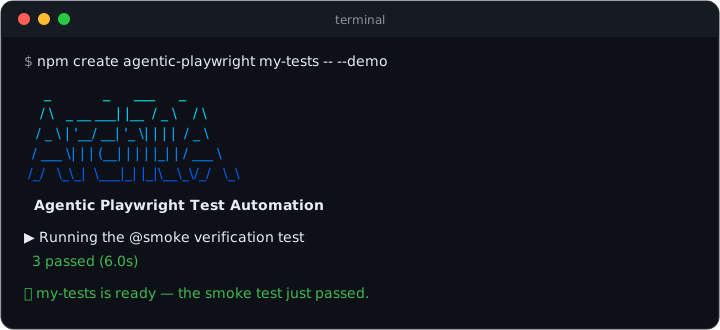
See it
From the (empty) directory your project should live in — the . means "scaffold right
here, and name the project after this folder" (a fresh git clone of an empty repo
works too). Prefer a new subfolder? Pass a name instead of .:
npm create agentic-playwright . -- --demo
Zero questions. Scaffolds the framework, installs dependencies and a browser, and ends
by running the smoke test against a live demo application — you see green before
writing a line. Under 5 minutes on normal broadband.
Without the rulebook vs with it
The same prompt — "write a test for the product search" — to the same AI assistant:
// ❌ Unsupervised: XPath, hard waits, `any`, magic timeouts, no structure
test('search', async ({ page }) => {
    await page.goto('https://practicesoftwaretesting.com');
    await page.locator('//input[@id="search-query"]').fill('pliers');
    await page.locator('//button[@type="submit"]').click();
    await page.waitForTimeout(5000);
    const cards: any = await page.$$('.card');
    expect(cards.length > 0).toBe(true);
});
// ✅ With Agentic Playwright: fixtures, steps, web-first assertions
import { expect, test } from '../../../fixtures/pom/test-options';

test(
    'should show only matching products when searching',
    { tag: '@regression' },
    async ({ homePage }) => {
        await test.step('GIVEN the user is on the home page', async () => {
            await homePage.open();
        });

        await test.step('WHEN the user searches for "pliers"', async () => {
            await homePage.searchFor('pliers');
        });

        await test.step('THEN every result matches the search term', async () => {
            await expect(homePage.searchCaption).toContainText('pliers');
            await expect(homePage.productNames.first()).toContainText('Pliers');
        });
    }
);
Dependency-injected page objects, Given/When/Then steps, web-first assertions, no hard
waits, no any, one tag per test — enforced by a Constitution and 17 skills the
assistant loads automatically, with a write-time hook that blocks the forbidden
patterns outright.
Not affiliated with Microsoft. Playwright is an open-source project by Microsoft; this scaffold builds on it.
This is a scaffold, not a finished framework. The example files (
AppPage,login.spec.ts,NavigationComponent, etc.) demonstrate the patterns and conventions you should follow. Replace them with your real application's pages, tests, and data as you build out your test suite.
Table of Contents
- Features
- Prerequisites
- Quick Start: npm create
- Quick Start: Dev Container
- Quick Start: Local Setup Script
- Manual Installation
- Getting Started: Adapting the Scaffold
- Project Structure
- Configuration
- Environment Variables
- Running Tests
- Tag Reference
- Writing Tests
- Page Object Model
- API Testing
- Data Strategy
- Authentication Setup
- Code Quality
- Coding Standards
- Core Principles (The Constitution)
- AI-Assisted Development Workflow
- AI Rules Architecture
- Architecture Overview
- Troubleshooting
- Agentic Playwright Pro
- License
Features
- TypeScript -- Full type safety with strict mode enabled
- Page Object Model -- Maintainable and scalable test architecture
- Fixture-based Architecture -- Reusable test components with dependency injection
- API Testing -- Built-in
apiRequestfixture with Zod schema validation and helper fixtures for setup/teardown - Multi-browser Support -- Chrome, Firefox, and WebKit configurations
- Environment Management -- Flexible
.envconfiguration with multi-environment support - Authentication Handling -- Pre-configured storage state for authenticated tests
- Code Quality -- ESLint + Prettier + Husky pre-commit hooks
- Parallel Execution -- Fast test runs with configurable workers
- Comprehensive Reporting -- HTML reports with traces, screenshots, and videos
- AI-Assisted Development -- Modular orchestrator rules for Claude Code, Cursor, and GitHub Copilot with glob-scoped auto-loading. Each tool's rule tree (
.claude/,.cursor/,.github/instructions/) is self-contained and stands alone. - Confidence-Gated Workflow -- The
ai-native-workflowskill is the sole entry-point router for non-trivial work. Every plan must includeConfidence: <1-10>,Rationale, andUnknowns; below confidence 5 the agent is required to stop and ask the user for the missing primary input rather than emit a plan built on guesses. - Constitution Enforcement Hook --
.claude/scripts/enforce_constitution.pyis wired as a Claude CodePreToolUsehook in.claude/settings.json. It blocks anyWrite/Edit/MultiEditthat would introduce a mechanically-detectable WON'T violation (waitForTimeout,z.objectin schemas, XPath,@playwright/testimports in specs,.jsonstatic data, the@functionaltag, tags ontest.describe()) before the file is ever written -- a hard backstop beneath the prompt-level rules. - Version Single-Source -- the root
VERSIONfile is the one source of truth for the product version.npm run version:stampwrites it intopackage.json;npm run check:versionassertsVERSION==package.json== the latestCHANGELOG.mdheading and fails on drift. Gated in.husky/pre-commit(when a version surface is staged) and in CI (skill-lint.yml). - Pre-Commit Drift Lints --
npm run check:skills-driftkeeps Constitution rules anchored in their owning skill's Critical block;npm run check:skills-referenceswalks all three rule trees (.claude/skills/,.cursor/skills/,.github/instructions/,.github/skills/) and catches broken pointers, orphan references, and broken section anchors between eachSKILL.mdand itsreferences/siblings. Both fire from.husky/pre-commitwhenever any of those trees has files staged. - Upstream Skill Sync --
skills-lock.jsonrecords the SHA-256 of the locally vendored copies ofskill-creator(fromanthropics/skills) andplaywright-cli(from@playwright/cli).npm run skills:verifyre-hashes the local files and exits non-zero on drift;npm run skills:reinstallfetches upstream, overwrites.claude/skills/<name>/SKILL.mdand.cursor/skills/<name>/SKILL.md, and refreshes the lock;npm run skills:updatere-locks after intentional local edits. - Playwright CLI Exploration --
playwright-cliis the default browser exploration path for UI discovery, tracing, storage inspection, and flow capture - Out-of-the-Box Anthropic Skills --
playwright-cliandskill-creatorare reinstalled fresh from the upstream Anthropic packages and tracked viaskills-lock.jsonfor reproducible installs - AI Task Workflows Playbook --
AI-WORKFLOWS.mdmaps the exact step sequence for every common flow (API suite for a controller, functional tests from a ticket, E2E suite, debugging, refactors, and more) to its owning skill and phase, with an anti-drift guardrails table -- so AI-assisted execution stays consistent across sessions
Prerequisites
- Node.js v22.x or later
- npm v10.x or later
Quick Start: npm create
The fastest path — scaffold a fresh project with everything wired, straight into the
directory you are standing in:
npm create agentic-playwright . -- --demo
Why the .? It scaffolds into the current directory and names the project
after the folder — the natural fit when you have already created (or cloned) an empty
repo for your tests. The directory must be empty apart from repo bookkeeping like.git; if a git repo already exists there, the initializer detects it and skipsgit init. Prefer a new subfolder instead? Pass a name:
npm create agentic-playwright my-tests -- --demo  # same, but in ./my-tests
npm create agentic-playwright .                   # interactive — 4 questions
npm create agentic-playwright . -- --bare         # your own app URLs
Useful flags: --no-claude / --no-cursor / --no-copilot (prune AI rule trees you
don't use), --yes, --skip-install, --skip-browsers, --skip-git, --skip-smoke.
Quick Start: Dev Container
The fastest way to get a fully working environment. Requires Docker Desktop and a Dev Containers extension for your editor:
- Cursor: Install the Dev Containers extension by Dev Containers.
- VS Code: Install the Dev Containers extension by Microsoft.
Important: Make sure Docker Desktop is up and running before proceeding with the steps below. The Dev Container will fail to build if Docker is not started.
Clone the repository:
git clone <your-repository-url>   # replace with your fork/clone URL
cd playwright-scaffold
Open in Cursor/VS Code and accept the prompt to "Reopen in Container" (or run
Dev Containers: Reopen in Containerfrom the Command Palette).Done. The Docker image ships with pre-warmed npm and
playwright-clibrowser caches, sopostCreateCommandcompletes in seconds even on first start. The container provides Node.js, npm dependencies (on a fast named volume), Playwright test browsers, Python 3, Claude Code CLI, andplaywright/playwright-clilinked into~/.local/bin. Editenv/.env.devwith your app configuration and runnpm test.
Version alignment: The Playwright Docker image tag in
.devcontainer/Dockerfilemust match the@playwright/testversion inpackage.json. When upgrading Playwright, update both.
Claude Code Custom Status Line
The scaffold includes a custom Claude Code status line that displays git branch, PR status, model, duration, cost, lines changed, and context window usage directly in the terminal.
To enable it, add the following to your .claude/settings.local.json (create the file if it doesn't exist):
{
    "statusLine": {
        "type": "command",
        "command": "python3 .claude/scripts/status_line.py"
    }
}
This renders a rich status bar at the bottom of the Claude Code terminal:
✦ main ● | 📁 project | 🤖 Sonnet 4.6 | ⏳ 12m05s | 💰 $1.42 | + 85 | — 12 | [████████░░░░] 42.5% (85,012/200k)
The status line script lives at .claude/scripts/status_line.py and uses a Gruvbox Dark color palette. It shows:
| Segment | Description |
|---|---|
| Git branch | Current branch with dirty indicator (●) |
| PR status | Review state emoji with clickable PR link (requires gh CLI) |
| Directory | Current workspace folder |
| Model | Active Claude model |
| Duration | Session duration |
| Cost | Cumulative API cost |
| Lines changed | Lines added/removed in the session |
| Context bar | Visual context window usage scaled to the autocompact threshold |
Note: Cost, lines changed, and context bar segments appear dynamically as you interact with Claude Code. A fresh session will only show git, directory, model, and duration.
Quick Start: Local Setup Script
For terminal-based workflows or if you prefer not to use Docker. Works on macOS and Linux (Windows users: use WSL2).
Clone the repository:
git clone <your-repository-url>   # replace with your fork/clone URL
cd playwright-scaffold
Run the setup script:
bash scripts/setup.shThis automatically installs Node.js v22 (via nvm if needed), npm dependencies, Playwright browsers with system deps, Python 3.11+, links
playwrightandplaywright-cliinto~/.local/bin, and installs a dedicatedplaywright-cliChromium cache. If you already have Node.js v22+ installed, you can also runnpm run setup— it is equivalent.Ensure
~/.local/binis on your PATH (if your shell does not already include it):export PATH="$HOME/.local/bin:$PATH"This is where the scaffold links
playwrightandplaywright-cli. Add this line to your~/.zshrcor~/.bashrcto make it permanent.Edit
env/.env.devwith your app configuration and runnpm test.
Manual Installation
If you prefer to install dependencies manually. Steps 1-3 and 5-6 are identical on all platforms; step 4 differs.
Clone the repository:
git clone <your-repository-url>   # replace with your fork/clone URL
cd playwright-scaffold
Install npm dependencies:
npm installInstall Playwright test browsers:
npx playwright install --with-depsLink CLI commands and install
playwright-clibrowsers:macOS / Linux:
bash scripts/link-cli.sh "$(pwd -P)"
npm run playwright-cli:install-browsers
Then ensure
~/.local/binis on your PATH (add to~/.zshrcor~/.bashrcto make permanent):export PATH="$HOME/.local/bin:$PATH"Windows (PowerShell):
npm run playwright-cli:install-browsersSet up environment variables:
macOS / Linux:
cp env/.env.example env/.env.devWindows (PowerShell):
Copy-Item env\.env.example env\.env.devEdit
env/.env.devwith your application's configuration.Run tests:
npm test
Verify Your Installation
After any setup method, confirm all tools are available:
macOS / Linux:
playwright --version
playwright-cli --version
Windows (PowerShell):
npx playwright --version
playwright-cli --version
Expected output (exact versions vary with your installed packages):
playwright --version      → Version 1.60.0
playwright-cli --version  → 0.1.13
Getting Started: Adapting the Scaffold
This scaffold ships with example files that demonstrate every pattern. Here's how to replace them with your real application code, step by step.
Step 1: Configure Your Environment
Edit env/.env.dev with your application's actual URLs and credentials:
APP_URL=https://your-real-app.com
API_URL=https://your-real-api.com
[email protected]
APP_PASSWORD=your-test-password
Step 2: Update Enums
Open enums/app/app.ts and replace the placeholder values with your app's actual messages, API endpoints, and storage state paths:
export enum Messages {
    LOGIN_SUCCESS = 'Your actual success message',
    LOGIN_ERROR = 'Your actual error message',
    // Add more messages as needed
}

export enum ApiEndpoints {
    LOGIN = '/your/actual/login/endpoint',
    // Add more endpoints as needed
}
Step 3: Create Your First Page Object
Replace pages/app/app.page.ts with a page object for your application's actual login page (or whichever page you're testing first). Use the existing file as a template:
- Update the locators to match your app's actual elements
- Update the action methods to match your app's actual behavior
- Keep the same patterns: getter locators, JSDoc comments,
Promise<void>return types
Tip: If using Cursor with AI, ask it to "navigate to [your-url] and create a page object" -- the AI rules will guide it to use
playwright-cliby default to explore the page and generate accurate locators.
Step 4: Update Authentication Setup
Edit helpers/app/createStorageState.ts to match your app's actual login flow. The two functions to update:
createAppStorageState()-- Browser-based login for storage statesetUserAccessToken()-- API-based login for access tokens
Step 5: Write Your First Real Test
Replace the example tests in tests/app/functional/ with tests for your application. Follow the pattern in the example files:
import { expect, test } from '../../../fixtures/pom/test-options';

test.describe('Your Feature', () => {
    test(
        'should do something specific',
        { tag: '@smoke' },
        async ({ appPage }) => {
            await test.step('GIVEN precondition', async () => {
                /* ... */
            });
            await test.step('WHEN action is taken', async () => {
                /* ... */
            });
            await test.step('THEN expected result', async () => {
                /* ... */
            });
        }
    );
});
Step 6: Run and Verify
npm test
What to Keep vs. What to Replace
| Keep As-Is | Replace With Your App |
|---|---|
fixtures/pom/test-options.ts |
pages/app/*.page.ts (your page objects) |
fixtures/pom/page-object-fixture.ts (extend it) |
tests/app/**/*.spec.ts (your tests) |
fixtures/api/plain-function.ts |
enums/app/app.ts (your messages/endpoints) |
fixtures/api/api-types.ts |
test-data/static/app/*.ts (your test data) |
fixtures/helper/helper-fixture.ts (extend it) |
test-data/factories/app/*.factory.ts (your factories) |
config/, helpers/util/ |
helpers/app/createStorageState.ts (your auth flow) |
.claude/skills/, .cursor/skills/, .github/instructions/ (AI skills) |
fixtures/api/schemas/app/ (your API schemas) |
playwright.config.ts (mostly) |
pages/components/ (your UI components) |
Project Structure
root/
├── .devcontainer/             # Dev Container configuration (Docker-based setup)
│   ├── Dockerfile             # Playwright + Python + pre-warmed npm/CLI caches + Claude Code
│   ├── devcontainer.json      # VS Code/Cursor container settings
│   └── post-create.sh         # Auto-setup script (npm ci, CLI links, env file, etc.)
│
├── .playwright/
│   └── cli.config.json        # playwright-cli browser defaults (Chromium channel)
│
├── scripts/
│   ├── check-rules-drift.sh         # Constitution rules <-> skill Critical-block anchors
│   ├── check-skill-references-drift.sh  # SKILL.md <-> references/ pointers, orphans, anchors
│   ├── check-skill-crossrefs.sh    # Skills Index sync, frontmatter, cross-skill refs
│   ├── check-version-drift.sh      # VERSION <-> package.json <-> CHANGELOG consistency
│   ├── stamp-version.sh            # Stamp VERSION into package.json (single-source)
│   ├── install-playwright-cli-browsers.sh
│   ├── link-cli.sh            # Links playwright/playwright-cli into ~/.local/bin
│   ├── playwright-cli.sh      # Wrapper that isolates PLAYWRIGHT_BROWSERS_PATH for @playwright/cli
│   └── setup.sh               # Local development setup (non-Docker alternative)
│
├── VERSION                    # Single source of truth for the product version
├── CHANGELOG.md               # Release history (newest first)
├── CLAUDE.md                  # AI orchestrator for Claude Code (always loaded)
├── AI-WORKFLOWS.md            # Step-by-step task workflow playbook (anti-drift reference)
├── .claude/                   # Claude Code configuration and AI skills
│   ├── settings.json          # Shared settings (Constitution enforcement PreToolUse hook)
│   ├── settings.local.json    # Local settings (status line, permissions)
│   ├── scripts/
│   │   ├── enforce_constitution.py  # PreToolUse hook: blocks mechanical WON'T violations
│   │   └── status_line.py     # Custom status line renderer (Gruvbox Dark theme)
│   └── skills/                # Detailed AI skills (tool-agnostic)
│       ├── api-testing/       # apiRequest fixture, schema validation, helpers
│       ├── common-tasks/      # Prompt templates, anti-patterns, verification checklist
│       ├── config/            # Configuration patterns, environment variables
│       ├── data-strategy/     # Factories (Faker + Zod) vs static TS data (`.ts` `as const`, three-tier rule)
│       ├── enums/             # Enum conventions, naming, organization
│       ├── fixtures/          # DI pattern, fixture creation, merging
│       ├── helpers/           # Helper function conventions, auth helpers
│       ├── page-objects/      # POM pattern, getter locators, components
│       ├── playwright-cli/    # Default browser exploration workflow for UI discovery
│       ├── pr-reviewer/       # Review a branch as a PR against the base branch, judged by this repo's rules
│       ├── refactor-values/   # Safe refactoring of enum values and static data
│       ├── selectors/         # Exploration-first workflow, selector priority, feedback selectors
│       ├── skill-creator/     # Meta-skill for creating, evaluating, and improving skills
│       ├── test-standards/    # Test structure, tagging, steps, assertions
│       └── type-safety/       # Zod schemas, no-any, TypeScript strict mode
│
├── .cursor/                   # Cursor AI rules and skills
│   ├── rules/
│   │   └── rules.mdc          # AI orchestrator for Cursor (always loaded)
│   └── skills/                # Mirror of .claude/skills/ for Cursor compatibility
│       ├── api-testing/
│       ├── common-tasks/
│       ├── config/
│       ├── data-strategy/
│       ├── enums/
│       ├── fixtures/
│       ├── helpers/
│       ├── page-objects/
│       ├── playwright-cli/
│       ├── pr-reviewer/
│       ├── refactor-values/
│       ├── selectors/
│       ├── skill-creator/
│       ├── test-standards/
│       └── type-safety/
│
├── .github/                   # GitHub Copilot AI instructions
│   ├── copilot-instructions.md        # AI orchestrator for Copilot (always loaded)
│   ├── skills/
│   │   └── skill-creator/             # Meta-skill for creating and improving skills
│   └── instructions/                  # Scoped instructions (auto-injected by file glob)
│       ├── api-testing.instructions.md
│       ├── config.instructions.md
│       ├── data-strategy.instructions.md
│       ├── enums.instructions.md
│       ├── fixtures.instructions.md
│       ├── helpers.instructions.md
│       ├── page-objects.instructions.md
│       ├── playwright-cli.instructions.md
│       ├── refactor-values.instructions.md
│       ├── selectors.instructions.md
│       ├── test-standards.instructions.md
│       └── type-safety.instructions.md
│
├── config/                    # Application configuration
│   ├── app.ts                 # App-specific config (URLs, paths)
│   └── util/                  # Utility configurations
│       └── util.ts
│
├── enums/                     # Constants and enumerations
│   ├── app/                   # App-specific enums
│   │   └── app.ts
│   └── util/                  # Shared enums (roles, etc.)
│       └── roles.ts
│
├── env/                       # Environment configuration
│   ├── .env.example           # Template for environment variables
│   └── .env.dev               # Development environment (git-ignored)
│
├── fixtures/                  # Playwright test fixtures
│   ├── api/                   # API testing utilities
│   │   ├── api-request-fixture.ts  # API request fixture (apiRequest)
│   │   ├── api-types.ts            # TypeScript types for API
│   │   ├── plain-function.ts       # Core API request function (internal)
│   │   └── schemas/                # Zod validation schemas
│   │       ├── app/                # App-specific schemas
│   │       │   └── userSchema.ts
│   │       └── util/               # Common error schemas
│   │           └── errorResponseSchema.ts
│   ├── helper/                # Setup/teardown helper fixtures
│   │   └── helper-fixture.ts      # API-driven precondition fixtures
│   └── pom/                   # Page Object fixtures
│       ├── page-object-fixture.ts  # Page object instantiation
│       └── test-options.ts         # Merged test fixtures (use this)
│
├── helpers/                   # Helper functions
│   ├── app/                   # App-specific helpers
│   │   └── createStorageState.ts   # Authentication helpers
│   └── util/                  # Utility functions
│       └── util.ts
│
├── pages/                     # Page Object Model classes
│   ├── app/                   # App page objects
│   │   └── app.page.ts        # Main application page
│   └── components/            # Reusable UI components
│       └── navigation.component.ts
│
├── test-data/                 # Test data files
│   ├── static/                # Immutable data (boundary/invalid cases)
│   │   └── app/
│   │       └── invalidCredentials.ts
│   └── factories/             # Dynamic data generators (Faker + Zod)
│       └── app/
│           └── user.factory.ts
│
├── tests/                     # Test specifications
│   └── app/                   # App tests
│       ├── auth.setup.ts      # Authentication setup
│       ├── api/               # API tests
│       │   └── login.spec.ts
│       ├── e2e/               # End-to-end tests
│       │   └── e2e.spec.ts
│       └── functional/        # Functional tests
│           └── login.spec.ts
│
├── .gitignore
├── .prettierrc                # Prettier configuration
├── eslint.config.mts          # ESLint configuration (flat config)
├── package.json
├── playwright.config.ts       # Playwright configuration
├── README.md
└── tsconfig.json              # TypeScript configuration
Configuration
Playwright Configuration
The playwright.config.ts file contains all test runner settings:
| Setting | Local | CI |
|---|---|---|
| Parallel execution | Enabled | Enabled |
| Workers | Auto | 1 |
| Retries | 0 | 2 |
| Reporter | HTML (opens on failure) | Blob + HTML |
| Traces | On first retry | On first retry |
| Screenshots | On failure | On failure |
| Videos | Retain on failure | Retain on failure |
Browser Projects
| Project | Description | Dependencies |
|---|---|---|
setup |
Authentication setup | None |
chromium |
Main tests on Chrome | setup |
firefox |
Firefox (commented out) | setup |
webkit |
Safari (commented out) | setup |
Timeouts
| Timeout | Value |
|---|---|
| Test timeout | 60 seconds |
| Action timeout | 10 seconds |
| Navigation timeout | 30 seconds |
| Expect timeout | 10 seconds |
Environment Variables
Setup
Copy the example file:
cp env/.env.example env/.env.devConfigure your variables in
env/.env.dev:# Application URL (frontend) APP_URL=https://your-app-url.com # API URL (backend) API_URL=https://your-api-url.com # Test User Credentials [email protected] APP_PASSWORD=your-secure-password # Optional: Additional service URLs UTILITY_URL=https://your-utility-service.com
Switching Environments
# Default (dev)
npm test

# Staging environment
ENVIRONMENT=staging npm test

# Production environment (read-only tests)
ENVIRONMENT=prod npm test
Creating New Environments
Create env/.env.<environment> files:
env/.env.dev-- Developmentenv/.env.staging-- Stagingenv/.env.prod-- Production
Running Tests
Basic Commands
# Run all tests (excludes @destructive)
npm test

# Run tests on specific browser (excludes @destructive)
npm run test:chromium
npm run test:firefox
npm run test:webkit

# Run in headed mode (see browser)
npm run test:headed

# Run in debug mode (Playwright Inspector)
npm run test:debug

# Run with UI mode (interactive)
npm run test:ui
Running by Tag
Run tests filtered by tag. See the Tag Reference section for the full list of available tags and their meanings.
# Run by importance level
npm run test:smoke          # Critical path tests
npm run test:sanity         # Key functionality verification
npm run test:regression     # Full regression coverage

# Run by test type
npm run test:api            # API-only tests
npm run test:e2e            # End-to-end user flows

# Run destructive tests only (single worker, isolated)
npm run test:destructive
CI Mode
Optimized for CI environments with single worker, blob reports:
npm run test:ci
View Reports
npm run report
Tag Reference
Tags control selective test execution. Each test has exactly one tag. Apply tags to individual tests via { tag: '@smoke' } -- never on test.describe() blocks. @functional is forbidden.
The Single-Tag Rule
A test gets exactly one tag from this set. @destructive is the heaviest tag and always wins -- but only for shared/global state. A test that mutates state other tests or users depend on (locale, permissions, roles, guest access, feature flags, global settings) is tagged only @destructive, regardless of what importance or type tag it would otherwise carry. A test that creates and cleans up only its own isolated data is NOT destructive -- tag it by importance (@smoke/@regression/@api/…).
| Tag | Purpose | npm Command |
|---|---|---|
@smoke |
Critical path -- run first and frequently | npm run test:smoke |
@sanity |
Key functionality verification | npm run test:sanity |
@regression |
Full regression coverage of a single behaviour | npm run test:regression |
@e2e |
End-to-end multi-feature user journey | npm run test:e2e |
@api |
API contract and schema validation | npm run test:api |
@destructive |
Mutates shared/global state -- locale, permissions, roles, guest access, feature flags, global settings (overrides any other tag) | npm run test:destructive |
How Tag Filtering Works
npm testruns the full suite excluding@destructivetests (via--grep-invert), because the full suite runs in parallel and destructive tests modify shared state.- Tag-specific commands (e.g.,
test:smoke) use--grep @smoketo run only matching tests. Because each test has exactly one tag, a@destructivetest only runs undernpm run test:destructive-- not undertest:smoke,test:regression, etc. npm run test:destructiveruns only@destructivetests with--workers=1for sequential execution.
The @destructive Tag
@destructive is reserved for shared/global state -- state that lives outside the test and that other tests, users, or sessions depend on: changing the locale, granting/removing permissions, roles, or guest access, toggling feature flags or global settings, or mutating shared seed data every test reads (e.g. "delete all users"). They follow strict rules:
- Excluded from
npm test-- The base command uses--grep-invert @destructiveto prevent them from running in the parallel full-suite execution. - Run via dedicated command --
npm run test:destructivewith a single worker.
Not destructive: a test that creates its own record, asserts, then deletes only that record in cleanup is isolated, not destructive. Tag it by importance and let it run in the parallel suite.
Cleanup applies to any state-mutating test. Every test that writes persistent state -- @destructive shared-state tests and isolated own-data tests -- MUST use test.afterEach() or test.afterAll() to revert what it wrote, so subsequent tests always run against a clean environment.
test.describe('admin data management', () => {
    test.afterEach(async ({ apiRequest }) => {
        // REQUIRED: Revert state changes made by the test
        await apiRequest({
            method: 'POST',
            url: '/api/admin/reset',
            baseUrl: process.env.API_URL,
        });
    });

    test(
        'should delete all inactive users',
        { tag: '@destructive' },
        async ({ apiRequest }) => {
            // Test modifies shared state, afterEach reverts it
        }
    );
});
Forbidden Tag Patterns
// FORBIDDEN -- @functional is not a valid tag
test('should login', { tag: '@functional' }, async ({ appPage }) => { ... });

// FORBIDDEN -- combining tags is not allowed
test('should authenticate', { tag: ['@smoke', '@api'] }, async ({ apiRequest }) => { ... });

// FORBIDDEN -- @destructive must be the ONLY tag (it always wins)
test('should purge cache', { tag: ['@regression', '@destructive'] }, async ({ apiRequest }) => { ... });

// FORBIDDEN -- tags belong on the test, not on the describe
test.describe('Feature @smoke', () => { ... });
Writing Tests
Test File Structure
Always import from the merged fixtures in test-options.ts:
import { expect, test } from '../../../fixtures/pom/test-options';

test.describe('Feature Tests', () => {
    test.beforeEach(async ({ appPage }) => {
        await appPage.openHomePage();
    });

    test('should perform action', { tag: '@smoke' }, async ({ appPage }) => {
        await test.step('GIVEN user is on the home page', async () => {
            await expect(appPage.appTitle).toBeVisible();
        });

        await test.step('WHEN user performs an action', async () => {
            // Perform action
        });

        await test.step('THEN expected result should occur', async () => {
            // Assert result
        });
    });
});
Using Test Steps
Use test.step() for better readability and reporting with Given/When/Then structure:
test('descriptive test name', async ({ appPage }) => {
    await test.step('GIVEN user is on the login page', async () => {
        await appPage.openHomePage();
    });

    await test.step('WHEN user enters valid credentials', async () => {
        await appPage.login(email, password);
    });

    await test.step('THEN user should see dashboard', async () => {
        await expect(appPage.username).toBeVisible();
    });
});
Data-Driven Tests
Use loops outside of test blocks to generate individual tests:
import { INVALID_LOGIN_ATTEMPTS } from '../../../test-data/static/app/invalidCredentials';

for (const { description, email, password } of INVALID_LOGIN_ATTEMPTS) {
    test(
        `should show error for ${description}`,
        { tag: '@regression' },
        async ({ appPage }) => {
            await appPage.openHomePage();
            await appPage.login(email, password);
            await expect(appPage.errorMessage).toBeVisible();
        }
    );
}
Page Object Model
Creating Page Objects
Page objects encapsulate locators and actions for a page or component:
import { expect, Locator, Page } from '@playwright/test';
import { Messages } from '../../enums/app/app';

export class MyPage {
    constructor(private readonly page: Page) {}

    // ==================== Locators ====================

    get inputField(): Locator {
        return this.page.getByLabel('Email address');
    }

    get submitButton(): Locator {
        return this.page.getByRole('button', { name: 'Submit' });
    }

    // ==================== Feedback Locators ====================

    get successMessage(): Locator {
        return this.page.getByText(Messages.SUBMIT_SUCCESS);
    }

    get errorMessage(): Locator {
        return this.page.getByText(Messages.SUBMIT_FAILED);
    }

    // ==================== Actions ====================

    /**
     * Submits the form and waits for the response.
     * @param {string} value - The value to enter in the form.
     * @returns {Promise<void>}
     */
    async submitForm(value: string): Promise<void> {
        await this.inputField.fill(value);
        await this.submitButton.click();
        await this.page.waitForResponse((response) =>
            response.url().includes('/api/submit')
        );
    }
}
Locator Priority
Use semantic locators in this order of preference:
page.getByRole()-- Accessibility-based (recommended)page.getByLabel()-- Form labelspage.getByPlaceholder()-- Placeholder textpage.getByText()-- Text contentpage.getByTestId()-- Test IDs (fallback)page.locator()-- CSS/XPath (last resort)
Registering Page Objects
Add new page objects to fixtures/pom/page-object-fixture.ts:
import { test as base } from '@playwright/test';
import { AppPage } from '../../pages/app/app.page';
import { MyNewPage } from '../../pages/app/my-new.page';

export type FrameworkFixtures = {
    appPage: AppPage;
    myNewPage: MyNewPage;
};

export const test = base.extend<FrameworkFixtures>({
    appPage: async ({ page }, use) => {
        await use(new AppPage(page));
    },
    myNewPage: async ({ page }, use) => {
        await use(new MyNewPage(page));
    },
});
Using the resetStorageState Fixture
The framework provides a resetStorageState fixture to clear cookies and permissions during a test. This is useful when testing login flows in authenticated test projects:
test.beforeEach(async ({ resetStorageState, appPage }) => {
    await resetStorageState();
    await appPage.openHomePage();
});

test('should login successfully', async ({ appPage }) => {
    await appPage.login(email, password);
    await expect(appPage.username).toBeVisible();
});
Component Pattern
Reusable UI components can be composed into Page Objects:
import { NavigationComponent } from '../components/navigation.component';

export class DashboardPage {
    readonly nav: NavigationComponent;

    constructor(private readonly page: Page) {
        this.nav = new NavigationComponent(page);
    }
}

// Usage in tests
await dashboardPage.nav.clickHome();
await dashboardPage.nav.logout();
API Testing
Making API Requests
Use the apiRequest fixture for all API calls in tests:
import { expect, test } from '../../../fixtures/pom/test-options';
import {
    UserResponse,
    UserResponseSchema,
} from '../../../fixtures/api/schemas/app/userSchema';

test('should return user data', { tag: '@api' }, async ({ apiRequest }) => {
    const { status, body } = await apiRequest<UserResponse>({
        method: 'GET',
        url: '/api/users/me',
        baseUrl: process.env.API_URL,
        headers: process.env.ACCESS_TOKEN,
    });

    expect(status).toBe(200);
    expect(UserResponseSchema.parse(body)).toBeTruthy();
});
Use the apiRequest fixture directly for all API work -- assertions, beforeEach/afterEach, one-off calls. Do not create separate helpers for every endpoint.
API Request Options
| Option | Type | Description |
|---|---|---|
method |
'GET' | 'POST' | 'PUT' | 'DELETE' | 'PATCH' |
HTTP method |
url |
string |
Endpoint path |
baseUrl |
string (optional) |
Base URL to prepend |
body |
Record<string, unknown> (optional) |
Request payload |
headers |
string (optional) |
Authentication token for Authorization header |
authType |
'Bearer' | 'Token' | 'Basic' (optional) |
Auth scheme (default: 'Bearer') |
Schema Validation with Zod
Define schemas in fixtures/api/schemas/. Zod 4 promotes string format validators to top-level APIs for better tree-shaking and clarity:
import { z } from 'zod';

export const UserResponseSchema = z.strictObject({
    id: z.uuid(),
    email: z.email(),
    token: z.string(),
});

export type UserResponse = z.infer<typeof UserResponseSchema>;
Use schemas to validate responses:
const { body } = await apiRequest<UserResponse>({ ... });

// This will throw if the response doesn't match the schema
const validatedUser = UserResponseSchema.parse(body);
Helper Fixtures for Important Setup/Teardown
For critical, recurring setup/teardown reused across many test files, use helper fixtures in fixtures/helper/helper-fixture.ts:
// In tests -- the fixture handles lifecycle automatically
test('should edit resource', async ({ createdResource, appPage }) => {
    // createdResource was created via API before this test
    await appPage.navigateToResource(createdResource.id);
    // createdResource is deleted via API after this test (even on failure)
});
See fixtures/helper/helper-fixture.ts for the full setup/teardown pattern. Use helpers only when the same multi-step setup/teardown is duplicated across 3+ test files.
Data Strategy
This framework uses a bifurcated data strategy to ensure both determinism and test isolation:
Static Data (test-data/static/)
Immutable TypeScript files (.ts with as const exports) for curated boundary and invalid data. This data never changes, ensuring reproducible tests for edge cases. JSON is forbidden -- it cannot represent undefined, has no comments, no type safety, and no narrow literal autocomplete.
The scaffold follows a three-tier rule (see the data-strategy skill):
- Universal type-mismatch arrays (wrong type for any field of a given primitive type) live in
test-data/static/util/invalid-values.tsas exportedas consttuples (INVALID_STRING_VALUES,INVALID_NUMBER_VALUES,INVALID_BOOLEAN_VALUES,INVALID_UUID_VALUES,INVALID_ENUM_VALUES,INVALID_ARRAY_VALUES,INVALID_OBJECT_VALUES). Import; never redefine inline. - Domain-specific curated invalid sets (invalid email formats, weak passwords, forbidden enum values, locale strings, etc.) live under
test-data/static/{area}/*.ts-- this is where new static files usually go. - Field-specific boundary / range values (e.g., out-of-range for a
1..5number) may stay inline in the spec file when used in exactly one place.
test-data/static/
├── util/
│   └── invalid-values.ts       # Universal type-mismatch tuples (as const)
└── app/
    └── invalidCredentials.ts   # Domain-specific: INVALID_EMAILS, INVALID_PASSWORDS, INVALID_LOGIN_ATTEMPTS
Usage:
import { INVALID_LOGIN_ATTEMPTS } from '../../../test-data/static/app/invalidCredentials';

for (const { description, email, password } of INVALID_LOGIN_ATTEMPTS) {
    test(
        `should reject ${description}`,
        { tag: '@regression' },
        async ({ appPage }) => {
            await appPage.login(email, password);
            await expect(appPage.errorMessage).toBeVisible();
        }
    );
}
Dynamic Data (test-data/factories/)
TypeScript factory functions using Faker + Zod for generating unique, valid data per test run. This prevents data collision in parallel execution.
test-data/factories/
└── app/
    └── user.factory.ts  # generateUser(), generateLoginCredentials()
Usage:
import {
    generateUser,
    generateLoginCredentials,
} from '../../../test-data/factories/app/user.factory';

test('should create user with unique data', async ({ apiRequest }) => {
    // Generate unique user data for this test run
    const user = generateUser();
    const credentials = generateLoginCredentials();

    // Use in API calls or UI interactions
    const { status } = await apiRequest({
        method: 'POST',
        url: '/api/users',
        baseUrl: process.env.API_URL,
        body: { email: credentials.email, password: credentials.password },
    });

    expect(status).toBe(201);
});
Factory with Overrides:
// Generate user with specific properties
const adminUser = generateUser({ email: '[email protected]' });

// Generate credentials with specific password
const creds = generateLoginCredentials({ password: 'SpecificPassword123!' });
Authentication Setup
How It Works
auth.setup.tsruns before main tests- Performs login via API to get access token
- Performs login via browser to generate storage state
- Main tests use the saved storage state (already authenticated)
Storage State
The storage state is saved to .auth/app/appStorageState.json and includes:
- Cookies
- localStorage data
- Session information
Using Authentication in Tests
Tests using the chromium project automatically load the storage state:
// No login needed - user is already authenticated
test('should show dashboard', async ({ appPage }) => {
    await appPage.openHomePage();
    await expect(appPage.username).toBeVisible();
});
Using API Token
For API tests requiring authentication:
const { status, body } = await apiRequest<UserData>({
    method: 'GET',
    url: '/api/protected-resource',
    baseUrl: process.env.API_URL,
    headers: process.env.ACCESS_TOKEN, // Set by auth.setup.ts
});
Code Quality
Linting
# Check for issues
npm run lint

# Auto-fix issues
npm run lint:fix
Formatting
npm run format
Pre-commit Hooks
Husky automatically runs on staged files before each commit:
- ESLint with auto-fix
- Prettier formatting
- Skill drift lints (
check:skills-drift,check:skills-references) -- only when a rule tree is staged - Version drift lint (
check:version) -- only whenVERSION,package.json, orCHANGELOG.mdis staged
Constitution Enforcement Hook
.claude/scripts/enforce_constitution.py is registered as a Claude Code PreToolUse hook in .claude/settings.json (matcher Write|Edit|MultiEdit). It is the deterministic backstop beneath the prompt-level Constitution: it reads the pending tool call on stdin and blocks (exit 2, message fed back to the agent) any write that would introduce a mechanically-detectable WON'T violation:
| Blocked | Rule |
|---|---|
@playwright/test import in a spec/setup file |
Imports must come from fixtures/pom/test-options.ts |
waitForTimeout( in any .ts |
No hard waits |
z.object( in a schema file |
Schemas must use z.strictObject() |
XPath selector in pages/** or tests/** |
No XPath |
.json under test-data/static/ |
Static data must be .ts as const |
@functional tag in a spec |
Single-tag rule (six canonical tags only) |
Tag inside test.describe() |
Tags on individual tests only |
Malformed payloads and non-target files always pass -- the hook never blocks on its own infrastructure errors.
Versioning
The root VERSION file is the single source of truth. To cut a release:
# 1. Bump the version (writes VERSION, then stamps package.json)
npm run version:stamp 2.5.0

# 2. Add the matching `## v2.5.0` entry at the top of CHANGELOG.md

# 3. Verify all three surfaces agree
npm run check:version
check:version fails if VERSION, package.json, and the latest CHANGELOG.md heading disagree -- enforced in .husky/pre-commit and the skill-lint.yml CI workflow.
Coding Standards
TypeScript
| Rule | Description |
|---|---|
| Type annotations | Always specify types for parameters and return values |
Avoid any |
Use proper types or unknown |
| Strict mode | Enabled in tsconfig.json |
| ESNext features | Optional chaining, nullish coalescing |
Naming Conventions
| Type | Convention | Example |
|---|---|---|
| Variables | camelCase | userName |
| Functions | camelCase | getUserData() |
| Classes | PascalCase | AppPage |
| Interfaces/Types | PascalCase | UserResponse |
| Enums | PascalCase | Roles |
| Enum values | SCREAMING_SNAKE | ADMIN |
| Files | kebab-case or dot notation | user-schema.ts, app.page.ts |
File Naming Conventions
| Type | Directory | Pattern | Example |
|---|---|---|---|
| Page objects | pages/app/ |
[name].page.ts |
login.page.ts |
| Components | pages/components/ |
[name].component.ts |
navigation.component.ts |
| Functional tests | tests/app/functional/ |
[name].spec.ts |
login.spec.ts |
| API tests | tests/app/api/ |
[name].spec.ts |
login.spec.ts |
| E2E tests | tests/app/e2e/ |
[name].spec.ts |
checkout.spec.ts |
| Setup files | tests/app/ |
[name].setup.ts |
auth.setup.ts |
| Data factories | test-data/factories/app/ |
[name].factory.ts |
user.factory.ts |
| Static data | test-data/static/app/ |
[name].ts |
invalidCredentials.ts |
| Zod schemas | fixtures/api/schemas/app/ |
[name]Schema.ts |
userSchema.ts |
Page Object Guidelines
- Locators as Getters -- Use
getaccessors for all locators - Semantic Locators -- Prefer
getByRole,getByLabelover CSS/XPath - Three Locator Sections -- Every page object should have: interactive element locators, feedback/validation message locators, and action methods
- Action Methods -- Methods should represent complete user flows
- JSDoc on Actions Only -- Add JSDoc with
@paramand@returnsto action methods only. Never add JSDoc to locator getters.
Test Guidelines
- Descriptive Names -- Test names should describe expected behavior
- Test Tags -- Use importance tags (
@smoke,@sanity,@regression), type tags (@e2e,@api), and@destructivefor tests that modify shared/global state (see Tag Reference) - Tags on Tests Only -- Apply tags to individual tests via
{ tag: '@...' }, never ontest.describe()blocks - Test Steps -- Use
test.step()with Given/When/Then for readability - Independence -- Tests should be independent and not rely on other tests
- Web-first Assertions -- Use
toBeVisible,toHaveText, etc. - No Hardcoded Timeouts -- Rely on Playwright's auto-waiting
Core Principles (The Constitution)
This repository follows a strict architecture designed for deterministic Playwright testing and AI-assisted development. All code (human or AI-generated) MUST adhere to these rules.
MUST (Mandatory)
| Rule | Description |
|---|---|
| Dependency Injection | ALWAYS use custom fixtures from fixtures/pom/test-options.ts. NEVER instantiate page objects manually (e.g., new LoginPage(page) is FORBIDDEN in test files). |
| Imports | ALWAYS import test and expect from fixtures/pom/test-options.ts. NEVER import directly from @playwright/test in spec files. |
| Selectors | Prioritize semantic locators: getByRole(), getByLabel(), getByPlaceholder(), getByText(). Use getByTestId() as fallback. |
| Type Safety | Strictly enforce TypeScript. All data types must be defined using Zod schemas in fixtures/api/schemas/. |
| Strict Schemas | Always use z.strictObject() for API schemas -- rejects unknown keys instead of silently stripping them. |
| Response Validation | Assert API responses with the exact pattern expect(SchemaName.parse(body)).toBeTruthy();. Type generics or a bare Schema.parse(body) are insufficient. |
| Sources of Truth | URLs and credentials come from process.env.* (declared in env/.env.example). Endpoint paths, route constants, UI message strings, and storage-state paths come from enums/{area}/* and enums/util/*. Never hardcode. |
| Assertions | Use explicit web-first assertions (e.g., expect(locator).toBeVisible()). |
| Linting | Code must pass ESLint and Prettier standards without warnings. |
| Data Strategy | Universal invalid arrays in test-data/static/util/invalid-values.ts. Domain-specific curated sets in test-data/static/{area}/*.ts. Dynamic happy-path data in test-data/factories/{area}/. See Tag Reference and the data-strategy skill. |
| State Cleanup | Any test that mutates persistent state MUST include afterEach/afterAll hooks that revert it -- both @destructive shared-state tests and ordinary tests that create their own data. See Tag Reference. |
| Test Verification | After adding or modifying test files, run the affected tests with npx playwright test [file] and confirm all pass. Do not mark the task complete with failing tests. |
| Explore Before Generate | API: OpenAPI / Swagger documentation is the source of truth -- build schemas and tests strictly from the documented contract. Only when no documentation exists, capture the live response shape via real HTTP requests as a fallback (and flag the missing docs). Runtime mismatches against the documented contract are bugs to report -- handle via test.skip + // FIXME: (see "No Silent Coverage Drops"); never loosen the schema. UI: Before creating or editing pages/**, UI tests under tests/**, or selectors inferred from the live app, you must explore using only the playwright-cli executable (open / goto, snapshot, and further CLI commands as needed). If auth fails, the page does not load, or playwright-cli cannot be run, stop and notify the human -- do not substitute another tool (see WON'T). |
SHOULD (Recommended)
| Rule | Description |
|---|---|
| Data Generation | Use Faker via factories in test-data/factories/ for happy-path data to ensure test isolation. |
| Test Isolation | Tests should be independent. Use test.beforeEach for setup, not shared state between tests. |
| Test Steps | Use test.step() with Given/When/Then structure for better readability and reporting. |
| Comments | Add JSDoc comments to all public methods explaining parameters and return values. |
| Enums | Use enums from enums/ for repeated string values (roles, routes, messages). |
WON'T (Forbidden)
| Rule | Description |
|---|---|
| No XPath | NEVER use XPath selectors. They are brittle and unreadable. |
| No Hard Waits | NEVER use page.waitForTimeout(). Use web-first assertions (e.g., await expect(locator).toBeVisible()). |
| No Magic Numbers | Define timeouts and constants in config/ or enums/. |
No any Type |
Avoid any type in TypeScript. Use strictly typed interfaces or Zod schemas. |
| No Manual Instantiation | NEVER create page objects with new PageObject(page) inside test files. Use fixtures. |
| No Hardcoded Secrets | NEVER commit credentials, API keys, or environment-specific URLs. Use process.env. |
| No Tags on Describe | NEVER put tags in test.describe(). Apply tags only to individual tests via { tag: '@...' }. |
| No Multiple Tags | Each test has exactly ONE tag from @smoke, @sanity, @regression, @e2e, @api, @destructive. @functional is forbidden. @destructive is the heaviest tag and always wins -- but only for shared/global state (locale, permissions, roles, guest access, feature flags, global settings); a test that creates and cleans up only its own data keeps its importance tag. Never combined with another tag. |
| No Loose Schemas | NEVER use z.object() for API schemas. Use z.strictObject() to catch unexpected fields. |
| No JSON Static Data | Files under test-data/static/** must be TypeScript (.ts with as const exports). JSON is forbidden -- it cannot represent undefined, has no comments, no type safety, and no narrow literal autocomplete. |
| No Empty-Body-Only 400 | NEVER test 400 responses with only an empty body. Every field must have per-field omission and invalid-type for...of loop tests. |
| No Feedback-Less POM | NEVER create page objects for forms or CRUD pages without selectors for success, error, and validation messages. |
| No Substitute UI Exploration | NEVER use IDE browser MCP, Cursor browser tools, Playwright Test codegen, or any browser automation other than playwright-cli to satisfy Explore Before Generate. If playwright-cli is unavailable, stop and notify the human. |
| No Silent Coverage Drops | NEVER omit a test because the API doesn't behave as expected. Use test.skip with // FIXME comment instead. Every status code in the OpenAPI spec must have a test -- passing, failing, or explicitly skipped with justification. |
AI-Assisted Development Workflow
This framework is optimized for AI-assisted test development. Follow this workflow for the best results:
The Golden Rule: Verify -> Commit -> Proceed
┌─────────────────────────────────────────────────────────────────────────────┐
│                         AI-ASSISTED DEVELOPMENT CYCLE                       │
│                                                                             │
│    ┌──────────┐     ┌──────────┐     ┌──────────┐     ┌──────────┐          │
│    │  PROMPT  │────▶│  REVIEW  │────▶│  VERIFY  │────▶│  COMMIT  │──┐       │
│    │          │     │   CODE   │     │  TESTS   │     │          │  │       │
│    └──────────┘     └──────────┘     └──────────┘     └──────────┘  │       │
│         ▲                                                           │       │
│         └───────────────────────────────────────────────────────────┘       │
│                              Next prompt                                    │
└─────────────────────────────────────────────────────────────────────────────┘
Step-by-Step Best Practices
| Step | Action | Why It Matters |
|---|---|---|
| 1. One Task Per Prompt | Focus each prompt on a single, well-defined task (one page object, one test file, one schema) | Smaller changes are easier to review, test, and revert if needed |
| 2. Review Generated Code | Read through the AI-generated code before running it. Check for selector accuracy, proper patterns, and adherence to Constitution rules | Catch issues early before they propagate to dependent code |
| 3. Verify Tests Pass | Run the generated tests: npm test or specific test commands. Ensure they pass consistently |
A failing test committed now becomes technical debt later |
| 4. Commit Working Code | Once verified, commit immediately with a descriptive message | Creates a safe checkpoint. Future prompts cannot break what's already committed |
| 5. Proceed to Next Task | Only after committing, move to the next prompt | Builds incrementally on verified, working code |
Why This Workflow?
- Isolation of Changes: Each commit represents a verified, working state
- Easy Rollback: If a prompt produces broken code, simply
git checkoutto the last working commit - Incremental Progress: Complex features are built step-by-step with verification at each stage
- AI Context Preservation: Committed code becomes part of the codebase context for future prompts
- Reduced Debugging: Issues are caught immediately, not after multiple layers of changes
Example Workflow Session
# Prompt 1: "Create a LoginPage page object for https://app.example.com/login"
# → Review the generated code
# → Run: npm run test:smoke (verify any smoke tests still pass)
# → Commit: git add . && git commit -m "Add LoginPage page object"

# Prompt 2: "Create login tests for valid and invalid credentials"
# → Review the generated tests
# → Run: npm run test:functional (verify tests pass)
# → Commit: git add . && git commit -m "Add login functional tests"

# Prompt 3: "Add password reset flow to LoginPage"
# → Review the additions
# → Run tests
# → Commit: git add . && git commit -m "Add password reset flow"
Recovery from Bad Prompts
If a prompt produces unsatisfactory results, simply discard the changes and try again:
# Discard all uncommitted changes and continue
git checkout .
If you need to go back to a specific commit (e.g., after multiple bad prompts):
# View commit history to find the commit you want
git log --oneline

# Go back to a specific commit (replace <commit-hash> with actual hash)
git reset --hard <commit-hash>

# Example: go back to the commit before the last 3 commits
git reset --hard HEAD~3
This is why committing after each verified change is critical. Each commit is a safe checkpoint you can return to at any time.
AI Skills Architecture
This project uses a modular orchestrator + skills pattern for AI-assisted development. It is tool-agnostic and works across Claude Code, Cursor, and GitHub Copilot in VS Code.
How It Works
- Orchestrator -- Always loaded. Contains the Constitution quick reference, AI workflow, and an index of all skills. Each tool has its own copy:
CLAUDE.md(project root) -- Automatically loaded by Claude Code.cursor/rules/rules.mdc-- Automatically loaded by Cursor (alwaysApply: true).github/copilot-instructions.md-- Automatically loaded by GitHub Copilot
- Skills / Instructions -- Detailed rules, patterns, and examples for specific areas. Each skill covers one concern in depth. Located per tool:
.claude/skills/*/SKILL.md-- Claude Code skills (read on demand by the AI based on the orchestrator's Skills Index).cursor/skills/*/SKILL.md-- Cursor skills (mirror of Claude Code skills).github/instructions/*.instructions.md-- Copilot instructions (auto-injected when editing files matching theapplyToglob pattern)
- Common tasks (
.claude/skills/common-tasks/SKILL.md) -- Prompt templates, anti-patterns checklist, and verification checklist for code generation.
Self-contained trees. Each tool's rule tree (
.claude/,.cursor/,.github/instructions/) stands alone — no cross-tree references in user-facing prose. When you edit a rule, edit it in all three trees in the same PR; thenpm run check:skills-driftandnpm run check:skills-referenceslints gate.claude/skills/only, so per-tree mirror parity is a hand-maintained discipline.
Tool Comparison
| Feature | Claude Code | Cursor | GitHub Copilot |
|---|---|---|---|
| Orchestrator | CLAUDE.md |
.cursor/rules/rules.mdc |
.github/copilot-instructions.md |
| Skill activation | On demand (AI reads when needed) | On demand (AI reads when needed) | Automatic (applyTo glob match) |
| Skill location | .claude/skills/ |
.cursor/skills/ |
.github/instructions/ |
| Browser exploration | playwright-cli |
playwright-cli |
Scoped instructions only |
Skills Index
| Skill | Read When Working On | Covers |
|---|---|---|
playwright-cli |
UI exploration, flow capture, and test case creation | Browser interaction, tracing, storage, request mocking, and action capture |
selectors |
pages/** |
Exploration-first workflow, selector priority, feedback/validation selectors |
page-objects |
pages/** |
POM pattern, three locator sections, component composition, registration |
fixtures |
fixtures/**, tests/** |
Dependency injection, fixture creation, merging |
test-standards |
tests/** |
Test structure, imports, tagging, steps, assertions |
type-safety |
**/*.ts |
Zod schemas, no-any enforcement, TypeScript strict mode |
data-strategy |
test-data/**, tests/** |
Factories, static data, when to use which |
api-testing |
fixtures/api/**, fixtures/helper/**, tests/**/api/** |
apiRequest fixture, schema validation, comprehensive negative testing |
enums |
enums/** |
Enum conventions, naming, organization |
config |
config/** |
Configuration patterns, environment variables |
helpers |
helpers/** |
Helper function conventions, auth helpers, helper vs fixture |
common-tasks |
Code generation tasks | Prompt templates, anti-patterns checklist, verification checklist |
refactor-values |
Changing enum values, enum keys, or test-data/static/ values |
Impact analysis, cascading updates, TypeScript verification workflow |
debugging |
Whenever a test fails or behaves unexpectedly | Failure-mode taxonomy, capture defaults (trace / screenshot / video), UI Mode / Trace Viewer / Inspector / report tools, npx playwright trace (1.59+), --debug=cli (1.59+), CI-only-failure replay workflow |
ai-native-workflow |
Sole entry point for non-trivial work. Onboarding, "how should I work with AI here?", "which skill for X?", planning a multi-step change | 8-phase main workflow (classify → route → explore → plan+confidence → human gate → apply → verify → report), Phase 4 confidence-gate format (1-10 + Rationale + Unknowns; <5 → ASK), skill-routing matrix |
skill-creator |
Creating or improving agent skills | Draft skills, eval loops, benchmarks, description optimization, packaging |
pr-reviewer |
Reviewing a branch as a PR against the base branch (user names a branch + review intent) | Fetch + switch + three-dot diff, route changed paths to applicable skills, verify (eslint/prettier/tsc + attempt tests), tiered report + confidence, optional gated fix + commit. Claude + Cursor skill trees; Copilot exposes it as a /pr-reviewer prompt (.github/prompts/), no .github/instructions/ mirror |
Architecture Overview
The framework uses a layered fixture composition pattern that provides clean separation of concerns:
┌─────────────────────────────────────────────────────────────────────────┐
│                         test-options.ts                                 │
│                    (Single Import Point for Tests)                      │
│                                                                         │
│     import { test, expect } from 'fixtures/pom/test-options';           │
└──────────┬──────────────────────┬───────────────────────┬───────────────┘
           │                      │                       │
    mergeTests()           mergeTests()            mergeTests()
           │                      │                       │
┌──────────▼────────────┐  ┌──────▼──────────────┐  ┌────▼──────────────────┐
│ page-object-fixture   │  │ api-request-fixture │  │ helper-fixture.ts     │
│                       │  │                     │  │                       │
│ • appPage: AppPage    │  │ • apiRequest<T>()   │  │ • createdResource     │
│ • resetStorageState() │  │   - Type-safe       │  │ • (your setup/        │
│                       │  │   - Zod validation  │  │    teardown fixtures) │
└──────────┬────────────┘  └──────┬──────────────┘  └──────┬────────────────┘
           │                      │                        │
┌──────────▼───────────┐  ┌────────▼──────────────┐  ┌─────▼─────────────────┐
│    pages/            │  │ fixtures/api/schemas/ │  │ fixtures/api/         │
│                      │  │                       │  │ plain-function.ts     │
│ • AppPage            │  │ • UserResponseSchema  │  │ (internal impl used   │
│ • NavigationComponent│  │ • ErrorResponseSchema │  │  by fixture & helpers)│
│ • (Your Pages)       │  │ • (Your Schemas)      │  └───────────────────────┘
└──────────────────────┘  └───────────────────────┘
Key Architectural Decisions
| Decision | Rationale |
|---|---|
| Single import point | Tests always import from test-options.ts, ensuring consistent fixture access |
apiRequest fixture |
Primary tool for all API calls in tests -- injected via DI, type-safe with generics |
| Helper fixtures | Important recurring setup/teardown with guaranteed lifecycle (setup/yield/teardown) |
| Fixture composition | mergeTests() combines POM, API, and helper fixtures without coupling |
| Schema validation | Zod schemas provide runtime type safety for API responses |
| Component pattern | Reusable UI components (like NavigationComponent) can be composed into pages |
Troubleshooting
APP_URL is undefined or tests navigate to undefined
The environment file is missing or not loaded. Ensure env/.env.dev exists:
cp env/.env.example env/.env.dev
Then edit it with your application's actual URLs and credentials.
browserType.launch: Executable doesn't exist
Playwright test browsers are not installed. Run:
npx playwright install
If the error is coming from playwright-cli, refresh its separate browser cache instead:
npm run playwright-cli:install-browsers
playwright-cli: command not found
The scaffold links CLI tools into ~/.local/bin. Add it to your shell PATH and re-run the linker:
export PATH="$HOME/.local/bin:$PATH"
bash scripts/link-cli.sh "$(pwd -P)"
bash\r: No such file or directory when running scripts in the container
Shell scripts have Windows-style CRLF line endings. The \r is appended to bash in the shebang, making the kernel look for an interpreter called bash\r. This happens when Git's core.autocrlf=true (the Windows default) converts LF to CRLF on checkout, and the files are then bind-mounted into the Linux container.
The .gitattributes file prevents this for new clones, but existing working trees need a one-time re-normalization. On the host (Windows), run:
# Delete affected files and let Git re-checkout them with LF endings
rm scripts/*.sh .devcontainer/Dockerfile .devcontainer/post-create.sh
git checkout -- scripts/ .devcontainer/
Verify with git ls-files --eol -- scripts/*.sh -- all files should show w/lf.
Auth setup fails and all tests are skipped
The setup project runs before all test projects. If it fails (wrong credentials, app not reachable), all dependent projects are skipped entirely. Check:
- Your
APP_URLandAPI_URLare reachable from your machine - Your
APP_EMAILandAPP_PASSWORDare valid credentials - The login flow in
helpers/app/createStorageState.tsmatches your app's actual login form
Cannot find module '../fixtures/pom/test-options'
Import paths are relative to the test file location. From tests/app/functional/:
import { expect, test } from '../../../fixtures/pom/test-options';
Count the directory levels carefully. Spec files in tests/app/api/ and tests/app/e2e/ use the same relative path.
ESLint errors after generating code
Run the auto-fixer:
npm run lint:fix
If errors persist, check that the generated code follows the Core Principles -- common violations are missing return types, use of any, or raw locators.
Tests pass locally but fail in CI
Common causes:
- Missing environment variables -- Ensure CI has all variables from
env/.env.example - Timeouts -- CI machines may be slower; adjust timeouts in
playwright.config.tsif needed - Browser differences -- CI typically runs headless; test locally with
npm run test:cifirst to reproduce
Agentic Playwright Pro
Rules are advice. Enforcement is a guarantee.
The free scaffold tells your AI what good tests look like. Agentic Playwright Pro makes it physically unable to ship anything else — a three-layer enforcement engine that checks every line as it's written, plus an automated evaluation suite that continuously proves the rules still work.
| Free (this repo) | Pro | |
|---|---|---|
| Full Playwright + TypeScript scaffold (page objects, API contracts, factories, fixtures) | ✅ | ✅ |
| Constitution + 17 AI skills (Claude Code, Cursor, GitHub Copilot) | ✅ | ✅ |
| PR-review skill + exploration-first UI workflow | ✅ | ✅ |
| Constitution write-time hook (basic) | ✅ | ✅ |
| Skill lint, cross-reference, and version gates | ✅ | ✅ |
| Full enforcement hook suite (write guards, refactor + verification reminders) | — | ✅ |
| Custom AST lint rules for every Constitution WON'T | — | ✅ |
| Generated, always-in-sync rule trees across all AI tools (no manual mirroring) | — | ✅ |
| Drift / parity / canary gates that fail CI when rules and mirrors diverge | — | ✅ |
| Automated skill-evaluation CI — the rules re-tested continuously | — | ✅ |
| Every new release first + direct access to the author | — | ✅ |
License
This project is licensed under the MIT License -- see the LICENSE file for details.
Reviews (0)
Sign in to leave a review.
Leave a reviewNo results found