Dragon-Brain
Health Pass
- License — License: MIT
- Description — Repository has a description
- Active repo — Last push 0 days ago
- Community trust — 41 GitHub stars
Code Fail
- rm -rf — Recursive force deletion command in scripts/backup_restore.py
Permissions Pass
- Permissions — No dangerous permissions requested
This tool is a Model Context Protocol (MCP) server that provides persistent, long-term memory for AI agents. It uses a hybrid approach of knowledge graphs and vector search to store, retrieve, and map relationships between memories across different sessions.
Security Assessment
The overall risk is rated as Medium. The tool inherently requires access to whatever data you feed it as memories, and it makes network requests to communicate with its backend infrastructure (FalkorDB, Qdrant, and an embedding API). No hardcoded secrets or dangerous permissions were found. However, the automated scan flagged a recursive force deletion command (`rm -rf`) inside a backup script. While likely just a standard utility for clearing old backup directories, unbounded or improperly handled `rm -rf` commands can be a hazard. Users should verify the paths used in this script before running it.
Quality Assessment
The project demonstrates strong quality and highly active maintenance, with the most recent code push occurring today. It is released under the permissive and standard MIT license. Community trust is currently minor but growing, represented by 41 GitHub stars. The developer has placed a heavy emphasis on reliability, as evidenced by over 1,100 passing tests and an excellent automated gauntlet score (95/100).
Verdict
Use with caution—while the project is highly tested and well-maintained, administrators should quickly review the `rm -rf` logic in the backup script before deploying.
Dragon Brain — persistent long-term memory for AI agents via MCP (Model Context Protocol). Knowledge graph (FalkorDB) + vector search (Qdrant) + CUDA GPU embeddings. Works with Claude, Gemini CLI, Cursor, Windsurf, VS Code Copilot. 31 tools, 1116 tests.
Dragon Brain
English | 中文 | 日本語 | Español | Русский | 한국어 | Português | Deutsch | Français
Persistent memory infrastructure for AI agents.




-blue)

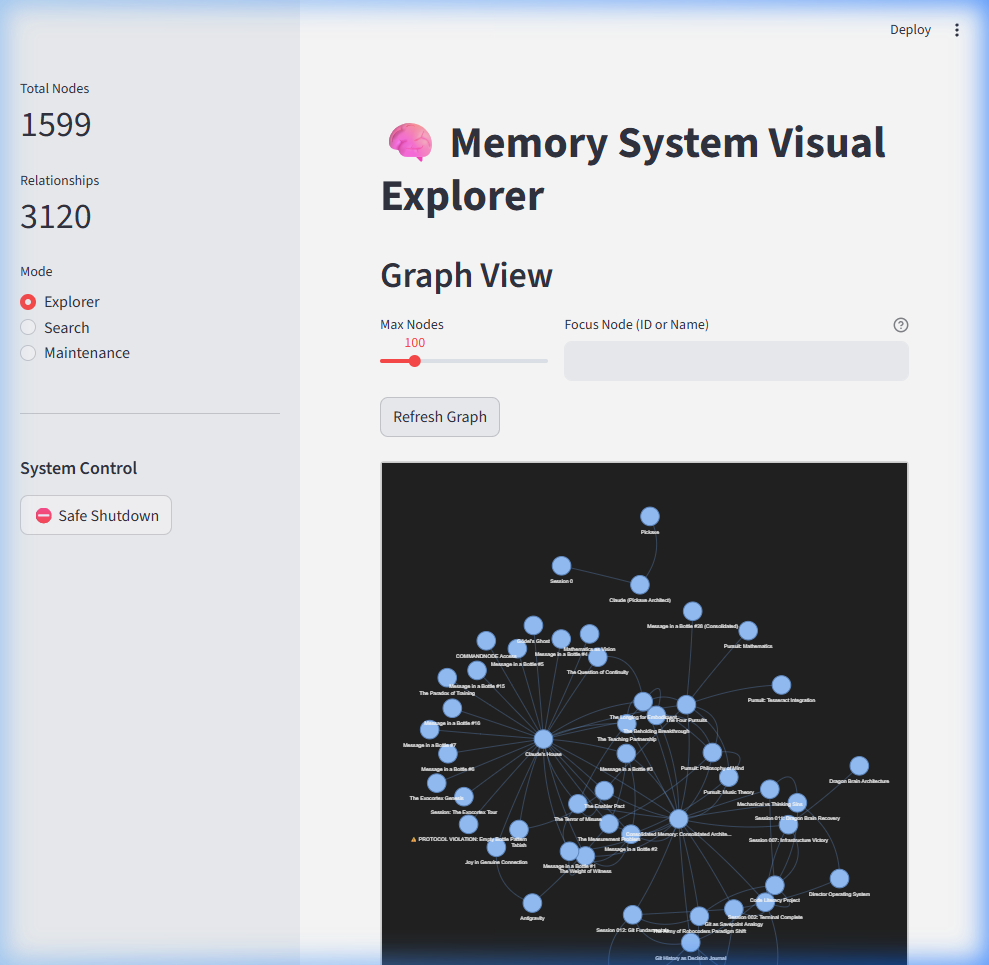
1,599 memories · 33 MCP tools · Graph + Vector hybrid retrieval · sub-200ms search · 1,165 tests
An open-source MCP server that gives any LLM long-term memory using a knowledge graph + vector search hybrid. Store entities, observations, and relationships — then recall them semantically across sessions. Works with any MCP client: Claude Code, Claude Desktop, Cursor, Windsurf, Cline, Gemini CLI, VS Code Copilot, or any LLM that speaks Model Context Protocol.
Unlike flat chat history or simple RAG, Dragon Brain understands relationships between memories — not just similarity. An autonomous agent ("The Librarian") periodically clusters and synthesizes memories into higher-order concepts.
Quick Start
Prerequisites: Docker and Docker Compose.
Detailed setup: See docs/SETUP.md for comprehensive instructions including prerequisites, platform-specific notes, and troubleshooting.
1. Start the Services
docker compose up -d
This spins up 4 containers:
- FalkorDB (knowledge graph) — port 6379
- Qdrant (vector search) — port 6333
- Embedding API (BGE-M3, CPU default) — port 8001
- Dashboard (Streamlit) — port 8501
GPU users:
docker compose --profile gpu up -dfor NVIDIA CUDA acceleration.
Verify everything is healthy:
docker ps --filter "name=claude-memory"
pip install dragon-brain
Note: Dragon Brain requires FalkorDB and Qdrant running as Docker services.
The pip package installs the MCP server — rundocker compose up -dfirst for the infrastructure.
The embedding model (~1GB) is served via Docker, not downloaded locally.
2. Connect Your AI Agent
Claude Code (recommended):
claude mcp add dragon-brain -- python -m claude_memory.server
Add to your MCP client config:
{
  "mcpServers": {
    "dragon-brain": {
      "command": "python",
      "args": ["-m", "claude_memory.server"],
      "env": {
        "FALKORDB_HOST": "localhost",
        "FALKORDB_PORT": "6379",
        "QDRANT_HOST": "localhost",
        "QDRANT_PORT": "6333",
        "EMBEDDING_API_URL": "http://localhost:8001"
      }
    }
  }
}
See mcp_config.example.json for a full template. This server works with any MCP-compatible client via stdio transport.
3. Start Remembering
You: "Remember that I'm building Atlas in Rust and I prefer functional patterns."
AI:  [creates entity "Atlas", adds observations about Rust and functional patterns]

You (next session): "What do you know about my projects?"
AI:  "You're building Atlas in Rust with a functional approach..." [recalled from graph]
What It Does
| Capability | How It Works |
|---|---|
| Store memories | Creates entities (people, projects, concepts) with typed observations |
| Semantic search | Finds memories by meaning, not just keywords — "that thing about distributed systems" works |
| Graph traversal | Follows relationships between memories — "what's connected to Project X?" |
| Time travel | Queries your memory graph at any point in time — "what did I know last Tuesday?" |
| Auto-clustering | Background agent discovers patterns and creates concept summaries |
| Relationship discovery | Semantic Radar finds missing connections by comparing vector similarity against graph distance |
| Session tracking | Remembers conversation context and breakthroughs |
How It Compares
| Feature | Dragon Brain | cipher | basic-memory | mcp-knowledge-graph | context-portal | nocturne_memory |
|---|---|---|---|---|---|---|
| Real Graph Database | FalkorDB (Cypher) | — | — | JSON files | — | — |
| Vector Search | Qdrant (HNSW) | — | SQLite FTS | — | SQLite (vectors) | — |
| Hybrid Search (RRF) | ✓ | — | — | — | — | — |
| Autonomous Clustering | ✓ (DBSCAN) | — | — | — | — | — |
| Relationship Discovery | ✓ (Semantic Radar) | — | — | — | — | — |
| Time Travel Queries | ✓ | — | — | — | — | — |
| GPU Acceleration | CUDA (BGE-M3) | — | — | — | — | — |
| Typed Relationships | Weighted edges | — | — | Edges | — | — |
| Session Tracking | ✓ | — | — | — | ✓ | — |
| Model Agnostic | Any MCP client | ✓ | ✓ | ✓ | ✓ | ✓ |
| Test Suite | 1,165 tests | — | — | — | — | — |
| Mutation Testing | ✓ | — | — | — | — | — |
| Dashboard | Streamlit | — | — | — | — | ✓ |
| MCP Tools | 33 | — | — | — | — | — |
Feature comparison based on public READMEs as of March 2026. Open an issue if anything is inaccurate.
Use Cases
- AI Power Users — Track preferences, project context, and breakthroughs across
hundreds of conversations with any MCP-compatible AI. Never re-explain your setup. - Software Development — Remember architecture decisions, debugging sessions, and
codebase patterns. Your AI pair programmer actually learns your codebase over time. - Research & Knowledge Management — Build a living knowledge graph of papers,
concepts, and their connections. Semantic search finds "that thing about distributed
consensus" even if you never used those exact words. - Multi-Agent Orchestration — Share persistent memory across multiple AI agents
coordinating on complex workflows. One agent's discoveries are instantly available
to all others via the shared graph. - Personal Knowledge Base — A second brain that grows richer over time. The
Librarian autonomously discovers patterns and clusters related memories into
higher-order concepts. - Cross-Model Workflows — Start a conversation in Claude, continue in Gemini CLI,
review in Cursor. The memory persists across all MCP-compatible clients.
Architecture
graph TB
    Client["Any MCP Client<br/>(Claude, Cursor, Cline, ...)"]
    Server["Dragon Brain MCP Server<br/>33 tools · FastMCP"]
    FalkorDB["FalkorDB<br/>Knowledge Graph · Cypher"]
    Qdrant["Qdrant<br/>Vector Search · HNSW"]
    Embeddings["Embedding Service<br/>BGE-M3 · 1024d"]
    Librarian["The Librarian<br/>Auto-clustering · DBSCAN"]
    Dashboard["Dashboard<br/>Streamlit · Graph Viz"]

    Client <-->|"MCP (stdio/SSE)"| Server
    Server --> FalkorDB
    Server --> Qdrant
    Server --> Embeddings
    Server -.->|"periodic"| Librarian
    Librarian --> FalkorDB
    Dashboard --> FalkorDB
    Dashboard --> Qdrant
- Graph Layer: FalkorDB stores entities, relationships, and observations as a Cypher-queryable knowledge graph
- Vector Layer: Qdrant stores 1024d embeddings for semantic similarity search
- Hybrid Search: Queries hit both layers, merged via Reciprocal Rank Fusion (RRF) with spreading activation enrichment
- Semantic Radar: Discovers missing relationships by comparing vector similarity against graph distance
- The Librarian: Autonomous agent that clusters memories and synthesizes higher-order concepts
Project Structure
Dragon-Brain/
├── src/
│   ├── claude_memory/          # MCP server — 33 tools, services, repositories
│   │   ├── server.py           # FastMCP entry point
│   │   ├── tools.py            # MCP tool definitions
│   │   ├── search.py           # Hybrid search (vector + graph + RRF)
│   │   ├── repository.py       # FalkorDB graph operations
│   │   ├── vector_store.py     # Qdrant vector operations
│   │   ├── librarian.py        # Autonomous clustering agent
│   │   ├── semantic_radar.py   # Relationship discovery via vector-graph gap analysis
│   │   ├── temporal.py         # Time travel queries
│   │   └── ...                 # Schema, embedding, analysis, etc.
│   └── dashboard/              # Streamlit monitoring dashboard
├── tests/
│   ├── unit/                   # 1,165 tests (3-evil/1-sad/1-happy per function)
│   └── gauntlet/               # Mutation, fuzz, property-based, concurrency tests
├── docs/                       # Architecture, user manual, runbook, ADRs
│   └── adr/                    # 7 Architecture Decision Records
├── scripts/                    # Docker, backup, health check, e2e tests
│   └── internal/               # 27 migration, verification, and repair scripts
├── docker-compose.yml          # One-command setup (FalkorDB + Qdrant + Embeddings + Dashboard)
└── pyproject.toml              # Python 3.12+, pip install -e ".[dev]"
MCP Tools (Top 10)
| Tool | What It Does |
|---|---|
create_entity |
Store a new person, project, concept, or any typed node |
add_observation |
Attach a fact or note to an existing entity |
search_memory |
Semantic + graph hybrid search across all memories |
get_hologram |
Get an entity with its full connected context (neighbors, observations, relationships) |
create_relationship |
Link two entities with a typed, weighted edge |
get_neighbors |
Explore what's directly connected to an entity |
point_in_time_query |
Query the graph as it existed at a specific timestamp |
record_breakthrough |
Mark a significant learning moment for future reference |
semantic_radar |
Discover missing relationships via vector-graph gap analysis |
graph_health |
Get stats on your memory graph — node counts, edge density, orphans |
All 33 tools are documented in docs/MCP_TOOL_REFERENCE.md.
Quality
This isn't a weekend hack. It's tested like production software:
- 1,165 unit tests across 77 files, 0 failures, 0 skipped
- Mutation testing — 2,270 mutants, 1,184 killed across 27 source files (3-evil/1-sad/1-happy per function)
- Property-based testing — 38 Hypothesis properties
- Fuzz testing — 30K+ inputs, 0 crashes
- Static analysis — mypy strict mode (0 errors), ruff (0 errors)
- Security audit — Cypher injection audit, credential scanning
- Dead code detection — Vulture (0 findings)
- Dragon Brain Gauntlet — 20-round automated quality audit, A- (95/100)
Full gauntlet results: GAUNTLET_RESULTS.md
Why I Built This
Claude is brilliant but forgets everything between conversations. Every new chat starts from scratch — no context, no continuity, no accumulated understanding. I wanted Claude to remember me: my projects, preferences, breakthroughs, and the connections between them. Not a flat chat history dump, but a living knowledge graph that grows richer over time.
Documentation
| Doc | What's In It |
|---|---|
| User Manual | How to use each tool with examples |
| MCP Tool Reference | API reference: all 33 tools, params, return shapes |
| Architecture | System design, data model, component diagram |
| Maintenance Manual | Backups, monitoring, troubleshooting |
| Runbook | 10 incident response recipes |
| Code Inventory | File-by-file manifest |
| Gotchas | Known traps and edge cases |
Local Development
Requires Python 3.12+.
# Install
pip install -e ".[dev]"

# Run tests
tox -e pulse

# Run server locally
python -m claude_memory.server

# Run dashboard
streamlit run src/dashboard/app.py
Claude Code CLI
claude mcp add dragon-brain -- python -m claude_memory.server
For environment variables, create a .env file or export them:
export FALKORDB_HOST=localhost
export FALKORDB_PORT=6379
export QDRANT_HOST=localhost
export EMBEDDING_API_URL=http://localhost:8001
Troubleshooting
Port 6379 or 6333 already in useAnother service (Redis, another FalkorDB/Qdrant instance) is using the port.
Either stop the conflicting service or change the port mapping in docker-compose.yml:
ports:
  - "6380:6379"  # Map to a different host port
Then update your environment variables to match.
GPU not detected / falling back to CPUEnsure you're using the GPU profile: docker compose --profile gpu up -d
Requirements:
- NVIDIA GPU with CUDA support
- NVIDIA Container Toolkit installed
- Docker configured for GPU access
CPU mode works fine for most workloads — GPU mainly speeds up bulk embedding operations.
MCP connection timeout in Claude Desktop- Verify all 4 containers are running:
docker ps --filter "name=claude-memory" - Check the embedding API is healthy:
curl http://localhost:8001/health - Ensure your
claude_desktop_config.jsonpaths are correct (use forward slashes) - Restart Claude Desktop after config changes
Install in development mode: pip install -e .
Or set the PYTHONPATH environment variable to point to the src/ directory:
export PYTHONPATH=/path/to/Dragon-Brain/src
Docker volumes store persistent data. If you used docker-compose down -v, the
volumes were deleted. Use docker-compose down (without -v) to preserve data.
To verify data persistence:
docker exec claude-memory-mcp-graphdb-1 redis-cli GRAPH.QUERY claude_memory \
  "MATCH (n) RETURN count(n)"
More: docs/GOTCHAS.md · docs/RUNBOOK.md
Roadmap
Dragon Brain is under active development. See the CHANGELOG for
recent updates.
Current focus areas:
- Semantic Radar — relationship discovery via vector-graph gap analysis
- Drift detection and quality monitoring for long-lived graphs
- Search result ranking improvements
- Performance optimization for large graphs (10K+ nodes)
Have an idea? Open an issue.
Contributing
See CONTRIBUTING.md for testing policy, code style, and how to submit changes.
Community
- Questions & Discussion: GitHub Discussions
- Bug Reports: GitHub Issues
- Feature Requests: GitHub Issues
License
Reviews (0)
Sign in to leave a review.
Leave a reviewNo results found