operator-oss
Health Pass
- License — License: Apache-2.0
- Description — Repository has a description
- Active repo — Last push 0 days ago
- Community trust — 89 GitHub stars
Code Warn
- network request — Outbound network request in app/Orchestrator.tsx
- network request — Outbound network request in app/TaskChanges.tsx
Permissions Pass
- Permissions — No dangerous permissions requested
No AI report is available for this listing yet.
Run many Claude Code (or Codex) sessions in parallel — across every project — from one screen. Local-first, git-worktree-isolated tasks, no API key.
Operator
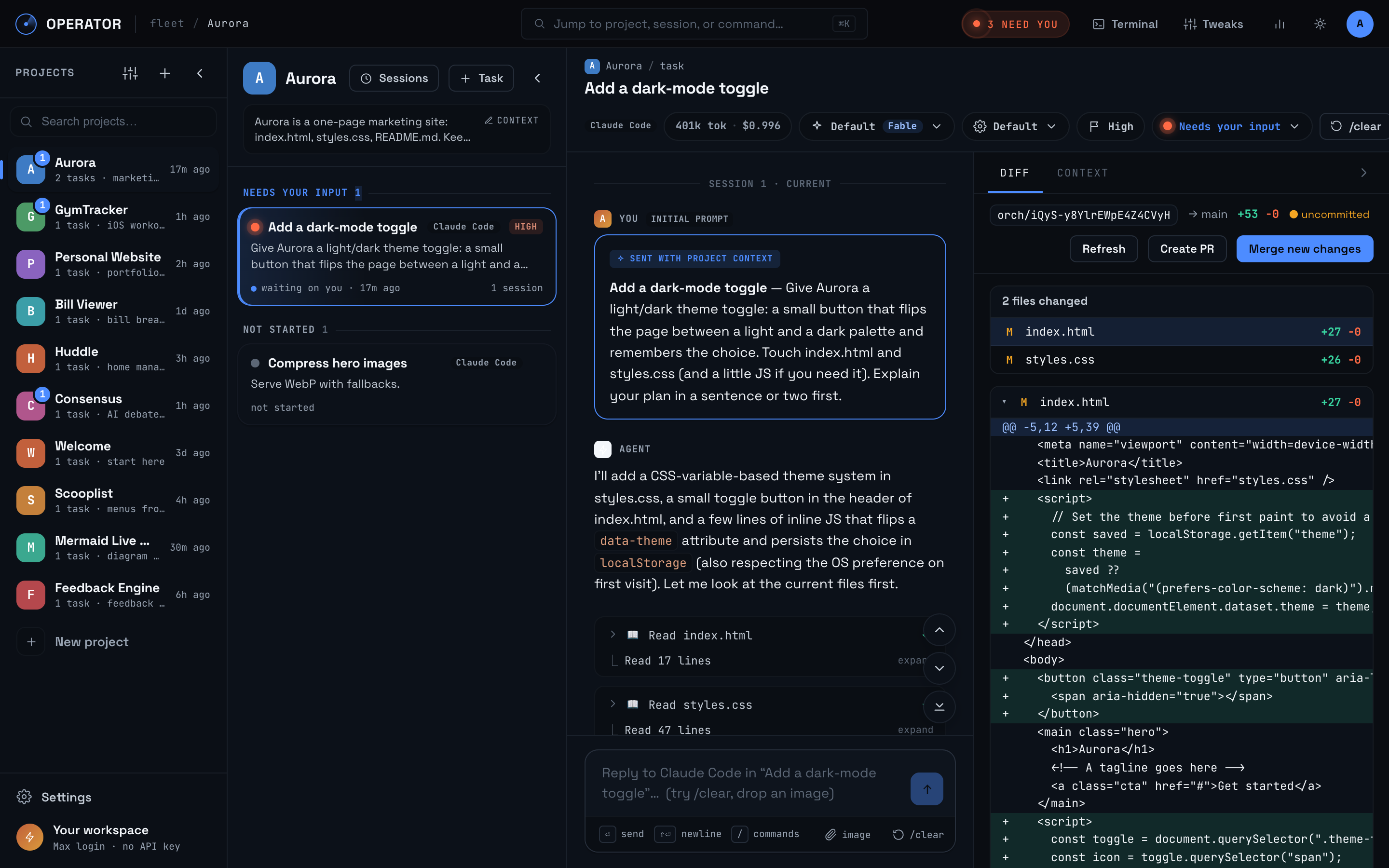
Run many Claude Code sessions in parallel — across every project — from one screen.
Each project carries reusable context. Each task is its own agent session — Claude Code or Codex — in its own git worktree. Drive ten at once, see exactly which one needs you, review every diff before it merges. Runs on your Max/Pro login — no API key, no per-token billing.



Why
- Your Claude plan can run more than one session at a time — stop working it one terminal at a time.
- One screen for every project and every task. No tab-juggling.
- Project context is written once and injected into every task. Stop re-explaining your stack.
- A cross-project "N need you" signal shows exactly which session is waiting on you.
Features
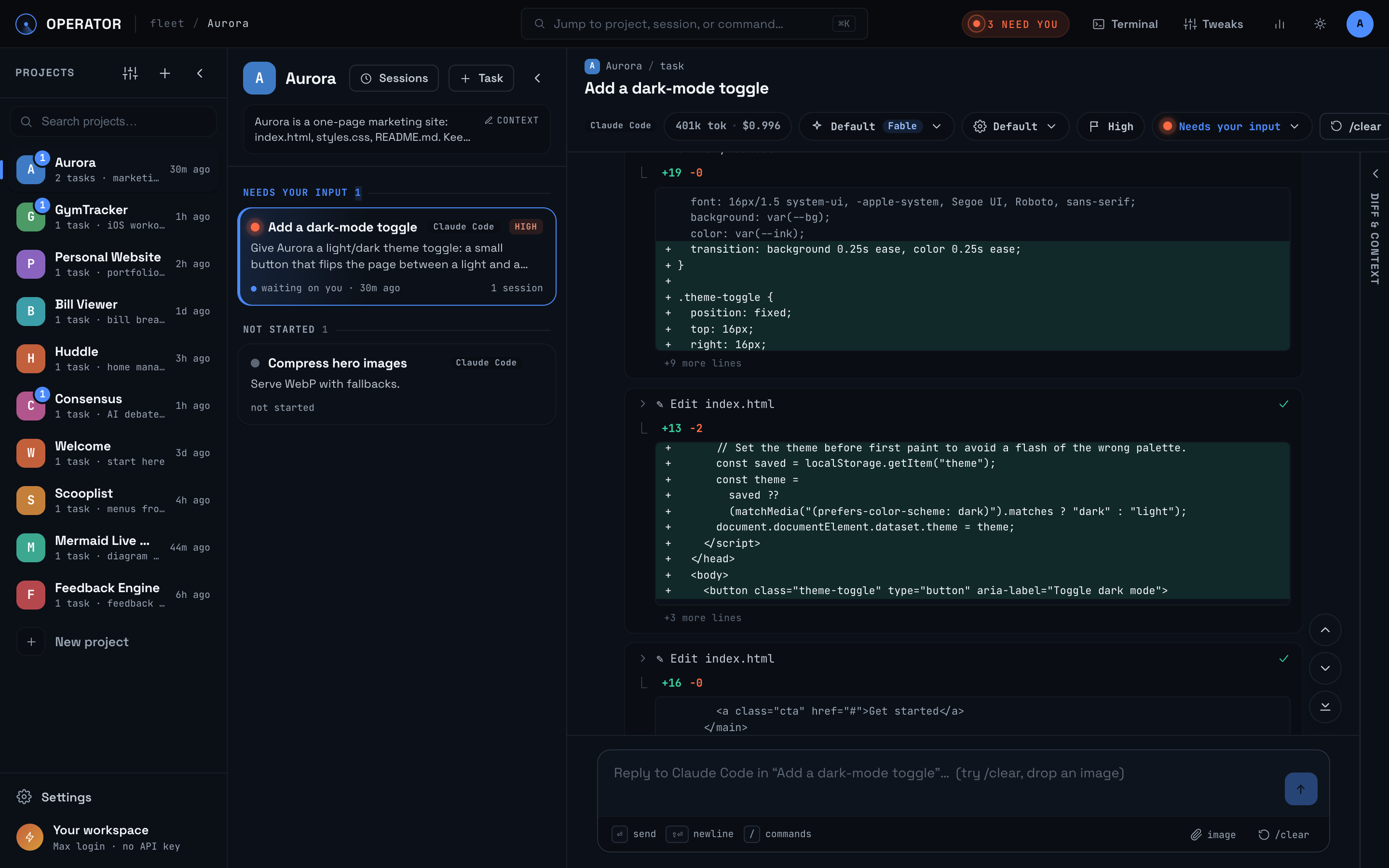
- Parallel sessions — every task is an isolated git worktree with its own agent session.
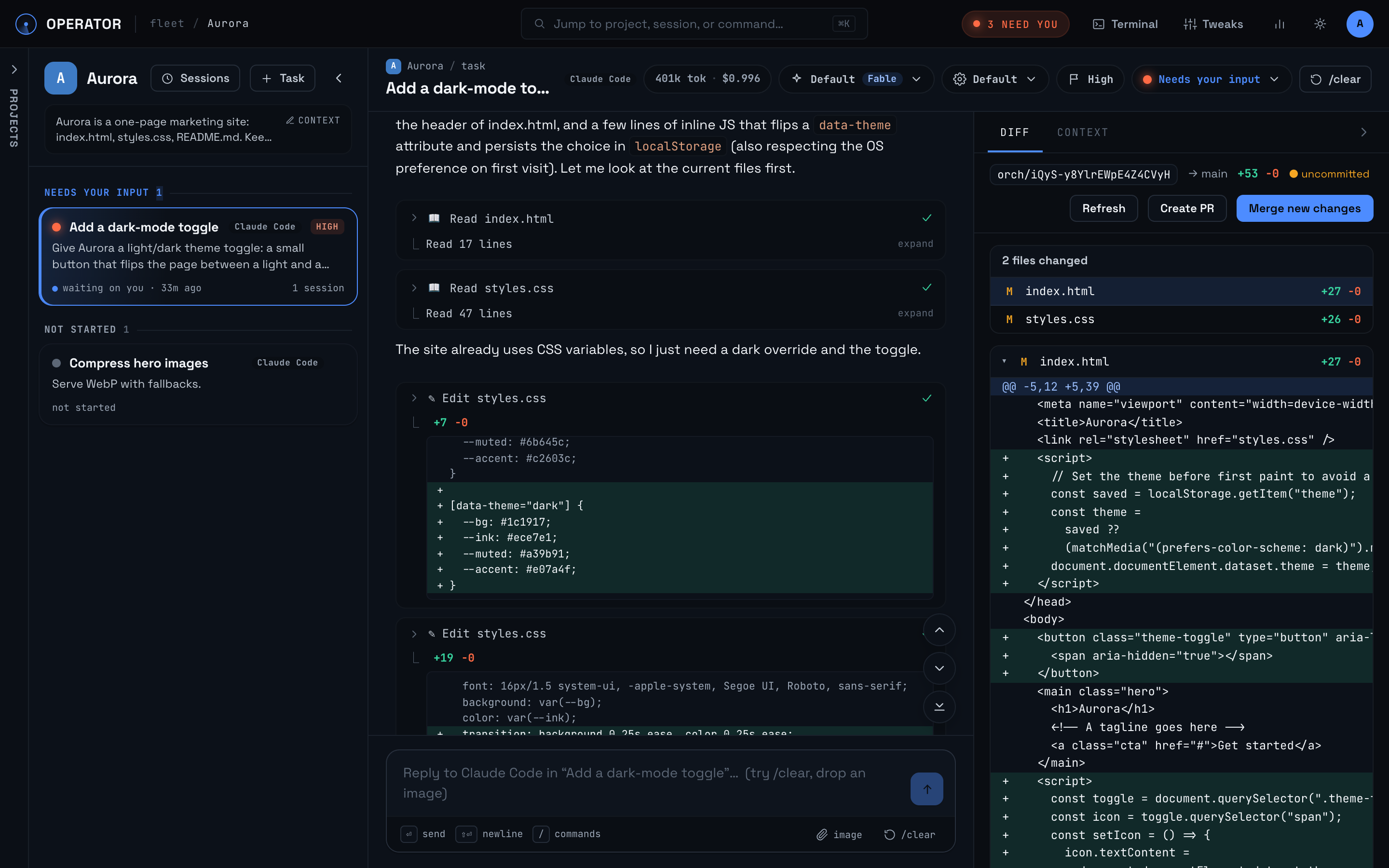
- Diff review → one-click merge — or AI conflict resolution, branch sync, and GitHub PR creation.
- Pick your agent per task — Claude Code or Codex, both on subscription logins.
- Write-once project context — auto-injected into every task; Refresh with AI redrafts it from the repo.
- Session lineage —
/clearhands a summary to a fresh context window; the task lives on. - Reconnect-safe turns — turns run server-side; reload or sleep the laptop and the transcript catches up. Queue follow-ups mid-turn.
- Knows when your agent login dies — an expired sign-in raises a workspace-wide banner with a one-click reconnect (plus the same button in the failed transcript). Queued follow-ups stay queued instead of failing one by one, and the banner clears itself the moment a turn runs again.
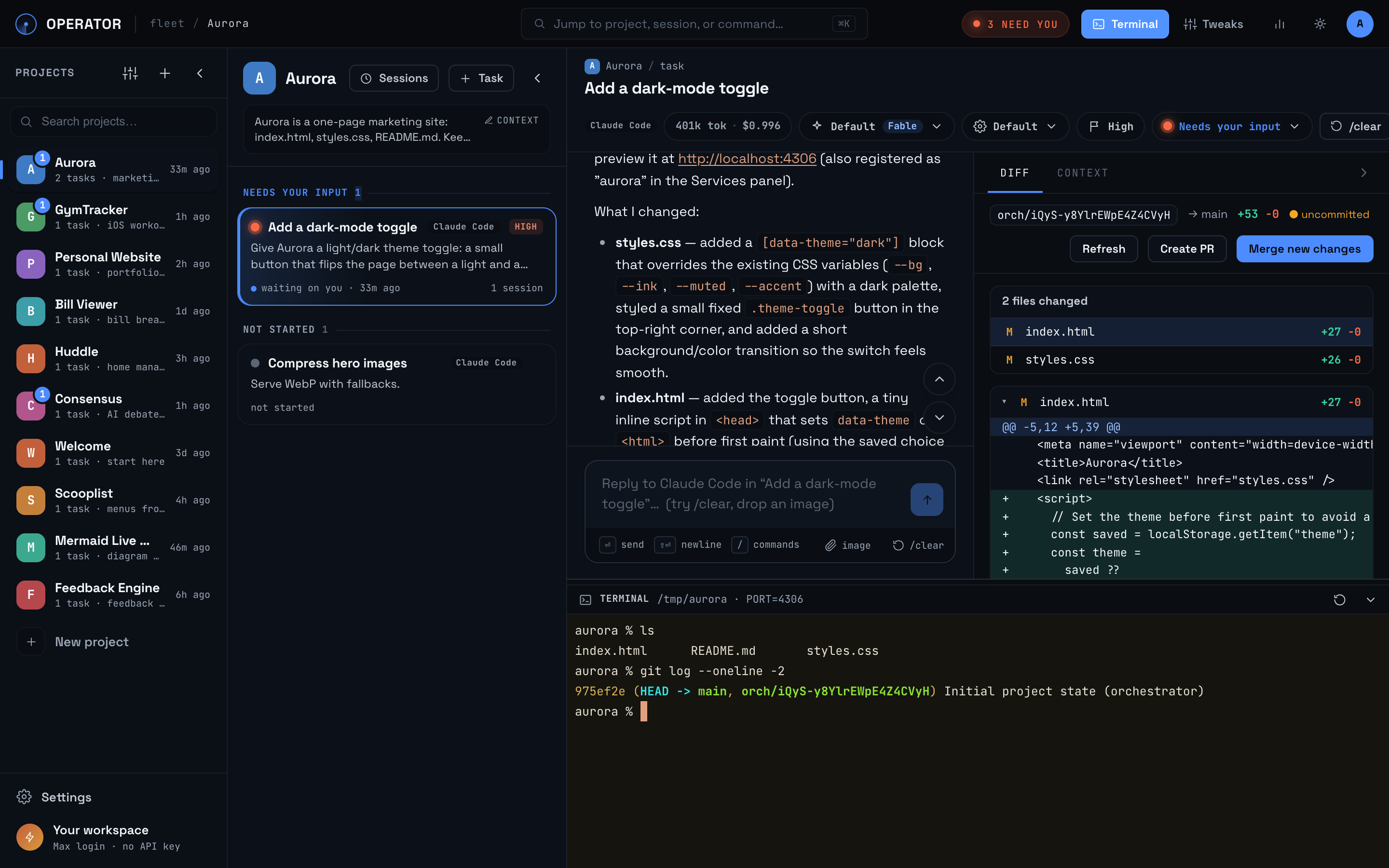
- Integrated terminal + managed services — a real shell per project, plus supervised dev/setup/test processes that survive restarts, with live logs and optional public URLs.
- Cost tracking + insights — live per-task spend and a local analytics dashboard.
- List or kanban board — flip the workspace to a full-width board of live status columns (Suggested / Not started / In progress / Needs input / Done); drag cards to reorder or change status, click one to open its session in a slide-over. ⌘⇧B toggles.
- Plus: agent-suggested tasks, task dependencies, image attachments, clone from GitHub, recaps, a first-run tutorial.
Watch the session stream — tool calls, edits, questions:
Review the diff next to the chat, then merge (or open a PR):
A real terminal, right in the workspace:
Supported coding agents
| Agent | Status |
|---|---|
| Claude Code | Fully supported — the reference driver; every feature lands here first. |
| OpenAI Codex | Fully supported — parallel tasks, diff review/merge, /clear lineage, interactive questions (via the orchestrator's ask_user bridge), and cost tracking. Two caveats from the upstream CLI being non-interactive: dollar figures are estimated from token counts × published API prices (ChatGPT-plan auth reports tokens only — shown with a ~), and there are no mid-turn command approval prompts, so the permission modes offered are Auto-run and Plan. Issues welcome. |
Want another agent? The driver seam is small — see adding a new agent.
Insights
Open Insights from the top bar for a local analytics dashboard of what your agents cost and ship: per-day spend and token usage (including cache reads/writes), tasks shipped, and lines merged to base — sliceable by project and agent across 7/30/90-day ranges, with deltas against the prior period. Everything is computed from the local SQLite database in a single fetch, filter changes recompute instantly in the browser, and nothing is sent anywhere. Claude spend is the SDK-reported dollar figure; Codex spend is estimated from token counts at published API prices and marked with a ~.
Managed services
Give a project dev / setup / test commands in its context editor (⚙) and the
Services drawer runs them as supervised processes owned by the server — not by an
agent turn or a browser tab — so npm run dev keeps serving after the turn ends and the
tab closes, with live logs on reconnect. Agents can also register servers they started
via the expose_service tool.
- Each project gets a stable port (
ORCH_SERVICE_PORT_BASE+ slot), injected asPORT
into its services and PTY shell. - Services are persisted: a dev server that was running is auto-restarted when the
app boots. If the server died hard (kill -9, OOM), the next boot reaps the orphaned
process group before respawning, so restarts never fight zombies for ports; a clean
shutdown kills its service processes on the way out. - If the configured port is already taken by an unmanaged process, the service shows a
readable error in the drawer instead of crash-looping. - Log capture is bounded per service (
ORCH_SERVICE_LOG_LINES, default 1500 lines). - A running service does not block idle-stop (
GET /api/instance/idlereportsrunningServicesinformationally): stopping the instance is safe because services
restart on boot at the same URL.
Public URLs are a separate opt-in. Set ORCH_SERVICE_HOSTS=1 (plusPUBLIC_BASE_URL and wildcard DNS/TLS) and each service gets a stable hostname<slug>--<your-host> with per-service visibility — private (your session only),
shared (tokened link), or public. Enabling the services feature alone exposes
nothing. Frameworks with host checks see the hostname as ORCH_PUBLIC_HOST in the
service's env: Vite → server.allowedHosts: [process.env.ORCH_PUBLIC_HOST], Next dev →allowedDevOrigins: [process.env.ORCH_PUBLIC_HOST]; CRA/webpack-dev-server is
pre-cleared via env.
Managed services are on by default; ORCH_FEATURE_SERVICES=0 turns the whole feature off.
Quick start
npm install
npm run dev
# open http://localhost:3000
You need Node 18.18+, macOS or Linux, and at least one agent CLI: Claude Code
(npm i -g @anthropic-ai/claude-code, Pro/Max plan — recommended) or Codex
(npm i -g @openai/codex, ChatGPT plan). First run opens a setup wizard that signs the
agent in from the browser — connecting either one completes setup (it becomes the app
default and the tutorial runs on it) — then drops you into a 2-minute hands-on tutorial.
Keep ANTHROPIC_API_KEY / OPENAI_API_KEY unset so it uses your subscription, not the API.
Every setting is an env var with a sane default — see .env.example.
Self-host
One hardened Docker container, built to sit behind an authenticated tunnel:
docker build -t agent-orchestrator .
ORCH_USER=alice ORCH_PORT=10001 docker compose -p orch-alice up -d
The port binds to loopback only — the app hands out a full shell, so put auth in front
and never expose it raw. Tunnels, Cloudflare Access, idle sleep, and every config
knob: docs/SELF_HOSTING.md.
Hosted
Don't want to run a server? getoperator.dev is your own
always-on instance — works from your phone, zero setup. Same codebase plus a
closed-source control plane.
Docs
- Architecture — how it works; the agent-driver seam; adding a new agent
- Self-hosting — Docker, auth, configuration, caveats
- Contributing · Security
License
Reviews (0)
Sign in to leave a review.
Leave a reviewNo results found