gargantua
Health Pass
- License — License: AGPL-3.0
- Description — Repository has a description
- Active repo — Last push 0 days ago
- Community trust — 18 GitHub stars
Code Fail
- rm -rf — Recursive force deletion command in Scripts/build-metallib.sh
Permissions Pass
- Permissions — No dangerous permissions requested
No AI report is available for this listing yet.
Native macOS system cleaner with YAML-driven safety rules, local AI explainability via MLX, and an MCP server for agent-controlled cleanup workflows.

Gargantua




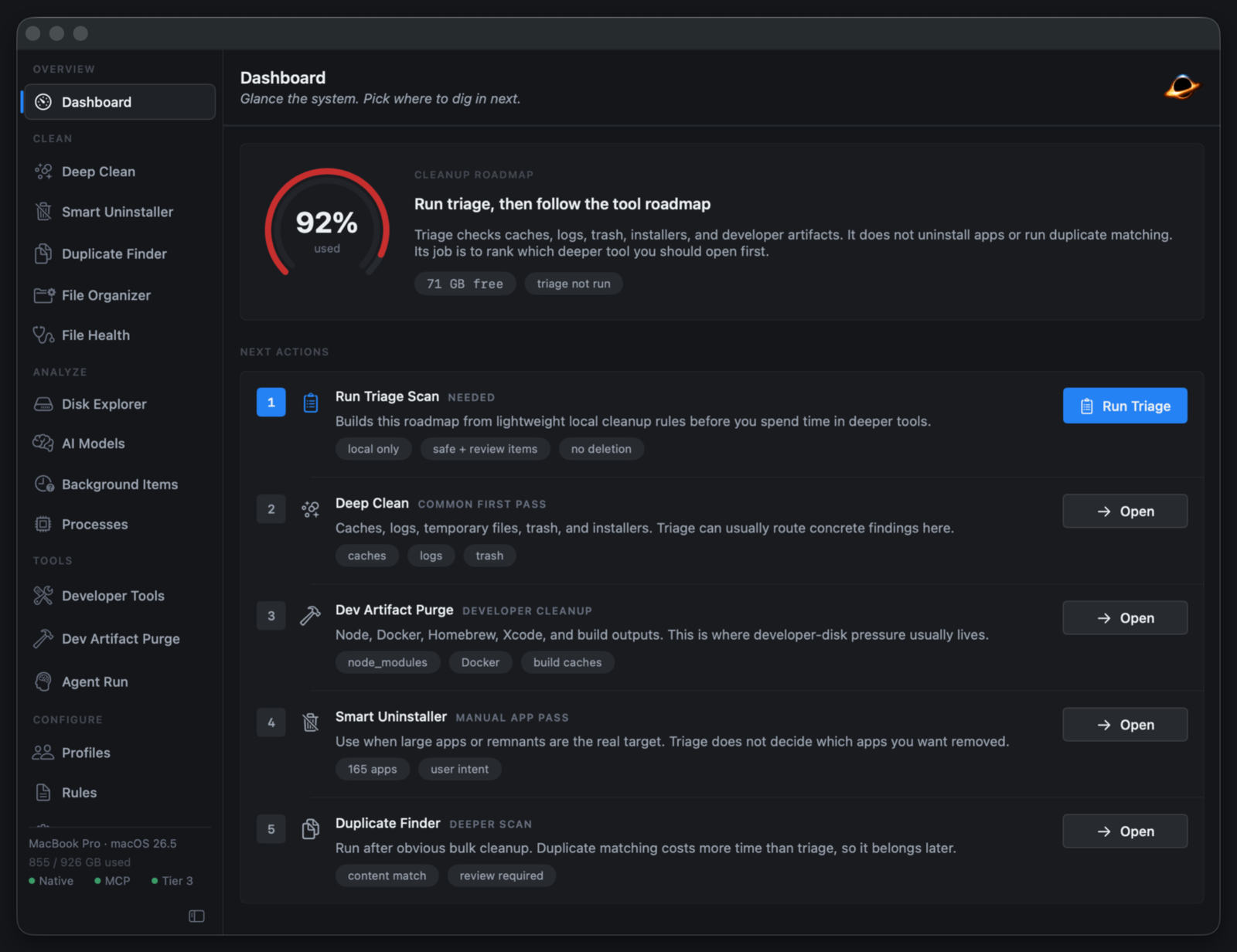
Gargantua is a native macOS cleaner for developers and power users. It scans common cache, build-artifact, duplicate-file, and app-remnant locations, classifies findings by risk, explains why each item is considered safe or risky, and only removes files through explicit user-controlled flows.
The project is built as a Swift Package with four executables:
Gargantua: the SwiftUI macOS appGargantuaMCP: a local Model Context Protocol server for automation-driven scans and guarded cleanupsGargantuaScheduler: a launchd-driven background runner used by Scheduled ScansGargantuaPrivilegedHelper: an SMAppService/XPC helper for operations that require elevated trust
Install
brew tap inceptyon-labs/tap
brew install --cask gargantua
This pulls the signed, notarized DMG from the latest GitHub Release. Updates after install are delivered through the in-app Sparkle channel, so the cask only tracks :latest. Apple Silicon, macOS 14 (Sonoma) or newer.
Why Gargantua Exists
Most cleaner apps optimize for a big "GB found" number and vague confidence. Gargantua optimizes for traceability:
- Every finding comes from a rule, parser, or local scanner path that can be tested.
- Every result is classified as
safe,review, orprotected. - Protected items are visible, but destructive paths reject them.
- Cleanup actions prefer Trash and write audit records for destructive workflows.
- Optional local or cloud explanations can summarize why a rule exists, but they cannot downgrade a safety classification.
What Makes Gargantua Different
Mainstream cleaners are closed black boxes that ask you to trust an inflated number. Indie cleaners are usually a curated path list with no explanation of why. Gargantua is the only macOS cleaner that is open, auditable, agent-drivable, and explainable end to end.
| Typical cleaner | Gargantua | |
|---|---|---|
| What you delete | "1,000 junk files found" — opaque | Every item traces to a named rule with a safe/review/protected rating |
| Why it's safe | Marketing copy | Per-item explanation from the rule's own metadata; AI can elaborate but cannot downgrade the rating |
| Who writes the rules | Vendor, behind closed doors | Public, reviewed PRs in gargantua-rules; every bundled rule records the upstream commit it came from |
| Automation | A button in a GUI | A local MCP server — Claude, Cursor, or Claude Code can scan and run guarded cleanups for you |
| AI | Cloud, with your data | On-device by default (template or local MLX); cloud is opt-in, redacted, and spend-capped |
| Reversibility | Permanent delete | Trash-first, with an audit log for every destructive attempt |
| Source | Proprietary | AGPL-3.0 — swift build produces a fully unlocked binary, no trial, no CTA |
The features that don't exist anywhere else in this category:
- A community rule-contribution model. Cleanup logic isn't a vendor secret — it's a public, reviewed, versioned ruleset. Each bundled rule carries provenance (the exact
gargantua-rulescommit) surfaced in-app, so you can audit where a path came from and who reviewed it. - A three-tier safety classification that AI can't override. Findings are graded
safe/review/protectedbefore any UI sees them. A bundled protected-roots policy hard-blocks cleanup at filesystem roots no matter what a rule (or a model) says. - Explainability as a first-class output. Every finding answers "why is this here and why is it safe to remove" — from rule metadata directly, or from an optional local/cloud model that can add detail but never lower a rating.
- AI-agent automation over MCP. Gargantua ships a local Model Context Protocol server with segregated read-only and destructive tool registries, bearer-token auth, per-client rate limits, and a hard
protectedreject. No other cleaner lets an AI agent drive it under guardrails. - Local-first and telemetry-free. The default explanation engine needs no network and no model. Local MLX inference runs entirely on Apple Silicon. Nothing phones home.
- Developer-native cleanup. Tool-aware previews for Docker, Homebrew, Xcode simulators, pnpm, Go, and Cargo — run through each tool's own commands, not by blindly deleting directories.
- Open and free at the source. The paid build only gates the execution of destructive actions behind a one-time license; scans always run, and a clean source build is fully unlocked forever.
Features
- Deep Clean: YAML-driven scan rules for browser caches, app caches, system logs, temp files, Trash, installers, developer artifacts, Docker, Homebrew, language build caches, and review-gated stale developer versions.
- Dev Purge: narrow-scope view limited to developer artifacts, Docker, Homebrew, and stale developer versions so a routine cleanup can't accidentally widen into a full scan.
- Developer Tools: tool-native Homebrew, Docker, Xcode Simulator, pnpm, Go, and Cargo cleanup previews and run buttons, with Docker
system dfJSON parsing when available and full-modal acknowledgment for protected prunes. - Smart Uninstaller: app bundle inspection plus post-uninstall remnant detection for support files, launch agents, preferences, and related state, including a
review-gated prune of orphaned Spotlight search rules (deadcom.apple.Spotlightentries macOS leaves behind and offers no UI to remove). - Duplicate Finder: duplicate-group detection backed by
fclones, scoped to user-defined personal-scope roots. - File Health: empty-file, big-file, similar-image, and broken-symlink scans through bundled
czkawkahelpers. - Disk Explorer: interactive treemap and directory drill-down for understanding where space goes before cleaning.
- AI Models cleanup: dedicated profile for downloaded LLM and diffusion model storage, with review-only duplicate/orphan model-file intelligence since re-downloading is expensive.
- Cleanup Profiles: built-in (
Developer,Light Cleanup,Deep Clean,Dev Purge,AI Models) and custom profiles that decide which rule categories run and which safety overrides apply. - Explainability: per-item explanations sourced from rules, metadata, and optional local or cloud model inference.
- Scheduled Scans: launchd-backed background scans with interval presets, custom cron expressions, profile selection, and skip-on-battery.
- Menu Bar Widget: glanceable status from the menu bar, optional launch-at-login.
- MCP Server: local Model Context Protocol server for automation-driven scans and guarded cleanups (see below).
- Audit Trail: MCP-triggered cleanup attempts are written to
~/Library/Logs/Gargantua/audit.json. - Auto Updates: Sparkle 2 appcasts with EdDSA signatures, signed-feed validation, and stable/beta channels.
- Release Pipeline: scripts for assembling, signing, notarizing, stapling, and packaging the app as a DMG.
Safety Model
Gargantua's trust layer uses three safety levels:
| Level | Meaning | Default Behavior |
|---|---|---|
safe |
Disposable files that are expected to regenerate or have no user-owned state. | Preselected in cleanup flows. |
review |
Files that may be removable, but could contain preferences, sync state, offline data, or context the user should inspect. | Shown, explained, not silently selected. |
protected |
Files with system impact, privilege implications, or high risk of data loss. | Visible for transparency; destructive flows hard-reject them. |
Rules live under Sources/GargantuaCore/Resources/cleanup_rules/, Sources/GargantuaCore/Resources/uninstall_rules/, and Sources/GargantuaCore/Resources/command_rules/. The bundled rule snapshot is deterministic; Gargantua does not load mutable remote rules at runtime. The reviewed snapshot ships five evidence shapes:
- Path-based cleanup rules: 51 files / 287 rules across apps, browsers, developer tools, and system locations.
- Path-based remnant rules: 2 generic files / 28 rules plus 7 app-pack files / 63 app-specific rules for Docker, Xcode, Android Studio, JetBrains, VS Code/Cursor/Zed, Unity/Unreal/Godot, and Raycast.
- Command-action rules: 4 developer-tool commands (
xcrun simctl delete unavailable,pnpm store prune,go clean -cache,go clean -modcache) recorded with tool version, exit code, and arguments per run. Advanced commands are isolated in an opt-in profile with explicit consequence copy. - Code-native stale-version discovery: Xcode DeviceSupport and JetBrains Toolbox version directories grouped by product/family/version with keep-latest, current-version, and pinned-path guards.
- Dynamic
pkgutilreceipt evidence: Smart Uninstaller surfaces ownership provenance (pkg ID, version, install date) for any package whose receipt matches an app being uninstalled. Receipts are evidence, not deletion permission; shared system paths upgrade toprotected.
Trust Layer parity is evidence-shape parity, not Mole-shell line parity. Every shape is explainable, bounded, reversible, and audited. Deferred Mole behaviors (nix-collect-garbage, npm cache clean, version-retention loops, receipt-driven deletion) are tracked in docs/mole-rule-parity-audit.md and CONTRIBUTING.md.
Your own rules
You can write your own rules without forking. Open Rules → Custom Rules (or drop files directly into ~/Library/Application Support/Gargantua/rules/{cleanup,uninstall,command}/) and add YAML using the same schema as the bundled set. They load alongside the bundled rules on every scan and survive app updates — the bundled snapshot is replaced on update, but this folder is not.
User rules run with reduced privilege so an unreviewed rule can't widen the blast radius:
- Safety is floored to
review— a user rule can surface a candidate, but never classify one as one-clicksafe. - Profile-scoped safety overrides are dropped.
- Command rules always run as
reviewand are rejected if they touch a protected root. - A user rule whose id collides with a bundled rule is ignored; the bundled rule wins.
Rules you intend to share should still go through a PR to gargantua-rules, where review earns them full bundled-rule trust.
A few things to know about local rules:
- A custom cleanup rule only runs when the active profile includes its
category. Reuse an existing category, or pick a profile that scans it. - Command rules run the literal
tool+argumentsyou write under your own user account. The protected-root check covers declaredaffected_roots, not arbitrary argument content, and the file is re-read (and re-clamped toreview) at execution time — so only add command rules you'd run by hand. This is why command rules are neversafe: you confirm the exact command before it runs.
A bundled protected-roots policy (Sources/GargantuaCore/Resources/safety_policy/protected_roots.yaml) hard-blocks cleanup at filesystem roots regardless of rule classification. It covers /, /Applications, /Library, /System, /Users, ~, ~/Library, /private, /var, /var/folders/*/*/{C,T,X}, and equivalents under /System/Volumes/Data. Users can add their own protected roots in Settings → Storage; bundled entries cannot be removed.
Configuration
Everything below is configurable from Settings. Five tabs: AI · Automation · Network · Storage · About.
AI (Settings → AI)
| Engine | Default | Network | Where keys/data live |
|---|---|---|---|
| Template | On | Local-only | None (rule-based, instant) |
| Local MLX | Off | Local-only after download | ~/Library/Application Support/Gargantua/Models/ |
| Cloud (Anthropic) | Off | api.anthropic.com over TLS |
API key in macOS Keychain |
| Claude Code Agent | Off | Spawns local Claude Code CLI | Configuration in app prefs; CLI manages its own auth |
- Template engine: the default. Generates explanations directly from YAML rule metadata. No model required, no network.
- Local MLX: opt-in. Downloads
mlx-community/Llama-3.2-1B-Instruct-4bit(~700 MB) to local storage. Runs on Apple Silicon via MLX. First explanation per session compiles Metal shaders. Idle engine unloads after 60 s. - Cloud AI (Anthropic): off by default. Requires a user-supplied Anthropic API key, stored only in macOS Keychain, never written to disk in plaintext. Sends file paths, sizes, classifications, and confidence scores. File content snippets (4 KB max, redacted for tokens and keys) are sent only with the explicit "Allow file-content previews" toggle. Configurable monthly spend cap (default $0; hard ceiling enforced client-side). Default model:
claude-sonnet-4-6. - Claude Code Agent: opt-in local agent runtime. Spawns the Claude Code CLI for non-interactive maintenance runs. Tools are read-only by default; destructive MCP tools must be explicitly granted per session. Configurable model, max turns, and scheduled-audit toggle.
In all engines: AI can explain a classification but cannot lower it. A protected finding remains protected regardless of what any model says.
Storage (Settings → Storage)
- Scan Roots: where Dev Purge looks for build artifacts. Empty list uses sensible defaults; user-added roots must be absolute or
~/-prefixed and cannot be/or$HOMEdirectly. - Personal Scope: folders the Duplicate Finder is allowed to traverse. Same path validation as scan roots. Seeded with sane defaults on first launch.
- Exclusions (whitelist): paths or glob patterns Gargantua should never propose for cleanup. Persists across scans; entries can be removed individually.
- Protected Roots: bundled hard-protect list plus user-added entries. Bundled entries are read-only; user entries support
~/,${HOME}, and absolute paths.
Automation (Settings → Automation)
- Scheduled scans: launchd agent registered via SMAppService. Interval presets (hourly, daily, weekly) or a custom 5-field cron expression with validation. Selectable profile (default
Light). Toggle to skip when on battery. - Menu bar widget: glanceable status, optional.
- Launch at login: registered through
SMAppService.loginItem.
Network (Settings → Network)
- MCP Transport: toggle SSE transport, change bind (
localhostorlan), set port, and manage the bearer token (generate, rotate, revoke). Token lives in Keychain.
About (Settings → About)
- Updates: Sparkle feed host, last check, channel (
stable/beta), automatic checks, automatic downloads. - Audit retention: how long destructive-attempt audit entries are kept (default 90 days).
MCP Server
GargantuaMCP exposes local tools for MCP clients over newline-delimited JSON-RPC 2.0 on stdin/stdout. It can also serve MCP over localhost Server-Sent Events on port 7493. Logs go to stderr.
Run it locally:
swift run GargantuaMCP
Run the SSE transport only:
swift run GargantuaMCP -- --transport sse --port 7493 --bind localhost
Run both transports:
swift run GargantuaMCP -- --transport both
SSE binds to 127.0.0.1 by default. Binding to LAN uses --bind lan or the app's Settings → Network pane and requires a bearer token stored in Keychain or supplied with --token. The SSE endpoint is:
http://127.0.0.1:7493/sse
SSE TLS for LAN clients
GargantuaMCP serves SSE over plain HTTP. For LAN or remote clients, the supported TLS pattern is to keep Gargantua bound to localhost and terminate HTTPS in a reverse proxy on the same Mac:
swift run GargantuaMCP -- --transport sse --port 7493 --bind localhost
Then configure the proxy to listen on the LAN-facing interface with a certificate trusted by your client and forward to 127.0.0.1:7493. Example Caddy route:
gargantua.example.lan {
    reverse_proxy 127.0.0.1:7493
}
Clients connect to the HTTPS proxy endpoint:
https://gargantua.example.lan/sse
If you choose --bind lan, treat it as an advanced trusted-network mode: Gargantua still requires a bearer token, but it does not terminate TLS itself. Put a TLS reverse proxy in front of the port before exposing it beyond the local machine.
Client configuration
{
  "mcpServers": {
    "gargantua": {
      "command": "swift",
      "args": ["run", "GargantuaMCP", "--", "--stdio"]
    }
  }
}
{
  "mcpServers": {
    "gargantua": {
      "url": "http://127.0.0.1:7493/sse"
    }
  }
}
For Claude Desktop, Cursor, or Claude Code, use the first shape when the client launches the server process and the second shape when the client connects to a separately running SSE server.
Tools
Read-only:
scan: dry-run scan for reclaimable itemsanalyze: health score, disk usage, and recommendationsstatus: current system health metricsexplain: explain a filesystem path or prior scan itemlist_profiles: list built-in and custom cleanup profiles
Destructive:
clean: clean item IDs returned by a priorscan
clean is guarded by server-side checks:
confirm: trueis required.- Unknown item IDs are rejected.
- Any
protecteditem aborts the whole request. - Each MCP client gets one clean operation per 60 seconds.
- Every non-dry-run attempt writes an audit entry with the client identifier to
~/Library/Logs/Gargantua/audit.json. - The app attempts a local notification with a short cancel window before files move.
The read-only and destructive tools live in separate registries in code, so a read-only server can't accidentally advertise the destructive clean tool — exposing it requires explicitly opting the destructive registry in. See CONTRIBUTING.md.
Security
Gargantua runs with elevated trust on a user's machine. Defenses are layered:
- Trust layer: every finding gets a
safe/review/protectedclassification before any UI sees it. Destructive flows hard-rejectprotected. - Bundled protected roots:
protected_roots.yamlblocks cleanup at filesystem roots regardless of rule classification. Users can extend it but cannot remove bundled entries. - Privileged helper: operations needing elevated trust are routed through
GargantuaPrivilegedHelper, registered via SMAppService and reached over XPC. The app never callssudodirectly. - MCP guardrails: bearer-token auth (Keychain-backed) for non-local binds, per-client rate limit, hard
protectedreject, audit log, cancel-notification grace period, and separate read-only/destructive tool registries. - Keychain-only secret storage: Anthropic API key and MCP bearer token live in Keychain, never on disk in plaintext.
- Cloud AI redaction: outbound cloud requests strip apparent secrets and tokens from any included content. File contents are only sent with explicit per-config consent, capped at 4 KB per item, with hard monthly spend caps.
- Hardened runtime + notarization: release builds are signed with Developer ID, hardened runtime enabled, notarized, and stapled. Sparkle update artifacts are EdDSA-signed and feed-validated.
- Pre-commit secret scanning: versioned
.githooks/withgitleaksblocks committed credentials. See CONTRIBUTING.md. - Dependency scanning:
trivy fsplus an OSV wrapper run againstPackage.resolvedto flag CVEs in pinned SwiftPM dependencies.
If you discover a security issue, especially anything involving the privileged helper, MCP guardrails, audit trails, cloud-AI redaction, or a path that could remove a protected item, please report it privately per SECURITY.md. Do not open a public issue.
Build From Source
Requirements:
- macOS 14 (Sonoma) or newer; macOS 15 + the latest stable Xcode is required to resolve the
mlx-swift-lmdependency, which declaresswift-tools-version: 6.1. - Apple Silicon is the only supported architecture for development and release builds.
- Xcode Command Line Tools (
xcode-select --install): providescodesign,notarytool,stapler,iconutil,swift. - The Metal Toolchain (
xcodebuild -downloadComponent MetalToolchain): required to build at all, not just for local AI.mlx-swift'sBuildMetallibPluginruns as a SwiftPM prebuild command and shells out toxcrun metalto compile the GPU shaders intomlx.metallib. On recent Xcode the Metal Toolchain is a separate download; if it's missing,xcrun metalis unavailable and the prebuild command fails, which fails the wholeswift build. (The MLX model weights are a separate, on-demand download at runtime — those are never bundled.)
Clone and build:
git clone https://github.com/inceptyon-labs/gargantua.git
cd gargantua
swift build
Run the app target:
swift run Gargantua
Run the MCP server:
swift run GargantuaMCP
Run tests:
swift test
For the local helper binaries and MLX shader setup used by the test/release scripts, prefer:
Scripts/test.sh
Open-source vs commercial builds
Gargantua's source is AGPL-3.0. swift build from a clean clone produces a fully unlocked binary: no trial timer, no license gate, no buy CTA. That is the open-source path and it is always free.
Official notarized releases (the DMG on the GitHub Release, the Homebrew cask, the Polar.sh storefront) build with the GARGANTUA_LICENSING=1 environment variable set. That flag activates a 14-day trial clock and the license gate that fronts destructive actions. After the trial, scans still run; Deep Clean / Uninstaller / Quarantine execute paths gate behind a license key. Licenses are sold through Polar.sh and validated against their public customer-portal API; see docs/licensing/.
Limitation: removing system-owned files requires a signed build
A swift build clone can scan everything and remove any file you own (user caches, your Trash, dev artifacts). It cannot remove files owned by root or another user. Those go through a privileged helper registered with SMAppService, and the helper only accepts XPC connections whose code-signing requirement pins to the official bundle ID and Developer ID team (Sources/GargantuaCore/Services/XPCPrivilegedUninstallHelper.swift). An ad-hoc swift build binary isn't a signed .app bundle and can't register the daemon at all, so on a source build those items fail with an "owned by the system" notice and a pointer to the signed release — by design; an unsigned binary shouldn't be able to spin up a root daemon. A fork can restore the capability by repointing PrivilegedHelperConfiguration (bundle ID, teamID, and the requirement's leaf OU) to its own identity and signing with its own Developer ID cert.
If you maintain or contribute to Gargantua and want to test the licensed code path locally:
GARGANTUA_LICENSING=1 swift build
GARGANTUA_LICENSING=1 swift run Gargantua
Releasing
Releases are cut locally on a developer's Mac. The pipeline produces a signed, notarized, stapled DMG plus a signed Sparkle appcast, uploads both to a GitHub Release, and pushes a refreshed Cask to inceptyon-labs/homebrew-tap.
Scripts/release-interactive.sh
The interactive entry point shows the current version, prompts for the bump type (patch / minor / major / beta / custom), updates CHANGELOG.md, creates the git tag, runs the build + sign + notarize + upload + tap-push pipeline, and offers to push the tag at the end.
For non-interactive runs (you've already created the tag), use Scripts/publish.sh directly. Both are thin wrappers around Scripts/release.sh. The full one-time-setup checklist (Apple Developer ID cert, notarytool keychain profile, Sparkle EdDSA keypair, gh CLI, tap repo permissions) and per-release steps live in docs/RELEASING.md. Per-stage details for the build pipeline itself are in Scripts/release/README.md.
Useful supporting scripts:
Scripts/fetch-vendored-bins.sh: refresh pinned helper binaries (fclones,czkawka_cli)Scripts/build-metallib.sh: build the MLX Metal shader library used by local inferenceScripts/smoke/verify-vendored-bins.sh: confirm an installed app resolves its bundled helpersScripts/smoke/privileged-helper.sh: smoke-test privileged helper installation and status
Rule Contributions
Rules use a two-repo model: rule-only PRs (schema, new paths, refinements) go to the public inceptyon-labs/gargantua-rules repository. This app repo vendors a reviewed, deterministic snapshot under Sources/GargantuaCore/Resources/, which is what ships at runtime; there is no live remote rule fetch.
The full flow (PR → review → snapshot sync → release), schema crib, classification guidance, evidence checklist, and local-testing steps are in CONTRIBUTING.md.
How rules get updated
Because the snapshot is compiled into the binary, there is no separate rule-update channel:
Installed app: new rules arrive with app updates over the Sparkle channel. The Rules screen says as much and links to Check for Updates. Updating the app is how you get the latest reviewed rules.
Source build: pull the latest reviewed rules into your snapshot, then rebuild:
Scripts/sync-rules.sh status   # show the synced commit and any drift vs upstream
Scripts/sync-rules.sh apply    # pull upstream rules in and regenerate rules-sync.json
Scripts/sync-rules.sh check    # CI gate: fail on undeclared drift
Sources/GargantuaCore/Resources/rules-sync.json records the exact gargantua-rules commit the bundled snapshot was reconciled against, plus any declared local-only or pending-upstream divergence. The app surfaces that commit in each rule's Provenance & Trust panel.
Development Notes
After cloning, activate the versioned pre-commit hook if you plan to commit:
git config core.hooksPath .githooks
brew install gitleaks
The hook runs gitleaks against staged changes to reduce the chance of committing API keys or credentials.
The following are intentionally local-only and ignored by Git:
- task trackers and handoff archives
- local assistant instructions
- design-system scratch files
- release secrets and environment files
- downloaded local model files
Contributing
See CONTRIBUTING.md for development setup, PR expectations, and rule contribution guidance.
Credits
Gargantua stands on a lot of open source.
Rule research
tw93/Mole: many of the bundled cleanup paths (cloud, office, communication, virtualization, creative/media, productivity, launcher, game, remote desktop) were ported from Mole's shell-driven cleanup library and reviewed, classified, and rewritten as YAML rules with conservative safety classifications. Seedocs/mole-rule-parity-audit.mdfor what's ported and what's deferred.
Vendored helper binaries (built from source via Scripts/fetch-vendored-bins.sh)
pkolaczk/fclones: backs the Duplicate Finderqarmin/czkawka: backs the File Health scans (empty files, big files, similar images, broken symlinks)
Swift packages
ml-explore/mlx-swift-lmand the broader MLX project: local AI inference on Apple Siliconhuggingface/swift-transformers: tokenizer for the local model- The
mlx-community/Llama-3.2-1B-Instruct-4bitMLX conversion of Meta's Llama 3.2: the optional local explanation model jpsim/Yams: YAML parsing for the rule layersparkle-project/Sparkle: auto-update framework with EdDSA-signed appcasts
Security and supply-chain tooling
gitleaks/gitleaks: pre-commit secret scanningaquasecurity/trivy:Package.resolvedCVE scanninggoogle/osv-scannerand the OSV database: vulnerability checks against pinned SwiftPM revisionsmuter-mutation-testing/muter: optional mutation testing for changed Swift files
If you ship a fork that adds dependencies, please update this list; credit is part of the contract.
License
Gargantua is licensed under the GNU Affero General Public License v3.0.
The Gargantua name, application icon, and Inceptyon Labs branding are trademarks of Inceptyon Labs LLC and are not covered by the AGPL. You are free to use, modify, and redistribute the code, but modified builds must be rebranded. See TRADEMARK.md for details.
YAML cleanup and uninstall rules under Sources/GargantuaCore/Resources/ are sourced from the public inceptyon-labs/gargantua-rules repository; see that repo's license for rule-specific terms.
Reviews (0)
Sign in to leave a review.
Leave a reviewNo results found