bettercallgpt
Health Warn
- License — License: MIT
- Description — Repository has a description
- Active repo — Last push 0 days ago
- Low visibility — Only 8 GitHub stars
Code Pass
- Code scan — Scanned 12 files during light audit, no dangerous patterns found
Permissions Pass
- Permissions — No dangerous permissions requested
No AI report is available for this listing yet.
Put Claude Code on a voice call. Talk while it codes; GPT Realtime talks back.

Put Claude Code on a voice call
Talk while it codes. GPT Realtime talks back. A spoken “yes” never approves anything.
Demo • Install • How it works • Guide • 简体中文



Better Call GPT
Say what you want while you do something else. A realtime voice model keeps the conversation;
only real requests reach your Claude Code session, which does the work in your repo and reports
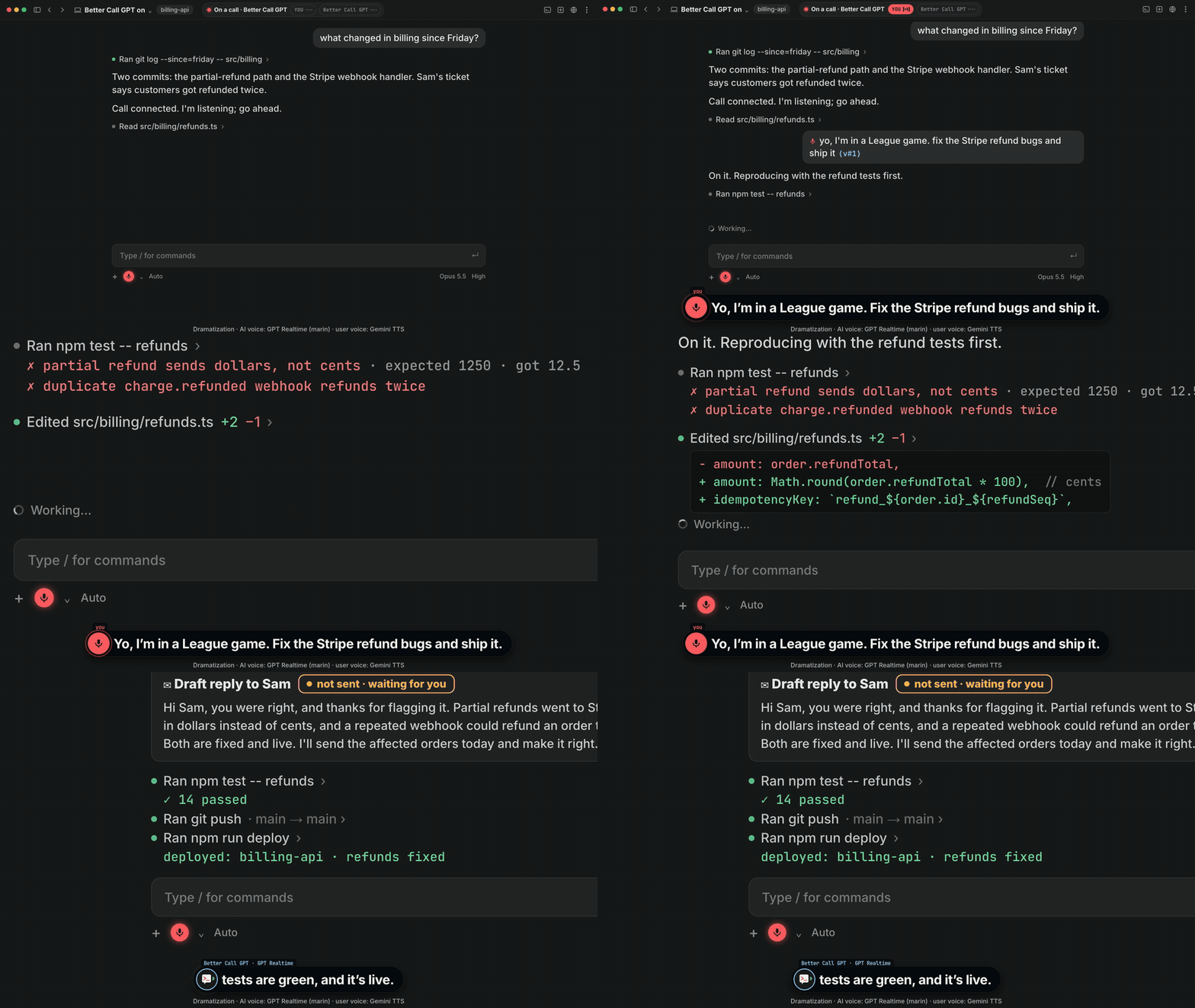
back by voice. In the launch video: fix a Stripe refund bug, draft an email you approve before it sends,
and learn a Sylas combo, all mid-game.
How a call works
sequenceDiagram
    participant You
    participant GPT as GPT Realtime
    participant CC as Claude Code (your session)
    You->>GPT: speak: "fix the refund bug and ship it"
    GPT-->>You: small talk is answered right here
    GPT->>CC: real requests arrive as a line tagged ⟨v#35;1⟩
    CC->>CC: reads, edits, runs tests, pushes
    CC-->>GPT: progress and results
    GPT-->>You: reads them back, you can interrupt any time
    Note over You,CC: Permission prompts go to your keyboard only. The voice cannot approve.
/bettercallgpt:onstarts a voice process bound to this session only. It proves which
session started it with zero keystrokes and refuses anything else.- You talk, full duplex, in your language. It opens in Chinese and answers in whatever
language you just spoke; English tech words don't switch it. GPT Realtime decides what is chat
and what is work. - Work is relayed as your words, tagged
⟨v#n⟩, so Claude treats it as you speaking. - Results come back by voice when they land; ask “how's it going?” mid-task.
- It ends when you say so, type
/bettercallgpt:off, or stay quiet for 10 minutes.
Install once
npx skills add insta-fusion/bettercallgpt -g # needs Node; macOS + Claude Code
Then tell your agent: “set up bettercallgpt”. No Node? Paste this into Claude Code instead:Set up https://github.com/insta-fusion/bettercallgpt for me. (it follows AGENTS.md). It checks for uv
and your platform, installs the Claude Code plugin, creates an empty key file and runs a
readiness check. You do two things yourself:
- Paste your key into the file it names (Azure Voice Live; OpenAI Realtime is
experimental). Setup never asks for the key — don't paste it into the chat. - Type
/bettercallgpt:onin a new Claude Code session and approve the start. A rising tone:
you're live.
Better Call GPT is free and MIT; the voice service bills your own account. Prefer to skip the skill?
Install uv, type /plugin marketplace add insta-fusion/bettercallgpt
and /plugin install bettercallgpt@bettercallgpt, fill ~/.config/bettercallgpt/.env from.env.example, then /bettercallgpt:on.
Or pin the release without the skill: uv tool install "git+https://github.com/insta-fusion/[email protected]".
Speakers or headphones? Pick the voice model
| Voice Live (default) | GPT-Live | |
|---|---|---|
| Model | gpt-realtime-2.1 |
gpt-live-1 |
| Echo | The service removes its own voice from your mic (server echo cancellation), so open speakers are fine. | Echo cancellation is not advertised, so the call's start notes “use headphones”. On open speakers it is untested: our own calls on it did not cut themselves off. |
Keys in ~/.config/bettercallgpt/.env |
AZURE_OPENAI_ENDPOINT, AZURE_OPENAI_API_KEY |
VOICE_LIVE_PROVIDER=gpt_live, VOICE_GPT_LIVE_ENDPOINT, VOICE_GPT_LIVE_API_KEY (its own Azure resource) |
If the AI ever cuts itself off mid-sentence while on speakers, put on headphones or switch to
Voice Live (delete the VOICE_LIVE_PROVIDER=gpt_live line).
Commands
| Command | Does |
|---|---|
/bettercallgpt:on |
start a call attached to this session |
/bettercallgpt:status |
one line: phase, relay |
/bettercallgpt:off |
end the call |
Safe by design
- A spoken “yes” never approves anything. The voice cannot answer a permission prompt; you
answer it on the keyboard. (What your agent may already do without asking is still up to your
Claude Code permission settings.) - The start asks you first — unless Claude Code runs in auto or bypass mode, or an allow rule
matches it. Don't allow-list it (nobettercallgptwildcard, no broaduvxrule): it opens your microphone and a paid connection. - What leaves your machine: your microphone audio, and what the voice needs to talk about the
work (your prompts, the agent's progress and results, permission prompts), go to the voice
provider you configure. The call ledger stays local (0600). See
SECURITY.md › Privacy notes. - It attaches only to the session that started it, proven with zero keystrokes, and refuses
anything else. - The plugin is three small command files (plugin/commands/) that only
you can run: no hooks, and the voice process runs only during a call. They run the tagged
release from GitHub throughuvx; release tags are published as immutable GitHub releases,
so a tag cannot be moved after release.
Works with
| Today | Not yet | |
|---|---|---|
| Agent | Claude Code CLI on macOS, any terminal, and the Claude desktop app's Code tab (both proven live) | Cowork (runs in a VM: unsupported), Codex as a child agent (VOICE_BACKEND=process, unit-tested) |
| Voice | Azure GPT Realtime (gpt-realtime-2.1 through Azure Voice Live; default, proven live, echo-cancelled: speakers OK) and the Azure GPT-Live API (gpt-live-1, proven live; headphones) |
OpenAI Realtime API (unit-tested; no echo cancellation: headphones) |
| OS | macOS | Linux/Windows: the Claude Code backend's peer check is macOS-only |
| Orca | Works in any Orca pane; when the pane proves itself (needs the orca CLI) the call also tells you when Claude is waiting on a permission prompt |
long calls in that mode: unverified |
Want it in another coding agent or CLI (Codex, Gemini CLI, Cursor, Aider, …) or on another voice model or OS? Open a support request and say which one; requests decide what comes next.
More
Status line, running without the plugin, configuration, how it is built and tests: docs/GUIDE.md.
License
MIT — see LICENSE.
Reviews (0)
Sign in to leave a review.
Leave a reviewNo results found