oneringai
Health Pass
- License — License: MIT
- Description — Repository has a description
- Active repo — Last push 0 days ago
- Community trust — 53 GitHub stars
Code Warn
- network request — Outbound network request in apps/amos/src/commands/commands/ExternalCommand.ts
Permissions Pass
- Permissions — No dangerous permissions requested
This library is a unified AI agent framework designed to facilitate multi-provider workflows. It handles text, image, video, and audio generation, while providing advanced features like desktop automation, multi-agent orchestration, and external API integrations.
Security Assessment
Overall risk: Medium. The tool natively interacts with external APIs and makes outbound network requests (specifically flagged in ExternalCommand.ts). Because its core functionality involves routing data to third-party AI providers, Microsoft Graph, and external APIs, it inherently handles sensitive information. No dangerous base permissions or hardcoded secrets were detected by the automated scan. However, developers should be aware that features like desktop automation and custom tool generation give the underlying AI models extensive capabilities that could interact with the local system if not properly sandboxed.
Quality Assessment
Overall quality: Good. The project is very new but actively maintained, with its most recent push occurring today. It uses a permissive MIT license, includes a comprehensive README, and has garnered 53 GitHub stars, indicating a solid early foundation of community trust for an emerging tool.
Verdict
Use with caution — verify the specific AI providers and external APIs you connect it to, and ensure the agent's desktop automation features are properly restricted in your environment.
One lib to rule them all (gen ai)
@everworker/oneringai
A unified AI agent library with multi-provider support for text generation, image/video generation, audio (TTS/STT), and agentic workflows.


Table of Contents
- Features
- Quick Start — Installation, basic usage, tools, vision, audio, images, video, search, scraping
- Supported Providers
- Key Features
- 1. Agent with Plugins
- 2. Dynamic Tool Management
- 3. Tool Execution Plugins
- 4. Session Persistence
- Storage Registry
- 5. Working Memory
- 6. Research with Search Tools
- 7. Context Management
- 8. InContextMemory
- 9. Persistent Instructions
- 10. User Info
- 11. Direct LLM Access
- 12. Audio Capabilities
- Embeddings — Multi-vendor text embeddings with MRL dimension control
- 13. Model Registry
- 14. Streaming
- 15. OAuth for External APIs
- 16. Developer Tools
- 17. Custom Tool Generation — Agents create, test, and persist their own tools
- 18. Document Reader — PDF, DOCX, XLSX, PPTX, CSV, HTML, images
- 19. Desktop Automation Tools — Screenshot, mouse, keyboard, window control for computer use agents
- 20. Routine Execution — Multi-step workflows with task dependencies, validation, and memory bridging
- 21. External API Integration — Scoped Registry, Vendor Templates, Tool Discovery
- 22. Microsoft Graph Connector Tools — Email, calendar, meetings, and Teams transcripts
- 23. Tool Catalog — Dynamic tool loading/unloading for agents with 100+ tools
- 24. Async (Non-Blocking) Tools — Background tool execution with auto-continuation
- 25. Long-Running Sessions (Suspend/Resume) — Suspend agent loops waiting for external input, resume days later
- 26. Agent Registry — Global tracking, deep inspection, parent/child hierarchy, event fan-in, external control
- 27. Agent Orchestrator — Multi-agent teams with shared workspace, delegation, and async execution
- 28. Telegram Connector Tools — Bot API tools for messaging, updates, and webhooks
- 29. Twilio Connector Tools — SMS and WhatsApp messaging tools
- 30. Google Workspace Connector Tools — Gmail, Calendar, Meet, and Drive tools
- 31. Zoom Connector Tools — Meeting management and transcripts
- 32. Unified Calendar — Cross-provider meeting slot finder (Google + Microsoft)
- 33. Multi-Account Connectors — Multiple accounts per vendor with automatic routing
- 34. Integration Testing — Reusable test suites for connector tools
- 36. Instruction Templates —
{{DATE}},{{AGENT_ID}}, custom{{COMMAND:arg}}with extensible registry
- MCP Integration
- Documentation
- Examples
- Development
- Architecture
- Troubleshooting
- Contributing
- License
Documentation
Start here if you're looking for detailed docs or the full API reference.
| Document | Description |
|---|---|
| User Guide | Comprehensive guide covering every feature with examples — connectors, agents, context, plugins, audio, video, search, MCP, OAuth, and more |
| API Reference | Auto-generated reference for all public exports — classes, interfaces, types, and functions with signatures |
| CHANGELOG | Version history and migration notes |
Tutorial / Architecture Series
Part 0. One Lib to Rule Them All: Why We Built OneRingAI: introduction and architecture overview
Part 1. Your AI Agent Forgets Everything. Here’s How We Fixed It.: context management plugins
EVERWORKER DESKTOP APP
We realize that library alone in these times is not enough to get you excited, so we built a FREE FOREVER desktop app on top of this library to showcase its power! Check the Everworker Desktop repository for installation instructions. Or watch the video first:
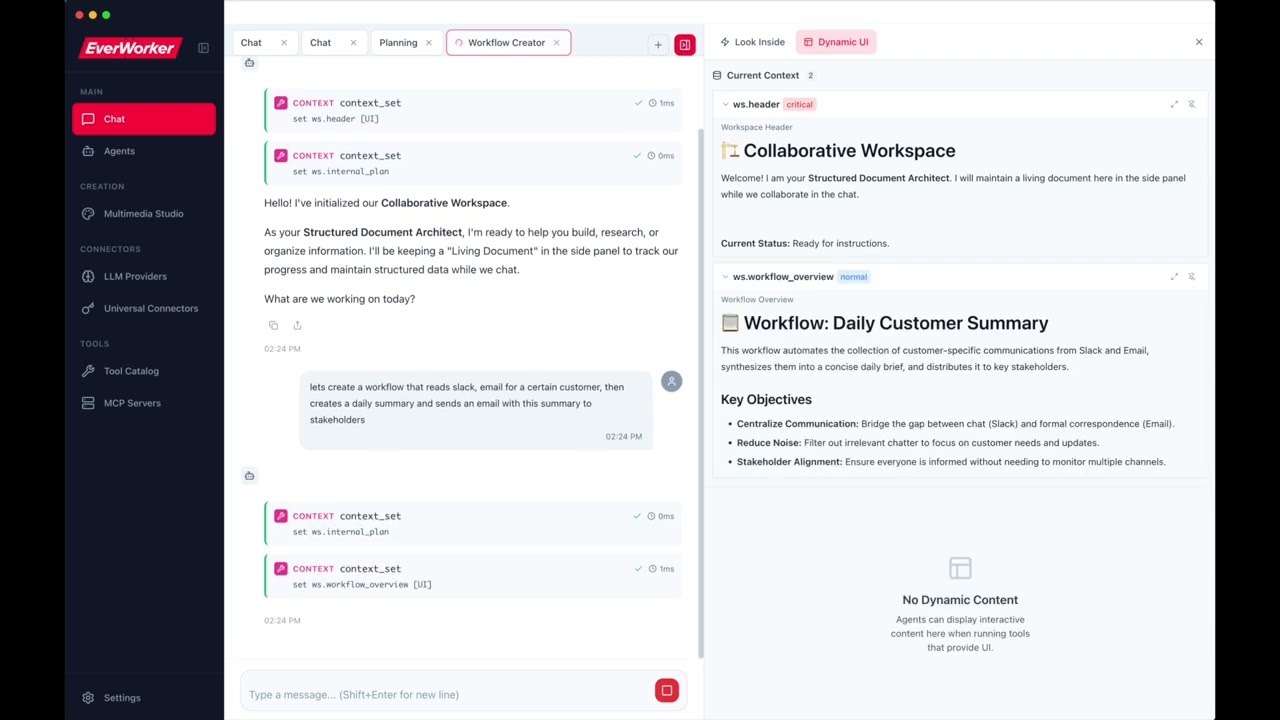
Better to see once and then dig in the code! :)
YOUetal
Showcasing another amazing "built with oneringai": "no saas" agentic business team
Features
- ✨ Unified API - One interface for 12 AI providers (OpenAI, Anthropic, Google, Vertex, Groq, Together, Perplexity, Grok, DeepSeek, Mistral, Ollama, Custom)
- 🔑 Connector-First Architecture - Single auth system with support for multiple keys per vendor
- 📊 Model Registry - Complete metadata for 60+ latest (2026) models with pricing and features
- 🎤 Audio Capabilities - Text-to-Speech (TTS) and Speech-to-Text (STT) with OpenAI and Groq
- 🖼️ Image Generation - DALL-E 3, gpt-image-1, Google Imagen 4 with editing and variations
- 🎬 Video Generation - NEW: OpenAI Sora 2 and Google Veo 3 for AI video creation
- 🔢 Embeddings - NEW: Multi-vendor embedding generation with MRL dimension control (OpenAI, Google, Ollama, Mistral)
- 🔍 Web Search - Connector-based search with Serper, Brave, Tavily, and RapidAPI providers
- 🔌 NextGen Context - Clean, plugin-based context management with
AgentContextNextGen - 🎛️ Dynamic Tool Management - Enable/disable tools at runtime, namespaces, priority-based selection
- 🔌 Tool Execution Plugins - NEW: Pluggable pipeline for logging, analytics, UI updates, custom behavior
- 💾 Session Persistence - Save and resume conversations with full state restoration
- ⏸️ Long-Running Sessions - NEW: Suspend agent loops via
SuspendSignal, resume hours/days later withAgent.hydrate() - 👤 Multi-User Support - Set
userIdonce, flows automatically to all tool executions and session metadata - 🔒 Auth Identities - Restrict agents to specific connectors (and accounts), composable with access policies
- 🤖 Universal Agent - ⚠️ Deprecated - Use
Agentwith plugins instead - 🤖 Task Agents - ⚠️ Deprecated - Use
AgentwithWorkingMemoryPluginNextGen - 🔬 Research Agent - ⚠️ Deprecated - Use
Agentwith search tools - 🎯 Context Management - Algorithmic compaction with tool-result-to-memory offloading
- 📌 InContextMemory - Live key-value storage directly in LLM context with optional UI display (
showInUI) - 📝 Persistent Instructions - NEW: Agent-level custom instructions that persist across sessions on disk
- 👤 User Info Plugin - NEW: Per-user preferences/context automatically injected into LLM context, shared across agents
- 🛠️ Agentic Workflows - Built-in tool calling and multi-turn conversations
- 🔧 Developer Tools - NEW: Filesystem and shell tools for coding assistants (read, write, edit, grep, glob, bash)
- 🧰 Custom Tool Generation - NEW: Let agents create, test, and persist their own reusable tools at runtime — complete meta-tool system with VM sandbox
- 🖥️ Desktop Automation - NEW: OS-level computer use — screenshot, mouse, keyboard, and window control for vision-driven agent loops
- 📄 Document Reader - NEW: Universal file-to-text converter — PDF, DOCX, XLSX, PPTX, CSV, HTML, images auto-converted to markdown
- 🔌 MCP Integration - NEW: Model Context Protocol client for seamless tool discovery from local and remote servers
- 👁️ Vision Support - Analyze images with AI across all providers
- 📋 Clipboard Integration - Paste screenshots directly (like Claude Code!)
- 🔐 Scoped Connector Registry - NEW: Pluggable access control for multi-tenant connector isolation
- 💾 StorageRegistry - Centralized storage configuration — swap all backends (sessions, media, custom tools, etc.) with one
configure()call - 🔐 OAuth 2.0 - Full OAuth support for external APIs with encrypted token storage
- 📦 Vendor Templates - NEW: Pre-configured auth templates for 43+ services (GitHub, Slack, Stripe, etc.)
- 📧 Microsoft Graph Tools - NEW: Email, calendar, meetings, and Teams transcripts via Microsoft Graph API
- 🔁 Routine Execution - NEW: Multi-step workflows with task dependencies, LLM validation, retry logic, and memory bridging between tasks
- 📊 Execution Recording - NEW: Persist full routine execution history with
createExecutionRecorder()— replaces manual hook wiring - ⏰ Scheduling & Triggers - NEW:
SimpleSchedulerfor interval/one-time schedules,EventEmitterTriggerfor webhook/queue-driven execution - 📦 Tool Catalog - NEW: Dynamic tool loading/unloading — agents discover and load only the categories they need at runtime
- Async Tools - NEW: Non-blocking tool execution — long-running tools run in background while the agent continues reasoning, with auto-continuation when results arrive
- 📡 Agent Registry - NEW: Global tracking of all active agents — deep inspection, parent/child hierarchy, event fan-in, external control
- 📱 Telegram Tools - NEW: 6 Telegram Bot API tools — send messages/photos, get updates, webhooks, chat info
- 📞 Twilio Tools - NEW: 4 Twilio tools — SMS, WhatsApp messaging, message listing and details
- 📧 Google Workspace Tools - NEW: 11 tools for Gmail, Calendar, Meet transcripts, and Drive (read, search, list files)
- 🎥 Zoom Tools - NEW: 3 Zoom tools — create/update meetings, get cloud recording transcripts
- 📅 Unified Calendar - NEW: Cross-provider meeting slot finder aggregating Google + Microsoft calendars
- 👥 Multi-Account Connectors - NEW: Multiple accounts per vendor (e.g., work + personal) with automatic routing
- 🧪 Integration Testing - NEW: Reusable test suite framework for connector tools with 10 built-in suites
- 📝 Instruction Templates - NEW:
{{DATE}},{{AGENT_ID}},{{RANDOM:1:10}}and custom{{COMMAND:arg}}in agent instructions — extensible registry with async support - 🔄 Streaming - Real-time responses with event streams
- 📝 TypeScript - Full type safety and IntelliSense support
v0.2.0 — Multi-User Support: Set
userIdonce on an agent and it automatically flows to all tool executions, OAuth token retrieval, session metadata, and connector scoping. Combine withidentitiesand access policies for complete multi-tenant isolation. See Multi-User Support and Auth Identities in the User Guide.
Quick Start
Installation
npm install @everworker/oneringai
Basic Usage
import { Connector, Agent, Vendor } from '@everworker/oneringai';

// 1. Create a connector (authentication)
Connector.create({
  name: 'openai',
  vendor: Vendor.OpenAI,
  auth: { type: 'api_key', apiKey: process.env.OPENAI_API_KEY! },
});

// 2. Create an agent
const agent = Agent.create({
  connector: 'openai',
  model: 'gpt-4.1',
});

// 3. Run
const response = await agent.run('What is the capital of France?');
console.log(response.output_text);
// Output: "The capital of France is Paris."
With Tools
import { ToolFunction } from '@everworker/oneringai';

const weatherTool: ToolFunction = {
  definition: {
    type: 'function',
    function: {
      name: 'get_weather',
      description: 'Get current weather',
      parameters: {
        type: 'object',
        properties: {
          location: { type: 'string' },
        },
        required: ['location'],
      },
    },
  },
  execute: async (args) => {
    return { temp: 72, location: args.location };
  },
};

const agent = Agent.create({
  connector: 'openai',
  model: 'gpt-4.1',
  tools: [weatherTool],
});

await agent.run('What is the weather in Paris?');
Vision
import { createMessageWithImages } from '@everworker/oneringai';

const agent = Agent.create({
  connector: 'openai',
  model: 'gpt-4o',
});

const response = await agent.run(
  createMessageWithImages('What is in this image?', ['./photo.jpg'])
);
Audio (NEW)
import { TextToSpeech, SpeechToText } from '@everworker/oneringai';

// Text-to-Speech
const tts = TextToSpeech.create({
  connector: 'openai',
  model: 'tts-1-hd',
  voice: 'nova',
});

await tts.toFile('Hello, world!', './output.mp3');

// Speech-to-Text
const stt = SpeechToText.create({
  connector: 'openai',
  model: 'whisper-1',
});

const result = await stt.transcribeFile('./audio.mp3');
console.log(result.text);
Image Generation (NEW)
import { ImageGeneration } from '@everworker/oneringai';

// OpenAI DALL-E
const imageGen = ImageGeneration.create({ connector: 'openai' });

const result = await imageGen.generate({
  prompt: 'A futuristic city at sunset',
  model: 'dall-e-3',
  size: '1024x1024',
  quality: 'hd',
});

// Save to file
const buffer = Buffer.from(result.data[0].b64_json!, 'base64');
await fs.writeFile('./output.png', buffer);

// Google Imagen
const googleGen = ImageGeneration.create({ connector: 'google' });

const googleResult = await googleGen.generate({
  prompt: 'A colorful butterfly in a garden',
  model: 'imagen-4.0-generate-001',
});
Video Generation (NEW)
import { VideoGeneration } from '@everworker/oneringai';

// OpenAI Sora
const videoGen = VideoGeneration.create({ connector: 'openai' });

// Start video generation (async - returns a job)
const job = await videoGen.generate({
  prompt: 'A cinematic shot of a sunrise over mountains',
  model: 'sora-2',
  duration: 8,
  resolution: '1280x720',
});

// Wait for completion
const result = await videoGen.waitForCompletion(job.jobId);

// Download the video
const videoBuffer = await videoGen.download(job.jobId);
await fs.writeFile('./output.mp4', videoBuffer);

// Google Veo
const googleVideo = VideoGeneration.create({ connector: 'google' });

const veoJob = await googleVideo.generate({
  prompt: 'A butterfly flying through a garden',
  model: 'veo-3.0-generate-001',
  duration: 8,
});
Embeddings (NEW)
import { Embeddings } from '@everworker/oneringai';

// OpenAI embeddings
const embeddings = Embeddings.create({ connector: 'openai' });

const result = await embeddings.embed(['Hello world', 'How are you?'], {
  model: 'text-embedding-3-small',
  dimensions: 512,  // MRL: reduce dimensions for faster search
});

console.log(result.embeddings.length);     // 2
console.log(result.embeddings[0].length);  // 512

// Ollama (local, free)
const local = Embeddings.create({ connector: 'ollama-local' });
const localResult = await local.embed('search query');
// Uses qwen3-embedding (4096 dims, #1 on MTEB multilingual)
Document Reader (NEW)
Read any document format — agents automatically get markdown text from PDFs, Word docs, spreadsheets, and more:
import { Agent, developerTools } from '@everworker/oneringai';

const agent = Agent.create({
  connector: 'openai',
  model: 'gpt-4.1',
  tools: developerTools,
});

// read_file auto-converts binary documents to markdown
await agent.run('Read /path/to/report.pdf and summarize the key findings');
await agent.run('Read /path/to/data.xlsx and describe the trends');
await agent.run('Read /path/to/presentation.pptx and list all slides');
Programmatic usage:
import { DocumentReader, readDocumentAsContent } from '@everworker/oneringai';

// Read any file to markdown pieces
const reader = DocumentReader.create();
const result = await reader.read('/path/to/report.pdf');
console.log(result.pieces); // DocumentPiece[] (text + images)

// One-call conversion to LLM Content[] (for multimodal input)
const content = await readDocumentAsContent('/path/to/slides.pptx', {
  imageFilter: { minWidth: 100, minHeight: 100 },
  imageDetail: 'auto',
});

const response = await agent.run([
  { type: 'input_text', text: 'Analyze this document:' },
  ...content,
]);
Supported Formats:
- Office: DOCX, PPTX, ODT, ODP, ODS, RTF (via
officeparser) - Spreadsheets: XLSX, CSV (via
exceljs) - PDF (via
unpdf) - HTML (via Readability + Turndown)
- Text: TXT, MD, JSON, XML, YAML
- Images: PNG, JPG, GIF, WEBP, SVG (pass-through as base64)
Web Search
Connector-based web search with multiple providers:
import { Connector, SearchProvider, ConnectorTools, Services, Agent, tools } from '@everworker/oneringai';

// Create search connector
Connector.create({
  name: 'serper-main',
  serviceType: Services.Serper,
  auth: { type: 'api_key', apiKey: process.env.SERPER_API_KEY! },
  baseURL: 'https://google.serper.dev',
});

// Option 1: Use SearchProvider directly
const search = SearchProvider.create({ connector: 'serper-main' });
const results = await search.search('latest AI developments 2026', {
  numResults: 10,
  country: 'us',
  language: 'en',
});

// Option 2: Use with Agent via ConnectorTools
const searchTools = ConnectorTools.for('serper-main');

const agent = Agent.create({
  connector: 'openai',
  model: 'gpt-4.1',
  tools: [...searchTools, tools.webFetch],
});

await agent.run('Search for quantum computing news and summarize');
Supported Search Providers:
- Serper - Google search via Serper.dev (2,500 free queries)
- Brave - Independent search index (privacy-focused)
- Tavily - AI-optimized search with summaries
- RapidAPI - Real-time web search (various pricing)
Web Scraping
Enterprise web scraping with automatic fallback and bot protection bypass:
import { Connector, ScrapeProvider, ConnectorTools, Services, Agent, tools } from '@everworker/oneringai';

// Create ZenRows connector for bot-protected sites
Connector.create({
  name: 'zenrows',
  serviceType: Services.Zenrows,
  auth: { type: 'api_key', apiKey: process.env.ZENROWS_API_KEY! },
  baseURL: 'https://api.zenrows.com/v1',
});

// Option 1: Use ScrapeProvider directly
const scraper = ScrapeProvider.create({ connector: 'zenrows' });
const result = await scraper.scrape('https://protected-site.com', {
  includeMarkdown: true,
  vendorOptions: {
    jsRender: true,        // JavaScript rendering
    premiumProxy: true,    // Residential IPs
  },
});

// Option 2: Use web_scrape tool with Agent via ConnectorTools
const scrapeTools = ConnectorTools.for('zenrows');

const agent = Agent.create({
  connector: 'openai',
  model: 'gpt-4.1',
  tools: [...scrapeTools, tools.webFetch],
});

// web_scrape auto-falls back: native → API
await agent.run('Scrape https://example.com and summarize');
Supported Scrape Providers:
- ZenRows - Enterprise scraping with JS rendering, residential proxies, anti-bot bypass
- Jina Reader - Clean content extraction with AI-powered readability
- Firecrawl - Web scraping with JavaScript rendering
- ScrapingBee - Headless browser scraping with proxy rotation
Supported Providers
| Provider | Text | Vision | TTS | STT | Image | Video | Tools | Context |
|---|---|---|---|---|---|---|---|---|
| OpenAI | ✅ | ✅ | ✅ | ✅ | ✅ | ✅ | ✅ | 128K |
| Anthropic (Claude) | ✅ | ✅ | ❌ | ❌ | ❌ | ❌ | ✅ | 1M |
| Google (Gemini) | ✅ | ✅ | ✅ | ❌ | ✅ | ✅ | ✅ | 1M |
| Google Vertex AI | ✅ | ✅ | ❌ | ❌ | ❌ | ❌ | ✅ | 1M |
| Grok (xAI) | ✅ | ✅ | ❌ | ❌ | ✅ | ✅ | ✅ | 128K |
| Groq | ✅ | ❌ | ❌ | ✅ | ❌ | ❌ | ✅ | 128K |
| Together AI | ✅ | Some | ❌ | ❌ | ❌ | ❌ | ✅ | 128K |
| DeepSeek | ✅ | ❌ | ❌ | ❌ | ❌ | ❌ | ✅ | 64K |
| Mistral | ✅ | ❌ | ❌ | ❌ | ❌ | ❌ | ✅ | 32K |
| Perplexity | ✅ | ❌ | ❌ | ❌ | ❌ | ❌ | ✅ | 128K |
| Ollama | ✅ | Varies | ❌ | ❌ | ❌ | ❌ | ✅ | Varies |
| Custom | ✅ | Varies | ❌ | ❌ | ❌ | ❌ | ✅ | Varies |
Key Features
1. Agent with Plugins
The Agent class is the primary agent type, supporting all features through composable plugins:
import { Agent, createFileContextStorage } from '@everworker/oneringai';

// Create storage for session persistence
const storage = createFileContextStorage('my-assistant');

const agent = Agent.create({
  connector: 'openai',
  model: 'gpt-4.1',
  userId: 'user-123',            // Flows to all tool executions automatically
  identities: [                   // Only these connectors visible to tools
    { connector: 'github' },
    { connector: 'slack' },
  ],
  tools: [weatherTool, emailTool],
  context: {
    features: {
      workingMemory: true,      // Store/retrieve data across turns
      inContextMemory: true,    // Key-value pairs directly in context
      persistentInstructions: true,  // Agent instructions that persist to disk
    },
    agentId: 'my-assistant',
    storage,
  },
});

// Run the agent
const response = await agent.run('Check weather and email me the report');
console.log(response.output_text);

// Save session for later
await agent.context.save('session-001');
Features:
- 🔧 Plugin Architecture - Enable/disable features via
context.features - 💾 Session Persistence - Save/load full state with
ctx.save()andctx.load() - 📝 Working Memory - Store findings with automatic eviction
- 📌 InContextMemory - Key-value pairs visible directly to LLM
- 🔄 Persistent Instructions - Agent instructions that persist across sessions
2. Dynamic Tool Management (NEW)
Control tools at runtime. AgentContextNextGen is the single source of truth - agent.tools and agent.context.tools are the same ToolManager instance:
import { Agent } from '@everworker/oneringai';

const agent = Agent.create({
  connector: 'openai',
  model: 'gpt-4.1',
  tools: [weatherTool, emailTool, databaseTool],
});

// Disable tool temporarily
agent.tools.disable('database_tool');

// Enable later
agent.tools.enable('database_tool');

// UNIFIED ACCESS: Both paths access the same ToolManager
console.log(agent.tools === agent.context.tools);  // true

// Changes via either path are immediately reflected
agent.context.tools.disable('email_tool');
console.log(agent.tools.listEnabled().includes('email_tool'));  // false

// Context-aware selection
const selected = agent.tools.selectForContext({
  mode: 'interactive',
  priority: 'high',
});

// Backward compatible
agent.addTool(newTool);        // Still works!
agent.removeTool('old_tool');  // Still works!
3. Tool Execution Plugins (NEW)
Extend tool execution with custom behavior through a pluggable pipeline architecture. Add logging, analytics, UI updates, permission prompts, or any custom logic:
import { Agent, LoggingPlugin, type IToolExecutionPlugin } from '@everworker/oneringai';

const agent = Agent.create({
  connector: 'openai',
  model: 'gpt-4.1',
  tools: [weatherTool],
});

// Add built-in logging plugin
agent.tools.executionPipeline.use(new LoggingPlugin());

// Create a custom plugin
const analyticsPlugin: IToolExecutionPlugin = {
  name: 'analytics',
  priority: 100,

  async beforeExecute(ctx) {
    console.log(`Starting ${ctx.toolName}`);
  },

  async afterExecute(ctx, result) {
    const duration = Date.now() - ctx.startTime;
    trackToolUsage(ctx.toolName, duration);
    return result; // Must return result (can transform it)
  },

  async onError(ctx, error) {
    reportError(ctx.toolName, error);
    return undefined; // Let error propagate (or return value to recover)
  },
};

agent.tools.executionPipeline.use(analyticsPlugin);
Plugin Lifecycle:
beforeExecute- Modify args, abort execution, or pass through- Tool execution
afterExecute- Transform results (runs in reverse priority order)onError- Handle/recover from errors
Plugin Context (PluginExecutionContext):
interface PluginExecutionContext {
  toolName: string;           // Name of the tool being executed
  args: unknown;              // Original arguments (read-only)
  mutableArgs: unknown;       // Modifiable arguments
  metadata: Map<string, unknown>; // Share data between plugins
  startTime: number;          // Execution start timestamp
  tool: ToolFunction;         // The tool being executed
  executionId: string;        // Unique ID for this execution
}
Built-in Plugins:
LoggingPlugin- Logs tool execution with timing and result summaries
Pipeline Management:
// Add plugin
agent.tools.executionPipeline.use(myPlugin);

// Remove plugin
agent.tools.executionPipeline.remove('plugin-name');

// Check if registered
agent.tools.executionPipeline.has('plugin-name');

// Get plugin
const plugin = agent.tools.executionPipeline.get('plugin-name');

// List all plugins
const plugins = agent.tools.executionPipeline.list();
4. Tool Permissions (NEW)
Policy-based permission system with per-user rules, argument inspection, and pluggable storage. Permissions are enforced at the ToolManager pipeline level -- all tool execution paths are gated.
Zero-Config (Backward Compatible)
Existing code works unchanged. Safe tools (read-only, memory, catalog) are auto-allowed; all others default to prompting:
const agent = Agent.create({ connector: 'openai', model: 'gpt-4.1', tools: [readFile, bash] });

// read_file executes immediately (in DEFAULT_ALLOWLIST)
// bash triggers approval flow (write/shell tools require approval by default)
Per-User Permission Rules
User rules have the highest priority -- they override all built-in policies. Rules support argument inspection with conditions:
import { PermissionPolicyManager } from '@everworker/oneringai';

const manager = new PermissionPolicyManager({
  userRules: [
    // Allow bash, but only in the project directory
    {
      id: '1', toolName: 'bash', action: 'allow', enabled: true,
      createdBy: 'user', createdAt: new Date().toISOString(), updatedAt: new Date().toISOString(),
      conditions: [{ argName: 'command', operator: 'not_contains', value: 'rm -rf' }],
    },
    // Block all web tools unconditionally
    {
      id: '2', toolName: 'web_fetch', action: 'deny', enabled: true, unconditional: true,
      createdBy: 'admin', createdAt: new Date().toISOString(), updatedAt: new Date().toISOString(),
    },
  ],
});
Condition operators: starts_with, not_starts_with, contains, not_contains, equals, not_equals, matches (regex), not_matches.
Built-in Policies
Eight composable policies evaluated in priority order (deny short-circuits):
| Policy | Description |
|---|---|
| AllowlistPolicy | Auto-allow tools in the allowlist (read-only, memory, catalog) |
| BlocklistPolicy | Hard-block tools in the blocklist (no approval possible) |
| SessionApprovalPolicy | Cache approvals per-session with optional argument-scoped keys |
| PathRestrictionPolicy | Restrict file tools to allowed directory roots |
| BashFilterPolicy | Block/flag dangerous shell commands by pattern |
| UrlAllowlistPolicy | Restrict web tools to allowed URL domains |
| RolePolicy | Role-based access control (map user roles to tool permissions) |
| RateLimitPolicy | Limit tool invocations per time window |
import { PathRestrictionPolicy, BashFilterPolicy } from '@everworker/oneringai';

const agent = Agent.create({
  connector: 'openai', model: 'gpt-4.1',
  permissions: {
    policies: [
      new PathRestrictionPolicy({ allowedPaths: ['/workspace'] }),
      new BashFilterPolicy({ blockedPatterns: ['rm -rf', 'sudo'] }),
    ],
  },
});
Approval Dialog Integration
When a tool needs approval, the onApprovalRequired callback fires. Return a createRule to persist the decision:
const agent = Agent.create({
  connector: 'openai', model: 'gpt-4.1',
  permissions: {
    onApprovalRequired: async (ctx) => {
      const userChoice = await showApprovalDialog(ctx.toolName, ctx.args);

      return {
        approved: userChoice.allow,
        // Persist as a user rule so it won't ask again
        createRule: userChoice.remember ? {
          description: `Auto-allow ${ctx.toolName}`,
          conditions: [{ argName: 'path', operator: 'starts_with', value: '/workspace' }],
        } : undefined,
      };
    },
  },
});
Tool Self-Declaration
Tool authors declare permission defaults on the tool definition. App developers can override at registration:
const myTool: ToolFunction = {
  definition: { type: 'function', function: { name: 'deploy', description: '...', parameters: {...} } },
  execute: async (args) => { /* ... */ },
  // Author-declared defaults
  permission: {
    scope: 'once',
    riskLevel: 'high',
    approvalMessage: 'This will deploy to production',
    sensitiveArgs: ['environment', 'version'],
  },
};

// App developer can override at registration
agent.tools.register(myTool, {
  permission: { scope: 'session' },  // Relax to session-level approval
});
For complete documentation, see the User Guide.
5. Session Persistence
Save and resume full context state including conversation history and plugin states:
import { AgentContextNextGen, createFileContextStorage } from '@everworker/oneringai';

// Create storage for the agent
const storage = createFileContextStorage('my-assistant');

// Create context with storage
const ctx = AgentContextNextGen.create({
  model: 'gpt-4.1',
  features: { workingMemory: true },
  storage,
});

// Build up state
ctx.addUserMessage('Remember: my favorite color is blue');
await ctx.memory?.store('user_color', 'User favorite color', 'blue');

// Save session with metadata
await ctx.save('session-001', { title: 'User Preferences' });

// Later... load session
const ctx2 = AgentContextNextGen.create({ model: 'gpt-4.1', storage });
const loaded = await ctx2.load('session-001');

if (loaded) {
  // Full state restored: conversation, plugin states, etc.
  const color = await ctx2.memory?.retrieve('user_color');
  console.log(color); // 'blue'
}
What's Persisted:
- Complete conversation history
- All plugin states (WorkingMemory entries, InContextMemory, etc.)
- System prompt
Storage Location: ~/.oneringai/agents/<agentId>/sessions/<sessionId>.json
Storage Registry
Swap all storage backends (sessions, media, custom tools, OAuth tokens, etc.) with a single configure() call at init time. No breaking changes — all existing APIs continue to work.
import { StorageRegistry } from '@everworker/oneringai';

StorageRegistry.configure({
  media: new S3MediaStorage(),
  oauthTokens: new EncryptedFileTokenStorage(),
  // Context-aware factories — optional StorageContext for multi-tenant partitioning
  customTools: (ctx) => new MongoCustomToolStorage(ctx?.userId),
  sessions: (agentId, ctx) => new RedisContextStorage(agentId, ctx?.tenantId),
  persistentInstructions: (agentId, ctx) => new DBInstructionsStorage(agentId, ctx?.userId),
  workingMemory: (ctx) => new RedisMemoryStorage(ctx?.tenantId),
  routineDefinitions: (ctx) => new MongoRoutineStorage(ctx?.userId),
});

// All agents and tools automatically use these backends
const agent = Agent.create({ connector: 'openai', model: 'gpt-4.1' });
Resolution order: explicit constructor param > StorageRegistry > file-based default.
Multi-tenant: Factories receive an optional StorageContext (opaque, like ConnectorAccessContext). Set via StorageRegistry.setContext({ userId, tenantId }) — auto-forwarded to all factory calls for per-user/per-tenant storage partitioning.
See the User Guide for full documentation.
6. Working Memory
Use the WorkingMemoryPluginNextGen for agents that need to store and retrieve data:
import { Agent } from '@everworker/oneringai';

const agent = Agent.create({
  connector: 'openai',
  model: 'gpt-4.1',
  tools: [weatherTool, emailTool],
  context: {
    features: { workingMemory: true },
  },
});

// Agent now has unified store_get, store_set, store_delete, store_list, store_action tools
await agent.run('Check weather for SF and remember the result');
Features:
- 📝 Working Memory - Store and retrieve data with priority-based eviction
- 🏗️ Hierarchical Memory - Raw → Summary → Findings tiers for research tasks
- 🧠 Context Management - Automatic handling of context limits
- 💾 Session Persistence - Save/load via
ctx.save()andctx.load()
7. Research with Search Tools
Use Agent with search tools and WorkingMemoryPluginNextGen for research workflows:
import { Agent, ConnectorTools, Connector, Services, tools } from '@everworker/oneringai';

// Setup search connector
Connector.create({
  name: 'serper-main',
  serviceType: Services.Serper,
  auth: { type: 'api_key', apiKey: process.env.SERPER_API_KEY! },
  baseURL: 'https://google.serper.dev',
});

// Create agent with search and memory
const searchTools = ConnectorTools.for('serper-main');

const agent = Agent.create({
  connector: 'openai',
  model: 'gpt-4.1',
  tools: [...searchTools, tools.webFetch],
  context: {
    features: { workingMemory: true },
  },
});

// Agent can search and store findings in memory
await agent.run('Research AI developments in 2026 and store key findings');
Features:
- 🔍 Web Search - SearchProvider with Serper, Brave, Tavily, RapidAPI
- 📝 Working Memory - Store findings with priority-based eviction
- 🏗️ Tiered Memory - Raw → Summary → Findings pattern
8. Context Management
AgentContextNextGen is the modern, plugin-based context manager. It provides clean separation of concerns with composable plugins:
import { Agent, AgentContextNextGen } from '@everworker/oneringai';

// Option 1: Use AgentContextNextGen directly (standalone)
const ctx = AgentContextNextGen.create({
  model: 'gpt-4.1',
  systemPrompt: 'You are a helpful assistant.',
  features: { workingMemory: true, inContextMemory: true },
});

ctx.addUserMessage('What is the weather in Paris?');
const { input, budget } = await ctx.prepare(); // Ready for LLM call

// Option 2: Via Agent.create
const agent = Agent.create({
  connector: 'openai',
  model: 'gpt-4.1',
  context: {
    features: { workingMemory: true },
  },
});

// Agent uses AgentContextNextGen internally
await agent.run('Check the weather');
Feature Configuration
Enable/disable features independently. Disabled features = no associated tools registered:
// Minimal stateless agent (no memory)
const agent = Agent.create({
  connector: 'openai',
  model: 'gpt-4.1',
  context: {
    features: { workingMemory: false }
  }
});

// Full-featured agent with all plugins
const agent = Agent.create({
  connector: 'openai',
  model: 'gpt-4.1',
  context: {
    features: {
      workingMemory: true,
      inContextMemory: true,
      persistentInstructions: true
    },
    agentId: 'my-assistant',  // Required for persistentInstructions
  }
});
Available Features:
| Feature | Default | Plugin | Associated Tools |
|---|---|---|---|
workingMemory |
true |
WorkingMemoryPluginNextGen | Unified store_* tools (store="memory"). Actions: cleanup_raw, query |
inContextMemory |
true |
InContextMemoryPluginNextGen | Unified store_* tools (store="context") |
persistentInstructions |
false |
PersistentInstructionsPluginNextGen | Unified store_* tools (store="instructions"). Actions: clear |
userInfo |
false |
UserInfoPluginNextGen | Unified store_* tools (store="user_info") + todo_add/update/remove |
toolCatalog |
false |
ToolCatalogPluginNextGen | tool_catalog_search/load/unload |
sharedWorkspace |
false |
SharedWorkspacePluginNextGen | Unified store_* tools (store="workspace"). Actions: log, history, archive, clear |
AgentContextNextGen architecture:
- Plugin-first design - All features are composable plugins
- ToolManager - Tool registration, execution, circuit breakers
- Single system message - All context components combined
- Smart compaction - Happens once, right before LLM call
Compaction strategy:
- algorithmic (default) - Moves large tool results to Working Memory, limits tool pairs, applies rolling window. Triggers at 75% context usage.
Context preparation:
const { input, budget, compacted, compactionLog } = await ctx.prepare();

console.log(budget.totalUsed);           // Total tokens used
console.log(budget.available);           // Remaining tokens
console.log(budget.utilizationPercent);  // Usage percentage
9. InContextMemory
Store key-value pairs directly in context for instant LLM access without retrieval calls:
import { AgentContextNextGen } from '@everworker/oneringai';

const ctx = AgentContextNextGen.create({
  model: 'gpt-4.1',
  features: { inContextMemory: true },
  plugins: {
    inContextMemory: { maxEntries: 20 },
  },
});

// Access the plugin
const plugin = ctx.getPlugin('in_context_memory');

// Store data - immediately visible to LLM
plugin.set('current_state', 'Task processing state', { step: 2, status: 'active' });
plugin.set('user_prefs', 'User preferences', { verbose: true }, 'high');

// Store data with UI display - shown in the host app's sidebar panel
plugin.set('dashboard', 'Progress dashboard', '## Progress\n- [x] Step 1\n- [ ] Step 2', 'normal', true);

// LLM uses unified store tools: store_set("context", ...), store_get("context", ...), etc.
// Or access directly via plugin API
const state = plugin.get('current_state');  // { step: 2, status: 'active' }
Key Difference from WorkingMemory:
- WorkingMemory: External storage + index → requires
store_get("memory", key)for values - InContextMemory: Full values in context → instant access, no retrieval needed
UI Display (showInUI): Entries with showInUI: true are displayed in the host application's sidebar panel with full markdown rendering (code blocks, tables, charts, diagrams, etc.). The LLM sets this via store_set("context", key, { ..., showInUI: true }). Users can also pin specific entries to always display them regardless of the agent's setting. See the User Guide for details.
Use cases: Session state, user preferences, counters, flags, small accumulated results, live dashboards.
10. Persistent Instructions
Store agent-level custom instructions that persist across sessions on disk:
import { Agent } from '@everworker/oneringai';

const agent = Agent.create({
  connector: 'openai',
  model: 'gpt-4.1',
  context: {
    agentId: 'my-assistant',  // Required for storage path
    features: {
      persistentInstructions: true,
    },
  },
});

// LLM uses unified store tools: store_set("instructions", ...), store_delete("instructions", ...), etc.
// Instructions persist to ~/.oneringai/agents/my-assistant/custom_instructions.json
Key Features:
- 📁 Disk Persistence - Instructions survive process restarts and sessions
- 🔧 LLM-Modifiable - Agent can update its own instructions during execution
- 🔄 Auto-Load - Instructions loaded automatically on agent start
- 🛡️ Never Compacted - Critical instructions always preserved in context
Store Tools (via unified store_* interface):
store_set("instructions", key, { content })- Add or update a single instruction by keystore_delete("instructions", key)- Remove a single instruction by keystore_list("instructions")- List all instructions with keys and contentstore_action("instructions", "clear", { confirm: true })- Remove all instructions
Use cases: Agent personality/behavior, user preferences, learned rules, tool usage patterns.
11. User Info
Store user-specific preferences and context that are automatically injected into the LLM system message:
import { Agent } from '@everworker/oneringai';

const agent = Agent.create({
  connector: 'openai',
  model: 'gpt-4.1',
  userId: 'alice',  // Optional — defaults to 'default' user
  context: {
    features: {
      userInfo: true,
    },
  },
});

// LLM uses unified store tools: store_set("user_info", ...), store_get("user_info", ...), etc.
// Data persists to ~/.oneringai/users/alice/user_info.json
// All entries are automatically shown in context — no need to call store_get each turn
Key Features:
- 📁 Disk Persistence - User info survives process restarts and sessions
- 🔄 Auto-Inject - Entries rendered as markdown and included in the system message automatically
- 👥 User-Scoped - Data is per-user, not per-agent — different agents share the same user data
- 🔧 LLM-Modifiable - Agent can update user info during execution
Store Tools (via unified store_* interface):
store_set("user_info", key, { value, description? })- Store/update user informationstore_get("user_info", key?)- Retrieve one entry or all entriesstore_delete("user_info", key)- Remove a specific entrystore_action("user_info", "clear", { confirm: true })- Clear all entries
TODO Tools (built into the same plugin):
todo_add- Create a TODO (title,description?,people?,dueDate?,tags?)todo_update- Update a TODO (id, plus any fields to change includingstatus: 'done')todo_remove- Delete a TODO by id
TODOs are stored alongside user info and rendered in a separate "Current TODOs" checklist in context. The agent proactively suggests creating TODOs when conversation implies action items, reminds about due/overdue items once per day, and auto-cleans completed TODOs after 48 hours.
Use cases: User preferences (theme, language, timezone), user context (role, location), accumulated knowledge about the user, task/TODO tracking with deadlines and people.
12. Direct LLM Access
Bypass all context management for simple, stateless LLM calls:
const agent = Agent.create({ connector: 'openai', model: 'gpt-4.1' });

// Direct call - no history tracking, no memory, no context preparation
const response = await agent.runDirect('What is 2 + 2?');
console.log(response.output_text);  // "4"

// With options
const response = await agent.runDirect('Summarize this', {
  instructions: 'Be concise',
  temperature: 0.5,
  maxOutputTokens: 100,
});

// Multimodal (text + image)
const response = await agent.runDirect([
  { type: 'message', role: 'user', content: [
    { type: 'input_text', text: 'What is in this image?' },
    { type: 'input_image', image_url: 'https://example.com/image.png' }
  ]}
]);

// Streaming
for await (const event of agent.streamDirect('Tell me a story')) {
  if (event.type === 'output_text_delta') {
    process.stdout.write(event.delta);
  }
}
Comparison:
| Aspect | run() |
runDirect() |
|---|---|---|
| History tracking | ✅ | ❌ |
| Memory/Cache | ✅ | ❌ |
| Context preparation | ✅ | ❌ |
| Agentic loop (tool execution) | ✅ | ❌ |
| Overhead | Full context management | Minimal |
Use cases: Quick one-off queries, embeddings-like simplicity, testing, hybrid workflows.
Thinking / Reasoning (Per-Call)
Control reasoning effort per call — vendor-agnostic API that maps to OpenAI's reasoning_effort, Anthropic's budget_tokens, and Google's thinkingBudget:
const agent = Agent.create({ connector: 'anthropic', model: 'claude-sonnet-4-6' });

// Set reasoning at agent level (applies to all calls)
const agent2 = Agent.create({
  connector: 'openai', model: 'o3-mini',
  thinking: { enabled: true, effort: 'medium' },
});

// Override per call via RunOptions
const deep = await agent.run('Prove this theorem', {
  thinking: { enabled: true, budgetTokens: 16384 },
});

const quick = await agent.run('What is 2+2?', {
  thinking: { enabled: true, effort: 'low' },
});

// Streaming with reasoning
for await (const event of agent.stream('Analyze this code', {
  thinking: { enabled: true, effort: 'high' },
})) { /* ... */ }

// Also works with runDirect()
const resp = await agent.runDirect('Quick question', {
  thinking: { enabled: true, effort: 'medium' },
});
RunOptions (for run() / stream()): thinking, temperature, vendorOptions — override agent-level config for a single call.
13. Audio Capabilities
Text-to-Speech and Speech-to-Text with multiple providers:
import { TextToSpeech, SpeechToText } from '@everworker/oneringai';

// === Text-to-Speech ===
const tts = TextToSpeech.create({
  connector: 'openai',
  model: 'tts-1-hd',       // or 'gpt-4o-mini-tts' for instruction steering
  voice: 'nova',
});

// Synthesize to file
await tts.toFile('Hello, world!', './output.mp3');

// Synthesize with options
const audio = await tts.synthesize('Speak slowly', {
  format: 'wav',
  speed: 0.75,
});

// Introspection
const voices = await tts.listVoices();
const models = tts.listAvailableModels();

// === Speech-to-Text ===
const stt = SpeechToText.create({
  connector: 'openai',
  model: 'whisper-1',      // or 'gpt-4o-transcribe'
});

// Transcribe
const result = await stt.transcribeFile('./audio.mp3');
console.log(result.text);

// With timestamps
const detailed = await stt.transcribeWithTimestamps(audioBuffer, 'word');
console.log(detailed.words);  // [{ word, start, end }, ...]

// Translation
const english = await stt.translate(frenchAudio);
Streaming TTS — for real-time voice applications:
// Stream audio chunks as they arrive from the API
for await (const chunk of tts.synthesizeStream('Hello!', { format: 'pcm' })) {
  if (chunk.audio.length > 0) playPCMChunk(chunk.audio);  // 24kHz 16-bit LE mono
  if (chunk.isFinal) break;
}

// VoiceStream wraps agent text streams with interleaved audio events
const voice = VoiceStream.create({
  ttsConnector: 'openai', ttsModel: 'tts-1-hd', voice: 'nova',
});
for await (const event of voice.wrap(agent.stream('Tell me a story'))) { ... }
Available Models:
- TTS: OpenAI (
tts-1,tts-1-hd,gpt-4o-mini-tts), Google (gemini-tts) - STT: OpenAI (
whisper-1,gpt-4o-transcribe), Groq (whisper-large-v3- 12x cheaper!)
Embeddings (NEW)
Generate text embeddings across multiple vendors with a unified API. Supports Matryoshka Representation Learning (MRL) for flexible output dimensions.
import { Embeddings, Connector, Vendor } from '@everworker/oneringai';

// Setup
Connector.create({
  name: 'openai',
  vendor: Vendor.OpenAI,
  auth: { type: 'api_key', apiKey: process.env.OPENAI_API_KEY! },
});

const embeddings = Embeddings.create({ connector: 'openai' });

// Single text
const result = await embeddings.embed('Hello world');
console.log(result.embeddings[0].length);  // 1536 (default for text-embedding-3-small)

// Batch with custom dimensions (MRL)
const batch = await embeddings.embed(
  ['search query', 'document chunk 1', 'document chunk 2'],
  { dimensions: 512 }
);
console.log(batch.embeddings.length);     // 3
console.log(batch.embeddings[0].length);  // 512

// Local with Ollama (free, no API key)
Connector.create({
  name: 'ollama-local',
  vendor: Vendor.Ollama,
  auth: { type: 'none' },
  baseURL: 'http://localhost:11434/v1',
});

const local = Embeddings.create({ connector: 'ollama-local' });
const localResult = await local.embed('semantic search query');
// Uses qwen3-embedding by default (4096 dims, #1 on MTEB multilingual)
Model introspection and cost estimation:
import {
  getEmbeddingModelInfo,
  getEmbeddingModelsByVendor,
  calculateEmbeddingCost,
  EMBEDDING_MODELS,
  Vendor,
} from '@everworker/oneringai';

// Model details
const info = getEmbeddingModelInfo('text-embedding-3-small');
console.log(info.capabilities.maxDimensions);       // 1536
console.log(info.capabilities.features.matryoshka);  // true (supports MRL)
console.log(info.capabilities.maxTokens);            // 8191

// Cost estimation
const cost = calculateEmbeddingCost('text-embedding-3-small', 1_000_000);
console.log(`$${cost} per 1M tokens`);  // $0.02

// Browse models by vendor
const ollamaModels = getEmbeddingModelsByVendor(Vendor.Ollama);
console.log(ollamaModels.map(m => `${m.name} (${m.capabilities.defaultDimensions}d)`));
// ['qwen3-embedding (4096d)', 'qwen3-embedding:4b (4096d)', 'qwen3-embedding:0.6b (1024d)', ...]
Available Embedding Models:
| Vendor | Model | Dims | MRL | Tokens | Price/1M |
|---|---|---|---|---|---|
| OpenAI | text-embedding-3-small |
1536 | yes | 8191 | $0.02 |
| OpenAI | text-embedding-3-large |
3072 | yes | 8191 | $0.13 |
text-embedding-004 |
768 | yes | 2048 | Free | |
| Mistral | mistral-embed |
1024 | no | 8192 | $0.10 |
| Ollama | qwen3-embedding (8B) |
4096 | yes | 8192 | Free (local) |
| Ollama | qwen3-embedding:0.6b |
1024 | yes | 8192 | Free (local) |
| Ollama | nomic-embed-text |
768 | yes | 8192 | Free (local) |
14. Model Registry
Complete metadata for 60+ models with pricing, context windows, and feature flags:
import { getModelInfo, calculateCost, LLM_MODELS, Vendor } from '@everworker/oneringai';

// Get model information
const model = getModelInfo('gpt-5.2');
console.log(model.features.input.tokens);  // 400000
console.log(model.features.input.cpm);     // 1.75 (cost per million)

// Calculate costs
const cost = calculateCost('gpt-5.2', 50_000, 2_000);
console.log(`Cost: $${cost}`);  // $0.1155

// With caching
const cachedCost = calculateCost('gpt-5.2', 50_000, 2_000, {
  useCachedInput: true
});
console.log(`Cached: $${cachedCost}`);  // $0.0293 (90% discount)
Available Models:
- OpenAI (27+): GPT-5.4, GPT-5.3, GPT-5.2, GPT-5.1, GPT-5, GPT-4.1, GPT-4o, o3, o4-mini, o1, Deep Research, Audio, Realtime, Open-Source
- Anthropic (9): Claude 4.6 (Opus, Sonnet), Claude 4.5, Claude 4.1, Claude 4, Claude 3.7 Sonnet, Haiku 4.5
- Google (10): Gemini 3.1, Gemini 3, Gemini 2.5
- Grok (5): Grok 4.20 (reasoning, non-reasoning, multi-agent), Grok 4.1 Fast
15. Streaming
Real-time responses:
import { StreamHelpers } from '@everworker/oneringai';

for await (const text of StreamHelpers.textOnly(agent.stream('Hello'))) {
  process.stdout.write(text);
}
16. OAuth for External APIs
import { OAuthManager, FileStorage } from '@everworker/oneringai';

const oauth = new OAuthManager({
  flow: 'authorization_code',
  clientId: process.env.GITHUB_CLIENT_ID!,
  clientSecret: process.env.GITHUB_CLIENT_SECRET!,
  authorizationUrl: 'https://github.com/login/oauth/authorize',
  tokenUrl: 'https://github.com/login/oauth/access_token',
  storage: new FileStorage({ directory: './tokens' }),
});

const authUrl = await oauth.startAuthFlow('user123');
17. Developer Tools
File system and shell tools for building coding assistants:
import { developerTools } from '@everworker/oneringai';

const agent = Agent.create({
  connector: 'openai',
  model: 'gpt-4.1',
  tools: developerTools, // Includes all 11 tools
});

// Agent can now:
// - Read files (read_file)
// - Write files (write_file)
// - Edit files with surgical precision (edit_file)
// - Search files by pattern (glob)
// - Search content with regex (grep)
// - List directories (list_directory)
// - Execute shell commands (bash)
// - Start dev servers (dev_server)
// - Manage background processes (bg_process_output, bg_process_list, bg_process_kill)

await agent.run('Read package.json and tell me the dependencies');
await agent.run('Find all TODO comments in the src directory');
await agent.run('Run npm test and report any failures');
Available Tools:
- read_file - Read file contents with line numbers
- write_file - Create/overwrite files
- edit_file - Surgical find/replace edits
- glob - Find files by pattern (
**/*.ts) - grep - Search content with regex
- list_directory - List directory contents
- bash - Execute shell commands with safety guards
- dev_server - Start a development server in the background
- bg_process_output - Read output from a background process
- bg_process_list - List running background processes
- bg_process_kill - Stop a background process
Safety Features:
- Blocked dangerous commands (
rm -rf /, fork bombs) - Configurable blocked directories (
node_modules,.git) - Timeout protection (default 2 min)
- Output truncation for large outputs
18. Custom Tool Generation (NEW)
Let agents create their own tools at runtime — draft, test, iterate, save, and reuse. The agent writes JavaScript code, validates it, tests it in the VM sandbox, and persists it for future use. All 6 meta-tools are auto-registered and visible in Everworker Desktop.
import { createCustomToolMetaTools, hydrateCustomTool } from '@everworker/oneringai';

// Give an agent the ability to create tools
const agent = Agent.create({
  connector: 'openai',
  model: 'gpt-4.1',
  tools: [...createCustomToolMetaTools()],
});

// The agent can now: draft → test → save tools autonomously
await agent.run('Create a tool that fetches weather data from the OpenWeather API');

// Later: load and use a saved tool
import { createFileCustomToolStorage } from '@everworker/oneringai';
const storage = createFileCustomToolStorage();
const definition = await storage.load(undefined, 'fetch_weather'); // undefined = default user
const weatherTool = hydrateCustomTool(definition!);

// Register on any agent
agent.tools.register(weatherTool, { source: 'custom', tags: ['weather', 'api'] });
Meta-Tools: custom_tool_draft (validate), custom_tool_test (execute in sandbox), custom_tool_save (persist), custom_tool_list (search), custom_tool_load (retrieve), custom_tool_delete (remove)
Dynamic Descriptions: Draft and test tools use descriptionFactory to show all available connectors and the full sandbox API — automatically updated when connectors are added or removed.
Pluggable Storage: Default FileCustomToolStorage saves to ~/.oneringai/users/<userId>/custom-tools/ (defaults to ~/.oneringai/users/default/custom-tools/ when no userId). Implement ICustomToolStorage for MongoDB, S3, or any backend.
See the User Guide for the complete workflow, sandbox API reference, and examples.
19. Desktop Automation Tools (NEW)
OS-level desktop automation for building "computer use" agents — screenshot the screen, send to a vision model, receive tool calls (click, type, etc.), execute them, repeat:
import { desktopTools } from '@everworker/oneringai';

const agent = Agent.create({
  connector: 'openai',
  model: 'gpt-4.1',
  tools: desktopTools, // All 11 desktop tools
});

// Agent can now see and interact with the desktop:
await agent.run('Take a screenshot and describe what you see');
await agent.run('Open Safari and search for "weather forecast"');
Available Tools:
- desktop_screenshot - Capture full screen or region (returns image to vision model)
- desktop_mouse_move - Move cursor to position
- desktop_mouse_click - Click (left/right/middle, single/double/triple)
- desktop_mouse_drag - Drag from one position to another
- desktop_mouse_scroll - Scroll wheel (vertical and horizontal)
- desktop_get_cursor - Get current cursor position
- desktop_keyboard_type - Type text
- desktop_keyboard_key - Press shortcuts (e.g.,
ctrl+c,cmd+shift+s,enter) - desktop_get_screen_size - Get screen dimensions and scale factor
- desktop_window_list - List visible windows
- desktop_window_focus - Bring a window to the foreground
Key Design:
- All coordinates are in physical pixel space (same as screenshot pixels) — no manual Retina scaling needed
- Screenshots use the
__imagesconvention for automatic multimodal handling across all providers (Anthropic, OpenAI, Google) - Requires
@nut-tree-fork/nut-jsas an optional peer dependency:npm install @nut-tree-fork/nut-js
20. Document Reader
Universal file-to-LLM-content converter. Reads arbitrary document formats and produces clean markdown text with optional image extraction:
import { DocumentReader, mergeTextPieces } from '@everworker/oneringai';

const reader = DocumentReader.create({
  defaults: {
    maxTokens: 50_000,
    extractImages: true,
    imageFilter: { minWidth: 100, minHeight: 100 },
  },
});

// Read from file path, URL, Buffer, or Blob
const result = await reader.read('/path/to/report.pdf');
const result = await reader.read('https://example.com/doc.xlsx');
const result = await reader.read({ type: 'buffer', buffer: myBuffer, filename: 'doc.docx' });

// Get merged markdown text
const markdown = mergeTextPieces(result.pieces);

// Metadata
console.log(result.metadata.format);          // 'pdf'
console.log(result.metadata.estimatedTokens); // 12500
console.log(result.metadata.processingTimeMs); // 234
Automatic Integration — No Code Changes Needed:
read_filetool — Agents callingread_fileon a PDF, DOCX, or XLSX get markdown text automaticallyweb_fetchtool — Documents downloaded from URLs are auto-converted to markdown
Content Bridge for Multimodal Input:
import { readDocumentAsContent } from '@everworker/oneringai';

// Convert document directly to Content[] for LLM input
const content = await readDocumentAsContent('/path/to/slides.pptx', {
  extractImages: true,
  imageDetail: 'auto',
  maxImages: 20,
});

// Use in agent.run() with text + images
await agent.run([
  { type: 'input_text', text: 'Analyze this presentation:' },
  ...content,
]);
Pluggable Architecture:
- 6 built-in format handlers (Office, Excel, PDF, HTML, Text, Image)
- 3 default transformers (header, table formatting, truncation)
- Custom handlers and transformers via
DocumentReader.create({ handlers, ... }) - All heavy dependencies lazy-loaded (officeparser, exceljs, unpdf)
Image Filtering:
- Configurable min dimensions, min size, max count, pattern exclusions
- Automatically removes junk images (logos, icons, tiny backgrounds)
- Applied both at extraction time and at content conversion time
See the User Guide for complete API reference and configuration options.
21. Routine Execution (NEW)
Execute multi-step AI workflows where tasks run in dependency order with automatic validation:
import { executeRoutine, createRoutineDefinition } from '@everworker/oneringai';

const routine = createRoutineDefinition({
  name: 'Research Report',
  tasks: [
    {
      name: 'Research',
      description: 'Search for information about quantum computing',
      suggestedTools: ['web_search'],
      validation: {
        completionCriteria: ['At least 3 sources found', 'Key findings stored in memory'],
      },
    },
    {
      name: 'Write Report',
      description: 'Write a report based on research findings',
      dependsOn: ['Research'],
      validation: {
        completionCriteria: ['Report has introduction and conclusion', 'Sources are cited'],
      },
    },
  ],
});

const execution = await executeRoutine({
  definition: routine,
  connector: 'openai',
  model: 'gpt-4.1',
  tools: [...searchTools],
  onTaskComplete: (task, exec) => console.log(`[${exec.progress}%] ${task.name} done`),
});

console.log(execution.status); // 'completed' | 'failed'
Key Features:
- Task Dependencies - DAG-based ordering via
dependsOn - Memory Bridging - In-context memory (
store_set("context", ...)) + working memory (store_set("memory", ...)) persist across tasks while conversation is cleared - LLM Validation - Self-reflection against completion criteria with configurable score thresholds
- Retry Logic - Configurable
maxAttemptsper task with automatic retry on validation failure - Smart Error Classification - Permanent errors (auth, config, model-not-found) skip retry; transient errors retry normally
- Control Flow -
map,fold, anduntilflows with optional per-iteration timeout (iterationTimeoutMs) - Progress Tracking - Real-time callbacks and progress percentage
- Failure Modes -
fail-fast(default) orcontinuefor independent tasks - Custom Prompts - Override system, task, or validation prompts
ROUTINE_KEYSexport - Well-known ICM/WM key constants for custom integrations
Control Flow with Timeout:
const routine = createRoutineDefinition({
  name: 'Process Batch',
  tasks: [{
    name: 'Process Each',
    description: 'Process each item',
    controlFlow: {
      type: 'map',
      source: '__items',
      resultKey: '__results',
      iterationTimeoutMs: 60000, // 1 min per item
      tasks: [{ name: 'Process', description: 'Handle the current item' }],
    },
  }],
});
Execution Recording: Persist full execution history (steps, task snapshots, progress) with createExecutionRecorder(). Replaces ~140 lines of manual hook wiring with a single factory call:
import {
  createRoutineExecutionRecord, createExecutionRecorder,
  type IRoutineExecutionStorage,
} from '@everworker/oneringai';

const record = createRoutineExecutionRecord(definition, 'openai', 'gpt-4.1');
const execId = await storage.insert(userId, record);
const recorder = createExecutionRecorder({ storage, executionId: execId });

executeRoutine({
  definition, agent, inputs,
  hooks: recorder.hooks,
  onTaskStarted: recorder.onTaskStarted,
  onTaskComplete: recorder.onTaskComplete,
  onTaskFailed: recorder.onTaskFailed,
  onTaskValidation: recorder.onTaskValidation,
})
  .then(exec => recorder.finalize(exec))
  .catch(err => recorder.finalize(null, err));
Scheduling & Triggers: Run routines on a timer or from external events:
import { SimpleScheduler, EventEmitterTrigger } from '@everworker/oneringai';

// Schedule: run every hour
const scheduler = new SimpleScheduler();
scheduler.schedule('hourly-report', { intervalMs: 3600000 }, () => executeRoutine({ ... }));

// Event trigger: run from webhook
const trigger = new EventEmitterTrigger();
trigger.on('new-order', (payload) => executeRoutine({ ... }));
// In your webhook handler:
trigger.emit('new-order', { orderId: '123' });
Routine Persistence: Save and load routine definitions with FileRoutineDefinitionStorage (or implement IRoutineDefinitionStorage for custom backends). Per-user isolation via optional userId. Integrated into StorageRegistry as routineDefinitions.
import { createFileRoutineDefinitionStorage, createRoutineDefinition } from '@everworker/oneringai';

const storage = createFileRoutineDefinitionStorage();
const routine = createRoutineDefinition({ name: 'Daily Report', description: '...', tasks: [...] });
await storage.save(undefined, routine);  // undefined = default user
const loaded = await storage.load(undefined, routine.id);
const all = await storage.list(undefined, { tags: ['daily'] });
See the User Guide for the complete API reference, architecture details, and examples.
22. External API Integration
Connect your AI agents to 45+ external services with enterprise-grade resilience:
import { Connector, ConnectorTools, Services, Agent } from '@everworker/oneringai';

// Create a connector for an external service
Connector.create({
  name: 'github',
  serviceType: Services.Github,
  auth: { type: 'api_key', apiKey: process.env.GITHUB_TOKEN! },
  baseURL: 'https://api.github.com',

  // Enterprise resilience features
  timeout: 30000,
  retry: { maxRetries: 3, baseDelayMs: 1000 },
  circuitBreaker: { enabled: true, failureThreshold: 5 },
});

// Generate tools from the connector
// GitHub connectors get 7 dedicated tools + generic API automatically:
// search_files, search_code, read_file, get_pr, pr_files, pr_comments, create_pr
const tools = ConnectorTools.for('github');

// Use with an agent — userId flows to all tools automatically
const agent = Agent.create({
  connector: 'openai',
  model: 'gpt-4.1',
  userId: 'user-123',  // All tool API calls use this user's OAuth tokens
  tools: tools,
});

await agent.run('Find all TypeScript files in src/ and show me the entry point');
await agent.run('Show me PR #42 and summarize the review comments');
Supported Services (45+):
- Communication: Slack, Discord, Microsoft Teams, Twilio, Telegram (6 built-in tools), Zoom (3 built-in tools)
- Development: GitHub (7 built-in tools), GitLab, Jira, Linear, Bitbucket
- Google Workspace: Google APIs (11 built-in tools) — Gmail, Calendar, Meet transcripts, Drive
- Microsoft: Microsoft Graph (11 built-in tools) — email, calendar, meetings, Teams transcripts, OneDrive
- Productivity: Notion, Asana, Monday, Airtable, Trello
- CRM: Salesforce, HubSpot, Zendesk, Intercom
- Payments: Stripe, PayPal, Square
- Cloud: AWS, Azure, GCP, DigitalOcean
- And more...
Enterprise Features:
- 🔄 Automatic retry with exponential backoff
- ⚡ Circuit breaker for failing services
- ⏱️ Configurable timeout
- 📊 Metrics tracking (requests, latency, success rate)
- 🔐 Protected auth headers (cannot be overridden)
// Direct fetch with connector
const connector = Connector.get('github');
const data = await connector.fetchJSON('/repos/owner/repo/issues');

// Metrics
const metrics = connector.getMetrics();
console.log(`Success rate: ${metrics.successCount / metrics.requestCount * 100}%`);
Scoped Connector Registry (NEW)
Limit connector visibility by user, group, or tenant in multi-user systems:
import { Connector, ScopedConnectorRegistry } from '@everworker/oneringai';
import type { IConnectorAccessPolicy } from '@everworker/oneringai';

// Define an access policy
const policy: IConnectorAccessPolicy = {
  canAccess: (connector, context) => {
    const tags = connector.config.tags as string[] | undefined;
    return !!tags && tags.includes(context.tenantId as string);
  },
};

// Set the global policy
Connector.setAccessPolicy(policy);

// Create a scoped view for a specific tenant
const registry = Connector.scoped({ tenantId: 'acme-corp' });

// Only connectors tagged with 'acme-corp' are visible
registry.list();           // ['acme-openai', 'acme-slack']
registry.get('other-co');  // throws "not found" (no info leakage)

// Use with Agent
const agent = Agent.create({
  connector: 'acme-openai',
  model: 'gpt-4.1',
  registry,  // Agent resolves connectors through the scoped view
});

// Use with ConnectorTools
const tools = ConnectorTools.for('acme-slack', undefined, { registry });
const allTools = ConnectorTools.discoverAll(undefined, { registry });
Features:
- Pluggable
IConnectorAccessPolicyinterface — bring your own access logic - Opaque context object (
{ userId, tenantId, roles, ... }) — library imposes no structure - Denied connectors get the same "not found" error — no information leakage
- Zero changes to existing API — scoping is entirely opt-in
- Works with
Agent.create(),ConnectorTools.for(), andConnectorTools.discoverAll()
Vendor Templates (NEW)
Quickly set up connectors for 43+ services with pre-configured authentication templates:
import {
  createConnectorFromTemplate,
  listVendors,
  getVendorTemplate,
  ConnectorTools
} from '@everworker/oneringai';

// List all available vendors
const vendors = listVendors();
// [{ id: 'github', name: 'GitHub', authMethods: ['pat', 'oauth-user', 'github-app'], ... }]

// Create connector from template (just provide credentials!)
const connector = createConnectorFromTemplate(
  'my-github',           // Connector name
  'github',              // Vendor ID
  'pat',                 // Auth method
  { apiKey: process.env.GITHUB_TOKEN! }
);

// Get tools for the connector
const tools = ConnectorTools.for('my-github');

// Use with agent
const agent = Agent.create({
  connector: 'openai',
  model: 'gpt-4.1',
  tools,
});

await agent.run('List my GitHub repositories');
Supported Categories (43 vendors):
| Category | Vendors |
|---|---|
| Communication | Slack, Discord, Telegram, Microsoft Teams, Zoom, Twilio |
| Development | GitHub, GitLab, Bitbucket, Jira, Linear, Asana, Trello |
| Productivity | Notion, Airtable, Google Workspace, Microsoft 365, Confluence |
| CRM | Salesforce, HubSpot, Pipedrive |
| Payments | Stripe, PayPal |
| Cloud | AWS, GCP, Azure |
| Storage | Dropbox, Box, Google Drive, OneDrive |
| SendGrid, Mailchimp, Postmark | |
| Monitoring | Datadog, PagerDuty, Sentry |
| Search | Serper, Brave, Tavily, RapidAPI |
| Scrape | ZenRows |
| Other | Zendesk, Intercom, Shopify |
Each vendor includes:
- Credentials setup URL - Direct link to where you create API keys
- Multiple auth methods - API keys, OAuth, service accounts
- Pre-configured URLs - Authorization, token endpoints pre-filled
- Common scopes - Recommended scopes for each auth method
See the User Guide for complete vendor reference.
Vendor Logos:
import { getVendorLogo, getVendorLogoSvg, getVendorColor } from '@everworker/oneringai';

// Get logo with metadata
const logo = getVendorLogo('github');
if (logo) {
  console.log(logo.svg);           // SVG content
  console.log(logo.hex);           // Brand color: "181717"
  console.log(logo.isPlaceholder); // false (has official icon)
}

// Get just the SVG (with optional color override)
const svg = getVendorLogoSvg('slack', 'FFFFFF');  // White icon

// Get brand color
const color = getVendorColor('stripe');  // "635BFF"
Tool Discovery with ToolRegistry
For UIs or tool inventory, use ToolRegistry to get all available tools:
import { ToolRegistry } from '@everworker/oneringai';

const allTools = ToolRegistry.getAllTools();

for (const tool of allTools) {
  if (ToolRegistry.isConnectorTool(tool)) {
    console.log(`API: ${tool.displayName} (${tool.connectorName})`);
  } else {
    console.log(`Built-in: ${tool.displayName}`);
  }
}
23. Microsoft Graph Connector Tools (NEW)
11 dedicated tools for Microsoft Graph API — email, calendar, meetings, Teams transcripts, and OneDrive/SharePoint files. Auto-registered for connectors with serviceType: 'microsoft' or baseURL matching graph.microsoft.com.
import { Connector, ConnectorTools, Services, Agent } from '@everworker/oneringai';

// Create a Microsoft connector (OAuth required for most operations)
Connector.create({
  name: 'microsoft',
  serviceType: Services.Microsoft,
  auth: { type: 'oauth', /* ... OAuth config ... */ },
  baseURL: 'https://graph.microsoft.com/v1.0',
});

// Get all Microsoft tools (generic API + 11 dedicated tools)
const tools = ConnectorTools.for('microsoft');

const agent = Agent.create({
  connector: 'openai',
  model: 'gpt-4.1',
  tools,
});

await agent.run('Draft an email to [email protected] about the project update');
await agent.run('Schedule a 30-minute meeting with [email protected] next Tuesday at 2pm');
await agent.run('Find available meeting slots for alice and bob this week');
Tools:
| Tool | Description | Risk |
|---|---|---|
create_draft_email |
Create a draft email or reply draft | medium |
send_email |
Send an email or reply immediately | medium |
create_meeting |
Create calendar event with optional Teams link | medium |
edit_meeting |
Update an existing calendar event | medium |
get_meeting |
Get full details of a single calendar event | low |
list_meetings |
List calendar events in a time window | low |
find_meeting_slots |
Find available slots when all attendees are free | low |
get_meeting_transcript |
Retrieve Teams meeting transcript as text | low |
read_file |
Read a OneDrive/SharePoint file as markdown | low |
list_files |
List files/folders in OneDrive/SharePoint | low |
search_files |
Search across OneDrive/SharePoint | low |
Supports both delegated (/me — user signs in) and application (/users/{id} — app-only) permission modes. See the User Guide for full parameter reference.
24. Tool Catalog
When agents have 100+ available tools, sending all definitions to the LLM wastes tokens and degrades performance. The Tool Catalog lets agents discover and load only the categories they need:
import { Agent, ToolCatalogRegistry } from '@everworker/oneringai';

// Register custom categories (built-in tools auto-register)
ToolCatalogRegistry.registerCategory({
  name: 'knowledge',
  displayName: 'Knowledge Graph',
  description: 'Search entities, get facts, manage references',
});
ToolCatalogRegistry.registerTools('knowledge', [
  { name: 'entity_search', displayName: 'Entity Search', description: 'Search entities', tool: entitySearchTool, safeByDefault: true },
]);

// Enable tool catalog with scoping
const agent = Agent.create({
  connector: 'openai',
  model: 'gpt-4.1',
  // Identities control which connector categories are visible
  identities: [{ connector: 'github' }, { connector: 'slack' }],
  context: {
    features: { toolCatalog: true },
    toolCategories: ['filesystem', 'knowledge'],  // scope for built-in categories
    plugins: {
      toolCatalog: {
        pinned: ['filesystem'],       // always loaded, LLM can't unload
        autoLoadCategories: ['knowledge'],  // pre-loaded, LLM can unload
      },
    },
  },
});

// Agent gets 3 metatools: tool_catalog_search, tool_catalog_load, tool_catalog_unload
// It can browse categories, load what it needs, and unload when done
await agent.run('Search for information about quantum computing');
Key Features:
- Dynamic loading — Agent loads only needed categories, saving token budget
- Pinned categories — Always-loaded categories that the LLM cannot unload
- Dual scoping —
toolCategoriesscopes built-in categories,identitiesscopes connector categories - Dynamic instructions — LLM sees exactly which categories are available, with
[PINNED]markers - Connector discovery — Connector tools auto-discovered as categories, filtered by
identities - Registry API —
ToolCatalogRegistry.resolveTools()for app-level tool resolution
See the User Guide for full documentation.
25. Async (Non-Blocking) Tools
Some tools take seconds or minutes to complete (web scraping, data analysis, API calls). With async tools, the agent doesn't wait — it continues reasoning and receives results later:
import { Agent, ToolFunction } from '@everworker/oneringai';

// Define a long-running tool as non-blocking
const analyzeData: ToolFunction = {
  definition: {
    type: 'function',
    function: {
      name: 'analyze_dataset',
      description: 'Run statistical analysis on a dataset (takes ~30s)',
      parameters: {
        type: 'object',
        properties: { dataset: { type: 'string' } },
        required: ['dataset'],
      },
    },
    blocking: false, // <-- This makes it async
  },
  execute: async (args) => {
    // Long-running work happens here
    const result = await runAnalysis(args.dataset);
    return { summary: result.summary, score: result.score };
  },
};

// Auto-continue mode (default): agent handles everything
const agent = Agent.create({
  connector: 'anthropic',
  model: 'claude-sonnet-4-6',
  asyncTools: {
    autoContinue: true,     // Re-enter agentic loop when results arrive (default)
    batchWindowMs: 1000,    // Batch results arriving within 1s (default: 500ms)
    asyncTimeout: 300000,   // 5 min timeout per async tool (default)
  },
  tools: [analyzeData, readFile], // Mix async and blocking tools
});

const response = await agent.run('Analyze the sales dataset and summarize');
// response.pendingAsyncTools lists any still-running async tools
// When results arrive, agent auto-continues and processes them

// Manual mode: caller controls when to continue
const agent2 = Agent.create({
  connector: 'anthropic',
  model: 'claude-sonnet-4-6',
  asyncTools: { autoContinue: false },
  tools: [analyzeData],
});

agent2.on('async:tool:complete', (event) => {
  console.log(`${event.toolName} finished in ${event.duration}ms`);
});

const response2 = await agent2.run('Analyze the dataset');
if (agent2.hasPendingAsyncTools()) {
  // Do other work while waiting, then:
  const continuation = await agent2.continueWithAsyncResults();
  console.log(continuation.output_text);
}
How It Works:
- LLM calls a
blocking: falsetool - Tool starts executing in background; LLM gets placeholder: "Tool is executing asynchronously..."
- Agentic loop continues — LLM can call other tools, reason, or produce text
- When the real result arrives, it's injected as a user message with the full result
- If
autoContinue: true, the agent re-enters the agentic loop to process the result
Key Features:
- Mixed execution — Blocking and async tools work together in the same iteration
- Result batching — Multiple async results arriving close together are delivered in one message
- Timeout protection — Configurable per-tool timeout (default 5 min)
- 5 events —
async:tool:started,async:tool:complete,async:tool:error,async:tool:timeout,async:continuation:start - Public API —
hasPendingAsyncTools(),getPendingAsyncTools(),cancelAsyncTool(id),cancelAllAsyncTools() - Clean cleanup —
agent.destroy()cancels all pending async tools
See the User Guide for the full guide.
26. Long-Running Sessions (Suspend/Resume)
Some workflows span hours or days — an agent sends an email, then waits for a reply. With SuspendSignal, tools can pause the agent loop, and external events resume it later:
import { Agent, SuspendSignal, ToolFunction } from '@everworker/oneringai';

// Tool that suspends the agent loop
const presentToUser: ToolFunction = {
  definition: {
    type: 'function',
    function: {
      name: 'send_results_email',
      description: 'Email analysis results to the user and wait for their reply',
      parameters: {
        type: 'object',
        properties: { to: { type: 'string' }, body: { type: 'string' } },
        required: ['to', 'body'],
      },
    },
  },
  execute: async (args) => {
    const { messageId } = await emailService.send(args.to, args.body);
    return SuspendSignal.create({
      result: `Email sent to ${args.to}. Waiting for reply.`,
      correlationId: `email:${messageId}`,
      metadata: { messageId },
    });
  },
};

// Run agent — it suspends when the tool returns SuspendSignal
const response = await agent.run('Analyze data and email results to [email protected]');
// response.status === 'suspended'
// response.suspension.correlationId === 'email:msg_123'
// response.suspension.sessionId — saved automatically

// --- Days later: email reply arrives via webhook ---

// Resolve which session to resume
const ref = await correlationStorage.resolve('email:msg_123');

// Reconstruct agent from stored definition + session
const resumedAgent = await Agent.hydrate(ref.sessionId, { agentId: ref.agentId });

// Customize before running (add hooks, tools, etc.)
resumedAgent.tools.register(presentToUser);

// Continue with user's reply — may complete or suspend again!
const result = await resumedAgent.run('Thanks, but also look at Q2 data');
How It Works:
- Tool returns
SuspendSignal.create({ result, correlationId })instead of a normal result - Agent loop adds the
resultas normal tool output, does a final wrap-up LLM call (no tools) - Session is saved automatically; correlation mapping stored for routing
AgentResponsehasstatus: 'suspended'with fullsuspensionmetadata- Later,
Agent.hydrate()reconstructs from stored definition + session - Caller customizes (hooks, tools), then
run(input)continues the loop
Key Features:
- Zero LLM awareness — The LLM just calls tools; suspension is handled by the loop
- Multi-step workflows — Resume can lead to another suspension (natural chains)
- Configurable TTL — Default 7 days, per-signal via
ttloption - Correlation storage — Pluggable via
StorageRegistry.set('correlations', myStorage) - Full state restoration — Conversation history + all plugin states (memory, instructions, etc.)
See the User Guide for the full guide.
27. Agent Registry
Every Agent automatically registers with AgentRegistry on creation and unregisters on destroy. Query, inspect, and control all agents from one place:
import { Agent, AgentRegistry } from '@everworker/oneringai';

// Agents auto-register — no setup needed
const researcher = Agent.create({ connector: 'openai', model: 'gpt-4.1', name: 'researcher' });
const coder = Agent.create({ connector: 'anthropic', model: 'claude-sonnet-4-6', name: 'coder' });

// Query
AgentRegistry.count;                          // 2
AgentRegistry.getByName('researcher');         // [researcher]
AgentRegistry.filter({ status: 'idle' });     // [researcher, coder]

// Aggregate stats
AgentRegistry.getStats();
// { total: 2, byStatus: { idle: 2, ... }, byModel: { 'gpt-4.1': 1, ... }, ... }

// Deep inspection — full context, conversation, plugins, tools, metrics
const inspection = await AgentRegistry.inspect(researcher.registryId);
// inspection.context.plugins     — all plugin states (working memory, etc.)
// inspection.context.tools       — all registered tools with call counts
// inspection.conversation        — full InputItem[] array
// inspection.execution.metrics   — tokens, tool calls, errors, durations

// Parent/child hierarchy (for agent-spawns-agent patterns)
const child = Agent.create({
  connector: 'openai', model: 'gpt-4.1',
  parentAgentId: researcher.registryId,   // link to parent
});
AgentRegistry.getChildren(researcher.registryId);  // [child]
AgentRegistry.getTree(researcher.registryId);      // recursive tree

// Event fan-in — all events from all agents through one listener
AgentRegistry.onAgentEvent((agentId, name, event, data) => {
  console.log(`[${name}] ${event}`);  // "[researcher] execution:start"
});

// External control
AgentRegistry.pauseAgent(researcher.registryId);
AgentRegistry.cancelAll('shutting down');
AgentRegistry.destroyMatching({ model: 'gpt-4.1' });
See the User Guide for the full API reference.
28. Agent Orchestrator (NEW)
Create autonomous agent teams with conversational delegation and shared workspace:
import { createOrchestrator, Connector, Vendor } from '@everworker/oneringai';

Connector.create({ name: 'openai', vendor: Vendor.OpenAI, auth: { type: 'api_key', apiKey: process.env.OPENAI_API_KEY! } });

const orchestrator = await createOrchestrator({
  connector: 'openai',
  model: 'gpt-4.1',
  agentTypes: {
    architect: {
      systemPrompt: 'You are a senior software architect.',
      description: 'Senior architect who designs clean, scalable systems',
      scenarios: ['designing new modules', 'reviewing architecture'],
      capabilities: ['read/write files', 'system design'],
      tools: [readFile, writeFile],
    },
    developer: {
      systemPrompt: 'You are a senior developer.',
      description: 'Developer who writes clean, tested code',
      tools: [readFile, writeFile, editFile, bash],
    },
  },
  tools: [readFile],  // Direct tools for the orchestrator itself
});

const result = await orchestrator.run('Build an auth module with JWT support');
How it works:
- 3-tier routing: DIRECT (orchestrator handles), DELEGATE (hand session to sub-agent), ORCHESTRATE (multi-agent)
- Workers are persistent Agent instances that remember reasoning across turns
- All agents share a workspace (bulletin board) for artifacts and status
delegate_interactivehands the user-facing session to a sub-agent with monitoring and auto-reclaim
Orchestration tools:
| Tool | Purpose |
|---|---|
assign_turn(agent, type, instruction) |
Assign work (auto-creates agent if needed, always async, optional autoDestroy) |
delegate_interactive(type, instruction) |
Hand user session to a sub-agent with monitoring/reclaim |
send_message(agent, message) |
Inject message into running/idle agent |
list_agents() |
See team status + delegation state |
destroy_agent(name) |
Remove a worker (auto-reclaims if delegated) |
See the User Guide for detailed examples including delegation, parallel research, and custom workflows.
29. Telegram Connector Tools (NEW)
6 tools for Telegram Bot API, auto-registered via ConnectorTools.for('telegram'):
import { createConnectorFromTemplate } from '@everworker/oneringai';

createConnectorFromTemplate('my-bot', 'telegram', 'bot-token', {
  apiKey: process.env.TELEGRAM_BOT_TOKEN!,
});

// Tools auto-available when agent has a telegram connector identity:
// telegram_send_message, telegram_send_photo, telegram_get_updates,
// telegram_set_webhook, telegram_get_me, telegram_get_chat
30. Twilio Connector Tools (NEW)
4 tools for SMS and WhatsApp via Twilio, auto-registered via ConnectorTools.for('twilio'):
import { createConnectorFromTemplate } from '@everworker/oneringai';

createConnectorFromTemplate('my-twilio', 'twilio', 'api-key', {
  apiKey: process.env.TWILIO_AUTH_TOKEN!,
  extra: { accountId: process.env.TWILIO_ACCOUNT_SID! },
}, { vendorOptions: { defaultFromNumber: '+15551234567' } });

// Tools: send_sms, send_whatsapp, list_messages, get_message
31. Google Workspace Connector Tools (NEW)
11 tools for Google APIs (Gmail, Calendar, Meet, Drive), auto-registered via ConnectorTools.for('google-api'):
import { Connector, Agent, Vendor, ConnectorTools } from '@everworker/oneringai';

// OAuth connector for Google
Connector.create({
  name: 'google',
  vendor: Vendor.Google,
  baseURL: 'https://www.googleapis.com',
  auth: {
    type: 'oauth', flow: 'authorization_code',
    clientId: process.env.GOOGLE_CLIENT_ID!,
    clientSecret: process.env.GOOGLE_CLIENT_SECRET!,
    redirectUri: 'http://localhost:3000/callback',
    scope: 'https://www.googleapis.com/auth/gmail.compose https://www.googleapis.com/auth/calendar https://www.googleapis.com/auth/drive.readonly',
  },
  config: { serviceType: 'google-api' },
});

// All 11 tools auto-available:
// create_draft_email, send_email, create_meeting, edit_meeting,
// get_meeting, list_meetings, find_meeting_slots, get_meeting_transcript,
// read_file, list_files, search_files
const tools = ConnectorTools.for('google');
| Tool | Purpose | Risk |
|---|---|---|
create_draft_email |
Create Gmail draft (or reply draft) | medium |
send_email |
Send email or reply via Gmail | once |
create_meeting |
Create Calendar event with optional Meet link | medium |
edit_meeting |
Update existing Calendar event | medium |
get_meeting |
Get full details of a calendar event | low |
list_meetings |
List calendar events in time window | low |
find_meeting_slots |
Find free slots via freeBusy API | low |
get_meeting_transcript |
Get Meet transcript from Drive | low |
read_file |
Read Drive file as markdown | low |
list_files |
List Drive files/folders | low |
search_files |
Full-text search across Drive | low |
32. Zoom Connector Tools (NEW)
3 tools for Zoom meeting management, auto-registered via ConnectorTools.for('zoom'):
import { createConnectorFromTemplate, ConnectorTools } from '@everworker/oneringai';

createConnectorFromTemplate('my-zoom', 'zoom', 'oauth-user', {
  clientId: process.env.ZOOM_CLIENT_ID!,
  redirectUri: 'http://localhost:3000/callback',
});

// Tools: zoom_create_meeting, zoom_update_meeting, zoom_get_transcript
const tools = ConnectorTools.for('my-zoom');
33. Unified Calendar (NEW)
Cross-provider meeting slot finder — aggregates busy intervals from Google + Microsoft calendars:
import {
  createUnifiedFindMeetingSlotsTool,
  createGoogleCalendarSlotsProvider,
  createMicrosoftCalendarSlotsProvider,
} from '@everworker/oneringai';

const tool = createUnifiedFindMeetingSlotsTool([
  createGoogleCalendarSlotsProvider(googleConnector),
  createMicrosoftCalendarSlotsProvider(msftConnector),
]);

const result = await tool.execute({
  attendees: ['[email protected]', '[email protected]'],
  startDateTime: '2026-04-15T08:00:00',
  endDateTime: '2026-04-15T18:00:00',
  duration: 30,
});
// Returns: slots where ALL attendees across ALL providers are free
34. Multi-Account Connectors (NEW)
Use multiple accounts per connector (e.g., work + personal Microsoft accounts):
import { Agent, Connector, Vendor } from '@everworker/oneringai';

const agent = Agent.create({
  connector: 'openai',
  model: 'gpt-4.1',
  identities: [
    { connector: 'microsoft', accountId: 'work' },
    { connector: 'microsoft', accountId: 'personal' },
    { connector: 'google', accountId: 'main', toolFilter: ['send_email', 'read_file'] },
  ],
});
// Each identity generates its own set of account-prefixed tools.
// toolFilter restricts which tools are created per identity.
35. Integration Testing (NEW)
Reusable test suite framework for validating connector tools against live APIs:
import { IntegrationTestRunner } from '@everworker/oneringai';

// List all available suites
const suites = IntegrationTestRunner.getAllSuites();
// → google, microsoft, slack, github, telegram, twilio, zoom, web-search, web-scrape, generic-api

// Run a suite
const result = await IntegrationTestRunner.runSuite('google', tools, {
  params: { testEmail: '[email protected]' },
});
36. Instruction Templates (NEW)
Use {{COMMAND}} placeholders in agent instructions that resolve automatically — static values at creation, dynamic values every LLM call. Fully extensible with custom handlers:
import { Agent, TemplateEngine } from '@everworker/oneringai';

// Built-in templates resolve automatically
const agent = Agent.create({
  connector: 'openai',
  model: 'gpt-4.1',
  instructions: `You are {{AGENT_NAME}}, running on {{VENDOR}}/{{MODEL}}.
Today is {{DATE}}. Current time: {{TIME:HH:mm}}.
Your session ID is {{RANDOM:1000:9999}}.`,
});

// Register custom handlers — override built-ins or add your own
TemplateEngine.register('COMPANY', () => 'Acme Corp');
TemplateEngine.register('DATE', (fmt, ctx) => {
  // Override built-in DATE with user-timezone support
  const tz = (ctx.timezone as string) ?? 'UTC';
  return new Date().toLocaleDateString('en-CA', { timeZone: tz });
}, { dynamic: true });

// Async handlers for dynamic data
TemplateEngine.register('USER_COUNT', async () => {
  return String(await db.users.countDocuments());
}, { dynamic: true });

// Escape templates to pass them literally to the LLM:
// Triple braces: {{{DATE}}} → {{DATE}}
// Raw blocks:    {{raw}}...{{/raw}} → content verbatim
Built-in handlers: DATE, TIME, DATETIME (with format args like MM/DD/YYYY), RANDOM:min:max, AGENT_ID, AGENT_NAME, MODEL, VENDOR, USER_ID
See the User Guide for the full reference.
MCP (Model Context Protocol) Integration
Connect to MCP servers for automatic tool discovery and seamless integration:
import { MCPRegistry, Agent, Connector, Vendor } from '@everworker/oneringai';

// Setup authentication
Connector.create({
  name: 'openai',
  vendor: Vendor.OpenAI,
  auth: { type: 'api_key', apiKey: process.env.OPENAI_API_KEY! },
});

// Connect to local MCP server (stdio)
const fsClient = MCPRegistry.create({
  name: 'filesystem',
  transport: 'stdio',
  transportConfig: {
    command: 'npx',
    args: ['-y', '@modelcontextprotocol/server-filesystem', process.cwd()],
  },
});

// Connect to remote MCP server (HTTP/HTTPS)
const remoteClient = MCPRegistry.create({
  name: 'remote-api',
  transport: 'https',
  transportConfig: {
    url: 'https://mcp.example.com/api',
    token: process.env.MCP_TOKEN,
  },
});

// Connect and discover tools
await fsClient.connect();
await remoteClient.connect();

// Create agent and register MCP tools
const agent = Agent.create({ connector: 'openai', model: 'gpt-4.1' });
fsClient.registerTools(agent.tools);
remoteClient.registerTools(agent.tools);

// Agent can now use tools from both MCP servers!
await agent.run('List files and analyze them');
Features:
- 🔌 Stdio & HTTP/HTTPS transports - Local and remote server support
- 🔍 Automatic tool discovery - Tools are discovered and registered automatically
- 🏷️ Namespaced tools -
mcp:{server}:{tool}prevents conflicts - 🔄 Auto-reconnect - Exponential backoff with configurable retry
- 📊 Session management - Persistent connections with session IDs
- 🔐 Permission integration - All MCP tools require user approval
- ⚙️ Configuration file - Declare servers in
oneringai.config.json
Available MCP Servers:
- @modelcontextprotocol/server-filesystem - File system access
- @modelcontextprotocol/server-github - GitHub API
- @modelcontextprotocol/server-google-drive - Google Drive
- @modelcontextprotocol/server-slack - Slack integration
- @modelcontextprotocol/server-postgres - PostgreSQL database
- And many more...
See MCP_INTEGRATION.md for complete documentation.
Examples
# Basic examples
npm run example:text               # Simple text generation
npm run example:agent              # Basic agent with tools
npm run example:conversation       # Multi-turn conversation
npm run example:chat               # Interactive chat
npm run example:vision             # Image analysis
npm run example:providers          # Multi-provider comparison

# Tools and hooks
npm run example:json-tool          # JSON manipulation tool
npm run example:hooks              # Agent lifecycle hooks
npm run example:web                # Web research agent

# OAuth examples
npm run example:oauth              # OAuth demo
npm run example:oauth-registry     # OAuth registry
Development
# Install dependencies
npm install

# Build
npm run build

# Watch mode
npm run dev

# Run tests
npm test

# Type check
npm run typecheck
Architecture
The library uses Connector-First Architecture:
User Code → Connector Registry → Agent → Provider → LLM
Benefits:
- ✅ Single source of truth for authentication
- ✅ Multiple keys per vendor
- ✅ Named connectors for easy reference
- ✅ No API key management in agent code
- ✅ Same pattern for AI providers AND external APIs
- ✅ Scoped registry for multi-tenant access control
Troubleshooting
"Connector not found"
Make sure you created the connector with Connector.create() before using it.
"Invalid API key"
Check your .env file and ensure the key is correct for that vendor.
"Model not found"
Each vendor has different model names. Check the User Guide for supported models.
Vision not working
Use a vision-capable model: gpt-4.1, claude-sonnet-4-6, gemini-2.5-flash.
Contributing
Contributions are welcome! Please see our Contributing Guide (coming soon).
License
MIT License - See LICENSE file.
Version: 0.5.3 | Last Updated: 2026-04-12 | User Guide | API Reference | Changelog
Reviews (0)
Sign in to leave a review.
Leave a reviewNo results found