cloudping
Health Pass
- License — License: MIT
- Description — Repository has a description
- Active repo — Last push 0 days ago
- Community trust — 20 GitHub stars
Code Pass
- Code scan — Scanned 12 files during light audit, no dangerous patterns found
Permissions Pass
- Permissions — No dangerous permissions requested
This tool is a web-based network diagnostic utility that provides ping, traceroute, and DNS probing capabilities. It is designed with an API-first approach and includes a dedicated MCP server interface, allowing AI agents and command-line clients to easily request network latency and routing data.
Security Assessment
The overall risk is rated as Medium. The project itself does not contain hardcoded secrets, request dangerous system permissions, or exhibit malicious code patterns in the light audit. However, its core function is making external network requests (ICMP, UDP, TCP) and executing probes. Because it acts as a network testing tool, deploying it inherently exposes network diagnostic capabilities to the user or AI agent controlling it. Additionally, the architecture relies on JWT authentication for the MCP server and hub-agent communication, which requires the operator to securely manage and store access tokens.
Quality Assessment
The project demonstrates strong health indicators for an open-source repository. It is actively maintained, with recent pushes occurring within the last day. It is written in Go, properly documented, and has a CI/CD pipeline in place (indicated by passing build badges). The code is openly licensed under the standard and permissive MIT license. While it has a relatively small community footprint with 20 GitHub stars, it shows clear signs of active, structured development and feature-rich architectural design.
Verdict
Safe to use, provided you properly secure the required JWT authentication tokens when configuring the MCP server.
Simple web-based ping & traceroute
CloudPing

CloudPing is a web-based ping and traceroute tool that provides an easy-to-use interface, giving users an intuitive view of network information such as how IP packets are routed and what the round-trip latency looks like. We believe that making these network tracing and diagnostic capabilities available via the cloud is a great idea — hence the name "CloudPing".
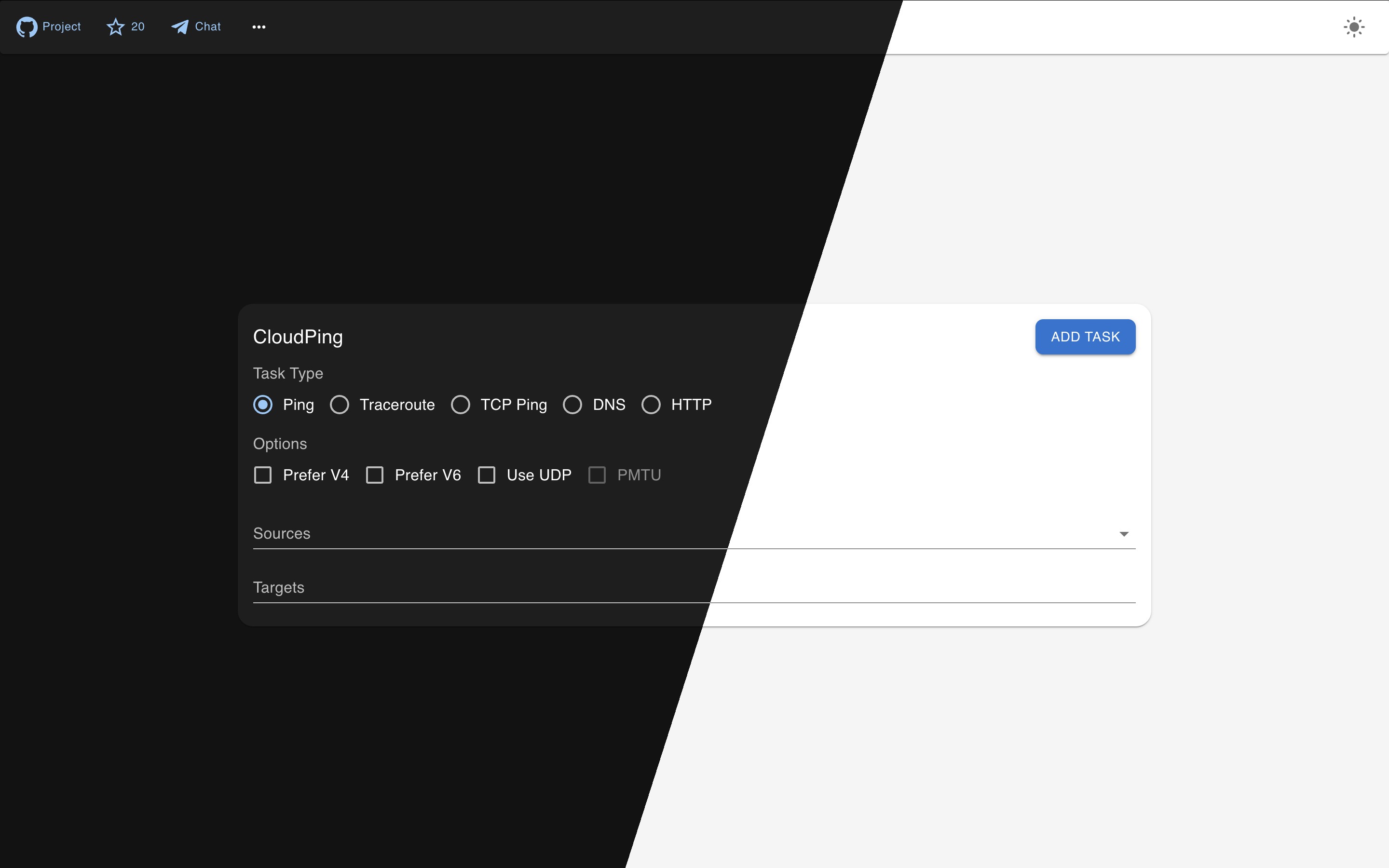
Features
- Ping, Traceroute (UDP flavor or ICMP flavor)
- TCP Ping
- DNS Probe (UDP, TCP, RFC7858 DoT, RFC8484 DoH)
- HTTP Probe (HTTP/1.1, HTTP/2 and HTTP/3)
- DN42 Dual Stack support, Internet support
- Basic IP information display (like ASN, Country, and probably Lat Lon)
- API-first design, CLI friendly (can be access through http clients like
curl) - QUIC for hub-agent communication support and NAT-traversal
- JWT authentication
- Telegram Bot (Currently supporting:
/ping,/traceroute, and/probe) - Email Interface (Interact via Email)
- MCP Server (StreamableHTTP + JWT)
- Multiple GeoIP/IPInfo provider support (IPInfo.io, IP2Location.io, and IPRegistry.co)
- Prometheus Metrics
Architecture
CloudPing is designed with a three-layer architecture that separates user-facing interfaces, control logic, and actual probe execution.
┌───────────────────────────────────────────────────────────────────────────────┐
│                           Access Layer                                        │
│  ┌──────────────┐  ┌──────────────┐  ┌──────────────┐  ┌───────────────────┐  │
│  │  Web Client  │  │ Telegram Bot │  │ Email Client │  │    MCP Server     │  │
│  │  (Next.js)   │  │   (@bot)     │  │ (SMTP/IMAP)  │  │ (Streamable HTTP) │  │
│  └──────┬───────┘  └──────┬───────┘  └──────┬───────┘  └──────┬────────────┘  │
└─────────┼─────────────────┼─────────────────┼─────────────────┼───────────────┘
          │                 │                 │                 │
          │                 │                 ▼                 │
          │                 │      ┌────────────────────┐       │
          │                 │      │   Email Gateway    │       │
          │                 │      │(Cloudflare Email)  │       │
          │                 │      └─────────┬──────────┘       │
          ▼                 ▼                ▼                  ▼
┌─────────────────────────────────────────────────────────────────────────────┐
│                           Control Layer                                     │
│  ┌─────────────────────────────────────────────────────────────────────┐    │
│  │                              Hub                                    │    │
│  │   (HTTP API, WebSocket/QUIC for agents, JWT Auth, Request Routing)  │    │
│  └─────────────────────────────────────────────────────────────────────┘    │
└─────────────────────────────────────────────────────────────────────────────┘
          │
          │  QUIC / mTLS / WebSocket
          ▼
┌─────────────────────────────────────────────────────────────────────────────┐
│                         Execution Layer                                     │
│  ┌─────────┐  ┌─────────┐  ┌─────────┐  ┌─────────┐  ┌─────────┐            │
│  │ Agent 1 │  │ Agent 2 │  │ Agent 3 │  │ Agent N │  │  ...    │            │
│  │(at-vie1)│  │(us-nyc1)│  │(us-lax1)│  │(jp-tyo1)│  │         │            │
│  └─────────┘  └─────────┘  └─────────┘  └─────────┘  └─────────┘            │
│      Ping, Traceroute, DNS Probe, HTTP Probe, TCP Ping                      │
└─────────────────────────────────────────────────────────────────────────────┘
- Access Layer: End-user interfaces including the web UI, Telegram bot, email interface, and MCP server.
- Email Gateway: Sits between the Email Client and the Hub. Currently, the only supported email gateway is Cloudflare Email Service.
- Control Layer: The Hub acts as the central coordinator — it exposes the public API, authenticates requests, and routes probe tasks to the appropriate agents.
- Execution Layer: Distributed agents running at various geographical locations that perform the actual network measurements (ping, traceroute, DNS, HTTP probes) and stream results back to the hub.
Try
If you are in a hurry, just go straight to try our deployed instance at here, or here(DN42). Which is ready to use, and doesn't require you to build or install anything.
Telegram Bot service is available via @as4242421771_bot.
Build
Make sure golang of newer version is already installed, if not, go visit go.dev/doc/install to download and un-tar a tarball, and make sure that $GOPATH/bin, and /usr/local/go/bin are in the $PATH.
git clone https://github.com/internetworklab/cloudping
cd cloudping
./buildversion.sh # to generate version metadata dependence
go build -o bin/globalping ./cmd/globalping
Now the binary bin/globalping can serve as an agent or a hub depending on the CLI arguments provided.
Debugging
For how to generate self-signed certs (and CA) for testing, see Notes.md.
After the binary is built, to see how it goes, try launch a testing purpose localhost agent:
Open a terminal window, launch the testing hub in foreground:
scripts/launch_example_clustered_hub.sh
Then open one or more terminal winodws, launch the testing agent(s) in foreground:
scripts/launch_example_clustered_agent_1.sh # ls scripts/*.sh to see all
It binds on 127.0.0.1:8084, listens for plaintext HTTP requests, you can call the API with whaever HTTP client you like, for example:
curl --url-query targets=1.1.1.1 --url-query count=3 localhost:8084/simpleping
Doing so cause it send out 3 icmp echo request packets to the destination specified, 1.1.1.1, and the response will be stream to stdout in realtime in JSON line format.
It's better to use the web UI directly, since it has much richer feature set as well as easier to use UI.
Screenshots
Currently the looking is still rugged, but we are actively iterating it.
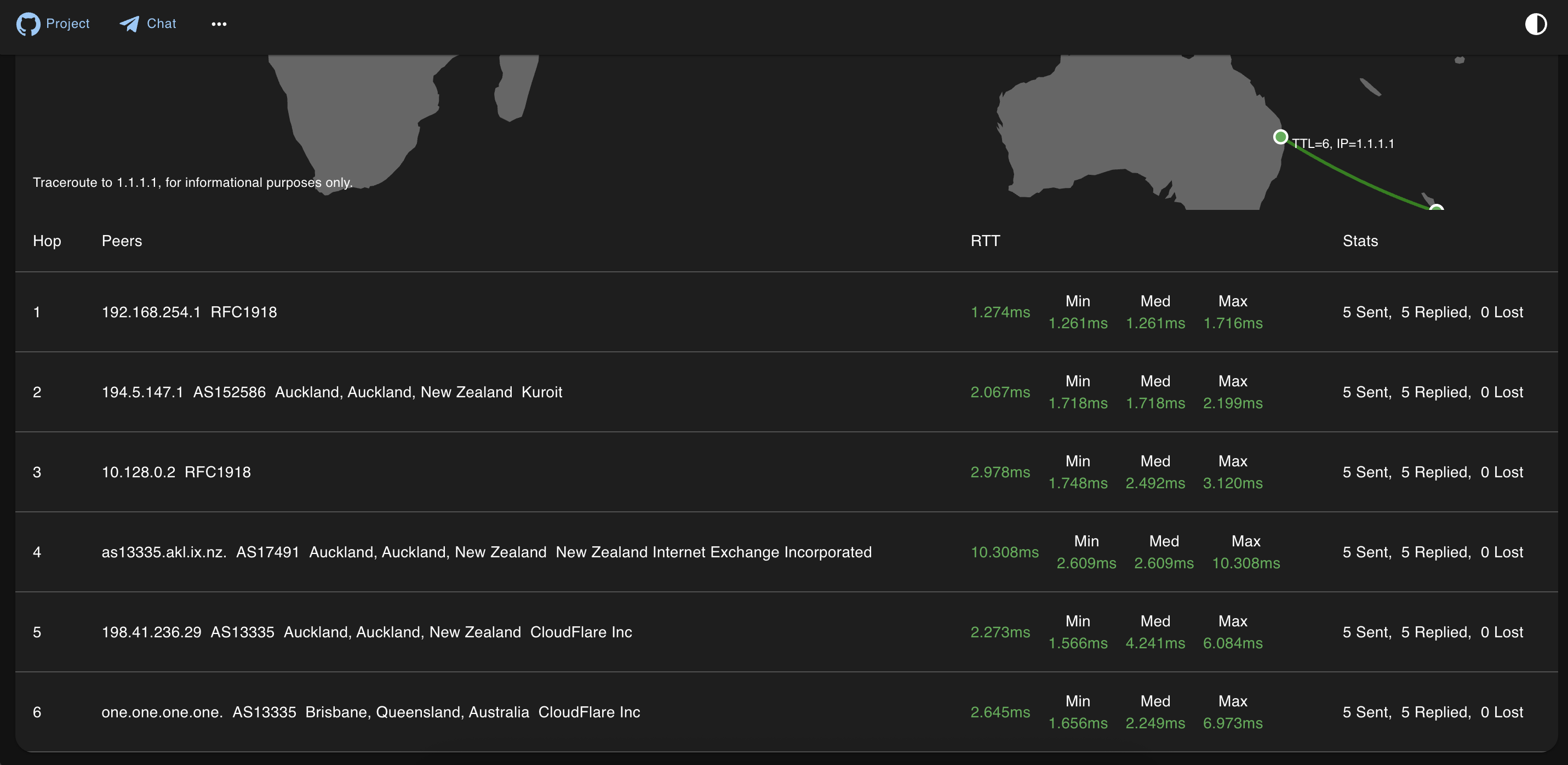
Traceroute screenshot:
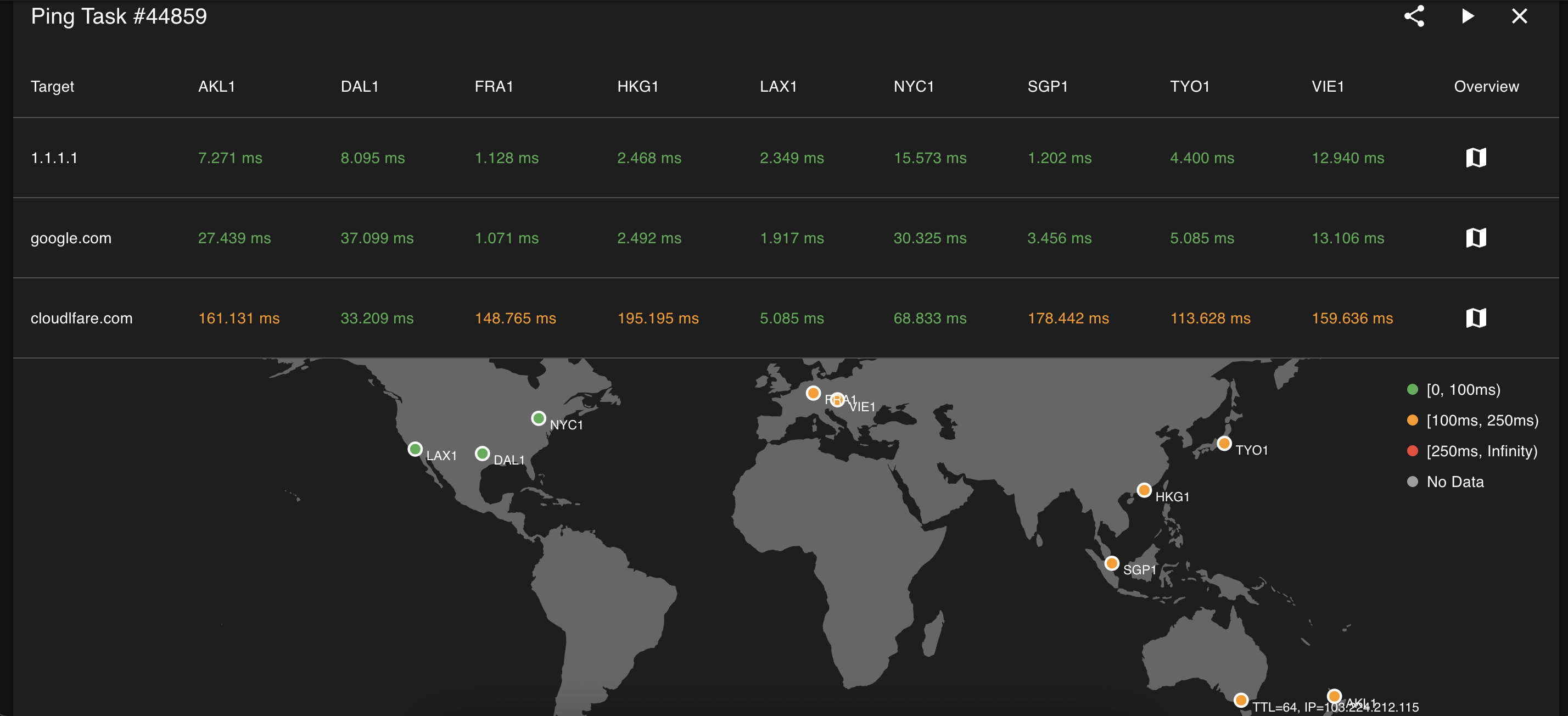
Ping screenshot:
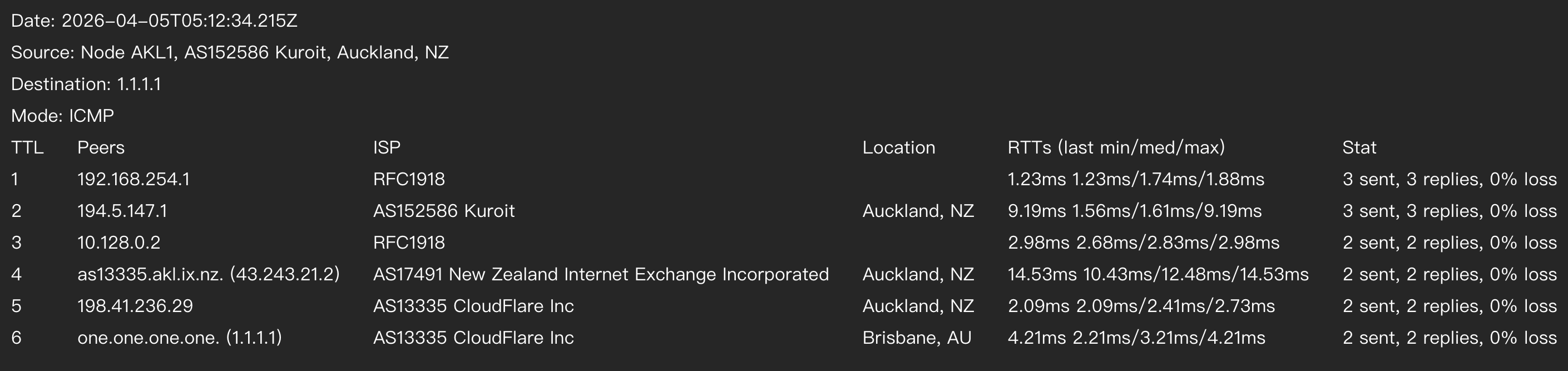
Traceroute exported to PNG via HTML5 Canvas:
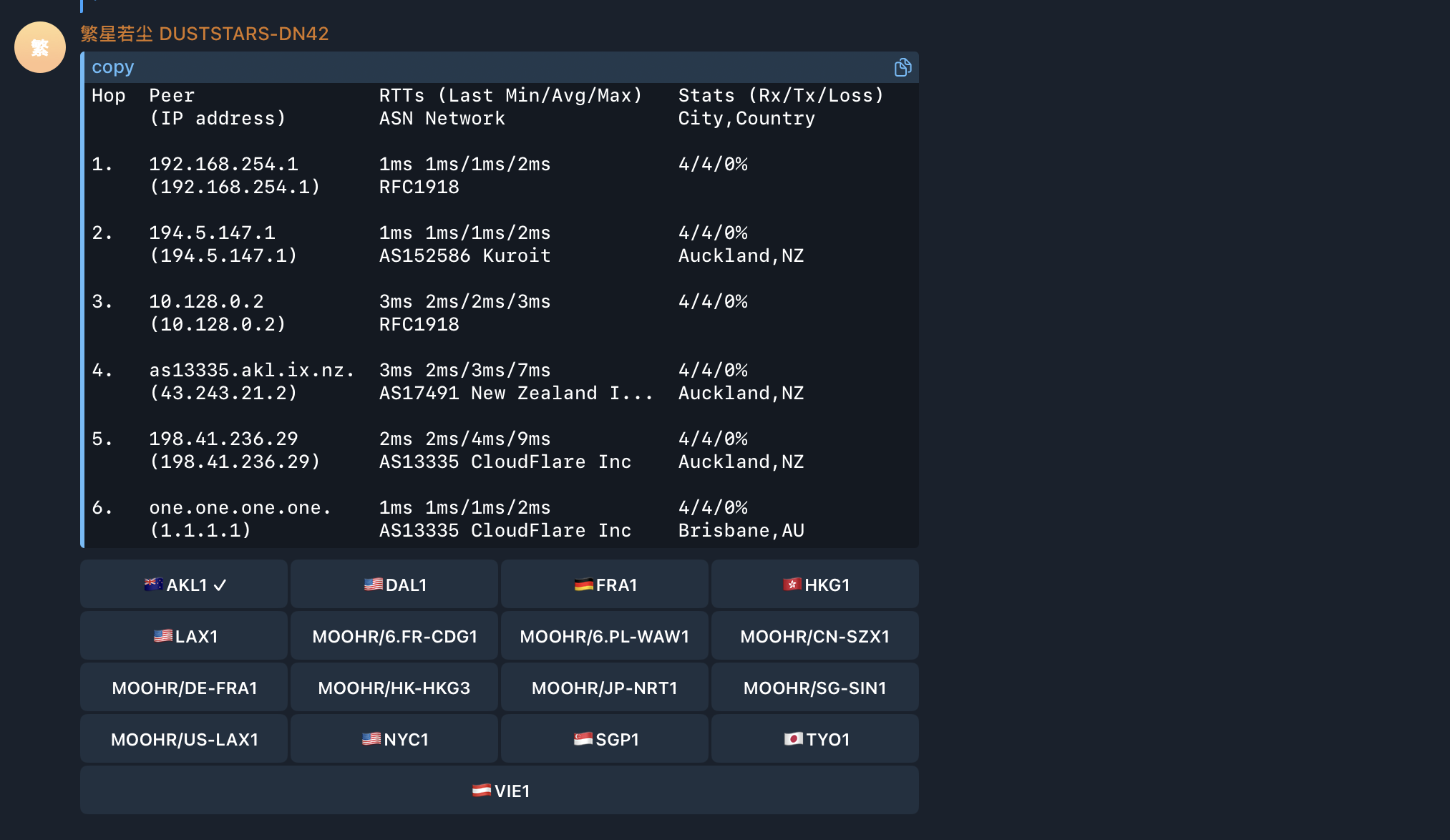
Traceroute from Telegram Bot (screenshot):
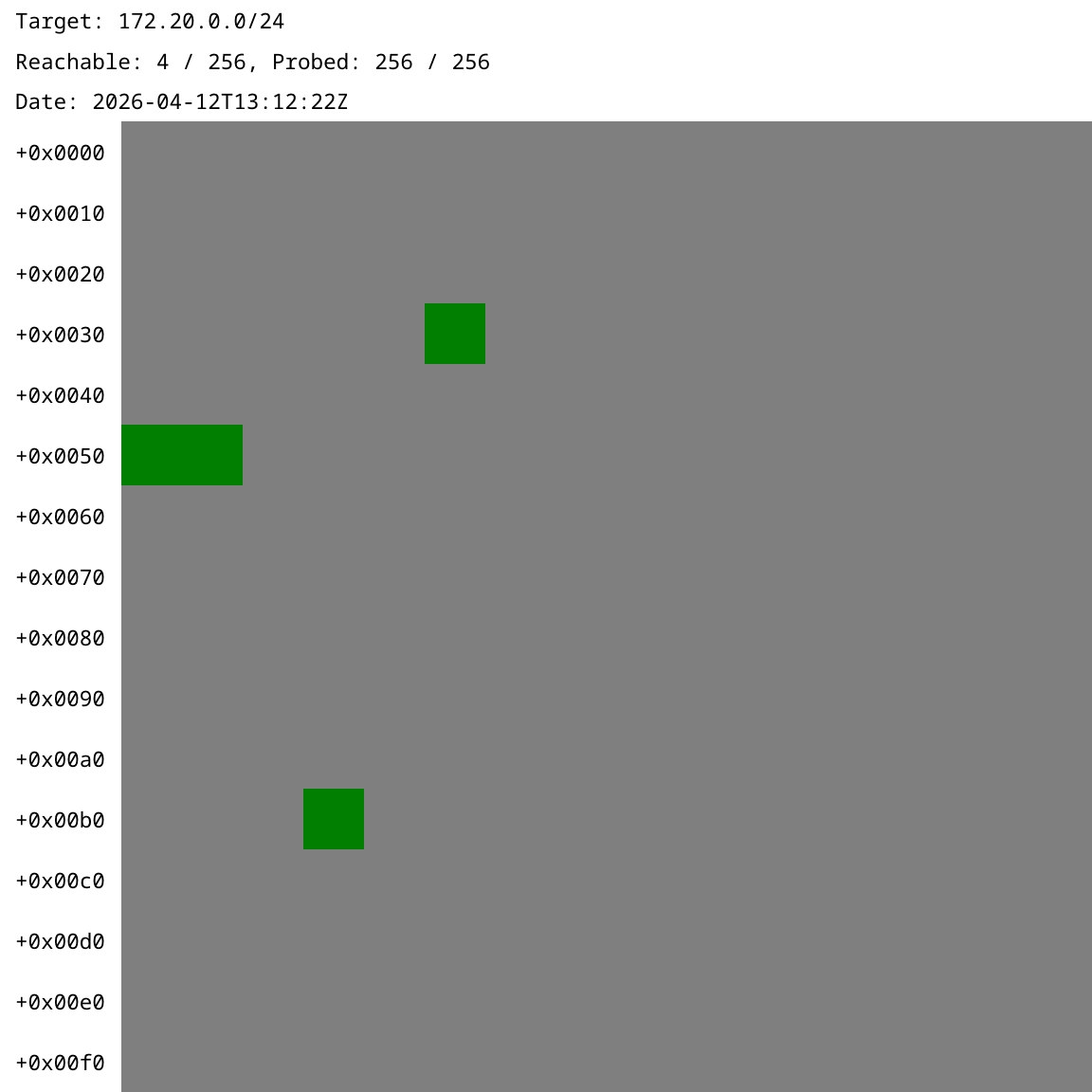
Probe (via Telegram Bot):
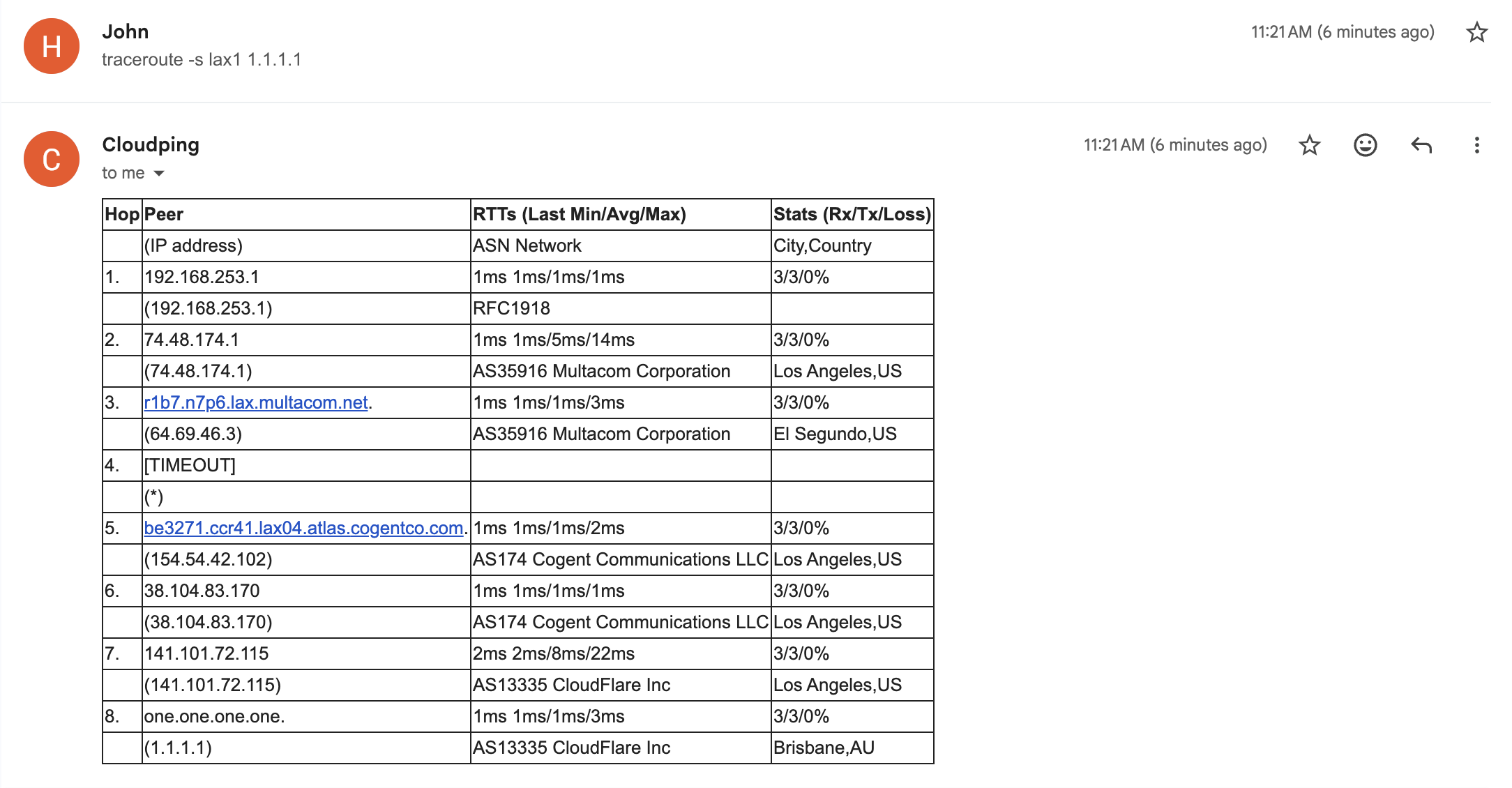
Traceroute via the Email interface (screenshot):
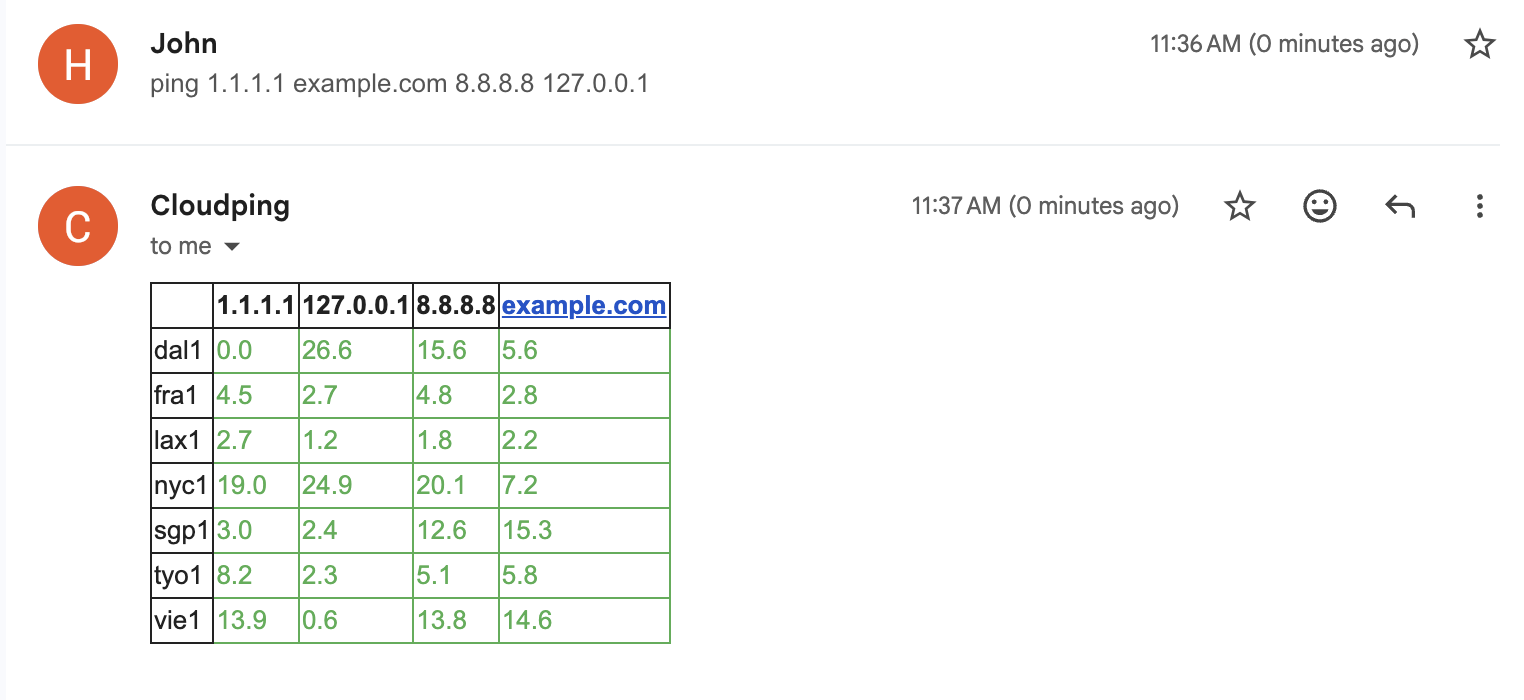
Ping matrix reply from the Email interface (screenshot):
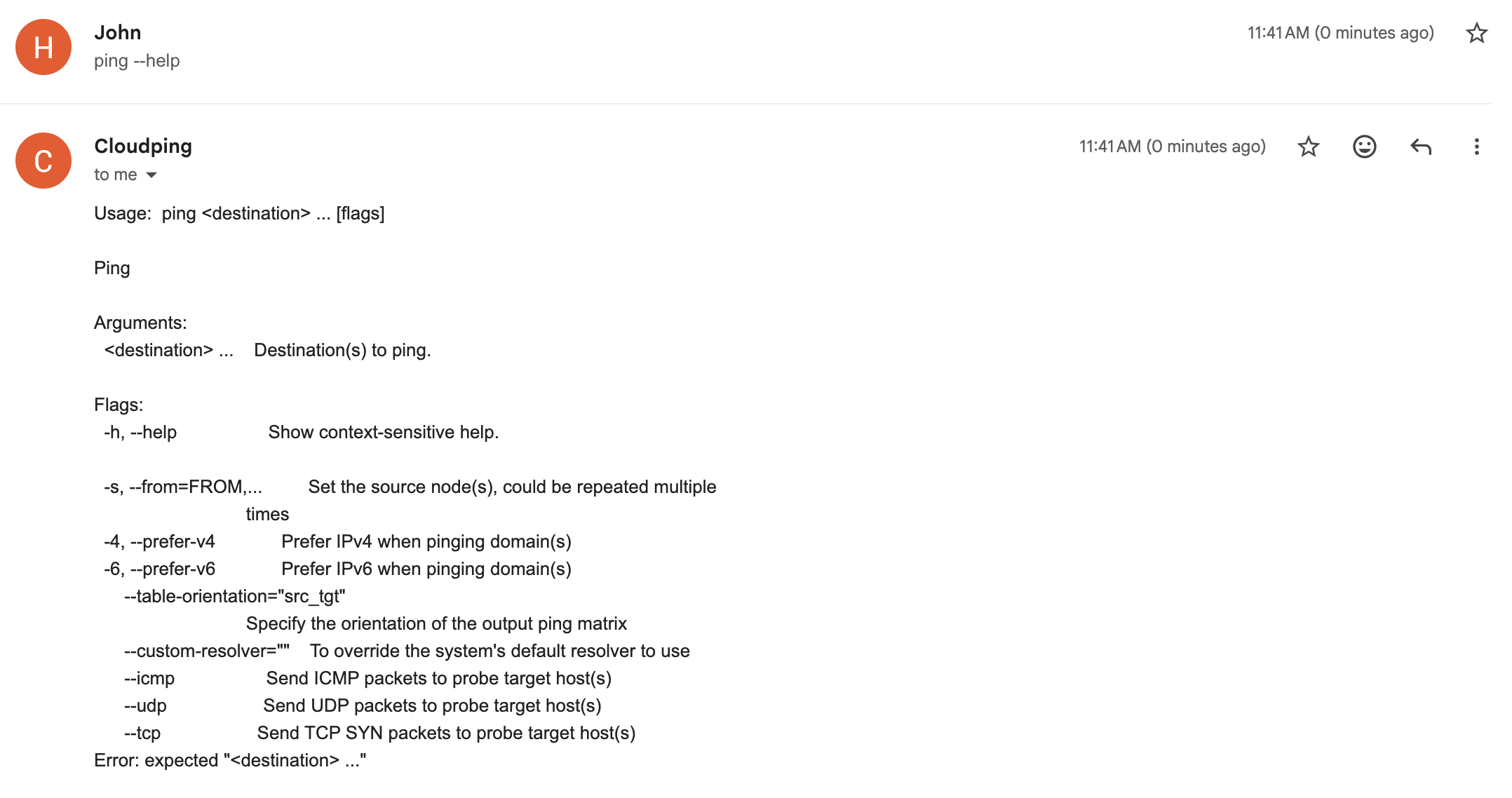
Help sent back from the Email interface (screenshot):
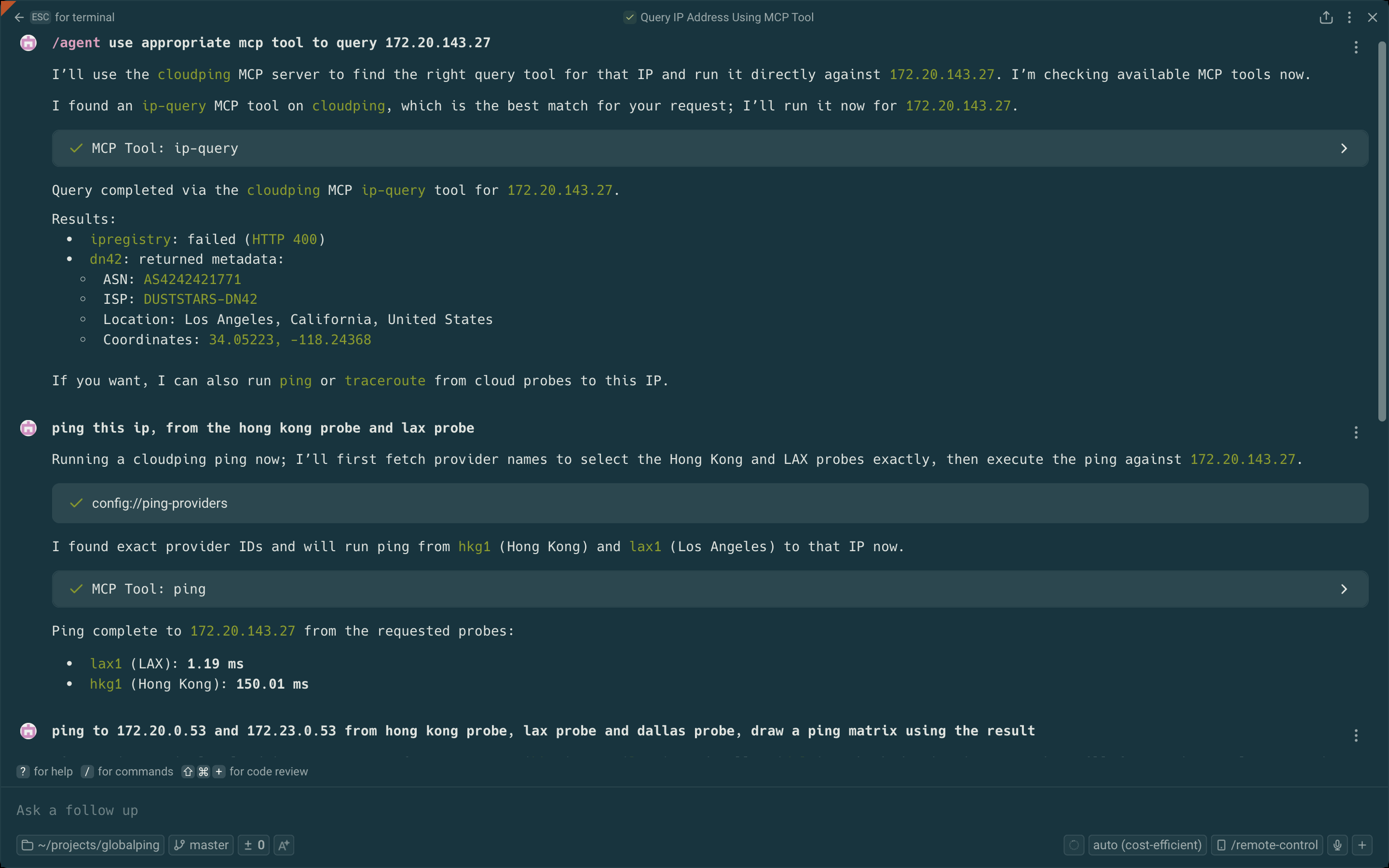
Use tools exposed from the MCP server:
API Design
Endpoints Overview
| Component | Endpoint | Method | Target Parameter | Targets Supported |
|---|---|---|---|---|
| Agent | /simpleping |
GET | destination |
Single target |
| Hub | /ping |
GET | targets |
Multiple (comma-separated) |
Port numbers are configured via command-line arguments.
Request Format
Parameters are encoded as URL search params. For available parameters and their effects, see:
- pkg/pinger/request.go - Supported parameters
- pkg/pinger/ping.go - Parameter effects
Example (curl):
Bring up the testing hub and agent(s) as described in the Debugging section
# Agent
curl --url-query targets=1.1.1.1 --url-query count=3 localhost:8085/simpleping

# Hub
curl --url-query from=us-lax1 --url-query targets=1.1.1.1 --url-query count=3 localhost:8084/ping
Note:
--url-queryis curl syntax sugar for encoding URL search params.
Prometheus Metrics:
Agents can expose Prometheus metrics by setting --metrics-listen-address (e.g. :2112). The metrics path defaults to /metrics.
# Agent (requires --metrics-listen-address to be set when launching the agent)
curl localhost:2112/metrics
Response Format
Both endpoints return a stream of JSON lines. Use line feed (\n) as the delimiter.
Developer Note
These APIs are intended for developers only. End users should use the Web UI.
Bot Interface
Currently, only Telegram Bot is supported.
| Command | Description | Example |
|---|---|---|
/ping |
Ping a destination with real-time streaming statistics. Supports IPv4/IPv6 preference and interactive location switching. | /ping -c 3 example.com |
/traceroute |
Traceroute to a destination with hop-by-hop peer and latency details. Supports IPv4/IPv6 preference and packet count. | /traceroute -6 example.com |
/probe |
Probe a CIDR subnet and generate a bitmap visualization. Requires a source node. | /probe -s us-lax1 172.23.0.0/24 |
/list |
List all available probe nodes with their network (ASN/ISP) and location information. | /list |
/version |
Show build version information as a JSON payload. | /version |
For how to deploy your own bot, see the docker-compose.yaml file in example1 or the dev scripts in scripts/.
Email Interface
Send email to cli at ping2.sh to interact with it. To display the help, send --help or [subcommand] --help (e.g. traceroute --help, no backtick).
| Command | Description | Example |
|---|---|---|
list |
List all available probe nodes with their network (ASN/ISP) and location information. | list |
ping |
Ping one or more destinations from specified source nodes. Supports IPv4/IPv6 preference and protocol selection (ICMP/UDP/TCP). | ping example.com |
traceroute |
Traceroute to a destination from a specified source node with hop-by-hop latency details. Supports IPv4/IPv6 preference and packet count. | traceroute -s lax1 -c example.com |
Connect to the MCP server
First, grab a JWT token by sending a /token command to the bot @as4242421771_bot.
Our MCP server: https://mcp.ping2.sh/mcp .
Authentication: JWT.
Example MCP server config on Warp.dev terminal's MCP server setting page:
{
  "cloudping": {
    "headers": {
      "Authorization": "bearer the_token_here"
    },
    "url": "https://mcp.ping2.sh/mcp"
  }
}
And the MCP client have to be able to use StreamableHTTP as transport.
Deployment
Web (frontend)
The Web UI is built with Next.js and supports the following build-time environment variables:
| Variable | Description | Default (Example) |
|---|---|---|
NEXT_PUBLIC_API_ENDPOINT |
API endpoint to use (prefix prepended to every request path) | /api |
NEXT_PUBLIC_GITHUB_REPO |
Link to the repository website | internetworklab/cloudping |
NEXT_PUBLIC_REPO_OWNER |
For display count of stargazers of the repo in the page | internetworklab |
NEXT_PUBLIC_REPO_NAME |
For display count of stargazers of the repo in the page | cloudping |
NEXT_PUBLIC_SITE_NAME |
WebUI title for self-hosted deployments | CloudPing |
NEXT_PUBLIC_DEFAULT_RESOLVER |
Resolver to specify in every probe request send to backend | 127.0.0.11:53 |
NEXT_PUBLIC_<NAME>_LOGIN_URL |
URL of oauth login page | /login/as/<name> |
These variables are evaluated at build time and embedded into the frontend bundle.
For 3rd-parth OAuth2 Login, currently we supports: Github, Google, iEdon, Kioubit, Visitor, available env variables are: NEXT_PUBLIC_GITHUB_LOGIN_URL, NEXT_PUBLIC_GOOGLE_LOGIN_URL, NEXT_PUBLIC_IEDON_LOGIN_URL, NEXT_PUBLIC_KIOUBIT_LOGIN_URL, NEXT_PUBLIC_VISITOR_LOGIN_URL.
Full Deployment (Docker Compose)
A complete self-hosted deployment example is available under docker/example1/. It includes a docker-compose.yaml that brings up all components — web frontend (Caddy), hub, Telegram bot, probe agents, and a Cloudflare Tunnel (cloudflared) for public ingress — along with setup scripts for provisioning tunnels, DNS records, and self-signed mTLS certificates for securing hub-to-agent's bidirectional communication.
Note: This is intended as a hands-on demonstration, not a production-ready setup, for a production setup, the agents should be deployed at where they actually are.
For step-by-step instructions, see docker/example1/README.md.
Join Agent
To run your cloudping agent and join our cluster, prepare three files:
docker-compose.yaml:
networks:
  globalping:
    name: globalping
    enable_ipv6: false
    ipam:
      driver: default
      config:
        - subnet: "${SUBNET_OVERRIDE}"
services:
  agent:
    container_name: globalping-agent
    pull_policy: always
    image: ghcr.io/internetworklab/cloudping:${VERSION}
    working_dir: /app/globalping
    networks:
      - globalping
    volumes:
      - "./.env.inside:/app/globalping/.env:ro" # .env.inside has some sensitive data, such as apikeys for invoking third-party services.
    command:
      - "/usr/local/bin/globalping"
      - "agent"
      - "--node-name=${NODE_NAME}"
      - "--exact-location-lat-lon=${EXACT_LOCATION_LAT_LON}"
      - "--country-code=${ALPHA2}"
      - "--city-name=${CITY}"
      - "--asn=${ASN}"
      - "--isp=${ISP}"
      - "--dn42-asn=${DN42_ASN}"
      - "--dn42-isp=${DN42_ISP}"
    mem_limit: 256m
.env:
NODE_NAME=nickname-nue1
SUBNET_OVERRIDE=192.168.253.0/30
EXACT_LOCATION_LAT_LON=48.1952,16.3503
VERSION=latest
ALPHA2=DE
CITY=Nuremberg
ASN=AS197540
ISP=netcup GmbH
DN42_ASN=AS4242421234
DN42_ISP=YOUR-DN42-AS
Just don't forget to replace the informations in .env with that of yours, such as node name (node name must not be conflict with current node names), locations and ASNs.
.env.inside:
JWT_TOKEN=<jwt_token>
Grab the JWT token from bot @as4242421771_bot, with command /token.
Credits
Thanks the following GeoIP datasources, in no particular order:
Reviews (0)
Sign in to leave a review.
Leave a reviewNo results found