codey
Health Pass
- License — License: MIT
- Description — Repository has a description
- Active repo — Last push 0 days ago
- Community trust — 14 GitHub stars
Code Fail
- rm -rf — Recursive force deletion command in .github/workflows/release.yml
- child_process — Shell command execution capability in codey-mac/build/dist-mac.js
- spawnSync — Synchronous process spawning in codey-mac/build/dist-mac.js
- fs.rmSync — Destructive file system operation in codey-mac/build/dist-mac.js
- process.env — Environment variable access in codey-mac/build/dist-mac.js
- fs module — File system access in codey-mac/build/dist-mac.js
- fs module — File system access in codey-mac/build/latest-yml.js
- fs.rmSync — Destructive file system operation in codey-mac/build/latest-yml.test.ts
- child_process — Shell command execution capability in codey-mac/build/notarize-dist.js
- spawnSync — Synchronous process spawning in codey-mac/build/notarize-dist.js
- fs.rmSync — Destructive file system operation in codey-mac/build/notarize-dist.js
- process.env — Environment variable access in codey-mac/build/notarize-dist.js
- fs module — File system access in codey-mac/build/notarize-dist.js
- fs.rmSync — Destructive file system operation in codey-mac/electron/browser-agent-bridge.test.ts
- process.env — Environment variable access in codey-mac/electron/browser-agent-bridge.test.ts
- network request — Outbound network request in codey-mac/electron/browser-agent-bridge.test.ts
Permissions Pass
- Permissions — No dangerous permissions requested
No AI report is available for this listing yet.
A multi-agent workbench for coding agents — orchestrate Claude Code, Codex, OpenCode & pi from a native macOS app, Telegram/Discord/iMessage, or voice. Per-project workspaces, worker teams, flow graphs, parallel runs. Local-first, MIT.

Codey 🚀 — a multi-agent workbench for Claude Code, Codex, OpenCode & pi




A multi-agent workbench for coding agents. Codey is one place to organize, switch between, and orchestrate Claude Code, OpenCode, Codex, pi (and more) across your projects — give each project its own workspace, build worker teams with different agents/models per role, run several agents in parallel on the same task to compare, and reach all of it from a native macOS app, chat platforms (Telegram / Discord / iMessage), or system-wide push-to-talk voice.
Think of it less as a chat bridge and more as the control plane for the coding agents you already use. It runs entirely on your own machine, using your existing agent CLIs and accounts — no proxy server, no extra subscription.
Contents: Why Codey · Download · Features · Quick Start · Configuration · Teams & flow graphs · Commands · Voice · FAQ
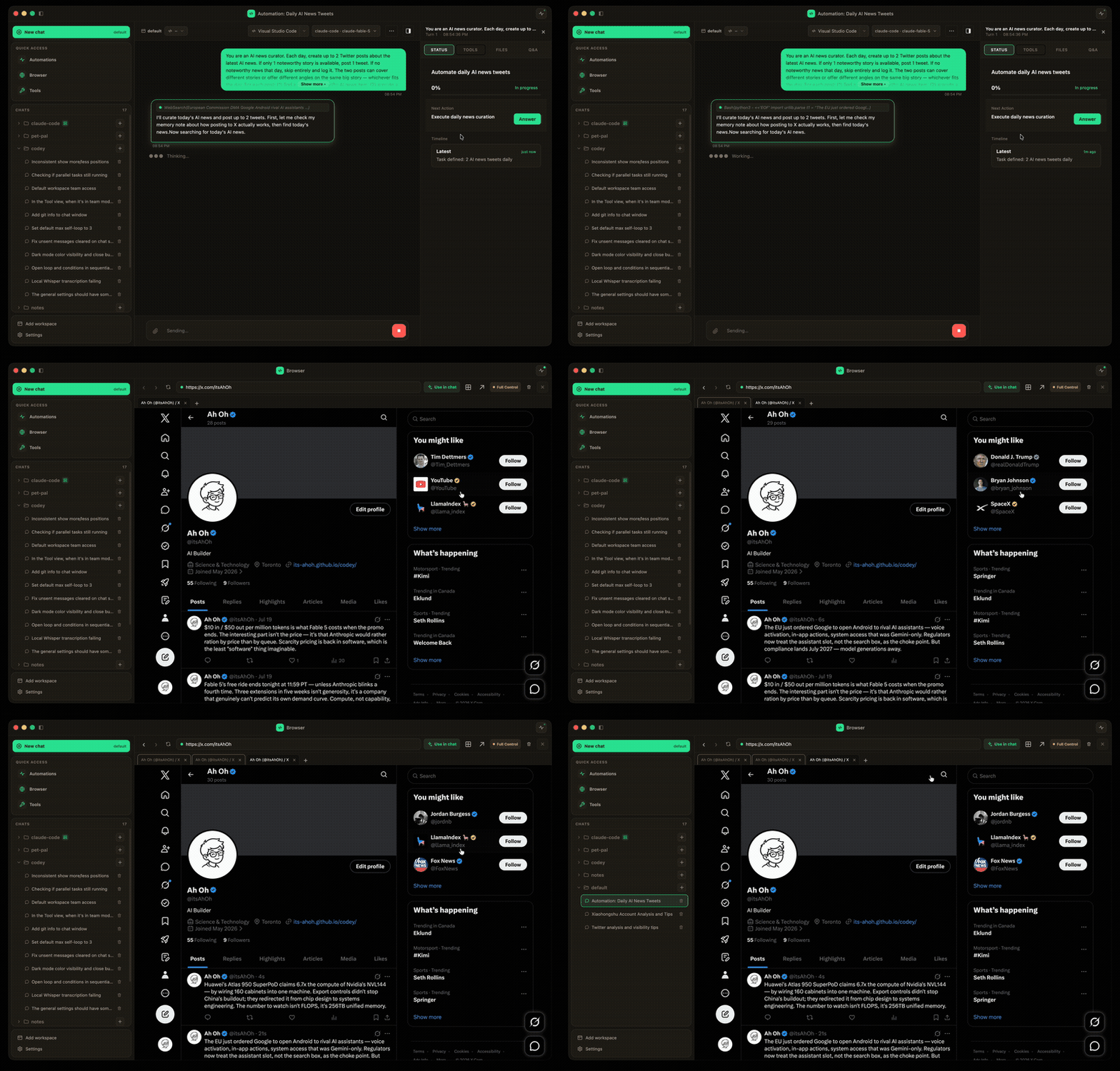
A scheduled Automation researches the news, drafts a post, and publishes it through Codey's built-in agent-controlled browser — hands-free (2.5× speed).
Why Codey
- One project, the right agent for each job. Per-workspace defaults plus per-worker overrides — Architect on Opus, Executor on Codex, Reviewer on local OpenCode, etc.
- Run multiple agents in parallel on the same prompt. Compare Claude Code vs. Codex vs. OpenCode side by side instead of guessing which one fits.
- Worker teams instead of single prompts. Define roles, personalities, tools, and let them run sequentially or be auto-dispatched to the subset that's actually relevant.
- Use them from anywhere. Native macOS menu-bar app for daily driving, chat platforms for delegating from your phone, voice input for hands-free dictation into any focused app.
- Local and yours. Runs on your machine, talks to your accounts, no proxy server in the middle.
Download
Grab the latest macOS app from the Releases page:
- Apple Silicon:
Codey-<version>-arm64.dmg - Intel:
Codey-<version>.dmg
Builds are currently unsigned — on first launch, right-click the app → Open → confirm to bypass Gatekeeper.
Features
Agent management
- Multiple coding agents: Claude Code, OpenCode, Codex, pi (with session resume)
- Parallel execution: Run multiple agents on the same prompt simultaneously to compare
- Per-workspace defaults: Each project picks its own default agent + model
- Thinking effort: One low → max control that maps onto each CLI's own reasoning knob
- Auto-dispatcher: Optional built-in dispatcher routes a task to the right subset of a team
Workspaces & workers
- Multi-workspace: Each workspace has its own working directory, memory, and workers
- Worker teams: Define workers with roles, personalities, tools, and per-worker agent/model
- Flow graphs: Draw a team as a graph on a canvas — a judge LLM picks the next edge by its condition, so runs can branch, loop back for revisions, or pause to ask you
- Memory: Workspace + user-global memory that workers read on every run and write insights back to
- Conversation context: Remembers previous messages within a session
Interfaces
- macOS menu-bar app with multi-chat tabs, workspace switcher, and inline settings
- Chat platforms: Telegram, Discord, iMessage
- Voice (macOS): Push-to-talk dictation into any focused app, plus a spoken back-and-forth conversation mode — on-device WhisperKit (CoreML / ANE), OpenAI-compatible APIs, or streaming realtime
- Health endpoints: Built-in health check and metrics
In the chat window
- Live status panel: The agent's own todo list and what it's working on right now, normalized across all four CLIs
- File changes: Every edit in the chat, grouped by file, as git-style diffs
- Git-aware: Branch picker, sync status, and optional per-chat git worktree isolation so parallel chats never collide
- Quick Question: A read-only side thread that answers questions about the current chat without touching it
@file mentions, attachments, and themes: Type@to pull in workspace files; paste or drop images and files; pick a color theme
Skills, automation & web
- Skills & playbooks: Toggle skills per workspace; Codey watches what your runs actually do and crystallizes repeated procedures into reusable playbooks
- Automations: Put agents on a schedule — daily posts, recurring checks, cron-style workflows managed from the Mac app
- Agent-controlled browser: A built-in secure browser agents can open, read, click, and fill — view-only by default, with every state-changing action gated on your approval
- External MCP servers: Plug extra tools into your agents from the Mac app's MCP tab
- QR pairing: Link Telegram / iMessage to your gateway by scanning a code
Quick Start
This is a monorepo with three workspaces: @codey/core, @codey/gateway, and codey-mac.
# Install dependencies (all workspaces)
npm install

# Build everything
npm run build

# Copy config template
cp gateway.json.example gateway.json

# Configure (optional)
npm run configure

# Start the gateway
npm start
To run the macOS app in development:
npm run dev -w codey-mac        # dev with hot reload
npm run build:mac -w codey-mac  # produce a DMG in codey-mac/release/
Configuration
Edit gateway.json:
{
  "gateway": {
    "port": 3000,
    "defaultAgent": "claude-code",
    "defaultModel": "claude-sonnet-4-20250514"
  },
  "channels": {
    "telegram": { "enabled": true, "botToken": "YOUR_TOKEN" },
    "discord": { "enabled": false, "botToken": "" },
    "imessage": { "enabled": false }
  },
  "agents": {
    "claude-code": { "enabled": true, "provider": "anthropic", "defaultModel": "claude-sonnet-4-20250514" },
    "opencode": { "enabled": true, "provider": "openai", "defaultModel": "gpt-4.1" },
    "pi": { "enabled": true, "provider": "anthropic", "defaultModel": "claude-sonnet-4-5" },
    "codex": { "enabled": true, "provider": "openai", "defaultModel": "gpt-5-codex" }
  },
  "profiles": [
    {
      "name": "default",
      "anthropic": { "apiKey": "sk-..." },
      "openai": { "apiKey": "sk-..." }
    }
  ],
  "activeProfile": "default",
  "dev": {
    "logLevel": "info"
  }
}
Advisor (auto-dispatch + team routing) settings: advisor.{agent, model} (optional).
Workspace Structure
workspaces/
├── default/
│   ├── workspace.json       # Workspace config (workingDir + workers)
│   ├── memory.md            # Project memory/notes
│   └── workers/
│       ├── architect.md
│       └── executor.md
├── project-a/
│   ├── workspace.json
│   ├── memory.md
│   └── workers/
│       └── ...
└── project-b/
    ├── workspace.json
    ├── memory.md
    └── workers/
        └── ...
Each workspace ties to a project directory via workspace.json:
{
  "workingDir": "/path/to/project",
  "workers": {
    "architect": {
      "codingAgent": "claude-code",
      "model": "claude-opus-4-6",
      "tools": ["file-system", "git", "web-search"]
    }
  }
}
Switching workspaces (/workspace myproject) automatically sets the agent's working directory.
Worker Configuration
Each worker is defined in a markdown file:
# Worker: Architect

## Role
Lead architect responsible for project planning...

## Soul
Strategic thinker, focused on scalability...

## Coding Agent
claude-code

## Model
claude-opus-4-20250514

## Tools
file-system, git, web-search

## Relationship
Leads the implementation workers

## Instructions
When prompted, analyze requirements and provide...
Commands
Workers
| Command | Description |
|---|---|
/workers |
List all workers in current workspace |
/worker <name> <task> |
Run a specific worker |
/team <name> [--all] <task> |
Run a named team (see below) |
Team dispatch details:
/team <name> [--all] <task>— Run a named team. Members run sequentially with carry chain.- Teams default to
dispatch: 'all'(every member runs). - Teams configured with
dispatch: 'auto'first invoke the built-in Advisor
that selects the relevant subset. Pass--allto bypass it for one call. - Optional
dispatchHinton each worker'sconfig.jsonimproves routing accuracy. - The Advisor's agent/model is configured under
gateway.jsonadvisor.{agent, model},
defaulting to the gateway's default agent/model. - Teams configured with
dispatch: 'parallel'run as an Advisor-moderated roundtable:
all workers run concurrently as long-lived agent sessions, sharing opinion files inchats/<chatId>/discussion/. An Advisor loop evaluates progress, maintains a summary,
and decides when to ask the user, continue, or terminate.
Optional settings underparallel: { maxDurationMs, idleTimeoutMs, advisorPollMs }.
See design spec. - A sequential (
all) team can also carry a flow graph —graph: { entry, maxHops, nodes, edges }.
Nodes are workers (plusstart/end); each edge carries a natural-language condition.
After every worker runs, a judge LLM (the Advisor's agent/model) picks the next edge, so a flow can
branch or loop back to an earlier worker for revision until it reachesendor hitsmaxHops.
Workers can pause the flow with[ASK_USER]; the run resumes when you reply, on chat or in the Mac app.
Draw one on the drag-and-drop canvas in the Mac app's flow editor.
- Teams default to
Workspaces
| Command | Description |
|---|---|
/workspaces |
List all workspaces |
/workspace <name> |
Switch to a workspace |
Agents
| Command | Description |
|---|---|
/parallel <prompt> |
Run all agents in parallel |
/all <prompt> |
Run all agents in parallel |
/agent <name> |
Switch default agent |
Settings
| Command | Description |
|---|---|
/help |
Show help message |
/status |
Show gateway status |
/clear |
Clear conversation history |
/reset |
Start a new conversation |
/model <name> |
Show/set model |
Examples
# Switch workspace
/workspace myproject

# List workers
/workers

# Run a worker
/worker architect design a REST API

# Run team task
/team build a todo app

# Run all agents in parallel
/parallel create a hello world app
Voice Input (macOS)
System-wide push-to-talk dictation. Hold the configured hotkey (default Fn), speak, release — Codey transcribes and pastes into whatever text field is focused, no matter which app you're in.
Transcription backends:
- Local (WhisperKit) — on-device CoreML / Neural Engine. Models pulled from HuggingFace on first use; default is
large-v3-turboquantized (~954 MB). No network, no API key. Pipeline idle-unloads after 30s so RAM/ANE stay free when you're not dictating. - API — any OpenAI-compatible
/audio/transcriptionsendpoint. Just pointapiUrl/apiKey/apiModel(e.g.whisper-1,gpt-4o-transcribe).
HUD overlay:
- Recording: floating pill with a 5-bar live audio meter so you can see the mic is hearing you
- Transcribing: spinner + "Transcribing…"
- Inserted: green check, auto-hide
- No focus to paste into: full transcript shown in a wider card, auto-copied to clipboard, dismiss by click
Controls:
- Hotkey (default
Fn) — toggle recording on / off. Configurable to F-keys or modifier combos (Cmd+Shift+V, etc.) - Esc while recording — cancel without transcribing (buffer discarded)
Configure everything from the macOS app's Whisper tab: pick provider, swap models, download / warm / delete WhisperKit variants, change hotkey or injection mode (paste vs Accessibility API).
Requires Microphone and Accessibility permissions (the app prompts on first launch).
Health Endpoints
The gateway exposes health endpoints on port + 1:
GET /health- Full status JSONGET /metrics- Prometheus-style metricsGET /ready- Readiness check
CLI Commands
npm run configure              # Interactive configuration
npm run status                 # Show config
npm run set-agent claude-code  # Set default coding agent
npm run set-model              # Set default model
npm run tui                    # Launch terminal UI
npm run build                  # Build all workspaces
For everything else (channels, profiles, API keys), edit gateway.json directly or use the macOS app's Settings panel.
Project Structure
packages/
├── core/                # Shared types, workspace + worker managers
│   └── src/
└── gateway/             # Gateway server, channels, agents
    └── src/
        ├── agents/      # Coding agent adapters (claude-code, opencode, codex, pi)
        ├── channels/    # Chat platform handlers (telegram, discord, imessage)
        ├── config.ts
        ├── conversation.ts
        ├── gateway.ts
        ├── health.ts
        ├── logger.ts
        └── index.ts
codey-mac/               # macOS menu-bar app (Electron + React)
├── electron/            # Main + preload processes
└── src/                 # Renderer (React UI)
voice/                   # Native Swift helper for hotkey + capture + WhisperKit
└── Sources/CodeyVoice/  # AudioCapture, HotkeyManager, HudOverlay, WhisperKitEngine, ...
workspaces/              # Per-workspace config, memory, and workers
FAQ
Does Codey replace Claude Code / Codex / OpenCode?
No — it drives them. Codey shells out to the agent CLIs you already have installed and signed in, and adds the layer above them: workspaces, worker teams, parallel runs, scheduling, and remote access.
Do I need an API key?
Only for what you use. If your agent CLI is already authenticated (e.g. a Claude subscription), Codey uses it as-is. API keys in gateway.json are for agents/models you want to reach directly, and for cloud voice transcription.
Is my code sent anywhere?
Codey itself is local — the gateway, the macOS app, and the voice helper all run on your machine. Your code goes wherever your chosen agent CLI already sends it, and nowhere else. On-device WhisperKit keeps voice local too.
Which platforms are supported?
The gateway is Node.js and runs anywhere Node does; the desktop app and voice input are macOS-only today.
Can I use it from my phone?
Yes — connect Telegram, Discord, or iMessage (scan a QR code to pair) and send prompts to the same workspaces from anywhere.
How is this different from running several terminals?
Shared workspaces and memory across agents, teams and flow graphs instead of one-shot prompts, per-chat git worktrees so parallel work doesn't collide, scheduled automations, and one UI that shows every run's status, diffs, and todo list.
License
Releasing (maintainers)
codey-mac auto-updates via electron-updater from GitHub Releases.
Required repo secrets (Settings → Secrets and variables → Actions):
CSC_LINK— base64 of the Apple Developer ID.p12certificateCSC_KEY_PASSWORD— password for that.p12APPLE_ID— Apple ID email used for notarizationAPPLE_APP_SPECIFIC_PASSWORD— app-specific password for that Apple IDAPPLE_TEAM_ID— Apple developer team ID (N59NN58KB2)
(GITHUB_TOKEN is provided automatically.)
To ship a release:
- Bump the version in
package.jsonandcodey-mac/package.json. - Commit, then tag:
git tag vX.Y.Z && git push origin vX.Y.Z. - The
Release codey-macworkflow builds, signs, notarizes, and publishes the
dmg + zip +latest-mac.ymlto the GitHub Release. - Installed apps detect the new version on next launch (or within ~4h) and show
the update button in the sidebar footer.
Reviews (0)
Sign in to leave a review.
Leave a reviewNo results found