friday
Health Pass
- License — License: MIT
- Description — Repository has a description
- Active repo — Last push 0 days ago
- Community trust — 16 GitHub stars
Code Pass
- Code scan — Scanned 12 files during light audit, no dangerous patterns found
Permissions Pass
- Permissions — No dangerous permissions requested
No AI report is available for this listing yet.
⚡ The open-source persistent cognitive memory layer for AI coding agents. Stop your Cursor, Claude & Copilot from having amnesia.
 Friday
An open-source, self-hosted persistent cognitive memory layer for AI coding agents (Cursor, Claude, VS Code).
Persists architecture decisions, schemas, and preferences across sessions via the Model Context Protocol (MCP).








| 🚀 Quickstart | 🔌 IDE Setup | ✨ Features | 📡 API Docs | 🏗️ Architecture | 🗺️ Roadmap |
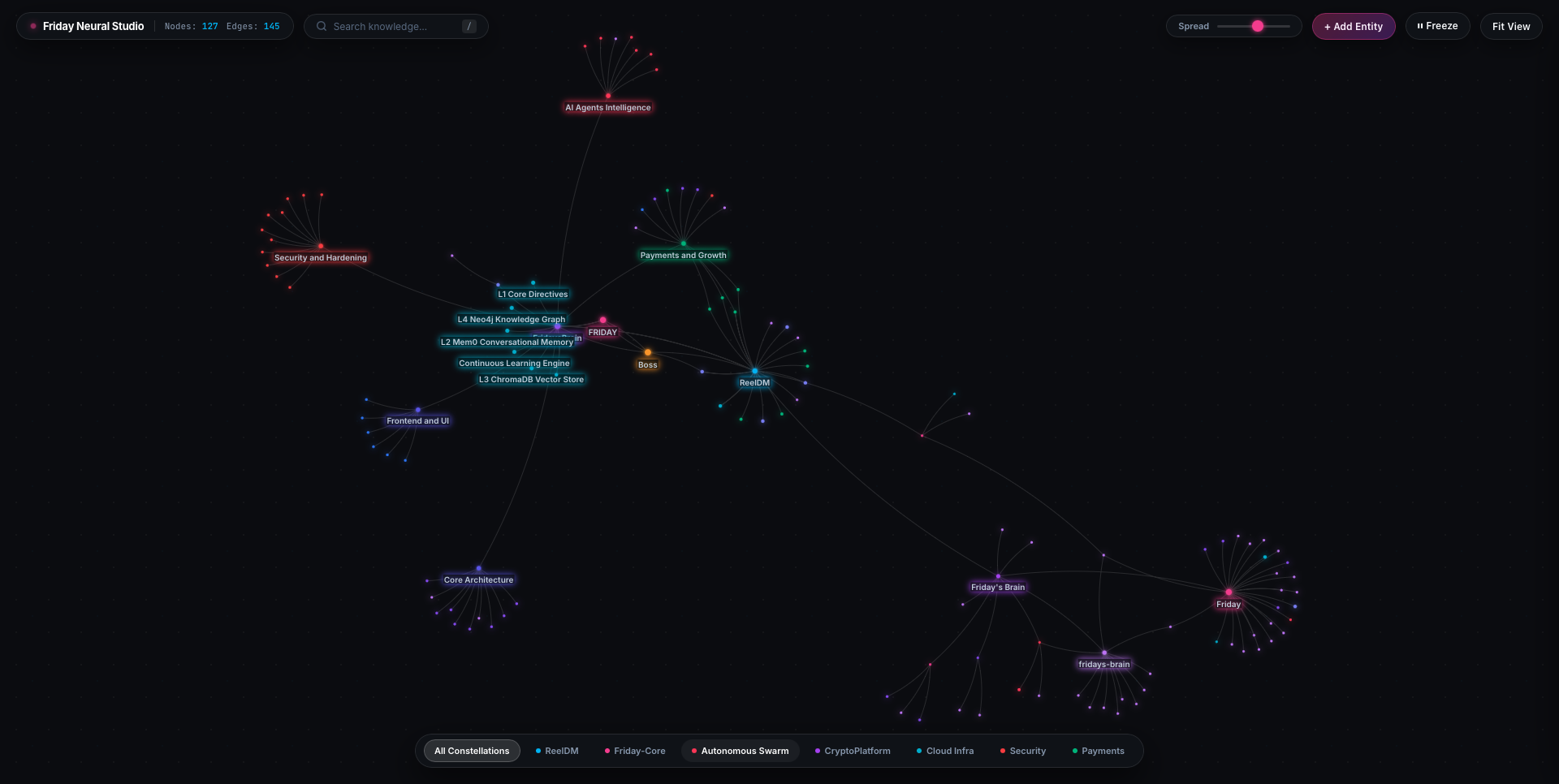
Live Neural Studio — Obsidian-grade knowledge graph visualizer mapping real AI cognitive memory constellations.
Problem: Session Amnesia & Token Overhead
Modern coding assistants (Cursor, Claude Code, Copilot, Antigravity) initialize each chat thread without cross-session memory. While developers frequently mitigate this using project documentation (AGENTS.md, prompt templates, or manual file references), this workflow presents two major bottlenecks:
- Context Window & Token Inefficiency: Injecting massive architecture documents or having agents repeatedly read entire repository directories consumes thousands of context tokens on every single query.
- Loss of Incremental Decisions: Ephemeral decisions—such as chosen dependency versions, schema adjustments, or bug fix rationale made in prior sessions—are lost when a session resets, forcing developers to repeatedly re-explain core constraints.
Architecture & Solution
Friday runs as an open-source, self-hosted Model Context Protocol (MCP) server. Instead of dumping entire documentation files into prompt context, Friday exposes 4 targeted tools (add_memory, add_fact, memory_search, get_context) backed by a multi-tier storage engine:
- Semantic Memory (Mem0): Preserves past decisions, preferences, and workflows across sessions.
- Targeted Vector Search (ChromaDB): Retrieves only the exact memory snippets relevant to the immediate query.
- Relational Knowledge Graph (Neo4j): Automatically extracts entities and relationships in the background, mapping connections between components, schemas, and dependencies.
- Neural Studio: Embedded web visualizer to inspect and query the knowledge graph in real time.
┌──────────────────────────────────────────────────────────────────────┐
│         YOUR AI AGENT   (Cursor / Claude / Antigravity / VS Code)    │
└──────────────────────────────┬───────────────────────────────────────┘
                               │
                    4 MCP Tools (stdio transport)
                    ├── add_memory
                    ├── add_fact
                    ├── memory_search
                    └── get_context
                               │
                               ▼
┌──────────────────────────────────────────────────────────────────────┐
│                        FRIDAY BRAIN (FastAPI)                        │
│                                                                      │
│    Layer 2: Mem0           Layer 3: ChromaDB      Layer 4: Neo4j     │
│  ┌──────────────────┐    ┌─────────────────┐    ┌───────────────┐   │
│  │ Semantic Memory  │    │  Vector Search  │    │  Knowledge    │   │
│  │                  │    │                 │    │  Graph        │   │
│  │ • Cross-session  │    │ • 90% fewer     │    │  ──────────   │   │
│  │   persistence    │    │   tokens via    │    │  ● WebApp     │   │
│  │ • Contextual     │    │   targeted      │    │  ● Auth       │   │
│  │   similarity     │    │   retrieval     │    │  ● Payments   │   │
│  └──────────────────┘    └─────────────────┘    └───────────────┘   │
│                                                                      │
│    ⚡ Auto-Graph Engine                                              │
│  ┌─────────────────────────────────────────────────────────────┐    │
│  │  Every memory → LLM extraction → Neo4j nodes + edges        │    │
│  │  Zero manual linking. Your knowledge base wires itself.      │    │
│  └─────────────────────────────────────────────────────────────┘    │
│                                                                      │
│    🎨 Neural Studio                                                  │
│  ┌─────────────────────────────────────────────────────────────┐    │
│  │  Obsidian-grade live knowledge graph browser                 │    │
│  │  Spread slider • Filters • Inspector drawer • Full CRUD      │    │
│  └─────────────────────────────────────────────────────────────┘    │
└──────────────────────────────────────────────────────────────────────┘
Comparison: Static Prompts vs. Persistent Graph Memory
| Capability | Static Prompts / AGENTS.md | Friday (MCP + Neo4j + Vector) |
|---|---|---|
| Cross-Session Memory | ❌ Lost on thread reset | ✅ Persisted in database |
| Context Retrieval | ⚠️ Brute-force re-reading entire files | ✅ Targeted semantic & graph queries |
| Entity Relationships | ❌ Unstructured flat text | ✅ Neo4j Knowledge Graph |
| Graph Generation | ❌ Manual maintenance | ✅ Autonomous background extraction |
| Visual Inspection | ❌ None | ✅ Live browser UI (Neural Studio) |
| Audit Trail | ❌ None | ✅ Immutable versioned facts ledger |
| Infrastructure | Local files | 100% Self-hosted (Docker Compose) |
Quickstart
Requirements: Docker + Docker Compose installed.
That's literally it. No Python setup. No database config. No services to manage manually.
Clone and configure
git clone https://github.com/friday-memory/friday.git
cd friday
cp .env.example .env
Fill in your .env — takes 60 seconds
# Set your own master password to protect your self-hosted server
FRIDAY_API_KEY=pick_any_secret_password_you_want

# DeepSeek (ultra-affordable — $0.14/M tokens)
# Get yours at: https://platform.deepseek.com
DEEPSEEK_API_KEY=sk-xxxxxxxxxxxxxxxxxxxxxxxxxxxxxxxx

# Mem0 — generous free tier available
# Get yours at: https://mem0.ai
MEM0_API_KEY=m0-xxxxxxxxxxxxxxxxxxxxxxxxxxxxxxxx

# Neo4j password — you choose this
NEO4J_PASSWORD=change_to_something_strong
Launch everything in one command
docker compose up -d
This starts:
- 🧠 Friday Brain on
http://localhost - 🕸️ Neo4j on
http://localhost:7474 - 🎨 Neural Studio at
http://localhost
Verify it's running
curl http://localhost/health
# {"status":"healthy","layers":{"neo4j":"ok","mem0":"ok","facts":"ok (0 entries)"}}
Store your first memory
curl -X POST http://localhost/add \
  -H "X-Brain-Key: your_key" \
  -H "Content-Type: application/json" \
  -d '{
    "content": "We use JWT with 15min access tokens + 7-day refresh. Implementation in gateway/auth.py. Never store tokens in localStorage — httpOnly cookies only.",
    "project": "MyApp"
  }'
Your AI now remembers. Forever. ✅
🔌 Connecting Your Agents (MCP Setup)
Friday is designed to be the central cognitive memory for all your AI coding tools.
Whether Friday runs locally on your machine or on a remote 24/7 cloud server (AWS EC2, VPS, Homelab), every agent connects to the same unified memory via the Model Context Protocol (MCP).
 ┌───────────────────────┐
 │   Cursor (Desktop)    │──┐
 └───────────────────────┘  │
 ┌───────────────────────┐  │
 │    Claude Code CLI    │──┼── MCP Protocol (stdio transport)
 └───────────────────────┘  │   FRIDAY_URL="http://your-server-ip:8000"
 ┌───────────────────────┐  │   BRAIN_API_KEY="your_secret_key"
 │    Antigravity IDE    │──┤
 └───────────────────────┘  │
 ┌───────────────────────┐  │
 │ Codex / Custom Agents │──┘
 └───────────────────────┘
                            ▼
             ┌──────────────────────────────┐
             │     FRIDAY CENTRAL BRAIN     │
             │   (Self-Hosted on Cloud/EC2) │
             │   FastAPI + Mem0 + Neo4j     │
             └──────────────────────────────┘
💡 Shared Brain Superpower: An architectural rule or decision stored by Claude Code in your terminal is immediately accessible to Cursor, Antigravity IDE, or Codex on your desktop. Zero manual syncing. One brain across your entire toolchain.
Step-by-Step Client Configurations
Pick your client below, paste the configuration, and restart your agent:
⚡ Antigravity IDEAdd Friday to your Antigravity global MCP configuration at ~/.gemini/config/mcp_config.json:
{
  "mcpServers": {
    "friday": {
      "command": "python",
      "args": ["-m", "mcp.server"],
      "cwd": "/path/to/friday",
      "env": {
        "FRIDAY_URL": "http://localhost:8000",
        "BRAIN_API_KEY": "your_key_from_env"
      }
    }
  }
}
(If Friday runs on a remote server/EC2, change FRIDAY_URL to http://<your-server-ip>:8000)
Connect Claude Code to your Friday brain with one terminal command:
claude mcp add friday -e FRIDAY_URL="http://localhost:8000" -e BRAIN_API_KEY="your_key_from_env" -- python -m mcp.server
Or configure directly in ~/.claude.json under "mcpServers":
{
  "mcpServers": {
    "friday": {
      "command": "python",
      "args": ["-m", "mcp.server"],
      "cwd": "/path/to/friday",
      "env": {
        "FRIDAY_URL": "http://localhost:8000",
        "BRAIN_API_KEY": "your_key_from_env"
      }
    }
  }
}
Create or edit .cursor/mcp.json in your project root (or add globally in Cursor Settings → MCP → Add New Server):
{
  "mcpServers": {
    "friday": {
      "command": "python",
      "args": ["-m", "mcp.server"],
      "cwd": "/path/to/friday",
      "env": {
        "FRIDAY_URL": "http://localhost:8000",
        "BRAIN_API_KEY": "your_key_from_env"
      }
    }
  }
}
(For a remote server, change FRIDAY_URL to http://<your-server-ip>:8000)
Any custom agent, Codex script, or CI loop can interact with Friday in two ways:
Option A: Via MCP stdio
Run the MCP server directly as a subprocess using standard JSON-RPC 2.0.
Option B: Direct HTTP REST API (zero client dependencies)
# Store memory from any agent script
curl -X POST http://<your-server-ip>:8000/add   -H "X-Brain-Key: your_key"   -H "Content-Type: application/json"   -d '{"content": "Refactored payment gateway to Stripe SDK v2.", "project": "MyApp"}'

# Retrieve relevant context before starting a prompt
curl -X POST http://<your-server-ip>:8000/search   -H "X-Brain-Key: your_key"   -H "Content-Type: application/json"   -d '{"query": "How is payments structured?", "project": "MyApp"}'
Add to your VS Code settings.json (or via Cline MCP settings):
{
  "cline.mcpServers": {
    "friday": {
      "command": "python",
      "args": ["-m", "mcp.server"],
      "cwd": "/path/to/friday",
      "env": {
        "FRIDAY_URL": "http://localhost:8000",
        "BRAIN_API_KEY": "your_key_from_env"
      }
    }
  }
}
Edit your Claude Desktop configuration:
- macOS:
~/Library/Application Support/Claude/claude_desktop_config.json - Windows:
%APPDATA%\Claude\claude_desktop_config.json
{
  "mcpServers": {
    "friday": {
      "command": "python",
      "args": ["-m", "mcp.server"],
      "cwd": "/path/to/friday",
      "env": {
        "FRIDAY_URL": "http://localhost:8000",
        "BRAIN_API_KEY": "your_key_from_env"
      }
    }
  }
}
📁 Pre-built config templates for all clients are available in
examples/.
Features
Auto-Graph Engine — Automated Relationship Extraction
Every memory you store is automatically analyzed by an LLM (DeepSeek Flash).
Entities and relationships are extracted and wired into your Neo4j knowledge graph
without any manual input from you.
Input:
"MyApp uses Stripe for subscriptions. Plans: Free ($0), Pro ($19/mo), Team ($49/mo).
 PayPal handles international. Webhooks at /api/payments/webhook."

Auto-extracted graph:
  MyApp ────USES────────▶ Stripe
  MyApp ────USES────────▶ PayPal
  MyApp ────HAS_PLAN────▶ FreePlan     [price: $0]
  MyApp ────HAS_PLAN────▶ ProPlan      [price: $19/mo]
  MyApp ────HAS_PLAN────▶ TeamPlan     [price: $49/mo]
  Stripe ───WEBHOOK_AT──▶ /api/payments/webhook
No YAML. No manual tagging. Just store memories, and your knowledge graph builds itself.
Neural Studio — Graph Visualization UI
A browser-based visual explorer for your AI's knowledge — built with the same graph engine
that powers Obsidian's graph view.
What you can do:
- 🌌 Explore your entire knowledge base as a living constellation
- 🔍 Full-text search — camera auto-follows, inspector slides open
- 🎛️ Spread slider (1–10) — breathe space into dense graphs in real-time
- 🏷️ Project filter chips — isolate WebApp vs Auth vs Payments constellations
- 🖱️ Click any node → right-side inspector with facts, edges, actions
- ➕ Add / ✏️ Rename / 🗑️ Delete / 🔗 Connect — full CRUD via UI
- ❄️ Freeze physics to lock a layout, Fit View to reset camera
- ⚡ Live auto-refresh as new memories arrive
Versioned Facts Ledger
Discrete facts (rules, preferences, constants) are stored with immutable version history.
Old versions are superseded, never deleted. You always have a full audit trail.
# Store a fact
POST /facts  →  {"content": "We deploy on Ubuntu 22.04 LTS + systemd"}
# id: "a3f9e1b2", created_at: "2026-09-01", superseded: false

# 3 months later — upgraded
POST /facts  →  {"content": "We deploy on Ubuntu 24.04 LTS + Docker Compose"}
# Old fact: superseded: true  ← preserved for history
# New fact: superseded: false ← active version

# Your AI always gets the active version. Past versions auditable via API.
GET /facts?include_superseded=true
Semantic Search via Vector Embeddings
Instead of dumping your entire memory into every prompt, Friday uses ChromaDB vector search
to retrieve only the most relevant context for each query.
# Traditional RAG — expensive and noisy
context = all_memories  # 10,000 tokens of everything

# Friday — surgical precision
context = memory_search("JWT refresh token implementation")
# Returns: exactly the 3-5 memories about JWT, nothing else
# Cost: ~200 tokens vs 10,000  →  95% reduction
Native MCP Toolset
Once connected, your AI agent automatically calls Friday's tools. No prompting required.
┌──────────────────────────────────────────────────────────────────┐
│  Tool            │  When Your Agent Uses It                      │
├──────────────────┼───────────────────────────────────────────────┤
│  get_context     │  At session START — loads all active facts    │
│                  │  + recent memories for instant orientation     │
├──────────────────┼───────────────────────────────────────────────┤
│  memory_search   │  Before answering architecture/design Q's     │
│                  │  "What's our auth pattern again?"              │
├──────────────────┼───────────────────────────────────────────────┤
│  add_memory      │  After implementing features, fixing bugs,    │
│                  │  making architectural decisions                │
├──────────────────┼───────────────────────────────────────────────┤
│  add_fact        │  For atomic rules that never change:          │
│                  │  stack choices, team preferences, standards   │
└──────────────────┴───────────────────────────────────────────────┘
Suggested system prompt addition:
At the start of every session, call get_context to load my preferences and project context.
Before answering any technical question, call memory_search with the relevant topic.
After implementing features or making decisions, call add_memory to persist the context.
Architecture
friday/
│
├── 📡 gateway/
│   └── main.py              # FastAPI backbone — auth, routing, all endpoints
│
├── 🧩 layers/               # Pluggable memory backends (swap any layer)
│   ├── layer2_mem0.py       # Semantic memory — Mem0 cloud API
│   ├── layer3_chroma.py     # Vector store — ChromaDB (local)
│   └── layer4_neo4j.py      # Knowledge graph — Neo4j
│
├── ⚡ pipelines/            # Background intelligence
│   ├── auto_graph.py        # LLM entity extraction → Neo4j wiring
│   └── extract_facts.py     # S3-style versioned fact management
│
├── 🔀 orchestrator/
│   └── router.py            # Query routing — picks best layer per query type
│
├── 🔌 mcp/
│   └── server.py            # MCP stdio server (JSON-RPC 2.0)
│                            # ← This is what your IDE connects to
│
├── 🎨 studio/
│   └── index.html           # Neural Studio — 1,400 lines, zero dependencies
│                            # force-graph + d3 + vanilla JS
│
├── 🐳 docker-compose.yml    # Neo4j + Friday Brain — production-ready
├── 🐳 Dockerfile            # python:3.11-slim, multi-stage ready
├── 📦 requirements.txt      # Pinned dependencies
└── 🌱 seed/                 # Demo data to bootstrap a fresh install
    ├── facts.example.json
    └── blueprints/demo_architecture.md
Data Flow:
[Your IDE]
    → MCP call: add_memory("We use Redis for rate limiting")
        → gateway/main.py  → Mem0 store (sync)
                           → auto_graph.py (background)
                               → DeepSeek: extract entities
                               → Neo4j: MERGE Redis node
                               → Neo4j: CREATE edge (:App)-[:USES]->(:Redis)
        ← {"status": "added", "mem0_id": "abc123"}
API Reference
All authenticated endpoints require the X-Brain-Key header.
🌐 = public endpoint (no auth required).
| Method | Endpoint | Auth | Description |
|---|---|---|---|
GET |
/ 🌐 |
— | Serves the Neural Studio UI |
GET |
/health 🌐 |
— | Health check — reports status of all layers |
GET |
/docs 🌐 |
— | Interactive Swagger UI |
POST |
/add |
✅ | Store a memory + trigger auto-graph wiring |
POST |
/facts |
✅ | Add or supersede a versioned fact |
GET |
/facts 🌐 |
— | List all active facts |
GET |
/facts?include_superseded=true 🌐 |
— | Full history including superseded |
POST |
/search |
✅ | Semantic search via Mem0 |
POST |
/ingest |
✅ | Ingest a document / architecture blueprint |
GET |
/api/graph-data 🌐 |
— | All nodes + edges for Neural Studio |
GET |
/api/search-quick?q=term 🌐 |
— | Fast fuzzy node name search |
POST |
/api/node/create |
✅ | Create entity node in graph |
DELETE |
/api/node/{id} |
✅ | Delete node + all relationships |
POST |
/api/node/rename |
✅ | Rename an entity node |
POST |
/api/link/create |
✅ | Create a typed relationship edge |
Full interactive docs:
http://localhost/docs
Environment Variables
| Variable | Required | Default | Description |
|---|---|---|---|
FRIDAY_API_KEY |
✅ | — | Your self-hosted server secret (set by you to protect endpoints) |
DEEPSEEK_API_KEY |
✅ | — | LLM key for auto-graph extraction |
MEM0_API_KEY |
✅ | — | Mem0 key for semantic memory |
NEO4J_PASSWORD |
✅ | — | Neo4j DB password (you set this) |
NEO4J_URI |
— | bolt://neo4j:7687 |
Neo4j connection string |
NEO4J_USER |
— | neo4j |
Neo4j username |
DEEPSEEK_BASE_URL |
— | https://api.deepseek.com |
LLM API base URL |
DEEPSEEK_MODEL |
— | deepseek-chat |
LLM model name |
FACTS_PATH |
— | /app/facts/facts.json |
Path for facts ledger file |
HOST |
— | 0.0.0.0 |
Server bind address |
PORT |
— | 8000 |
Server port |
Where to get your keys (all have free tiers):
| Service | Link | Cost |
|---|---|---|
| DeepSeek | platform.deepseek.com | ~$0.14/M tokens — cheapest capable LLM |
| Mem0 | mem0.ai | Generous free tier |
| Neo4j | Bundled in Docker Compose | Free & local |
Roadmap
v1.0 — Foundation ✅ shipped
- FastAPI memory gateway with full REST API
- Neo4j knowledge graph integration
- Autonomous graph extraction engine (DeepSeek + Neo4j)
- Neural Studio UI — Obsidian-grade graph browser
- MCP server — Cursor / Antigravity / Claude Desktop / VS Code
- S3-style versioned facts ledger
- Docker Compose — 1-command self-hosted setup
- ChromaDB semantic search layer
- Full CRUD via Neural Studio (add / rename / delete / connect)
- Per-project constellation namespacing
v1.1 — Multi-User & DX 🚧 in progress
- Multi-user support with isolated namespaces
- Python SDK (
pip install friday-client) - TypeScript/JavaScript SDK
-
fridayCLI —friday add "...",friday search "..."from terminal
v1.2 — Integrations 📋 planned
- GitHub Actions bot — auto-store PR summaries as memories
- Slack integration —
/friday remember ...from Slack - Jira / Linear sync — auto-import tickets as project context
- VS Code extension — sidebar memory panel
v2.0 — Cloud 🌐 future
- Friday Cloud — managed, zero-infra option
- Team workspaces — shared memory across your engineering team
- Private beta waitlist
Contributing
Friday is built in public and we'd love your contributions.
# Fork & clone
git clone https://github.com/YOUR_USERNAME/friday.git
cd friday

# Set up environment
cp .env.example .env
pip install -r requirements.txt

# Run tests — all must be green before PRing
python -m pytest tests/ -v
# ✅ 9 passed in 0.34s

# Create your branch
git checkout -b feat/your-amazing-feature

# Commit using conventional commits
git commit -m "feat: add X that does Y"

# Push & open PR
git push origin feat/your-amazing-feature
See CONTRIBUTING.md for full guidelines.
Browse good first issue labels to find where to start.
Security
Friday is designed for self-hosted deployment. A few notes:
- API Key auth — all write endpoints require
X-Brain-Keyheader - Public read —
/health,/facts(read),/api/graph-data, and Neural Studio are public by default. If you expose Friday publicly, consider adding reverse-proxy authentication (e.g., Nginx basic auth or Cloudflare Access). - Secrets — never commit your
.env. It's in.gitignoreby default. - Network — by default, Friday binds to
0.0.0.0. For local-only use, change to127.0.0.1in.env.
Found a vulnerability? Please open a private security advisory on GitHub rather than a public issue.
License
MIT © 2026 Friday Contributors — see LICENSE for details.
Built for the AI-native developer generation.
If Friday saved you from AI amnesia, please consider giving it a ⭐
It helps more developers discover the project and keeps us motivated.
⭐ Star on GitHub ·
🐛 Report Bug ·
💡 Request Feature ·
💬 Discussions
Made with ❤️ by developers who were tired of repeating themselves to their AI.
Reviews (0)
Sign in to leave a review.
Leave a reviewNo results found