OpenDiagram
Health Warn
- License — License: Apache-2.0
- Description — Repository has a description
- Active repo — Last push 0 days ago
- Low visibility — Only 7 GitHub stars
Code Pass
- Code scan — Scanned 12 files during light audit, no dangerous patterns found
Permissions Pass
- Permissions — No dangerous permissions requested
No AI report is available for this listing yet.
AI diagram generator for software architecture - the open-source Eraser.io alternative. Describe your system in plain English, get editable system design, sequence, ERD & cloud diagrams on an Excalidraw canvas. Self-hostable, bring your own key. Vibe diagramming for engineers.
OpenDiagram
The open-source AI diagram generator for software architecture
Describe your system in plain English. Get editable architecture, sequence, ERD and cloud diagrams on a real Excalidraw canvas.
An open-source alternative to Eraser.io and DiagramGPT - self-hostable, bring your own key, and it never outputs Mermaid.



Try it live · Getting Started · Comparison · FAQ · Contributing
What is OpenDiagram?
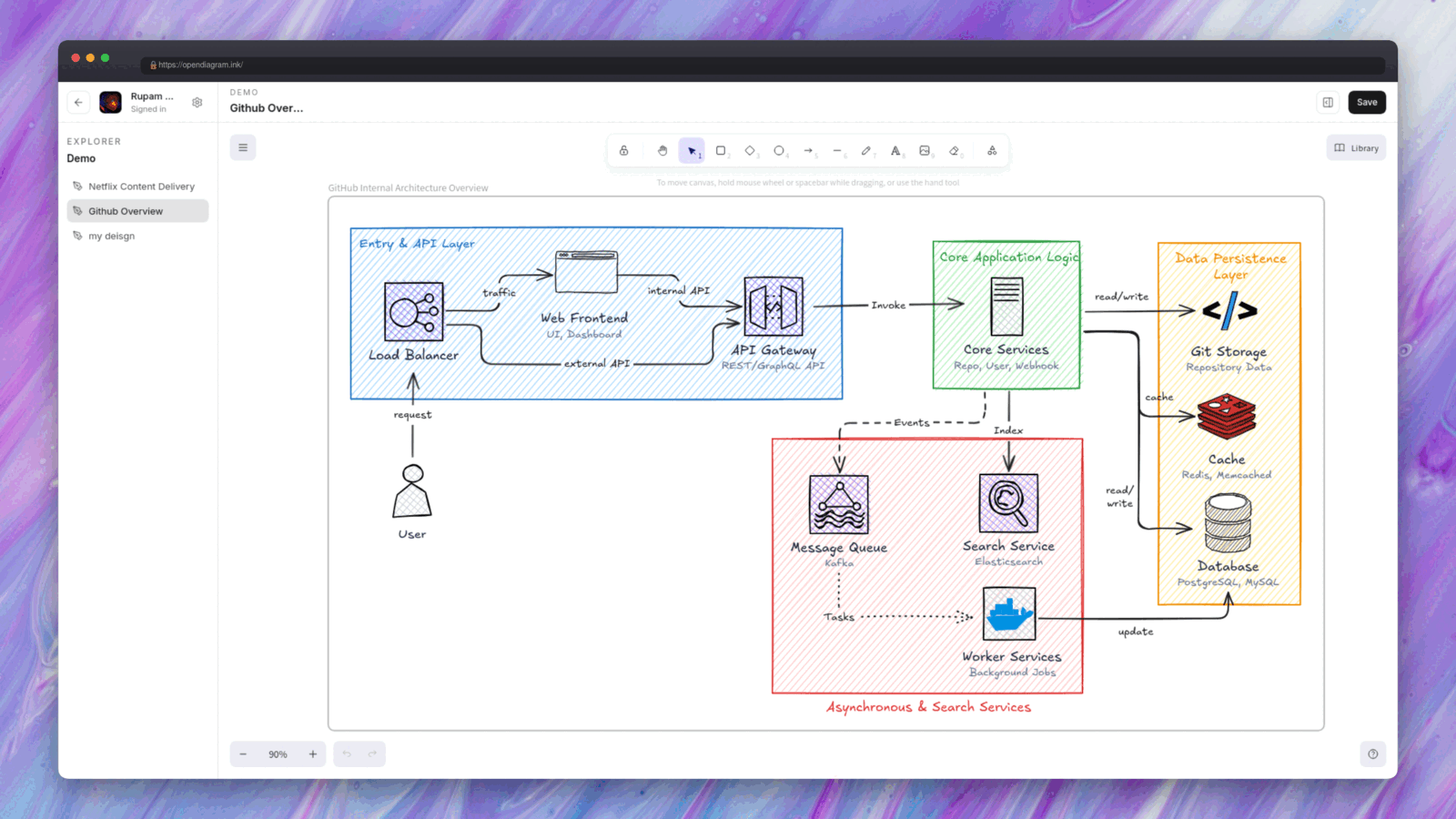
OpenDiagram is a free, open-source AI diagram generator built for engineers. Type a prompt like "Design a microservices architecture for an e-commerce platform on AWS" and an AI agent designs the system, then draws it as clean, editable shapes on an Excalidraw whiteboard.
It is vibe diagramming for software architecture: describe the system, look at it, refine it in conversation - the same loop vibe coding gave you for code, applied to design.
Most AI diagram tools stop at generating Mermaid syntax. OpenDiagram doesn't. The AI emits a typed, semantic spec; a deterministic layout engine and renderer own every pixel. That is why the output looks like a senior engineer drew it instead of like generated boxes.
Why OpenDiagram?
Engineering teams scatter design work across tools: diagrams in one app, docs in another, ADRs in a wiki, and an AI chat that forgets everything between sessions.
- Not Mermaid. The AI outputs a typed
DiagramSpec, and it never chooses pixels, colors or fonts. A layout engine (ELK) and themed renderer turn that spec into styled Excalidraw elements - real AWS/GCP/Kubernetes icons, orthogonal arrows, consistent typography. LLMs decide what, code decides how it looks. - A real canvas, not a PNG. Everything lands on an open Excalidraw whiteboard. Move things, restyle them, add notes. New diagrams land beside your work instead of wiping it.
- Memory that persists. Project context, design decisions and diagram state survive across sessions. Ask "why did we pick Kafka?" next week and get a real answer.
- Conversational iteration. "Add a Redis cache between the gateway and the product service" updates the diagram in place.
- Bring your own key. Plug in your own OpenAI, Anthropic, Google or OpenRouter key. Keys are encrypted at rest and never leave your instance.
- Open and self-hostable. Apache 2.0. Run the whole stack on your own infrastructure.
Features
AI architecture diagram generation
- System design & cloud architecture diagrams - card nodes with real AWS, GCP and Kubernetes icons, VPC/cluster grouping, labeled protocol arrows
- Sequence diagrams - lifelines, numbered messages, dashed replies, red error paths, green confirmations, UML
alt/loopfragments - ER diagrams (ERD) - entity tables with typed columns, PK/FK markers, crow-foot relationship notation
- Flowcharts, network and infrastructure diagrams
Two visual themes
- Sketch - hand-drawn Excalifont look with hachure fills, straight from a whiteboard session
- Classic - crisp architectural style: white cards, solid fills, eraser-style discipline
An agent, not a form
The chat agent asks a clarifying question when your request is ambiguous, streams its design plan, draws via tools, and self-corrects invalid output. It knows what is already on your canvas.
Bring your own AI provider
Ship your own key for OpenAI, Anthropic, Google or OpenRouter, pick the model per project, and keep your usage on your own billing. No provider lock-in.
Workspace
Projects, files, a docs editor, GitHub repo import, and guest mode - try everything without an account.
OpenDiagram vs other AI diagram tools
| OpenDiagram | Eraser.io / DiagramGPT | draw.io | Mermaid | Lucidchart | |
|---|---|---|---|---|---|
| Open source | ✅ Apache 2.0 | ❌ | ✅ | ✅ | ❌ |
| Self-hostable | ✅ | ❌ | ✅ | ✅ | ❌ |
| AI generation from text | ✅ | ✅ | Plugin | External | ✅ |
| Output format | Native Excalidraw elements | Proprietary | XML | Mermaid | Proprietary |
| Editable after AI draws | ✅ full canvas | ⚠️ AI-only | ✅ | Text only | ✅ |
| Bring your own AI key | ✅ | ❌ | - | - | ❌ |
| Persistent project memory | ✅ | ❌ | ❌ | ❌ | ❌ |
| Free | ✅ | Limited credits | ✅ | ✅ | Limited |
Getting Started
Try it instantly at opendiagram.ink - no account needed. Or self-host the whole thing:
Prerequisites: Bun 1.3+ and a PostgreSQL database.
git clone https://github.com/Itz-Agasta/OpenDiagram.git
cd OpenDiagram
just reinstall

cp .env.sample apps/server/.env
cp .env.sample apps/web/.env    # then fill in values in both
bun run dev
Web runs on :3001, API on :3000, docs on :4000. Open http://localhost:3001, create a project (no login needed), and ask for a diagram.
Roadmap
- Interactive Excalidraw whiteboard
- AI diagram generation (system design, cloud, flowchart)
- Sequence diagrams (lifelines, fragments, error/success paths)
- ER diagrams (entity tables, crow-foot notation)
- Diagram templates
- Project memory & docs generation
- Bring Your Own Key (OpenAI, Anthropic, Google, OpenRouter)
- Export presets (PNG / SVG /
.excalidraw) - Position-locked incremental updates
- Team collaboration & version history
- MCP server support
FAQ
Is there an open-source alternative to Eraser.io?
Yes - OpenDiagram. It is Apache 2.0 licensed, self-hostable, and generates system architecture, sequence and ER diagrams from natural language. Unlike Eraser, the output is native Excalidraw elements you fully own and can edit anywhere.
Can AI generate architecture diagrams from text?
Yes. OpenDiagram takes a plain-English description of a system and produces a laid-out architecture diagram with real cloud provider icons, grouped boundaries and labeled connections. Ambiguous prompts get a clarifying question instead of a wrong guess.
How is this different from AI tools that generate Mermaid?
Mermaid-based tools hand the LLM a text syntax and let its renderer decide the layout, so you get generic boxes and arrows that engineers redraw by hand. OpenDiagram separates concerns: the LLM only decides what the system contains, and a deterministic layout engine plus a themed renderer decide how it looks.
What is vibe diagramming?
Vibe diagramming is describing a system, flow or process in plain language and letting AI render it instantly, then iterating conversationally instead of dragging shapes. OpenDiagram is the open-source, engineer-focused take on it - built for architecture diagrams specifically, not generic charts.
Can I self-host OpenDiagram?
Yes. The entire stack - Next.js web app, Hono API and diagram engine - is Apache 2.0 and runs on your own infrastructure. You supply your own database and AI provider key.
Which AI models are supported?
OpenDiagram is provider-agnostic. Bring your own key for OpenAI, Anthropic, Google or OpenRouter, and pick the model per project.
Is OpenDiagram free?
Yes, and it always will be. Apache 2.0, no open-core tricks on the diagram engine.
Contributing
Contributions are welcome - bug fixes, themes, icon packs, layout improvements, docs. Start with CONTRIBUTING.md for setup, project layout and code style, then open a PR.
Working on layout or rendering? Read packages/harness/README.md first - the diagram engine has rules that are easy to trip over.
Found a security issue? Please follow SECURITY.md instead of opening a public issue.
License
If OpenDiagram saved you an hour of dragging boxes, consider starring the repo ⭐

Built with Excalidraw, ELK, Next.js and Bun.
Reviews (0)
Sign in to leave a review.
Leave a reviewNo results found