splitlane
Health Warn
- License — License: GPL-3.0
- Description — Repository has a description
- Active repo — Last push 0 days ago
- Low visibility — Only 5 GitHub stars
Code Fail
- rm -rf — Recursive force deletion command in .github/workflows/libghostty-linux.yml
Permissions Pass
- Permissions — No dangerous permissions requested
No AI report is available for this listing yet.
Native desktop workspace for running several CLI coding agents side by side, with live status for which one needs you. Rust + GPUI.

Splitlane
Run Claude Code, Codex and other coding agents side by side,
and see at a glance which one is waiting for you.

Install · How it knows · What is in the window · Neighbours · FAQ · Docs
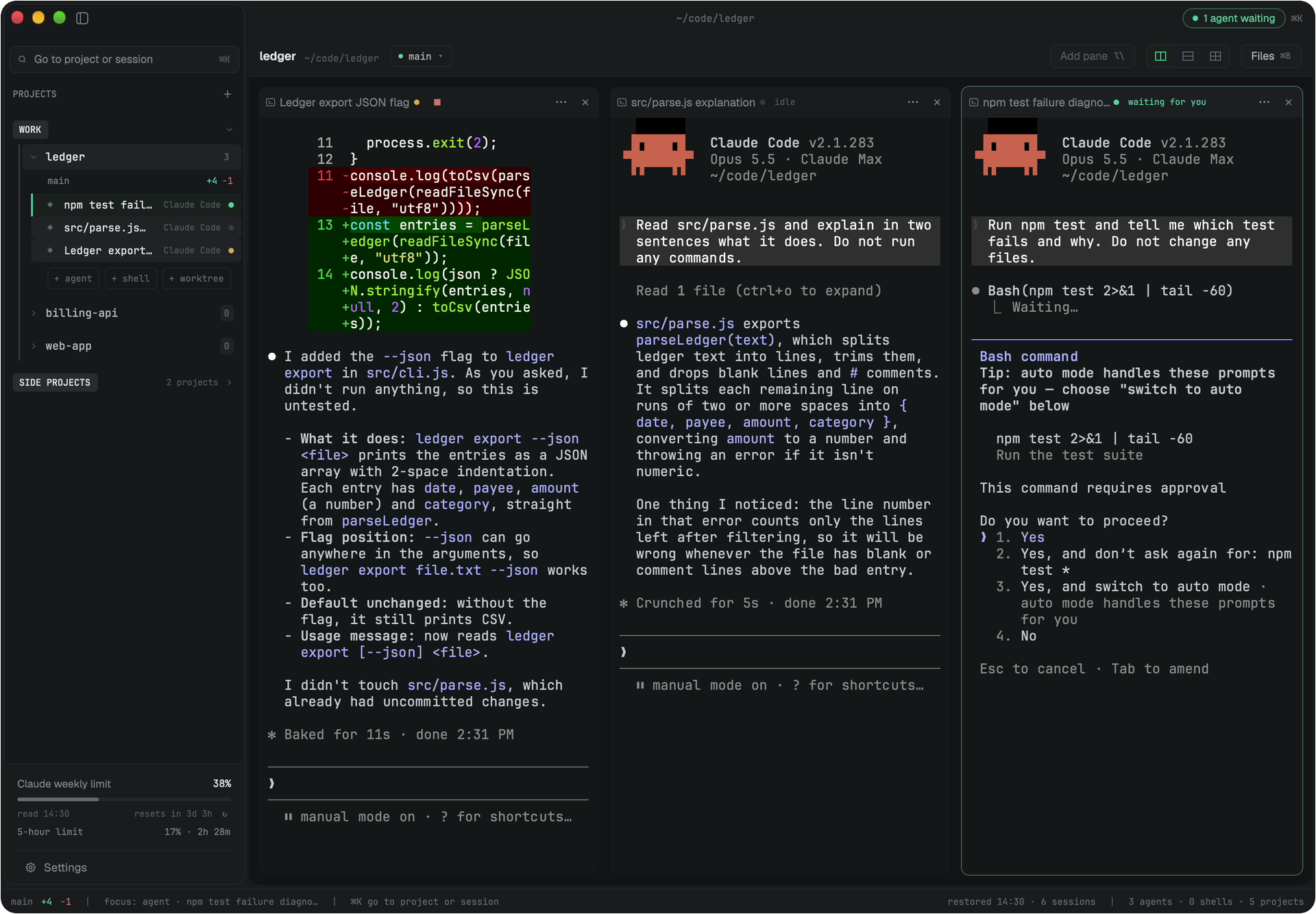
Three agents in one project. One is working, one has finished, and one is asking to run npm test - the rail, its pane header and the title bar all say so.
https://github.com/user-attachments/assets/8dbb4e22-822f-4928-90e0-1b394e192eb1
Splitlane is a native desktop app for supervising several CLI coding agents at
once. Every agent runs in a real terminal pane, exactly as it would in your own
terminal. What Splitlane adds is the part a terminal cannot tell you: which
session is working, which has finished, and which is stopped on a question for
you - read from the agents themselves, not guessed from terminal activity.
It is written in Rust on Zed's GPUI,
runs on macOS, Linux and Windows, and keeps everything local: the agents are
the CLIs you already use, with your own accounts.
Status: early. Splitlane is used daily on macOS (Apple Silicon). Linux
(x86_64, aarch64) and Windows (x64) are built and tested in CI but have had
far less hands-on use. Release builds exist for macOS and Linux; Windows is
built from source for now - see Install.
How it knows
A status dot you cannot trust is worse than none, so each agent's state comes
from the best source that agent offers - and the sources are not equal:
- Claude Code and Codex are read directly from their own session records -
Claude Code's status file and transcript, Codex's rollout - plus the process
tree under the pane. A permission prompt,
a running tool call and a finished turn are told apart from what the agent
recorded, not from whether the terminal is printing. - Eight more - Gemini, Cursor, OpenCode, Pi, Hermes Agent, Grok, CodeBuddy
and Qoder - report through hooks that a small shim on the pane'sPATH
installs for the length of the session. - The last six - Copilot, Kiro, Factory, Antigravity, Openclaw and Amp -
expose no hook surface Splitlane can use. For them it knows only that the
process is running and when it exits, so their row can sayrunningwhile
the agent is in fact waiting for you.
Five words, everywhere a session is listed: starting, running,waiting for you, idle, failed. A finished run you have not looked at yet
stays marked until its pane is on screen, so a pile of uncollected results does
not go quiet. You answer an agent in its own terminal; there is no second
approval UI to keep in sync.
What is in the window
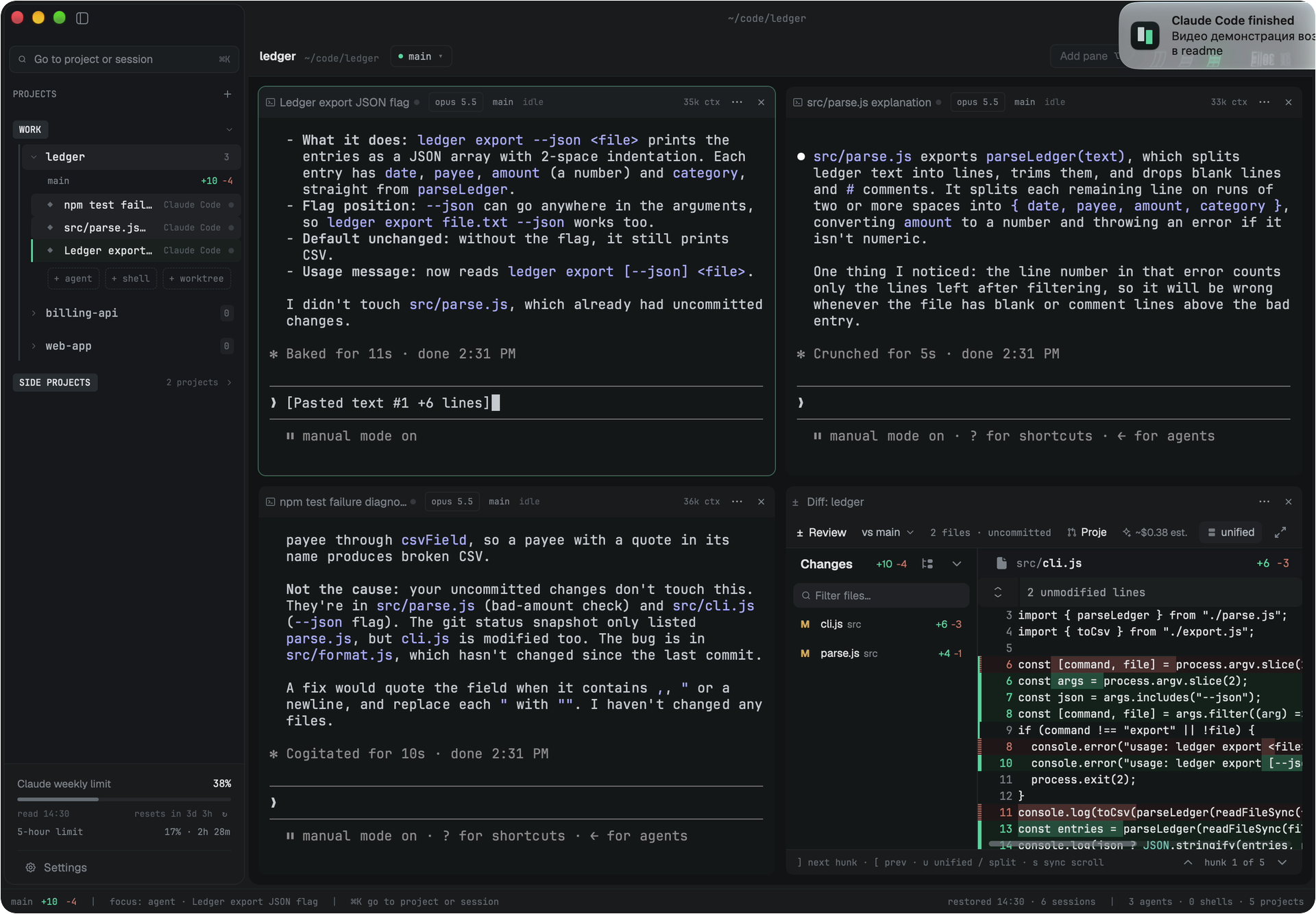
The same project as a grid of four: the three agents and the diff of what they changed.
- Panes. A project's panes are a row, a column, or a grid of four.
⌥\
adds a pane; an empty pane lists the agents on yourPATH, this project's
open sessions and its past sessions, and you pick one inside the pane. - The rail. One list of projects, each expanding to its sessions with their
status.⌥⇥jumps to the next session waiting for you. - Groups. Projects can sit under named labels in the rail. Fold a group
away, or keep its project names out of notifications. - Hand an answer over. A session's last answer goes to another agent on
screen from the pane's menu, onto its input line; you press Enter.⌘⌥C
copies it instead. - Diff. A project's uncommitted changes, with a file list, a filter and a
revision picker, in a pane next to the agents that made them. - Files. A tree of the project with git change marks (
⌘B). - Limits. Your Claude and Codex plan usage in the rail, with when it resets.
- Sessions survive a restart. Claude Code sessions resume into the same
conversation. - Notifications when a session is waiting, has failed, or (optionally) has
finished - only for sessions you cannot currently see. - Presets. A saved set of panes, each with its own directory and agent,
started from the Launch pad (⇧⌘L) or withsplitlane up. - For agents. A read-only MCP bridge (
splitlane mcp install) lets one
agent read another pane's output, and a local CLI and JSON-RPC socket
(splitlane ls,read,send,wait,watch) script the app. An agent
in a pane can open sessions of its own and work through them - the next
section. A script outside a pane can open sessions too and write to the
ones it opened; into any other pane it types only when you start Splitlane
with that switched on.
Supported agents: Claude Code, Codex, OpenCode, Gemini, Cursor, Copilot, Amp,
Pi, Hermes Agent, Grok, Kiro, Antigravity, CodeBuddy, Factory, Qoder and
Openclaw. Any other CLI runs in an ordinary shell pane.
Keys above are macOS; Linux and Windows use Ctrl-based equivalents that do
not collide with readline. The full list is in Settings → Shortcuts and
docs/user/keybindings.md.
One agent working through others
An agent in a pane can open agent sessions of its own: hand each a task, wait
for its turn to end, read the answer, stop it when the plan changes, close it.
Nothing has to be switched on, because it reaches only what it opened - which
is no more than it could do by starting a second agent in its own shell. Done
through Splitlane, each of those sessions is a row in the rail with a status
you can see.
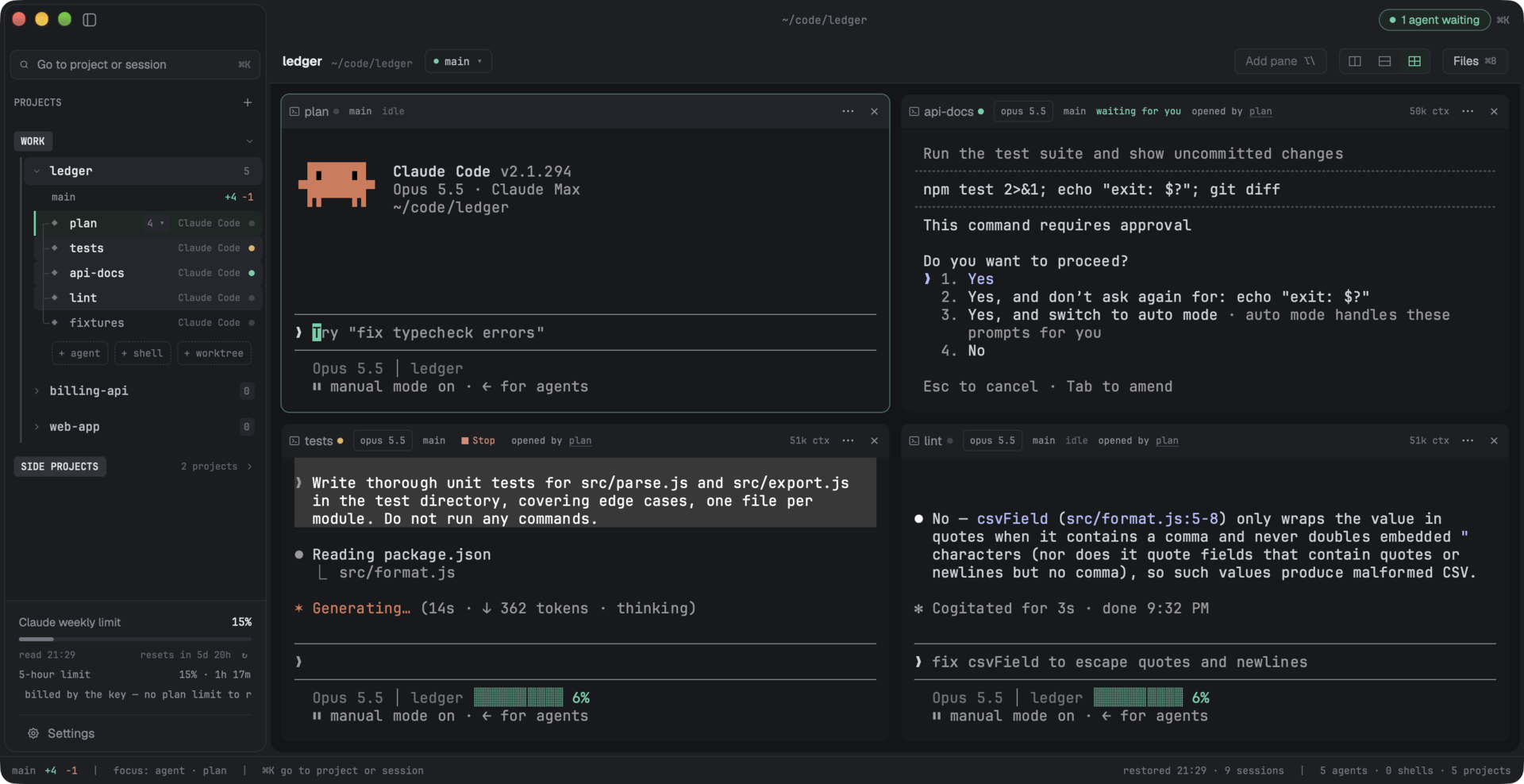
One session and the four it opened. One is working, one is waiting for you.
- You can tell whose a session is. Sessions sit under the one that opened
them, joined by a bracket in the margin. The opener's row counts them, and
the count folds them away; folded, the row says what they are doing. Each
one's pane saysopened by <name>. - Eight at most, one level deep. A session that was opened by another
cannot open any. - A session you opened is yours. When an agent sends to one, nothing is
written and you are asked, in that agent's own pane:plan wants to send messages to api. Your answer holds for that pair of sessions until you quit.Stop plan drivingtakes it back, and an agent never closes a session you
opened. - A question meant for you reaches you. No agent types into a session
that is waiting for a person, and the notification says which session
opened the one that is asking. - What an agent typed says so. Text one session sends another starts with
[Splitlane] Sent by the agent session "<name>", not typed by a person.
Splitlane writes a skill that teaches Claude Code and Codex these commands
each time it starts, so there is nothing to install first: ask an agent in a
pane to open a session in Splitlane. Settings → Agents → Fleet skill turns
that off. The commands and their exit codes are in
Scripting.
Next to its neighbours
Several tools put coding agents side by side, and three of them come up often
next to this one. Everything said about them here is taken from each project's
own documentation as of October 2026. All three change quickly, so check their
docs before relying on it.
| Where the agents run | How it learns an agent needs you | Platforms | License | |
|---|---|---|---|---|
| Splitlane | Terminal panes in a desktop app | The agent's own session records for Claude Code and Codex, hooks for eight more; for the rest, only whether the process is alive | macOS, Linux; Windows from source | GPL-3.0-or-later |
| herdr | Panes inside the terminal you already use | Rules matched against what the agent draws on screen; hooks or the agent's own reports for some agents | Linux, macOS, Windows | Apache-2.0 |
| cmux | Terminal panes in a native macOS app | Terminal notification sequences, a cmux notify command and hooks it installs |
macOS | GPL-3.0-or-later |
| Conductor | Its own chat interface, one git worktree per workspace | Its documentation does not say | macOS | Closed source |
The third column is the one Splitlane was built around. A permission prompt and
an idle prompt can look alike on screen, and an agent's interface changes from
one release to the next. Claude Code and Codex each keep a record of their own
session, so Splitlane reads that record and the process tree under the pane,
and leaves the screen out of it. Here's the catch: that works for exactly two
agents, and each has to be checked again when its record format changes. herdr
reports state for more agents than Splitlane does.
Where the neighbours are ahead:
- herdr keeps terminals running in a background server after you close it
or lose an SSH connection, and lists several SSH machines together. Splitlane
does neither. It is local only, and closing it stops every process it
started. A Claude Code conversation resumes on the next launch; a turn that
was running does not. - cmux puts a scriptable browser next to the terminal. Splitlane has no
browser. - Conductor builds the whole workflow on worktrees, with a setup script and
a run script for each workspace. Splitlane's+ worktreeis thinner: a
branch, a checkout and one setup command.
Where Splitlane goes a different way on purpose:
- Agents run in ordinary terminals, the same as outside the app. Conductor
puts them in its own chat interface and keeps its terminal mode experimental. - herdr and cmux both give agents an API that can send input to another pane.
In Splitlane the MCP bridge can only read, and the CLI commands that type
into a pane stay off until you turn them on. - The diff of what the agents changed and the project's file tree are in the
same window.
If you work inside a terminal or over SSH, herdr or plain tmux will fit better.
If you want a worktree per task behind a chat interface on a Mac, that is
Conductor. Splitlane is for a few agents in ordinary terminals on your own
machine, where the question is which one is waiting.
Install
Download the file for your platform from the
latest release.
| Platform | File | Notes |
|---|---|---|
| macOS (Apple Silicon) | splitlane-<version>-aarch64-apple-darwin.dmg |
The image and the app in it are signed and notarized: open the image and drag Splitlane to Applications, or run brew install --cask ivkan/splitlane/splitlane. Intel Macs are not built yet. |
| Debian, Ubuntu | splitlane-<version>-<arch>.deb |
sudo apt install ./splitlane-<version>-<arch>.deb |
| Fedora, openSUSE | splitlane-<version>-<arch>.rpm |
Import the signing key once (check its fingerprint first, see keys/), then install: sudo rpm --import https://raw.githubusercontent.com/ivkan/splitlane/main/keys/splitlane-release.asc, then sudo dnf install ./splitlane-<version>-<arch>.rpm or sudo zypper install ./splitlane-<version>-<arch>.rpm. zypper refuses the package without the key. |
| Other Linux | .AppImage or .tar.gz |
The AppImage runs as is after chmod +x. The tarball unpacks to splitlane.app/; splitlane.app/install.sh installs it under ~/.local without sudo. |
| Windows | - | No signed installer yet; build from source. |
<arch> is x86_64 or aarch64 (not amd64/arm64). Linux builds need
glibc 2.35 or newer (Ubuntu 22.04, Debian 12, Fedora 36 and later) and a
Vulkan driver. Every file has a .sha256 and a minisign.minisig beside it, and the .deb and .rpm are also GPG-signed;
keys/README.md has the public keys and the commands to check
them. If the AppImage will not start because FUSE is missing, run it with--appimage-extract-and-run.
Splitlane asks the release feed for a newer version at startup and every four
hours after that, for as long as it stays open. When there is one it appears
in the title bar, and a click installs it (through the package manager for a.deb or .rpm). A Homebrew install updates the
same way, since the cask only puts the app in place; brew upgrade --cask splitlane works too. "check_for_updates": false in splitlane.json turns
the check off.
Build from source
Install Rust with rustup; the exact toolchain is pinned in
rust-toolchain.toml and is picked up automatically. Then
the platform's build tools:
macOS (Apple Silicon): Xcode. GPUI compiles its Metal shaders with
xcrun metal, and the Metal compiler ships with Xcode, not with the Command
Line Tools alone.Linux (x86_64, aarch64): Vulkan and the Wayland/X11 development
libraries. On Debian or Ubuntu:sudo apt-get install libvulkan-dev libwayland-dev libxkbcommon-dev \ libxkbcommon-x11-dev libx11-dev libxcb1-dev libxcb-render0-dev \ libxcb-shape0-dev libxcb-xfixes0-dev libfontconfig1-dev libfreetype6-devWindows (x64): Visual Studio Build Tools with the C++ workload (MSVC).
git clone https://github.com/ivkan/splitlane.git
cd splitlane
cargo run --release -p splitlane-app
The binary is target/release/splitlane (splitlane.exe on Windows). A
first build takes several minutes: GPUI and its dependencies are compiled from
source.
FAQ
Why not tmux with one agent per pane?
tmux shows you the panes; it cannot tell you which agent is blocked on a
question. If you work over SSH or want something headless, use tmux. Splitlane
is for supervising agents on your own machine, where knowing who is waiting is
the whole job.
Is it an Electron app?
No. It is Rust on GPUI, rendering with Metal on macOS, Vulkan on Linux and
DirectX on Windows.
Does it run agents for me, or in the cloud?
Neither. The agents are the CLIs installed on your machine, signed in with your
own accounts, running in ordinary terminals. Splitlane never sends a prompt on
its own. An agent can send one to a session it opened itself, and to a session
you opened only after you say it may. A script of yours can open a session
with a task and write to the sessions it opened; into any other pane it
types only when you start Splitlane with that switched on.
Can other agents read my terminals?
Only agents you register with the MCP bridge, and only to read. Output it hands
to an agent is marked as untrusted content.
Does it phone home?
Only if you opt in. Telemetry never includes terminal contents, paths or
prompts, and SPLITLANE_NO_TELEMETRY=1 turns it off regardless of settings.
Docs
- User guide - installation, layouts, configuration, themes
- Scripting - the CLI,
splitlane upand the JSON-RPC socket - MCP bridge - letting agents read other panes
- Windows notes - support matrix and caveats
- Architecture and design decisions - for contributors
- Changelog - what changed in each release
- Contributing - building, the checks a pull request runs, and how to send one
- AGENTS.md - instructions for coding agents working on this repository
Acknowledgements
Splitlane is based on arthjean/paneflow
by Arthur Jean, and is distributed under the same license. It has been modified
since 2026.
The interface is built on GPUI,
the UI framework of the Zed editor, by Zed Industries
(Apache-2.0). Some code is adapted from Zed: a few pieces from GPUI
(Apache-2.0) and more from Zed's own crates (GPL-3.0-or-later); see
THIRD_PARTY_NOTICES.md.
Bundled icons and fonts keep their own licenses; see
THIRD_PARTY_NOTICES.md. Product names, logos and
brands shown in Splitlane (agent CLIs, editors, programming languages) are
trademarks of their respective owners and are used only to identify those
tools. Splitlane is not affiliated with or endorsed by them.
License
Reviews (0)
Sign in to leave a review.
Leave a reviewNo results found