marp-agent-mcp
mcp
Warn
Health Pass
- License — License: NOASSERTION
- Description — Repository has a description
- Active repo — Last push 0 days ago
- Community trust — 16 GitHub stars
Code Warn
- process.env — Environment variable access in main.ts
Permissions Pass
- Permissions — No dangerous permissions requested
Purpose
This is an experimental tool that converts a natural language presentation generator ("パワポ作るマン") into an MCP server. It allows users to generate, preview, and export slides (PDF, PPTX) directly within AI clients like Claude Desktop.
Security Assessment
The overall risk is Low, but with minor caveats. The codebase does not request dangerous permissions or appear to execute raw shell commands. However, there is a warning for environment variable access in `main.ts`, which is standard for configuring server settings but still requires standard caution.
The biggest security consideration is network architecture. While the source code is open, the README directs users to connect to a hosted remote server (`https://pawapo.iwamot.com/mcp`). The developer explicitly warns that this free public endpoint may be shut down or changed without notice. Additionally, uploading the provided external `skill.zip` file means you are trusting third-party code outside the immediate repository. No hardcoded secrets were found.
Quality Assessment
The project is highly active, with its last code push occurring today. It has a clear MIT license, though the repository metadata currently flags it as "NOASSERTION." As a niche, experimental project, it has low community trust indicators with only 16 GitHub stars.
Verdict
Use with caution: the open-source code itself is safe and transparent, but connecting to the developer's hosted remote server and uploading external skills introduces third-party dependencies outside your control.
This is an experimental tool that converts a natural language presentation generator ("パワポ作るマン") into an MCP server. It allows users to generate, preview, and export slides (PDF, PPTX) directly within AI clients like Claude Desktop.
Security Assessment
The overall risk is Low, but with minor caveats. The codebase does not request dangerous permissions or appear to execute raw shell commands. However, there is a warning for environment variable access in `main.ts`, which is standard for configuring server settings but still requires standard caution.
The biggest security consideration is network architecture. While the source code is open, the README directs users to connect to a hosted remote server (`https://pawapo.iwamot.com/mcp`). The developer explicitly warns that this free public endpoint may be shut down or changed without notice. Additionally, uploading the provided external `skill.zip` file means you are trusting third-party code outside the immediate repository. No hardcoded secrets were found.
Quality Assessment
The project is highly active, with its last code push occurring today. It has a clear MIT license, though the repository metadata currently flags it as "NOASSERTION." As a niche, experimental project, it has low community trust indicators with only 16 GitHub stars.
Verdict
Use with caution: the open-source code itself is safe and transparent, but connecting to the developer's hosted remote server and uploading external skills introduces third-party dependencies outside your control.
パワポ作るマンを実験的にMCP Apps化したやつ
README.md
パワポ作るマンを実験的にMCP Apps化したやつ
みのるんさんのパワポ作るマンをMCP Apps化した実験的プロジェクトです。
Claude Desktop AppとClaude.aiで動作確認済み。
機能
- 自然言語によるスライド生成(スキルも併用)
- インタラクティブなプレビュー
- 3つのテーマ (
speee,border,gradient) - 4つのダウンロード形式(PDF、PPTX、編集可能なPPTX、Markdown)
使用例
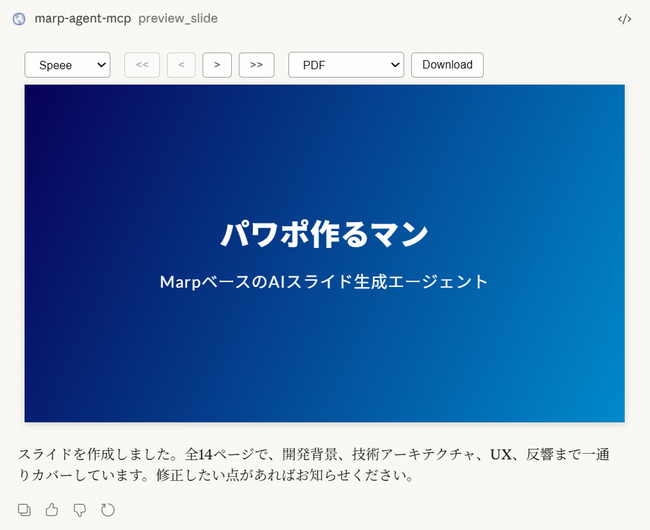
使い方
MCPサーバーの設定
Claude Desktop App/Claude.aiのカスタマイズ画面で、新しいカスタムコネクタとして https://pawapo.iwamot.com/mcp を追加します。認証は不要です。
ただし、このリモートMCPサーバーは予告なく仕様変更・停止・終了する可能性があります。
スキルの設定
https://pawapo.iwamot.com/skill.zip をダウンロードし、Claude Desktop App/Claude.aiのカスタマイズ画面で、新しいスキルとしてアップロードします。
MCPサーバーの構成
ツール
| ツール | 説明 |
|---|---|
validate_slide |
スライドのオーバーフローチェック |
export_pdf |
PDF出力 |
export_pptx |
PPTX出力(編集可能オプションあり) |
インタラクティブツール
| ツール | 説明 |
|---|---|
preview_slide |
スライドのプレビュー表示 |
MCP Apps開発者向けメモ
- インタラクティブツールのHTMLサイズが大きいと、カスタムコネクタ経由ではUIが表示されないことがあった。本プロジェクトでは marp-core を esm.sh (CDN) から読み込むことで解決した
ライセンス
MIT
Reviews (0)
Sign in to leave a review.
Leave a reviewNo results found