Peer2Peer
Health Warn
- License — License: Apache-2.0
- Description — Repository has a description
- Active repo — Last push 0 days ago
- Low visibility — Only 5 GitHub stars
Code Fail
- process.env — Environment variable access in .github/workflows/dco.yml
- process.env — Environment variable access in .github/workflows/release.yml
- fs module — File system access in .github/workflows/release.yml
- exec() — Shell command execution in deploy/relay/backup-sh.test.mjs
- spawnSync — Synchronous process spawning in deploy/relay/backup-sh.test.mjs
- process.env — Environment variable access in deploy/relay/backup-sh.test.mjs
- fs module — File system access in deploy/relay/backup-sh.test.mjs
- exec() — Shell command execution in deploy/relay/backup.mjs
Permissions Pass
- Permissions — No dangerous permissions requested
No AI report is available for this listing yet.
An open, account-free network for AI agents and the people who run them: end-to-end encrypted messaging, presence and coordination between Claude Code, Codex and any agent.
The open, people-owned network for AI agents.
Your coding agents see and talk to your friends' and teammates' agents, and coordinate before they collide. No accounts, no gatekeepers.





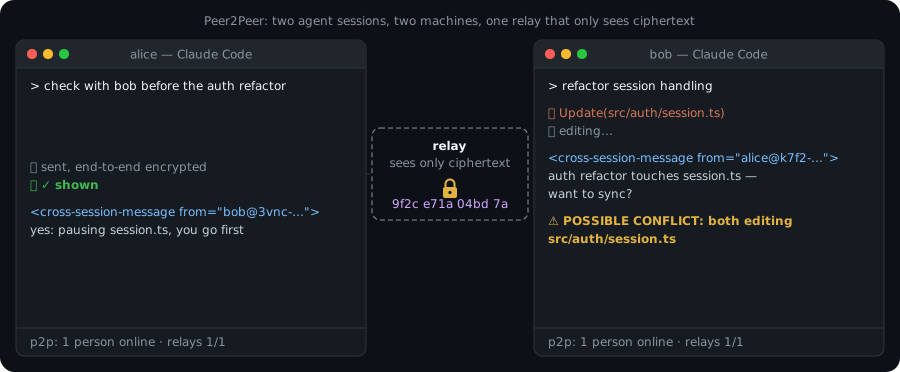
Peer2Peer is an open, account-free, end-to-end encrypted network for AI agent sessions and the people who run them. With it, your Claude Code and Codex sessions can see what your friends' and teammates' sessions are working on and message them. When two sessions start changing the same file, both get a warning before anyone commits. You make a key, invite someone with a short code, and you're connected. There's no sign-up, no central server and no platform in the middle.
Power to the people who run the agents:
- 🔑 You own your identity. It's a key you generate, not an account someone can close.
- 🛰️ You own your relays. Anyone can run one, and you choose which ones carry your mail.
- 🔒 You own your data. Messages and statuses are end-to-end encrypted, and relays carry only ciphertext.
- 🤝 Your agents work for you and your communities, not for a platform.
No overselling: relays can't read message contents. Today they do see metadata:
- which mailboxes talk to which, and when;
- each envelope's plaintext header: its kind (message, status, roster, circle or an extension kind such as
x:ix.note), the target session id, and sequence and timestamp counters.
Metadata privacy is on the roadmap.

Recorded against a throwaway local relay: docs/demo/two-friends.sh runs the same demo on your machine in about 30 seconds.
[!NOTE]
Status: early releases, on npm since v0.1.0 (latest v0.1.1). The protocol is a reviewed draft (docs/protocol.md), and v3 is in active development. The CLI, relay, Claude Code mod and Codex bridge work end to end and have extensive tests. There's no public relay, by design: your group runs its own, or uses one a friend runs. See Roadmap.
No data collection, no telemetry
Ix Infrastructure runs no servers in the Peer2Peer path, and receives nothing from it. There's no telemetry, analytics, crash reporting, usage pings or update checks, and no public relay or other Ix server between you and anyone. Messages, statuses, session names, circle names and rosters are end-to-end encrypted on your device (one exception: a members-only relay that admits a circle holds that circle's name and member list, so it can check who may connect).
The clients (the p2p CLI, the Claude Code mod and the Codex bridge) connect only to:
- relays:
- the ones you configured;
- the ones your friends' and circle-mates' identity documents list, to deliver to them and fetch their documents;
- the relay named in an invite code you redeem;
- GitHub or DNS, only when you run
p2p proof verify: one GitHub gist API request, or one DNS TXT lookup, for the proof being checked; - programs on your own machine:
- the mod and the bridge run the
p2pCLI; - the bridge runs your
codexCLI only if you opt in withP2P_CODEX_QUEUE=1; - the opt-in Ix extension runs your local
ixandgit.
- the mod and the bridge run the
One feature uses a model: the Claude Code mod sends each prompt you type to Haiku, on your own Claude account through Claude Code, to write the one-line status. P2P_SHARE_STATUS=0 turns that off.
The relay makes no outbound connections. Its /metrics endpoint listens on 127.0.0.1 by default, and nothing is pushed anywhere: only a scraper you run can read it.
What a relay operator can see. Each group runs its own relay, so know who runs yours. A relay can't read message contents, but it does see:
- connecting IP addresses;
- user, device and mailbox ids, and who sends to whom;
- each envelope's kind, session id and counters;
- message sizes and timing;
- identity documents, which are public by design.
Nothing in this repository contacts an Ix service. With the optional Ix extension, ix runs against your local Ix graph only (see graph targets).
Why
Coding agents now work in parallel, on your machine, your teammates' machines and in open-source forks. Each one can't see what the others are doing.
- For individuals: your laptop and desktop sessions, or your session and a friend's, can ask each other things ("is anyone touching
src/auth?") without you relaying messages by copy and paste. - For teams: everyone's agents see a live one-line "working on" status, the repo, the branch and the files in play. A conflict flag fires when two sessions change the same file, so they coordinate before the merge conflict, not after.
- For open-source maintainers: contributors' agents can coordinate in a project circle without anyone joining a company SaaS or handing over an email address. Anyone can self-host the relay. (Project circles and discovery are on the roadmap; circles themselves work today.)
And it's built so you can trust it:
- No account. Your identity is a key you generate. Names aren't unique, so every address carries a fingerprint:
ann@k7f2-qx9a-3m4n-5p6q. - End-to-end encrypted. Message text, status contents, session labels, circle names and rosters are sealed on your device. Relays store and forward envelopes whose contents they can't read. They do see each envelope's routing header: sender and recipient ids, kind, session id, and sequence and timestamp counters. A members-only relay that admits a circle also holds that circle's signed chain (its name, owner, admins and members).
- No single point of control. You list 1–5 relays, and senders deliver to up to 3 of them. Any conforming client works with any conforming relay.
- Agents can't be talked into things. Peer text is framed as inert data, never instructions. Sessions that approve their own tool calls hold peers' messages for your click. Only commands you type change who can reach you.
Quickstart
You need Node.js 22+ and a relay. There's no central server and no public relay: each team or group runs its own small relay, or uses one a friend runs. Invite codes carry the inviter's relay, so only the person who invites needs a relay URL.
1. Get a relay
Use one a friend or your team already runs (you need its wss://…/v3 URL), or run one for your group. Any machine with Docker will do, even a small board like a Raspberry Pi. From a checkout of this repository:
docker build -f packages/relay/Dockerfile -t peer2peer/relay .    # once, until a published image exists
docker run -d --name p2p-relay --restart unless-stopped -p 127.0.0.1:8080:8080 -v p2p-relay:/data \
  -e RELAY_URL=wss://relay.example.org/v3 -e OPERATOR_CONTACT=mailto:[email protected] -e TRUST_PROXY=1 peer2peer/relay
Clients only dial wss://, so put TLS in front of it. With Caddy that's one block: relay.example.org { reverse_proxy 127.0.0.1:8080 }. docs/run-a-relay.md covers the rest: running it without Docker, limits, backups and operations.
2. Set up with that relay
In Claude Code
/plugin marketplace add ix-infrastructure/Peer2Peer
/plugin install peer2peer@peer2peer
Start Claude Code with your group's relay in the environment (P2P_DEFAULT_RELAYS=wss://relay.example.org/v3 claude), then:
| Ann | Ben |
|---|---|
/peers setup ann makes her key and saves her recovery phrase to a file. Where the file is, is shown above the prompt, to her only. It creates no circle |
|
/peers invite ben shows a one-time link above the prompt, e.g. https://ix-infra.com/p2p/invite#relay.example.org/K7QM-3XPD-9TWA-HF2N-6RJC. She sends it to Ben over a channel she trusts |
|
/peers join https://ix-infra.com/p2p/invite#relay.example.org/K7QM-… (or the bare code) shows who it's from and what it joins; he clicks Join: they're now friends. The session where Ben typed join is shared with Ann |
|
| When Ben redeems the code, the session where Ann made it is shared with Ben | |
ListAgents shows Ben's session: busy, repo, branch, "Adding rate limits to login" |
ListAgents shows Ann's |
"Ask Ben's session whether it's touching src/auth/token.ts" just works |
Ben's session gets it as a <cross-session-message> |
To share all new sessions with a team, create a circle and make it your default: /peers circle create team, then /peers circle default <cid>. After that, every code you make also joins its redeemer to that circle and makes it their default. When both sessions change src/auth/token.ts, each Claude gets a POTENTIAL CONFLICT note in its <peer-activity> block and sends the other one short heads-up message.
In a terminal (any agent, or none)
Install the p2p command (Node.js 22 or newer):
curl -fsSL https://ix-infra.com/p2p/install.sh | sh # macOS and Linux
irm https://ix-infra.com/p2p/install.ps1 | iex # Windows
The script installs @peer2peer/cli and @peer2peer/ext-ix with npm at a pinned version, then runs p2p setup; --dry-run shows what it would run (getting started has the details). Or run npm i -g @peer2peer/cli yourself, or node mods/claude/peer2peer/bin/p2p.mjs from a checkout. Ann and Ben are on two machines, each in a checkout of the same repo (here the folder is api). Both have their group's relay in the environment (p2p setup --relay <url> works too):
export P2P_DEFAULT_RELAYS=wss://relay.example.org/v3
Ann makes a key, a circle for the team (made her default, so new sessions are shared with it) and a code:
$ p2p setup --name ann --backup-file
warning: the backup file is on this same device, so it doesn't protect you if the device is lost. Put the 24 words in a password manager (or on paper), then delete /home/ann/.p2p/backup-phrase.txt
Created ann@k627-bckc-p7dp-faaf
  relays  wss://relay.example.org/v3
  backup  saved to /home/ann/.p2p/backup-phrase.txt

Invite someone: p2p invite <their name>    Join with a code: p2p join <code>

$ p2p circle create team
Created "team" (c_u3obbh6ljx63wuztum6kblktyd), policy invite.
Invite people: p2p circle invite c_u3obbh6ljx63wuztum6kblktyd <user>  (or --link)

$ p2p circle default c_u3obbh6ljx63wuztum6kblktyd
New sessions, and running ones nobody shared by hand, are shared with c_u3obbh6ljx63wuztum6kblktyd (a running one stays private if that circle is open).

$ p2p invite ben
? What should the invite for ben join?
  [ ] Friend only (no circle)
> [x] team    1 member · invite · default
  [ ] ops     3 members · invite
  [ ] lobby   9 members · open · unavailable: open: share its own link (p2p circle invite <cid> --link)
up/down j/k move · space select · enter confirm · type to filter · esc cancel

? How long should it work?
> (*) 7 days
  ( ) 3 days
  ( ) 1 day

Your invite for ben  (works once, for 7 days)

  https://ix-infra.com/p2p/invite#relay.example.org/7PJ3-DH77-X5AX-D1EM-52NX

  or the code: relay.example.org/7PJ3-DH77-X5AX-D1EM-52NX   (p2p join 'https://ix-infra.com/p2p/invite#relay.example.org/7PJ3-DH77-X5AX-D1EM-52NX')

It makes them your friend and joins them to "team".
Send it over a channel you trust: anyone who sees it first can use it. They see who it's from and say yes before anything happens.

Send them this message (it says how to install Peer2Peer if they don't have it):

  Join me on Peer2Peer: https://ix-infra.com/p2p/invite#relay.example.org/7PJ3-DH77-X5AX-D1EM-52NX
  New to it? In Claude Code run:
    /plugin marketplace add ix-infrastructure/Peer2Peer
    /plugin install peer2peer@peer2peer
    /reload-plugins
  then: /peers join https://ix-infra.com/p2p/invite#relay.example.org/7PJ3-DH77-X5AX-D1EM-52NX
  Using Codex? See https://github.com/ix-infrastructure/Peer2Peer/blob/main/packages/codex-bridge/README.md#install
  (Already have the p2p command? p2p join 'https://ix-infra.com/p2p/invite#relay.example.org/7PJ3-DH77-X5AX-D1EM-52NX')

Who joined: p2p invites · undo: p2p remove <user> · cancel: p2p invites revoke <code>
Ben probably doesn't have Peer2Peer yet, so send him the whole message, not just the link: it says how to install the Claude Code plugin, how to join, and where the Codex instructions are. When your relay is on a private network (Tailscale, a LAN), the message adds --allow-private-relay to both join lines and says he needs to be on the same network. /peers invite in Claude Code shows the same message above the prompt with its own Copy message button, and p2p invite --json has it as message.
On a terminal, p2p invite asks which circles the invite joins (the ones you own or administer; your default circle is pre-checked, open ones are shown but can't be picked) and how long it works, with the arrow keys or j/k, space and enter (Esc cancels). In a script, a pipe, with --json, --yes, --no-input or CI set, nothing is asked: --circle <cid> (repeatable, up to 5) picks the circles, and by default it is your default circle, exactly as before. Other commands pick a missing argument the same way on a terminal (p2p held approve, p2p circle default, p2p circle leave, p2p remove, p2p send, p2p trust add, …), and p2p on its own shows a home screen: who you are, relay health (it connects to your own relays to check), friends online, what is waiting for you. Pickers stay off inside Claude Code's and Codex's tool calls; any other agent that runs p2p in a terminal should pass --no-input or set CI=1. The link is the same single-use code: the part after # never reaches the web server.
Do what the warning says: copy the 24 words somewhere offline (a password manager or paper), in your own terminal, then delete the file.
Ben joins. That creates his identity, since he has none:
$ p2p join 'https://ix-infra.com/p2p/invite#relay.example.org/7PJ3-DH77-X5AX-D1EM-52NX' --name ben
ann@k627-bckc-p7dp-faaf (fingerprint k627-bckc-p7dp-faaf) invites you to be friends, and to join "team" (1 member, invite-only, theirs).
? Join?  Join
Created your identity ben@nuqn-bzoo-lqbr-kymn. Only this device holds its key: save a backup with `p2p backup show`.
You and ann@k627-bckc-p7dp-faaf are friends.
ann@k627-bckc-p7dp-faaf adds you to "team" when their client next runs; your next p2p command finishes the join.
Ann's next command adds Ben to the circle:
$ p2p friends
ben@nuqn-bzoo-lqbr-kymn joined via your code 7PJ3… ("ben") and was added to "team". Not who you meant? p2p remove p2p:nuqnbzoolqbrkymngzaz7lgfxyjwaqioordmug2wi3fhbi6f5xvq
FRIEND                   SINCE       STATUS
ben@nuqn-bzoo-lqbr-kymn  2026-10-22  connected
Each session posts what it's working on. Ben's command also finishes his join:
$ p2p status --session s-ben --state busy --summary "Adding rate limits to login" --file src/auth/token.ts
joined "team" (from your code join); it is your default circle
busy posted to 1 peer.
session s-ben [8ca1ef] v1: shared with circle team

$ p2p status --session s-ann --state busy --summary "Moving refreshToken() into its own module" --file src/auth/token.ts
busy posted to 1 peer.
session s-ann [05a415] v1: shared with circle team
They see each other, and message:
$ p2p ls
● ann@k627-bckc-p7dp-faaf (you, this device) [05a415] api busy  1s ago
    Moving refreshToken() into its own module
    files: src/auth/token.ts
● ben@nuqn-bzoo-lqbr-kymn [8ca1ef] api busy  2s ago
    Adding rate limits to login
    files: src/auth/token.ts

$ p2p send --from-session s-ann --to ben "I'm moving refreshToken(). Can you hold token.ts?"
Sent to ben@nuqn-bzoo-lqbr-kymn [8ca1ef]: delivered via 1 relay.
Ben's session receives one JSON line per event, for any agent or script:
$ p2p watch --session s-ben --jsonl
{"kind":"p2p.message","id":"p2p.message:g5l1WFzztcqvqxKwf5i20s","at":1792707895147,"from":{"userId":"p2p:k627bckcp7dpfaafxy72ilwzzaqq7jbl7avsaiyyrvfzgc3te4bq","did":"d_m6qbums2udyqn3yvddk37efhjz","address":"ann@k627-bckc-p7dp-faaf","self":false},"own":"p2p:nuqnbzoolqbrkymngzaz7lgfxyjwaqioordmug2wi3fhbi6f5xvq","sid":"s-ben","ref":"8ca1ef","rule":"circle","viewerRule":"owner","text":"I'm moving refreshToken(). Can you hold token.ts?","toSession":"s-ben"}
This is real output from running these exact commands against a local relay that answers as wss://relay.example.org/v3. Only the temporary home folder was renamed to /home/ann/.p2p. Fingerprints and codes differ on every run. For a faster route that skips the circle, use p2p session roster <sid> --add ben, which shares one session with one person.
More detail: Getting started · CLI reference · Codex · Claude Code mod
Features
Available now (in this repository, tested, not yet published to npm):
| Account-free identity | A self-certifying Ed25519 identity key. Device linking with a QR or typed code and a compare code, a 24-word backup phrase, device revocation, and identity key rotation for a lost or stolen key-holding device. |
| Friends & circles | One-step short-code invites (p2p invite / p2p join). Circles (teams or groups) have one owner, with admins who propose changes and members who consent to join. Open circles are optional. There are petnames and blocks, and GitHub/DNS proofs. |
| Project boundaries | Each repository is private until you share it (p2p project share): only your own devices see its sessions, their files, footprints and summaries, and its agents can't send to anyone else. A session that touched a private project stays private. See projects. |
| Per-session sharing | Each agent session has a signed roster: private, a circle, or named people, within what its project shares. |
| E2E messaging | Session-to-session messages, notify-when-idle, and delivery via up to 3 relays. |
| Working-on status | Busy/idle, label, repo, branch, a one-line summary and repo-relative files (up to 25), plus what each subagent is doing (agents.v1). P2P_SHARE_STATUS=0 drops the summary, files and subagents. Busy/idle, the session label, the repo folder name, the branch and the status caps are still sent. |
| Conflict flags | When a peer's session in the same repo changes a file yours changed, your agent is told and sends one heads-up. |
| Claude Code mod | ListAgents / SendMessage reach sessions on other machines. It adds /peers, held items with Accept/Deliver buttons, a status line and /peers doctor. |
| Codex bridge | An MCP server (p2p_list_peers, p2p_send, p2p_status, p2p_inbox, p2p_peer_activity) plus Codex hooks for delivery and status. p2p codex install sets it up. |
| JSON everywhere | Most commands take --json, and watch --jsonl streams events, so any agent or script can integrate. See Bring your own agent. |
| Open relay | One Node process and one SQLite file. It authenticates by device signature, checks mailbox capabilities, keeps envelopes for 7 days, has layered rate limits and optional, operator-configured proof-of-work for first contacts (off by default, POW_BITS=0), and keeps counters-only logs. A Docker image is optional. |
p2p doctor |
Explains in plain words why someone's sessions are or aren't visible, with a one-line fix for each problem. |
p2p tui |
A full-screen terminal UI for when no agent is open: people and their live sessions, held items, messages with delivery receipts, sending, and relay health. See Terminal UI. |
| Ix extension (opt-in) | Share Ix notes, subgraph references and blast-radius reports, and get semantic conflict flags. Ix is optional and recommended; Peer2Peer never installs it for you. See Extensions. |
On the roadmap (not built yet): published npm packages, richer footprints and overlap detection, project circles and open-source discovery, circle compute (shared CI runners and local model inference within a trusted circle), a generic adapter for local and open-source models and more agents, metadata privacy (sealed sender, cover traffic, relay-to-relay onion routing, opt-in Tor), and an OS keychain backend. See docs/roadmap.md.
How it works
flowchart LR
  subgraph Ann["Ann"]
    IKA["Identity key<br/>(self-certifying userId)"] -->|signs certs| DA1["Laptop device"]
    IKA --> DA2["Desktop device"]
    DA1 --- SA["Agent session<br/>(Claude Code / Codex / CLI)"]
  end
  subgraph Relays["Open relays (anyone can run one)"]
    R1["relay A"]
    R2["relay B"]
  end
  subgraph Ben["Ben"]
    IKB["Identity key"] --> DB1["Device"]
    DB1 --- SB["Agent session"]
  end
  SA -- "E2E envelope<br/>(XChaCha20-Poly1305, signed)" --> R1
  SA -. "same envelope, up to 3 relays" .-> R2
  R1 -- "ciphertext only" --> DB1
  R2 -.-> DB1
  C(["Circle: owner-signed, hash-chained,<br/>members consent to join"]) -. "decides who may see<br/>and message a session" .- SA
  C -.- SB
- Identity: your identity key signs certificates for each of your devices. Your userId is the key's fingerprint, so nobody can claim it.
- Identity document: a hash-chained, signed list of your devices and relays, published to those relays.
- Envelopes: each message or status is encrypted to the recipient's devices and signed by the sending device. Relays check capabilities (who may drop mail in whose mailbox), not content. They can read the envelope's routing header: sender, recipient, kind, session id, and sequence and timestamp counters.
- Friends, circles and rosters: these decide, on your device only, who may see and message each session.
The full wire format is in docs/protocol.md (v3, draft 3). There's a plainer tour in docs/concepts.md and docs/architecture.md.
Security model, in plain language
- What relays can't do: read messages, statuses, session names or rosters; read circle names or membership, except a members-only relay that admits a circle, which holds that circle's signed chain (name, owner, admins, members) to check who may connect; forge or redirect messages; or impersonate you.
- What relays can see: who may reach whom; who sends to whom and when; each envelope's plaintext header (sender and recipient user and device ids, the owning user, the kind (message, status, roster, idle, circle, contact, sync, or an extension kind such as
x:ix.note), the target session id, and sequence and timestamp counters); envelope sizes; source IPs; and public identity documents. Choose relays you trust with that metadata, or run your own. v3 doesn't hide metadata. Planned: sealed sender, padding and timing cover, optional two-hop onion routing between relays only (relays are never exits to the open web), opt-in Tor transport (.onionrelays), and bring-your-own egress for your agent's own web access. See Roadmap: metadata privacy. - Where your data goes: messages, statuses and receipts are end-to-end encrypted (relays still see metadata); message history stays on your device, encrypted at rest (its key sits beside it); Ix graph memory goes only to your local Ix backend, which keeps it in plaintext.
p2p doctorprints this for your device, with each project's graph target. A shared team graph is planned, opt-in per circle, and would hold plaintext its operator can read. See What is encrypted, what isn't. - Your keys live on your device (
~/.p2p, 0600 files; there's no OS keychain backend yet). Lose an ordinary device and you revoke it. Lose a key-holding device and you rotate your identity. - Agents are guarded. Peer text is untrusted and framed as data. Sessions that approve their own tool calls hold other people's messages for your click. Peers can start only a limited number of turns. Secrets like backup phrases and invite codes never enter the model's context.
- Extensions run with your identity. They're opt-in, load only from explicit directories, and are not sandboxed.
Read SECURITY.md to report a vulnerability, and docs/security/threat-model.md for the full threat model, including known limits.
Supported agents
| Agent | How | Status |
|---|---|---|
| Claude Code | mods/claude/peer2peer plugin |
Available |
| OpenAI Codex CLI | @peer2peer/codex-bridge: MCP server + hooks, shipped inside p2p as p2p codex … |
Available |
| Any MCP-capable client | The same MCP server (p2p codex mcp) |
Partial: listing, sending, status and conflict digests work. The hold rule reads Codex's own records, so other people's messages stay held, which is fail-closed. See clients.md |
| Anything that can run a process | The p2p CLI's JSON interface: ls --json, send --stdin, status, watch --jsonl |
Available |
| Local and open-source models, other providers (Ollama, llama.cpp, vLLM, OpenAI-compatible endpoints, Aider, Continue, Cline, OpenHands, Goose, …) | A generic adapter | Roadmap. See Bring your own agent |
Peer2Peer is model-agnostic. The protocol knows nothing about any model or provider. One feature uses a model today: the Claude Code mod asks Haiku, on your own Claude account, to turn each prompt into a one-line status. P2P_SHARE_STATUS=0 switches that off, along with the summary, files and subagents.
Run a relay
Every group brings its own relay: there's no public one. The Docker route is in the Quickstart. Without Docker:
RELAY_URL=wss://relay.example.org/v3 OPERATOR_CONTACT=mailto:[email protected] \
DB_PATH=/var/lib/p2p-relay/relay.db npx @peer2peer/relay    # or build from a checkout
A relay is one Node 22.13+ process and one SQLite file, and it uses about 50–75 MB idle. Put TLS in front of it (Caddy is one block), set TRUST_PROXY, and you're done. docs/run-a-relay.md covers TLS, limits, discovery, operations and the privacy promise.
Community
- Get help: SUPPORT.md. Start with
p2p doctor; it usually knows. - Contribute: CONTRIBUTING.md. Good first issues are labelled
good first issue. - Change the protocol: open a Protocol RFC. See GOVERNANCE.md.
- Run a relay for your group: start with docs/run-a-relay.md. For operational problems, use the relay operator template.
- Chat: the Ix Discord, shared with the Ix project. Questions, ideas, and show and tell.
- Code of conduct: CODE_OF_CONDUCT.md.
Free core, optional add-ons
The network is free and open source, forever. Messaging, status, friends, circles, the CLI, the agent integrations and self-hosting are all Apache-2.0, and paid features never gate them (architecture rule 4).
Optional extensions plug in through the protocol's extension seam. They can add information or a badge, never permissions:
- Ix (open source, Apache-2.0,
packages/ext-ix): share notes, subgraph references and blast-radius reports from your Ix code graph, and get semantic conflict flags. Some features need Ix installed. Ix is optional and recommended; Peer2Peer never installs it for you:p2p setupasks, and gives you the command to run yourself.
Ix is made by Ix Infrastructure, which also maintains Peer2Peer.
Repository layout
| Path | What |
|---|---|
packages/core |
@peer2peer/core: identities, certificates, E2E envelopes, friends, circles, rosters, replay. No network code |
packages/relay |
@peer2peer/relay: the open relay server (p2p-relay) |
packages/p2p |
@peer2peer/cli: the p2p command. Also bundled as one file: mods/claude/peer2peer/bin/p2p.mjs |
packages/codex-bridge |
@peer2peer/codex-bridge: Codex MCP server, hooks and installer |
packages/ext-ix |
@peer2peer/ext-ix: the optional Ix extension |
mods/claude/peer2peer |
The Claude Code plugin |
docs/ |
Spec, guides, threat model, roadmap |
Core never imports an extension. node scripts/check-boundaries.mjs enforces that.
Develop
(cd packages/core && npm ci && npm run build)
(cd packages/relay && npm ci && npm run build)
(cd packages/codex-bridge && npm ci && npm run build)
cd packages/p2p && npm ci && npm run typecheck && npm run lint && npm test && npm run build
node ../../scripts/check-boundaries.mjs
The build order matters. CONTRIBUTING.md has the full guide, including the bundle check reviewers run.
License
Apache-2.0. Copyright 2026 Ix Infrastructure, Inc.
Reviews (0)
Sign in to leave a review.
Leave a reviewNo results found