reclaude
Health Warn
- License — License: MIT
- Description — Repository has a description
- Active repo — Last push 0 days ago
- Low visibility — Only 5 GitHub stars
Code Fail
- exec() — Shell command execution in reclaude.py
- network request — Outbound network request in reclaude.py
Permissions Pass
- Permissions — No dangerous permissions requested
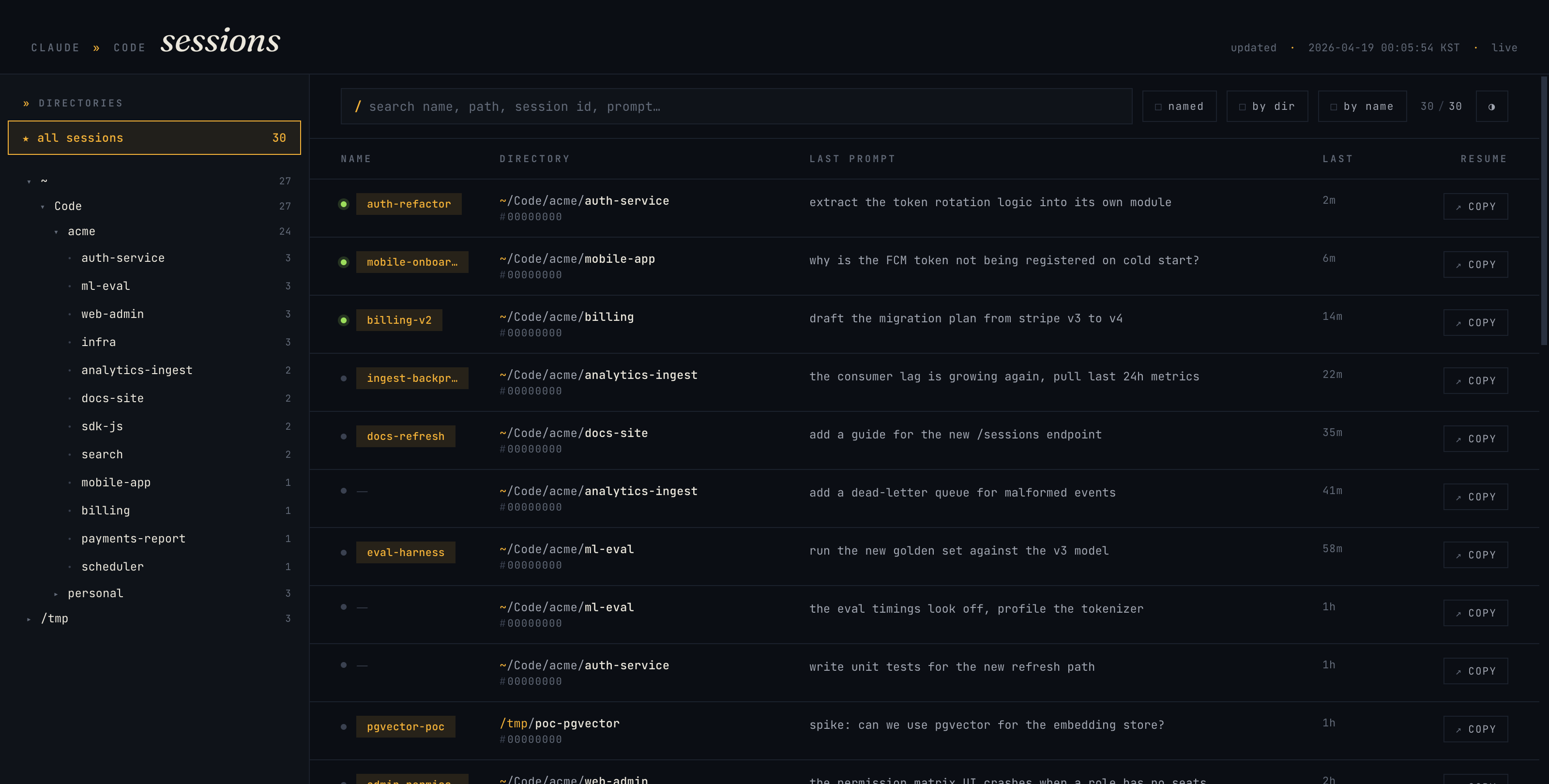
This tool provides a local web-based browser for your Claude Code sessions. It scans your local session history files to help you quickly find and resume past sessions after a terminal crash or reboot.
Security Assessment
Risk: Low. The tool accesses sensitive data by scanning your local `~/.claude/` directory to read your past prompts and session working directories, but it explicitly operates in a read-only mode and does not write back to those files. The automated scans detected shell command execution and outbound network requests, which are standard and benign for this application: it launches a local HTTP server on `127.0.0.1` to serve the user interface. Because it runs a local web server, it is recommended to avoid exposing the default port (`9999`) to public networks to prevent unintended access to your session history. There are no hardcoded secrets, and the tool requires zero third-party dependencies.
Quality Assessment
The project is fresh and actively maintained, with its latest code push occurring today. It is properly licensed under the highly permissive MIT license. However, it currently has very low community visibility with only 5 GitHub stars. While the lack of community adoption means it hasn't been broadly vetted by a wide audience, the codebase is extremely lightweight and requires no external packages, making it easy for any developer to manually audit and trust.
Verdict
Safe to use. The read-only approach and lack of dependencies make it a transparent and secure utility for local development.
Live browser for your Claude Code sessions — find the right session to `claude --resume` after a terminal crash.
reclaude
Live browser for your Claude Code sessions.
After a terminal crash, a laptop reboot, or just losing track of where you were,reclaude shows every past session at a glance — custom names (/rename),
working directories, last prompt, last activity — so you know exactly where toclaude --resume.
Why
~/.claude/projects/*/*.jsonl holds every session you've ever run. It's
durable and complete, but not browsable. reclaude reads it live and
surfaces the signal: what did I name this session, which directory was it in,
what was I doing last?
Install
Requires Python 3.11+. No third-party packages.
git clone [email protected]:jadewon/reclaude.git ~/.reclaude
Run
python3 ~/.reclaude/reclaude.py
# then open http://127.0.0.1:9999/
Options:
| flag | default | note |
|---|---|---|
--port |
9999 |
HTTP port |
How it works
- Server scans
~/.claude/projects/*/*.jsonlat startup and keeps an
in-memory map keyed by session ID. - Watcher thread polls file mtimes every 2 s. On change, rescans only the
affected file(s). - Transport is Server-Sent Events.
event: snapshotis pushed once on connect (full state).event: deltais pushed on change, carrying only{upsert, remove}by
session ID — no full payload re-sends.
- Client keeps a
Mapkeyed by session ID, applies deltas, re-renders.
No REST endpoints, no polling from the browser. One long-lived stream per tab.
UI
- Left sidebar: directory tree (filters to that subtree on click)
- Toolbar: full-text search (
/) across session bodies with word-AND fuzzy +regextoggle; matches preview the surrounding context with the hit highlighted,namedfilter,by dir/by namegrouping - Dark + light themes (auto by OS, manual toggle persists)
- Each row:
copybutton writescd "<cwd>" && claude --resume <name|id>
to clipboard
Preferences (named-only, group-mode, theme, tree expansion, selected
directory) persist in localStorage.
Run as a background daemon (macOS)
Copy the example plist, edit the path to match your clone, load it:
cp examples/com.github.jadewon.reclaude.plist ~/Library/LaunchAgents/
# edit paths inside the plist if your clone isn't at ~/.reclaude

launchctl load ~/Library/LaunchAgents/com.github.jadewon.reclaude.plist
Unload:
launchctl unload ~/Library/LaunchAgents/com.github.jadewon.reclaude.plist
Logs: /tmp/reclaude.log, /tmp/reclaude.err.
Data
Read-only. reclaude never writes to ~/.claude/. It only scans for:
type: "user"messages → last prompttype: "custom-title"/type: "agent-name"→ session name- file mtime → activity time
cwdfield → working directory~/.claude/sessions/*.json→ active PID detection (green dot)
License
MIT. See LICENSE.
Reviews (0)
Sign in to leave a review.
Leave a reviewNo results found