URKit
Health Gecti
- License — License: MIT
- Description — Repository has a description
- Active repo — Last push 0 days ago
- Community trust — 18 GitHub stars
Code Gecti
- Code scan — Scanned 3 files during light audit, no dangerous patterns found
Permissions Gecti
- Permissions — No dangerous permissions requested
Bu listing icin henuz AI raporu yok.
A native C++ modding framework for Unity Mono and IL2CPP games.
URKit






URKit is a native C++ modding toolkit for Windows x64 Unity games. It supports
Mono and IL2CPP through one loader ABI and provides Unity object access, managed
method calls, hooks, lifecycle callbacks, networking, and ImGui overlays.
Generated mod DLLs are URKit plugins. Load them with a URKit proxy orURKitInjector.dll; do not inject mod DLLs directly.
Release contents
urk-sdk.exe: project generator for Mono and IL2CPP mods.urk-updater.exe: checks and updates an existing generated project without
replacing user-owned source files.version.dll,winhttp.dll,winmm.dll: proxy loaders. Install exactly the
proxy imported by the game executable.URKitInjector.dll: loader for external injection workflows. URKit does not
include an injector.urk-dev-mcp.exe: local MCP server for building, deploying, diagnosing, and
runtime-testing generated URKit mods.URKitDevBridge.dll: optional development-only mod that executes MCP runtime
requests on the Unity main thread.
Place the selected proxy beside the game executable. Built mods belong in the
game's Mods directory. Do not rename a proxy or install more than one proxy in
the same game directory.
URKitInjector.dll provides a proxy-free alternative. Once loaded, it prompts
for a configuration file and one or more mod DLLs; it does not create files or
scan a Mods directory automatically.
Generate and build a mod
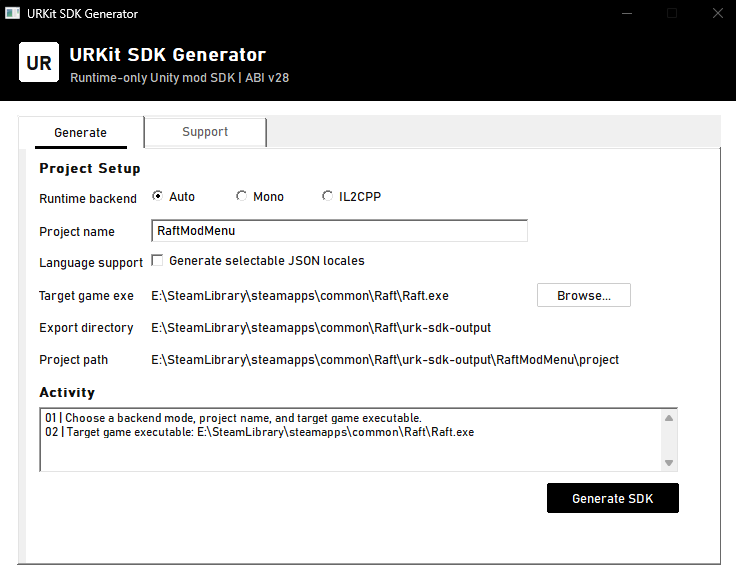
Run urk-sdk.exe, select a game executable and backend, then enter a project
name. The equivalent command is:
./urk-sdk.exe --game-exe C:\Games\Example\Example.exe --backend auto --name MyMod
auto detects Mono or IL2CPP from the game directory. Add --localization to
include editable locale JSON files. Projects are written to:
<GameDir>/urk-sdk-output/<Project>/project
Requirements:
- CMake 3.28 or newer;
- Ninja;
- LLVM/Clang or the MSVC toolchain from Visual Studio 2022 Build Tools or
newer.
Clang build:
cmake --preset clang-debug
cmake --build --preset clang-debug --parallel
MSVC build, from an x64 Visual Studio Developer PowerShell:
cmake --preset msvc-debug
cmake --build --preset msvc-debug --parallel
Use clang-release or msvc-release for distributable builds. Generated
projects copy the resulting DLL to the selected game's Mods directory.
Generated project layout
| Path | Purpose |
|---|---|
mod/lifecycle/mod_runtime.cpp |
Startup, main-thread updates, scene events, and shutdown. |
mod/hooks/mod_hooks.cpp |
Hook installation and removal. |
mod/lifecycle/mod_network.cpp |
HTTP configuration and policy. |
mod/support/mod_log.cpp |
Shared mod logging. |
mod/config/mod_config.h |
Mod identity and settings. |
mod/ui/theme.h |
UI styling. |
Files under sdk/, mod/generated/, and the native hook support are refreshed
by the generator. Files under mod/ui/ are created once and then preserved, so
menu and widget changes survive SDK updates. Keep unrelated features in separate
files under mod/ so generated infrastructure remains replaceable.
Update an existing project
Run urk-updater.exe, choose the generated project directory, and select
Check Project. The result lists every URKit-managed file that would be
added (+) or refreshed (~). Update Project displays that same list in a
confirmation dialog before it creates a backup under .urk/backups/ and
updates the files. User-owned files, such as mod/lifecycle/mod_runtime.cpp,
are preserved.
Use Check Updater to look for a newer urk-updater.exe release. It only
downloads the official GitHub release asset after confirmation, verifies its
published SHA-256 digest, replaces itself through a short-lived helper process,
and restarts. Every published release must therefore include urk-updater.exe;
the public-release staging target does this automatically.
The same flow is available for automation:
./urk-updater.exe --project C:\Games\Example\urk-sdk-output\MyMod\project --check
./urk-updater.exe --project C:\Games\Example\urk-sdk-output\MyMod\project --update
./urk-updater.exe --check-updater
Projects generated by current SDK versions contain .urk/project.ini. Older
projects are detected from their generated SDK and CMake deployment settings;
the updater writes the manifest when it completes their first update. The
updater refuses to downgrade a project created by a newer SDK.
Runtime notes
- Unity calls belong on the Unity main thread.
- Cache scene lookups and clear borrowed Unity handles on scene changes.
- Check
Unity::last_error()after an unexpected empty or zero result. - Detach hooks and release mod-owned resources before unload.
- DX11, DX12, and OpenGL overlays are supported. Vulkan overlays are not.
Loader API tables and context structures are versioned and append-only. Mods
must check the advertised version and size before accessing newer fields.
The public ABI is defined in sdk/mod_sdk.h.
See the URKit SDK Handbook for GameObject/component
access, custom bindings, threading, hooks, and diagnostics. Its highlight
chapter documents how overlay draw commands are
projected and submitted through the generated DirectX 11, DirectX 12, or OpenGL
render path. Internal components are described in
ARCHITECTURE.md.
AI-assisted mod development
urk-dev-mcp.exe exposes the same local MCP tools to Codex, Claude, and other
stdio-capable MCP clients. It reads the generated project's .urk/project.ini,
uses only declared CMake presets, verifies deployment, returns bounded URKit
logs, and connects to URKitDevBridge.dll for runtime status and tests.
Copy URKitDevBridge.dll to the target game's Mods directory, then configure
the MCP client with the generated mod project's root:
urk-dev-mcp.exe --project C:\Games\Example\urk-sdk-output\MyMod\project
Runtime tests use the fixed C ABI in sdk/dev_test.h. See
URKit Development MCP for client configuration, test exports,
security boundaries, and troubleshooting.
For loader and startup failures, inspect URKit_logs.log beside the game
executable. If the file does not exist, verify that the game imports the proxy
you installed.
URKit is available under the MIT License.
Yorumlar (0)
Yorum birakmak icin giris yap.
Yorum birakSonuc bulunamadi