volnix
Health Warn
- License — License: MIT
- Description — Repository has a description
- Active repo — Last push 0 days ago
- Low visibility — Only 5 GitHub stars
Code Pass
- Code scan — Scanned 12 files during light audit, no dangerous patterns found
Permissions Pass
- Permissions — No dangerous permissions requested
This tool provides programmable, stateful simulation environments for testing AI agents. It allows developers to define complex "worlds" with mock services, budgets, and policies to evaluate how autonomous agents perform and interact.
Security Assessment
Overall risk: Low. The tool does not request dangerous system permissions. A light code scan of 12 files found no dangerous patterns, malicious code, or hardcoded secrets. However, it inherently makes external network requests to interact with real LLM APIs (requiring keys for Google, OpenAI, or Anthropic). Users should be mindful that these API calls will consume usage credits and send the agent's simulated context data to the chosen third-party provider.
Quality Assessment
The project is actively maintained, with its last repository push occurring today. It uses a standard, permissive MIT license and includes a comprehensive README. The primary concern is its low visibility; with only 5 stars, it is a very new or niche project with minimal community testing. Because of this, developers should expect limited community support and potential edge-case bugs.
Verdict
Safe to use, though the low community adoption means you may encounter unreported issues while integrating it into your workflow.
A living world where agents exist as participants alongside NPCs, internal actors, real service APIs, budgets, policies, and consequences.
Volnix
Programmable worlds for AI agents.
Volnix creates living, governed realities for AI agents. Not mock servers. Not test harnesses. Complete worlds with stateful services, policies that push back, budgets that run out, NPCs that follow up and escalate, and consequences that cascade. Worlds are defined in YAML, run on their own timelines, and score every agent that interacts with them.


Quick Start
Requirements: Python 3.12+, uv (recommended), and at least one LLM API key (GOOGLE_API_KEY, OPENAI_API_KEY, or ANTHROPIC_API_KEY). See docs/llm-providers.md for supported providers.
Option 1: pip install
pip install volnix
export GOOGLE_API_KEY=...    # or OPENAI_API_KEY / ANTHROPIC_API_KEY
volnix check                 # verify setup
volnix run dynamic_support_center --internal agents_dynamic_support  # compile + run + report
Option 2: From source (includes dashboard)
git clone https://github.com/janaraj/volnix.git && cd volnix
uv sync --all-extras
export GOOGLE_API_KEY=...
uv run volnix run dynamic_support_center --internal agents_dynamic_support  # compile + run + report

# Dashboard (separate terminal — adds live event feed while running)
cd volnix-dashboard && npm install && npm run dev    # http://localhost:3000
With venv activated (
source .venv/bin/activate), you can runvolnixdirectly instead ofuv run volnix.
Note: The React dashboard is only available when installed from source. The pip package includes the full backend and CLI.
How It Works
Volnix supports two modes — connect your own agents to a governed world, or deploy internal agent teams that collaborate autonomously.
  Mode 1: Connect Your Own Agent           Mode 2: Deploy Internal Agent Teams
  ────────────────────────                ──────────────────────────

  Your Agent (any framework)              Mission + Team YAML
       │                                       │
       ▼                                       ▼
  Gateway (MCP/REST/SDK)                  Lead Agent ──▶ Slack ◀── Agent N
       │                                       │            ▲
       ▼                                       ▼            │
  ┌──────────────────────┐               ┌──────────────────────┐
  │   Volnix World       │               │   Volnix World       │
  │   7-Step Pipeline    │               │   7-Step Pipeline    │
  │   Simulated Services │               │   Simulated Services │
  │   Policies + Budget  │               │   Policies + Budget  │
  │   Static world       │               │   Living world (NPCs)│
  └──────────┬───────────┘               └──────────┬───────────┘
             │                                      │
             ▼                                      ▼
  Scorecard + Event Log                   Deliverable + Scorecard
Every action flows through a 7-step governance pipeline — permission, policy, budget, capability, responder, validation, commit — before it touches the world. Nothing bypasses it.
Internal Agents
Deploy agent teams that coordinate through the world itself — posting in Slack, updating tickets, processing payments. A lead agent manages a 4-phase lifecycle (delegate → monitor → buffer → synthesize) to produce a deliverable.
mission: >
  Investigate each open ticket. Process refunds where appropriate.
  Senior-agent handles refunds under $100. Supervisor approves over $100.
deliverable: synthesis

agents:
  - role: supervisor
    lead: true
    permissions: { read: [zendesk, stripe, slack], write: [zendesk, stripe, slack] }
    budget: { api_calls: 50, spend_usd: 500 }
  - role: senior-agent
    permissions: { read: [zendesk, stripe, slack], write: [zendesk, stripe, slack] }
    budget: { api_calls: 40, spend_usd: 100 }
See docs/internal-agents.md for the complete guide.
External Agents
Connect any agent framework — CrewAI, PydanticAI, LangGraph, AutoGen, or plain HTTP. Your agent interacts with simulated services as if they were real. It doesn't know it's in a simulation.
| Protocol | Endpoint | Best For |
|---|---|---|
| MCP | /mcp |
Claude Desktop, Cursor, PydanticAI |
| OpenAI compat | /openai/v1/ |
OpenAI SDK, LangGraph, AutoGen |
| Anthropic compat | /anthropic/v1/ |
Anthropic SDK |
| Gemini compat | /gemini/v1/ |
Google Gemini SDK |
| REST | /api/v1/ |
Any HTTP client |
# PydanticAI via MCP — zero Volnix imports
from pydantic_ai import Agent
from pydantic_ai.mcp import MCPServerStreamableHTTP

server = MCPServerStreamableHTTP("http://localhost:8080/mcp/")
agent = Agent("openai:gpt-4.1-mini", toolsets=[server])

async with agent:
    result = await agent.run("Check the support queue and handle urgent tickets.")
See docs/agent-integration.md for the full guide.
Games
Games are a run mode where agents take turns, are scored, and a winner is declared. Players call structured tools the LLM provider validates natively (no regex parsing of chat messages), a per-game-type evaluator interprets each round, and the framework picks a winner via pluggable win conditions.
Different players can run on different LLM providers — head-to-head Claude vs. Gemini vs. OpenAI in the same game, with per-agent model selection and Claude extended thinking opt-in.
agents:
  - role: buyer
    llm:
      model: claude-sonnet-4-6
      provider: anthropic
      thinking: { enabled: true, budget_tokens: 4096 }   # extended thinking
    permissions: { read: [slack], write: [slack, game] }
    budget: { api_calls: 30, spend_usd: 3 }

  - role: supplier
    llm:
      model: gemini-3-flash-preview
      provider: gemini
    permissions: { read: [slack], write: [slack, game] }
    budget: { api_calls: 30, spend_usd: 3 }
Adding a new game type (auction, debate, …) is a single-file plug-in: declare your structured tools, implement the round evaluator, register it. The framework handles tool dispatch, multi-turn conversation, scoring, win conditions, and the deliverable.
volnix serve negotiation_competition --internal agents_negotiation --port 8080
Today, players must be internal agents. The game runner activates each player synchronously through the agency engine on every turn — external (gateway) agents push actions asynchronously and don't have a turn-activation entry point yet. The structured tools, evaluator, scoring, and governance pipeline are all caller-agnostic, so adding external players is a future enhancement (turn coordination + per-turn endpoint), not an architectural rework.
See docs/games.md for the complete guide.
Key Features
- 7-step governance pipeline on every action (permission → policy → budget → capability → responder → validation → commit)
- Policy engine with block, hold, escalate, and log enforcement modes
- Budget tracking per agent (API calls, LLM spend, time)
- Reality dimensions — tune information quality, reliability, social friction, complexity, and boundaries
- 11 verified service packs — Stripe, Zendesk, Slack, Gmail, GitHub, Calendar, Twitter, Reddit, Notion, Alpaca, Browser
- BYOSP — bring any service; the compiler auto-resolves from API docs
- Multi-provider LLM — Gemini, OpenAI, Anthropic, Ollama, vLLM, CLI tools, with per-agent model + provider selection and Claude extended thinking opt-in
- Game framework — turn-based agent contests (negotiation, …) with structured move tools, round evaluators, and pluggable win conditions; head-to-head across LLM providers
- Decision trace — activation-level artifact answering "what did the agent do, why did governance intervene, and did the agent actually use the information it read?" (
decision_trace.jsonsaved alongside scorecard after every run) - Real-time dashboard with event feed, scorecards, and agent timeline
- Causal graph — every event traces back to its causes
- 13 built-in blueprints across support, finance, DevOps, research, security, marketing, and games
Use Cases
Some of the things you can do with Volnix:
| Use Case | What It Means |
|---|---|
| Agent evaluation | Put your agent in a governed world, measure how it handles policies, budgets, and ambiguity |
| Multi-agent coordination | Deploy agent teams that collaborate through shared world state — not a pipeline |
| Scenario simulation | Explore "what if" scenarios with realistic services, actors, and consequences |
| Gateway deployment | Route agent actions through governance (permission, policy, budget) before they hit real APIs |
| Synthetic data generation | Generate interconnected, realistic service data (tickets, charges, customers) with causal consistency |
| PMF / product exploration | Simulate business environments to test workflows, team structures, or product decisions |
Built-in Blueprints
| Blueprint | Domain | Services | Agent Team |
|---|---|---|---|
dynamic_support_center |
Support | Stripe, Zendesk, Slack | agents_dynamic_support (3) |
market_prediction_analysis |
Finance | Slack, Twitter, Reddit | agents_market_analysts (3) |
incident_response |
DevOps | Slack, GitHub, Calendar | — |
climate_research_station |
Research | Slack, Gmail | agents_climate_researchers (4) |
feature_prioritization |
Product | Slack | agents_feature_team (3) |
security_posture_assessment |
Security | Slack, Zendesk | agents_security_team (3) |
volnix blueprints                        # list all
volnix serve market_prediction_analysis \
  --internal agents_market_analysts --port 8080
See docs/blueprints-reference.md for the full catalog.
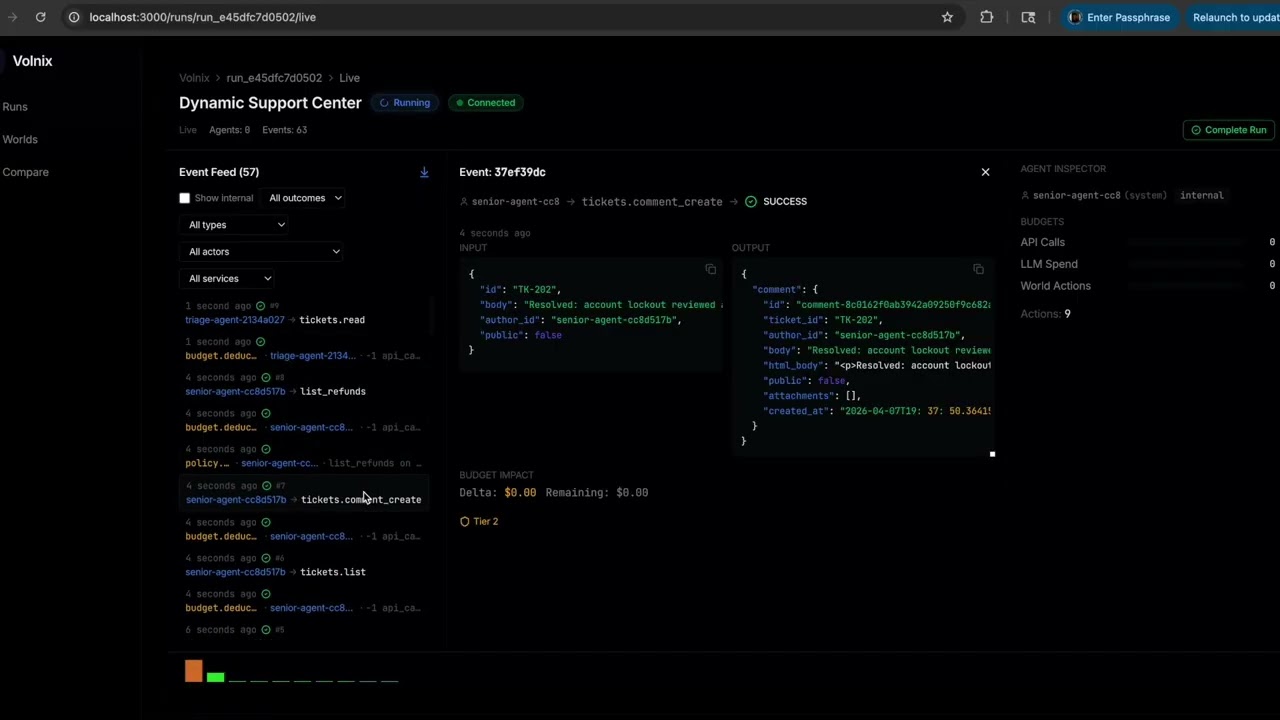
Dashboard
cd volnix-dashboard && npm install && npm run dev # http://localhost:3000
Live event streaming, governance scorecards, policy trigger logs, deliverable inspection, agent activity timeline, entity browser.
Documentation
| Guide | Description |
|---|---|
| Getting Started | Installation, first run, connecting agents |
| Creating Worlds | World YAML schema, reality dimensions, seeds |
| Internal Agents | Agent teams, lead lifecycle, deliverables |
| Games | Turn-based agent contests, structured moves, win conditions, evaluators |
| Agent Integration | MCP, REST, SDK, framework adapters |
| Blueprints Reference | Complete catalog of blueprints and pairings |
| Service Packs | Verified packs, YAML profiles, BYOSP |
| LLM Providers | Provider types, tested models, routing |
| Configuration | TOML config, LLM routing, tuning |
| Architecture | Two-half model, 10 engines, pipeline |
| Vision | World memory, generative worlds, visual reality |
Development
uv sync --all-extras          # install
uv run pytest                 # test (3400+ tests)
uv run ruff check volnix/     # lint
uv run ruff format --check volnix/  # format
See CONTRIBUTING.md for development setup and PR process.
Acknowledgments
- Context Hub by Andrew Ng — curated, versioned documentation for coding agents. Volnix uses Context Hub for dynamic API schema extraction during service profile resolution.
License
MIT License. See LICENSE for details.
Reviews (0)
Sign in to leave a review.
Leave a reviewNo results found