basecamp
Health Warn
- License — License: MIT
- Description — Repository has a description
- Active repo — Last push 0 days ago
- Low visibility — Only 6 GitHub stars
Code Pass
- Code scan — Scanned 2 files during light audit, no dangerous patterns found
Permissions Pass
- Permissions — No dangerous permissions requested
No AI report is available for this listing yet.
A production-ready Claude Code setup. Global CLAUDE.md, coding rules, per-project memory, and token optimization.
basecamp


A production-ready Claude Code setup. Global CLAUDE.md, coding rules, per-project memory, and token optimization.
Quick Start
git clone https://github.com/janmaaarc/basecamp.git
cd basecamp
bash setup.sh ~/Documents/your-vault
Then open ~/.claude/CLAUDE.md, fill in your stack, and follow Setup for tools and plugins.
What This Is
This is the exact setup I use daily. Not a template made for show. A working system built and refined through real projects.
Most Claude Code setups are minimal. This one is not. It covers:
- Global instructions Claude follows on every project
- Karpathy coding principles (think before coding, surgical changes)
- Commit, branch, and PR conventions
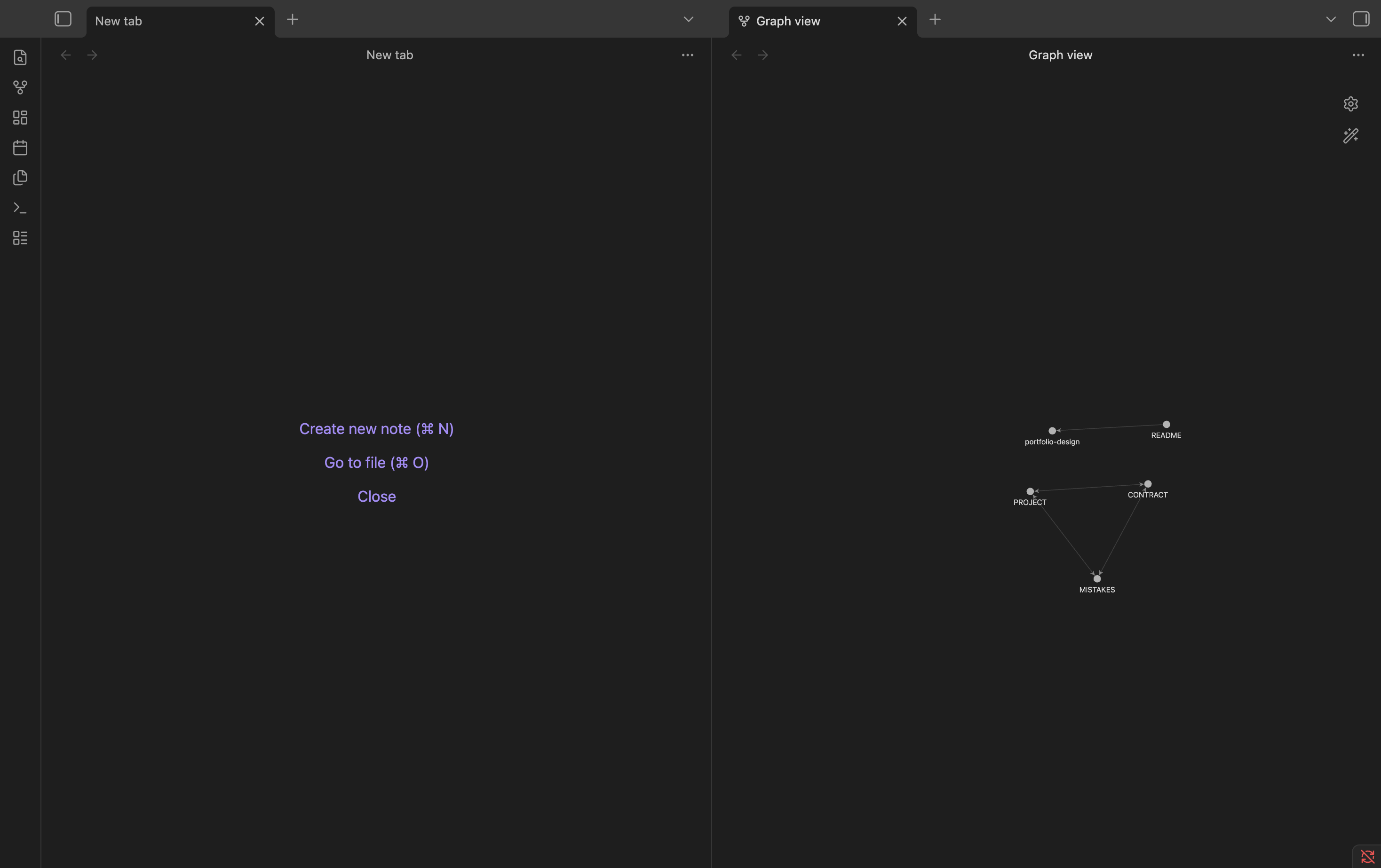
- Per-project memory via Obsidian (PROJECT, MISTAKES, CONTRACT files)
- Token optimization via RTK and Headroom
- Safety hooks (block dangerous commands, scan secrets)
- Persistent memory across sessions via claude-mem
Screenshots
Obsidian graph view (PROJECT, MISTAKES, CONTRACT linked)
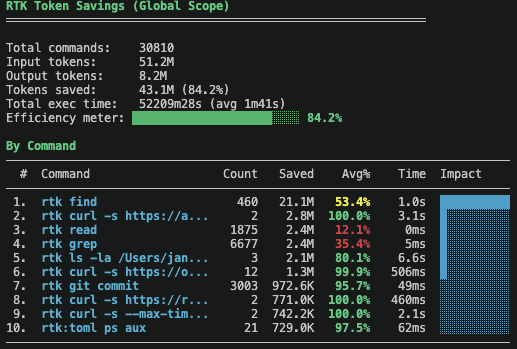
RTK token savings
Video Walkthrough
Coming soon. Full setup walkthrough covering: clone, setup.sh, filling in CLAUDE.md, Obsidian graph view, and token savings demo.
Requirements
- macOS (Linux partially supported, Windows not tested)
- Claude Code
- Obsidian (free, for per-project memory files)
- Homebrew (for RTK)
- Python 3.10+ (for Headroom)
- Node.js 18+ (for claude-mem)
Setup
1. Run setup script
bash setup.sh ~/Documents/your-vault
This copies all files to ~/.claude/ and your Obsidian vault. Or do it manually:
mkdir -p ~/.claude/rules
cp CLAUDE.md ~/.claude/CLAUDE.md
cp RTK.md ~/.claude/RTK.md
cp -r rules/ ~/.claude/rules/
cp -r Templates/ ~/Documents/your-vault/Templates/
2. Update CLAUDE.md
- Open
~/.claude/CLAUDE.mdand fill in your stack, vault path, and defaults - See
CLAUDE.example.mdfor a filled-in reference - Optional: import stack-specific rules with
@rules/typescript.md,@rules/security.md,@rules/web.md,@rules/ai-agents.md,@rules/data.md, or@rules/mobile.md
3. Install tools
RTK (token savings 60-90%):
brew tap rtk-ai/tap && brew trust rtk-ai/tap && brew install rtk
Headroom (context compression):
pip3 install "headroom-ai[proxy]"
headroom install apply
echo 'export ANTHROPIC_BASE_URL=http://127.0.0.1:8787' >> ~/.zshrc
headroom mcp install
claude-mem (persistent memory):
npx claude-mem install
echo '(npx claude-mem start &>/dev/null &)' >> ~/.zshrc
4. Install Claude Code plugins
Core (recommended for everyone):
# ECC — agents, skills, hooks
claude plugin marketplace add affaan-m/ECC
claude plugin install ecc@ecc

# Caveman — terse responses
claude plugin marketplace add JuliusBrussee/caveman
claude plugin install caveman@caveman

# Ponytail — YAGNI coding rules
claude plugin marketplace add DietrichGebert/ponytail
claude plugin install ponytail@ponytail

# Safety hooks — block dangerous commands, scan secrets
claude plugin marketplace add poshan0126/dotclaude
claude plugin install safety-hooks@dotclaude
Optional (install what fits your stack):
# n8n workflow skills
claude plugin marketplace add czlonkowski/n8n-skills
claude plugin install n8n-mcp-skills@n8n-mcp-skills

# PostgreSQL skills
claude plugin marketplace add timescale/pg-aiguide
claude plugin install pg@aiguide

# UI design rules and auditing
claude plugin marketplace add pbakaus/impeccable
claude plugin install impeccable@impeccable
How It Works
Per-Project Memory
Every project gets a folder in your Obsidian vault:
your-vault/
  Projects/
    my-app/
      PROJECT.md     <- what the project is, current status
      MISTAKES.md    <- recurring mistakes to avoid
      CONTRACT.md    <- plan for high-risk changes
  Templates/
    PROJECT.md
    MISTAKES.md
    CONTRACT.md
Claude reads these at session start automatically. Update PROJECT.md at end of each session (max 30 lines, current status only).
High-Risk Changes
For schema migrations, auth changes, major refactors:
- Claude researches first. No implementation yet.
- Claude creates
CONTRACT.mdwith plan, risks, rollback. - Claude asks clarifying questions.
- You approve.
- Claude implements.
- You verify.
Token Optimization
- RTK: Filters noisy bash/git/grep output before it hits Claude. 60-90% token savings on commands.
- Headroom: Compresses tool outputs (file reads, search results) before they reach Claude.
- claude-mem: Injects only relevant past context per session. No full history bloat.
- Caveman and Ponytail: Keeps responses and code minimal.
Tools Used
| Tool | Purpose | Repo | License |
|---|---|---|---|
| RTK | Token-optimized CLI proxy | rtk-ai/rtk | Apache 2.0 |
| Headroom | Context compression proxy | headroomlabs-ai/headroom | Apache 2.0 |
| ECC | Agents, skills, hooks | affaan-m/ECC | MIT |
| Caveman | Terse response mode | JuliusBrussee/caveman | MIT |
| Ponytail | YAGNI coding rules | DietrichGebert/ponytail | MIT |
| claude-mem | Persistent session memory | thedotmack/claude-mem | Apache 2.0 |
| safety-hooks | Block dangerous commands, scan secrets | poshan0126/dotclaude | MIT |
| n8n-mcp-skills | n8n workflow skills (optional) | czlonkowski/n8n-skills | MIT |
| pg-aiguide | PostgreSQL skills (optional) | timescale/pg-aiguide | Apache 2.0 |
| impeccable | UI design rules and auditing (optional) | pbakaus/impeccable | MIT |
Maintenance
# Update plugins
claude plugin marketplace update ecc
claude plugin marketplace update caveman
claude plugin marketplace update ponytail
claude plugin marketplace update dotclaude

# Update tools
brew upgrade rtk
headroom update
npx claude-mem update
FAQ
Do I need Obsidian?
No. The per-project memory system works with any folder. Obsidian just adds graph view and backlinks. Point the vault path in CLAUDE.md to any directory.
Does this work on Windows?
Claude Code itself has limited Windows support. setup.sh requires bash. Linux is mostly supported. macOS is the primary platform.
What if I don't use RTK?
Skip it. Remove the @RTK.md import from CLAUDE.md. The rest of the setup works without it.
Do I need all the plugins?
No. Install what fits your workflow. ECC is the most useful. Caveman and Ponytail change how Claude responds. Safety hooks is optional but recommended.
Can I use this with my stack?
Yes. Fill in Your Defaults in CLAUDE.md and import the relevant rules file: @rules/typescript.md, @rules/web.md, @rules/ai-agents.md, @rules/data.md, @rules/security.md, or @rules/mobile.md.
License
MIT
Reviews (0)
Sign in to leave a review.
Leave a reviewNo results found