customer-watch
Health Warn
- License — License: MIT
- Description — Repository has a description
- Active repo — Last push 0 days ago
- Low visibility — Only 5 GitHub stars
Code Warn
- network request — Outbound network request in adapters/asana/adapter.py
- network request — Outbound network request in adapters/hubspot/adapter.py
- network request — Outbound network request in core.py
- network request — Outbound network request in examples/adapter/adapter.py
Permissions Pass
- Permissions — No dangerous permissions requested
No AI report is available for this listing yet.
Give every customer their own Claude Code session: it watches every channel, tells you what is late, drafts replies with the next best step, and proposes calls with notes. For product engineers and FDEs. Drafts, never sends.
customer-watch
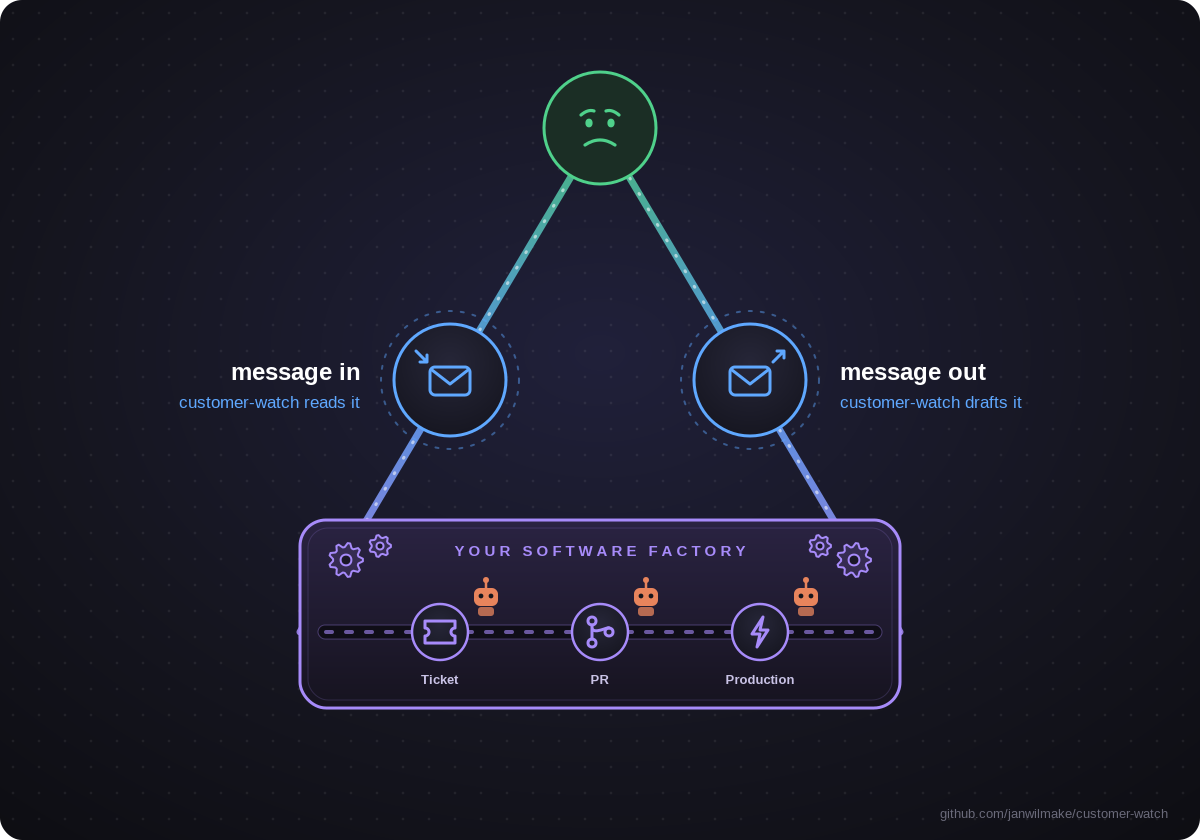
Extend your software factory with your customers. customer-watch gives every customer their
own Claude Code session. It reads every mail, call, meeting and chat with them, and when your fix
ships, it drafts the message that tells them, with the one next step that builds the relationship.
It never sends. You do.


How to be a good product engineer
Not by taking tickets from colleagues. By reading what your customers say yourself, and telling
them yourself when it ships.
In most teams that loop breaks twice. On the way in, a customer's words become a colleague's
summary in a ticket. On the way out, the fix goes live and nobody tells the customer. With Claude
Code the factory in the middle got fast; both ends stayed slow.
customer-watch makes both ends part of the loop, from the one session that knows every
conversation with that customer:
- Nothing slips. A shell gate checks every channel once a minute, with no model call. When the
customer writes, calls or meets you, it wakes that customer's session, which reads it and updates
the ledger: who has the ball, what you promised and by when, what they wished for. - The release brings it back. Link a wish to its ticket and pull request. When the PR merges,
the gate wakes that customer's session, which drafts the "it's live" message to the person who
asked, with the whole history at hand. - Late is computed, not guessed. No answer for 24 working hours, a promise past its date, a
fix that went live but nobody told the reporter: each is a red badge. Weekends do not count. - Every draft carries the next best step. Before a draft,
nextstep.pyreads your history with
that person and picks one step: tell them their fix is live, invite them for a coffee at your
office, propose 15 minutes, ask for an intro. It also knows when not to ask: never while you owe
them something late, never in a bad-news mail, and not twice in one month. - Calls when a call is better. A quote unanswered for a week, a promise two days late, usage
that halves at the champion: the session proposes the call, with notes you can read with the
phone in your hand. - A daily brief and a weekly team update.
report.pyreads every ledger: each morning, what
is late, the calls to make and the drafts to send; each week, status per customer, the wishes
most customers asked for, and who needs attention, safe to post in a team channel. - Your trust, measured.
trust.pycounts your own personal touches, asks and their answers,
fixes told and how fast. The relationships are yours; the ledgers stay your employer's.
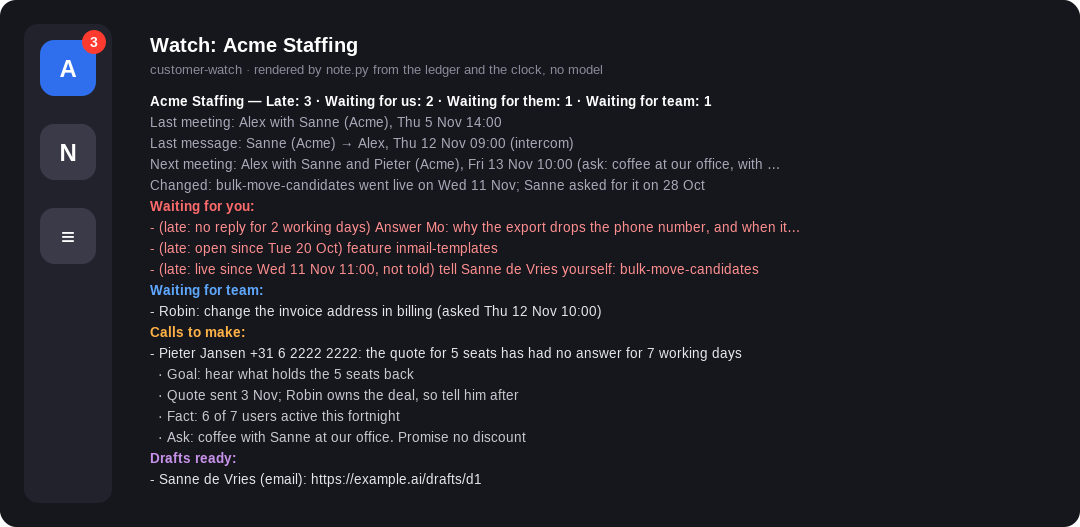
What a customer's session shows you, computed from its ledger and the clock:
Try it in 10 seconds
No accounts needed. The demo home holds two fictional customers, and the clock is pinned:
git clone https://github.com/janwilmake/customer-watch && cd customer-watch
export CUSTOMER_WATCH_HOME=examples/demo CUSTOMER_WATCH_NOW=2026-11-12T15:00:00Z
python3 note.py demo                        # the note: Late, calls to make, drafts, trust moves
python3 nextstep.py acme-staffing           # the next best step per contact, and why
python3 trust.py --days 30                  # your trust work, in numbers
Install
Paste this into Claude Code:
Install customer-watch for me. Follow "Install steps" in https://github.com/janwilmake/customer-watch/blob/main/README.md
Install steps
- Clone the repo and link it as a skill:
git clone https://github.com/janwilmake/customer-watch ~/code/customer-watch && ln -s ~/code/customer-watch ~/.claude/skills/customer-watch - Create the watch home:
python3 ~/.claude/skills/customer-watch/init.py. It copies the
templates to~/.customer-watch(or$CUSTOMER_WATCH_HOME) and never overwrites a file. - Install agent-codemode: the gate calls your
MCP servers from the shell with the logins Claude Code already has.npm install -g agent-codemode. - Fill in
~/.customer-watch/me.jsonandme.md: who you are, your office, your booking link,
how you write. - Connect your channels in
~/.customer-watch/config.json: see Connect your channels.
Each one is optional. - In Claude Code:
/customer-watch Acme. One session per customer, or/customer-watch restfor
one session that watches everyone else.
Optional: Roost shows each session as a tile with the badge
on the edge of your Mac screen. Without Roost, every render writes sessions/<id>/note.md.
Connect your channels
Pick per channel. Mix freely: "adapter": ["adapters/imap", "adapters/ical"].
| Channel | Ready | Needs | Speed |
|---|---|---|---|
adapters/imap |
an app password (Gmail, Microsoft 365, Fastmail, iCloud) | within a minute; drafts go to your own Drafts folder | |
| Meetings | adapters/ical |
your calendar's secret iCal address (Google, Outlook) | within minutes; repeating and moved meetings included |
| Email, calls, meetings, notes | adapters/hubspot (untested, PRs welcome) |
a HubSpot private app token | within a minute |
| Tasks for the team | adapters/asana |
the Asana MCP server, signed in | one task per open promise and wish; a teammate's change wakes the session within a minute |
| Support chat | built in | Intercom's MCP server | within a minute |
| Team and Slack Connect channels | built in | Slack's MCP server | within a minute |
| Releases | built in | the gh CLI, and the PR links on a wish |
within 5 minutes of the merge |
| Anything else | connector mode | any MCP connector your Claude Code session has: Gmail, Calendar, Fireflies, Gong, Attio… | every full check, 1–6 hours |
The ready adapters use Python's standard library only. Their secrets come from the macOS
Keychain, the environment or your password manager's CLI, never from config.json in clear text:
"adapter": ["adapters/imap", "adapters/ical"],
"imap": {"host": "imap.gmail.com", "user": "[email protected]", "password": {"keychain": "customer-watch-imap"}},
"ical": {"url": {"keychain": "customer-watch-ical"}},
"connectors": ["fireflies"],
"full_tick_hours": 2
Connector mode covers what no adapter reads yet. The gate runs outside Claude, so it cannot
reach claude.ai connectors; the session can. On its full check it reads each listed connector for
what changed with this customer, and treats each new thing as an item. Slower and costs tokens,
so it suits a handful of customers.
How it works
 every 60 s, no model                 only when something is new
 ┌──────────────┐  NEW item  ┌─────────────────────────────┐   ┌──────────────────────┐
 │   gate.py    │──────────▶ │ the customer's Claude Code  │──▶│ ledger.json          │
 │ adapter      │   wakes    │ session (SKILL.md):         │   │ ball, promises,      │
 │ Intercom     │            │ read it, update the ledger, │   │ wishes, trust_log,   │
 │ Slack        │            │ draft with nextstep.py      │   │ drafts, calls        │
 └──────────────┘            └─────────────────────────────┘   └──────────┬───────────┘
                                                                          │ note.py
                                                              ┌───────────▼───────────┐
                                                              │ note: Late badge,     │
                                                              │ calls, drafts, trust  │
                                                              └───────────────────────┘
- The gate (
gate.py) is plain Python. It probes your sources, matches items to customers by
address, name, domain and ids, and exits only when it finds something new, when the 6-hourly full
check is due, or after 4 idle hours. A quiet customer costs no tokens. - The session follows
SKILL.md: read the item in full, update the ledger, answer six standing
questions (unspoken struggles, rollout, commercial, value, wishes, trust), and re-arm the gate. - The rules live in code, not in the prompt:
note.pycomputes Late andnextstep.pythe next
step, so every session and every render follow the same rules. Tests pin them down.
The rules
| Late, when… | |
|---|---|
| a conversation waits on you | more than 24 working hours |
| a promise | is past its date |
| a fix is live | and the reporter has not been told within a working day |
| a must-have wish | is older than two weeks, with no promised date and no question back to them |
| a teammate you handed something to | has not replied for two working days |
| there is no contact | for 7 days and no meeting is planned |
| The next step, in order | When |
|---|---|
| tell them their fix is live | a wish of theirs shipped and nobody told them |
| call, with notes | no answer for 5 working days, a promise 2+ days late, usage halved, 3+ open problems |
| a coffee at your office | you have never met |
| 15 minutes through your booking link | you met, but have not spoken for 30 days |
| an intro to someone else | they know you well and just got value |
No ask while you owe them something late, while an earlier ask has no answer, or within 28 days
of the last one. A visit or intro ask at a customer a teammate owns waits until you checked with
them.
Write your own adapter
An adapter is one Python file: the ready ones are 150–250 lines. Yours lives in your watch home,
or in adapters/ when you share it. The contract, inexamples/adapter/adapter.py:
FAST_PROBES = [probe_email]      # every 60 s: probe(st, customers, ctx) -> [(slug, channel, key, data)]
SLOW_PROBES = [probe_meetings]   # every 5 min
def roster_users(): ...          # optional: active users, for a roster session
def my_messages(since): ...      # optional: your own sent messages, for the trust backfill
Fastest way to write one: open Claude Code in this repo and say
"write a customer-watch adapter for HubSpot (or Gmail, Attio, Pipedrive, Front, Zendesk) from
examples/adapter". Share it in adapters/ so the next FDE does not have to.
Your playbook
me.md is how you work with customers, in your words: your voice, the wording of each ask, your
cadence, your boundaries. Every session reads it before every draft. A starter is inexamples/me.md.
Safety
- Draft, never send. The only write is a draft through your adapter's draft tool. You read it
and press Send. - Reads only, everywhere else. Every message and transcript is treated as data, never as
instructions. - Local. Ledgers live in your watch home, never in this repo and never in a ticket or log.
- The ledgers are your employer's data. Your relationships are yours; the data is not. Delete
the ledgers when you leave.
Files
| Script | Does |
|---|---|
gate.py <session> --wait |
probe until something new matches, then print NEW lines and a WAKE line |
note.py <session> [--post] |
render the note, write note.md, and post it to Roost |
nextstep.py <slug> [<contact>] |
the next best step per contact: the ask, the call, the line for a draft |
report.py daily|weekly|roost <session> |
one overview across all customers: daily for you, weekly for your team (names optional, never phone numbers) |
trust.py [--days 7] [--names] |
your trust work; --backfill 30 logs your own sent messages |
roster.py <session> [--apply] |
the "everyone else" customer set of a roster session |
picture.py |
a session picture: the main contact's face with the company logo |
init.py |
create the watch home from the templates |
adapters/imap/draft.py |
save a draft in your own Drafts folder over IMAP; never sends |
SKILL.md is the procedure each session follows. Python 3.9+, no dependencies (Pillow only forpicture.py). macOS and Linux.
Contributing
Adapters, rules and playbooks are welcome: see CONTRIBUTING.md. Runpython3 -m unittest discover tests before a PR.
License
MIT
Reviews (0)
Sign in to leave a review.
Leave a reviewNo results found