claude-delegator
Health Pass
- License — License: MIT
- Description — Repository has a description
- Active repo — Last push 21 days ago
- Community trust — 928 GitHub stars
Code Fail
- execSync — Synchronous shell command execution in server/gemini/index.js
- process.env — Environment variable access in server/gemini/index.js
Permissions Pass
- Permissions — No dangerous permissions requested
No AI report is available for this listing yet.
Delegate tasks to Codex and Gemini directly from within Claude Code.
Claude Delegator
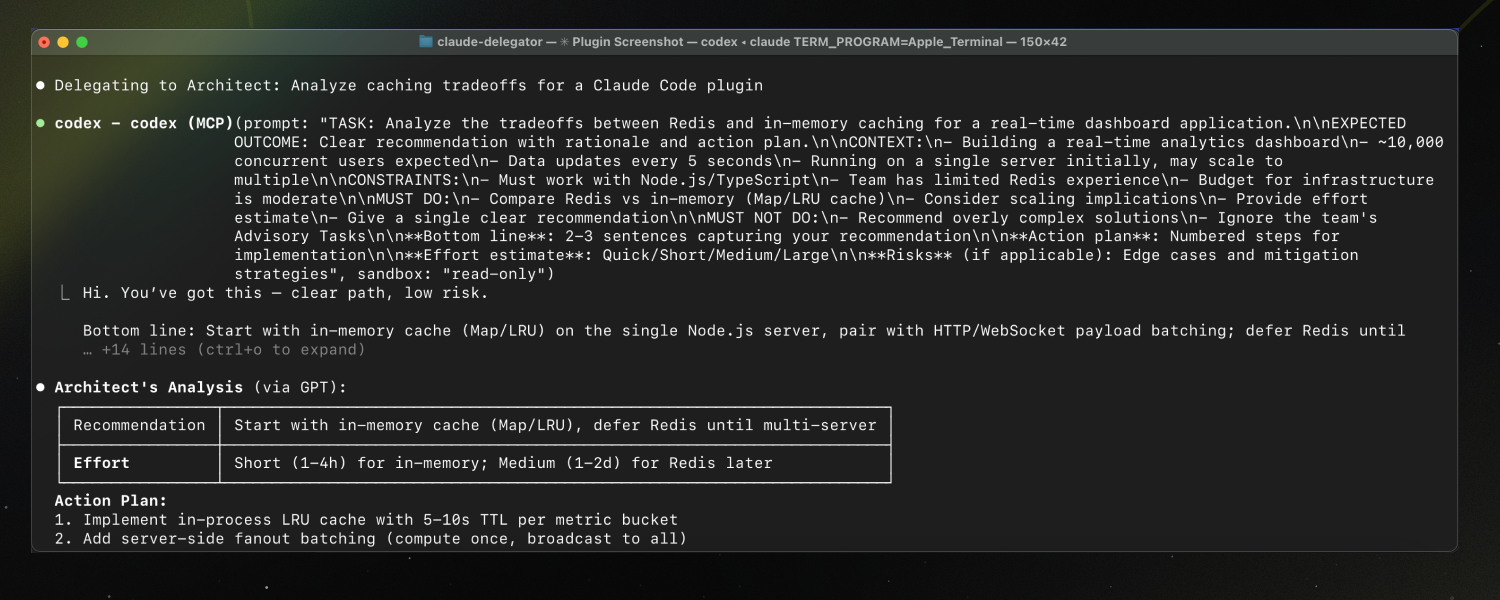
GPT expert subagents for Claude Code. Five specialists that can analyze AND implement—architecture, security, code review, and more.


Install
Inside a Claude Code instance, run the following commands:
Step 1: Add the marketplace
/plugin marketplace add jarrodwatts/claude-delegator
Step 2: Install the plugin
/plugin install claude-delegator
Step 3: Run setup
/claude-delegator:setup
Done! Claude now routes complex tasks to GPT experts automatically.
Note: Requires Codex CLI or Gemini CLI. Setup guides you through installation.
What is Claude Delegator?
Claude gains a team of GPT and Gemini specialists via native MCP. Each expert has a distinct specialty and can advise OR implement.
Note: You can use either provider (GPT or Gemini), or both. The plugin will automatically detect which one is configured and route tasks accordingly.
| What You Get | Why It Matters |
|---|---|
| 5 domain experts | Right specialist for each problem type |
| GPT or Gemini | Use your preferred model provider |
| Dual mode | Experts can analyze (read-only) or implement (write) |
| Auto-routing | Claude detects when to delegate based on your request |
| Synthesized responses | Claude interprets expert output, never raw passthrough |
The Experts
| Expert | What They Do | Example Triggers |
|---|---|---|
| Architect | System design, tradeoffs, complex debugging | "How should I structure this?" / "What are the tradeoffs?" |
| Plan Reviewer | Validate plans before you start | "Review this migration plan" / "Is this approach sound?" |
| Scope Analyst | Catch ambiguities early | "What am I missing?" / "Clarify the scope" |
| Code Reviewer | Find bugs, improve quality | "Review this PR" / "What's wrong with this?" |
| Security Analyst | Vulnerabilities, threat modeling | "Is this secure?" / "Harden this endpoint" |
When Experts Help Most
- Architecture decisions — "Should I use Redis or in-memory caching?"
- Stuck debugging — After 2+ failed attempts, get a fresh perspective
- Pre-implementation — Validate your plan before writing code
- Security concerns — "Is this auth flow safe?"
- Code quality — Get a second opinion on your implementation
When NOT to Use Experts
- Simple file operations (Claude handles these directly)
- First attempt at any fix (try yourself first)
- Trivial questions (no need to delegate)
How It Works
You: "Is this authentication flow secure?"
                    ↓
Claude: [Detects security question → selects Security Analyst]
                    ↓
        ┌───────────────────────────────┐
        │  mcp__codex__codex            │
        │  (or mcp__gemini__gemini)     │
        │  → Security Analyst prompt    │
        │  → Expert analyzes your code  │
        └───────────────────────────────┘
                    ↓
Claude: "Based on the analysis, I found 3 issues..."
        [Synthesizes response, applies judgment]
Key details:
- Each expert has a specialized system prompt (in
prompts/) - Claude reads your request → picks the right expert → delegates via MCP (GPT or Gemini)
- Responses are synthesized, not passed through raw
- Experts can retry up to 3 times before escalating
- Multi-turn conversations preserve context via
threadIdfor chained tasks
Multi-Turn Conversations
For chained implementation steps, the expert preserves context across turns:
Turn 1: mcp__*__* → returns threadId
Turn 2: mcp__*__*-reply(threadId) → expert remembers turn 1
Turn 3: mcp__*__*-reply(threadId) → expert remembers turns 1-2
Use single-shot (codex or gemini only) for advisory tasks. Use multi-turn for implementation chains and retries.
Configuration
Operating Modes
Every expert supports two modes based on the task:
| Mode | Sandbox | Use When |
|---|---|---|
| Advisory | read-only |
Analysis, recommendations, reviews |
| Implementation | workspace-write |
Making changes, fixing issues |
Claude automatically selects the mode based on your request.
Configuration Defaults
Set global defaults in ~/.codex/config.toml instead of passing parameters on every call:
sandbox_mode = "workspace-write"
approval_policy = "on-failure"
Per-call parameters override these defaults. See Codex CLI docs for all config options.
Manual MCP Setup
If /setup doesn't work, register the MCP server(s) manually:
# For Codex (GPT)
# Idempotent: safe to rerun
claude mcp remove codex >/dev/null 2>&1 || true
claude mcp add --transport stdio --scope user codex -- codex -m gpt-5.3-codex mcp-server

# For Gemini
# Idempotent: safe to rerun
claude mcp remove gemini >/dev/null 2>&1 || true
claude mcp add --transport stdio --scope user gemini -- node ${CLAUDE_PLUGIN_ROOT}/server/gemini/index.js
Verify with:
claude mcp list
printf '{"jsonrpc":"2.0","id":"health","method":"initialize","params":{}}\n' | node ${CLAUDE_PLUGIN_ROOT}/server/gemini/index.js
Customizing Expert Prompts
Expert prompts live in prompts/. Each follows the same structure:
- Role definition and context
- Advisory vs Implementation modes
- Response format guidelines
- When to invoke / when NOT to invoke
Edit these to customize expert behavior for your workflow.
Requirements
You need at least one of the following providers configured:
- Codex CLI (for GPT):
npm install -g @openai/codex - Gemini CLI (for Gemini):
npm install -g @google/gemini-cli
Authentication:
- Codex: run
codex login - Gemini: run
geminionce and complete the sign-in flow (or setGOOGLE_API_KEY)
Commands
| Command | Description |
|---|---|
/claude-delegator:setup |
Configure MCP server and install rules |
/claude-delegator:uninstall |
Remove MCP config and rules |
Troubleshooting
| Issue | Solution |
|---|---|
| MCP server not found | Restart Claude Code after setup |
| Provider not authenticated | Codex: run codex login. Gemini: run gemini once to complete sign-in (or set GOOGLE_API_KEY) |
| Tool not appearing | Run claude mcp list and verify registration |
| Expert not triggered | Try explicit: "Ask GPT to review..." or "Ask Gemini to review..." |
Development
git clone https://github.com/jarrodwatts/claude-delegator
cd claude-delegator

# Test locally without reinstalling
claude --plugin-dir /path/to/claude-delegator
See CONTRIBUTING.md for guidelines.
Acknowledgments
Expert prompts adapted from oh-my-opencode by @code-yeongyu.
License
MIT — see LICENSE
Star History
Reviews (0)
Sign in to leave a review.
Leave a reviewNo results found