unityctl
Health Pass
- License — License: MIT
- Description — Repository has a description
- Active repo — Last push 0 days ago
- Community trust — 19 GitHub stars
Code Warn
- fs module — File system access in ralph/competitor-analysis/calc.js
- fs module — File system access in ralph/competitor-analysis/calc_all.js
Permissions Pass
- Permissions — No dangerous permissions requested
No AI report is available for this listing yet.
Unity control plane for AI agents — 178 CLI commands, 12 MCP tools, headless CI/CD, undo rollback, and closed-loop verification.
unityctl



The execution layer for AI-driven game development.
Give your AI agent 179 commands to build Unity scenes, write C# scripts, validate builds, and ship games — with automatic rollback when things go wrong.
179 CLI commands · 12 MCP tools · 961 PR .NET tests · Windows / macOS / Linux
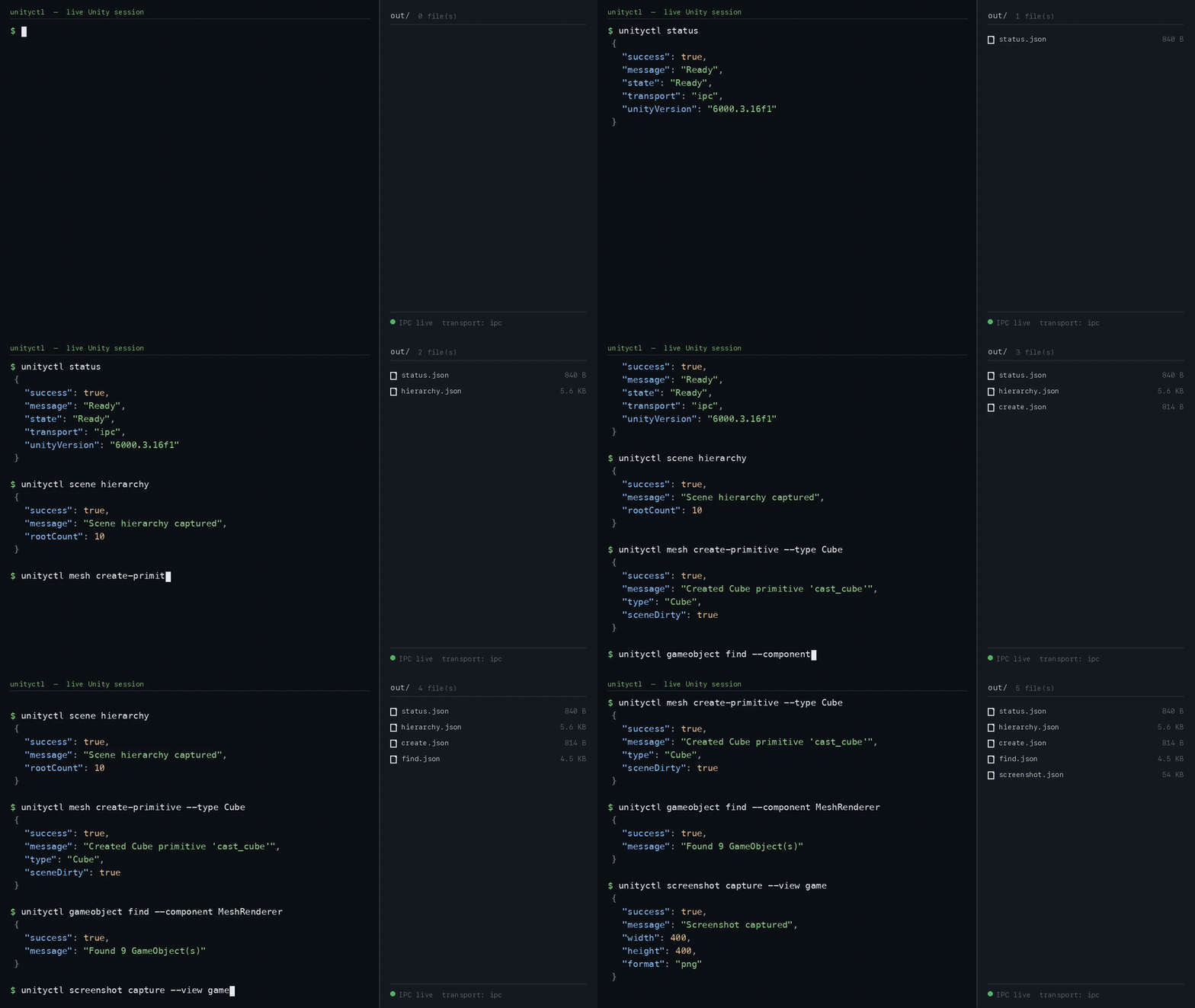
Unrehearsed session against a live Unity 6000.3.16f1 Editor — every command answers in structured JSON and drops an artifact in out/.
Benchmarked head-to-head against the official Unity CLI (1.0.0-beta.2 + com.unity.pipeline) on the same editor session — faster round-trips, smaller responses, and every measured gap absorbed the same day. See the benchmark.
| Measured (same editor, same tasks) | unityctl v0.6.0 | Official Unity CLI |
|---|---|---|
| Scene hierarchy read | 286 ms / 919 B | 617 ms / 1,602 B |
| Play enter → console → stop | 965 ms | 2,588 ms |
| Multi-statement C# eval | 1,755 ms (opt-in gate) | 2,634 ms (always on) |
| Domain-reload survival (unattended) | 313–516 ms | 739 ms |
| Unattended test run | 1 passed (4.2 s) | false success — 0 tests ran |
| Wrong arguments | explicit failure + candidate list | silently ignored, returns success |
| Screenshot with no camera in scene | captures the view | fails |
Quality gates: every PR runs the .NET Shared/Core/Cli/Mcp test suites on Windows, macOS, and Linux. Unity Editor-dependent validation is separated into the Unity Integration workflow, with init, sample-project doctor, check, scene hierarchy, player-settings set/get, and workflow verify evidence uploaded from nightly/manual runs. Unity Integration requires either a UNITY_LICENSE or UNITY_SERIAL GitHub secret.
Contributors: see CONTRIBUTING.md for the test trust checklist, flaky-test policy, command sync checklist, and Unity live-validation split.
The Problem
AI agents can write code, but they can't build games — because Unity has no programmatic interface for scene editing, asset management, or project validation.
Existing Unity MCP servers try to fix this, but they create new problems for AI agents:
| Pain Point | Impact on AI Agent |
|---|---|
| 45 KB+ schemas loaded every turn | Wastes tokens on tool definitions instead of reasoning |
| No validation feedback | Agent can't tell if the scene is broken after changes |
| No rollback | One bad command corrupts the project state |
| WebSocket drops on Play Mode | Agent loses connection during Unity's Domain Reload |
| Editor must be open | CI/CD pipelines can't run without a GUI |
The Solution
unityctl is a .NET CLI + MCP server that turns Unity Editor into a programmable API.
For AI agents, this means a closed-loop automation cycle — the agent doesn't just execute commands, it can verify results, diagnose failures, and recover from mistakes:
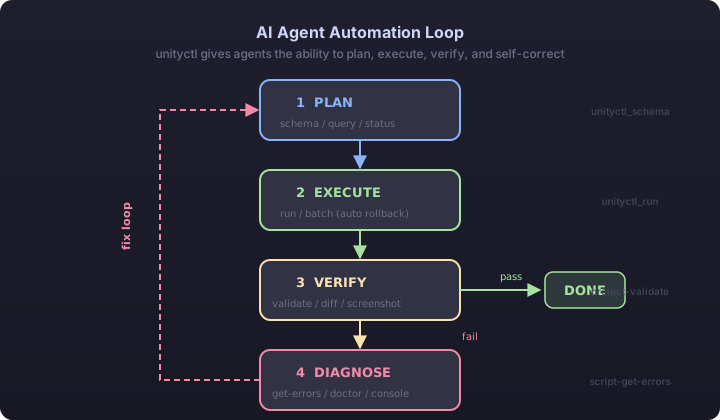
Other tools give agents hands. unityctl gives agents hands, eyes, and a safety net.
Why unityctl for AI Agents?
| unityctl | Existing Unity MCP | |
|---|---|---|
| Schema overhead | 5 KB per session (9x smaller) | 45 KB+ loaded every turn |
| Validation loop | project validate + scene diff + screenshot capture |
Agent flies blind |
| Error recovery | script get-errors with file/line/column |
Raw console output or nothing |
| Safe experimentation | batch execute --rollbackOnFailure + undo |
No rollback — mistakes are permanent |
| Connection stability | Named Pipe — survives Domain Reload | WebSocket drops, reconnect needed |
| CI/CD | check / test / build --dry-run work headless |
Editor must be open |
| Diagnostics | doctor classifies failures + suggests next steps |
"Connection failed" |
| Commands | 179 (read + write + validate + diagnose) | ~34-200 tools |
| Audit trail | NDJSON flight recorder for every command | No history |
| Runtime | Native .NET — no Python/TS bridge | Bridge overhead |
| Install | dotnet tool install -g unityctl |
Node.js + npm + port config |
| License | MIT | Varies |
Token Efficiency
AI agent costs are dominated by tool schemas sent every turn. unityctl uses on-demand schema loading:
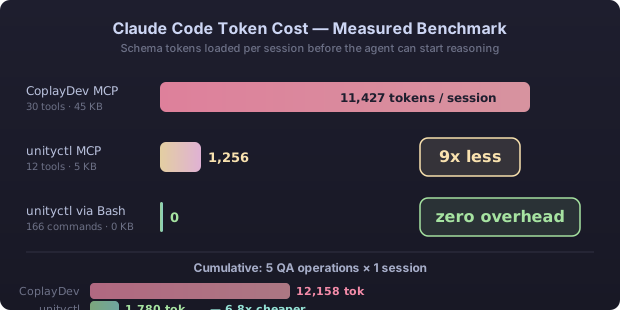
The CLI exposes 179 entry points, including convenience wrappers. The 12 MCP
tools keep prompts small by loading 171 canonical command schemas on demand
through unityctl_query, unityctl_run, and unityctl_schema.
Install
Standalone binary — no .NET SDK required (recommended):
# macOS (Apple Silicon) — swap in unityctl-osx-x64 / unityctl-linux-x64 as needed
curl -L https://github.com/Jason-hub-star/unityctl/releases/latest/download/unityctl-osx-arm64.tar.gz | tar xz
./unityctl --version
Windows: download unityctl-win-x64.zip from Releases and unzip.
Each archive contains a self-contained unityctl + unityctl-mcp executable and the embedded Unity plugin template.
Or via .NET tool (requires .NET 10 SDK):
dotnet tool install -g unityctl
dotnet tool install -g unityctl-mcp
Optional agent workflow skill for Claude Code and Codex:
npx skills add Jason-hub-star/unityctl \
  --skill unityctl-workflows \
  -a claude-code -a codex
The skill teaches agents to discover the live command surface, target the right
Unity project, and close every edit with structured readback and verification.
Bootstrap notes:
--sourceaccepts a localUnityctl.Pluginfolder or a Git URL:https://github.com/Jason-hub-star/unityctl.git?path=/src/Unityctl.Plugin#v0.6.4
Quick Start
# 1. Install the Editor plugin
unityctl init --project /path/to/project \
  --source "https://github.com/Jason-hub-star/unityctl.git?path=/src/Unityctl.Plugin#v0.6.4"

# 2. Open the project in Unity Editor, then verify connectivity
unityctl ping --project /path/to/project --json
unityctl status --project /path/to/project --json

# 3. Start building
unityctl gameobject create --name "Player" --project /path/to/project
unityctl component add --id "<PlayerId>" --type "Rigidbody" --project /path/to/project
unityctl scene save --project /path/to/project

# 4. Validate
unityctl project validate --project /path/to/project --json

# 5. Build
unityctl build --project /path/to/project --dry-run    # 13 preflight checks
MCP Setup (AI Agents)
One command per client — it merges into the existing config instead of replacing it:
unityctl mcp install --client claude-code            # or cursor / codex
unityctl mcp install --client vscode --project .     # VS Code is workspace-scoped
unityctl mcp install --client cursor --dry-run       # preview, writes nothing
Or add it by hand:
{
  "mcpServers": {
    "unityctl": {
      "command": "unityctl-mcp"
    }
  }
}
Documentation
- Command Reference — all 179 CLI commands and the 12 MCP tools
- README Appendix — worked examples, architecture, platform support
- Getting Started — installation, setup, and common workflows
- AI Agent Quickstart — MCP setup and agent integration guide
- Showcase Roadmap — recommended demo game ladder, asset checklist, and pre-production plan
- Architecture — system design and transport diagrams
- Glossary — key terms and concepts
Changelog
See GitHub Releases for version history.
License
MIT — see LICENSE
Reviews (0)
Sign in to leave a review.
Leave a reviewNo results found