netbox-service-canvas
Health Warn
- License — License: Apache-2.0
- Description — Repository has a description
- Active repo — Last push 0 days ago
- Low visibility — Only 8 GitHub stars
Code Pass
- Code scan — Scanned 12 files during light audit, no dangerous patterns found
Permissions Pass
- Permissions — No dangerous permissions requested
No AI report is available for this listing yet.
Interactive service map for NetBox: which services run where, how they talk, and what breaks if a host fails.
🗺️ NetBox Service Canvas
A NetBox plugin that shows on an interactive canvas which services run where, how they talk to each other and what
breaks if a host fails.






Installation · How it works · Features ·
Permissions · Wiki ·
Deutsch
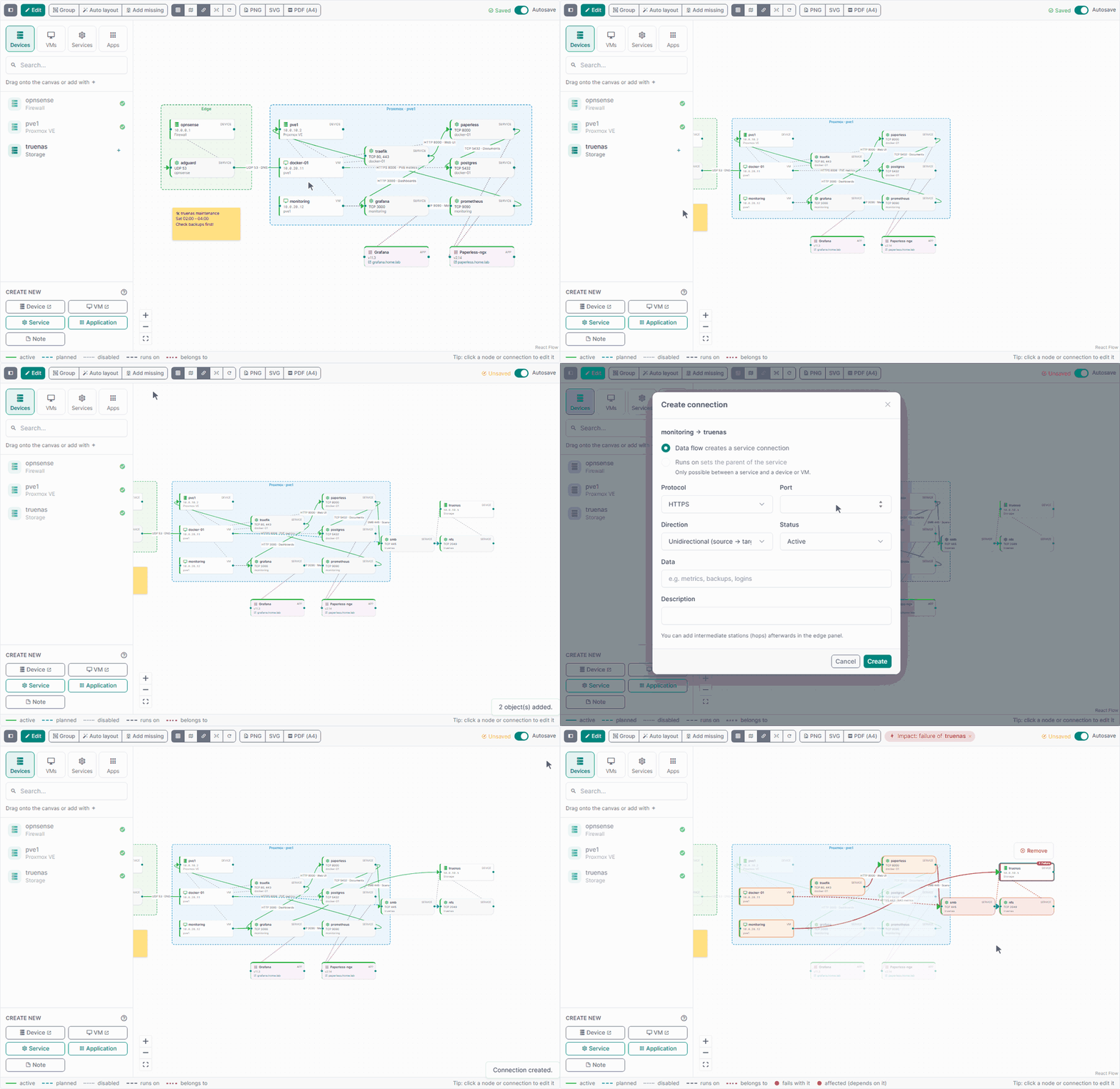
Drag a host in, let Add missing pull in its services, draw a connection, then check what breaks if it fails.
Installation
Requirements: NetBox 4.5.x and Python 3.12 or newer.
[!WARNING]
The plugin declares support for NetBox 4.5 only. On a newer minor version (for example 4.6) the whole of NetBox
refuses to start while the plugin is enabled. Before upgrading NetBox, check the
releases for a matching plugin version, or
removenetbox_service_canvasfromPLUGINSfirst.
netbox-docker
All files below are in your netbox-docker folder, next to docker-compose.yml. If you have never installed a plugin
there, read No plugins installed yet? first.
Open
plugin_requirements.txt(for example withnano plugin_requirements.txt) and add this line. It goes into
the file, not into the terminal:netbox-service-canvasOpen
Dockerfile-Pluginsand make sure it ends with this line. It copies the editor's JavaScript and CSS into
NetBox while the image is built:RUN DEBUG="true" SECRET_KEY="dummydummydummydummydummydummydummydummydummydummy" /opt/netbox/venv/bin/python /opt/netbox/netbox/manage.py collectstatic --no-inputOpen
configuration/plugins.pyand add"netbox_service_canvas"to the existingPLUGINSlist. Add it to the
list, do not replace the list. If you use netbox-branching,netbox_branchingmust stay the last entry:PLUGINS = [ # ... your other plugins ... "netbox_service_canvas", ]Rebuild the image and restart. Database migrations run automatically when the container starts:
docker compose build --no-cache
docker compose up -d
Check: the menu shows Plugins → Service Canvas. Create a canvas and open its Editor tab. If the editor stays at
"Loading canvas…", see Troubleshooting.
No plugins installed yet?
netbox-docker needs three files to install plugins. The official guide is
Using NetBox Plugins. For this plugin
alone, the files look like this:
plugin_requirements.txt
netbox-service-canvas
Dockerfile-Plugins (use the same image tag as in your docker-compose.yml)
FROM netboxcommunity/netbox:v4.5

COPY ./plugin_requirements.txt /opt/netbox/
RUN /usr/local/bin/uv pip install -r /opt/netbox/plugin_requirements.txt

RUN DEBUG="true" SECRET_KEY="dummydummydummydummydummydummydummydummydummydummy" /opt/netbox/venv/bin/python /opt/netbox/netbox/manage.py collectstatic --no-input
docker-compose.override.yml (if the file already exists, add the image, pull_policy and build lines and keep
your other settings, for example ports)
services:
  netbox:
    image: netbox:latest-plugins
    pull_policy: never
    build:
      context: .
      dockerfile: Dockerfile-Plugins
  netbox-worker:
    image: netbox:latest-plugins
    pull_policy: never
Then continue with step 3 above.
Plain install (without Docker)
Run these commands as the user that owns the NetBox installation (usually with sudo):
source /opt/netbox/venv/bin/activate
pip install netbox-service-canvas
echo netbox-service-canvas >> /opt/netbox/local_requirements.txt   # keeps the plugin across NetBox upgrades
Open /opt/netbox/netbox/netbox/configuration.py and add "netbox_service_canvas" to the existing PLUGINS list.
Then:
cd /opt/netbox/netbox
python manage.py migrate
python manage.py collectstatic --no-input
sudo systemctl restart netbox netbox-rq
Check as in step 5 above.
Configuration (optional)
The plugin works without any settings. If you want a different grid, add this to PLUGINS_CONFIG (next to your
existing entries):
PLUGINS_CONFIG = {
    "netbox_service_canvas": {
        "grid_size": 10,   # grid in pixels, default 10
    },
}
Update
Make a database backup first. With netbox-docker, run docker compose build --no-cache and docker compose up -d
again; this installs the newest release (or the version you pinned in plugin_requirements.txt). With a plain
install, run pip install --upgrade netbox-service-canvas and repeat migrate, collectstatic and the restart.
Then reload the editor once with Ctrl+F5.
Uninstall
[!CAUTION]
The first step deletes all canvases, connections, hops and applications of this plugin. Make a database backup
first. Devices, VMs and services in NetBox are not touched.
- Remove the plugin's tables while the plugin is still installed:
docker compose exec netbox /opt/netbox/netbox/manage.py migrate netbox_service_canvas zero
(plain install:python manage.py migrate netbox_service_canvas zero). - Remove
netbox_service_canvasfromPLUGINSandPLUGINS_CONFIG, and the line fromplugin_requirements.txt
orlocal_requirements.txt. - Rebuild and restart (netbox-docker) or
pip uninstall netbox-service-canvasand restart (plain install). - Optional: delete the leftover static files. In netbox-docker this needs root:
docker compose exec -u root netbox rm -rf /opt/netbox/netbox/static/netbox_service_canvas
A German step-by-step guide with backup and restore is in
docs/install-netbox-docker.md.
Troubleshooting
| Symptom | Cause and fix |
|---|---|
The editor stays at "Loading canvas…". The browser console shows a 404 for canvas.js or "MIME type ("") blocked". collectstatic fails with PermissionError. |
The static files were not collected. Add the collectstatic line to Dockerfile-Plugins (step 2) and rebuild. To run it by hand in netbox-docker, run it as root: docker compose exec -u root netbox /opt/netbox/netbox/manage.py collectstatic --no-input. Then reload with Ctrl+F5. |
NetBox does not start: ImproperlyConfigured … requires NetBox … |
The NetBox version is not 4.5.x. See the warning above. |
ModuleNotFoundError: No module named 'netbox_service_canvas' |
The image was not rebuilt, or the package line is missing from plugin_requirements.txt. |
| 403 when saving | The user lacks a permission. The editor names the missing one. See Permissions. |
How it works
- Go to Plugins → Service Canvas → Canvases → Add and give the canvas a name, for example Homelab.
- Open the Editor tab.
- Drag devices and VMs from the sidebar onto the canvas, then click Add missing to pull in their services.
- Drag from the dot on the right of a node to another node to create a connection.
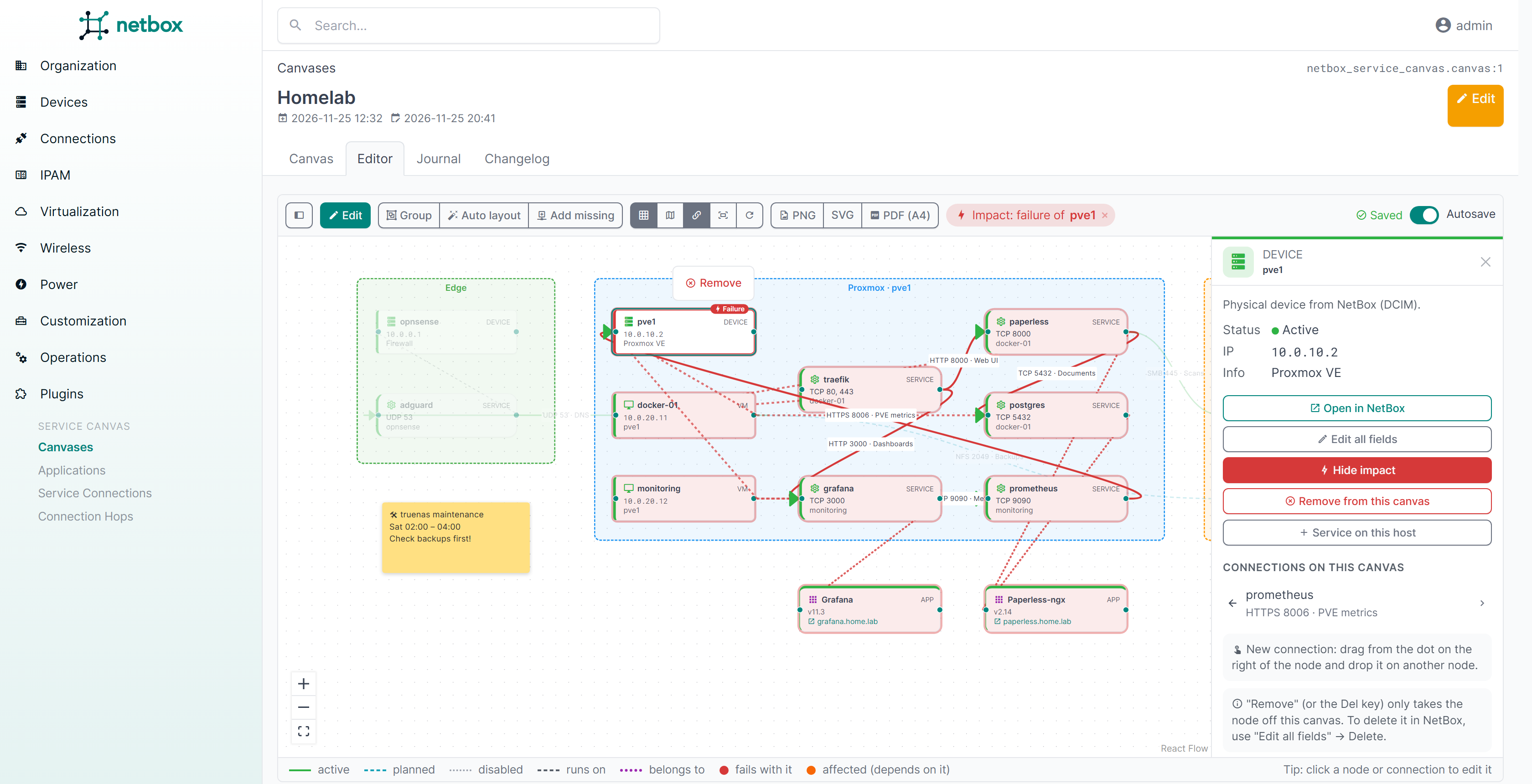
- Click a node or a connection to edit it. Impact analysis in the node panel shows what depends on the node.
- Export the canvas as PNG, SVG or an A4 PDF.
Relationships are stored as normal NetBox data, the canvas only stores the layout. The same object can appear on
several canvases. If an object is deleted in NetBox, it disappears from every canvas.
Features
- Applications: a new NetBox object for software made of one or more services, for example Grafana, with status,
version and URL. - Connections between services, devices, VMs and applications, with direction, protocol, port, a description of
the data and status. Each connection can have hops: intermediate stations such as a reverse proxy, VLAN or
tunnel. - Canvas editor: drag and drop from a searchable sidebar, groups, sticky notes, automatic layout, minimap and
autosave. - Impact analysis: shows what fails together with a host and what depends on it.
- Export as PNG, SVG or a printable A4 PDF with title, date and legend.
- Integrated into NetBox: lists, filters, CSV import, search, REST API, GraphQL and change log for all objects.
Device, VM, service and application pages get a Connections tab and a Show on canvas button. - Follows NetBox: permissions, light and dark theme, English or German depending on the NetBox language.
- Works offline: no CDNs, no external requests. The frontend is bundled with the plugin.
More details and screenshots are in the wiki.
 |
 |
Impact analysis: what breaks if truenas goes down? |
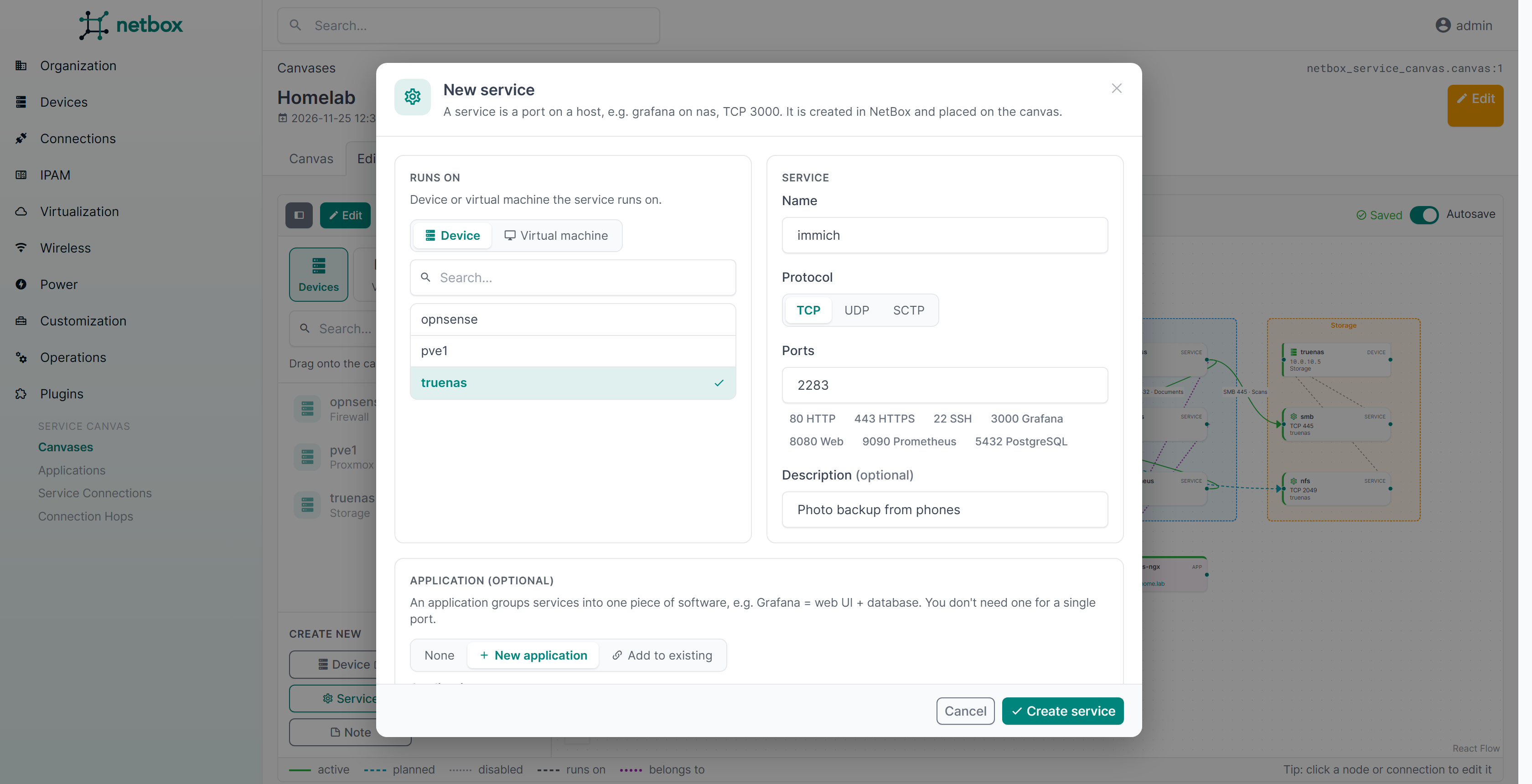
New service with an optional application, in one dialog |
Screenshots show a demo homelab.
Service vs. Application (in one sentence each)
- Service (NetBox core) = where something listens: one port on one host, for example
grafana · TCP 3000 · nas. - Application (this plugin) = what it is: the software, optionally spanning several services and hosts, for
exampleGrafana.
For a simple one-port app a service is enough. When you create a service in the editor, you can create or link the
application in the same dialog.
Permissions
| Action | Required permission |
|---|---|
| View a canvas | view on canvas (objects and connections only as far as you may view them) |
| Move, add, remove nodes | change on the canvas + add/change/delete on canvas node |
| Groups / notes | additionally add/change/delete on canvas group / canvas note |
| Create / edit / delete connections | add/change/delete on service connection |
| Hops | add/change/delete on connection hop |
| New service, "runs on", quick edit | add / change on ipam › service |
| Applications | add / change on application |
Users without change permission see the canvas in view-only mode.
More
- Wiki: getting started, editor guide, impact analysis,
export, FAQ - REST API under
/api/plugins/service-canvas/and GraphQL: see
API in the wiki - Bug reports, development setup and tests: CONTRIBUTING.md
- Changes per version: CHANGELOG.md
Why this exists
NetBox documents my homelab down to every cable and IP, but it did not show which service runs on which host and who
talks to whom. This plugin adds that service layer.
Built with AI
The code, tests and documentation of this plugin were written by AI (Claude via Claude Code).
I contributed the idea and requirements, tested it in my homelab and gave feedback. Issues and pull requests are
welcome.
License
Apache-2.0. Not affiliated with NetBox
Labs. NetBox is a trademark of NetBox Labs, Inc.
Reviews (0)
Sign in to leave a review.
Leave a reviewNo results found