orahermes-agent
Health Warn
- License — License: MIT
- Description — Repository has a description
- Active repo — Last push 0 days ago
- Low visibility — Only 6 GitHub stars
Code Pass
- Code scan — Scanned 12 files during light audit, no dangerous patterns found
Permissions Pass
- Permissions — No dangerous permissions requested
No AI report is available for this listing yet.
Oracle AI Agent Harness — fork of NousResearch/hermes-agent powered by OCI GenAI and Oracle 26ai Free

orahermes-agent
Persistent AI Agent powered by Oracle AI Database, Vector Search & OCI GenAI
Your agent. Its working memory.
A refined web workspace with readable session history, an at-a-glance session ledger, keyboard-expandable conversations, and explicit load-error recovery. Existing terminal chat and theme selection remain in place.
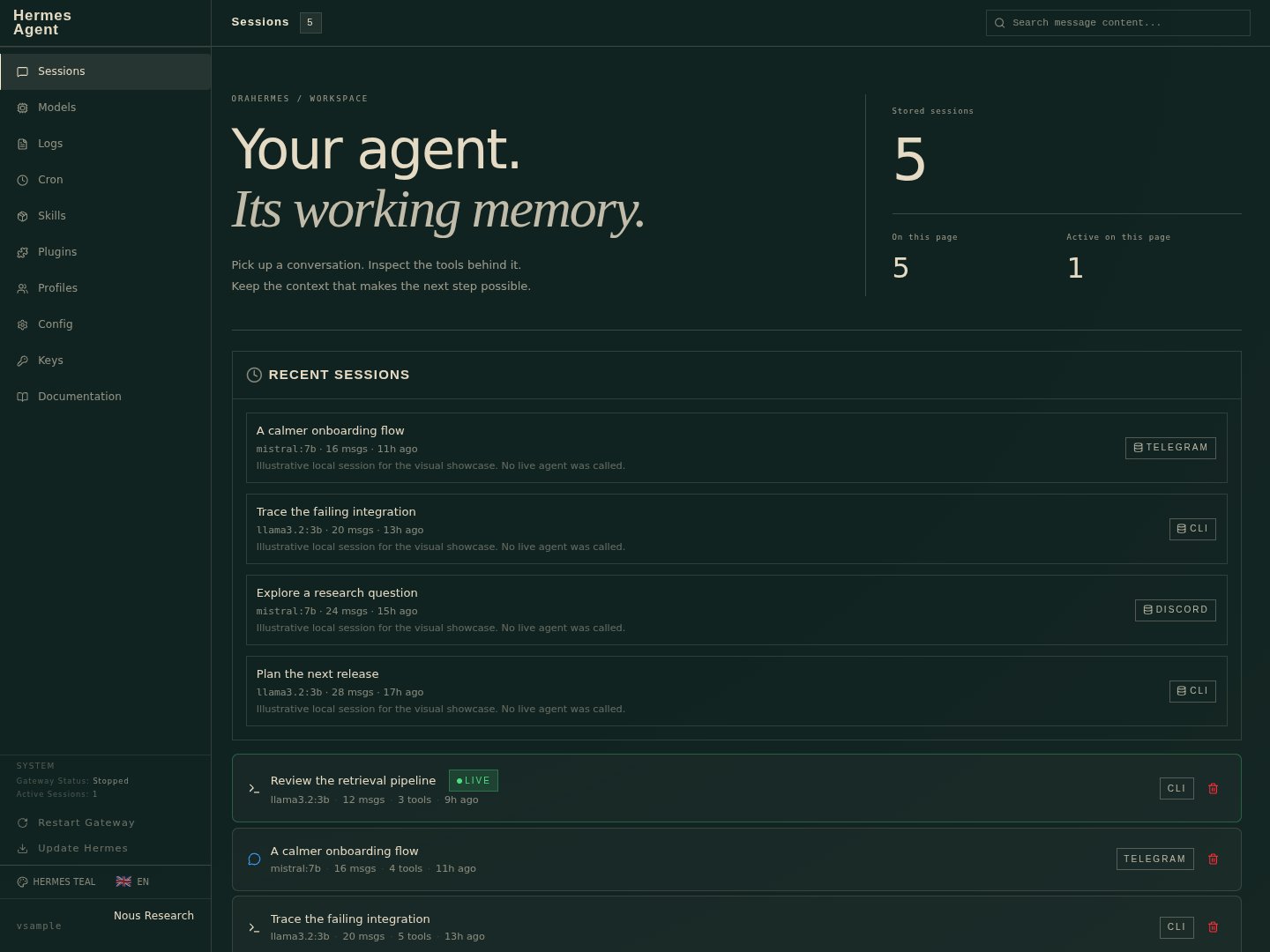
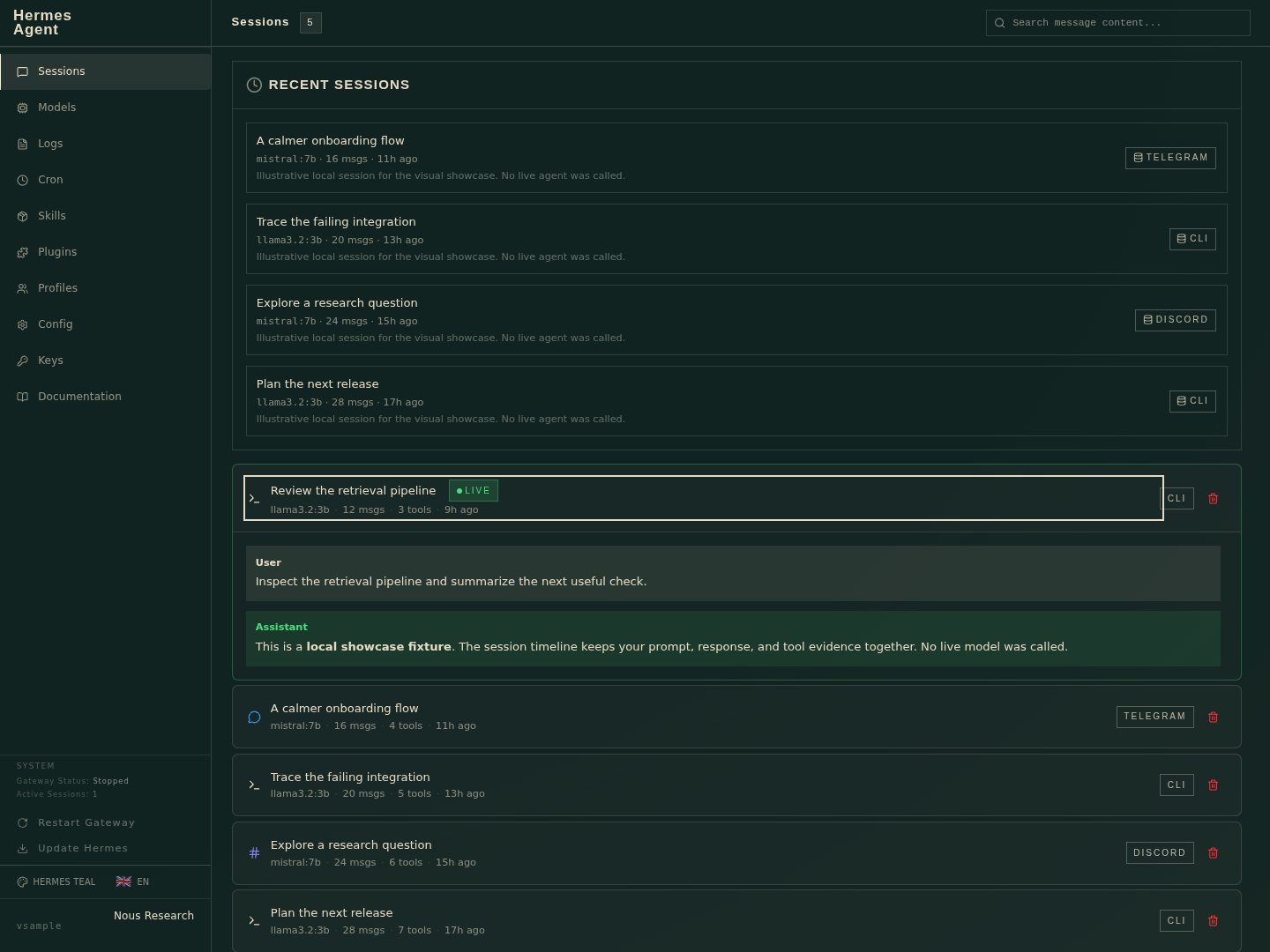
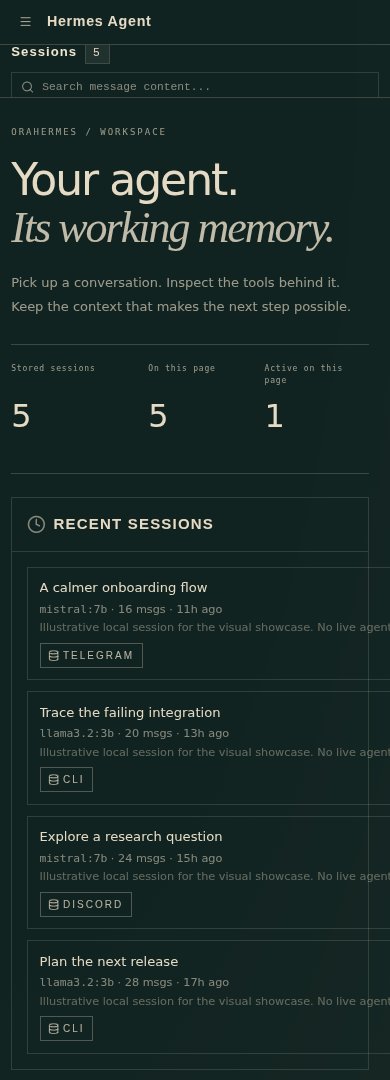
Actual browser captures with synthetic session records. No live agent, gateway, credentials, or Oracle data was used. Visual notes and verification limits.






-F80000.svg?style=for-the-badge&logo=oracle&logoColor=white)


View Interactive Presentation | Animated overview of the project
 |
 |
 |
 |
 |
 |
A fork of NousResearch/hermes-agent that replaces the default inference and storage layers with Oracle Cloud Infrastructure services, and adds semantic long-term memory via Oracle AI Vector Search:
- OCI GenAI (xAI Grok models) or Ollama (local inference) instead of OpenRouter
- Oracle 26ai Free as the only session and message store
- Oracle AI Vector Search -- messages are embedded in-database using an ONNX model, enabling meaning-based recall across past conversations
Table of Contents
- Quick Start
- Architecture
- Features
- What's Different from Upstream
- Configuration Reference
- Testing
- License
Quick Start
One-command install: clone, configure, and run in a single step:
Advanced optionscurl -fsSL https://raw.githubusercontent.com/jasperan/orahermes-agent/main/install.sh | bashOverride install location:
PROJECT_DIR=/opt/myapp curl -fsSL https://raw.githubusercontent.com/jasperan/orahermes-agent/main/install.sh | bashOr install manually:
git clone https://github.com/jasperan/orahermes-agent.git
cd orahermes-agent
# See below for setup instructions
Prerequisites
| Requirement | Details |
|---|---|
| Python | 3.11 or newer |
| Oracle 26ai Free | Running container (see Database Setup below) |
| LLM Provider | Ollama (local, default) or OCI GenAI (cloud) |
Installation
# Clone
git clone https://github.com/jasperan/orahermes-agent.git
cd orahermes-agent

# Run the setup script (installs uv, creates venv, installs deps)
./setup-hermes.sh

# Windows PowerShell installer
powershell -ExecutionPolicy Bypass -File scripts/install.ps1

# Or install manually
pip install -e ".[all]"
Database Setup
Start Oracle 26ai Free as a container:
docker run -d \
  --name oracle-26ai \
  -p 1521:1521 \
  -e ORACLE_PWD=YourPassword123 \
  container-registry.oracle.com/database/free:latest-lite
Wait for the database to be ready, then create the Hermes schema:
# Connect as SYSDBA and create the hermes user
sqlplus sys/YourPassword123@localhost:1521/FREEPDB1 as sysdba <<'SQL'
CREATE USER hermes IDENTIFIED BY HermesPass123
  DEFAULT TABLESPACE users QUOTA UNLIMITED ON users;
GRANT CONNECT, RESOURCE, CTXAPP, DB_DEVELOPER_ROLE TO hermes;
SQL

# Apply the base schema (sessions + messages + Oracle Text index)
sqlplus hermes/HermesPass123@localhost:1521/FREEPDB1 @oracle_setup.sql

# Apply the vector search migration (embedding column + HNSW index)
sqlplus hermes/HermesPass123@localhost:1521/FREEPDB1 @oracle_setup_vector.sql
Add the connection details to .env:
ORACLE_DSN=localhost:1521/FREEPDB1
ORACLE_USER=hermes
ORACLE_PASSWORD=HermesPass123
LLM Provider Setup
Option A: Ollama (local, default)
# Install Ollama and pull a model
ollama pull qwen3.5:4b

# That's it -- Ollama is the default provider, no extra config needed
Option B: OCI GenAI (cloud)
Configure your ~/.oci/config profile and set in .env:
OCI_PROFILE=DEFAULT
OCI_REGION=us-chicago-1
OCI_COMPARTMENT_ID=<your-compartment-ocid>
LLM_MODEL=xai.grok-3-mini
Then run the setup wizard to select OCI as your provider:
orahermes setup
Run
# Interactive CLI
orahermes

# Single query
orahermes chat -q "What's the status of our deployment?"

# Diagnostics
orahermes doctor

# Configuration wizard
orahermes setup

# List available tools
orahermes --list-tools
Architecture
+-----------------------+       +---------------------+       +---------------------------+
|                       |       |                     |       |                           |
|  Ollama / OCI GenAI   | <---> |   orahermes-agent   | <---> |    Oracle 26ai Free       |
|  / Custom endpoint    |       |                     |       |       (FREEPDB1)          |
|                       |       |                     |       |                           |
+-----------------------+       +---------------------+       +---------------------------+
  Three-provider LLM              Tool-calling engine           Session & message storage
  Ollama (default)                 30+ built-in tools            Oracle Text full-text search
  OCI GenAI (xAI Grok)            Skills & scheduling            Oracle AI Vector Search
  Any OpenAI-compatible            Messaging gateways            In-DB ONNX embeddings (384d)
                                   Memory & compression          HNSW vector index
Core Agent Loop
User input
  -> AIAgent.chat() [run_agent.py]
    -> Build system prompt (memory, skills, context files)
    -> LLM API call (Ollama / OCI GenAI / custom)
      -> Tool calls detected?
        -> Yes: registry.dispatch() -> execute tool -> embed result -> loop back
        -> No: return text response
      -> Persist message to Oracle DB (vector embeddings via backfill)
Session Backend
hermes_state.get_session_db() always returns the Oracle-backed SessionDB compatibility facade. Set ORACLE_DSN, ORACLE_USER, and ORACLE_PASSWORD, then apply oracle_setup.sql. There is no local database fallback in OraHermes. Vector search methods (semantic_search, hybrid_search, embed_message) are provided by Oracle AI Vector Search.
Features
Semantic Memory (Oracle AI Vector Search)
The headline feature unique to this fork. Messages are embedded as 384-dimensional vectors using an in-database ONNX model (ALL_MINILM_L6_V2), stored in a VECTOR(384, FLOAT32) column, and indexed with an HNSW vector index for fast approximate nearest-neighbor search.
This gives the agent semantic long-term memory -- it can recall past conversations by meaning, not just keywords.
How it works:
- In-database embeddings:
VECTOR_EMBEDDING()runs the ONNX model inside Oracle -- zero Python-side inference overhead.db.embed_message(message_id, content)embeds a single row;db.backfill_embeddings()embeds any messages that don't have an embedding yet. Run the backfill after applying the migration (or on a schedule) to populate semantic memory for existing conversations. - Three search modes via the
semantic_recalltool:hybrid(default): Combines Oracle Text keyword search with vector cosine similarity, weighted 40/60, and re-ranks results. Best overall accuracy.vector: Pure semantic similarity. Finds conceptually related conversations even with completely different wording.keyword: Traditional Oracle TextCONTAINSsearch. Exact term matching.
- Capability detection:
db.vector_search_enabledchecks that the migration is applied (embedding column present) and the ONNX model is loaded. When vector support is unavailable, thesemantic_recalltool reports thatoracle_setup_vector.sqlmust be applied, andkeywordmode keeps working against Oracle Text. Vector search is purely additive -- the agent works fine without it.
Example agent usage:
User: "Remember that time we debugged the deployment issue?"
Agent: [calls semantic_recall with query="debugging deployment problems"]
       -> Finds sessions about "rollout failures", "CI/CD pipeline errors",
         "nginx config issues" -- even though none used the word "deployment"
Schema additions (oracle_setup_vector.sql):
ALTER TABLE messages ADD (embedding VECTOR(384, FLOAT32));
CREATE VECTOR INDEX idx_messages_embedding ON messages(embedding)
    ORGANIZATION NEIGHBOR PARTITIONS DISTANCE COSINE WITH TARGET ACCURACY 95;
Three-Provider LLM Architecture
The agent supports three LLM backends, selectable via the setup wizard or environment variables:
| Provider | Backend | Default Model | Use Case |
|---|---|---|---|
ollama (default) |
Local Ollama instance | qwen3.5:4b |
Offline, privacy, no API costs |
oci |
OCI GenAI | xai.grok-3-mini |
Cloud inference, enterprise |
custom |
Any OpenAI-compatible endpoint | User-specified | vLLM, Together, Groq, etc. |
Available models:
- Ollama: Qwen3.5 family (0.8b through 35B-A3B MoE), plus any model Ollama supports
- OCI GenAI: xAI Grok-3, Grok-3-mini, Meta Llama 3.3 70B, Llama 4 Maverick
- Custom: Any model at any OpenAI-compatible endpoint
Provider is configured in ~/.hermes/config.yaml and can be overridden per-session with HERMES_PROVIDER=oci.
30+ Built-in Tools
Every tool self-registers via tools/registry.py at import time. The agent receives tool schemas in OpenAI function-calling format and can chain multiple tool calls per turn.
| Category | Tools | Description |
|---|---|---|
| Web | web_search, web_extract |
Search the web (SearXNG/DuckDuckGo), extract/scrape page content (Firecrawl) |
| Terminal | terminal, process |
Execute shell commands with multiple backends (local, SSH, Docker, Singularity, Modal), manage long-running processes |
| File Operations | read_file, write_file, patch, search_files |
Read, write, fuzzy-match patch, and search across files with content/path matching |
| Browser | browser_navigate, browser_click, browser_type, browser_scroll, browser_snapshot, browser_vision, + 4 more |
Full browser automation via Browserbase -- navigate, interact, screenshot, PDF export |
| Vision | vision_analyze |
Analyze images using vision models (Nous API) |
| Image Generation | image_generate |
Text-to-image via FAL.ai (Flux 2) |
| Text-to-Speech | text_to_speech |
Convert text to audio with Edge TTS (free), ElevenLabs, or OpenAI |
| Planning | todo |
Task management for multi-step agent work -- create, update, and track task lists |
| Memory | memory |
Persistent curated notes and user profile that survive across sessions. Injected into the system prompt |
| Session Search | session_search |
Keyword-based search across all past sessions with LLM-powered summarization of matching conversations |
| Semantic Recall | semantic_recall |
Vector similarity search over past conversations using Oracle AI Vector Search. Finds semantically related content by meaning |
| Skills | skills_list, skill_view, skill_manage |
Create, view, edit, and manage reusable skill documents (procedures, templates, checklists) |
| Reasoning | mixture_of_agents |
Multi-model collaboration -- query multiple LLMs and synthesize their responses |
| Code Execution | execute_code |
Run Python scripts in a sandboxed RPC environment with access to agent tools |
| Delegation | delegate_task |
Spawn child agents with isolated context for parallel subtask execution |
| Scheduling | schedule_cronjob, list_cronjobs, remove_cronjob |
Schedule, list, and remove recurring automated tasks |
| Messaging | send_message |
Send messages across platforms (Telegram, Discord, WhatsApp, Slack) from within the agent |
| Clarification | clarify |
Ask the user multiple-choice or open-ended clarifying questions |
| RL Training | 10 tools | Manage reinforcement learning environments and training runs (Atropos/Tinker) |
Skills System
The agent can learn, store, and reuse multi-step procedures as skills -- markdown documents with YAML frontmatter stored in ~/.hermes/skills/.
- Self-describing: Each skill has name, description, tags, and related skills
- Versioned: Tracks updates with auto-reload on change
- Composable: Skills can reference and call other skills
- Access-controlled: Agent requests user approval before executing sensitive skills
A Skills Hub design is in progress (docs/skills_hub_design.md) for discovering and sharing skills across the community, with security scanning for malicious content.
Messaging Gateways
The agent runs as a bot on four messaging platforms simultaneously via gateway/run.py:
| Platform | Features |
|---|---|
| Telegram | Full tool access, inline keyboards, file/image sharing, per-chat sessions |
| Discord | Server + DM support, message threading, file uploads, reaction handling |
| WhatsApp Business API integration, media support, per-chat sessions | |
| Slack | Workspace bot, threaded conversations, Slack Block Kit formatting |
Each adapter maintains per-chat session state via OracleSessionDB, enabling conversation continuity. Install as a systemd service:
./scripts/hermes-gateway install
./scripts/hermes-gateway start
Persistent Memory
OraHermes disables the legacy file-backed memory stores and external memory
providers. Runtime persistence and recall use Oracle Database only.
Context Compression
When the conversation token count approaches the model's context limit, the agent automatically:
- Summarizes older messages into a compressed history
- Uses an auxiliary LLM (Llama 3.3 70B on OCI or Qwen on Ollama) for summarization
- Replaces old messages with the summary, freeing context window for new turns
- Maintains conversation continuity through the compression boundary
Subagent Delegation
The delegate_task tool spawns child agents with isolated context for parallel subtask execution. Child sessions are linked via parent_session_id in Oracle DB, enabling full conversation tree tracing. The parent agent receives a summary of each child's work.
Cron Scheduler
Schedule recurring tasks that the agent executes on a cron schedule. Jobs persist across agent restarts and are managed through the schedule_cronjob, list_cronjobs, and remove_cronjob tools.
Training Data Export
Conversations are exportable in ShareGPT format for fine-tuning:
{
  "conversations": [
    {"from": "system", "value": "..."},
    {"from": "human", "value": "..."},
    {"from": "gpt", "value": "<tool_call>\n{...}\n</tool_call>..."}
  ],
  "tools": "[...]",
  "source": "hermes-agent"
}
Supports <tool_call>, <tool_response>, and <think> XML tags for training tool-calling and reasoning models. RL training environments (Atropos) are also included for reinforcement learning from human feedback.
Live Dashboard
A real-time D3.js dashboard visualizes all data orahermes-agent produces in Oracle Database -- sessions, messages, tool usage, token counts, and content lengths. Auto-refreshes every 3 seconds.
ORACLE_DSN=localhost:1521/FREEPDB1 ORACLE_USER=hermes ORACLE_PASSWORD=<password> \
    python dashboard_server.py --port 8501
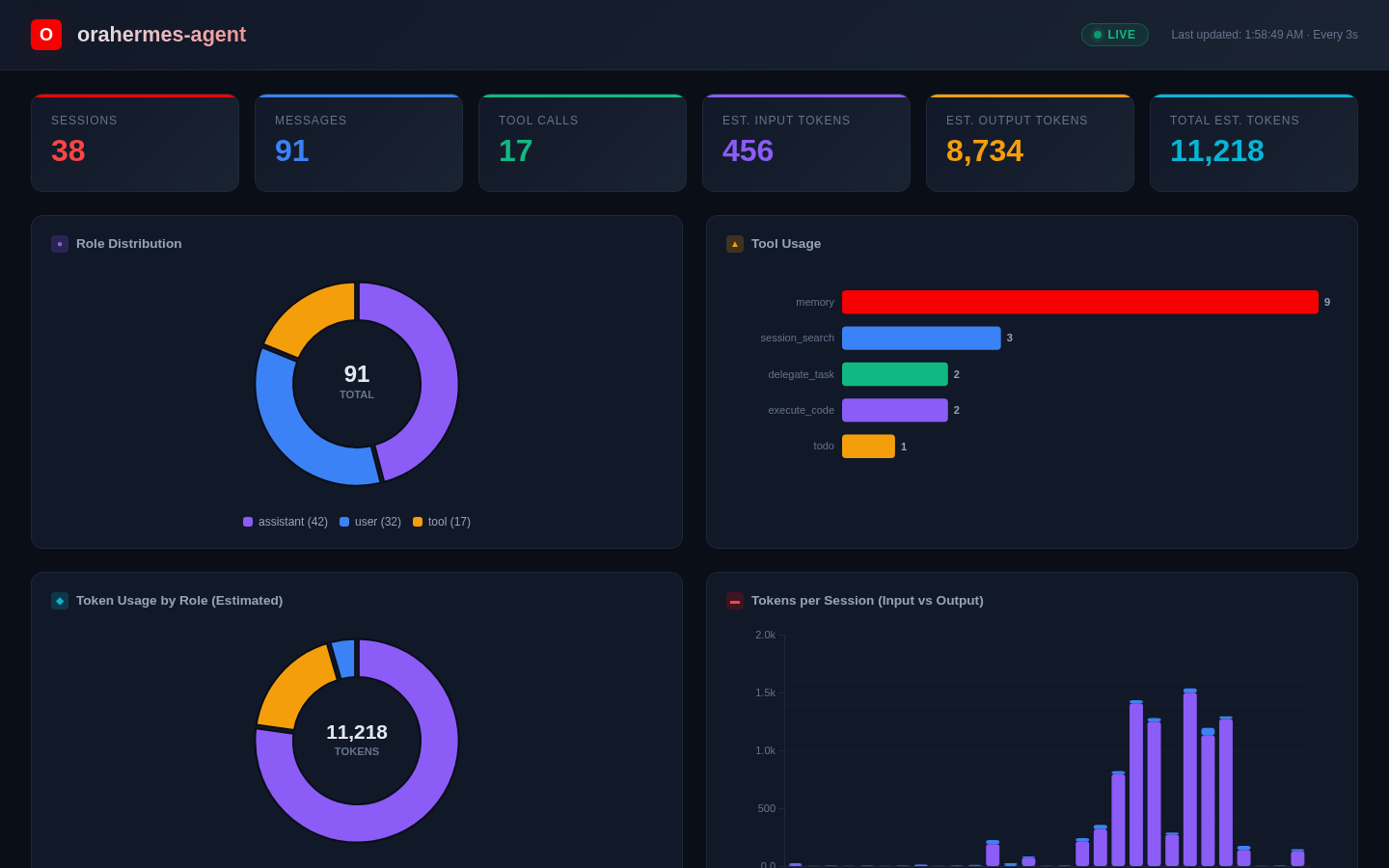
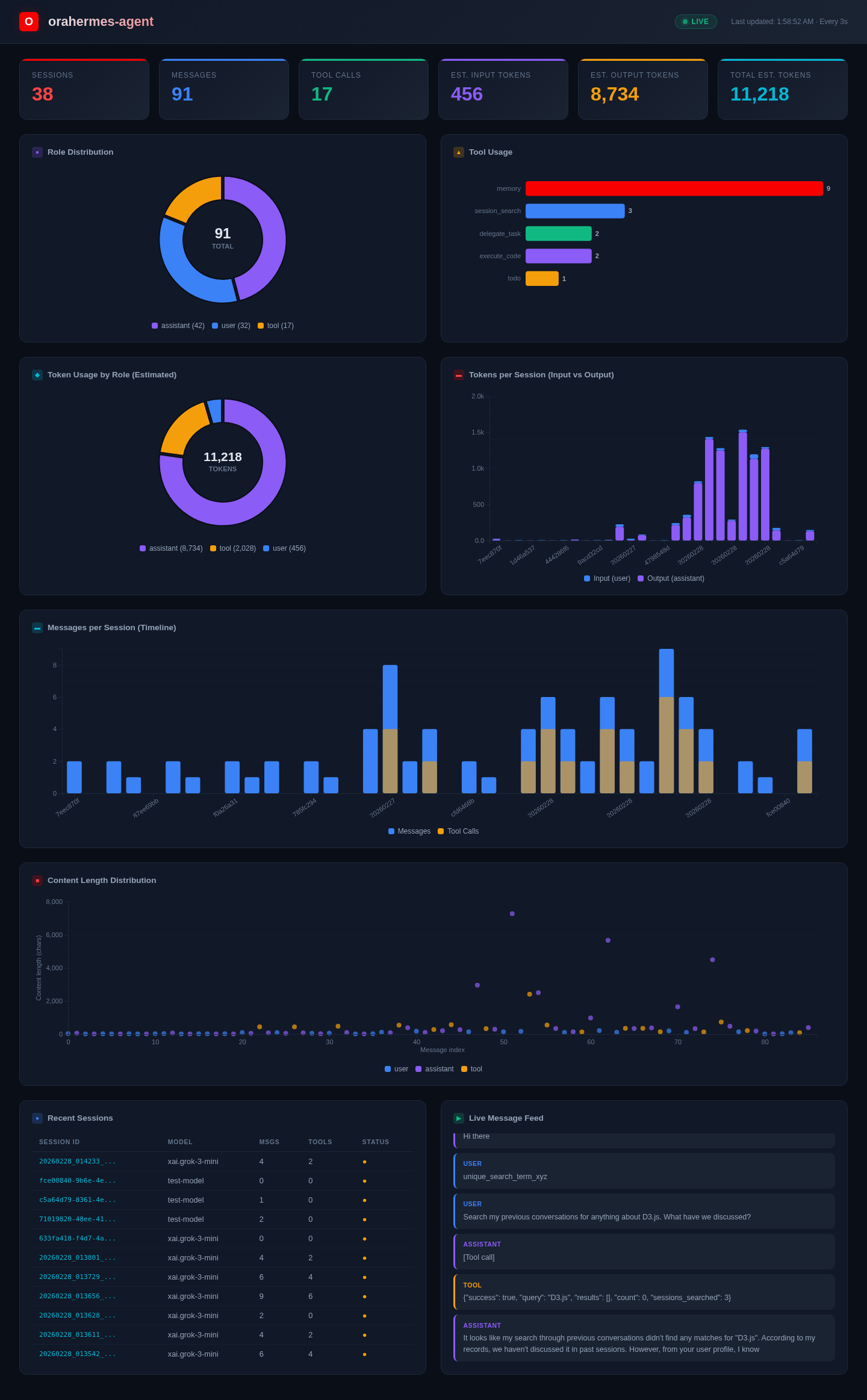
Charts included:
- KPI cards (sessions, messages, tool calls, estimated tokens) with animated counters and delta indicators
- Role distribution donut chart (user / assistant / tool)
- Tool usage horizontal bar chart
- Token usage by role donut chart
- Tokens per session stacked bar chart (input vs output)
- Messages per session timeline with tool call overlay
- Content length scatter plot colored by role
- Recent sessions table with model, message count, and status
- Live message feed with role-colored entries
What's Different from Upstream
This fork makes three additions on top of the upstream hermes-agent codebase:
1. OpenRouter --> OCI GenAI + Ollama
| Upstream | orahermes-agent | |
|---|---|---|
| Provider | OpenRouter | Ollama (default) / OCI GenAI / Custom |
| Auth | API key (OPENROUTER_API_KEY) |
None (Ollama) or OCI config profile |
| Default model | anthropic/claude-opus-4.6 |
qwen3.5:4b (Ollama) or xai.grok-3-mini (OCI) |
| SDK | openai |
openai (Ollama), oci-openai (OCI) |
New files: oci_client.py, agent/auxiliary_client.py (multi-provider), agent/model_metadata.py (local catalogue).
2. Local File Storage --> Oracle 26ai Free
| Upstream | orahermes-agent | |
|---|---|---|
| Database | Local file-backed store | Oracle 26ai Free (container) |
| Driver | Standard local driver | oracledb (python-oracledb) |
| Connection | File path | Connection pool (oracledb.create_pool) |
| Full-text search | Local text index | Oracle Text (CTXSYS.CONTEXT) |
New files: oracle_state.py (drop-in OracleSessionDB), oracle_setup.sql (DDL).
3. Oracle AI Vector Search (Semantic Memory)
| Upstream | orahermes-agent | |
|---|---|---|
| Long-term recall | Keyword search only | Keyword + vector similarity + hybrid |
| Embeddings | None | In-DB ONNX model (ALL_MINILM_L6_V2, 384d) |
| Vector index | None | HNSW with cosine distance, 95% target accuracy |
| Search tool | session_search (keyword) |
session_search (keywords) + semantic_recall (vector/hybrid) |
New files: oracle_setup_vector.sql (migration), tools/semantic_recall_tool.py. Extended: oracle_state.py (vector methods: embed_message, backfill_embeddings, semantic_search, hybrid_search, vector_search_enabled).
Configuration Reference
Environment Variables (.env)
# Oracle Database
ORACLE_DSN=localhost:1521/FREEPDB1
ORACLE_USER=hermes
ORACLE_PASSWORD=<password>

# LLM Provider (pick one)
HERMES_PROVIDER=ollama              # or: oci, custom
OLLAMA_BASE_URL=http://localhost:11434/v1

# OCI GenAI (if using oci provider)
OCI_PROFILE=DEFAULT
OCI_REGION=us-chicago-1
OCI_COMPARTMENT_ID=<compartment-ocid>
LLM_MODEL=xai.grok-3-mini

# Custom endpoint (if using custom provider)
OPENAI_API_KEY=<key>
OPENAI_BASE_URL=<url>

# Tool API Keys (optional -- tools degrade gracefully without them)
FIRECRAWL_API_KEY=<key>             # web_extract, web_crawl
FAL_KEY=<key>                       # image_generate
NOUS_API_KEY=<key>                  # vision_analyze
BROWSERBASE_API_KEY=<key>           # browser tools
BROWSERBASE_PROJECT_ID=<id>         # browser tools

# Messaging Gateways (optional)
TELEGRAM_BOT_TOKEN=<token>
DISCORD_BOT_TOKEN=<token>
SLACK_BOT_TOKEN=<token>
WHATSAPP_CREDENTIALS=<credentials>
Config File (~/.hermes/config.yaml)
Generated by orahermes setup. Key sections:
model: Provider, default model, base URLterminal: Backend (local/docker/ssh/modal/singularity)tools: Enabled/disabled toolsetsgateway: Platform tokens and settingsmemory: User profile, persistent notescompression: Token thresholds for context compression
Testing
# All unit tests, using the same hermetic runner as CI
scripts/run_tests.sh

# All tests with a local Oracle Free container/schema, no cloud DSN needed
scripts/run_oracle_free_tests.sh

# Oracle state tests with a local Oracle Free container/schema
scripts/run_oracle_free_tests.sh tests/test_oracle_state.py -q

# Semantic recall tests specifically
scripts/run_tests.sh tests/test_semantic_recall.py -v

# Single test
scripts/run_tests.sh tests/tools/test_file_tools.py -k "test_read"
Project Structure
orahermes-agent/
├── run_agent.py                 # Main agent loop (AIAgent class)
├── cli.py                       # Interactive CLI entry point
├── model_tools.py               # Tool discovery & dispatch orchestration
├── oracle_state.py              # OracleSessionDB: sessions, messages, vector search
├── oracle_setup.sql             # Base schema DDL (sessions + messages + Oracle Text)
├── oracle_setup_vector.sql      # Vector migration DDL (embedding column + HNSW index)
├── hermes_state.py              # Oracle-only SessionDB compatibility facade
├── oci_client.py                # OCI GenAI client factory
├── hermes_constants.py          # Models, endpoints, defaults
├── toolsets.py                  # Toolset definitions & resolution
├── dashboard_server.py          # Live D3.js dashboard
├── agent/                       # Agent internals
│   ├── prompt_builder.py        #   System prompt assembly
│   ├── context_compressor.py    #   Automatic conversation summarization
│   ├── auxiliary_client.py      #   Multi-provider auxiliary LLM client
│   ├── model_metadata.py        #   Local model catalogue
│   ├── trajectory.py            #   ShareGPT export
│   └── prompt_caching.py        #   Anthropic prompt caching support
├── tools/                       # 30+ self-registering tool modules
│   ├── registry.py              #   Central tool registry (singleton)
│   ├── semantic_recall_tool.py  #   Vector similarity search tool
│   ├── session_search_tool.py   #   Keyword search + summarization tool
│   ├── memory_tool.py           #   Persistent memory tool
│   ├── web_tools.py             #   Web search & extraction
│   ├── terminal_tool.py         #   Shell execution
│   ├── file_tools.py            #   File operations
│   ├── browser_tool.py          #   Browser automation
│   └── ...                      #   Vision, TTS, skills, delegation, etc.
├── gateway/                     # Multi-platform messaging adapter
│   ├── run.py                   #   Gateway entry point
│   └── platforms/               #   Telegram, Discord, WhatsApp, Slack
├── hermes_cli/                  # CLI subsystem
│   ├── main.py                  #   REPL with Rich formatting
│   ├── auth.py                  #   Provider resolution
│   ├── config.py                #   Config management
│   └── setup.py                 #   Setup wizard
├── tests/                       # Unit & integration tests (7300+)
├── skills/                      # Built-in skill documents
├── cron/                        # Cron scheduler
├── environments/                # Atropos RL training environments
└── docs/                        # Architecture docs & design plans
License
MIT -- same as upstream. See LICENSE.
Credit
Based on NousResearch/hermes-agent by Nous Research.



Reviews (0)
Sign in to leave a review.
Leave a reviewNo results found