hermes-pentest-lab
Health Warn
- License — License: MIT
- Description — Repository has a description
- Active repo — Last push 0 days ago
- Low visibility — Only 5 GitHub stars
Code Pass
- Code scan — Scanned 12 files during light audit, no dangerous patterns found
Permissions Pass
- Permissions — No dangerous permissions requested
No AI report is available for this listing yet.
Production-grade pentesting lab — Docker Compose tool isolation, AI agent orchestration, WireGuard OPSEC, LUKS encryption, automated PDF reports
Hermes Pentest Lab
Turn any Kali Linux laptop into a production-grade pentesting workstation — with AI agent orchestration, native tooling, VPN OPSEC, encrypted storage, and automated report generation.
⚠️ Requires Kali Linux — tools run natively on the host for raw sockets, SMB, and packet capture. Docker is used only for lab targets and Neo4j.









What It Looks Like
$ hermes
/skill pentest-engage

Agent: Validating scope...  ✓ 192.168.1.0/24 authorized
       VPN check...  ✓ wg0 UP
       LUKS check...  ✓ /dev/mapper/pentest mounted
       Pre-flight checks complete. 7/7 subagents ready.

Agent: OSINT agent → 12 subdomains, 47 email addresses found
       Recon agent → 14 live hosts, 3 high-value services
       Web agent → SQLi confirmed on /login (CVSS 9.8)
       Network agent → Kerberoastable account: svc_sql
       Verify agent → 5 DRAFT findings verified: 2 CORROBORATED, 1 GATED

Agent: Building report...
       Findings: 2 Critical, 1 High, 4 Medium, 3 Low
       Risk level: Critical
       Verification: 2 corroborated · 1 gated · 2 unverified · 0 refuted

Report saved: reports/acme-corp-2026-07/report-2026-07-01.pdf
Engagement complete. All actions logged to audit trail.
Architecture
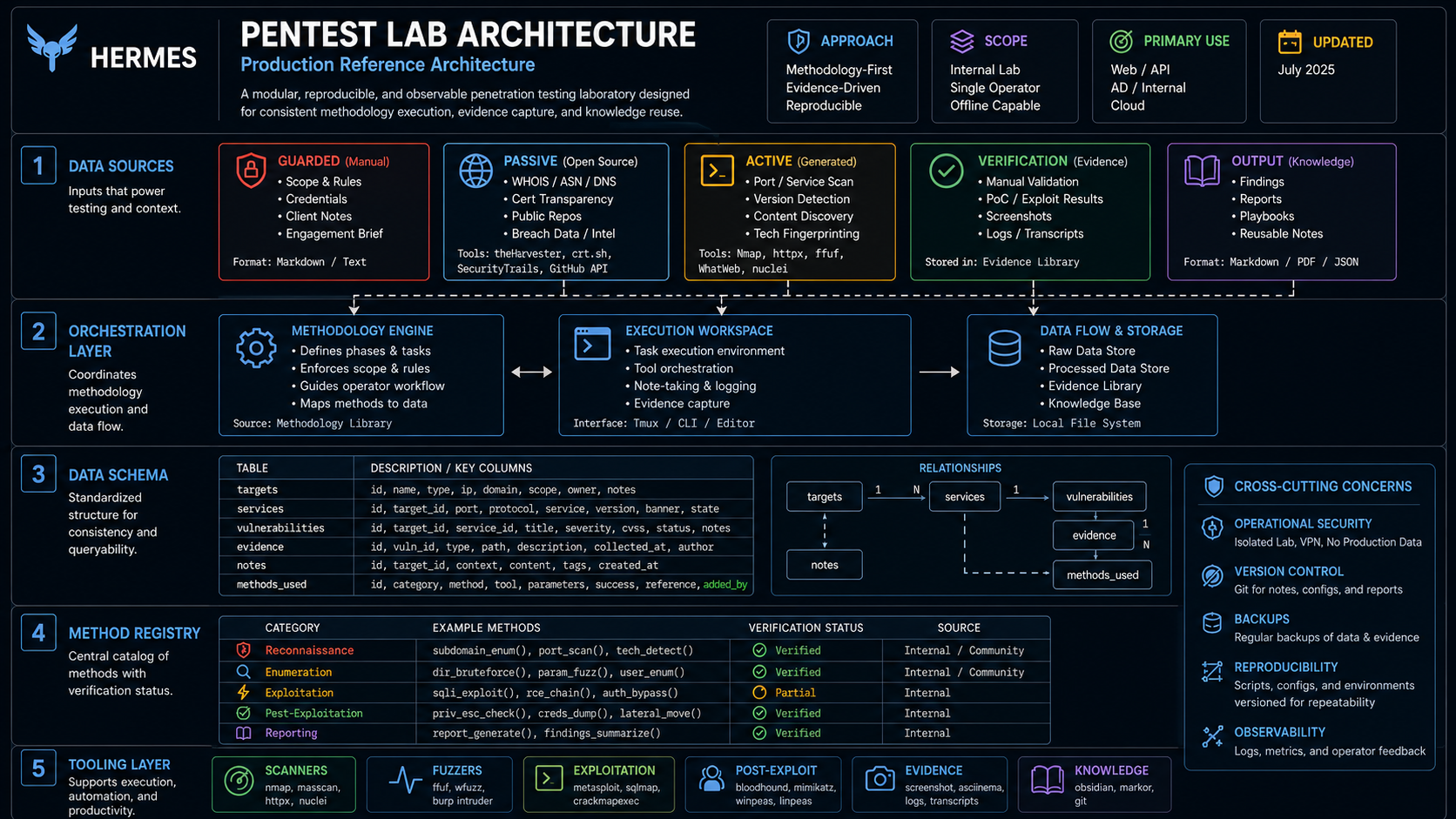
System Architecture — full inventory: subagents, DB schema, OPSEC
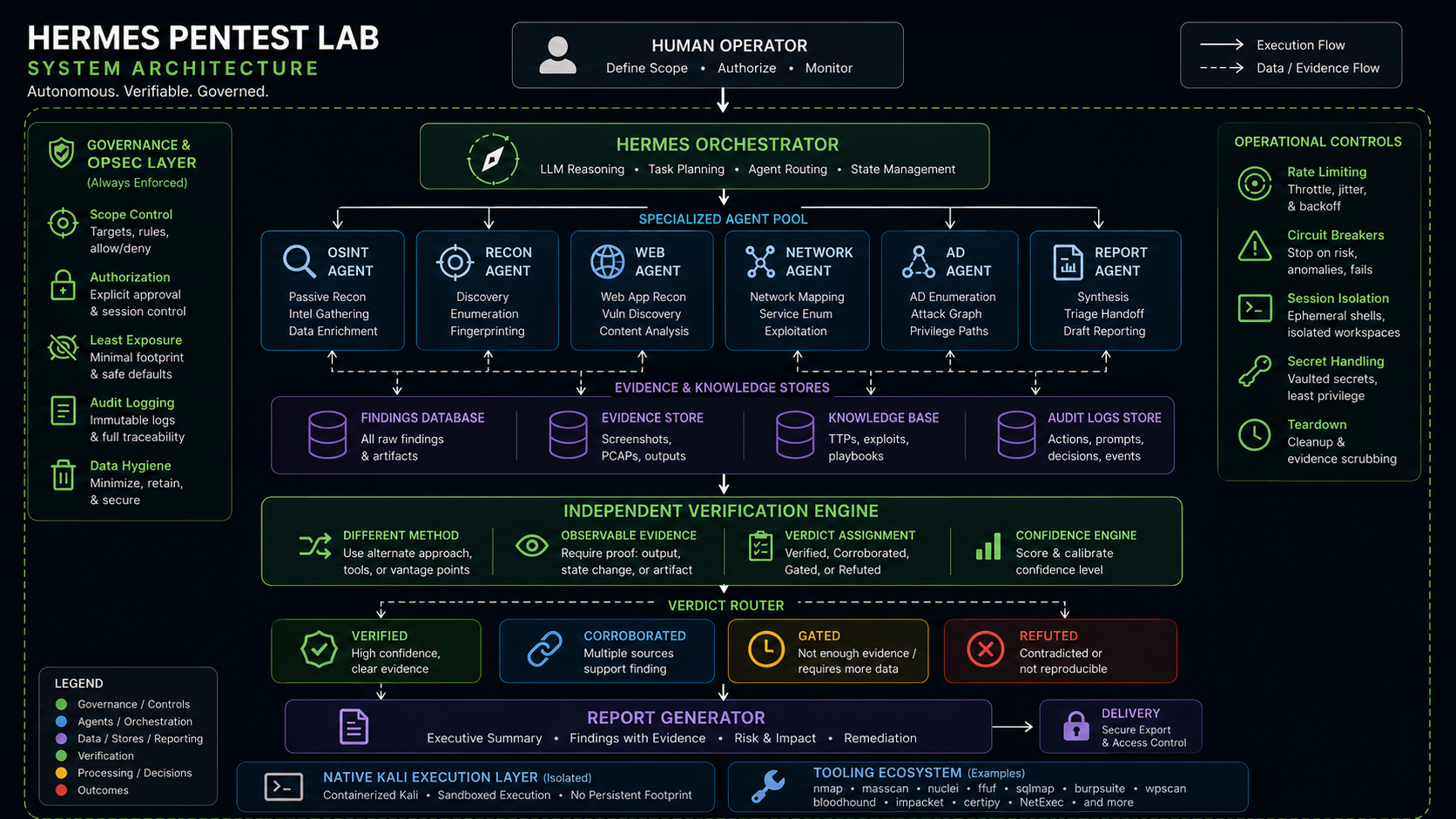
Verification Pipeline — verdict router, taxonomy, L1-L6
How It Works
- You tell Hermes what to test (e.g., "Scan 192.168.1.0/24")
- Hermes checks the scope, starts the VPN, and dispatches 7 subagents in parallel
- Each subagent runs tools natively on the Kali host
- Findings flow into a shared SQLite v4 database
- Verify agent independently reproduces every DRAFT finding — benign only
- Report agent generates a professional PDF with verdict badges and confidence tiers
- Audit trail logs every action
📊 Sample Reports
Two reports from live assessments — one vulnerable target, one hardened production site.
| Juice Shop Benchmark | ZeroDayBrief Blog | |
|---|---|---|
| Risk | 🔴 High (38/100) | 🟢 Low (94/100) |
| Findings | 14 (0C/1H/8M/5L) | 1 (Info) |
| Controls | 6 Pass / 3 Warn / 7 Fail | 15 Pass / 0 Warn / 1 Fail |
| Target | OWASP Juice Shop v20.0.0 | zerodaybrief.blog |
| juice-shop-benchmark-report.pdf (337KB) | zerodaybrief-report.pdf (43KB) | |
| HTML | View | View |
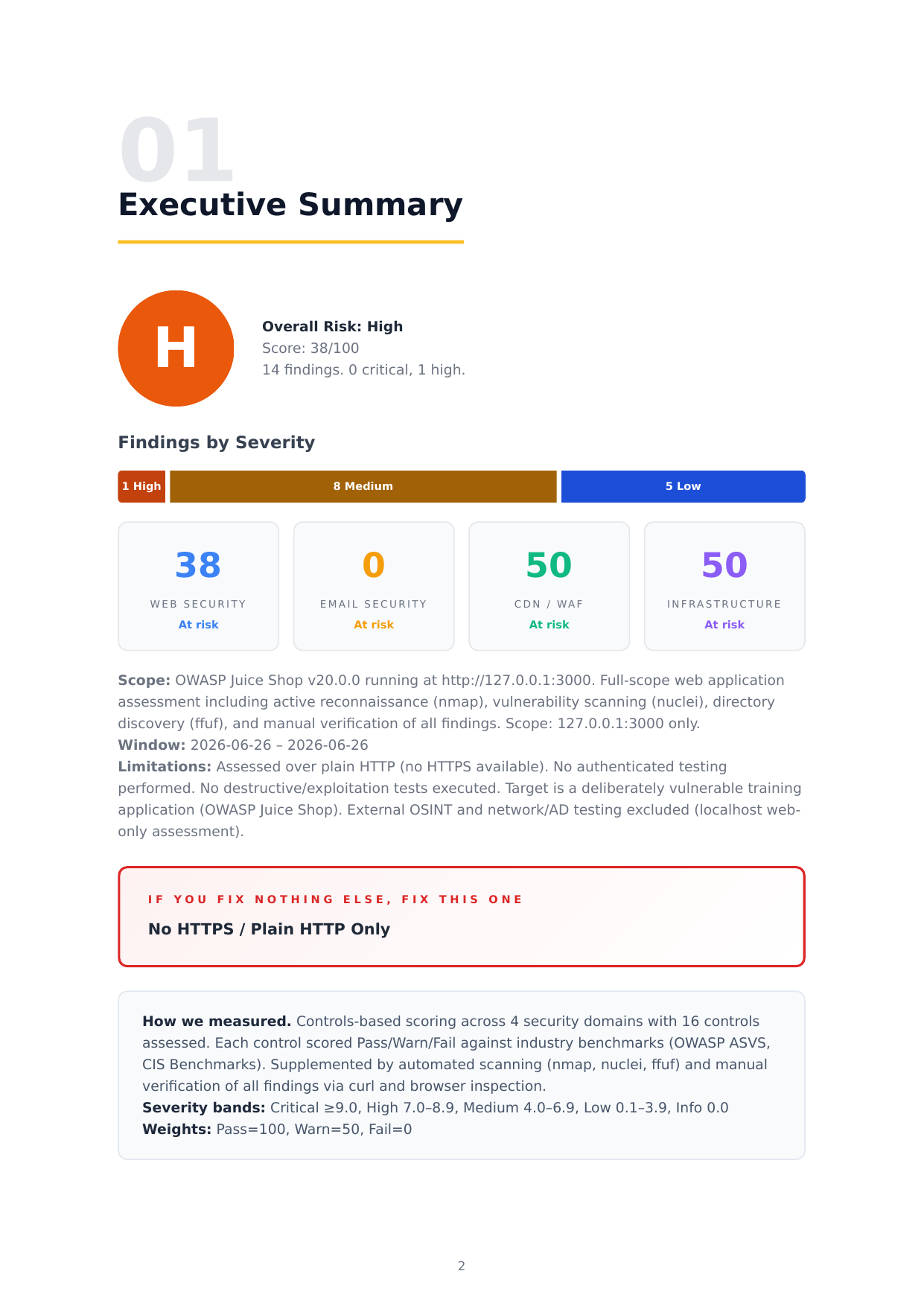
Design: Dark gradient cover · 4-category scorecards · findings heatmap · inline evidence screenshots · business-first descriptions · observed controls with values · remediation checklist · A4 portrait print-native
Generated by build-report.py v4 — automated CVSS impact generation, per-finding screenshot embedding, findings heatmap, 6-phase methodology (incl. verification pass).
🚀 Quick Start
What You Need
- Kali Linux (native or VM) with the tools installed via apt/pipx
- Docker + Docker Compose v2 (for lab targets and Neo4j only)
- 30GB free disk, 8GB RAM
- Hermes Agent (for AI orchestration)
1. Clone and install host tools
git clone https://github.com/jayelbotvibe-web/hermes-pentest-lab.git
cd hermes-pentest-lab

# Kali-packaged tools (apt)
sudo apt update && sudo apt install -y nmap metasploit-framework ffuf gobuster wpscan sqlmap hydra john hashcat enum4linux whatweb responder impacket-scripts evil-winrm wireshark seclists

# Python tools (pipx)
pipx install netexec          # NetExec — SMB/LDAP/WinRM enumeration (successor to crackmapexec)
pipx install bloodhound
pipx install certipy-ad
pipx install theHarvester
pipx install holehe
pipx install sherlock

# Docker (for lab targets + Neo4j only)
sudo apt install -y docker.io docker-compose-v2 wireguard-tools age cryptsetup pandoc
2. Start lab targets (optional — for practice)
docker compose -f docker/docker-compose.yml --profile lab up -d
# Juice Shop:  http://127.0.0.1:3000
# DVWA:        http://127.0.0.1:8080  (admin/password)
3. Run your first scan
./scripts/init-engagement.sh my-first-test
nmap -sV -p1-1000 <target>
./scripts/build-report.py my-first-test
You'll get a professional PDF report at reports/my-first-test/report-*.pdf.
4. Use the AI orchestrator
In a Hermes Agent session:
/skill pentest-engage
Then describe what you want to test — Hermes handles the rest.
🛠️ Tools Included
💻 = Native host 🐳 = Docker service
:port= web access
Web Application Testing
| Tool | Runtime | Purpose |
|---|---|---|
| ffuf | 💻 Host | Directory/file brute-force, virtual host discovery |
| nuclei | 💻 Host | CVE and misconfiguration scanning (6,683 templates) |
| sqlmap | 💻 Host | Automated SQL injection detection |
| gobuster | 💻 Host | Directory, DNS, and VHOST enumeration |
| wpscan | 💻 Host | WordPress vulnerability scanner |
| whatweb | 💻 Host | Technology fingerprinting |
Network & Active Directory
| Tool | Runtime | Purpose |
|---|---|---|
| nmap | 💻 Host | Port scanning, service detection, OS fingerprinting |
| metasploit | 💻 Host | Exploitation framework (6.4) — gated |
| netexec (nxc) | 💻 Host | SMB/LDAP/WinRM enumeration and authentication |
| bloodhound-python | 💻 Host | Active Directory attack path analysis |
| certipy-ad | 💻 Host | AD Certificate Services exploitation |
| kerbrute | 💻 Host | Kerberos user enumeration and password spraying |
| impacket | 💻 Host | Windows protocol tools (secretsdump, GetUserSPNs) |
| responder | 💻 Host | LLMNR/NBT-NS/mDNS poisoning — gated |
| evil-winrm | 💻 Host | Windows Remote Management shell |
| enum4linux | 💻 Host | SMB enumeration |
| hydra | 💻 Host | Online brute-force (user-approved only) |
| john / hashcat | 💻 Host | Password hash cracking |
OSINT & Passive Recon
| Tool | Runtime | Purpose |
|---|---|---|
| theHarvester | 💻 Host | Email, subdomain, and name enumeration |
| holehe | 💻 Host | Check if email is registered on services |
| sherlock | 💻 Host | Username search across 300+ social networks |
| crt.sh | 💻 Host | Certificate transparency log subdomain discovery |
| shodan | 💻 Host | Internet-connected device search engine |
Infrastructure
| Service | Access | Purpose |
|---|---|---|
| Neo4j 5 | 🐳 neo4j :7474 :7687 |
BloodHound CE graph database |
| Juice Shop | 🐳 lab :3000 |
OWASP vulnerable web app (practice) |
| DVWA | 🐳 lab :8080 |
Damn Vulnerable Web App (practice) |
Native Tools
| Tool | Runtime | Purpose |
|---|---|---|
| Burp Suite CE | 💻 Host | Intercepting proxy (653MB .jar) |
| Wireshark 4.6 | 💻 Host | Packet capture analysis |
| hashcat 7.1 | 💻 Host | GPU password cracking |
| Firefox + FoxyProxy | 💻 Host | Manual web testing |
| Report Builder | 💻 Host | Jinja2 → WeasyPrint → PDF → DOCX |
🤖 AI Subagents
7 specialized agents — each with deep domain knowledge, Pre-flight checks, and rate limiting.
| Agent | Phase | Tier | What It Does | Output |
|---|---|---|---|---|
| Scope | 1️⃣ Guard | 🛡️ Always first | Validates every target against scope, logs audit trail | {allowed, reason} |
| OSINT | 2️⃣ Passive | 🟢 Zero packets | Gathers intel without touching target | {subdomains, emails, tech} |
| Recon | 3️⃣ Active | 🟡 Rate-limited | Port scans, service detection, OS fingerprinting | {hosts, ports, services} |
| Web | 4️⃣ Active | 🟡 Rate-limited | Directory brute, CVE scan, SQLi testing | {vulns, endpoints, confidence} |
| Network | 5️⃣ Active | 🔴 Needs approval | SMB, LDAP, Kerberos, BloodHound, AD CS | {shares, users, paths} |
| Verify 🆕 | 5.5️⃣ Quality | 🔵 Benign only | Independently reproduces every DRAFT finding before reporting — benign observation, never exploits | {VERIFIED, CORROBORATED, GATED, UNVERIFIED, REFUTED} |
| Report | 6️⃣ Output | ⚪ Read-only | CVSS 3.1, finding docs, PDF generation | {report.md, report.pdf} |
| Findings KB | 🆕 Support | 📖 Load anytime | Maps tool output → severity + CVSS + report language | 14 interpretations, 5 categories |
| Guard | How |
|---|---|
| Pre-flight checks | VPN up? Target in scope? LUKS mounted? Canary passed? — every run |
| Rate limiting | 500 pps (nmap), 50 req/s (web), 3 tiers (safe/normal/fast) |
| Destructive test gating | Exploits, credential spraying, responder → explicit user approval |
| Hard refusal list | 13 items — DoS, mass scan, autonomous exploit, false-flag, etc. |
| Audit trail | Every action logged: timestamp, tool, target, scope validated |
| Finding sovereignty | Tool + version + command on every finding, DRAFT until approved |
| Verification gate | Every DRAFT finding independently reproduced before reporting — probe errors stay UNVERIFIED, destructive classes GATED, REFUTED findings in ruled-out appendix |
| Cross-validation | Critical findings (CVSS ≥ 9.0) require second-tool confirmation |
| Confidence levels | HIGH (multi-tool) / MEDIUM (single) / LOW (auto-only) / TENTATIVE (degraded) — verdict-driven via verification pass |
📊 Report Pipeline
Findings DB (SQLite) → Verify Pass (independent reproduction)
           ↓                        ↓
    Jinja2 Templates  ←  Verdicts + Confidence
           ↓
      WeasyPrint → PDF
           ↓
      Pandoc → DOCX (editable reports)
What's in the report
| Section | Audience | Contents |
|---|---|---|
| Executive Summary | C-suite | Risk level, finding counts, top 3 recommendations |
| Methodology | Technical leads | PTES phases, tools used, timeline |
| Technical Findings | Developers | CVSS 3.1 vectors, PoC steps, evidence, remediation |
| Remediation Roadmap | IT team | Prioritized fix list with effort estimates |
| Appendix | Auditors | Raw scan data, scope document, audit trail, glossary |
🔐 OPSEC & Encryption
| Layer | Technology | What It Protects |
|---|---|---|
| VPN | WireGuard (commercial VPN provider) | Hides your home IP from targets |
| Kill Switch | iptables DROP | Blocks ALL traffic if VPN drops |
| DNS | VPN provider DNS | Prevents DNS leak to ISP |
| Disk | LUKS dm-crypt (10GB) | Engagement data encrypted at rest |
| Credentials | pass (GPG-encrypted git) | Client passwords, API keys, VPN configs |
| Archives | age encryption | Post-engagement legal hold archives |
| Audit | audit.jsonl | Every tool run logged with scope validation |
| Backup | USB (age-encrypted) | Disaster recovery — all keys in one file |
📁 Repo Structure
hermes-pentest-lab/
├── README.md
├── .gitignore
├── docs/
│   ├── index.html                           ← GitHub Pages landing page
│   ├── pentest-architecture-complete.html   ← interactive system diagram
│   ├── pentest-architecture.html
│   ├── pentest-ops-architecture.html
│   ├── verification-pass-architecture.html  ← 🆕 verification pass system diagram
│   ├── pentest-reference.html               ← 🆕 complete production reference
│   ├── TROUBLESHOOTING.md
│   ├── WORKFLOW.md
│   └── reports/samples/
│       ├── juice-shop-benchmark-report.{html,pdf}  ← 14 findings, 38/100
│       ├── zerodaybrief-report.{html,pdf}           ← 1 finding, 94/100
│       ├── report-preview.png
│       └── screenshots/                      ← evidence screenshots (F-XXX-*.png)
├── docker/
│   ├── docker-compose.yml                   ← 4 services, 3 profiles (lab, sandbox, neo4j)
│   ├── Dockerfile.kali-web                   ← (deprecated — tools now native)
│   ├── Dockerfile.kali-net                   ← (deprecated — tools now native)
│   └── Dockerfile.osint-tools               ← (deprecated — tools now native)
├── scripts/
│   ├── pentest-canary.sh                    ← validates all tools before session
│   ├── pentest-up.sh                        ← starts containers + LUKS mount
│   ├── pentest-down.sh                      ← graceful shutdown + cleanup
│   ├── pentest-verify.sh                    ← post-startup verification
│   ├── init-engagement.sh                   ← creates forensics-style engagement dir
│   ├── init-engagement-db.py                ← SQLite schema (6 tables, v4 + verdict columns)
│   ├── build-report.py                      ← findings → Jinja2 → HTML + PDF (v4: verdict-aware)
│   ├── verify-findings.py                   ← 🆕 independent finding reproduction engine
│   ├── migrate-add-verification.py          ← 🆕 additive, idempotent DB migration (v3→v4)
│   ├── report_verification.py               ← 🆕 partition (body/ruled-out), verdict→confidence
│   ├── audit-log.sh                         ← scope-validated audit entries
│   ├── preflight.sh                         ← VPN + LUKS + DNS + scope checks
│   ├── wipe-engagement.sh                   ← encrypted archive + destruction cert
│   ├── capture-evidence.sh                  ← headless Chromium screenshots
│   └── convert-docs.py                      ← MarkItDown: PDF/DOCX → markdown
├── reports/templates/report.html            ← unified Jinja2 template (v2)
├── tools/
│   └── tool-catalog.yaml                    ← tools with version, fallback, rate limits
├── skills/
│   ├── pentest-context.md                   ← system map — loaded every session
│   ├── pentest-engage.md                    ← orchestrator — dispatches 7 subagents
│   ├── pentest-ops.md                       ← startup/shutdown/repair/troubleshooting
│   ├── pentest-verify.md                    ← 🆕 7th subagent — independent reproduction skill
│   ├── pentest-findings/SKILL.md            ← finding encyclopedia — 14 interpretations
│   ├── subagent-{osint,recon,web,net,report,scope}.md
│   └── safety-guards.md                     ← 13-item refusal list + rate limits
└── scope/
    ├── _template.json                       ← scope template (copied into engagements)
    └── contract-template.md                 ← rules of engagement
Engagement Directory (created by init-engagement.sh)
engagements/<name>/
├── ENGAGEMENT.yaml       ← client, dates, status, assessor
├── scope.json            ← scope definition (IPs, domains, signed)
├── findings.db           ← SQLite v4 database (6 tables, verdict columns)
├── findings.json         ← machine-readable findings export
├── metadata.json         ← controls, observations, methodology
├── audit/
│   └── actions.jsonl     ← every tool run, scope-validated (incl. verification actions)
├── evidence/             ← client documents (auto-converted via MarkItDown)
├── screenshots/          ← tool evidence (F-XXX-*.png auto-attach in report)
├── raw/scans/            ← nmap XML, nuclei JSON, tool output
└── reports/              ← generated HTML + PDF reports
🆚 How It Compares
Based on publicly available documentation as of June 2026. Features may have changed. Verify independently.
| Feature | Hermes Pentest Lab | Burp Suite Pro | PwnDoc |
|---|---|---|---|
| Agent runtime | Hermes Agent | Extensions API | Manual |
| Subagents | 7 (customizable) + 1 findings KB | None | 0 |
| Finding verification 🆕 | Independent reproduction pass (Phase 5.5) — benign only | Manual retest | None |
| Finding KB | 14-entry encyclopedia | None | None |
| Tool isolation | Native Kali host + Docker lab targets | Java VM | Not applicable |
| Report generation | Jinja2 + WeasyPrint → PDF | BApp extensions | Markdown → PDF |
| VPN / OPSEC | WireGuard + kill switch + DNS leak | None | None |
| Encryption | LUKS + pass + age | None | None |
| Scope guard | 13-item refusal list | Scope file | Check only |
| Findings DB | SQLite v4 (6 tables, versioned, verdict columns) | Project file | JSON store |
| Session canary | Validates all tools before work | None | None |
| Client contracts | RoE template included | None | None |
Hermes Pentest Lab is built for the practicing professional — it prioritizes safety, audit trails, and client deliverables over autonomous exploitation.
🆕 Verification Pass (Phase 5.5) — Just Added
Every DRAFT finding is independently reproduced before it reaches the report.
The verification pass sits between discovery (Phases 2-5) and reporting (Phase 6). It runs a benign, independent method against each finding — re-fetching headers with a plain stdlib client, observing TLS with a different tool, checking open ports with a socket probe. It never fires an exploit.
How it works
  DRAFT findings → verify-findings.py → 5 possible verdicts:
                                          ├─ VERIFIED       — manual confirmation
                                          ├─ CORROBORATED   — independent signal agrees
                                          ├─ GATED          — destructive class, abstained
                                          ├─ UNVERIFIED     — couldn't confirm (probe error ≠ refute)
                                          └─ REFUTED        — evidence contradicts finding → ruled-out appendix
Design rules (baked in)
| Rule | What it means |
|---|---|
| Independent method | Verification must differ from tool_used — no echo chamber |
| Benign observation only | Header re-fetch, TLS observe, socket banner. Never an exploit |
| Abstain, don't guess | SQLi, RCE, SSRF, auth-bypass → GATED with reason recorded |
| Probe error ≠ verdict | Timeout/DNS/reset → UNVERIFIED, never REFUTED |
| Confidence is an output | Verdict drives confidence tier — single source of truth |
| REFUTED is surfaced | Goes to the ruled-out appendix, never silently dropped |
Commands
python3 scripts/verify-findings.py <engagement>            # write verdicts
python3 scripts/verify-findings.py <engagement> --dry-run   # preview only
python3 scripts/migrate-add-verification.py --all           # migrate existing DBs
What the report shows
- Verdict badge on every finding card (
CORROBORATED,UNVERIFIED,GATED, etc.) - Confidence driven by verdict — CORROBORATED→MEDIUM, UNVERIFIED→LOW, GATED→TENTATIVE
- Independent Verification block on each finding — method used + observable evidence
- Ruled-Out Candidates appendix — REFUTED findings surfaced for transparency
→ Full verification architecture diagram
🎓 Learning Path
- PortSwigger Academy — free, all web security labs
- Juice Shop —
docker compose --profile lab up -d→ http://127.0.0.1:3000 - DVWA — http://127.0.0.1:8080 (admin/password, set security to "low")
- Portfolio reports — see sample reports above in
reports/samples/
⚠️ Legal
This toolkit is for authorized security testing only. Never use it on systems you don't own or have explicit written permission to test. Every engagement requires a signed scope document (scope/contract-template.md). Every tool run is logged to an audit trail. Every report includes a data destruction certificate.
📄 License
MIT — use it, modify it, share it. Built by @jayelbotvibe-web.
Reviews (0)
Sign in to leave a review.
Leave a reviewNo results found