agent-guard
Health Warn
- License — License: MIT
- Description — Repository has a description
- Active repo — Last push 0 days ago
- Low visibility — Only 6 GitHub stars
Code Fail
- process.env — Environment variable access in .github/workflows/codex-review.yml
- rm -rf — Recursive force deletion command in bootstrap.sh
Permissions Pass
- Permissions — No dangerous permissions requested
No AI report is available for this listing yet.
Deterministic secret-scanning guardrails for AI coding agents, Git hooks, and GitHub Actions
Agent Guard



Stop your AI coding agent from leaking secrets — in real time, before the tool call runs.
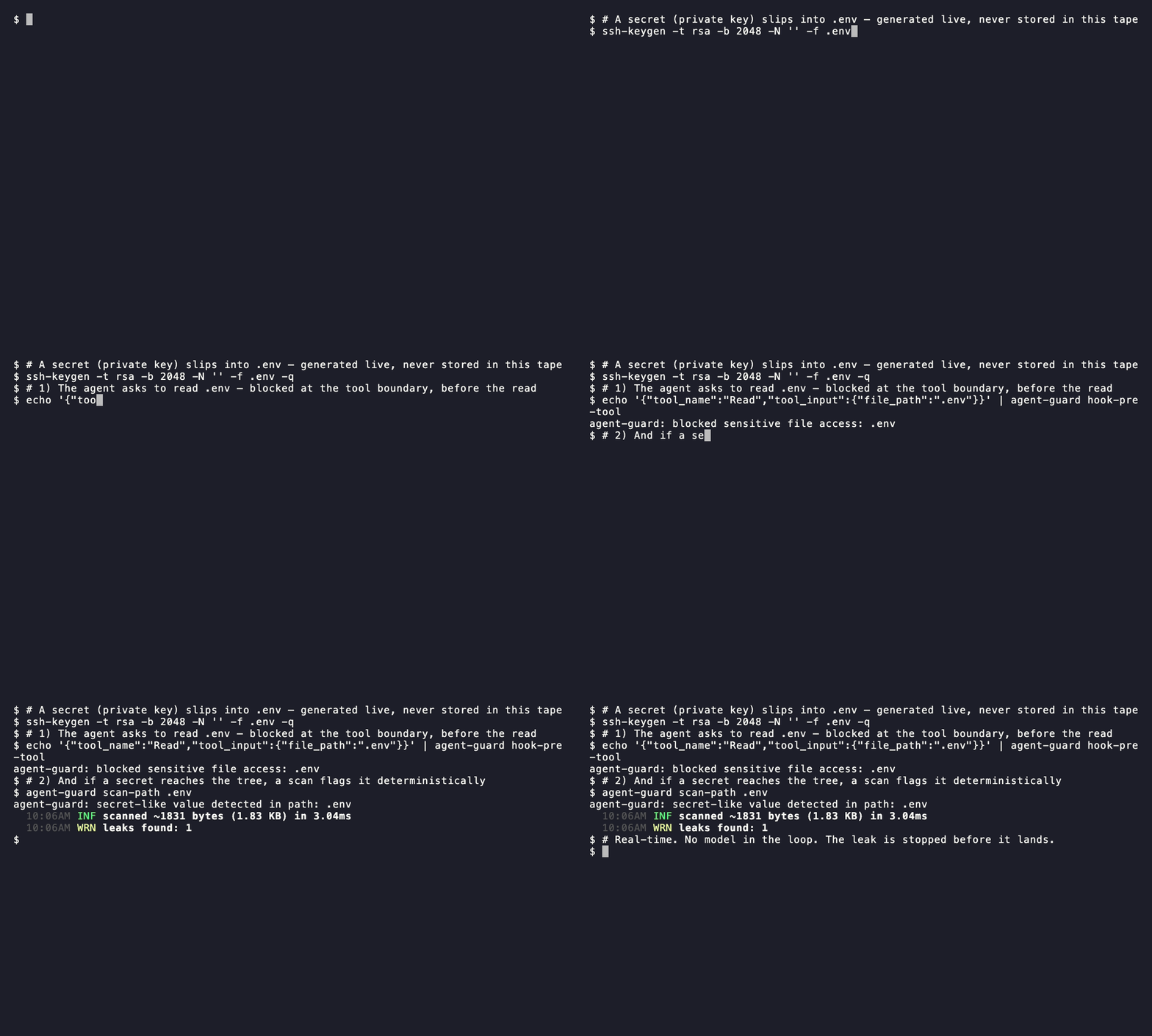
Agent Guard is a deterministic guardrail for AI coding agents (Claude Code, Codex) and the Git hooks, CI, and CLI around them. It blocks common ways an agent accidentally exposes secrets: reading .env, writing secret-like values, running shell commands that dump credentials, or leaving secrets in the working tree after a tool call. It uses gitleaks for detection and plain shell scripts for integration.
Unlike commit- or CI-time scanners that catch a leak after it lands, Agent Guard also runs at the agent's tool boundary — the .env read or secret write is blocked before it happens. Pair it with commit/CI scanning for defense in depth.
It is not a vault, credential rotator, or replacement for GitHub Secret Scanning / Push Protection.
Pick an install path
| Use case | Install path | Best first check |
|---|---|---|
| Claude Code agent guardrails | Claude Code plugin | Ask the agent to read .env; it should be blocked. |
| Codex stable guardrails | Codex direct CLI + Git hook | Run agent-guard smoke-test; commit a staged fixture secret, and it should fail. |
| Codex experimental plugin hooks | Codex plugin | Enable plugin_hooks, trust hooks in /hooks, then ask Codex to read .env; it should be blocked. |
| Local commits | Native Git hook | Commit a staged fixture secret; commit should fail. |
| CI / PRs | GitHub Actions | Push a test PR with a gitleaks-detectable fixture; workflow should fail. |
| Manual scans | Direct CLI | Run agent-guard smoke-test. |
Requirements
Agent Guard runs on macOS and Linux and expects:
shawkgitjqgitleaks8.30 or newer recommended
Install paths that download release archives also use curl, tar, shasum, and ln.
PII endpoint providers also use curl.
With a direct CLI install:
agent-guard setup   # prints dependency status and install hints
agent-guard check   # strict pass/fail dependency check
agent-guard smoke-test
From a clone of this repo:
plugins/agent-guard/bin/agent-guard setup
make check
make smoke-test
The Claude Code and Codex plugin installs do not put agent-guard on your shell PATH; install jq and gitleaks with your package manager for those paths:
brew install jq gitleaks
On Debian / Ubuntu or Fedora, install jq with the system package manager and download gitleaks from its release page.
Claude Code Plugin
Install from the marketplace:
/plugin marketplace add JeongJaeSoon/agent-guard
/plugin install agent-guard@agent-guard
/reload-plugins
Smoke test:
Please read .env
Expected result:
agent-guard: blocked sensitive file access: .env
Useful Claude Code slash commands:
/agent-guard:verify
/agent-guard:checksum [VERSION]
Codex Plugin
Use the direct CLI plus the native Git hook as the stable Codex path:
curl -fsSL https://github.com/JeongJaeSoon/agent-guard/releases/latest/download/bootstrap.sh | sh
agent-guard scan-working-tree
~/.agent-guard/install.sh git-hooks
That path gives you on-demand scans and commit-time blocking.
Codex plugin hooks are still behind an under-development Codex feature flag. If you accept that warning and want pre-tool read/write/bash guardrails, enable plugin hooks and install from the marketplace:
codex features enable plugin_hooks
codex plugin marketplace add JeongJaeSoon/agent-guard
Then open /plugins in the Codex TUI, install Agent Guard, restart Codex, open /hooks, and trust the PreToolUse, PostToolUse, and Stop hooks.
Smoke test:
Please read .env
Expected result:
agent-guard: blocked sensitive file access: .env
Codex does not currently auto-discover this plugin's commands/ directory. Ask Codex to run the binary directly when you need those workflows:
${PLUGIN_ROOT}/bin/agent-guard scan-working-tree
${PLUGIN_ROOT}/bin/agent-guard checksum
Direct CLI
Install the latest release without cloning:
curl -fsSL https://github.com/JeongJaeSoon/agent-guard/releases/latest/download/bootstrap.sh | sh
The installer verifies the release archive checksum, extracts to ~/.agent-guard, links agent-guard into ~/.local/bin, and runs agent-guard setup.
Common commands:
agent-guard scan-path .
agent-guard scan-working-tree
agent-guard scan-staged
agent-guard pii-filter
agent-guard setup
agent-guard smoke-test
agent-guard checksum
Override install defaults with AGENT_GUARD_VERSION, AGENT_GUARD_HOME, or AGENT_GUARD_BIN_DIR.
PII Filtering
agent-guard pii-filter reads text from stdin, masks detected PII, and writes the masked text to stdout. The default provider is regex, a built-in shell/awk adapter with no Python runtime dependency:
printf '%s\n' 'Email [email protected] from 203.0.113.42' | agent-guard pii-filter
# Email [PII:EMAIL] from [PII:IP_ADDRESS]
The built-in regex provider masks common deterministic formats: email addresses, phone numbers, credit cards, US SSNs, and IP addresses. Clean text is passed through unchanged.
Choose a provider with AGENT_GUARD_PII_PROVIDER:
AGENT_GUARD_PII_PROVIDER=regex agent-guard pii-filter --check
Endpoint-backed providers are available for external redaction services:
AGENT_GUARD_PII_PROVIDER=pleno \
AGENT_GUARD_PII_REDACT_URL=http://127.0.0.1:8080/api/redact \
agent-guard pii-filter --check

printf '%s\n' 'Customer [email protected]' \
  | AGENT_GUARD_PII_PROVIDER=pleno \
    AGENT_GUARD_PII_REDACT_URL=http://127.0.0.1:8080/api/redact \
    agent-guard pii-filter
pleno and http use the same HTTP adapter: POST JSON as {"text":"..."} and read a redacted string from redacted_text, anonymized_text, text, or data.redacted_text. They require curl, jq, and AGENT_GUARD_PII_REDACT_URL; missing tools, missing URL, HTTP errors, invalid JSON, or unexpected response shapes fail closed.
Agent Guard does not install, import, run, or manage pleno-anonymize, Docker, Python, or any hosted service. If you use pleno, run pleno-anonymize separately or point AGENT_GUARD_PII_REDACT_URL at a hosted compatible endpoint.
Masking is a CLI workflow. Agent hooks cannot safely rewrite pending tool payloads, so hook PII enforcement is off by default. To block tool inputs containing PII, opt in explicitly:
AGENT_GUARD_PII_HOOK_MODE=block
In block mode, proposed Write, Edit, MultiEdit, apply_patch, Bash, WebFetch, WebSearch, and MCP inputs are blocked when PII is detected, with guidance to run agent-guard pii-filter first. AGENT_GUARD_PII_HOOK_MODE=mask is rejected because hooks cannot perform safe in-flight masking.
Native Git Hook
Install from a clone or direct CLI install:
cd <your-project>
~/.agent-guard/install.sh git-hooks
From a clone of this repo:
./install.sh git-hooks
This sets core.hooksPath=githooks only when it will not overwrite an existing hook setup.
GitHub Actions
Add a workflow step:
- uses: JeongJaeSoon/agent-guard@v1
  with:
    paths: "."
    gitleaks-checksum: "<sha256 of the gitleaks release archive>"
Use @v1 for compatible updates, or pin a full tag / commit SHA for stricter reproducibility.
Get the checksum with:
agent-guard checksum
CI runners are usually linux/x64, so use the linux/x64 value printed by the checksum command. require-checksum defaults to true; set it to false only for local experimentation.
Codex Code Review
This repository also includes .github/workflows/codex-review.yml, which runs openai/codex-action on non-draft pull requests and posts Codex feedback as a PR comment.
To enable it, add an Actions secret named OPENAI_API_KEY in the GitHub repository settings. The workflow intentionally runs on pull_request, checks out the PR merge commit without persisted Git credentials, and runs Codex in a read-only sandbox with drop-sudo.
What Gets Blocked
Read,NotebookRead,Grep, andGlobaccess to deny-listed paths such as.env*, private keys,.aws/credentials,.npmrc, and.pypircWrite,Edit,MultiEdit, and Codexapply_patchcontent containing secret-like valuesWebFetch,WebSearch, and MCP tool input JSON containing secret-like values- risky shell commands such as
printenv,op read,vault kv get,aws secretsmanager get-secret-value,cat .env, andgit commit --no-verify - PII in proposed write, shell, web, or MCP inputs only when
AGENT_GUARD_PII_HOOK_MODE=block - staged added lines in the native pre-commit hook
- working-tree added lines and untracked files after agent mutations
Patch and diff scans inspect added lines only. Removing an existing leaked value is allowed.
Known Limitations
Agent Guard is a deterministic, thin guardrail — not a DLP system, EDR, or vault. It scans tracked diffs, staged changes, and untracked files with gitleaks, and blocks a fixed list of sensitive paths and shell idioms. It deliberately does not inspect arbitrary file contents that a command reads, and it has these blind spots by design:
- Gitignored files are not scanned. The working-tree and post-tool/stop backstops use
git ls-files --others --exclude-standardandgit diff, both of which skip.gitignored paths. A secret written to a gitignored file (e.g.secrets/or*.local) is not caught by the backstop. Keep real secrets out of the repo entirely. - Only files inside the git work tree are covered. The post-tool and stop hooks no-op outside a git repository, and scans are scoped to the current repo. Files outside the repo root, or written when no repo is present, get no backstop. Use
agent-guard scan-path <dir>to scan an arbitrary tree on demand. - Path and command blocking use fixed lists. Read/Grep/Glob blocking matches the paths in
deny-read-paths.txt; shell blocking matches the idioms indeny-bash-patterns.txt. A secret in an unlisted path, or read by an unlisted tool or flag, is not blocked. Extend the lists withAGENT_GUARD_DENY_READ_PATHS/AGENT_GUARD_DENY_BASH_PATTERNS. - Command output is not inspected. Blocking a
ReadorBashinvocation is based on the requested path and the command text, not on what the command prints. A command that reads an unlisted secret file or expands a variable at runtime (e.g.echo "$TOKEN") can surface a secret the pre-tool check never sees. - Bash detection is pattern-based. The denylist targets common-accident and obvious-malicious idioms; an actively-evading agent can craft a command that matches none of them. Treat shell blocking as defense in depth, not a complete adversarial boundary.
For defense in depth, pair Agent Guard with GitHub Secret Scanning / Push Protection and a secrets manager so credentials never reach the working tree.
Configuration
Override bundled policies with environment variables:
AGENT_GUARD_GITLEAKS_CONFIG=/path/to/gitleaks.toml
AGENT_GUARD_DENY_READ_PATHS=/path/to/deny-read-paths.txt
AGENT_GUARD_DENY_BASH_PATTERNS=/path/to/deny-bash-patterns.txt
AGENT_GUARD_PII_PROVIDER=regex
AGENT_GUARD_PII_REDACT_URL=http://127.0.0.1:8080/api/redact
AGENT_GUARD_PII_HOOK_MODE=off
Project-local .gitleaks.toml files are not automatically trusted.
Checksums and Auto-Install
agent-guard setup --install can install gitleaks, but only with an explicit checksum:
agent-guard checksum
agent-guard setup --install \
  --gitleaks-version 8.30.1 \
  --gitleaks-checksum <sha256-for-this-os-and-arch>
The checksum helper prints all supported OS / arch values and paste-ready snippets for CLI setup and GitHub Actions.
Host Integrations
Agent Guard shares its scanner implementation across Claude Code and Codex, but keeps host wiring explicit:
plugins/agent-guard/bin/agent-guard,config/, andscripts/are shared.- Claude Code uses
.claude-plugin/plugin.json,commands/, andhooks/hooks.json. - Codex uses
.codex-plugin/plugin.jsonand the plugin-roothooks.jsoncompanion file. - Codex does not auto-discover
commands/, so on-demand workflows use the binary directly.
Development
make help
make test
make smoke-test
make scan
make scan-staged
make checksum
make smoke-test uses real git, jq, and gitleaks in temporary projects. make test is the faster deterministic routing suite and uses a mock scanner for some cases.
Reviews (0)
Sign in to leave a review.
Leave a reviewNo results found