cerul
Health Pass
- License — License: Apache-2.0
- Description — Repository has a description
- Active repo — Last push 0 days ago
- Community trust — 89 GitHub stars
Code Pass
- Code scan — Scanned 12 files during light audit, no dangerous patterns found
Permissions Pass
- Permissions — No dangerous permissions requested
No AI report is available for this listing yet.
Real-time video search engine for AI agents. Search by meaning across visual scenes, speech, and on-screen content.

Cerul
Video understanding search API for AI agents.
Search what is shown in videos, not just what is said.
Docs · Quickstart · API Reference · Pricing · GitHub



Why Cerul
Web pages are easy for AI agents to search. Video is not.
Most video search today is limited to transcripts — what was said. Cerul goes further by indexing what is shown: slides, charts, product demos, code walkthroughs, whiteboards, and other visual evidence.
[!NOTE]
Cerul is in active development. The API is live at cerul.ai — get a free API key to start.
Quickstart
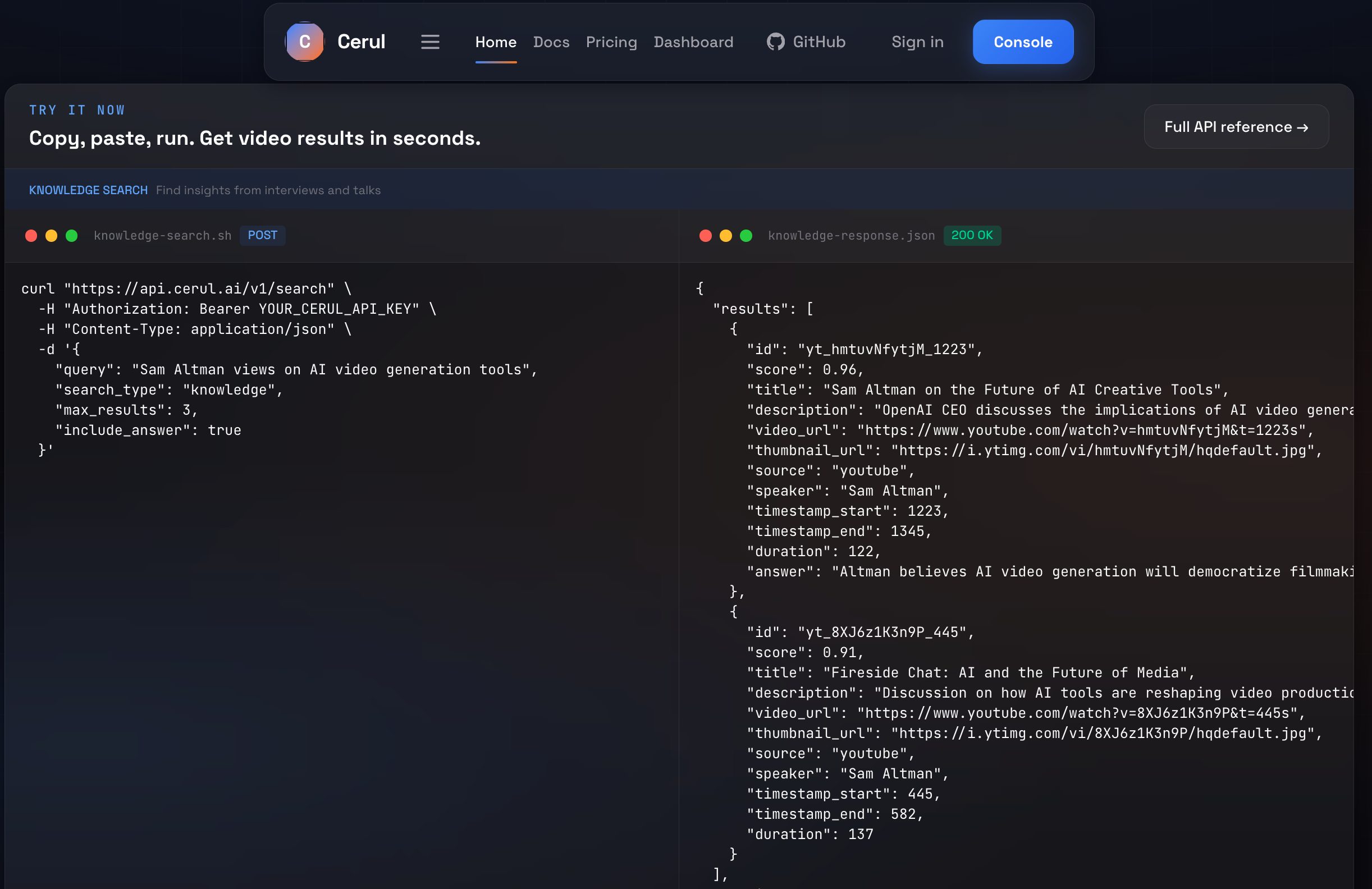
Index any video, then search it with one query:
curl "https://api.cerul.ai/v1/index" \
  -H "Authorization: Bearer YOUR_CERUL_API_KEY" \
  -H "Content-Type: application/json" \
  -d '{
    "url": "https://www.youtube.com/watch?v=hmtuvNfytjM"
  }'
curl "https://api.cerul.ai/v1/search" \
  -H "Authorization: Bearer YOUR_CERUL_API_KEY" \
  -H "Content-Type: application/json" \
  -d '{
    "query": "Sam Altman views on AI video generation tools",
    "max_results": 3,
    "include_answer": true,
    "filters": {
      "speaker": "Sam Altman",
      "source": "youtube"
    }
  }'
{
  "results": [
    {
      "id": "unit_hmtuvNfytjM_1223",
      "score": 0.96,
      "title": "Sam Altman on the Future of AI Creative Tools",
      "url": "https://cerul.ai/v/a8f3k2x",
      "snippet": "AI video generation tools are improving fast, but controllability and reliability still need work.",
      "thumbnail_url": "https://i.ytimg.com/vi/hmtuvNfytjM/hqdefault.jpg",
      "keyframe_url": "https://cdn.cerul.ai/frames/hmtuvNfytjM/f012.jpg",
      "duration": 5400,
      "source": "youtube",
      "speaker": "Sam Altman",
      "timestamp_start": 1223,
      "timestamp_end": 1345,
      "unit_type": "speech"
    }
  ],
  "answer": "Altman frames AI video generation as improving quickly, while noting that production-grade control is still the bottleneck.",
  "credits_used": 2,
  "credits_remaining": 998,
  "request_id": "req_abc123xyz456"
}
Features
| Feature | Description | |
|---|---|---|
| Visual Retrieval | Beyond transcripts | Index slides, charts, demos, and on-screen content — not just speech |
| Unified Search | One query surface | Search summaries, speech segments, and visual evidence without choosing a track |
| Unified Indexing | POST /v1/index |
Index YouTube, Pexels, Pixabay, and direct video URLs on the same pipeline |
| Agent-Ready | Built for LLMs | Designed for tool-use and function calling — clean JSON in, clean JSON out |
| Timestamp Precision | Frame-accurate results | Every result comes with exact start/end timestamps and confidence scores |
| Installable Skills | Codex & Claude | Drop-in agent skills with direct HTTP access — no MCP needed |
| Open Core | Apache 2.0 | Application code, pipelines, and agent integrations are open source |
Architecture
frontend/     Next.js app — landing page, docs, dashboard
api/          Hono / Cloudflare Workers API — public HTTP surface
workers/      Indexing pipelines and shared Python runtime helpers
docs/         Architecture, API specs, and runbooks
db/           Migrations and seed data
skills/       Agent skills for Codex / Claude-style clients
config/       YAML config defaults and templates
scripts/      Bootstrap and utility scripts
Development
# Local development uses .env by default. Keep deployment-only secrets in .env.production.
# When .env points to the local docker database, rebuild.sh will start the compose db service automatically.

# Quick start — install deps, run database migrations, and start both servers
./rebuild.sh

# Apply SQL migrations manually (useful for remote or one-off database updates)
./scripts/migrate-db.sh

# Load a different env file explicitly when needed
./rebuild.sh --env-file ./.env.production
./scripts/migrate-db.sh --env-file ./.env.production

# Or run frontend and API separately
pnpm --dir frontend dev
npm --prefix api run dev -- --env development --ip 127.0.0.1 --port 8787
Frontend
pnpm --dir frontend install
pnpm --dir frontend dev
pnpm --dir frontend lint
pnpm --dir frontend test
pnpm --dir frontend build
API
npm --prefix api install
npm --prefix api run dev -- --env development --ip 127.0.0.1 --port 8787
npm --prefix api run check
Workers
python3 -m venv workers/.venv
workers/.venv/bin/python -m pip install -r workers/requirements.txt
workers/.venv/bin/pytest workers/tests
workers/.venv/bin/python -m workers.worker --db-url "$DATABASE_URL"
workers/.venv/bin/python -m workers.scheduler --once --database-url "$DATABASE_URL"
Deployment
Deploy the frontend on Vercel:
- Import the repository and set Root Directory to
frontend - Keep the included
frontend/vercel.json - Optionally set
NEXT_PUBLIC_SITE_URLfor custom domain metadata
Deploy the API from api/ with wrangler deploy.
For API or worker deployments, run ./scripts/migrate-db.sh once against the target
database as a release/predeploy step before rolling out code that depends on the new schema.
Project Status
- Shared platform backbone: auth, API keys, usage tracking, rate limiting, dashboard, and docs
- Unified
index + searchflow on the shared retrieval stack - Summary, speech, and visual retrieval units in one embedding space
- Agent-facing integrations via installable skills and direct HTTP access
- Higher-scale production validation for indexing coverage and retrieval quality
- Stripe billing validation in test mode
- Python & TypeScript SDKs, only if direct API + skill access proves insufficient
Community
License
Licensed under Apache 2.0.
Reviews (0)
Sign in to leave a review.
Leave a reviewNo results found