voiceterm
Health Gecti
- License — License: NOASSERTION
- Description — Repository has a description
- Active repo — Last push 0 days ago
- Community trust — 13 GitHub stars
Code Basarisiz
- rm -rf — Recursive force deletion command in .github/workflows/adopter_portability.yml
Permissions Gecti
- Permissions — No dangerous permissions requested
Bu listing icin henuz AI raporu yok.
Low-latency Rust terminal overlay for Codex and Claude Code with local Whisper STT, PTY passthrough, wake words, macros, memory tools, and a customizable HUD.


Low-latency Rust terminal overlay for Codex and Claude Code with local Whisper
STT, PTY passthrough, wake words, macros, and a customizable HUD.
Whisper runs locally by default — no cloud API keys required.
Release history: CHANGELOG.
If you are new, use this path:
Quick Nav
- Install and Start
- How It Works
- Hands-Free Quick Start
- Features
- Supported Backends
- IDE Support
- UI Overview
- Controls
- Documentation
- Contributing
- For Developers
- Support
Install and Start
Install one supported AI CLI first:
Codex:
npm install -g @openai/codex
Claude Code:
curl -fsSL https://claude.ai/install.sh | bash
Then choose one VoiceTerm setup path:
Homebrew (recommended)brew tap jguida941/voiceterm
brew install voiceterm
cd ~/your-project
voiceterm
If needed, authenticate once:
voiceterm --login --codex
voiceterm --login --claude
pipx install voiceterm
# or: python3 -m pip install --user voiceterm

cd ~/your-project
voiceterm
If needed, authenticate once:
voiceterm --login --codex
voiceterm --login --claude
Requires Rust toolchain. See Install Guide for details.
git clone https://github.com/jguida941/voiceterm.git
cd voiceterm
./scripts/install.sh
If you are running from source while developing, run:
python3 dev/scripts/devctl.py check --profile ci
Optional advanced tools from the same checkout:
These companion surfaces are optional source-checkout workflow tools. They read
repo-visible live review/control state and do not replace the normal VoiceTerm
overlay path.
Double-click app/macos/VoiceTerm.app, pick a folder, and it opens Terminal
with VoiceTerm running.
For model options and startup tuning:
How It Works
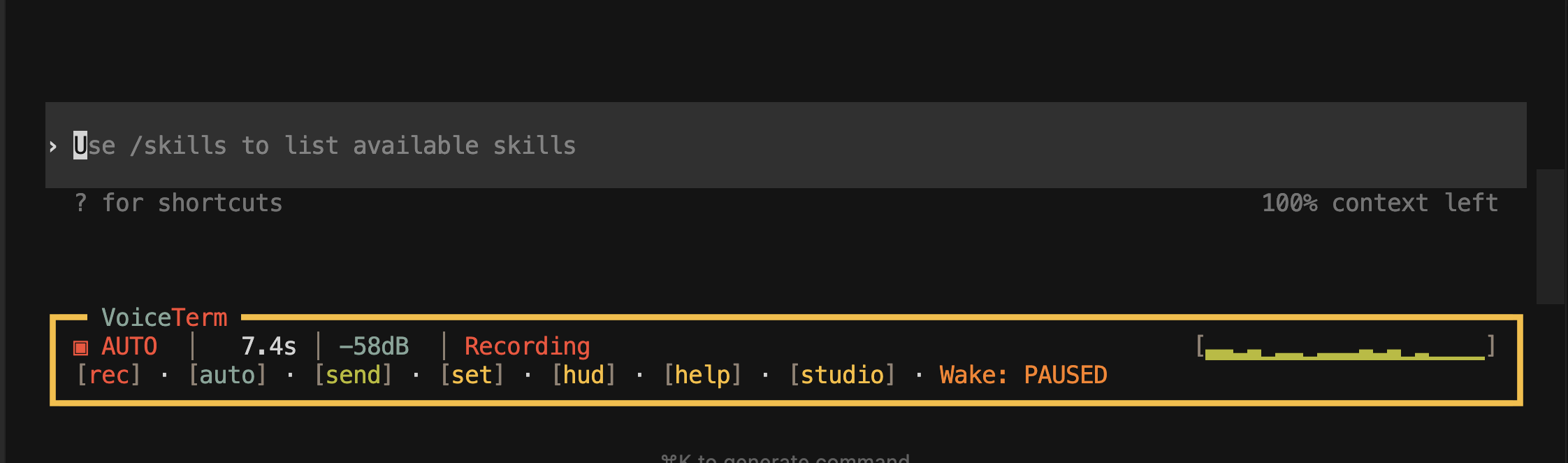
VoiceTerm listens to your mic, converts speech to text on your machine, and
types the result into your AI CLI input.
Requirements
- macOS or Linux (Windows needs WSL2)
- Microphone access
- ~0.5 GB disk for the default small model (base is ~142 MB, medium is ~1.5 GB)
Hands-Free Quick Start
VoiceTerm supports a fully hands-free workflow — no typing needed at all.
voiceterm --auto-voice --wake-word --voice-send-mode insert
- Say the wake phrase (
hey codexorhey claude) - Speak your prompt
- Say
sendorsubmitto deliver it
Features
Main features
| Feature | What it does |
|---|---|
| Local speech-to-text | Whisper runs on your machine — no cloud calls needed |
| Fast voice-to-text | Local Whisper turns speech into text quickly |
| Keep your CLI as-is | Your backend CLI layout and behavior stay the same |
| Auto voice mode | Keep listening on so you can talk instead of typing |
| Wake mode + voice send | Say hey codex/hey claude, then say send/submit |
| Image prompts | Use Ctrl+X for screenshot prompts, or enable persistent image mode |
| Transcript queue | If the CLI is busy, VoiceTerm waits and sends text when ready |
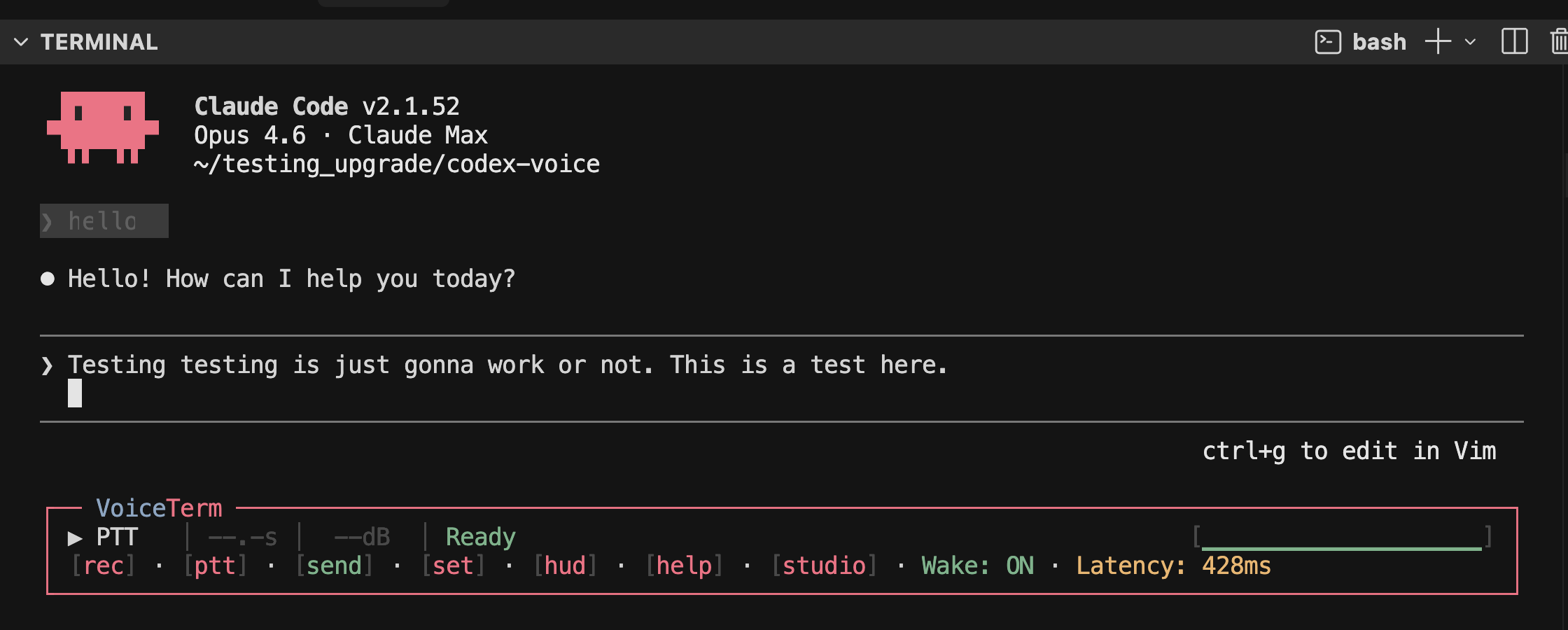
| Codex + Claude support | Primary support for Codex and Claude Code |
Everyday tools
| Tool | What it does |
|---|---|
| Voice navigation | Spoken scroll, send, show last error, copy last error, explain last error |
| Voice macros | Expand phrases from .voiceterm/macros.yaml — see Voice Macros |
| Built-in themes | 11 themes including ChatGPT, Catppuccin, Dracula, Nord, Tokyo Night, and Gruvbox |
| Transcript history | Ctrl+H to search and replay past text |
| Notification history | Ctrl+N to review recent status messages |
| Saved settings | Stored in ~/.config/voiceterm/config.toml |
| HUD controls | Mouse and keyboard both work by default |
For full details: Usage Guide.
Supported AI CLIs
VoiceTerm is optimized for Codex and Claude Code.
For full backend status and setup details, see
Usage Guide — Backend Support.
| Backend | Status | Notes |
|---|---|---|
| Codex | Supported | Default backend |
| Claude Code | Supported | Full support on current releases |
| Gemini CLI | Experimental | Not working in current releases |
| Other/custom backends | Experimental | See the usage guide for current limits |
IDE Support
| IDE host | Codex | Claude Code | Notes |
|---|---|---|---|
| Cursor terminal | Fully supported | Fully supported | Recommended host |
| JetBrains terminals (IntelliJ, PyCharm, WebStorm, CLion) | Fully supported | Fully supported | Claude may need a one-time terminal resize after long outputs — see Troubleshooting |
| AntiGravity | Not yet supported | Not yet supported | Not available in current releases |
| Other IDE terminals | Unverified | Unverified | Treat as experimental |
For more IDE details: Usage Guide — IDE Compatibility.
UI Overview
Theme Picker
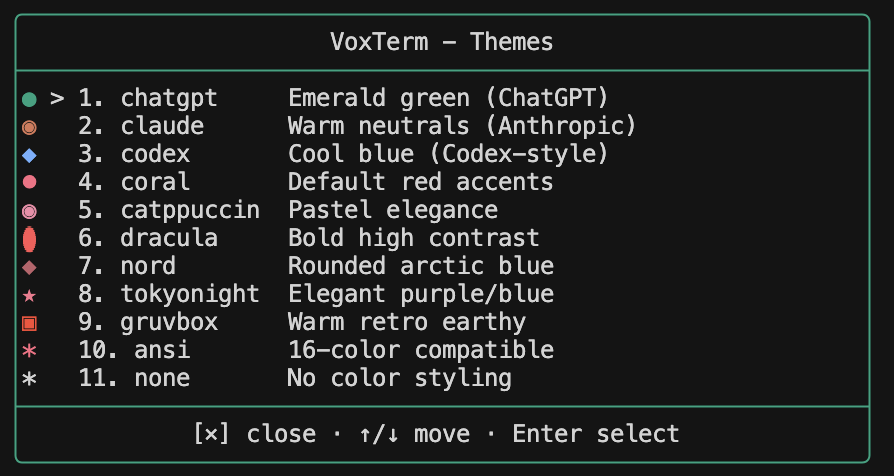
For details: Themes ·
CLI Flags.
Settings Menu
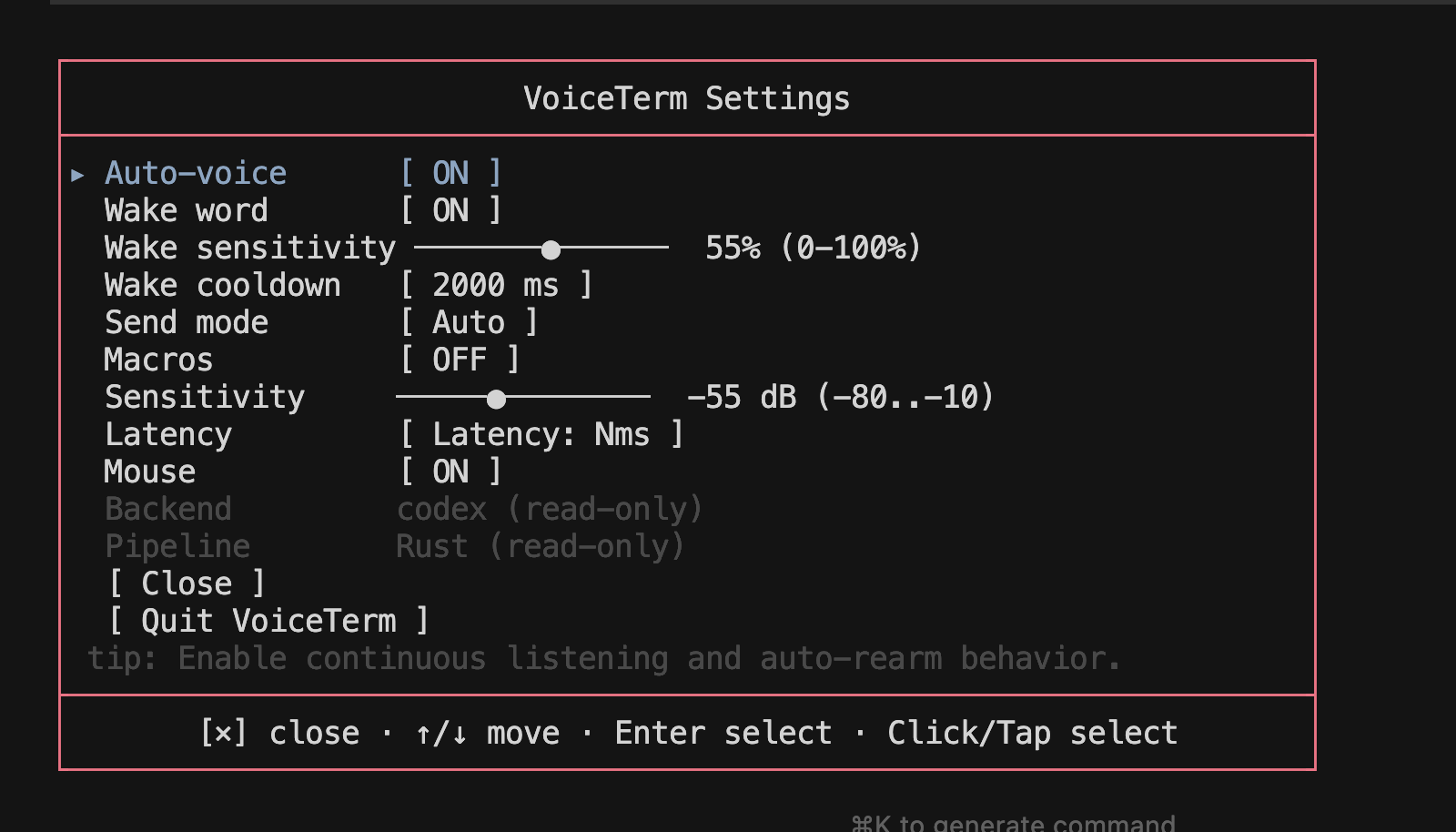
For details: Settings Menu ·
Themes ·
HUD styles.
Transcript History
Ctrl+H opens transcript history where you can search and replay past inputs.
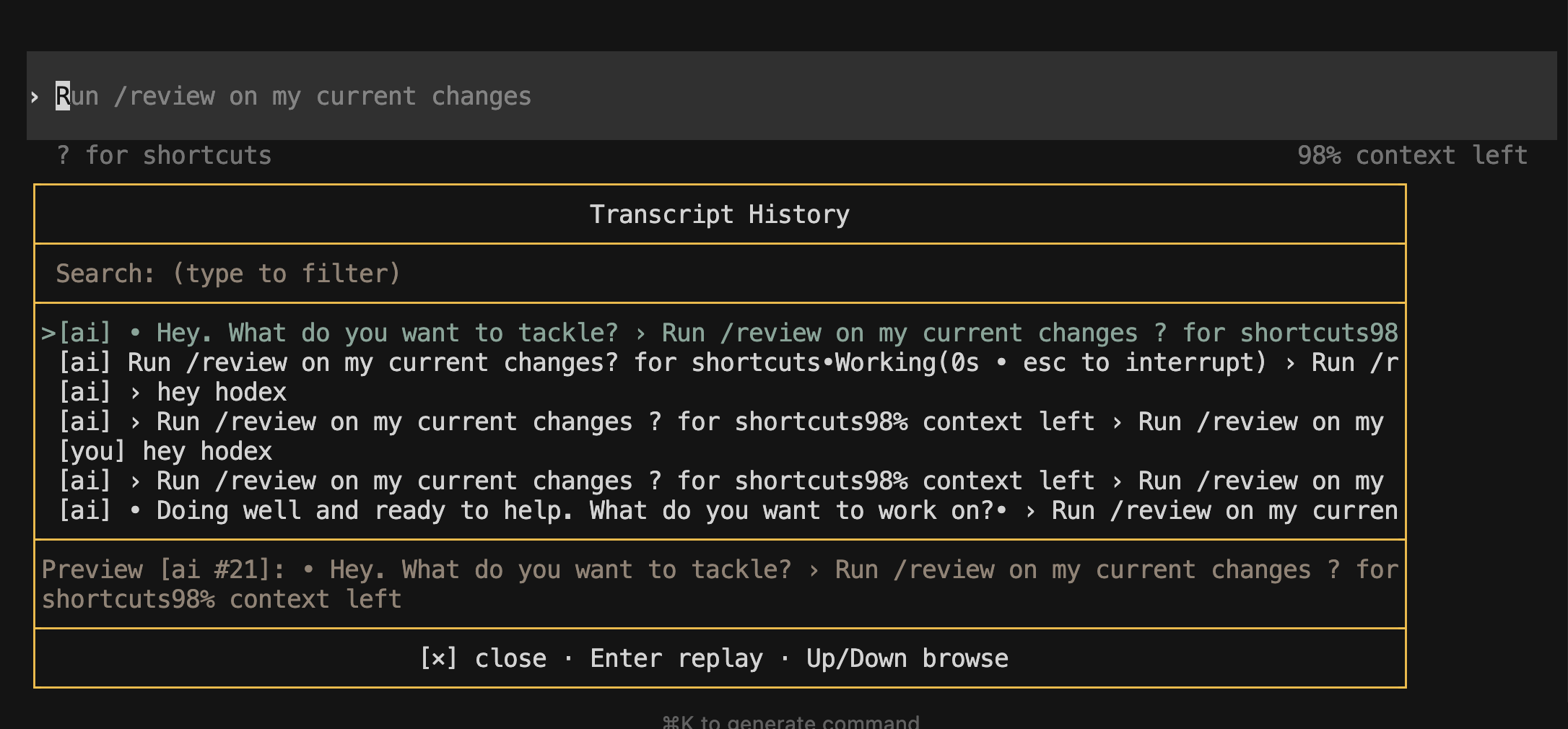
For details: Transcript History.
Shortcuts Overlay
Press Shift+? to open the shortcuts overlay with grouped hotkeys and
clickable links to Docs and Troubleshooting.
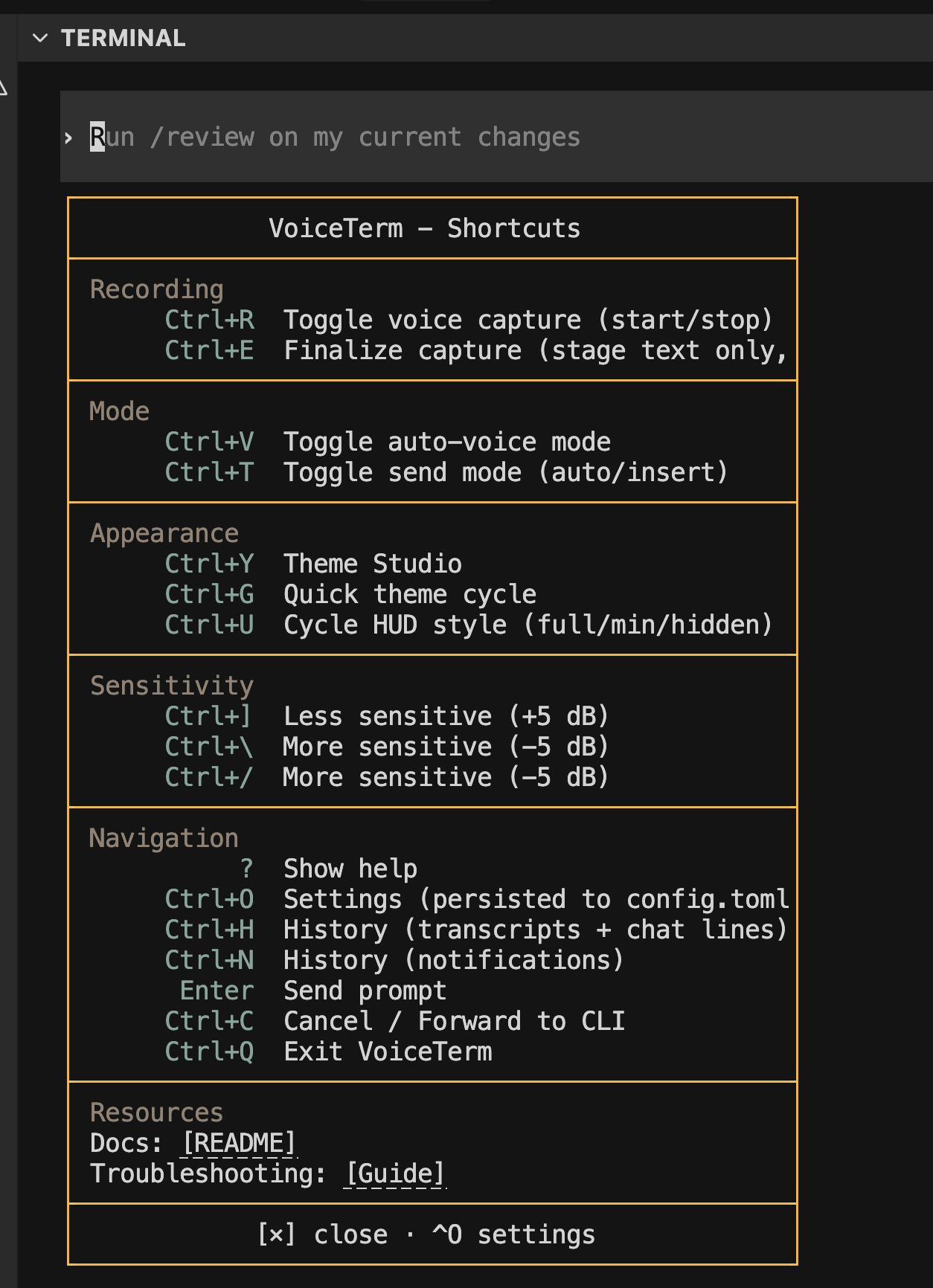
For details: Core Controls.
Controls
For shortcuts and behavior, see:
For CLI flags and command-line options:
voiceterm --help(orvoiceterm -h)- CLI Flags
Voice Macros
Note: Voice macros are still in development and may have rough edges.
Voice macros are project-local shortcuts in .voiceterm/macros.yaml.
Turn macros on in Settings when you want phrase expansion.
Setup and examples: Project Voice Macros.
Documentation
Start with the shortest useful doc for your goal:
| Audience | Document |
|---|---|
| User | Quick Start |
| User | Guides Index |
| User | Install Guide |
| User | Usage Guide |
| User | CLI Flags |
| User | Troubleshooting |
| Advanced | Operator Console (optional PyQt6 app) |
| Advanced | iPhone/iPad companion app |
Contributing
PRs welcome. See CONTRIBUTING.md.
Before opening a PR, run:
python3 dev/scripts/devctl.py check --profile cipython3 dev/scripts/devctl.py docs-check --user-facingpython3 dev/scripts/devctl.py hygiene
For Developers
Looking to contribute or dig into the codebase?
- Developer Index — tooling, architecture, and dev guides
- Development Guide — build, test, and CI instructions
- Operator Console README — optional PyQt6 shared-screen app and launcher usage
When do I run what?
| When | Command |
|---|---|
| Quick sanity check while coding | python3 dev/scripts/devctl.py check --profile quick |
| Before pushing to GitHub | python3 dev/scripts/devctl.py check --profile prepush |
| Publish governed AI-governance changes | python3 dev/scripts/devctl.py push --execute |
| Full CI-equivalent check locally | python3 dev/scripts/devctl.py check --profile ci |
| Rust tests only | cd rust && cargo test --bin voiceterm |
| Python tests only | python3 dev/scripts/devctl.py test-python --suite devctl |
| Check review-channel remote-control health | python3 dev/scripts/devctl.py review-channel --action doctor --terminal none --format md |
| Check docs are up to date | python3 dev/scripts/devctl.py docs-check --strict-tooling |
| Governance / archive hygiene | python3 dev/scripts/devctl.py hygiene |
| See project status | python3 dev/scripts/devctl.py status |
| List all devctl commands | python3 dev/scripts/devctl.py list |
Remote-control installs that need the detached review-channel publisher to
survive login/crash cycles can start from the checked-in launchd template and
wrapper under dev/config/launchd/.
For all available commands, what they do, and when to use them: devctl guide.
Support
- Troubleshooting:
guides/TROUBLESHOOTING.md - Bug reports and feature requests:
GitHub Issues - Security concerns:
.github/SECURITY.md
License
VoiceTerm is source-available under the proprietary evaluation license in
LICENSE.
- No third-party commercial use, production use, hosting, redistribution, or
derivative commercialization is allowed without prior written permission. - Separate commercial or production rights require a direct written license
from the Licensor. - Subtrees that ship their own local
LICENSEfile, such as
integrations/ci-cd-hub/LICENSE, keep that
local license for their subtree.
Yorumlar (0)
Yorum birakmak icin giris yap.
Yorum birakSonuc bulunamadi