retrace
Health Uyari
- License — License: Apache-2.0
- Description — Repository has a description
- Active repo — Last push 0 days ago
- Low visibility — Only 6 GitHub stars
Code Gecti
- Code scan — Scanned 12 files during light audit, no dangerous patterns found
Permissions Gecti
- Permissions — No dangerous permissions requested
Bu listing icin henuz AI raporu yok.
A private, on-device macOS rewind: capture, search, and scrub back through your day. 100% local, no telemetry.
Retrace




A private, on-device "rewind" for your Mac. Retrace quietly captures what's on
your screen, extracts the text and context, and lets you search and scrub back
through your day — plus time/usage analytics. Everything runs 100% on your
machine. No data ever leaves it. No accounts. No telemetry.
macOS only, on-device only. Retrace is built for macOS so it can lean on
native frameworks — ScreenCaptureKit, Accessibility, Vision, Foundation Models
(the on-device LLM), NaturalLanguage embeddings, SensitiveContentAnalysis, and
EventKit. There is no cloud component, by design.
The privacy promise (the whole point)
These are hard invariants, enforced in code and covered by tests — not preferences:
- Raw screenshots are never retained. Each frame goes to a private temp file,
is processed (text + a small thumbnail), then deleted in afinallyblock —
removed even if anything errors. Only extracted text, a short caption, a
downscaled JPEG thumbnail, and metadata persist. (verified:tests/test_pipeline.pyasserts the frame is gone on success, capture failure,
and exceptions.) - On-device only. No network calls for capture, OCR, captioning, embeddings, or
search. - Off by default. Capture is disabled until you turn it on, and that choice
persists across restarts. - Away = paused. When you're idle, the screen is locked, or the display is
asleep, Retrace stops capturing and stops counting time — a machine left on and
logged in never looks "active." - Blocks what it shouldn't see. A password-manager denylist, incognito/private
windows, and adult/sensitive content (URL/keyword rules and an on-device image
scan) are all skipped before anything is stored. - Hidden mode. One click pauses all recording (optionally for a set time).
- Bounded retention. Rows + thumbnails older than your window (default 30 days)
are purged automatically, with a manual purge too. - Local bind only. API and MCP listen on
127.0.0.1. - No telemetry. Zero analytics, zero phone-home.
What you get
| Menu bar | A native status-bar item (retrace menubar) to see live state and counters, capture now, pause, toggle Hidden mode, and open the dashboard. |
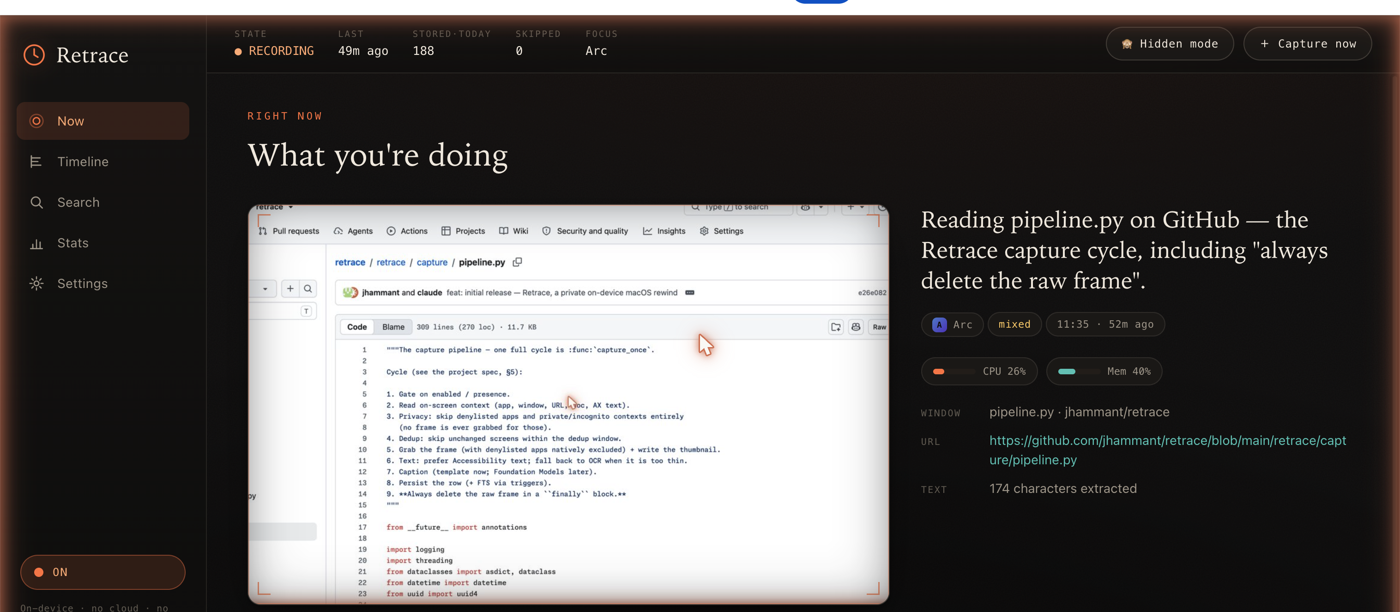
| Now | The latest capture, framed like a film cell, with a one-line on-device LLM caption. |
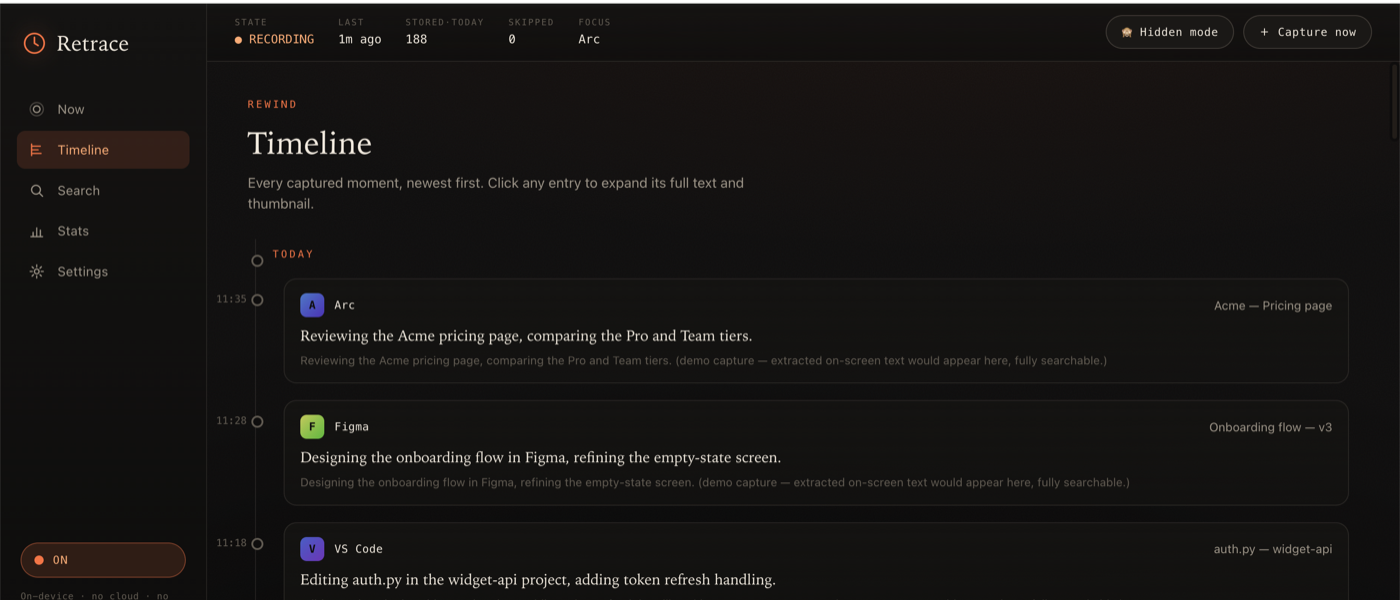
| Timeline | Reverse-chronological, infinite-scroll history. Click any moment to expand its full text + thumbnail. |
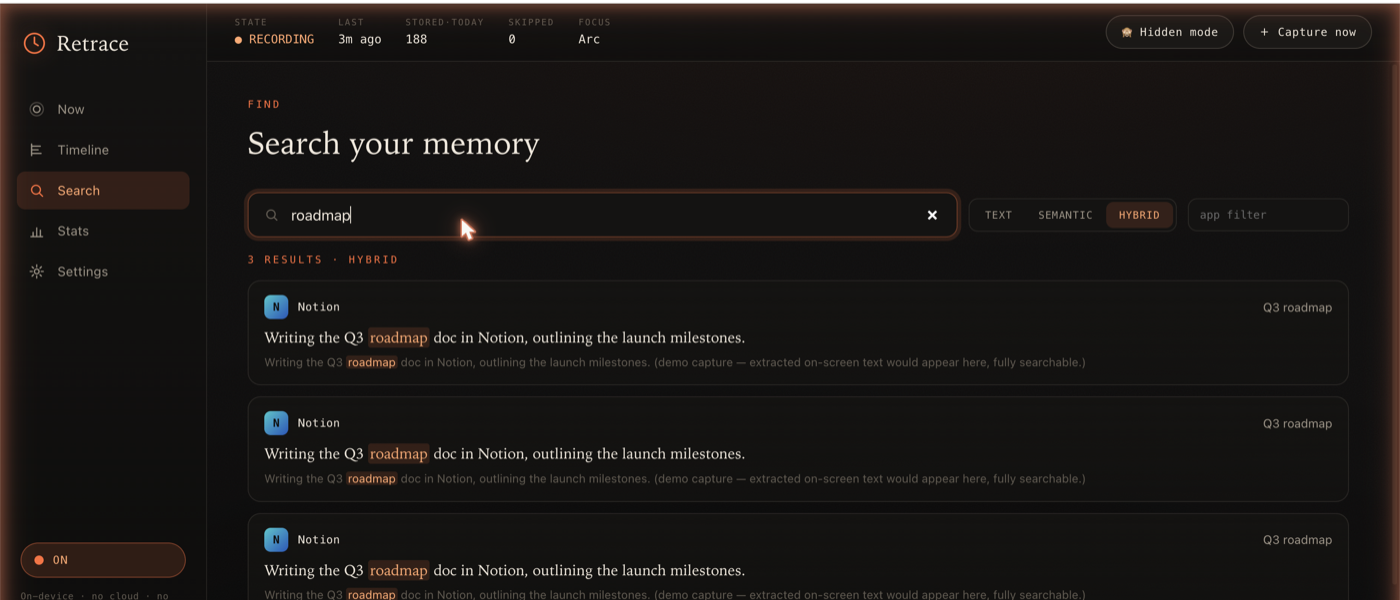
| Search | One box, three modes — text (FTS5), semantic (NaturalLanguage embeddings, fully local), and hybrid. |
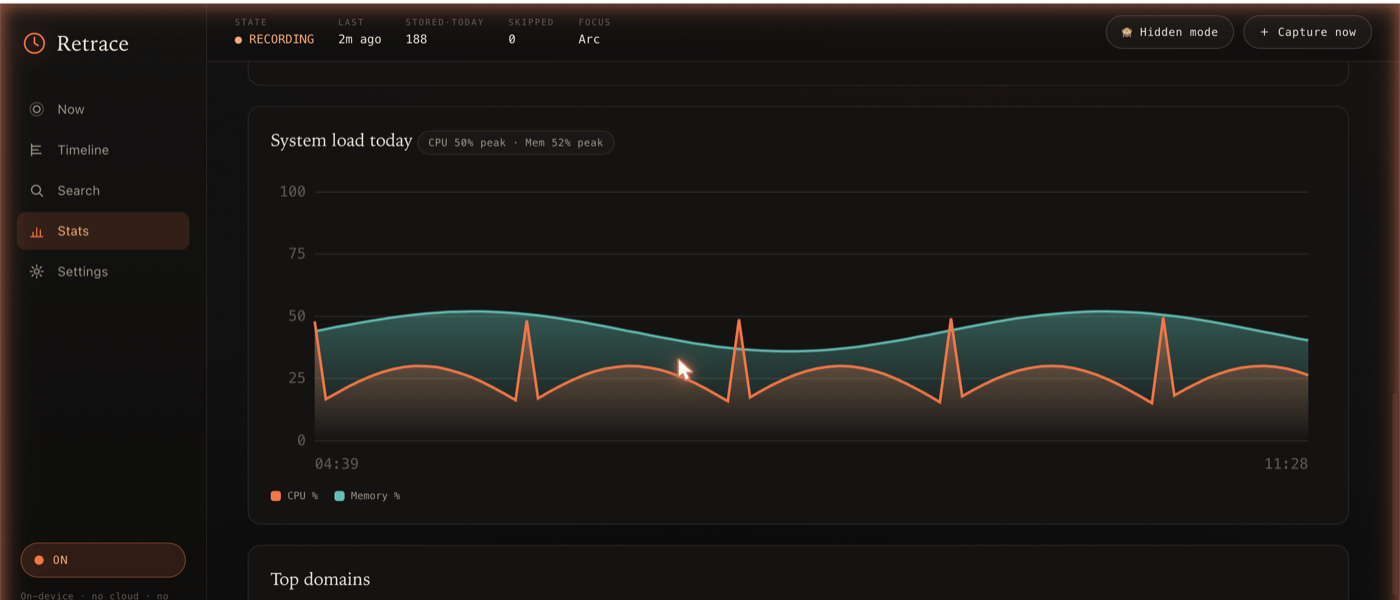
| Stats | Time-by-app, top domains, daily/weekly totals, and CPU/memory charts — AFK-aware so idle time isn't counted. Hand-rolled offline SVG, no chart library. |
| Settings | Enable/disable, retention, denylist, sensitive-content + page-capture controls, permission status. |
| MCP | A read-only server so other agents/assistants can query your timeline, search, and stats. |
| Plugins | Per-app collectors / enrichers / pollers. Ships with Claude Code, Spotify, Apple Music, system stats, calendar, notifications, git commits, Apple Mail, browser downloads, recent files, clipboard, and shell history. Drop your own in ~/.retrace/plugins/. |
Screenshots
Now — the latest capture with an on-device caption, the now-playing track, and live CPU/memory:
Stats — time-by-app, weekly activity, and a CPU/memory chart (hand-rolled offline SVG):
Timeline — every captured moment, searchable, with expandable full text:
Search — one box, three modes (text · semantic · hybrid), with highlighted matches:
Screenshots use demo data. A short demo video lives in
demo/(Remotion).
Quickstart
Requires macOS 14+ (built/tested on macOS 26), the Xcode command-line tools
(swiftc), and uv.
make setup            # create the venv (Python 3.13) + install Retrace
make build-helpers    # compile the native Swift helpers into ~/.retrace/bin
uv run retrace init   # create ~/.retrace (config + database). Capture is OFF.
uv run retrace doctor # check permissions + capabilities

uv run retrace start    # enable capture
uv run retrace tick --force   # take one capture right now
uv run retrace serve    # open http://127.0.0.1:8765
uv run retrace menubar  # add the menu bar icon (starts the server if needed)
On a notched Mac with a crowded menu bar, the icon can hide behind the notch —
a menu bar manager (Ice / Bartender) or quitting a few menu bar apps reveals it.
The first capture triggers macOS permission prompts (Screen Recording,
Accessibility). retrace doctor tells you exactly what's missing and how to grant it.
Architecture
┌──────────────────────────────────────────────────────────────────┐
│  Python core (FastAPI)                                            │
│   capture pipeline · daemon · activity · stats · search · plugins │
│   HTTP API + web UI  ·  read-only MCP server                      │
│        │  invokes (subprocess, JSON on stdout)                    │
│        ▼                                                          │
│  Swift helper binaries  (compile-on-first-use, cached in ~/.retrace/bin)
│   retrace-capture      ScreenCaptureKit frame + thumbnail (denylist excluded)
│   retrace-context      Accessibility: text / window / URL / doc / page text
│   retrace-ocr          Vision OCR fallback
│   retrace-present      idle / screen-lock / display-sleep + permission preflight
│   retrace-watch        NSWorkspace app-switch event stream (event-driven capture)
│   retrace-embed        NaturalLanguage sentence embedding
│   retrace-caption      Foundation Models text → 1-2 sentence caption
│   retrace-sensitivity  SensitiveContentAnalysis adult/NSFW image scan
└──────────────────────────────────────────────────────────────────┘
        All data under ~/.retrace  (SQLite + thumbnails). knowledgeC /
        Safari / Chrome history are read directly for time analytics.
The capture cycle: gate (enabled / present / hidden) → context (app, window,
URL, text) → privacy (denylist / incognito / sensitive) → dedup → frame +
thumbnail → on-device sensitivity scan → text (Accessibility, else OCR) →
caption → embed → persist → delete the raw frame, always.
Permissions
retrace doctor reports each of these; Retrace degrades gracefully when one is missing.
| Permission | Needed for | Where to grant |
|---|---|---|
| Screen Recording (required) | capturing frames | Privacy & Security → Screen & System Audio Recording |
| Accessibility (required) | real on-screen text, window titles, URLs | Privacy & Security → Accessibility |
| Automation | browser URL + incognito detection, full page text | prompted on first use (per browser) |
| Full Disk Access | knowledgeC focus history + Safari history (time analytics) | Privacy & Security → Full Disk Access |
| Calendar | correlating captures with events | Privacy & Security → Calendars |
For full-page text capture, also enable "Allow JavaScript from Apple Events" in your
browser (Safari: Develop menu; Chrome: View → Developer).
Privacy controls
- Hidden mode — the
🙈 Hidden modebutton (orPOST /capture/pause?minutes=N)
stops all recording until you resume. - Away handling — "Pause when away" (on by default) plus an adjustable idle
threshold; the header shows◌ AWAY/◍ LOCKED/◍ DISPLAY OFF. - Sensitive content — two layers, both on by default: an editable
domain/keyword blocklist, and an on-device SensitiveContentAnalysis image scan
that drops flagged frames (activates once you enable "Sensitive Content Warning" in
System Settings). - Incognito — Chrome-family private windows are detected and never captured.
- Denylist — password managers and other apps you list are never captured (and
are natively excluded from the frame via ScreenCaptureKit).
App plugins
Plugins extend Retrace per-app. A plugin can enrich a capture (when a matching
app is frontmost), collect an app's own data on a schedule, and/or poll for
lightweight periodic sampling (every ~capture interval). Built-ins cover Claude Code
transcripts, Spotify + Apple Music now-playing, system CPU/memory, calendar (EventKit),
macOS notifications, git commits across your repos, Apple Mail subjects, browser
downloads, recently-opened files, clipboard, and shell history — all on-device.
# ~/.retrace/plugins/my_app.py
from retrace.plugins import RetracePlugin

class MyApp(RetracePlugin):
    name = "my-app"
    bundle_ids = ("com.example.myapp",)

    def enrich(self, context, settings):
        return {"caption": "Doing the thing in MyApp", "text_append": "extra context"}

    def collect(self, settings):
        # read the app's data store, write captures, return a summary
        return {"name": self.name, "ingested": 0}

PLUGIN = MyApp()
Run collectors with uv run retrace collect (also runs daily in the daemon, and from
the Settings → "Collect app history" button). The built-in Claude Code plugin
ingests ~/.claude/projects/*.jsonl session transcripts into your timeline, fully
searchable.
MCP (read-only)
Other agents can query Retrace over MCP. It exposes only read/search tools — no
start/stop, no purge, no config changes:
retrace_search · retrace_timeline · retrace_get_capture ·retrace_what_was_i_doing · retrace_stats · retrace_now · retrace_list_apps
Register it (e.g. in claude_desktop_config.json or .mcp.json):
{
  "mcpServers": {
    "retrace": {
      "command": "uv",
      "args": ["run", "--directory", "/ABSOLUTE/PATH/TO/retrace", "retrace", "mcp"]
    }
  }
}
HTTP API
Bound to 127.0.0.1. Highlights:
GET /capture/status·POST /capture/start|stop|tick|pause|resumeGET /capture/recent·GET /capture/{id}·GET /capture/{id}/image·GET /capture/{id}/htmlPOST /capture/purge?days=GET /search?q=&mode=text|semantic|hybridPOST /activity/scan·GET /activity/apps|domains|statusGET /stats/daily|weekly|topGET /permissions·GET|POST /config·GET /plugins·POST /plugins/collect
Configuration
~/.retrace/config.toml (env vars RETRACE_* override it; both override defaults).
Edit the common ones in the Settings panel. Keys include: capture_interval_s,dedup_window_s, idle_threshold_s, pause_when_away, retention_days,thumb_max_edge, enable_semantic_search, enable_caption, denylist_bundle_ids,capture_private_browsing, block_sensitive_content, block_sensitive_images,sensitive_domains, sensitive_keywords, capture_page_text, capture_page_html,enable_plugins, disabled_plugins.
Run it in the background
A launchd user-agent template lives at scripts/com.retrace.daemon.plist (edit the
two absolute paths, then launchctl load -w ~/Library/LaunchAgents/...). See the
comments in that file for install/uninstall.
Development
make test            # run the test suite (isolated temp DB; never touches ~/.retrace)
make build-helpers   # (re)compile the Swift helpers
make run             # retrace serve
Tests use a throwaway RETRACE_HOME and refuse to run against your real database.
Native helpers are stubbed by default so the suite is fast and needs no Swift toolchain.
| Path | Purpose |
|---|---|
~/.retrace/retrace.db |
SQLite: captures, activity, FTS5, embeddings |
~/.retrace/thumbs/YYYY-MM-DD/*.jpg |
downscaled thumbnails |
~/.retrace/tmp/ |
transient raw frames (deleted every cycle) |
~/.retrace/status.json |
capture ledger |
~/.retrace/config.toml |
user config |
~/.retrace/bin/ |
compiled Swift helpers (cache) |
~/.retrace/plugins/ |
your custom app plugins |
Screenshots of the UI live in docs/screenshots/.
License
Apache-2.0. Built only on third-party + Apple frameworks. No telemetry,
ever.
Yorumlar (0)
Yorum birakmak icin giris yap.
Yorum birakSonuc bulunamadi