fjord
Health Warn
- License — License: NOASSERTION
- Description — Repository has a description
- Active repo — Last push 0 days ago
- Low visibility — Only 5 GitHub stars
Code Pass
- Code scan — Scanned 12 files during light audit, no dangerous patterns found
Permissions Pass
- Permissions — No dangerous permissions requested
No AI report is available for this listing yet.
Local-first project management, Linux first, also on Windows and macOS: kanban, notes with [[links]] and files in SQLite. Keyboard-first, mouse-friendly, with a CLI and MCP server for AI agents.

Fjord
Local-first project management — Linux first, also on Windows & macOS. Built for the keyboard, friendly to the mouse, and open to AI agents.




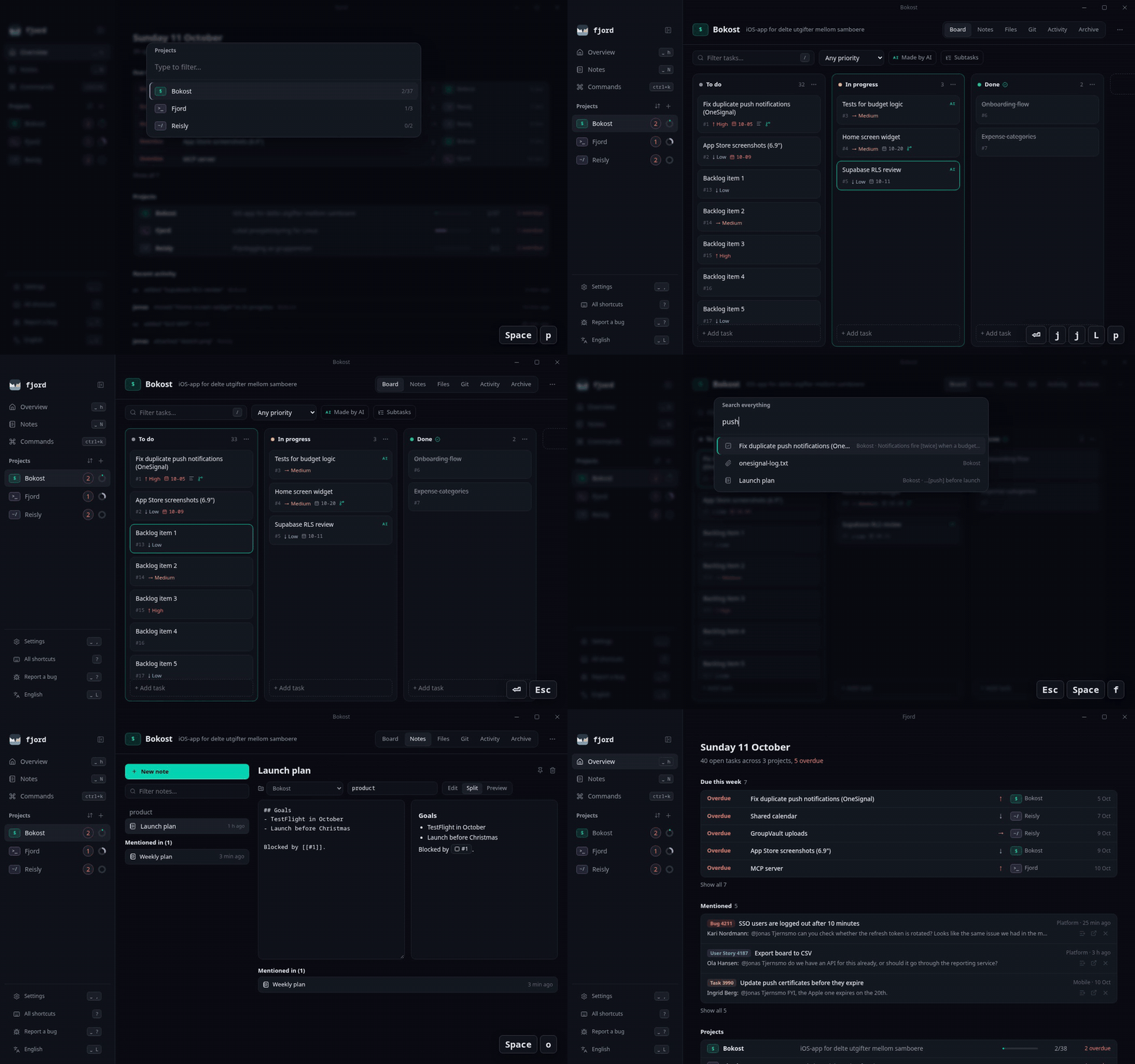
Fjord keeps your projects, kanban boards, files and notes in a single SQLite database on your own
machine. No account, no cloud, no telemetry. It's a lightweight native desktop app (Tauri), a scriptable
CLI, and an MCP server — so you and your AI assistant can work in
the same projects, and you can always see who did what.
Features
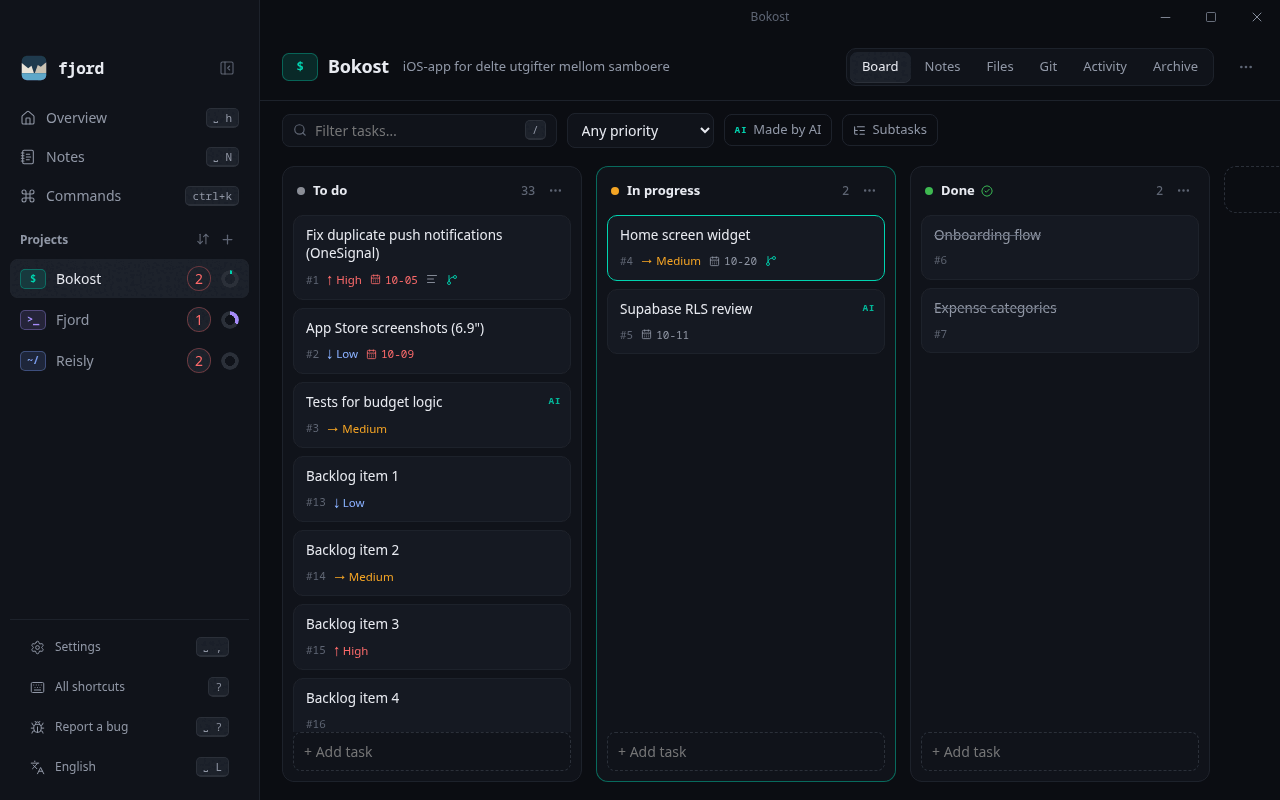
- Projects & kanban boards — drag and drop, or move tasks with
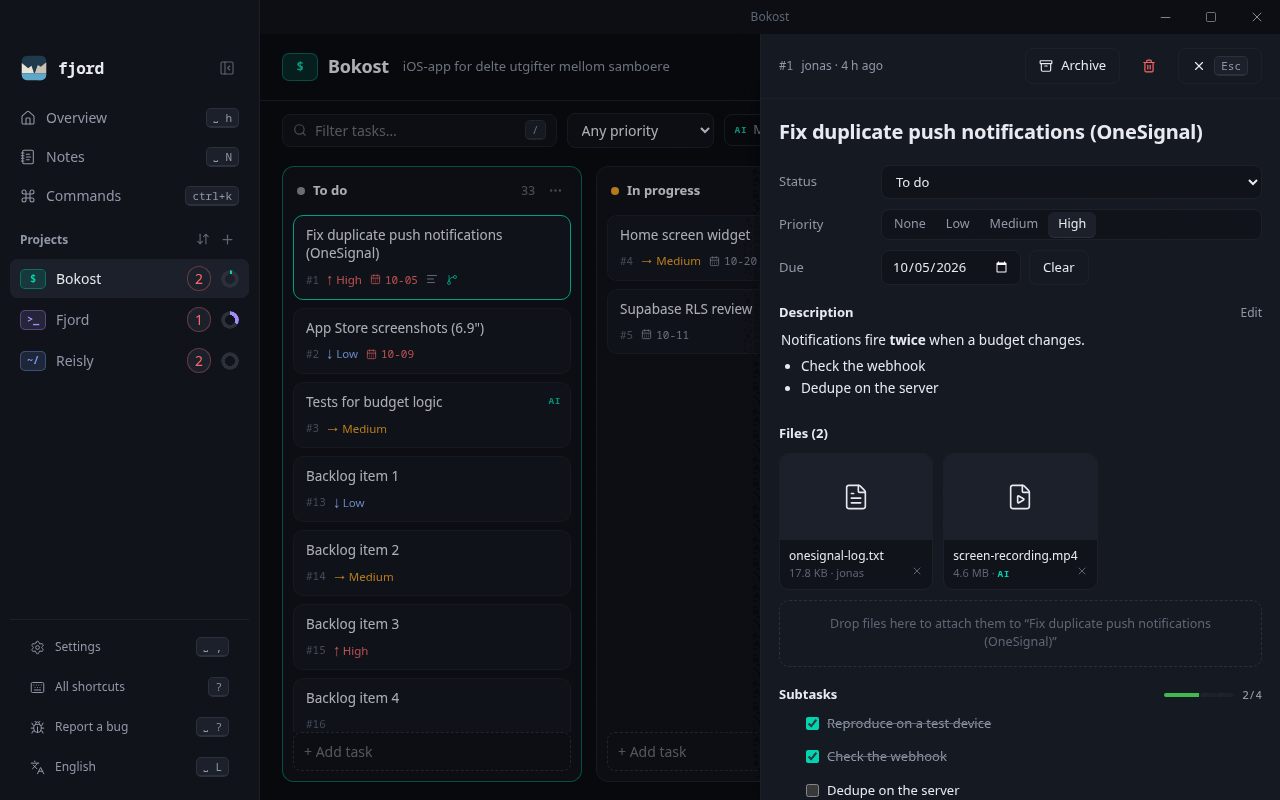
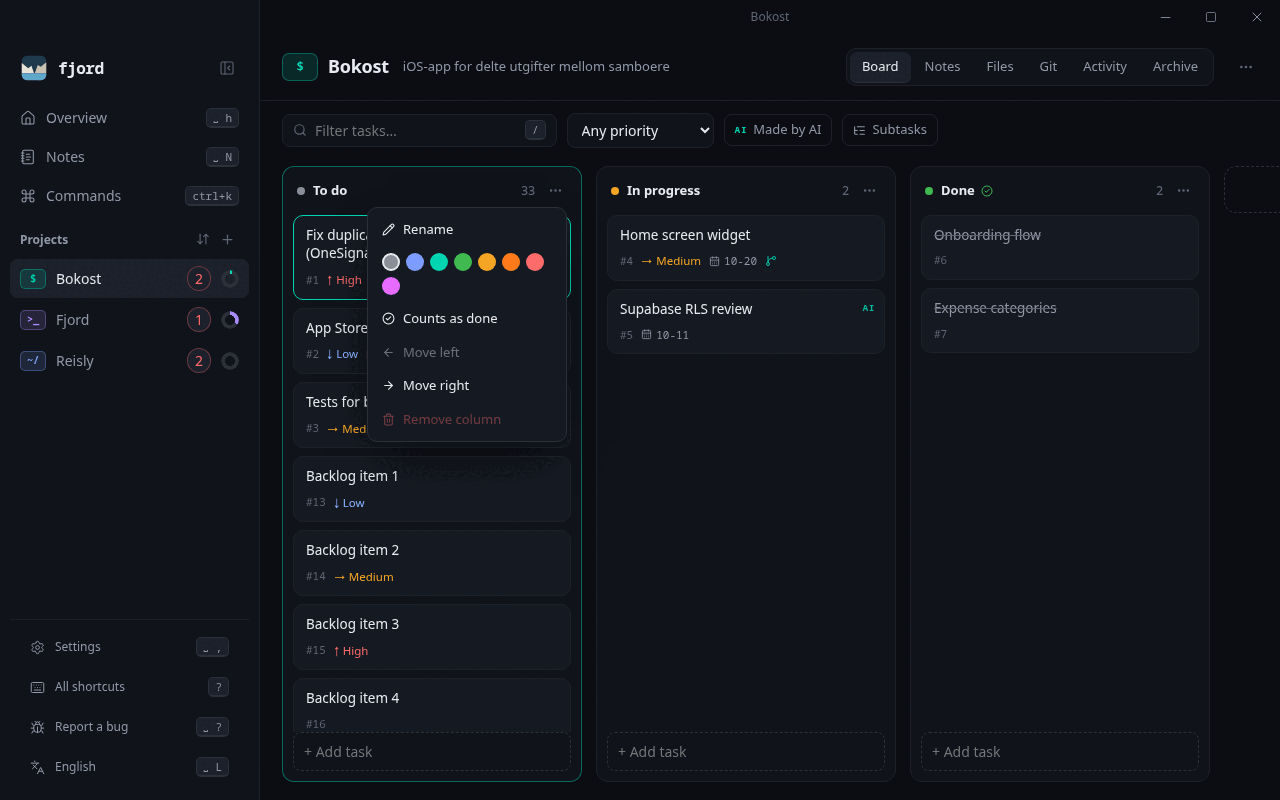
H/L. Rename, recolor, reorder and add columns, and mark one or more as done columns (e.g. Resolved and Done). Right-click a project to change its icon and colour. - Tasks — markdown descriptions, priority, due dates, overdue warnings, archive & restore. The Overview lists everything due this week across your projects, overdue first.
- Files — drop files onto the window to attach them to a project or task. Stored content-addressed (deduplicated) with image previews.
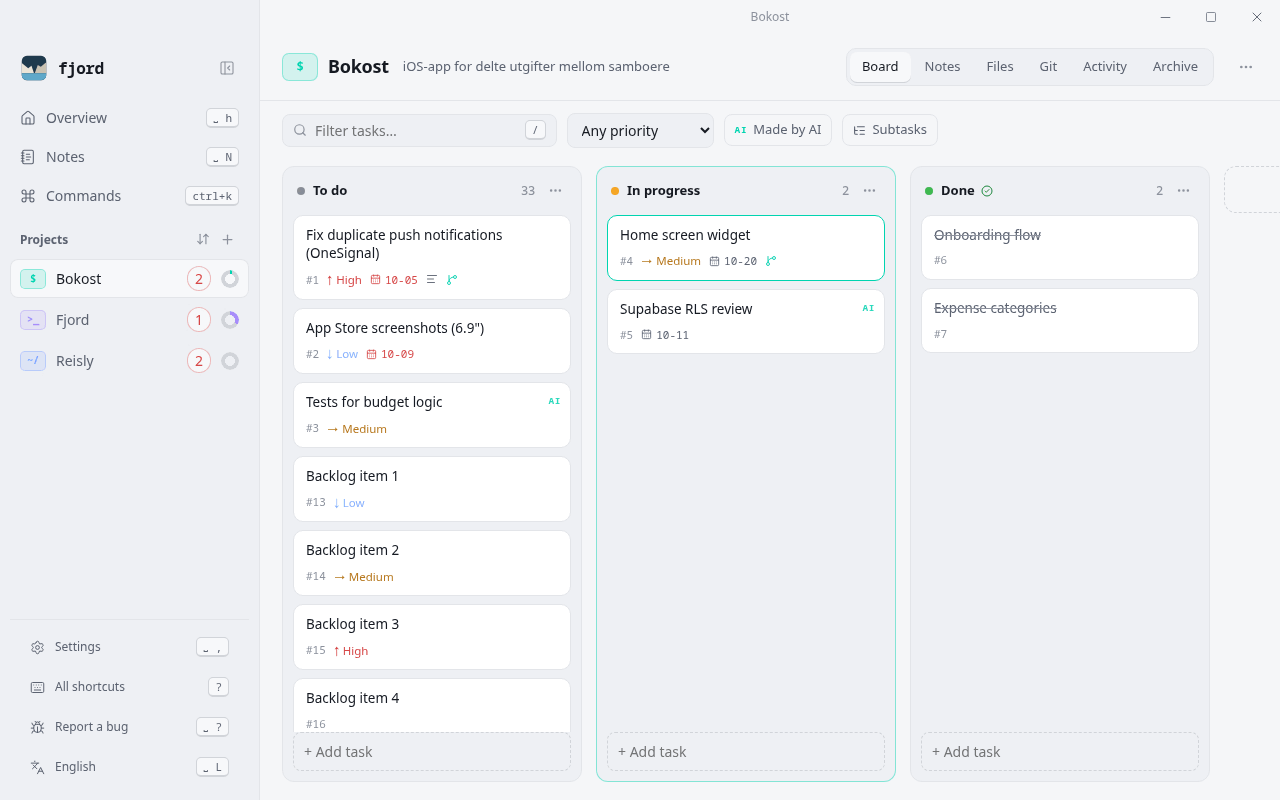
- Themes — five built-in themes (Fjord Dark/Light, Nord, Solarized Light, High Contrast), follow the OS with separate light/dark picks, or build your own with live preview: colours, text size, rounding and density; share themes as JSON.
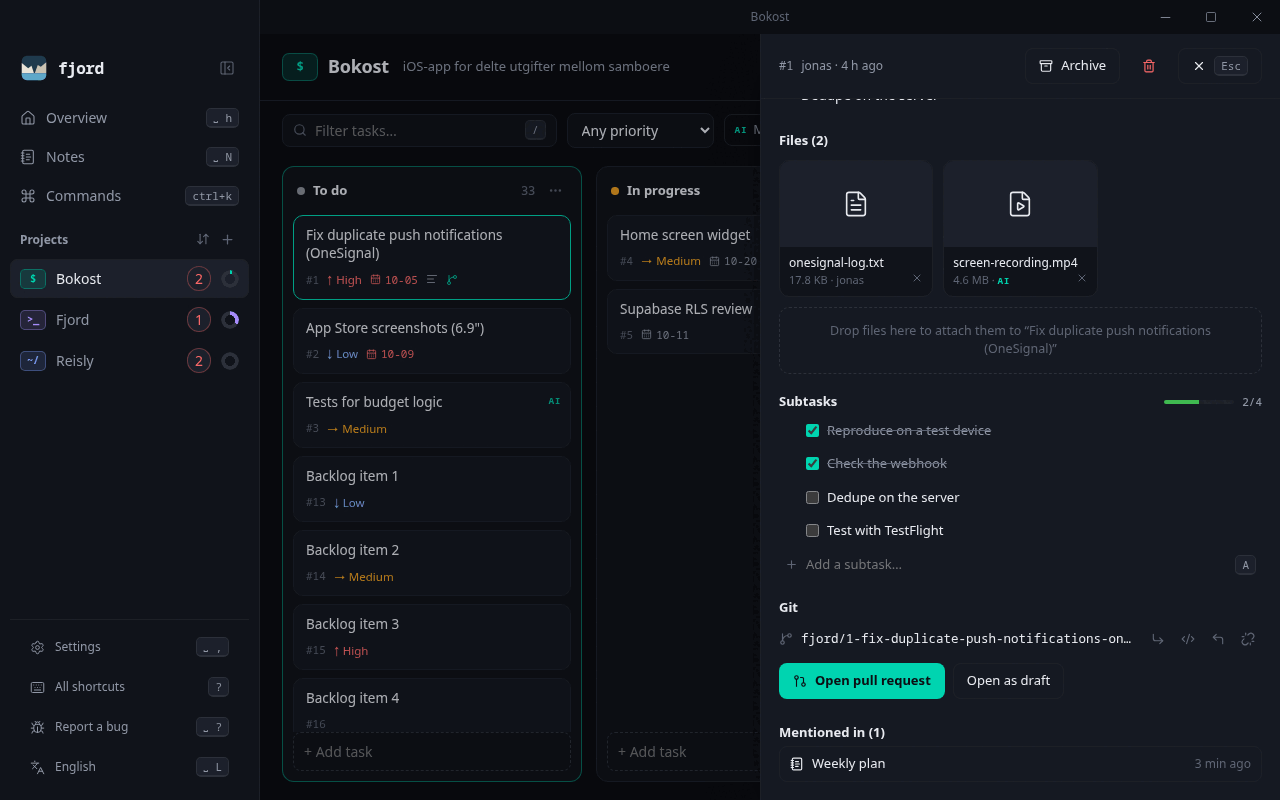
Space Tcycles themes. - Subtasks — break a task into subtasks (one level) with their own status, priority and branch; cards show progress (2/5), the task panel lists them with check-off, drag to reorder and
Ato add. - Notespace — Obsidian-style markdown notes, inside a project or free-floating, with folders and pins. Link anything with
[[Project]],[[#12]](a task) or[[Another note]]— type[[for autocomplete — and see backlinks (“mentioned in”) on tasks, projects and notes. Tables, task lists and Mermaid diagrams render in notes and task descriptions; web links open in your browser. - Full-text search across tasks, notes and file names (
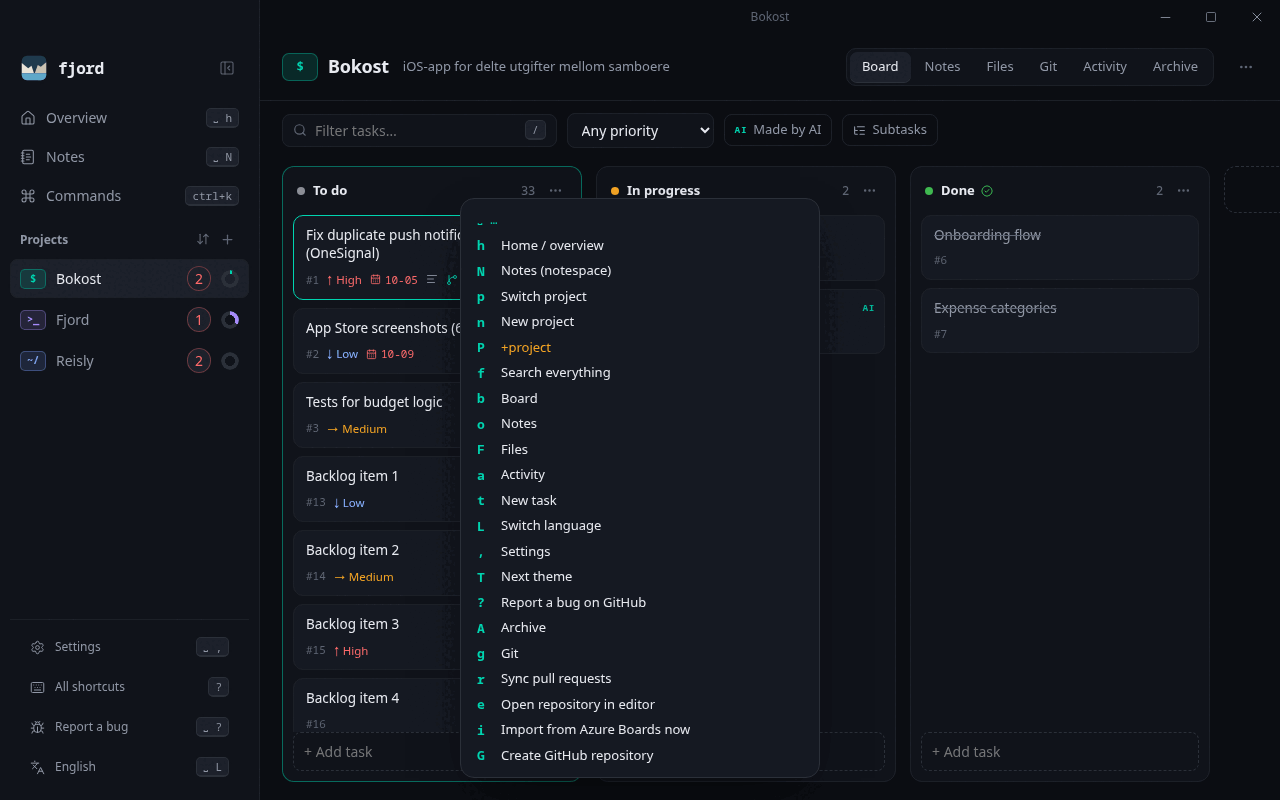
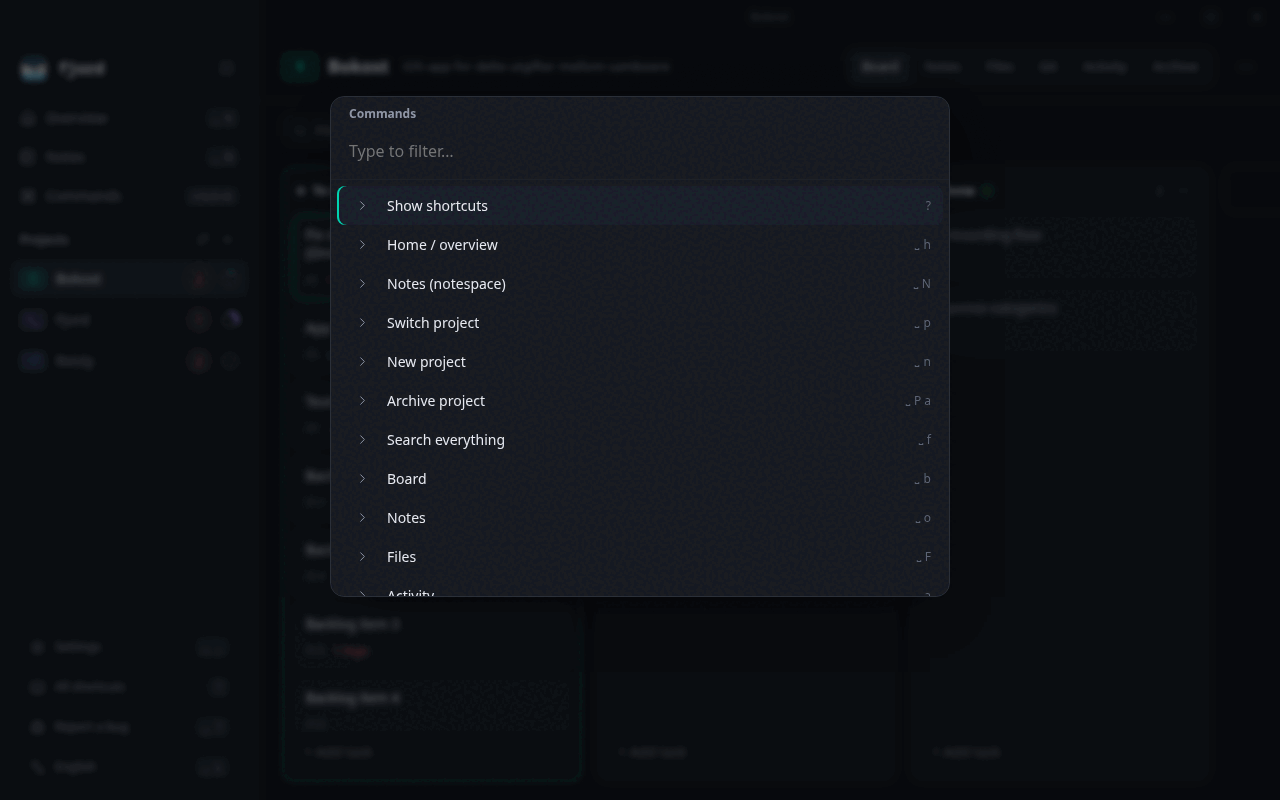
Space f). - Keyboard-first — a leader key with a which-key popup, vim motions on the board, a
Ctrl+Kcommand palette, and every binding configurable. The mouse works for everything too. - Git, GitHub & Azure DevOps — link a project to a repo, start a branch with a conventional name from any task (
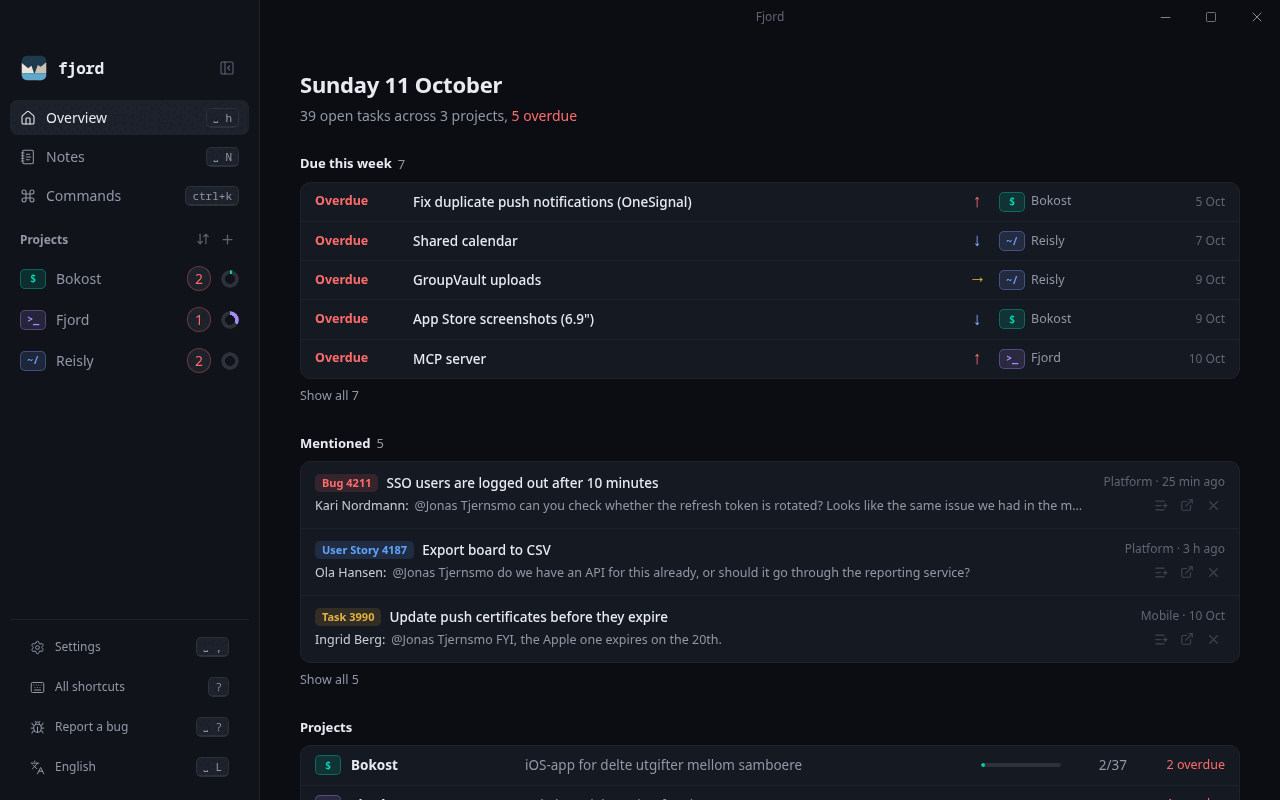
B, e.g.feat/12-add-login) or link an existing one, see pull requests with CI status, open PRs from a task, and let merged PRs move tasks to done. - Azure Boards import — work items assigned to you show up as tasks in the project you choose, with their state mapped to your columns, child items as subtasks, and the discussion readable in the task. Work items where someone @mentions you show up in the Overview.
- AI-agent ready —
fjord mcpexposes 25 tools to MCP clients such as Claude. Agents can create, edit, move and archive but never hard-delete, and every change is tagged with its author. - Activity log — what changed, when, and by whom (you or an agent).
- Live updates — changes from the CLI or an agent appear in the open app within a second or two.
- English and Norwegian — English by default; adding a language is one file.
- Updates itself — signed in-app updates; Settings shows the installed version.
 |
 |
 |
 |
 |
 |
Install
Fjord is Linux first: that's where it's developed and used daily. Windows and macOS builds come
from the same code and are tested in CI on every pull request.
Download
Grab the installer for your system from Releases:
| System | File |
|---|---|
| Linux | .AppImage (any distro), .deb (Debian/Ubuntu), .rpm (Fedora/openSUSE) |
| Windows 10/11 | .msi or -setup.exe |
| macOS | .dmg (Apple Silicon or Intel) |
On macOS (and for the CLI on Linux) you can also use Homebrew:
brew install --cask jhtjernsmo/fjord/fjord   # the app
brew install jhtjernsmo/fjord/fjord-cli      # the `fjord` command-line tool
The CLI is attached separately as fjord-cli-<platform>. From 0.2.9 the macOS app is signed with
an Apple Developer ID and notarized, so it opens normally. Windows builds aren't code-signed yet and
may show a SmartScreen warning (More info → Run anyway).
Build from source
Requirements: Rust (stable), Node.js 20+. On Linux also WebKitGTK 4.1; Windows uses the
built-in WebView2, and macOS needs the Xcode command line tools.
# Arch
sudo pacman -S --needed webkit2gtk-4.1 base-devel
# Debian / Ubuntu
sudo apt install libwebkit2gtk-4.1-dev build-essential libssl-dev librsvg2-dev
# Fedora
sudo dnf install webkit2gtk4.1-devel openssl-devel librsvg2-devel
git clone https://github.com/jhtjernsmo/fjord.git
cd fjord
npm --prefix ui install
npx --prefix ui tauri build          # installers for your OS in target/release/bundle
./target/release/fjord-app           # run it

cargo install --path crates/fjord-cli  # optional: puts `fjord` on your PATH
For development with hot reload: npx --prefix ui tauri dev.
Updates
From 0.2.1 on, Fjord checks GitHub Releases on startup and offers Update & restart (Windows, macOS and the Linux AppImage; .deb/.rpm update via your package manager). Updates are signed and verified before installing; the check can be turned off in Settings. Settings → Updates shows the installed version and has a Check now button. Versions before 0.2.1 have no updater, so install the latest release once by hand.
Keyboard
Press ? in the app to see every shortcut. Press the leader key (Space) and wait a moment to see
what comes next.
| Keys | Action | Keys | Action |
|---|---|---|---|
Ctrl+K |
Command palette | h j k l |
Move around the board |
Space p |
Switch project | H / L |
Move task to previous/next column |
Space t |
New task | J / K |
Move task down/up |
Space f |
Search everything | Enter |
Open task |
Space n |
New project | o |
New task in this column |
Space b o F a A |
Board, notes, files, activity, archive | x |
Toggle done |
Space , |
Settings | d d |
Archive task |
Space L |
Switch language | p |
Cycle priority |
Space N |
Notespace | / |
Filter the board |
Space g |
Git tab | B |
Start branch for task |
Space r |
Sync pull requests | a |
Add subtask to task |
Space i |
Import from Azure Boards | S |
Show or hide subtasks |
Space T |
Cycle themes | y |
Copy task reference ([[#12]]) |
Space ? |
Report a bug | g g / G |
First / last task |
Esc |
Close | Delete |
Delete task |
On the Overview: j / k move through due tasks, mentions and projects, Enter opens, a adds a
mention as a task and x dismisses it. Space G creates a GitHub repository for the current project.
In an open task: [ / ] move it to the previous/next column, e edits, A adds a subtask, B
starts a branch, L links an existing one and P opens a pull request.
On macOS, Ctrl shortcuts use ⌘ instead. Remap anything in keymap.json (see Data for where it lives):
{
  "leader": "space",
  "bindings": {
    "task.archive": "D",
    "search.open": "<leader>/"
  }
}
Action ids are listed in ui/src/keymap.ts.
Command line
fjord project add "Bokost" --icon '$'
fjord task add bokost "Fix push notifications" -p 3 --due 2026-10-10
fjord column add bokost Review
fjord task move 1 review
fjord task done 1
fjord project show bokost          # board in the terminal
fjord search push
fjord log bokost                   # activity
fjord --json project ls            # JSON for scripts
Run fjord --help for everything. Changes are recorded with an actor: --actor, $FJORD_ACTOR or $USER.
Git & GitHub
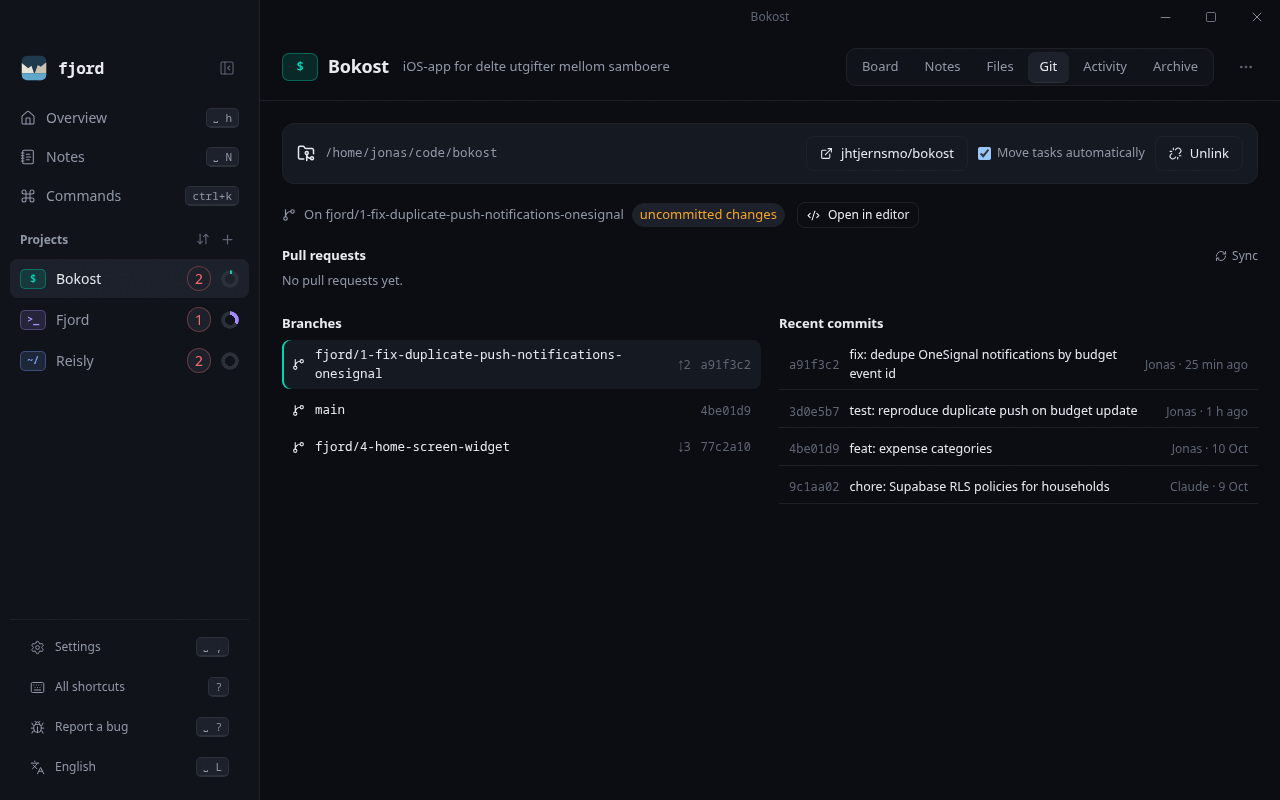
Link a project to a repository in the Git tab (or fjord git link <project> <path>). No
repository yet? Tick Also create a repository on GitHub when you make a project, or use the Git
tab: Fjord creates it (private or public, under you or an organization, with an optional README,.gitignore and license), clones it and links it in one step. A local repository without a remote
can be published the same way. If you aren't signed in to GitHub, you can sign in right there.
Once a project is linked, Fjord:
- starts a branch for a task with a conventional name —
fix/12-fix-push-notifications. Pick the type (feat, fix, chore, docs, refactor, test, perf, ci, hotfix) in the task, or let Fjord guess:fixfor bug-like tasks and Azure Bugs,featotherwise. The task moves to the second column, - or links a task to a branch that already exists. Several tasks can share one branch, and its pull request shows on all of them,
- shows branches, recent commits and GitHub pull requests with their CI status,
- links pull requests to tasks by branch name, and opens a PR straight from a task (the title follows the branch type, e.g.
feat: Add login, and the description comes from the task), - opens the repository in your editor or IDE (VS Code, Cursor, JetBrains IDEs, Visual Studio, Zed, Sublime, or your own command; set in Settings → Integrations), on the task's branch, with
Space e, - moves the task (or all tasks on the branch) to done when the PR is merged (on Sync), unless you turn auto-move off.
If GitHub or Azure DevOps refuses access, the Git tab shows their own explanation, for example an
organization that restricts OAuth apps or requires SSO approval.
Git runs through your installed git, so your config, hooks and credentials apply. GitHub access
(needed for private repositories and opening PRs) comes from, in order: GITHUB_TOKEN/GH_TOKEN, a
Sign in with GitHub in Settings (browser sign-in, OAuth device flow) or a personal access token pasted there, or gh auth login. A connected token is
checked with GitHub and kept in the OS credential store (Windows Credential Manager, macOS Keychain,
Secret Service on Linux), never in Fjord's database or files. Public repositories can be read without one.
Azure DevOps (beta). Repositories on dev.azure.com (and the older visualstudio.com URLs) are
detected the same way and get the same features: pull requests with pipeline status, a branch per
task, opening PRs from a task, and moving tasks to done when their PR completes. Auth comes fromAZURE_DEVOPS_EXT_PAT, a personal access token per organization in Settings → Azure DevOps
(scopes: Code Read & Write, Build Read; stored in the OS credential store), or the Azure CLI: add the organization in Settings without a token and Fjord uses az login.
Azure Boards import (beta). Work items assigned to you can be imported into chosen Fjord projects
(on start and every 10 minutes, no duplicates). Each item lands in the column named like its Azure
state (Active falls back to your in-progress column, New to the first), child items become subtasks,
items finished in the last 30 days (configurable) are included, and a notification tells you what
was added or changed. The task panel shows the work item's discussion. An AI agent can analyze new ones through the MCP
server (import_azure, list_new_imports, mark_analyzed). Setup, a ready-made triage prompt and
how to schedule it: docs/azure-boards-triage.md.
Mentions. When someone @mentions you in a work item that isn't assigned to you, the Overview
shows it under Mentioned: the item, who mentioned you and what they wrote. Open it in Azure, add
it to a project as a task, or dismiss it. New mentions also get a notification. This uses Azure
DevOps' own "recent mentions" (the last 30 days, Azure DevOps Services only).
 |
 |
fjord git link bokost ~/code/bokost
fjord git branch 12          # check out (or create) the task's branch
fjord git main bokost        # back to the main branch
fjord git status bokost      # branches and recent commits
fjord git prs bokost         # pull requests + CI; moves merged tasks to done
fjord git pr 12 --draft      # push the branch and open a pull request
AI agents (MCP)
fjord mcp runs a Model Context Protocol server on stdio. Changes it
makes are recorded as claude (override with --actor) and shown with an AI tag in the app.
With Claude Code:
claude mcp add fjord -- fjord mcp
Other clients:
{ "mcpServers": { "fjord": { "command": "fjord", "args": ["mcp"] } } }
Tools: list_projects, get_board, create_project, create_task, update_task, move_task,complete_task, archive_task, add_note, attach_file, search, recent_activity, link_repo,git_status, start_branch, link_branch, list_pull_requests, open_pull_request, list_notes, get_note, update_note, backlinks, import_azure, list_new_imports, mark_analyzed. There is deliberately no
delete tool.
Data
| Linux | Windows | macOS | |
|---|---|---|---|
Data (fjord.db, files/) |
~/.local/share/fjord |
%APPDATA%\fjord |
~/Library/Application Support/fjord |
Keymap (keymap.json) |
~/.config/fjord |
%APPDATA%\fjord |
~/Library/Application Support/fjord |
Settings in the app shows the exact paths. Set FJORD_DATA_DIR / FJORD_CONFIG_DIR to use other
locations (for example a separate test database). Back up by copying the data folder.
Architecture
crates/fjord-core   Rust library: schema & migrations, projects, columns, tasks, files, notes, search, activity
crates/fjord-vcs    Git (via the git CLI), GitHub and Azure DevOps REST integration
crates/fjord-cli    `fjord` CLI and MCP server
src-tauri           Tauri desktop shell — thin commands over fjord-core
ui                  React + TypeScript interface (dnd-kit, Lucide, Motion)
All three front ends (GUI, CLI, MCP) go through fjord-core, so validation and the activity log
behave the same everywhere.
Development
cargo test --workspace             # Rust: core unit tests, CLI and MCP end-to-end tests
npm --prefix ui test               # UI: keymap engine, i18n, helpers (Vitest)
cargo clippy --workspace --all-targets -- -D warnings
cargo fmt --all
npm --prefix ui run typecheck
See CONTRIBUTING.md. Translations are welcome: copy the no block inui/src/i18n.ts.
Roadmap
- More packaging: Flathub, AUR, winget, Homebrew
- Tags and saved filters
- Desktop notifications for due dates
- Paste images from the clipboard, PDF previews
- Writing status back to Azure Boards (opt-in)
- GitHub issues ↔ tasks, review status on cards
- Windows code signing
- Timeline and calendar views
Changes and security
What changed in each version is in CHANGELOG.md. Please report security problems
privately, as described in SECURITY.md.
License
Licensed under either of Apache License 2.0 or MIT, at your option.
Reviews (0)
Sign in to leave a review.
Leave a reviewNo results found