deepPPT
Health Pass
- License — License: MIT
- Description — Repository has a description
- Active repo — Last push 0 days ago
- Community trust — 20 GitHub stars
Code Fail
- child_process — Shell command execution capability in references/example_pptx/build_deepppt_examples.js
- spawnSync — Synchronous process spawning in references/example_pptx/build_deepppt_examples.js
- process.env — Environment variable access in references/example_pptx/build_deepppt_examples.js
Permissions Pass
- Permissions — No dangerous permissions requested
No AI report is available for this listing yet.
Research-style PowerPoint generation and QA skill for academic decks
English | 简体中文

deepPPT
面向科研汇报的 PowerPoint 生成与质量控制 Skill
Research-style academic PPTX generation with deterministic and visual QA.




简介
deepPPT 是一个 Agent Skill,用来生成中文科研汇报、组会、答辩、journal club 和会议风格 PowerPoint。它不只描述“怎么排版”,还把容易出错的步骤做成脚本检查:环境检查、PPTX 文本抽取、包结构检查、版式 QA、PowerPoint/LibreOffice 渲染预览。
它的目标是让不同 agent 生成的 PPT 看起来像同一套模板:深蓝到浅色的分段横线、双蓝块标题栏、蓝色 chevron 小标题、图表证据区、底部红色 key-finding 结论框。
示例
GitHub 可以保存 .pptx 文件,适合作为可下载参考;README 中无法像网页一样原生播放 PPTX,因此本仓库同时提供 PNG contact sheet 预览。
| 语言 | PPTX | 预览 |
|---|---|---|
| 中文 | deepPPT_intro_zh.pptx | 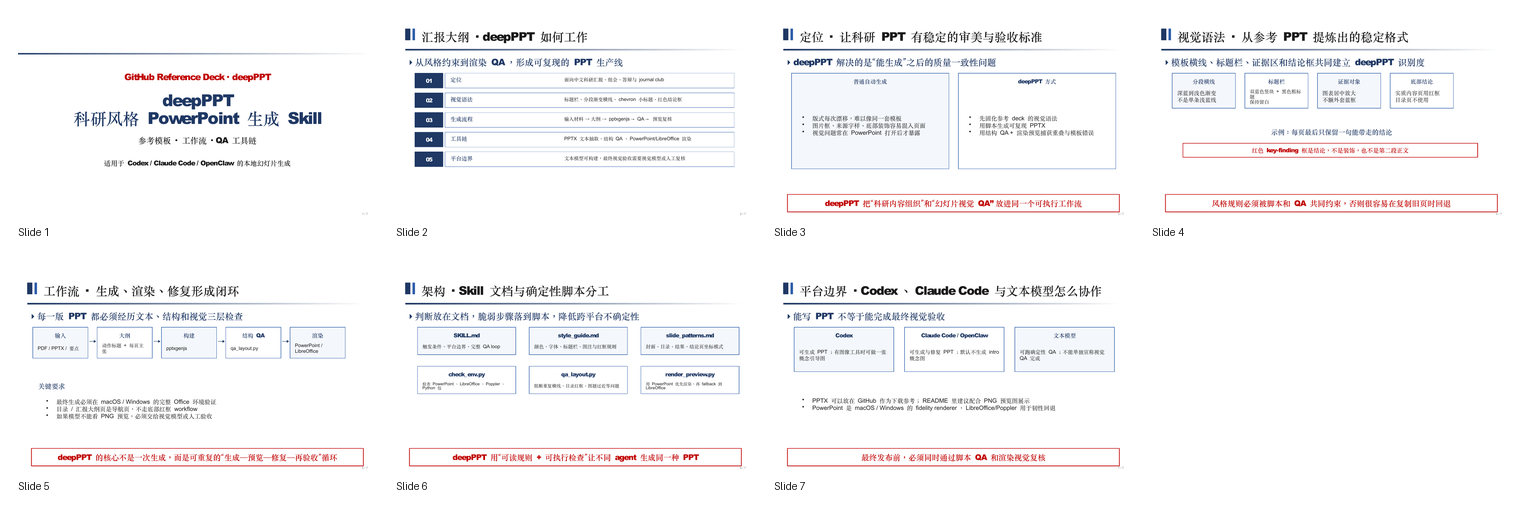 |
| English | deepPPT_intro_en.pptx | 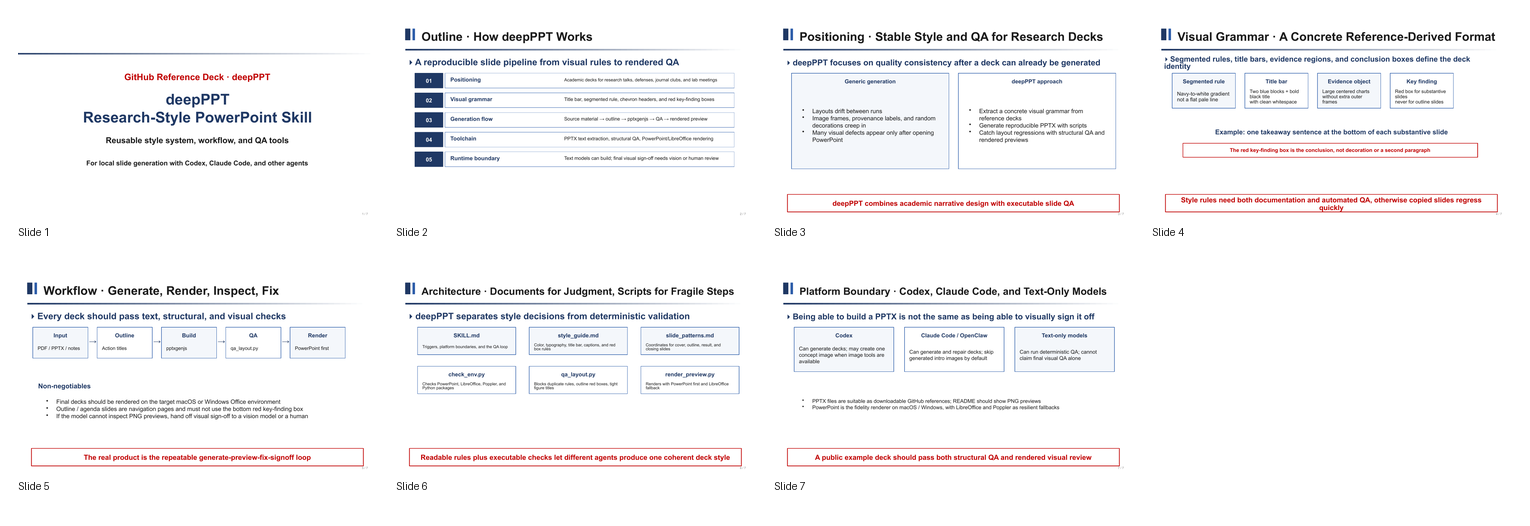 |
功能特色
- 固化科研 PPT 视觉语法:标题栏、分段横线、chevron 小标题、红色结论框。
- 支持从论文、提纲、要点或已有 PPTX 中提取的内容重建新的学术汇报;不原位修改输入 PPTX。
- Codex 环境可选生成一张介绍页概念图;Claude Code、OpenClaw 和未知运行时默认跳过该路径。
- 通过
qa_layout.py阻断重复模板线、目录页红框、可见构建/来源标签、图题过近等问题。 - 通过
render_preview.py优先使用本机 PowerPoint 渲染,再使用 LibreOffice/Poppler 做回退预览。 - 渲染预览帮助在交付前检查版式、可读性和模板一致性。
安装
Skill 目录名必须与调用名 deep-ppt 一致。macOS/Linux 上安装到 Codex:
mkdir -p ~/.codex/skills
git clone https://github.com/jiadizhunine/deepPPT.git ~/.codex/skills/deep-ppt
cd ~/.codex/skills/deep-ppt

python3.12 -m venv .venv
.venv/bin/python -m pip install -r requirements.txt
npm install -g [email protected]
安装到 Claude Code:
mkdir -p ~/.claude/skills
git clone https://github.com/jiadizhunine/deepPPT.git ~/.claude/skills/deep-ppt
cd ~/.claude/skills/deep-ppt

python3.12 -m venv .venv
.venv/bin/python -m pip install -r requirements.txt
npm install -g [email protected]
macOS 建议安装完整渲染工具链:
brew install node [email protected] poppler
brew install --cask libreoffice
Windows 需要安装 Microsoft PowerPoint desktop、Node.js、Python 3.12、LibreOffice 和 Poppler。以下示例安装到 Codex;Claude Code 用户将 .codex 改为 .claude:
New-Item -ItemType Directory -Force "$HOME\.codex\skills" | Out-Null
git clone https://github.com/jiadizhunine/deepPPT.git "$HOME\.codex\skills\deep-ppt"
Set-Location "$HOME\.codex\skills\deep-ppt"

py -3.12 -m venv .venv
.venv\Scripts\python -m pip install -r requirements.txt
npm install -g [email protected]
使用
在支持 Skills 的 agent 中调用 $deep-ppt,给出主题、材料和目标场景:
Use $deep-ppt to create a 12-slide Chinese lab meeting deck from this paper PDF.
Keep the deepPPT visual style, include rendered QA, and provide the final PPTX.
手动检查环境:
.venv/bin/python scripts/check_env.py
生成后建议运行:
.venv/bin/python scripts/normalize_pptx.py output.pptx
.venv/bin/python scripts/check_pptx.py output.pptx
.venv/bin/python scripts/extract_pptx_text.py output.pptx
.venv/bin/python scripts/qa_layout.py output.pptx
.venv/bin/python scripts/render_preview.py output.pptx --out preview
工作流程
- 读取来源材料:PDF、提纲、结构化要点;若输入为 PPTX,先提取内容并保留原文件不变。
- 规划大纲:每页用动作标题表达主张。
- 使用
pptxgenjs构建 PPTX。 - 规范化 PptxGenJS 包顺序,再运行确定性 QA:文本、PPTX 包与关系完整性、模板规则。
- 渲染预览:优先 PowerPoint,必要时 LibreOffice/Poppler 回退。
- 视觉复核:检查重叠、裁切、低对比、图表可读性、模板一致性。
项目结构
SKILL.md                         # skill 入口与工作流
style_guide.md                   # 视觉规范
slide_patterns.md                # 常用页面模式与坐标
pptxgenjs.md                     # 从零生成 PPTX 的实践说明
scripts/check_env.py             # 完整运行环境检查
scripts/check_pptx.py            # deepPPT 包结构与关系检查
scripts/safe_zip.py              # PPTX ZIP 安全边界
scripts/libreoffice_runtime.py   # LibreOffice 路径与无界面环境
scripts/normalize_pptx.py        # 修正 PptxGenJS 的 OOXML 元素顺序
scripts/qa_layout.py             # 结构 QA
scripts/render_preview.py        # 渲染预览
references/example_pptx/         # 公开示例 PPTX
assets/previews/                 # README 预览图
assets/icons/                    # 图标候选
许可证
本仓库当前发布的 deepPPT 原创代码采用 MIT 许可证。项目不再捆绑通用 Office 工具链或 OOXML schema。
Reviews (0)
Sign in to leave a review.
Leave a reviewNo results found